Author : Enerpize Team
Reviewed By : Enerpize Team
What is Invoice Management: A Comprehensive Guide
Table of contents:
- Key Takeaways
- What Is Invoice Management?
- Why Invoice Management Matters for Businesses?
- The Main Stages of the Invoice Lifecycle
- Common Invoice Management Challenges
- Manual vs. Automated Invoice Management
- Benefits of Automated Invoice Management
- Key Features of Invoice Management Software
- What to Look for in Invoice Management Software
- Best Practices for an Efficient Invoice Management Workflow
- Invoice Management KPIs to Track
- Invoice Management for Small Businesses
- How Enerpize Invoice Management Software Benefits Your Business
In every business, regardless of its size, invoices play a crucial role as the foundation. Given their significance, it is important to have a thorough understanding of how to manage them effectively to harness the full potential of your business.
Although the process might seem perplexing at times and require considerable dedication, it can also be simplified by using appropriate tools and methods. In this article, we will delve deeper into this topic, starting with the basics.
Key Takeaways
- Invoicing is the process of billing for goods or services, essential for collecting payments and keeping a business financially healthy, especially for small- to mid-sized businesses.
- Electronic invoices are fully digital, sent and stored electronically, offering faster delivery, easier payments, and eliminating the inefficiencies of paper-based systems.
- Traditional invoicing is prone to delays, lost mail, and difficulty tracking documents, issues that digital invoicing tools and cloud storage solve more effectively.
- E-invoicing ensures timely delivery, enables automated payment tracking, and saves time through reusable templates and real-time visibility into invoice status.
- Managing incoming invoices from suppliers is part of accounts payable, which verifies payment completion and maintains smooth supplier relationships.
- Automation simplifies invoice workflows by reducing manual input, accelerating approvals, and integrating with systems such as accounting and ERP tools to minimize errors.
- Invoice management software centralizes data, enables online payments, streamlines tasks, and provides businesses with better financial control and project oversight on a single platform.
What Is Invoice Management?
Invoice management is the end-to-end process of receiving, validating, approving, paying, and archiving supplier invoices within a business. It is a core part of accounts payable, ensuring that all incoming invoices are accurate, properly authorized, and paid on time.
Unlike invoicing, which focuses on issuing invoices to customers, invoice management deals with handling incoming invoices from vendors. It involves verifying invoice details against purchase orders or contracts, routing them through approval workflows, scheduling payments, and maintaining records for compliance and auditing.
By structuring this process, businesses gain better control over expenses, improve cash flow visibility, and ensure accurate financial reporting.
Why Invoice Management Matters for Businesses?
Effective invoice management is critical for maintaining financial control, ensuring accuracy, and supporting smooth business operations. By managing the full lifecycle of supplier invoices, businesses can achieve:
Improved Cash Flow Visibility
Tracking incoming invoices, payment schedules, and outstanding liabilities gives businesses a clear view of their financial obligations. This helps with planning, budgeting, and avoiding cash shortages.
Stronger Supplier Relationships
Timely and accurate invoice processing ensures suppliers are paid on time, building trust and enabling better negotiation of terms, discounts, and long-term partnerships.
Higher Payment Accuracy
Validating invoices against purchase orders, contracts, and receipts reduces errors, prevents overpayments, and ensures businesses only pay for what they receive.
Compliance and Audit Readiness
Maintaining proper records, approval workflows, and audit trails ensures compliance with financial regulations and simplifies audits, reducing risk and administrative burden.
Operational Efficiency
Streamlined workflows, automation, and centralized data reduce manual work, speed up approvals, and eliminate bottlenecks, allowing finance teams to focus on higher-value tasks.
The Main Stages of the Invoice Lifecycle
Understanding the full invoice lifecycle helps businesses streamline operations, improve cash flow visibility, and maintain compliance. The invoice lifecycle covers every stage from creation to archival:
1- Invoice Creation / Receipt
- Supplier invoices are received via email, portal, or paper.
- Accurate capture of invoice details (amount, date, supplier, purchase order) is critical for downstream processing.
Download Enerpize invoice free template to create a professional invoice.
2- Invoice Validation
- Verify invoice accuracy against purchase orders, contracts, and received goods or services.
- Identify discrepancies, missing details, or potential errors before approval.
3- Invoice Approval
- Invoices are routed to the responsible department or manager for review.
- Approval ensures the company authorizes payment only for verified goods or services.
4- Payment Processing
- Approved invoices are scheduled for payment according to terms (e.g., net 30, net 60).
- Payments can be automated through accounting software or ERP systems to ensure accuracy and timeliness.
5- Reconciliation and Recording
- Payments are matched against invoices in the accounting system to ensure accurate records.
- Reconciliation prevents duplicate payments and maintains correct financial statements.
For accurate reconciliation, Download our Accrued Expenses Reconciliation Template and use for free.
6- Archival and Compliance
- Paid invoices are securely stored for auditing, reporting, and regulatory compliance.
- Digital storage enables easy retrieval and reduces paperwork, supporting long-term efficiency.
7- Supplier Relationship Management (Optional but impactful)
- Timely processing and accurate payments strengthen supplier trust.
- Insights from invoice data can inform negotiations, contract terms, and procurement decisions.
Common Invoice Management Challenges
Even with defined processes, invoice management can face several operational challenges that impact accuracy, efficiency, and cash flow. Identifying these issues is the first step toward improving control and performance.
Manual Data Entry
Entering invoice data manually is time-consuming and increases the risk of errors, such as incorrect amounts, dates, or vendor details.
Delayed Approvals
Invoices can get stuck in approval cycles due to unclear workflows or lack of accountability, leading to late payments and missed deadlines.
Invoice Errors and Discrepancies
Mismatches between invoices, purchase orders, and receipts can result in overpayments, disputes, or processing delays if not properly validated.
Missing or Incomplete Information
Invoices without essential details such as PO numbers, tax data, or vendor information require additional follow-ups, slowing down the entire process.
Duplicate Invoices
Without proper controls, the same invoice may be processed more than once, causing duplicate payments and financial losses.
Fraud Risk
Weak verification and approval processes can expose businesses to fraudulent invoices or unauthorized payments, especially in manual systems.
Limited Visibility and Tracking
Lack of centralized tracking makes it difficult to monitor invoice status, payment timelines, and outstanding liabilities, affecting decision-making and cash flow planning.
Manual vs. Automated Invoice Management
Managing invoices can be done either manually or through automated systems, and the differences are significant. While manual workflows rely heavily on human input and are prone to errors, automated solutions streamline the entire process, improve accuracy, and provide real-time visibility. The table below highlights the key distinctions between the two approaches:
| Aspect | Manual Invoice Management | Automated Invoice Management |
| Data Entry | Entered by hand, prone to errors | Extracted automatically using AI or OCR, reducing mistakes |
| Approval Workflow | Manual routing via email or paper, slow and inconsistent | Automated routing with predefined approvers, notifications, and exception handling |
| Invoice Validation | Cross-checks done manually against POs and receipts, time-consuming | System automatically matches invoices with POs/contracts and flags discrepancies |
| Processing Time | High, can take days or weeks | Rapid, often real-time or same-day processing |
| Payment Scheduling | Manual tracking of due dates, risk of late payments | Automated reminders, early-payment optimization, and scheduled payments |
| Fraud & Duplicate Control | High risk due to lack of verification tools | Duplicate detection and fraud prevention features built-in |
| Reporting & Visibility | Limited visibility; tracking requires manual consolidation | Centralized dashboards with real-time status, analytics, and audit-ready reports |
| Storage & Archiving | Paper-based or disorganized digital folders | Secure, searchable, and compliant digital archive |
| Operational Efficiency | Labor-intensive and error-prone | Reduces workload, increases accuracy, and accelerates approvals |
| Scalability | Hard to scale as invoice volume grows | Easily handles high volumes without additional staff |
Benefits of Automated Invoice Management
Automating invoice management goes beyond simply digitizing paperwork—it transforms the entire accounts payable process. Businesses gain measurable efficiency, accuracy, and control while reducing costs. Key benefits include:
1. Time Savings
Automated workflows significantly reduce the time spent on manual data entry, routing, and approvals. Invoices move quickly through the system, enabling faster processing and payment cycles.
2. Fewer Errors
Automation minimizes human mistakes by automatically capturing invoice data, validating details against purchase orders, and flagging discrepancies. This ensures greater accuracy in financial records.
3. Faster Approvals
Predefined approval workflows route invoices to the right stakeholders instantly, reducing bottlenecks and accelerating decision-making. Exceptions are automatically flagged for review, keeping the process smooth.
4. Better Visibility
Centralized dashboards provide real-time insights into invoice status, payment schedules, and outstanding liabilities. Teams can track every invoice from receipt to payment without delays or guesswork.
5. Stronger Controls and Compliance
Automated systems enforce internal policies, maintain audit trails, and prevent duplicate or fraudulent payments, strengthening governance and regulatory compliance.
6. Lower Processing Costs
By reducing manual labor, paper handling, and administrative overhead, automation cuts operational costs while improving staff productivity, allowing teams to focus on higher-value tasks.
Key Features of Invoice Management Software
Modern invoice management software provides tools that streamline the entire accounts payable process, reduce errors, and improve visibility. The most important features include:
1. Optical Character Recognition (OCR)
Automatically extracts invoice data from scanned documents or PDFs, eliminating manual entry and speeding up processing.
2. Approval Routing
Predefined workflows route invoices to the appropriate approvers, handle exceptions, and ensure timely approvals.
3. Invoice Matching
Automatically checks invoices against purchase orders, receipts, and contracts to verify accuracy and prevent overpayment or duplicates.
4. Dashboards and Analytics
Centralized dashboards provide real-time insights into invoice status, outstanding payments, cash flow, and departmental performance.
5. System Integrations
Connects seamlessly with ERP, accounting, CRM, and payment systems, enabling synchronized data across finance, operations, and procurement teams.
6. Audit Trails
Maintains complete logs of all invoice actions and approvals, supporting compliance, internal controls, and financial audits.
7. Alerts and Notifications
Automated alerts for pending approvals, upcoming payment deadlines, discrepancies, or policy exceptions help prevent delays and errors.
What to Look for in Invoice Management Software
Choosing the right invoice management software can make a significant difference in efficiency, accuracy, and cost savings. When evaluating solutions, consider the following key criteria:
1. ERP and Accounting Integrations
Ensure the software connects seamlessly with your existing ERP or accounting systems. Integration reduces data duplication, improves reporting accuracy, and keeps financial information synchronized across departments.
2. Workflow Flexibility
Look for configurable approval workflows, exception handling, and routing rules that can adapt to your organization’s structure and policies. Flexible workflows help streamline invoice approvals and minimize bottlenecks.
3. Compliance and Audit Controls
The software should support regulatory compliance, maintain detailed audit trails, and provide secure document storage to meet internal and external auditing requirements.
4. Usability and User Experience
Intuitive interfaces, easy navigation, and minimal training requirements ensure faster adoption by your team and reduce the risk of errors caused by complex software.
5. Reporting and Analytics
Robust reporting capabilities give you visibility into invoice status, cash flow, payment cycles, and supplier performance. Look for dashboards and customizable reports to monitor KPIs and make informed financial decisions.
6. Automation and Alerts
Automated data capture, payment reminders, and exception notifications reduce manual work, prevent delays, and enhance control over the invoice lifecycle.
7. Scalability and Support
Select a solution that can grow with your business, support multiple departments or locations, and provide reliable customer support when needed.
Best Practices for an Efficient Invoice Management Workflow
To maximize accuracy, speed, and compliance in invoice management, businesses should adopt practical best practices that standardize processes and reduce errors:
1. Standardize Invoice Intake
Centralize all invoice submissions, whether digital or paper, in a single system. Standard templates and formats make it easier to capture data consistently and reduce processing delays.
2. Define Clear Approval Rules
Set clear approval hierarchies and thresholds based on invoice amounts or departments. Automated routing ensures that invoices reach the right approver without bottlenecks or confusion.
3. Implement Matching Controls
Use three-way or two-way matching (invoice vs. purchase order vs. receipt) to validate that the invoice details match the approved order and delivered goods or services. This prevents overpayments and errors.
4. Maintain Transparent Vendor Communication
Keep suppliers informed about invoice status, payment schedules, and any discrepancies. Proactive communication reduces disputes and strengthens supplier relationships.
5. Establish Exception Handling Procedures
Define how to handle invoices with missing information, discrepancies, or urgent payments. A clear protocol ensures that exceptions are resolved quickly without slowing down the overall workflow.
6. Regular Audits and Monitoring
Periodically review invoices, approvals, and payment timelines to detect patterns of delays, errors, or potential fraud. Monitoring KPIs like processing time and approval cycles improves continuous efficiency.
7. Leverage Automation and Alerts
Automate routine tasks such as data capture, reminders, and status updates. Alerts for overdue approvals or discrepancies help teams take timely action and maintain compliance.
Invoice Management KPIs to Track
Measuring the performance of your invoice management process is essential to improving efficiency, controlling costs, and ensuring compliance. Key performance indicators (KPIs) help you track workflow health, detect bottlenecks, and optimize operations:
1. Invoice Cycle Time
The total time from receiving an invoice to completing payment. Shorter cycle times indicate a more efficient process and faster cash flow management.
2. Approval Time
The average time invoices spend in the approval stage. Monitoring this KPI helps identify delays in routing, bottlenecks, or resource constraints.
3. Exception Rate
The percentage of invoices requiring manual intervention due to missing or incorrect information. Lower exception rates reflect better data quality and process accuracy.
4. Duplicate Invoice Rate
The number of duplicate invoices detected as a percentage of total invoices processed. Tracking this KPI helps prevent overpayments and strengthens internal controls.
5. On-Time Payment Rate
The proportion of invoices paid by the scheduled due date. High on-time payment rates indicate strong supplier relationships and effective cash management.
6. Cost Per Invoice
The total cost to process a single invoice, including labor, software, and overhead. Lower costs per invoice demonstrate efficiency gains and effective automation.
7. Early Payment Opportunities Captured (Optional KPI)
The number or percentage of invoices where early-payment discounts are successfully utilized. This can directly save money and improve supplier relationships.
Invoice Management for Small Businesses
For small businesses with lean teams, invoice management can be a major operational challenge, but automation and structured workflows make it manageable.
Streamlined Invoice Intake
Even with limited staff, small businesses can efficiently receive and process invoices. Automation allows invoices to be scanned, routed, and recorded in the accounting system, reducing manual entry and minimizing errors.
Fewer Bottlenecks
With clear approval workflows and automated reminders, small teams can avoid delays caused by manual routing or missing approvals. This ensures timely payments and keeps operations running smoothly.
Better Control as Volume Grows
As the number of vendors and invoices increases, a structured system helps SMBs maintain oversight. Features like duplicate detection, approval tracking, and real-time dashboards give small businesses the same level of control as larger organizations, without adding extra headcount.
How Enerpize Invoice Management Software Benefits Your Business
Enerpize invoice management software is connected with inventory control in one integrated platform, giving SMBs a unified view of purchases, stock, and payments.
By centralizing invoices and inventory, the software helps you:
- Avoid duplicate purchases and missed payments.
- Track stock levels and automatically trigger restocking when needed.
- Save time and reduce manual effort through automated invoice processing.
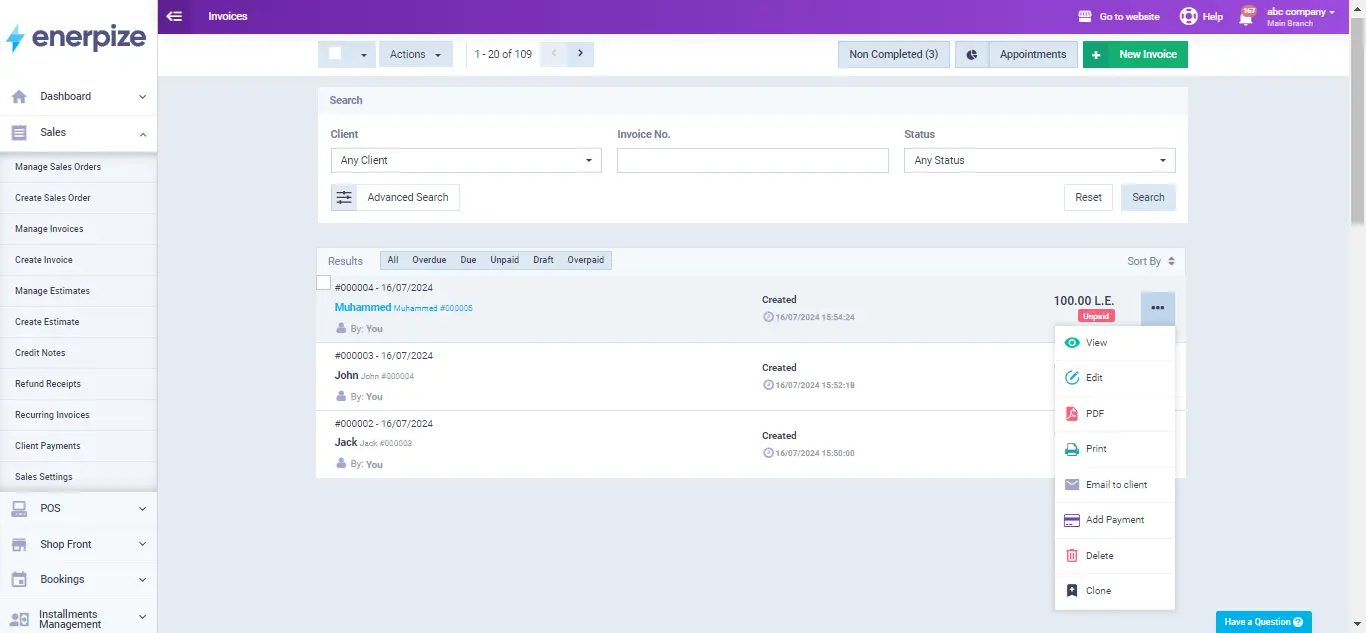
With Enerpize, managing invoices becomes seamless, letting you focus on growing your business while keeping finances and operations under control.
Invoice management is easy with Enerpize.
Try Enerpize invoicing software to manage your invoices.
Invoice management is easy with Enerpize.
Try Enerpize invoicing software to manage your invoices.