Posted on 5 August 2026
I9 Form Template: Word and PDF Download
- Available in Word and PDF, free to download with no signup required
- Matches the current USCIS edition exactly, Section 1, Section 2, Supplement A, and Supplement B
- Covers List A, List B, and List C acceptable documents in one structured reference
- Built for the current form's expiration date and edition, so you are never filling out an outdated version
An I9 form template is a structured version of the USCIS Employment Eligibility Verification form that walks an employer and employee through identity and work authorization verification before that record ever needs to be produced for an audit.


What Is an I9 Form?
Every employer in the country has to fill one of these out, for every single hire, citizen or not. That is not an exaggeration. An I9 form exists to confirm two things at once, who someone says they are, and whether they are actually authorized to work in the United States. Miss it, or get it wrong, and the liability sits with the employer, not the employee.
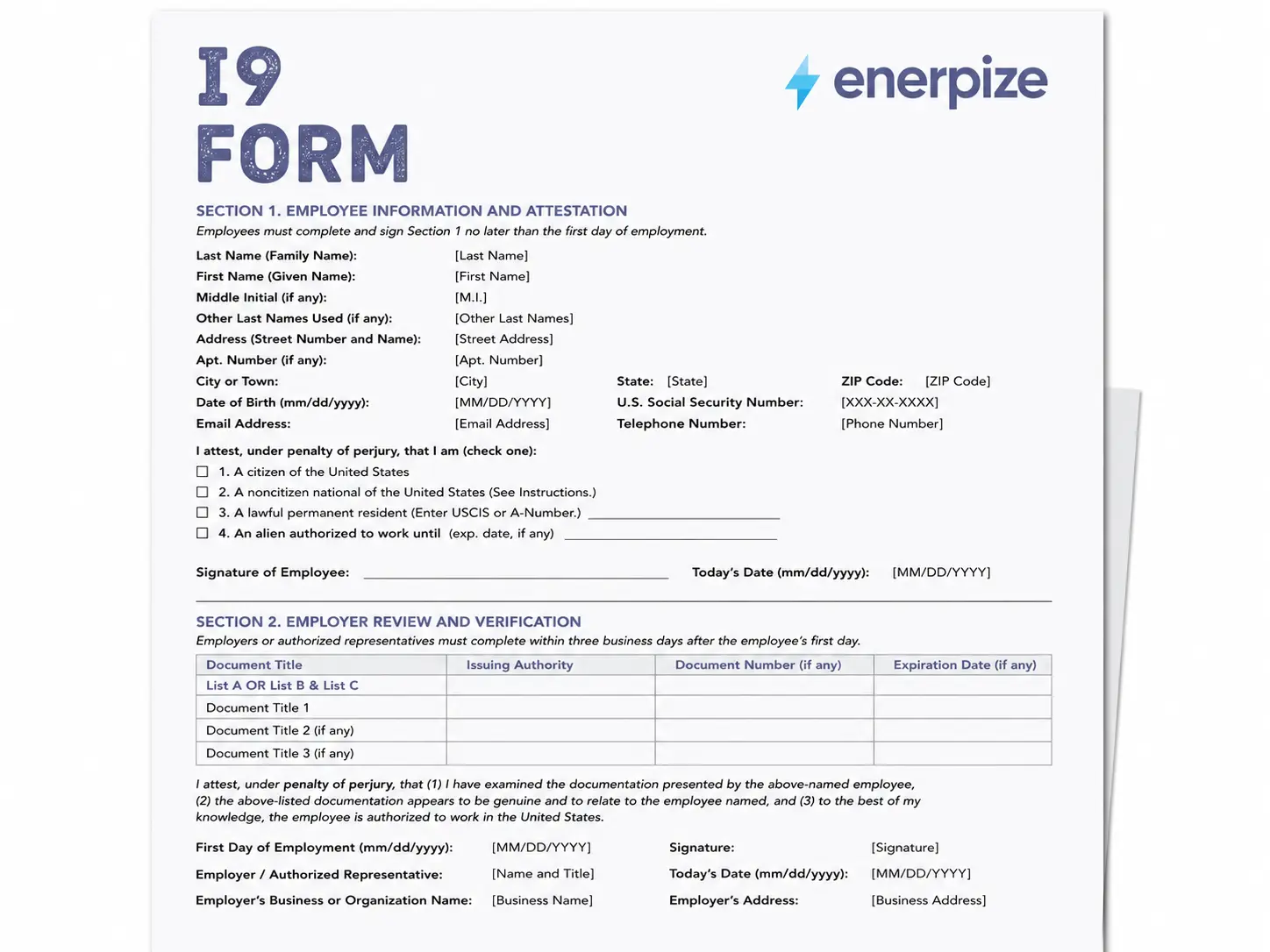
The form splits into two halves that belong to two different people. Section 1 is the employee's job, filled out no later than their first day of work, but never before they accept the offer. Section 2 is the employer's job, completed within three business days of that same first day, after physically examining documents the employee chooses to present.
That word "chooses" matters more than people expect. The form's own anti discrimination notice is explicit about this. Employers cannot demand specific documents or treat employees differently based on citizenship or immigration status. The employee decides which acceptable documents to bring, not the employer.
Getting hiring paperwork organized before day one saves the scramble later. Register free with Enerpize
What to Include on an I9 Form
Most i9 form guides describe the sections in general terms and stop there. Here is the field by field version.
| Field | Section | What It Captures |
|---|---|---|
| Last Name, First Name, Middle Initial | Section 1 | Employee's legal name, matched to their identity documents |
| Address, City, State, ZIP | Section 1 | Current residential address, not a P.O. box |
| Date of Birth | Section 1 | Used to confirm identity, not eligibility age |
| Social Security Number | Section 1 | Optional unless the employer uses E-Verify |
| Citizenship or Immigration Status (Boxes 1 to 4) | Section 1 | The employee's attestation of citizenship, national status, permanent residency, or authorized work status |
| USCIS A-Number, I-94 Number, or Foreign Passport Info | Section 1 | Only required if Box 4 is checked |
| Employee Signature and Date | Section 1 | Certifies the attestation under penalty of perjury |
| List A, List B, or List C Document Entries | Section 2 | Document title, issuing authority, document number, expiration date |
| Alternative Procedure Checkbox | Section 2 | Marked if the employer used a DHS authorized remote examination method instead of physical examination |
| First Day of Employment | Section 2 | The date that starts the three business day clock for completing this section |
| Employer Certification and Signature | Section 2 | The employer's attestation that documents were examined and appear genuine |
| Employer Business Name and Address | Section 2 | Identifies the employer of record |
Section 1 vs Section 2
These two sections belong to different people, at different times, for different reasons, and confusing them is one of the more common compliance mistakes on this form.
| Section | Who Completes It | Deadline | Contains |
|---|---|---|---|
| Section 1 | Employee | No later than first day of employment | Name, address, date of birth, citizenship attestation |
| Section 2 | Employer or authorized representative | Within 3 business days of first day | Document examination, List A/B/C entries, certification |
Section 1 is an attestation, made under penalty of perjury, that the employee's citizenship or immigration status information is true. Section 2 is the employer's certification that they examined the documents presented, that the documents reasonably appear genuine, and that they relate to the person named. Neither section substitutes for the other, and both are required for the form to be valid.
How Section 1 and Section 2 Connect to E-Verify
An i9 form and E-Verify are related but not the same thing, and this is where a lot of employers get confused. Completing an i9 form is required for every employer, every hire, no exceptions. E-Verify is a separate, optional system for most employers, though some states and federal contractors require it.
When an employer does use E-Verify, the information from Section 1 and Section 2 gets entered into the E-Verify system to compare against Social Security Administration and DHS records. That is why the Social Security Number field on Section 1, optional for a standard i9 form, becomes required the moment an employer participates in E-Verify. The i9 form itself does not change. What changes is what happens with the information on it after Section 2 is signed.
Onboarding compliance is easier to manage when your I9 records, contracts, and payroll setup live in one place. Register free with Enerpize
What the Enerpize I9 Form Template Includes
I built this the way I build every compliance document on this site, by using the actual current form rather than reconstructing it from memory or an old cached copy someone forgot to update.
The Exact Current Edition, Not a Guess
This template mirrors the USCIS edition dated 01/20/25, expiring 05/31/2027. That detail matters more than it sounds like it should. A lot of the i9 form content circulating right now still references the old Section 3, which does not exist anymore. It was replaced by a standalone Supplement B. If your reference material still says Section 3, it is describing a form that is no longer current.
All Four Parts, Not Just the Main Page
Section 1, Section 2, Supplement A for preparers and translators, and Supplement B for reverification and rehire. Most i9 form resources online only show the main two page form and leave out the supplements entirely, which is exactly the part people scramble to find when a rehire or a name change actually happens.
I9 Documents: List A, List B, and List C
This is the part of the i9 form that trips people up most, because the choice is not arbitrary. An employee presents either one document from List A, or one document each from List B and List C. Not List A and List B. Not two from List B. One from A, or one from B plus one from C.
List A documents establish both identity and work authorization in a single document, a U.S. passport is the most common example. List B documents establish identity alone, a driver's license fits here. List C documents establish work authorization alone, a Social Security card without restrictions is a common one. The full list of acceptable documents is maintained by USCIS directly, and it is worth checking against the current version rather than an old printout, since document types occasionally get added or removed.
Tracking which document combination each employee presented gets messy fast across a growing team. Register free with Enerpize
How to Fill Out an I9 Form
Here is the section by section process, matched to the current USCIS layout.
Step 1: Employee Completes Section 1
Name, address, date of birth, and Social Security number if applicable. The employee then checks one of four citizenship or immigration status boxes and signs. This has to happen no later than the first day of employment, but not before the employee has actually accepted the job offer.
Step 2: Preparer or Translator Completes Supplement A, If Needed
If someone assisted the employee in filling out Section 1, that person must complete Supplement A separately. This gets skipped constantly, and it is one of the more common gaps found in an audit.
Step 3: Employee Presents Documents
The employee chooses which acceptable documents to present, either one from List A, or one each from List B and List C. The employer cannot specify which documents to bring.
Step 4: Employer Completes Section 2
Within three business days of the first day of employment, the employer or an authorized representative physically examines the documents, or uses a DHS authorized alternative procedure, and records the document title, issuing authority, document number, and expiration date if any.
Step 5: Employer Signs the Certification
The employer attests, under penalty of perjury, that the documents were examined, appear genuine, and relate to the employee named. The employer's business name and address also get recorded here.
Step 6: Complete Supplement B for Reverification or Rehire
If an employee's work authorization expires and needs reverifying, or the employee is rehired within three years of the original i9 form, use Supplement B instead of filling out a brand new form.
I9 Form vs W4 Form vs W9 Form
New hire paperwork tends to blur together, so it helps to see all three side by side.
| Form | Purpose | Completed By |
|---|---|---|
| I9 Form | Verifies identity and work authorization | Employee and employer |
| W4 Form | Sets federal income tax withholding | Employee |
| W9 Form | Collects TIN for contractor tax reporting | Independent contractors, not employees |
An i9 form and a W4 form both apply to employees, but they serve completely different purposes, one confirms eligibility to work, the other sets tax withholding. A W9 form does not apply to employees at all, it is strictly for contractors and vendors who are not on payroll. If you are setting up withholding for a new hire, our W4 form template covers that separately, and if you are working with contractors instead of employees, our W9 form template is the right document instead.
Retention and Reverification
Completing the i9 form is not the end of the obligation. Employers have to retain completed I9 forms for as long as the employee works there, and then for a set period after employment ends, whichever is longer between three years from the hire date or one year from the termination date.
Reverification only applies in specific situations, most commonly when an employee's work authorization has an expiration date on the original form. When that date approaches, the employer completes Supplement B rather than starting over with a new i9 form. Getting this timing wrong, either reverifying too early or missing the deadline entirely, is one of the more common issues flagged during an ICE I9 inspection.
Key Takeaways
- An I9 form verifies both identity and work authorization, and every employer must complete one for every employee hired in the United States.
- Section 1 belongs to the employee, completed by the first day of work. Section 2 belongs to the employer, completed within three business days.
- Document choice follows a strict rule, one from List A, or one from List B plus one from List C, never any other combination.
- The old Section 3 no longer exists. It was replaced by Supplement B for reverification and rehire.
- Completed I9 forms must be retained for three years from hire or one year from termination, whichever is later.
An I9 form, a W4 form, and a W9 form all get confused with each other, but each serves a distinct purpose for a distinct type of worker.
Frequently Asked Questions
What is an I9 form used for?
It verifies both the identity and the legal work authorization of every person hired for employment in the United States, required for citizens and non-citizens alike.
Is an I9 form a tax form?
No. An I9 form has nothing to do with taxes. It verifies identity and work eligibility. Tax withholding is handled separately through a W4 form for employees or a W9 form for contractors.
Who fills out Section 1 versus Section 2?
The employee completes Section 1, no later than their first day of work. The employer or an authorized representative completes Section 2, within three business days of that same first day.
What documents do I need for an I9 form?
Either one document from List A, which establishes both identity and work authorization, or one document each from List B and List C, which separately establish identity and work authorization.
What happened to Section 3 on the I9 form?
It was replaced by Supplement B, Reverification and Rehire, on the current edition of the form. Use Supplement B instead of looking for a Section 3 that no longer exists.
How long do I need to keep a completed I9 form?
Three years from the date of hire, or one year from the date employment ends, whichever of the two is later.
Do I send the I9 form to USCIS?
No. The completed form stays with the employer's own records. It is not filed with USCIS unless specifically requested during an inspection or audit.
About the Author
Omar El Bahr is a Senior Digital Growth Specialist at Enerpize, where he leads SEO, content strategy, and organic growth across international markets. He is a Forbes Communications Council contributor and has written for Entrepreneur on business communication and digital strategy.
Disclaimer
This template is provided for informational purposes only and does not constitute immigration, legal, or employment compliance advice. It should not be construed as compliant with USCIS regulations, DHS requirements, state hiring law, or any other regulatory requirement for your specific situation. This template is not a substitute for professional counsel, and you are strongly advised to consult a qualified immigration attorney or HR compliance professional licensed in your jurisdiction before using or adapting it.
This template is provided on an "as is," "with all faults," and "as available" basis. Enerpize expressly disclaims all warranties of any kind, whether express, implied, statutory, or otherwise, including but not limited to warranties of merchantability, fitness for a particular purpose, or non-infringement.
Enerpize does not warrant or make any representations concerning the accuracy, completeness, or reliability of this template, the information in this article, or any results from its use. Enerpize is not affiliated with, endorsed by, or sponsored by the IRS. Always confirm current instructions against the official USCIS Form I-9 before filing.