Posted on 26 July 2026
Free Memo Template Download: Word, PDF & Google Docs
- Available in Word, PDF, and Google Docs, free to download with no sign up required
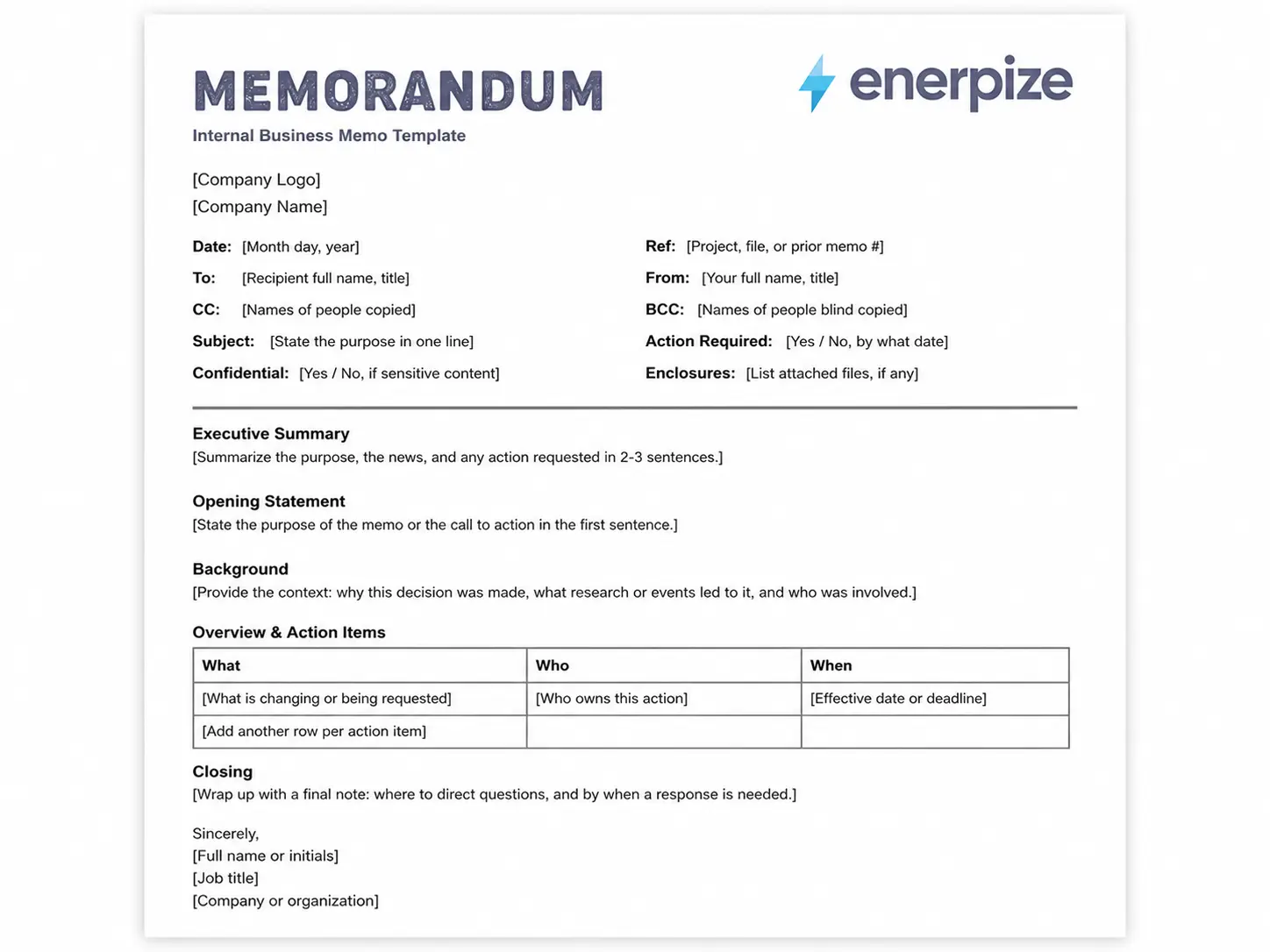
- Built with a full header block covering To, From, Date, Subject, Ref, Action Required, and Confidential fields, not just the basic four most templates give you
- Includes a dedicated Executive Summary section so the busiest reader in the building gets the point without reading past line three
- Comes with a Pre Send Checklist built to catch the mistakes that make an internal memo look rushed
A memo template is a pre formatted internal document that gives a sender a consistent structure, a header, a purpose statement, context, and a call to action, for communicating official information inside an organization.


What Is a Memo Template
Think about the last time someone handed you a printed page with MEMORANDUM stamped across the top. You read the header first. Who sent it, who it was for, what it was about. Then you decided in about two seconds whether the rest of the page was worth your time. That is the entire job of a memo template. It is not there to make you look formal. It is there to get your point across before the reader's attention wanders off to the next thing on their desk.
A memo template gives you that structure without starting from a blank page every time. You fill in the header, state your purpose in the first sentence, back it up with just enough context, and close with what you need the reader to do. No greeting, no sign off small talk. A memo gets straight to business because it was invented for people who do not have time for anything else.
People still confuse memos with emails, and honestly, it is an easy mix up. Both travel internally. Both get skimmed. But a memo carries more institutional weight. It becomes part of the record. A policy change, a budget shift, a structural announcement, these deserve a memo because a memo says this decision is official, and it is going in the file.
Tired of building the same header from scratch every time something needs announcing? With Enerpize you can keep every memo, contract, and proposal your business sends organized in one place. Start for free.
Memo vs Email vs Letter vs Circular
| Document | Audience | Formality | Becomes Part of the Record |
|---|---|---|---|
| Memo | Department, team, or company | Formal internal | Yes |
| Individual or small group | Casual | Rarely | |
| Letter | External party | Formal, can be casual | Sometimes |
| Circular | Mass distribution, multiple topics | Formal | Sometimes |
A memo stays inside the building. A letter goes outside it. An email is fast and forgettable. A circular covers several things at once for a wide audience. Once you know which box you are working in, choosing the right memo template becomes a lot less confusing.
What to Include in a Memo Template
Most free memo templates online give you four fields and call it done. To, From, Date, Subject. That covers the basics, but it leaves out the pieces that actually make a memo useful once it has been sitting in someone's inbox or filing cabinet for six months.
| Field | Why It Matters |
|---|---|
| Date | Anchors the memo in time, critical once it becomes a reference document |
| To | Names the primary recipient or department |
| From | Identifies the sender and their role |
| CC | Lists anyone who needs a copy without being the primary recipient |
| BCC | Lists anyone who needs a copy privately, common in HR and legal memos |
| Subject | States the topic in one clear line |
| Ref | Ties the memo to a project, file number, or prior correspondence |
| Action Required | Flags upfront whether the reader needs to respond, and by when |
| Confidential | Marks sensitive content, especially useful in financial or HR memos |
| Enclosures | Notes anything physically or digitally attached |
Skip the Ref and Action Required fields and you end up with a memo nobody can trace back to the decision it belongs to, and a reader who has no idea whether they are supposed to do something or just file it away. Small fields, big difference in how usable the document is six months from now.
What the Enerpize Memo Template Includes
Here is where we did something most free templates skip entirely. Every generic memo template you download gives you a header and a blank page and wishes you luck. Ours gives you the header, plus the pieces that turn a memo from a formality into something a reader can actually act on.
We built in an Executive Summary section that sits above everything else. Not because it looks nice, but because most people reading a memo will only read the first few lines before deciding whether the rest matters to them. Give them the whole story in two sentences and you have already done your job, even if they never scroll further.
We added a What, Who, When table for action items instead of asking you to bury them in a paragraph. If your memo has a deadline attached to it, that deadline belongs in a table where nobody can miss it, not in the middle of sentence four.
We included a Confidential flag and an Enclosures line, both of which show up constantly in real workplace memos and almost never in the templates people find through a quick search. If you are sending a financial update or a policy change, marking it confidential upfront protects you and sets the right tone before anyone reads a word further.
And we built in a Pre Send Checklist. This is the one piece nobody else bothers with. Eight quick checks before you hit send: is the purpose stated in the first sentence, does every action item have an owner and a deadline, has it been spell checked. Small thing, but it catches the errors that make a memo look like it was written in a hurry, which, let's be honest, most of them are.
Types of Memos
Not every memo does the same job, and using the wrong structure for the wrong purpose is how you end up with a five paragraph memo when three sentences would have worked.
| Memo Type | Use Case |
|---|---|
| Informative | Policy updates, announcements, general news |
| Persuasive | Proposing a new tool, process, or budget change |
| Confirmation | Putting a verbal agreement or decision in writing |
| Request | Asking a department or individual for information, resources, or action |
An organizational change memo, a financial update memo, and a problem solving memo are really just informative and persuasive memos wearing different hats depending on the subject matter. Once you understand the four base types, you can build almost any workplace memo from this same memo template without reinventing the structure each time.
How to Use the Memo Template
Step 1: Fill In the Header
Start with Date, To, From, and Subject. Add a Ref number if this memo connects to an earlier decision or an ongoing project, and mark Action Required if you need a response.
Step 2: Write the Executive Summary
Two to three sentences. What changed, when it takes effect, and what the reader needs to know. Assume this is the only part some people will read, because for a lot of them, it will be.
Step 3: State Your Purpose in the Opening Line
Start with something direct. "I am writing to" or "This memo confirms" works every time. Do not bury the purpose in paragraph two.
Step 4: Add Background and Context
Explain what led to this decision or update. Keep it to what the reader actually needs to follow the rest of the memo, not everything you know about the situation.
Step 5: List Action Items With Owners and Deadlines
Use the What, Who, When table. If there is nothing for the reader to do, skip this step and move straight to the closing.
Step 6: Close, Sign, and Run the Checklist
Restate the purpose, invite questions if appropriate, and sign off. Then run through the Pre Send Checklist before it goes out.
Memo Templates for Legal, Policy, and HR Communication
Some memos carry more weight than a routine update, and they need a different internal structure to hold up.
A legal memo generally follows an Issue, Rule, Analysis, Conclusion structure, often called IRAC. The Purdue University Online Writing Lab teaches this structure as the standard for professional and technical memo writing, and it holds up well for anyone documenting a legal question or a compliance decision inside a business.
A policy memo needs to show the reasoning, not just the outcome. Background on why the policy is changing, the options that were considered, and the recommendation. Skip the reasoning and you invite pushback from anyone who reads it and asks why.
Tracking Acknowledgment on Policy and Compliance Memos
Here is something nobody talks about when they write about memo templates. A routine memo announcing a new coffee machine does not need anyone's signature. A memo announcing a change to overtime policy absolutely does.
If your memo affects pay, benefits, safety procedures, or anything an employee could later claim they never received, you need proof they read it, not just proof you sent it. That means adding a signature or acknowledgment line and keeping a copy in the employee's file, the same way you would keep a signed employee contract on record.
How Enerpize Ties Your Memos to the Rest of the Business
A memo does not exist in a vacuum. It usually points at something bigger, a new hire, a budget change, a proposal, a request that needs to go somewhere once someone reads it. Most memo templates stop at the page. Ours does not, because a memo that nobody can act on is just a well formatted piece of paper.
Turning a Persuasive Memo Into a Formal Proposal
Say you wrote a persuasive memo proposing a new vendor or a process change, and leadership actually likes it. Now what? A memo was never meant to carry the full weight of a business case. Once your memo gets a yes, move the details into a proper business proposal template so the numbers, timeline, and scope have somewhere real to live.
Routing Request Memos Through Your Requisition Process
A request memo asking for new equipment or additional headcount reads fine on paper, but somebody still has to approve, track, and fulfill it. That is what a requisition form is built for. Write the memo to explain the why. Use the requisition form to handle the actual approval chain.
Announcing New Hires Without Starting From Scratch
An informative memo announcing a new team member is one of the most common memos any HR department writes. It reads better and moves faster when the paperwork behind it is already sorted, which is why we built an offer letter template that pairs naturally with this one. Get the offer signed first. The announcement memo practically writes itself after that.
Backing an Organizational Change Memo With a Real Plan
A memo announcing a restructure or a new direction needs more behind it than good intentions. If the change is big enough to need a memo, it is usually big enough to need a documented business plan template sitting right behind it, so the people reading your memo know this was thought through and not decided over coffee that morning.
None of this makes the memo itself more complicated. It just means the memo stops being an island. It becomes the front door to whatever comes next.
Memo Templates for Businesses in the United States
How Long to Keep a Policy or HR Memo on File
Here is a question almost nobody asks until they actually need the answer. Once you send a policy memo or an HR memo, how long are you supposed to hang onto it?
For US employers, the answer has a real number attached to it. The Equal Employment Opportunity Commission requires employers to retain personnel and employment records, which includes memos tied to promotions, demotions, transfers, layoffs, pay changes, and terminations, for at least one year from the date the record was made or the personnel action occurred. If the memo relates to someone who was involuntarily terminated, that one year clock starts on the termination date instead. Payroll related records connected to pay decisions need to stick around even longer, three years under federal wage law.
That one year figure is a floor, not a ceiling. If a memo touches something that could ever become a discrimination charge or a wage dispute, one year on a shelf is not enough. Keep it as long as the underlying employee record stays open, and treat the memo the same way you would treat a signed employee contract, filed, dated, and easy to pull up the moment somebody asks for it.
This is exactly why we built a Ref field and a Confidential flag into the header. A memo without either one is just a loose page. A memo with both is a document your business can actually point to a year from now and say, here is exactly what we said, when we said it, and why.
Key Takeaways
- A memo template needs more than To, From, Date, and Subject. Ref, Action Required, and Confidential fields turn a basic header into one that actually functions six months down the line.
- An Executive Summary above the body of the memo means your busiest readers still get the point even if they never read past line three.
- Action items belong in a What, Who, When table, not buried inside a paragraph where deadlines get missed.
- Legal memos generally follow an Issue, Rule, Analysis, Conclusion structure, while policy and HR memos need to show reasoning, not just an outcome.
- Policy and compliance memos need a signature or acknowledgment line kept on file, the same way you would keep a signed employee contract.
- Running a short checklist before sending catches the errors that make a memo look rushed, and takes less time than fixing a memo after the fact.
Frequently Asked Questions
What is the format of a memo?
A memo follows a header with To, From, Date, and Subject, followed by an opening statement, background or context, any action items, and a closing. No greeting, no formal sign off beyond a name and title.
What are the five parts of a memo?
Header, opening statement, context, call to action, and closing. Some memo templates, including ours, add an executive summary between the header and opening statement for longer or more complex memos.
How do I create a memo?
Start with a memo template, fill in the header fields, state your purpose in the first sentence, add just enough context to support it, and close with what you need the reader to do.
Does Word have a memo template?
Word has a small selection of generic memo templates built in, but they typically only include the four basic header fields. Downloading a memo template with a fuller header and a built in checklist saves you from having to add those fields manually every time.
What is the difference between a memo and an email?
A memo is more formal and becomes part of the official record. An email is faster and rarely gets filed as an official document. Use a memo for anything you would need to reference again later.
What is the difference between a memo and a letter?
A letter is addressed to someone outside the organization. A memo stays internal. Both can be formal, but a memo skips the greeting and closing conventions a letter usually includes.
Should a memo be signed?
Routine memos rarely need a signature. Policy, compliance, and HR memos should include a signature or acknowledgment line, since these often need to be verified as received later.
How long should a memo be?
Most business memos run one to two pages. If yours is running longer, that is usually a sign it needs an executive summary at the top so readers can get the point without reading the whole thing.
About the Author
Omar El Bahr is a Senior Digital Growth Specialist at Enerpize, where he leads SEO, content strategy, and organic growth across international markets. He is a Forbes Communications Council contributor and has written for Entrepreneur on business communication and digital strategy.
Disclaimer: This memo template and article are provided for general informational purposes and do not constitute legal, HR, or compliance advice. Consult a qualified professional before relying on a memo for legal, disciplinary, or regulatory matters.