Posted on 15 June 2026
Free Packing Slip Template Download: Word, Excel, PDF & Google Sheets and Docs
- Available in Word, Excel, PDF, Google Docs, and Google Sheets, free to download with no sign-up required
- Covers item names, SKUs, quantities ordered versus shipped, backorder flags, carrier details, tracking number, package weight, and return instructions in one structured document
- Includes fields for billing address and shipping address separately, which matters on every gift order and every B2B purchase where the payer and the recipient are different people
The Excel and Google Sheets versions calculate total quantities automatically using built-in formulas
A packing slip template is a pre-formatted shipping document that records every item inside a package, the quantities included, and the delivery details, giving both the business and the customer a clear record of what was dispatched and when


There is a moment every warehouse manager knows. The customer calls. The order arrived. Something is missing. And the first question out of their mouth is not "where is my product?" It is "what was even supposed to be in that box?"
A packing slip answers that question before it is ever asked.
It sits inside the shipment, quiet and unglamorous, doing the job that prevents that phone call from happening in the first place. And yet most businesses treat it like an afterthought, printing whatever their platform spits out, or worse, skipping it entirely.
This page gives you a free packing slip template you can download right now in Word, Excel, PDF, Google Docs, or Google Sheets. No sign-up. No wall. Just the template, plus everything you need to know about filling it out correctly and what makes a packing slip actually useful versus one that just looks like it exists.
What Is a Packing Slip?
Picture the inside of a package when your customer opens it. The product is there. But so is a single sheet of paper listing exactly what they ordered, what got shipped, and who sent it. That sheet is a packing slip.
Formally, a packing slip template is a pre-formatted shipping document that lists the items included in a shipment, their quantities, SKU or UPC codes, and the delivery details for both the sender and the recipient. It is not an invoice. It does not show prices. It does not request payment. It simply says: here is what is in this box, here is who it is going to, and here is how to reach us if something is wrong.
The warehouse team uses it before the box is sealed, as a physical checklist to confirm every item is accounted for. The customer uses it when the box arrives, to verify nothing is missing. And if something is missing, the packing slip is the document that makes the return or replacement conversation faster for both sides.
That is a lot of work for one sheet of paper.
Get an Auto-Generated Packing Slip. Start for free.
What the Enerpize Packing Slip Template Includes
Most free packing slip templates floating around the internet are a table with five columns and a company name at the top. They cover the minimum and stop there. The Enerpize packing slip template was built differently, because the minimum is rarely enough when something goes wrong.
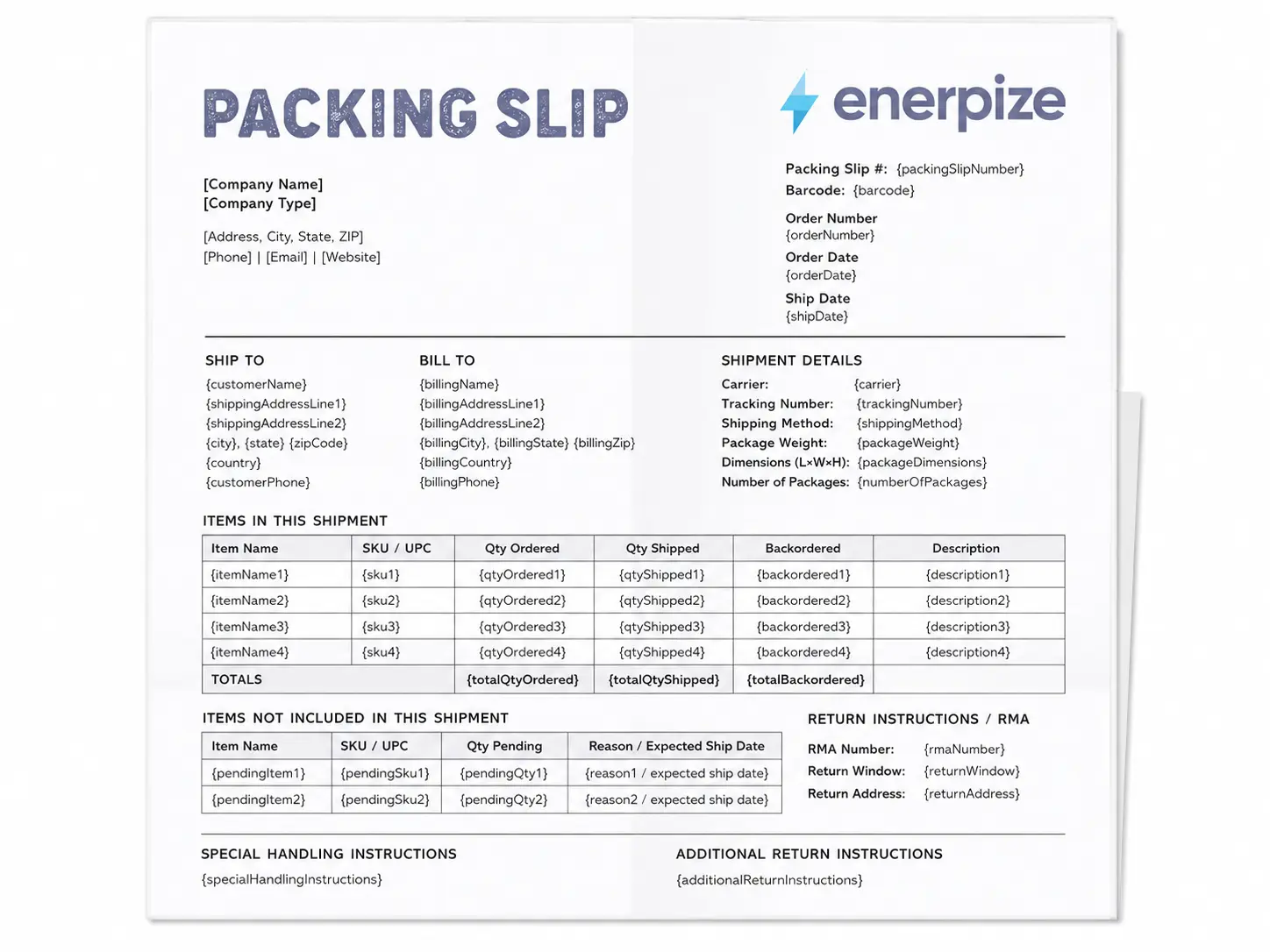
Here is what is inside, field by field.
| Field | What It Does |
|---|---|
| Packing Slip Number | A unique identifier for this specific shipment. Cross-references against your sales order and inventory records. |
| Company Name and Address | Your sender identity at the top of the document. Carriers use this if a label is damaged. Customers use it if they need to reach you. |
| Order Number | Ties the packing slip back to the confirmed sales order so both sides can trace the transaction. |
| Order Date | When the order was placed, not when it shipped. |
| Ship Date | When the package actually left your warehouse. A separate field because fulfillment windows matter. |
| Ship To Address | The delivery destination. Full address including country. |
| Bill To Address | The billing address. Separate from Ship To because on gift orders and B2B purchases, these are almost never the same person. |
| Barcode | Auto-generated in Enerpize and tied to the order and SKU. Warehouse staff scan it to confirm the pick without manual lookup. |
| Carrier and Tracking Number | The shipping provider and the tracking reference. Customers need this the moment their package is late. |
| Shipping Method | Standard, express, overnight. Documents what was agreed so disputes are easier to resolve. |
| Package Weight and Dimensions | Required by carriers for international shipments and customs documentation. |
| Number of Packages | For split shipments. Tells the customer this is box one of three, not a complete order. |
| Item Name | What was ordered, in plain language. |
| SKU / UPC | The stock-keeping unit or universal product code. Makes returns, exchanges, and inventory reconciliation unambiguous. |
| Quantity Ordered | What the customer actually bought. |
| Quantity Shipped | What went in this specific box. When these two numbers differ, the customer knows immediately and does not need to call. |
| Backordered Quantity | What is missing and still coming. Eliminates the "where is the rest of my order?" email. |
| Description | A brief product description for each line item. Useful for customs and for customers who ordered multiple similar products. |
| Items Not Included Section | A dedicated table for everything that did not ship. Reason, SKU, and expected ship date. |
| RMA Number and Return Instructions | How to initiate a return. Included upfront so customers do not have to search your website for a policy they cannot find. |
| Special Handling Instructions | Fragile items, temperature requirements, installation notes. |
| Customer Notes | Gift messages, preferences, or anything the customer added at checkout. |
| Total Quantities Row | Automatic sum of ordered, shipped, and backordered columns. Formulas built in for Excel and Google Sheets. |
| Customer Service Contact | Email, phone, and website so the customer has every channel in one place. |
| Made with Enerpize Footer | Links back to Enerpize with a UTM tag so you can track downloads in your analytics. |
The difference between this and a generic five-column packing slip is not aesthetic. It is functional. A template with separate Qty Ordered and Qty Shipped columns tells the customer exactly what happened with their order without a single support ticket. A dedicated backorder section sets expectations proactively. A barcode field connects the printed document to a live inventory system. These are not decorative extras. They are the fields that prevent the phone call.
Packing Slip vs. Invoice: What Is the Difference?
People confuse these two documents constantly, and it makes sense. They are often printed at the same time and they contain some of the same information. But they serve completely different purposes and they go to different people.
An invoice is a financial document. It tells the person responsible for payment how much they owe, what payment method is accepted, when payment is due, and what tax has been applied. It lives in the accounting system and both the sender and the buyer keep a copy for their records.
A packing slip is a logistics document. It lists the physical items in the shipment and where the package is going. It does not show prices. It does not request payment. It lives in the box.
The clearest example of why these need to be separate documents is a gift order. When you buy something online as a present for someone else, you want the invoice, because you paid for it. The recipient gets the packing slip, because they received it. If that packing slip also shows the price you paid, the surprise is gone and you have a problem.
| Packing Slip | Invoice | |
|---|---|---|
| Purpose | Documents what is in the shipment | Requests and records payment |
| Recipient | The person receiving the package | The person responsible for payment |
| Shows prices | No | Yes |
| Shows tax | No | Yes |
| Legal document | No | Yes |
| Created by | Seller, at the time of dispatch | Seller, at the time of sale |
| Kept for records | By the recipient for reference | By both parties for accounting |
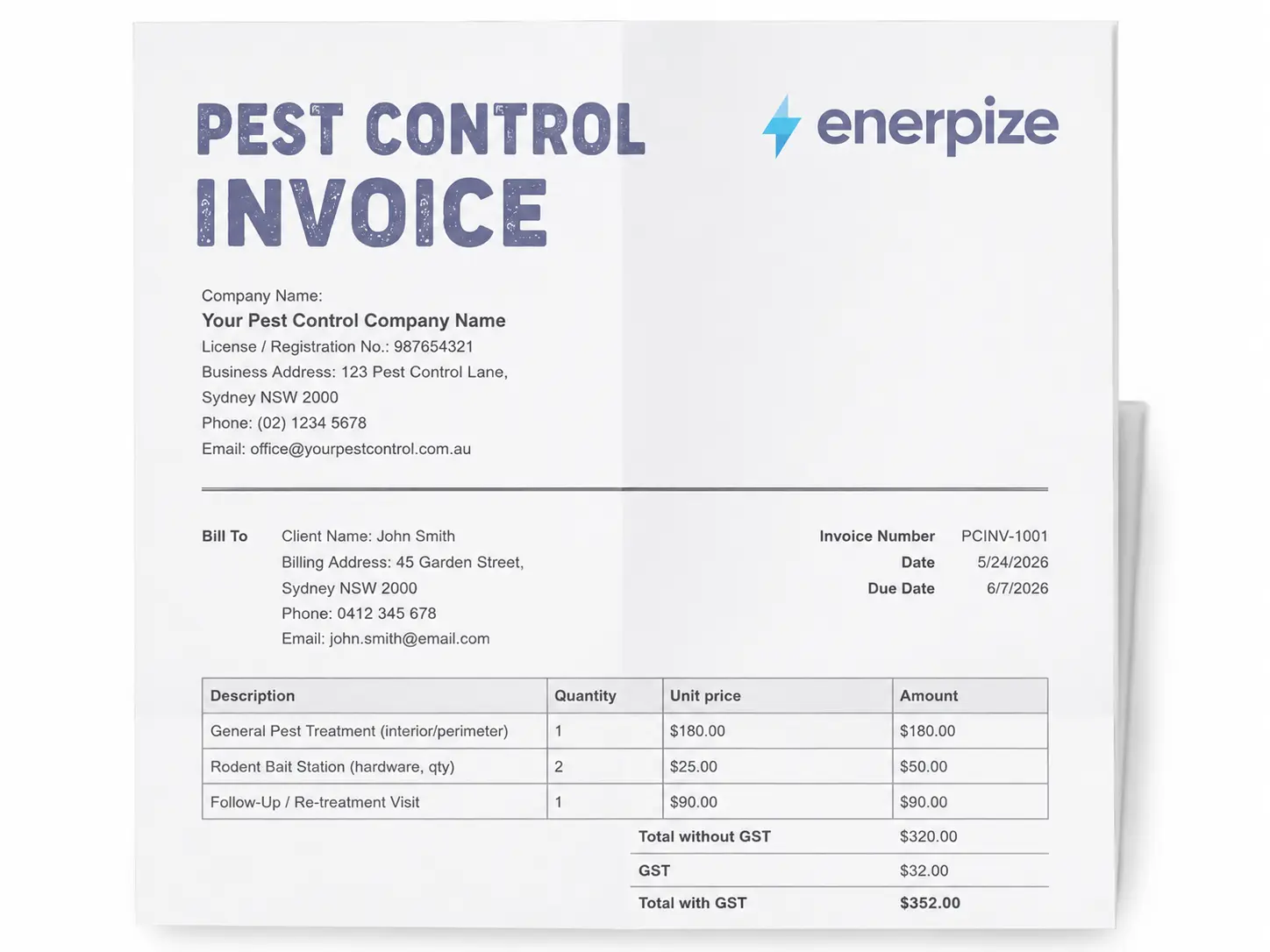
If you are looking for a billing document rather than a shipping document, the blank invoice template covers that side of the transaction.
Packing Slip vs. Shipping Label vs. Bill of Lading
Three documents. Three different jobs. All generated at roughly the same point in the fulfillment process, which is why they get confused.
| Packing Slip | Shipping Label | Bill of Lading | |
|---|---|---|---|
| Where it lives | Inside the package | Outside the package | With the carrier |
| Who uses it | Warehouse team and customer | Carrier | Carrier and seller |
| Legal standing | None | None | Legal contract |
| Contains item list | Yes | No | Sometimes |
| Contains delivery address | Yes | Yes | Yes |
| Contains price | No | No | Sometimes |
| International role | Supports customs documentation | Required for routing | Required for international freight |
A shipping label gets the package to the right address. A packing slip tells the person at that address what is inside the package. A bill of lading is the legal agreement between the seller and the freight carrier, acknowledging the goods were received and outlining the terms of transport.
The packing slip and the bill of lading both reference the shipment, but they serve entirely different audiences. The bill of lading is a legal contract. The packing slip is a communication tool. Confusing the two has real consequences, particularly in international shipping where customs authorities want both documents.
How to Fill Out a Packing Slip
Step 1: Add Your Company Identity
Put your company name, address, phone, email, and website at the top. This is the first thing a carrier reads if the label is damaged. It is also what the customer sees if they need to reach you about the shipment.
Step 2: Assign a Packing Slip Number
Give every packing slip a unique sequential number. This ties the document to your sales order records and makes it traceable if a dispute arrives weeks later. If you are using a system like Enerpize, this number is generated automatically.
Step 3: Fill in Both Addresses
Enter the Ship To address and the Bill To address separately. Do not assume they are the same. On gift orders, corporate purchases, and any B2B transaction where an accounts payable team handles payment, they almost never are.
Step 4: Enter the Order Details
Order number, order date, and ship date. The ship date is a separate field for a reason. Customers often check their packing slip to understand why their delivery window feels longer than expected. The ship date answers that question without a support ticket.
Step 5: Add Carrier and Package Details
Carrier name, tracking number, shipping method, package weight, and dimensions. For domestic shipments this is good practice. For international shipments this is required by customs agencies in most jurisdictions.
Step 6: List Every Line Item
For each product in the shipment, fill in the item name, SKU or UPC, quantity ordered, quantity shipped, backordered quantity, and a brief description. If Qty Ordered and Qty Shipped match, great. If they do not, the Backordered column is where you explain what is still coming.
Step 7: Complete the Items Not Included Section
Any product on the original order that did not make it into this box gets listed here with the reason and an expected ship date. This section alone eliminates a large volume of "where is the rest of my order?" inquiries.
Step 8: Add Return Instructions
Include the RMA reference number, the return window, and the return address. Putting this information inside the package means the customer does not have to dig through their inbox or navigate to a returns page when something needs to go back.
Step 9: Review Against the Sales Order Before Sealing
Cross-check every line item against the confirmed sales order. The Qty Ordered column makes this mechanical. If the numbers do not match and you cannot explain why, do not seal the box yet.
Ready to skip the manual work? Enerpize generates your packing slips automatically. Start for free.
Types of Packing Slip Templates
Not every business ships the same kind of order. The right packing slip format depends on what you are shipping, where it is going, and who is receiving it.
Standard Packing Slip
The format this page covers. An itemized list of everything in the shipment, sender and recipient details, carrier information, and return instructions. Works for most ecommerce, retail, and service businesses.
Retail Packing Slip
Adds a return policy summary and sometimes a QR code that links to the online returns portal. Prices are typically omitted so the document can travel with gift orders. Often includes a promotional message or discount code for the next purchase.
Wholesale and Bulk Packing Slip
Designed for B2B shipments where a single order might reference multiple purchase order numbers, arrive on pallets, and involve partial fulfillments across different delivery dates. Includes pallet count, gross weight, and cubic measurements.
International and Customs Packing Slip
Includes Harmonized System (HS) codes for each product, country of origin, declared value per item, and a statement that the document accompanies the commercial invoice. Customs agencies in most countries require this in addition to, not instead of, the commercial invoice. The delivery note template covers the companion document for confirmed delivery.
Digital Packing Slip
A PDF sent via email at the moment the shipment is confirmed. Contains identical information to a printed packing slip but generates no paper waste. Increasingly common among DTC brands building sustainability into their fulfillment process. Enerpize can generate this automatically from a confirmed sales order.
Packing Slip Template for US Businesses
The United States accounts for 73% of global monthly searches for "packing slip template," which tells you something about how seriously American businesses take fulfillment documentation.
For US shipments, the packing slip works alongside the major domestic carriers: USPS, UPS, FedEx, and DHL. Each carrier has its own label format requirements, but the packing slip inside the package is standardized by the business, not the carrier. FedEx publishes a Universal Packing List guide for commercial shippers that covers documentation requirements for international freight dispatched from the US. For domestic shipments, the standard fields covered in the Enerpize packing slip template are sufficient.
For cross-border shipments from the US, customs agencies at the destination will expect a commercial invoice alongside the packing slip. The packing slip confirms the contents. The commercial invoice declares the value. Both travel with the shipment.
One note on returns: the National Retail Federation reported that US retail return rates averaged 14.5% in 2023, with ecommerce returns running significantly higher. A packing slip with a clear RMA number and return address is not a courtesy. It is infrastructure.
Packing Slip Template for Canadian Businesses
Canada represents approximately 8% of global search volume for the packing slip template keyword, which is a meaningful slice for a country of 40 million people.
For Canadian domestic shipments, Canada Post and Purolator both accept standard packing slip formats with no carrier-specific requirements for the document inside the package. The fields covered in the Enerpize template apply directly.
For cross-border shipments entering or leaving Canada, the Canada Border Services Agency (CBSA) requires a detailed commercial invoice for customs clearance, and the packing slip serves as a supporting document confirming the physical contents. The CBSA's B3 Entry requirements expect item descriptions, quantities, country of origin, and values to be consistent across both documents.
Quebec-based businesses shipping within Canada may want to include bilingual field labels (French and English) particularly for consumer-facing packing slips. The Enerpize template fields can be duplicated or relabeled accordingly.
How Enerpize Generates Packing Slips Automatically
There is a version of fulfillment where someone types the order number into a Word template, copies the shipping address from one tab, pastes the line items from another, and prints the result hoping nothing was missed. That version exists at a lot of businesses right now.
Enerpize does it differently.
When a sales order is confirmed in Enerpize, the system generates the packing slip directly from that order data. No re-entry. No copy-paste. The customer name, shipping address, line items, SKUs, and quantities pull automatically from the confirmed order. The warehouse team gets a print-ready document with a barcode embedded, tied to the specific order and product. They scan it to confirm the pick. Inventory levels update in real time. The packing slip, the inventory deduction, and the eventual invoice all stay synchronized in one system.
Enerpize also gives warehouse managers the ability to assign packing slip workflows by location. If you run two warehouses, one handling fast-moving retail stock and one handling bulk wholesale orders, each location can be staffed separately and packing slips are routed accordingly. The right document reaches the right team without anyone making a decision about it manually.
For businesses managing backorders and partial shipments, Enerpize tracks what shipped and what did not at the order level, so the packing slip reflects the actual contents of each box rather than the full order.
That is the difference between a template and a system.
See How Enerpize Handles Your Packing Slips. Start for free.
Key Takeaways
- The core buyer problem is that manual packing slips cause pick errors, missing-item disputes, and customs delays that cost businesses time and money they cannot easily recover.
- What real integration means: a packing slip that auto-populates from a confirmed sales order, tied to live inventory, is not the same thing as a template someone fills out by hand. The system version removes the human error layer entirely.
- Most free packing slip templates cover five fields and stop there. They have no separate Qty Ordered versus Qty Shipped columns, no backorder section, no return instructions field, and no barcode. They document a shipment after the fact. They do not prevent errors before dispatch.
- The primary Enerpize differentiator: Enerpize auto-generates barcoded packing slips directly from confirmed sales orders, routes them to the correct warehouse by location, and updates inventory in real time on dispatch, trusted by 40,000+ businesses across its ecosystem.
- Secondary capability: Enerpize's AI Purchase Invoice Auto Matching means the packing slip, the purchase invoice, and the received goods record can be reconciled in three steps without any manual cross-checking between documents.
- Enerpize plans are built for SMEs. See the full feature comparison.
Frequently Asked Questions
What is a packing slip?
A packing slip is a document placed inside or attached to a shipment that lists every item included in the package, along with SKUs, quantities, and the customer's shipping address. The warehouse team uses it to verify the order before dispatch. The customer uses it to confirm what arrived. It is not a financial document and it does not include prices.
What should be included on a packing slip?
At minimum: packing slip number, order number, order date, ship date, sender details, Ship To address, Bill To address, an itemized list of every product with SKU and quantity shipped, a note on any backordered items, carrier name, tracking number, and a way to contact customer service. A good packing slip template also includes return instructions and package weight.
What is the difference between a packing slip and an invoice?
An invoice is a financial document that shows prices, taxes, and payment terms. It goes to the person responsible for payment. A packing slip is a logistics document that lists physical items and contains no pricing. It goes inside the shipment. They can be generated at the same time but they serve entirely different purposes.
Is a packing slip a legal document?
No. A packing slip carries no legal standing. It is an informational document for the warehouse team and the end customer. For legal purposes in commercial shipping, the bill of lading is the binding document between shipper and carrier.
Do I need a packing slip for international shipments?
You need both a packing slip and a commercial invoice for international shipments. The commercial invoice declares the value of the goods for customs purposes. The packing slip confirms the physical contents. Most customs agencies require both. The packing slip alone is not sufficient for clearance.
What is the difference between a packing slip and a shipping label?
A shipping label goes on the outside of the package. It tells the carrier where the package is going and carries a barcode for tracking. A packing slip goes inside the package. It tells the recipient what is inside. Both reference the same shipment but serve different audiences entirely.
Can a packing slip include prices?
It can, but most businesses deliberately leave prices off the packing slip. The main reason is gift orders. If a packing slip shows the purchase price, the recipient sees it. Many ecommerce brands and B2B suppliers keep the packing slip price-free and rely on the invoice to communicate financial details.
What is the difference between a packing slip and a bill of lading?
A bill of lading is a legal contract between the seller and the freight carrier. It acknowledges the carrier has received the goods, describes the cargo, and sets out the terms of transport. A packing slip is an informational document for the warehouse and the customer. A bill of lading is used extensively in international freight. A packing slip is used in virtually every shipment regardless of size or distance.
About the Author
Omar El Bahr is a Senior Digital Growth Specialist at Enerpize, where he leads SEO, content strategy, and organic growth across international markets. He is a Forbes Communications Council contributor and has written for Entrepreneur on business communication and digital strategy.
Disclaimer: The packing slip template and information on this page are provided for general reference purposes only. Requirements for shipping documentation vary by country, carrier, and shipment type. For international shipments, cross-border regulatory requirements, or legal matters, consult the relevant customs authority or a qualified professional.