Posted on 15 July 2026
AIA-Style G702/G703 Payment Application Template: Excel, Word, PDF, Google Sheet & Docs
- Tracks AIA-style G702/G703 payment applications, retainage withheld, and certified amounts for every billing period across all active projects.
- Automates the calculation of contract sum to date, total earned less retainage, and current payment due using your schedule of values.
- Provides a clear paper trail for internal approval, owner payment, and supporting documentation.
- The template is available in Word, Excel, and PDF, built to match the widely-used G702/G703 payment application format.
An AIA-style G702/G703 template is a structured payment application document used by US construction contractors to request progress payments, track retainage, and document completed work against a project's schedule of values each billing period.


What Are AIA G702 and G703?
If you work in US construction under an AIA contract, you already know the forms. If you are newer to the industry or just moved to a system that needs to handle them, here is the short version.
Already familiar with the forms? Skip ahead and manage your AIA-style G702/G703 payment applications directly in Enerpize. Start for free.
G702 and G703 are registered trademarks of the American Institute of Architects. The templates and guidance on this page are Enerpize's own AIA-style versions, built to match the widely-used format — they are not official AIA Contract Documents, and Enerpize is not affiliated with, endorsed by, or licensed by the American Institute of Architects or ACD Operations, LLC.
AIA G702: The Application for Payment
G702 is the cover sheet. The contractor submits it to request payment from the project owner at the end of a billing period. It summarizes the contract value, how much work has been completed to date, how much has been stored on site, what has already been paid, and what is currently due.
It also includes a certification section signed by the contractor, then reviewed and certified by the architect or construction manager before payment is released. The certified amount is what the owner actually pays. If the architect adjusts the figure down, they attach an explanation.
AIA G703: The Continuation Sheet
G703 is the supporting schedule that sits behind G702. It breaks the total contract value into individual line items, each representing a scope of work. For every line, it tracks how much has been completed in prior periods, how much was completed this period, how much material is stored on site but not yet installed, the running total, the percentage complete, and the retainage withheld.
How the Payment Calculation and Schedule of Values Work Together
Think of them as a report and its appendix. The Schedule of Values holds all the detail; the Payment Calculation page summarizes it and makes the formal request. The figures on the Payment Calculation page — specifically Lines 4 through 9 — are pulled directly from the totals on the Schedule of Values page. They're not two separate documents. They're two halves of the same application. The Schedule of Values holds every line item, every dollar completed, every dollar stored, every dollar withheld. The Payment Calculation page summarizes it into a single payment request and puts it in front of the reviewer for approval.
The connection is direct. The Total Completed & Stored column on the Schedule of Values page, which tracks the running total for each line item, feeds directly into Line 4 on the Payment Calculation page. The Retainage Held column feeds into Line 5. Change one and the other changes with it.
The Schedule of Values also carries memory forward. Every billing cycle, work completed in prior periods rolls into the Completed — Prior Periods column automatically. By the final application, that column tells the complete story of the project from day one.
Field-by-Field Guide: AIA-style G702/G703
The header fields identify the project and the parties involved. The financial fields are where the payment calculation happens.
Header Fields
| Field | What it means |
|---|---|
| Billed To (Owner) | The project owner receiving the payment request |
| Submitted By (Contractor) | Your company name and address |
| Project Name / Address | Project name and address |
| Application No. | Sequential number for this billing period (Application 1, 2, 3...) |
| Billing Period Ending | The date through which this application covers completed work |
| Contract Date | The date of the original contract between owner and contractor |
| Internal Project Ref. No. | Your own project reference number |
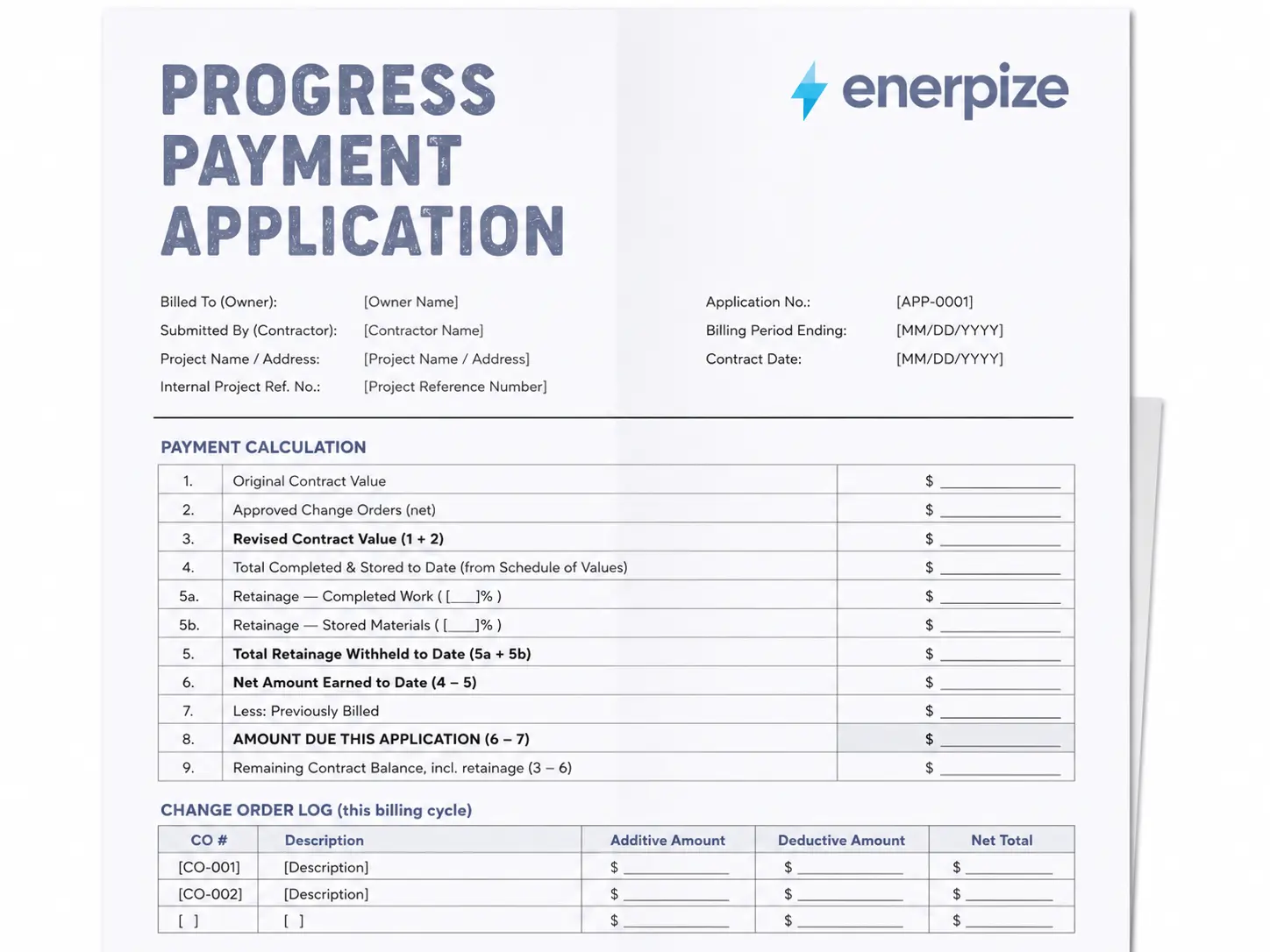
Payment Calculation for AIA-style G702/G703
Lines 1–5:
| Field | What it means |
|---|---|
| Line 1: Original Contract Value | The total contract value as signed. This number does not change unless there is a formal change order. |
| Line 2: Approved Change Orders (net) | The running total of all approved change orders, additions minus deductions. Pulled from the Change Order Log on the same page. |
| Line 3: Revised Contract Value | Line 1 plus Line 2. The current total contract value including all change orders. |
| Line 4: Total Completed & Stored to Date | The total value of all work completed and materials stored, pulled directly from the Total Completed & Stored column on the Schedule of Values page. |
| Line 5a: Retainage — Completed Work | A set percentage of completed work value, held back until the retainage release point. |
| Line 5b: Retainage — Stored Materials | A set percentage of stored materials value not yet installed. |
| Line 5: Total Retainage Withheld to Date | Sum of Lines 5a and 5b, or the total of the Retainage Held column on the Schedule of Values page. |
Lines 6–9:
| Field | What it means |
|---|---|
| Line 6: Net Amount Earned to Date | Line 4 minus Line 5. What has been earned and is eligible for payment after retainage is withheld. |
| Line 7: Less: Previously Billed | The total of all prior billed amounts. Carried from Line 6 of the previous application. |
| Line 8: Amount Due This Application | Line 6 minus Line 7. The amount being requested in this application. |
| Line 9: Remaining Contract Balance, incl. retainage | Line 3 minus Line 6. What remains to be earned on the project, including retained funds. |
Field-by-Field Guide: Schedule of Values or AIA-style G702/G703
The second page is a line-item schedule. Each row represents a distinct scope of work, feeding the totals on the Payment Calculation page.
| Field | What it means |
|---|---|
| Item No. | Sequential line item number. Matches your schedule of values. |
| Scope Description | The scope description for that line. Should match contract language exactly. |
| Budgeted Value | The total budgeted value for this line item. All line values must sum to the original contract value (Line 1). |
| Completed — Prior Periods | The cumulative completion value from all prior billing periods for this line. Carried forward from the previous application. |
| Completed — This Period | The value of work completed on this line item during the current billing period only. |
| Materials Stored | The value of materials purchased, delivered to site, and stored, but not yet incorporated into the work. |
| Total Completed & Stored | Sum of the three columns above. % Complete is calculated as this value divided by Budgeted Value. |
| Remaining Balance | Budgeted Value minus Total Completed & Stored. What is left to complete on this line. |
| Retainage Held | The amount withheld from this line item in the current period. |
Handle every calculation automatically, contract sum, retainage, and current payment due, inside Enerpize. Start for free.
How Enerpize Handles AIA-style G702/G703
Filling out a AIA-style G702/G703 payment application manually works for a single project. It starts to break down when you are running multiple projects simultaneously, tracking retainage release schedules, reconciling stored materials across sites, or trying to close your books without manually re-entering payment data.
Enerpize is built for construction companies that need the full picture in one system.
Invoicing with Retention Discounts
Generate contractor invoices in installments or lump sum, with retention amounts calculated and clearly shown on the invoice. Enerpize calculates retention based on total items after tax, which matches standard construction billing practice. When retainage is released at project close, it is tracked directly in the system without a separate manual entry.
Project Budget and Cost Tracking
Add each construction project with its site address, engineering plan, budget, and cost breakdown. Enerpize tracks profitability and cost reports per project so you know, at any billing period, whether your schedule of values is holding against actual costs. Every schedule of values line item can be mapped to a project cost center.
Labor Time and Cost Allocation
Allocate each engineer's and worker's time directly to the project they worked on. Labor costs flow into project cost reports automatically, so your schedule of values line items reflect actual job cost data rather than estimates updated manually at the end of each period.
Multiple Price Lists per Project
Construction pricing is not uniform. Material unit prices shift based on project size, client agreement, and volume. Enerpize supports multiple price lists so you can maintain project-specific pricing without overwriting your standard rates across other clients.
Supplier and Client Management
Track subcontractors, material suppliers, and clients in one place. Purchase management handles supplier invoices against project budgets. When a stored materials claim on the Materials Stored column needs documentation, the purchase record is already in the system.
FAQs
What is the difference between a AIA-style G702/G703 payment application cover sheet and a schedule of values?
The cover sheet is the formal payment request — it summarizes the contract value, retainage, and amount due, along with sign-off from the contractor and reviewer. The schedule of values is the supporting detail behind it — the line-item breakdown of scope, budgeted value, and completion status that the cover sheet's totals are pulled from. Both are submitted together as a single payment application package; the cover sheet isn't complete without the schedule of values behind it.
What is retainage in construction?
Retainage is a percentage of each certified payment that the owner withholds until the project reaches substantial completion. The standard rate is 10%, though it varies by contract. In this template, retainage is broken out on Lines 5a and 5b of the Payment Calculation page, and itemized per line item in the Retainage Held column on the Schedule of Values page. Retainage is typically released in a lump sum once the work is certified substantially complete and any punch list items are resolved.
Can I use this format on any construction contract, AIA or not?
Yes. The G702/G703 structure is widely recognized and accepted by owners, architects, lenders, and bonding companies regardless of which contract form was used to set up the project. Many contractors use this general format as their standard payment application across all projects because it's familiar to everyone in the payment chain — this template follows that same widely-used structure.
What is a schedule of values?
A schedule of values is a breakdown of the total contract amount into line items, each representing a portion of the scope of work. It's agreed upon at the start of the project and becomes the Scope Description and Budgeted Value columns on the Schedule of Values page. Every AIA-style G702/G703 payment application is measured against this schedule.
How should stored materials be documented?
Materials claimed in the Materials Stored column require supporting documentation — typically supplier invoices and delivery receipts proving the material is on site. Some owners also require a separate stored materials schedule or form. Always confirm documentation requirements with the architect or owner before claiming stored materials on a payment application.
What happens if the amount approved differs from the amount requested?
Whoever is certifying the payment (architect, construction manager, or owner's representative) should attach a written explanation and initial any changed figures on both the Payment Calculation and Schedule of Values pages. The certified amount is what actually gets paid. The contractor can dispute a reduction through the contract's standard claims procedure if they believe it wasn't justified.
How does ERP software handle AIA-style G702/G703?
An ERP system like Enerpize connects your payment application data to your accounts receivable, retainage ledger, project cost tracking, and payroll. Instead of manually transferring numbers from a spreadsheet into your accounting system, the payment data flows directly — when a payment is certified, the receivable is recorded, and when retainage is released, the ledger updates automatically. Schedule of values line items map to project cost centers so you can see job profitability at any point in the billing cycle.
Enerpize is an independent software product and is not affiliated with, endorsed by, or sponsored by the American Institute of Architects (AIA). AIA®, G702®, and G703® are registered trademarks of the American Institute of Architects. Enerpize produces AIA-style payment application templates and documents for workflow and submission purposes only and does not distribute official AIA Contract Documents offered by or authorized by ACD Operations, LLC.
Run your first payment application and see why construction companies in the US use Enerpize to close their billing cycles faster. Start for free.