Posted on 3 June 2026
Free NDIS Invoice Template Download: PDF, Excel, Word & Google Sheets
- Tracks participant NDIS numbers, support item codes, service delivery dates, and GST-free status for every claim you submit.
- Automates line-item calculations so the total matches what the plan manager or NDIA expects to see.
- Covers all three plan management types: plan-managed, NDIA-managed, and self-managed participants.
- Available in PDF, Word, Excel, and Google Sheets.
An NDIS invoice template is a pre-structured document that NDIS service providers use to claim payment for disability supports delivered to participants, addressed to their plan manager, the NDIA, or the participant directly depending on how their plan is managed.


What Is an NDIS Invoice?
You delivered the support. Now you need to get paid.
That part sounds simple. In practice, NDIS invoicing has more moving pieces than a standard tax invoice, and a single missing field is enough to get the whole thing sent back to you.
An NDIS invoice is the document you send to claim payment for supports delivered to a National Disability Insurance Scheme participant. Depending on how the participant manages their plan, it goes to one of three places: their plan manager, the NDIA directly via the myplace provider portal, or the participant themselves if they are self-managed.
The invoice needs to prove two things simultaneously. First, that you are a legitimate provider with a valid ABN. Second, that the support you delivered matches the funding allocated in that participant's NDIS plan. Get either of those wrong and payment stops until you fix it.
This is why a proper NDIS invoice template exists. Not to fill in a form, but to make sure neither of those things slips through.
Stop building invoices from scratch. Generate NDIS-compliant invoices directly in Enerpize, free, no credit card required. Start for free.
What Must Be on an NDIS Invoice? The 2025-26 Requirements
Every NDIS invoice you submit needs to include the following fields. The NDIA and plan managers check against this list. Missing any one of them is enough to delay or reject your claim.
Provider details
Your registered business name, your Australian Business Number (ABN), your contact details, and your NDIS provider registration number if you are a registered provider. The ABN is not optional. Even if your services are GST-free, the ABN still has to be there.
Participant details
The participant's full legal name and their NDIS number (also called a participant reference number). For Specialist Disability Accommodation claims, you also need their address including postcode. These fields are how the NDIA matches your claim to the right plan and budget.
Invoice details
A unique invoice number, the date the invoice was issued, and your payment terms including the due date. The invoice number needs to be sequential with no gaps. If you void an invoice, mark it cancelled and issue a new number. Do not reuse it.
Service details (the NDIS-specific part)
This is where most rejections happen. For every line item you include, you need:
- The date or date range the support was delivered (this must fall before the invoice date, you cannot invoice in advance)
- The NDIS support item code from the 2025-26 NDIS Support Catalogue, for example 01_011_0107_1_1 for Assistance with Self-Care Activities on a weekday daytime
- A clear description of the support provided
- Quantity in hours or units, rounded to two decimal points if partial
- Unit price, which must not exceed the NDIA price cap for that item
- The line total
Financial summary
Subtotal, GST amount (zero for most NDIS supports, but still show the line), and total payable. Payment details including BSB, account name, and account number.
For NDIS invoice requirements around pricing, the NDIA publishes the NDIS Pricing Arrangements and Price Limits each year. The current version covers 2025-26.
NDIS Invoice Requirements: What Changed in 2025-26
This section matters if you have older outstanding claims or if you are new to NDIS invoicing and need to understand the current rules before you start.
The 2-year claim window
From 3 October 2025, the NDIA's systems automatically reject any claim submitted more than two years after the support start date. This rule came into effect on 3 October 2024 with a 12-month grace period. The grace period ended at midnight on 2 October 2025. If you have any claims older than two years sitting unsubmitted, they are now rejected automatically regardless of their validity. Submit weekly, not monthly, to avoid this problem entirely.
Travel and service time must be separate
If you are claiming provider travel as a separate line item, it cannot be bundled into your service hours. Show them as two distinct rows on the invoice. If you are not charging for travel, list it at $0.00 so the plan manager can see it was considered.
Therapy moved to Capacity Building
Since the 2025-26 pricing update, all therapy services must be claimed under Capacity Building, specifically Improved Daily Living, rather than Core supports. Using the wrong budget category is a fast path to rejection.
Electronic record-keeping is now mandatory
Keep all invoices, timesheets, and service agreements in electronic format. The NDIA can request them at any time for audit purposes. Retain all records for a minimum of seven years. The NDIA's record-keeping requirements cover exactly what needs to be stored and for how long.
NDIS Invoice Example: A Fully Annotated Sample
This is what a correctly completed NDIS invoice looks like for a plan-managed participant.
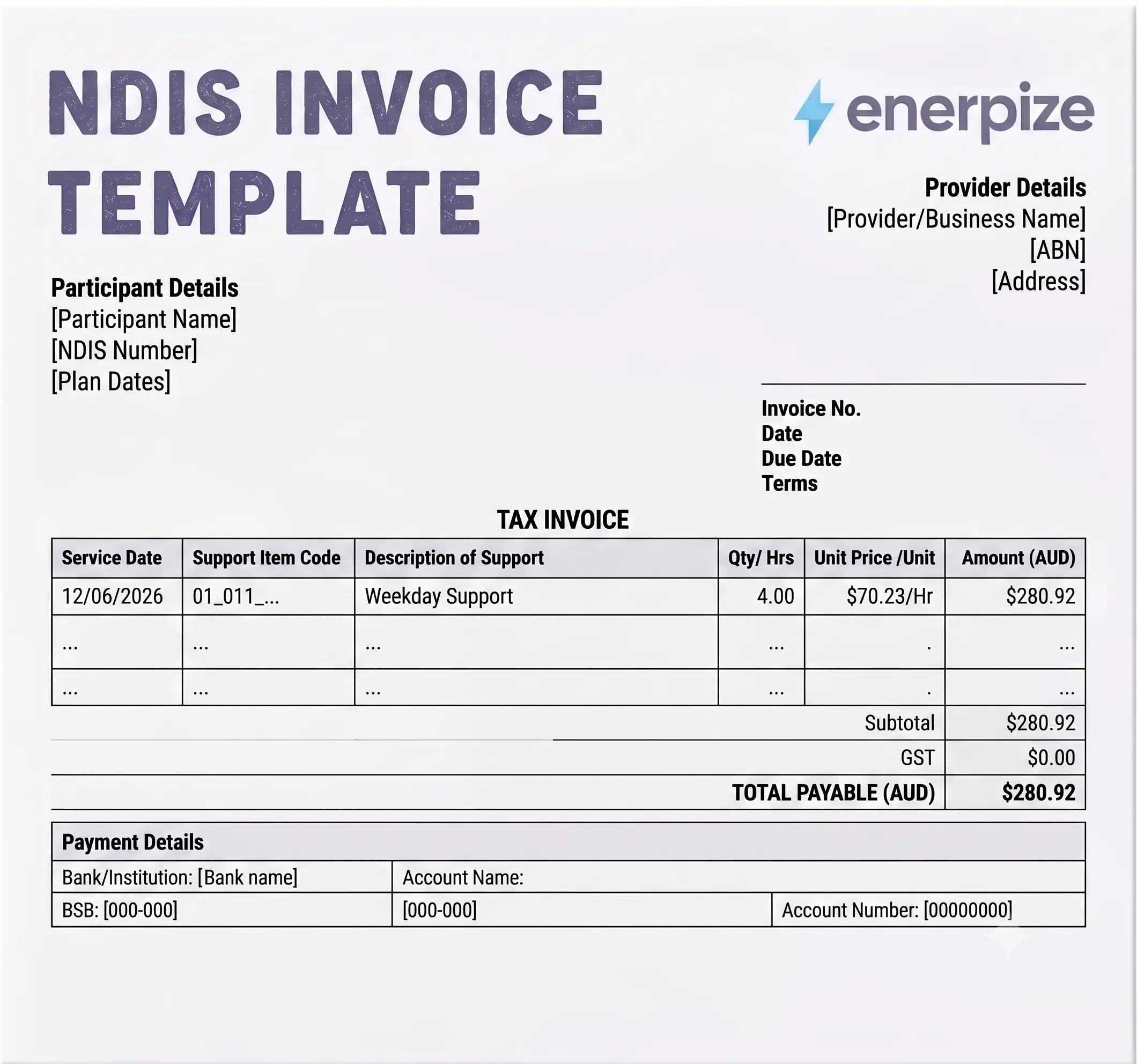
Provider details Business Name: Quality Care Support Services Pty Ltd ABN: 12 345 678 901 NDIS Provider No.: 4050012345 Phone: 0400 123 456 | Email: admin@qualitycare.com.au
Participant details Participant Name: Jane Smith NDIS Number: 1234 5678 9012
Invoice details Invoice Number: INV-2026-00456 Date Issued: 17 June 2026 Payment Due: 1 July 2026
| Service Date | Support Item Code | Description | Qty | Unit Price | Total |
|---|---|---|---|---|---|
| 12/06/2026 | 01_011_0107_1_1 | Assistance with Self-Care, Standard, Weekday Daytime | 4 hrs | $70.23 | $280.92 |
| 12/06/2026 | 04_104_0125_6_1 | Community Access, Standard, Weekday Daytime | 2 hrs | $70.23 | $140.46 |
| 14/06/2026 | 01_013_0107_1_1 | Assistance with Self-Care, Standard, Saturday | 3 hrs | $98.82 | $296.46 |
| 14/06/2026 | Provider Travel | Travel to participant's home | 0.5 hrs | $0.00 | $0.00 |
Subtotal: $717.84 GST: $0.00 Total Payable: $717.84
This invoice is GST-free under NDIS Pricing Arrangements.
Payment details: BSB 123-456 | Account: 12345678 | Account Name: Quality Care Support Services Pty Ltd
A sample NDIS invoice laid out this way answers the common search for an NDIS invoice example or sample NDIS invoice in one place. Every field shown is required. Nothing is decorative.
Support Worker Invoice Template: What Sole Traders and Subcontractors Need to Know
A lot of NDIS support work is done by sole traders. You have your ABN, you deliver supports directly to participants, and you want to get paid without the paperwork slowing you down. This section is specifically for you.
Your invoice format is the same as any other NDIS provider invoice template. Same 13 fields, same support item codes, same GST rules. But there is one situation that catches sole traders off guard, and it is worth covering clearly.
If you bill the participant or their plan manager directly, your supply of NDIS supports is GST-free under Section 38-38 of the GST Act. You show GST as $0.00 on your invoice. You still include your ABN.
If you are subcontracting to another registered NDIS provider (meaning you invoice a provider rather than the participant or plan manager), that supply is not considered a direct NDIS support. The ATO's guidance on this is clear: in that arrangement, you are supplying a service to a business, not to the participant. GST applies. You need to add GST to your invoice at 10%.
This subcontractor GST edge case is covered in detail on the ATO's NDIS GST guidance page.
If you are searching for an NDIS sole trader invoice template or an invoice template for NDIS support worker, the template download on this page covers both scenarios. The GST line is editable. Set it to $0.00 when billing direct, and to 10% when subcontracting.
For support workers who also manage their own payroll obligations as sole traders, our HR and payroll management module handles payslip generation and leave tracking alongside your invoicing.
Which Format Should You Use: Excel, Word, or PDF?
Every provider ends up asking this question at some point. Here is the honest answer.
Excel is the right choice when you are billing multiple line items for a single participant across a billing period, or when you want automatic total calculations without doing the math manually. If you regularly submit invoices with five or more line items, Excel saves time. It is also useful if you are tracking multiple participants across a spreadsheet before submitting. The downside is that Excel files are editable after they leave your hands, which plan managers do not like.
Word is useful for customizing the layout to match your brand. You can add your logo, adjust the column widths, and set up a version that looks professional. Once it is styled the way you want, save it as your master copy and never submit the editable version.
PDF is what you actually send. Every plan manager wants a PDF. It cannot be edited after the fact, which protects both you and the participant. Save your completed Word or Excel invoice as a PDF before you email it. If you are using Chrome or Edge, use Print to PDF. Safari users need to go to Print, then the PDF dropdown in the bottom left, then Save as PDF.
The NDIS invoice template excel and ndis invoice template word downloads on this page serve as your starting point. The PDF is what crosses the finish line.
For NDIS providers who also need to issue compliant invoices outside of disability supports, our Australian GST invoice template and invoice without GST template cover both scenarios.
How to Submit Your NDIS Invoice
Where your invoice goes depends on how the participant manages their NDIS plan. There are three paths.
Plan-managed participants
Send your invoice directly to the participant's plan manager by email. Include all mandatory fields. Plan managers are processing a high volume of invoices daily, so the cleaner your invoice, the faster you get paid. According to the NDIA's official invoicing guide, plan managers enter your invoice into the myplace provider portal on your behalf. Valid claims from registered providers typically process within two to three business days.
NDIA-managed participants
You submit a payment request directly through the myplace provider portal. This is not a traditional invoice you email somewhere. You log in, enter the service details including the support item code, quantity, and price, and submit. For NDIA-managed participants, you need to submit within 90 days from the end of the service booking period.
Self-managed participants
Invoice the participant directly. They pay you, then claim reimbursement from their NDIS funds using the my NDIS portal or app. Send them a receipt after payment so they have what they need to lodge the claim.
Common Reasons NDIS Invoices Are Rejected
One rejected invoice means waiting an extra 7 to 14 business days for payment. At $70 per hour across three weekly sessions, that is $840 to $1,680 delayed per participant. For providers working with multiple participants, it compounds fast.
These are the most common causes, drawn from feedback across plan managers and NDIS providers.
Wrong or outdated support item code
This is the number one reason. Support codes are updated annually. A code that was valid in 2024-25 may have changed in the 2025-26 Support Catalogue. Always verify the code before submitting.
Price exceeds the NDIA price cap
The NDIS Pricing Arrangements set maximum rates. You cannot charge above them for plan-managed or NDIA-managed participants. If your rate is even one cent over, the claim is rejected.
Service date missing or after the invoice date
Dates of service delivery must appear on the invoice and must be before the date the invoice was issued. You cannot invoice for supports you have not yet delivered.
Travel bundled into service hours
As of the 2025-26 pricing update, provider travel needs its own line. Show it separately, even if the dollar amount is $0.00.
ABN missing or incorrect
Check your ABN at ABN Lookup before using it on any invoice. Ensure the name on the invoice matches your ABN registration.
Duplicate invoice number
If you correct and resubmit a rejected invoice, use a new invoice number. Never reuse the original.
Claim submitted more than two years after the service date
From 3 October 2025, this is an automatic rejection. Set a calendar reminder to submit within 90 days of delivery as a baseline habit.
How to Make Your Invoice OCR-Friendly
Many plan managers now use Optical Character Recognition systems to automatically read and process invoices before a human reviews them. These systems work by scanning your PDF and extracting key data fields. If your invoice is hard for the system to read, it gets flagged for manual review and sits in a queue longer.
A few formatting habits plan managers recommend:
Type everything. Handwritten invoices are no longer accepted by most plan managers and were formally excluded from Empowrd's invoice processing requirements in 2026.
Save as PDF, not as the original editable file. A PDF locks the layout. When Excel or Word files are opened on a different machine, formatting can shift and fields can misalign.
Use a font size of at least 10pt. Small text is harder to extract accurately.
Avoid colored cell backgrounds in Excel before converting to PDF. OCR systems sometimes struggle to read text over dark fill colors.
State the participant's NDIS number as a single unformatted string. Some providers write it as 1234 5678 9012 with spaces, which is fine for humans but inconsistent for automated extraction. Check what your specific plan manager prefers.
Beyond the Template: NDIS Invoicing with Enerpize
A template gets you to your first payment. It does not scale.
If you are running an NDIS business with multiple support workers, managing payroll alongside service delivery, tracking expenses per participant, and trying to reconcile everything at the end of the month, a template in Excel is not your bottleneck. The bottleneck is having four different tools that do not talk to each other.
Enerpize connects your invoicing, payroll, and expense management in one platform. You can generate compliant invoices directly in the system, process support worker payroll without switching applications, and track costs per participant or service type using cost centers. There is no manual transfer of data between tools.
For NDIS providers who are also managing allied health staff, our HR and payroll management module handles salary structures, attendance tracking, and payslip generation. Our expenses management module captures costs at the point they happen, which simplifies your end-of-period reconciliation.
For healthcare providers using Enerpize across clinical and administrative functions, the medical invoice template covers clinical billing alongside your NDIS work.
Need to provide a quote before a service agreement is signed? The quotation template follows the same format as the invoice so there is no duplication of work.
See how Enerpize handles NDIS invoicing, payroll, and expenses together. Start for free.
Key Takeaways
- Every NDIS invoice must include 13 mandatory fields: provider ABN and business name, participant name and NDIS number, unique invoice number, invoice date, service dates, support item codes from the 2025-26 catalogue, service descriptions, quantities, unit prices within NDIA caps, line totals, GST status, and total payable.
- From 3 October 2025, the NDIA automatically rejects all claims submitted more than two years after the service start date. Submit weekly, not monthly.
- Most NDIS supports are GST-free when billed directly to the participant or plan manager. If you are a support worker subcontracting to another provider, GST at 10% applies to your invoice.
- Travel time and service time must appear as separate line items. Bundling them is one of the most common rejection causes in 2025-26.
- Save your invoice as PDF before submitting. Word and Excel files are editable and most plan managers will not accept them.
- Use the correct support item code from the current 2025-26 NDIS Support Catalogue. Outdated codes are the leading cause of invoice rejection.
Frequently Asked Questions
What is a compliant NDIS invoice?
A compliant NDIS invoice is one that includes all 13 mandatory fields set by the NDIA: provider ABN and business name, participant name and NDIS number, unique invoice number, date of issue, service delivery dates, support item codes from the current NDIS Support Catalogue, service descriptions, quantities, unit prices within NDIA price caps, line totals, GST status, and total payable. Every field is required. Missing one is enough to delay or reject the claim.
Do NDIS support workers need to charge GST?
It depends on who you are billing. If you invoice a participant or their plan manager directly for supports covered under their NDIS plan, your supply is GST-free under Section 38-38 of the GST Act. If you are subcontracting to another registered NDIS provider, you are supplying a service to a business rather than to the participant directly, so GST at 10% applies to your invoice. The ATO's NDIS GST guidance covers both scenarios in full.
What is the NDIS claim submission deadline?
For all providers, you have two years from the service delivery date to submit a claim. This rule has been enforced automatically since 3 October 2025. For NDIA-managed participants specifically, you also need to submit your payment request within 90 days of the service booking end date.
Can I use a Word document as an NDIS invoice?
Yes, but you must save it as a PDF before sending. Most plan managers require PDF format to prevent editing after submission. Fill in your Word invoice, check all 13 mandatory fields are complete, and use Print to PDF or Save as PDF to create the version you email.
What NDIS line item codes do I put on my invoice?
Support item codes come from the NDIS Support Catalogue, updated annually. The current version is the 2025-26 catalogue. Each code identifies the support type, intensity level, and time of delivery. For example, 01_011_0107_1_1 is Assistance with Self-Care Activities, Standard, Weekday Daytime. The code format always follows the same pattern: registration group, item number, support purpose, support category, and registration group number.
What happens if my NDIS invoice is rejected?
You will receive an email explaining the rejection reason. Correct the specific issue, assign a new invoice number (never reuse a rejected invoice number), and resubmit. Plan managers and the NDIA cannot amend your invoice on your behalf. Fixing it is your responsibility.
Can one NDIS invoice cover multiple participants?
No. Each invoice must be for a single participant only. One participant, one invoice. You can include multiple supports for that participant on the same invoice, but you cannot combine two participants on one document.
What is the difference between plan-managed and NDIA-managed invoicing?
For plan-managed participants, you email your invoice to their plan manager, who enters it into the myplace portal and processes the claim on your behalf. For NDIA-managed participants, you log into the myplace provider portal yourself and submit a payment request directly. The payment process is faster for NDIA-managed claims, typically two to three business days, but you need to be recorded as a "my provider" for the participant first.
About the Author
Omar El Bahr is a Senior Digital Growth Specialist at Enerpize, where he leads SEO, content strategy, and organic growth across international markets. He is a Forbes Communications Council contributor and has written for Entrepreneur on business communication and digital strategy.
Disclaimer
The information on this page, including pricing rates, support item codes, and GST guidance, is provided for general informational purposes only and does not constitute legal, financial, or professional advice. All rates are based on the NDIS Pricing Arrangements and Price Limits 2025-26 and are subject to change following NDIA annual reviews. It is the provider's responsibility to ensure all invoices submitted are accurate and compliant with current NDIA requirements. Enerpize accepts no liability for invoices that are delayed or rejected due to incorrect information entered by the user. For current pricing and requirements, refer to ndis.gov.au.