Posted on 28 May 2026
Free Quotation Template Download: Excel, Word, PDF & Google Sheets
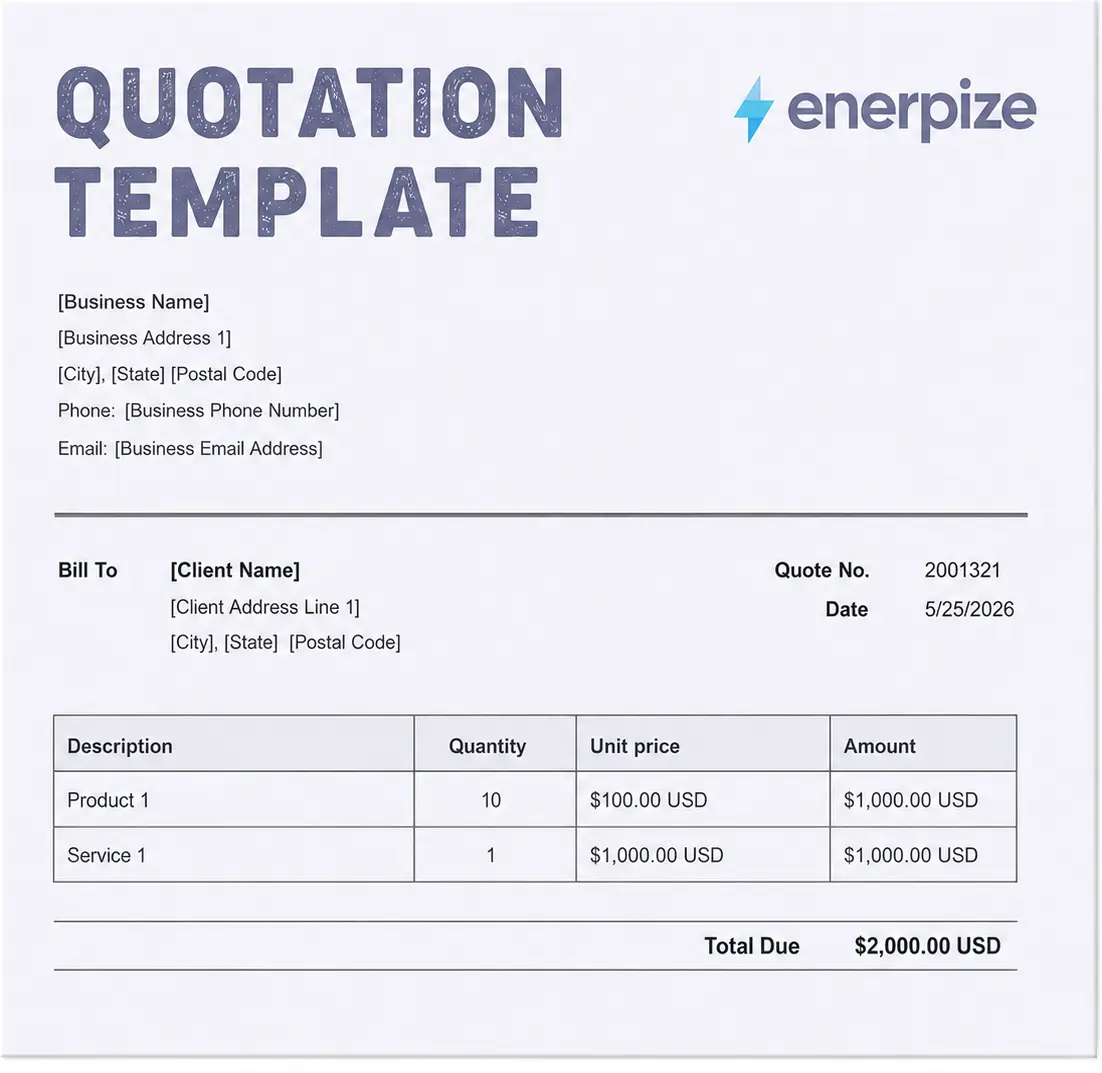
- Includes every field a professional quotation needs, covering line items, validity, taxes, discounts, terms, and client acceptance.
- Pre-built calculations work out subtotals, tax, and discounts automatically, so your totals are always accurate before the quote goes out.
- Quote number, issue date, and valid until fields are built in, plus the prepared by contact that turns an anonymous document into a real point of contact.
- Download the quotation template in Word, Excel, PDF, Google Sheets, or Google Docs.
A quotation template is a reusable document that lets a business propose a fixed price and quantity for specific goods or services to a potential buyer before the sale is confirmed, displaying itemized pricing, a validity period, and the terms of the offer so the client has everything they need to accept.


A client emails you on a Tuesday. They want a price. You open last month's quote, delete the old details, retype the new ones, fix the formula you broke deleting the old row, export to PDF, and send. Twenty minutes gone. Then they accept, and you do almost the exact same thing again to turn it into an invoice.
Sound familiar?
That little ritual is where small businesses quietly lose hours every week, and it is the reason this page exists. The quotation template below works in Excel, Word, PDF, and Google Sheets, and it covers every field a real quote needs. But a template only solves half the problem. The other half is what happens after the client says yes, and most quote templates pretend that part does not exist.
Yours should not. A quote is the first link in a chain: quote, then invoice, then purchase order. Rebuild each by hand and you are doing the same job three times. So we will start with the template, then show you how to close the whole loop without retyping a single line.
What Is a Quotation?
A quotation is a formal document in which a seller proposes a fixed price and quantity for specific goods or services to a potential buyer, before any work begins or any sale is confirmed. It lists what is being offered, what it costs, how long the price holds, and the terms attached to it.
The word that matters is fixed. An estimate is a guess. A quotation is a promise. Once your client accepts it, that promise can harden into a binding agreement, which is exactly why the structure is worth getting right. As the Legal Information Institute at Cornell Law School explains, an offer accepted on its stated terms can form an enforceable contract, and a detailed quotation is precisely that kind of offer.
A good quote does three jobs in one document. It tells the client what they are buying. It protects you with clear terms and an expiry date. And it makes you look like a business worth hiring before you have done a minute of the work. The U.S. Small Business Administration puts clear pricing communication at the center of managing your finances, and the quote is where that communication starts.
Skip the spreadsheet. Create professional quotations in Enerpize, calculate totals automatically, and convert any accepted quote into an invoice in one click. Start for free, no credit card required.
Quotation vs Estimate vs Proforma Invoice vs Invoice
Four documents, four jobs, and a lot of people use the words as if they were interchangeable. They are not, and the confusion costs money. Here is the clean version, sorted by when each one shows up and whether it commits you.
Document | Purpose | When issued | Price | Binding |
|---|---|---|---|---|
| Quotation | Fixed price offer for specific goods or services | Before work begins | Fixed | Yes, once accepted |
| Estimate | Approximate cost projection | During early discussion | Approximate, may vary | Generally no |
| Proforma invoice | Preliminary bill showing intent to deliver | After agreement, before delivery | Fixed | Shows intent, not a demand for payment |
| Invoice | Request for payment | After delivery or completion | Final | Yes, payment is due |
Here is the whole thing in one breath: an estimate is a guess, a quotation is a promise, a proforma is a heads-up, and an invoice is a bill.
Reach for a quotation when you can name an exact price and want to lock the terms. Use an estimate when the scope is still fuzzy. Send a proforma when a client needs to arrange payment or customs clearance before you deliver. And issue the invoice only once the work is done and the money is owed.
What to Include in a Quotation
A quote with missing fields creates back-and-forth, and back-and-forth is where deals go to die. Here is everything that belongs on a professional quotation, split into the header that names the parties and the body that does the pricing.
Header fields
Field | What it means |
|---|---|
| Your business details | Company name, address, phone, email, and logo |
| Client details | Client name, company, billing address, and contact |
| Quotation number | A unique sequential reference for tracking |
| Issue date | The date the quote was created |
| Valid until date | The expiry date after which the price no longer holds |
| Prepared by | The named person the client can contact with questions |
Line item and financial fields
Field | What it means |
|---|---|
| Description | The product or service being quoted, clearly named |
| Quantity | How many units, hours, or items |
| Unit price | The price per unit before tax |
| Discount | Any reduction, including a new client discount, entered as a line |
| Tax rate | Add your applicable tax rate, whether that is sales tax in the US, GST in Australia, or VAT in Kenya, and the total recalculates automatically |
| Line total | Quantity times unit price |
| Subtotal, tax, and total | The running total before tax, the tax added, and the final amount |
| Terms and conditions | Payment terms, deposit requirements, and delivery conditions |
| Acceptance | A signature line or written confirmation method |
Two fields get forgotten more than any others, and they are the two that matter most.
The valid until date protects your pricing when your own costs climb next month. The prepared by name turns an anonymous PDF into a real person the client can call. One guards your margin. The other closes the sale. Leave them off at your own risk.
Tired of recalculating totals by hand? Enerpize works out subtotals, tax, and discounts automatically and stores every quote against the client. Start for free, no credit card required.
How to Create a Quotation (Step by Step)
Five steps, whether you use the downloadable template or build the quote straight into software.
- Add your business and client details. Your company information, your logo, the client's name and contact, and the prepared by field.
- Assign a quotation number and dates. A unique number, the issue date, and the valid until date, so both sides know the clock is ticking.
- List your line items. Each product or service with a clear description, quantity, and unit price. Put any discount on its own line so the client actually sees the value you are handing them.
- Apply tax and calculate the total. Add your tax rate, let the template total the subtotal, tax, and final figure, and check the math before it leaves your hands.
- Add terms and send. Spell out the payment terms, save as a PDF, email it, and then, this is the part everyone skips, follow up within two or three days.
That follow-up is where most quotes quietly expire. A quote sent and forgotten is just a deal you gift-wrapped for your competitor.
How Enerpize Handles Quotations
A template is fine for the occasional quote. Send a few a week, try to track which ones landed, then try to turn the winners into invoices without retyping every line, and the cracks show fast. Enerpize runs the whole cycle in one place.
Quote to Invoice to Purchase Order in One Click
This is the part no standalone template can touch.
When a client accepts a quotation in Enerpize, you turn it into an invoice with one click, every line item, price, and tax already carried across. If filling that order means buying stock or materials, the same quote becomes a purchase order just as quickly. All three stay linked, so you can follow any sale from first proposal to final delivery on a single thread. Most quote tools get you halfway, from quote to invoice. This closes the entire loop, buy side and sell side.
Automatic Tax, Discount, and Multi-Currency Calculation
Enter the line items, and the arithmetic takes care of itself: subtotals, tax, discounts, the final total, no fragile spreadsheet formula waiting to break. Selling across borders? Quote in the client's currency, which is exactly what the businesses we work with across the US, Australia, and Kenya need.
Quote Validity, Expiry, and Version Tracking
Every quote carries its valid until date, and the system remembers. So when a client resurfaces three weeks later asking for a revised price, you are not excavating your sent folder to find what you last offered. You see what was quoted, when, and whether it has lapsed.
Client and Quote History in One Place
Because quoting lives in the same platform as your accounting software and your client records, every quote sits against the client it went to. What each customer was quoted, what they accepted, what is still open, all in one view, no shadow spreadsheet required.
Real Quotation Scenarios from SMBs
The same template bends to fit very different businesses. The structure stays identical. What changes is what happens after the client says yes. Three quick ones.
The service firm. A design studio quotes a brand project at a fixed eight thousand dollars, with half due up front. The client reads it, likes it, signs. In most setups that signature kicks off an afternoon of admin: open the accounting file, rebuild the numbers as a deposit invoice, then start a separate project record and type the same details a third time. Here the won quote becomes the deposit invoice and the project record in one move, no number re-entered, no version of the truth that disagrees with another. The studio is working on the actual project while a competitor is still reconciling theirs.
The trades business. An electrical contractor sends a quote with a 10 percent deposit and a 30 day validity, because materials prices move and an open-ended price is a slow leak on margin. The client accepts on day nine. Two things fire off the same accepted quote: the deposit invoice goes out to the client, and the purchase order for cable, conduit, and fittings goes to the supplier. One document, one acceptance, both sides of the job set in motion. No retyping a materials list that already existed on the quote.
The retailer or equipment supplier. A wholesaler quotes a bulk order to a business customer. When the order is confirmed, the accepted quotation converts straight into a purchase order to their own supplier to cover the stock, then into a customer invoice for the sale. The buy side and the sell side are tied to one reference number, so margin on that order is visible at a glance instead of being something you reconstruct at month end. When the customer calls to ask what they were quoted, the answer is one click away, not one folder dig away.
What ties these together is not the template. It is that the template is only the first link, and the businesses that win are the ones who never break the chain.
Quotation Numbering and Record-Keeping
A quote number looks like admin trivia. It is not. It is what lets you find a specific quote a year later when an audit or a dispute lands on your desk.
The cleanest scheme is sequential and dated, something like 2026/QT/001, where the year, a quotation code, and a running number combine into a reference that sorts itself and never repeats. Whatever you choose, stay consistent and keep the records. A quote is your evidence of what you offered and on what terms, which is precisely what you want on file when a client insists a different price was agreed. Stored inside your business system instead of scattered across folders and inboxes, that record is always there, always tied to the client and the eventual invoice.
Common Quoting Mistakes That Cost You Margin
A quoting error does not cost you one deal. It compounds. Harvard Business Review has argued for years that pricing is one of the highest-leverage decisions a business makes, and that leverage starts at the quote.
Underpricing to win the job. Five percent off a single quote feels harmless. Five percent off every job for a year is the gap between a good quarter and a flat one.
No expiry date. Without a valid until date, you are bound to a price long after your own costs have moved. Set the expiry. Always.
Vague line items. "Consulting services, $5,000" invites an argument. "Brand strategy workshop, two days, $5,000" ends one before it starts.
Slow delivery. The quote that takes three days loses to the one that took three hours. Speed is part of the offer, not separate from it.
Hidden costs. Spring a fee that was not on the quote and you do not just lose the margin, you lose the trust, and usually the client with it.
Key Takeaways
- A quotation is a fixed price offer that can become binding once the client accepts it, which makes accurate structure and clear terms essential.
- A quotation differs from an estimate, which is approximate, and from an invoice, which requests payment after the work is done.
- Every quote needs a unique number, an issue date, a valid until date, itemized pricing, tax, terms, and a named contact.
- The valid until date and the prepared by field are the two most commonly missed and most commercially important fields.
- Enerpize converts an accepted quotation into an invoice and a purchase order in one click, closing the full procurement loop that standalone templates cannot.
- Consistent quote numbering and stored records protect you in audits and disputes, and speed of delivery often decides who wins the deal.
Frequently Asked Questions
What is a quotation?
A quotation is a document in which a seller proposes a fixed price and quantity for specific goods or services to a potential buyer before the sale is confirmed. It includes the items offered, the price, a validity period, and the terms of the offer.
What is the difference between a quotation and an estimate?
A quotation offers a fixed price that you commit to for as long as the quote is valid. An estimate gives an approximate cost that may change as the scope becomes clearer. Use a quotation when you can name an exact price, and an estimate when the work is still loosely defined.
What is the difference between a quote and an invoice?
A quote is sent before work begins to propose a price. An invoice is sent after work is completed or goods are delivered to request payment. A quote helps win the sale, an invoice collects on it.
How do I make a quotation online for free?
Add your business and client details, give the quote a unique number and dates, list your line items with quantities and prices, apply your tax rate, and add your terms. With Enerpize you can create a quotation online free, then send it and convert it to an invoice when the client accepts.
Can I convert a quotation into an invoice?
Yes. In Enerpize, an accepted quotation converts into an invoice in one click, with all line items and pricing carried over. You can also convert the same quote into a purchase order if fulfilling the order requires buying stock or materials.
Is a quotation legally binding?
A quotation on its own is an offer, not a contract. It can become legally binding once the client accepts it on its stated terms within the validity period. To avoid ambiguity, state clearly whether the quote is binding and include an expiry date.
What should a business quotation include?
A business quotation should include your business and client details, a unique quotation number, the issue date and valid until date, itemized line items with quantities and prices, any discount, the tax rate and total, terms and conditions, and a named contact or signature line.
How long is a quotation valid for?
A quotation is valid until the date you set on it, commonly 30 days, though it can be shorter or longer. After that date you are no longer bound to the quoted price, which protects you against rising costs.
Can I create quotes and invoices online in one place?
Yes. Enerpize lets you create quotes and invoices online in one system, with accounting, client records, and purchasing all connected, so an accepted quote flows into an invoice and a purchase order without re-entering data.
Stop rebuilding quotes from scratch. Create, send, and convert quotes to invoices and purchase orders inside Enerpize. Start for free, no credit card required.
About the Author
Omar El Bahr is a Senior Digital Growth Specialist at Enerpize, where he leads SEO, content strategy, and organic growth across international markets. He is a Forbes Communications Council contributor and has written for Entrepreneur on business communication and digital strategy.
Disclaimer: This article is for informational purposes only and does not constitute legal advice. A quotation may become a binding agreement once accepted, depending on its wording and your local law. Consult a qualified professional for advice specific to your situation.