Posted on 11 June 2026
Free Landscaping Invoice Template Download: Excel, Word, PDF & Google Sheets and Docs
- The landscaping invoice template is available for download in Word, Excel, PDF, Google Sheets, and Google Docs.
- Covers all landscaping service types: labor, materials, equipment rental, and disposal fees, each on a separate line so tax applies to the right items.
- Includes a deposit deduction field, a PO/Job Reference number, and a service date field that generic invoice templates leave out.
- Built for US, UK, and Canadian landscapers, with notes on state sales tax, UK VAT, and Canadian GST/HST treatment.
A landscaping invoice template is a pre-formatted billing document landscaping businesses and contractors use to charge clients after completing outdoor services, with separate line items for labor, materials, equipment, and disposal so every cost is accounted for and taxed correctly.


What Is a Landscaping Invoice Template?
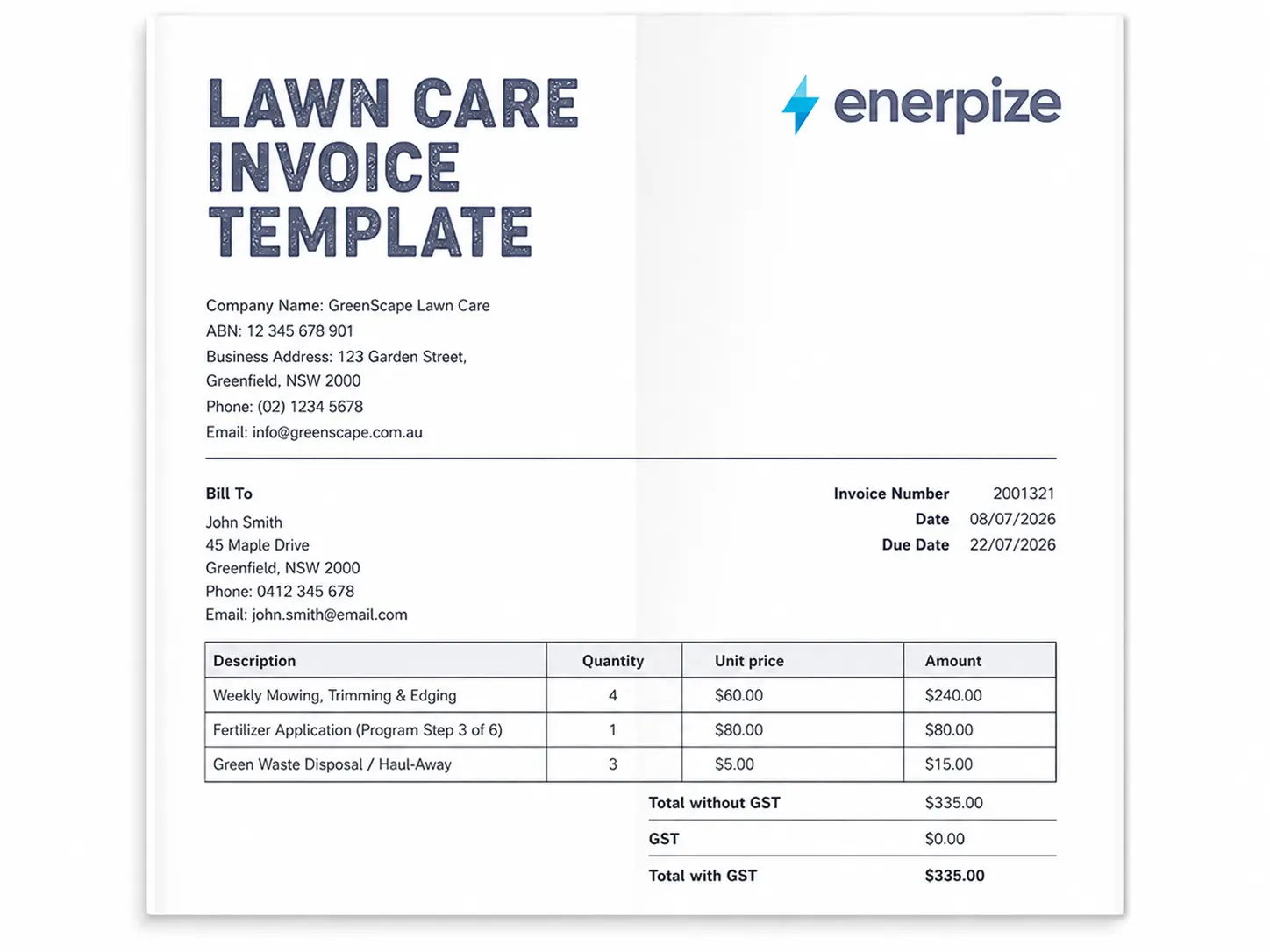
A landscaping invoice template is a ready-to-use billing document for landscaping businesses and independent contractors. You fill in your company details, your client's information, and the work you completed, and the template handles the rest: line-item totals, tax calculations, deposit deductions, and the final balance due.
The difference between a landscaping-specific template and a generic one is in the line structure. A mulching job and a retaining wall installation do not bill the same way. Labor hours, materials with markup, equipment rental, and haul-away fees all need to sit on separate rows so you can apply tax to the right items, show the markup clearly, and protect yourself if a client disputes the total.
This template covers all of that. It is free, available in every major format, and built around how landscaping businesses actually invoice.
Already past the template stage? Manage landscaping invoices, client records, and project finances directly in Enerpize. Start for free.
What Does the Enerpize Landscaping Invoice Template Include?
Most free landscape invoice templates are repurposed generic invoices. They have a description column, a quantity field, a rate field, and a total. That works for selling a product. It does not work well for a landscaping job where labor, materials, and equipment carry different tax treatment and different markup logic.
Here is what this template includes that others do not.
Header and Company Information
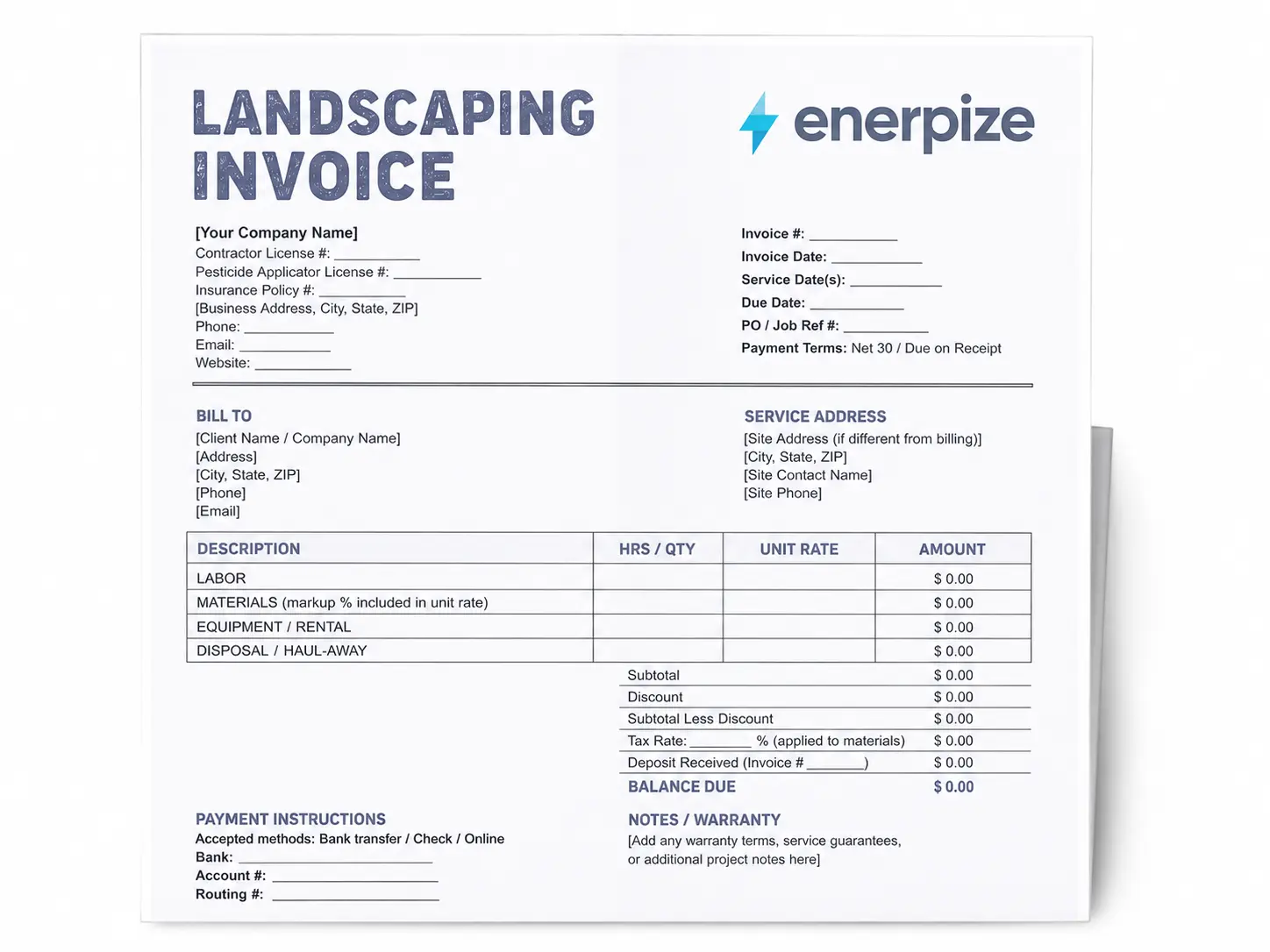
The header carries your company name, contractor license number, pesticide applicator license number if applicable, insurance policy number, business address, phone, email, and website. There is a logo slot at the top right. None of this is negotiable on a professional invoice, and most generic templates skip the pesticide and insurance fields entirely.
Invoice Metadata
The right side of the header includes the invoice number, invoice date, service date or date range, due date, PO/Job reference number, and payment terms. The service date field is separate from the invoice date. That matters for recurring clients, for commercial contracts that require date-matched invoices, and for UK VAT purposes where the tax point date is a legal requirement.
The PO/Job reference number is there because every commercial client, property manager, and HOA requires it to approve a payment. Without it, your invoice goes into a pending queue until someone calls you to ask for the reference. That call costs you days.
Bill To and Service Address
These are two separate blocks. The billing address is where the invoice goes. The service address is where the work happened. They are often different, especially for commercial clients managing multiple properties. Getting this wrong on an invoice is a fast way to have it kicked back.
Line Items: Four Separate Sections
This is the core of the template. The line items are split into four labeled sections rather than one generic table.
| Section | What goes here |
|---|---|
| Labor | Crew hours by task type: mowing, edging, pruning, planting, irrigation work, etc. |
| Materials | Plants, mulch, sod, fertilizer, seed, with unit cost and markup included in the rate |
| Equipment / Rental | Machinery rental, chipper, aerator, compactor, or depreciation charge for owned equipment |
| Disposal / Haul-Away | Green waste removal, dump fees, debris haul-off by load or weight |
Each section has columns for description, hours/quantity, unit, rate, and amount. The Excel version calculates the amount automatically as hours times rate. Keeping labor and materials separate is not just good practice: in many US states, labor is exempt from sales tax but materials are not. If you bundle them into one line, you either overtax the client or underreport taxable revenue.
Totals Block
The totals section runs in this order: subtotal, discount, subtotal less discount, tax rate applied to materials only, tax amount, deposit received with a reference field for the original deposit invoice number, and the final balance due. Every field is live in the Excel version. The tax rate applies only to the materials rows, not the entire total.
The deposit line is the field most landscaping invoice templates leave out. If you collected 40% upfront before a hardscaping project, that deposit needs to show on the final invoice with a reference to the original deposit invoice number. Without it, the client sees the full balance and either disputes it or pays twice.
Payment Instructions and Notes
The bottom section is split into two columns. The left side carries your payment instructions: accepted methods, bank details, and the late fee clause. The right side is for warranty terms, service guarantees, and project notes. These are two separate things and they belong in two separate places, not combined into one remarks box.
Signatures
Contractor signature and client signature lines at the bottom, each with a name and date field. Required for any commercial job and useful for residential clients on larger projects.
How to Fill Out a Landscaping Invoice
Step 1: Add Your Business Details
Company name, contractor license number, pesticide applicator license if your services include chemical treatments, insurance policy number, address, phone, email, and website. If you are in a US state that requires a landscape contractor license (California, Florida, Texas, and others require it), the license number belongs on every invoice.
Step 2: Enter the Invoice Metadata
Assign a sequential invoice number. LND-001, LND-002 works fine. Add the invoice date, the date or range of service, the due date, and the PO or job reference number if the client gave you one. Set your payment terms: Net 7 for residential jobs is standard, Net 30 for commercial.
Step 3: Fill In Client and Site Details
Client name or company name, billing address, and service site address if different. For commercial clients with multiple properties, always confirm which site and which billing contact before sending. A mismatch here is the most common reason an invoice gets delayed.
Step 4: List Your Line Items by Section
Go through each section in order. Labor first, then materials, then equipment, then disposal. For each line, enter a brief description of the work, the number of hours or quantity, the unit, and your rate. The Excel version calculates the amount automatically. Keep descriptions specific enough that the client can match them to the job without calling you.
Step 5: Apply Tax Correctly
Enter your tax rate in the tax rate field. The template applies it only to the materials section. If you are in a US state where labor is also taxable, add a second tax line manually or apply the rate to the full subtotal and note it in the remarks. Tax treatment varies significantly by state, province, and service type. The country-specific sections below cover the main scenarios.
Step 6: Deduct the Deposit
If you collected a deposit before the job, enter it in the deposit received field and reference the original deposit invoice number. The balance due updates automatically in the Excel version.
Step 7: Fill In Payment Instructions and Notes
Add your bank details, the payment methods you accept, and your late fee policy. A clear late fee clause on the invoice, typically 1.5% per month after the due date, is the simplest way to get paid on time without an awkward follow-up.
Step 8: Send Within 24 to 48 Hours
The faster you send the invoice after completing the job, the faster you get paid. Research consistently shows that invoices sent the same day or the next day get paid significantly faster than invoices sent a week later.
Skip the manual process. Enerpize generates landscaping invoices directly from completed jobs and sends them automatically. Start for free.
What to Include in a Landscaping Invoice
| Element | Details |
|---|---|
| Business name and logo | Establishes brand and authenticity |
| Contractor / landscape license number | Required in many US states and Canadian provinces |
| Pesticide applicator license number | Required for chemical services in most jurisdictions |
| Insurance policy number | Protects both parties; required by most commercial clients |
| Client name and service address | Service site can differ from billing address |
| Invoice number | Unique sequential reference for records and disputes |
| Issue date and due date | Anchors payment terms |
| Service date or date range | Required for UK VAT, commercial contracts, and recurring billing |
| PO / Job reference number | Required by commercial clients and property managers |
| Itemized line items by section | Labor, materials, equipment, disposal each on separate rows |
| Materials markup | Standard is 15 to 20 percent; disclose in payment terms |
| Subtotal, tax, total | Tax applied only to taxable items by section |
| Deposit deduction | Applied against balance with reference to original deposit invoice |
| Payment terms | Net 7, Net 30, accepted methods, late fee policy |
| Warranty or service notes | Guarantee terms or follow-up instructions |
Landscaping Invoice vs. Work Order: What Is the Difference?
A work order is issued before work begins. It authorizes the job, documents the agreed scope, and may include a cost estimate. A landscaping invoice is issued after the work is complete. It confirms what was delivered and requests payment.
For larger projects, the workflow is: issue a work order to get written authorization, complete the job, then issue an invoice that mirrors the agreed scope. If the final invoice deviates from the work order, the difference needs to be explained and approved by the client before it goes out.
Enerpize handles both documents in one system. You create the work order, mark it complete, and generate the invoice directly from it. The line items carry over automatically, so there is no re-entry and no risk of numbers drifting between the two documents. See the Work Order Template for the standalone version.
Seasonal and Recurring Landscaping Invoices
Most template guides cover one-time jobs. The billing logic for recurring contracts and seasonal work is different, and it is worth covering here because this is where most landscaping invoices cause confusion.
Monthly Maintenance Contracts
Issue a recurring invoice on the first of each month at the flat monthly rate. List any add-on services performed that month as separate line items with their individual rates. If a visit was skipped because of weather or a holiday, add a credit line: Rain skip credit, 1 visit, minus the per-visit rate. This keeps the record clean and avoids disputes at renewal time.
Seasonal Package Billing
For spring cleanup, fall leaf removal, or similar defined seasonal jobs, take a deposit upfront to cover mobilization and materials, then issue the final invoice on completion and apply the deposit. A 40 to 50 percent deposit upfront is standard for seasonal packages.
Large Installation Projects
Hardscaping, irrigation system installation, and full landscape design projects should use milestone billing. A common structure:
| Milestone | Payment |
|---|---|
| Contract signing | 40% deposit |
| Site preparation complete | 30% progress payment |
| Project handover and walkthrough | 30% final balance |
Each stage gets its own invoice with the deposit or previous payment applied as a deduction. This is the same logic used in construction payment applications. For context on how milestone billing works at scale, see the AIA G702/G703 payment application template, which covers the same principle for formal construction contracts.
Landscaping Invoice Templates for the United States
The United States accounts for 57 percent of global search volume on this keyword, and the billing rules are anything but uniform. Landscaping services are taxable in Texas, Florida, and New York. In California, labor is generally exempt but materials are taxable. In several states, landscaping is entirely exempt from sales tax. The IRS guidance on self-employment tax obligations is worth reviewing alongside your state revenue department's rules on service taxability.
This is exactly why the template separates labor and materials into distinct line sections. If you lump everything into one line and apply tax to the total, you either overcharge the client in a state where labor is exempt, or you underreport in a state where the full amount is taxable. Neither outcome is good.
Key fields for US landscaping invoices:
- State contractor or landscape contractor license number (required in California, Florida, Texas, Arizona, and others)
- Pesticide applicator license number for any chemical services
- Sales tax applied only to taxable line items, labeled clearly
- W-9 on file for commercial clients paying over $600 annually, for their 1099 reporting
For multi-crew operations where labor cost allocation matters, Enerpize's payroll module connects job hours directly to payroll records so the labor cost on your invoice matches what you actually paid out.
Landscaping Invoice Templates for the United Kingdom
The United Kingdom represents 21 percent of global search volume on this keyword. UK landscaping invoices follow a different set of rules.
Landscaping services are subject to VAT at the standard 20 percent rate when supplied by a VAT-registered business. If your landscaping work is part of a qualifying new residential construction project, it may be zero-rated. Commercial landscaping maintenance is always standard-rated. The distinction matters because it affects what you charge and what you owe HMRC.
Key fields for UK landscaping invoices:
- VAT registration number (mandatory on all VAT invoices)
- Tax point date, which is the service date, not the invoice date, for VAT purposes
- VAT amount shown as a separate line
- CIS deduction line if you are operating as a subcontractor on a construction site
Landscaping Invoice Templates for Canada
Canada accounts for 5 percent of global search volume but has its own tax structure that requires a different invoice setup. GST applies federally at 5 percent. HST replaces GST in harmonized provinces: Ontario is 13 percent, Nova Scotia is 15 percent. In British Columbia, GST and PST apply separately. In Alberta, there is no provincial sales tax on services. The Canada Revenue Agency GST/HST guide covers registration thresholds and filing requirements.
Key fields for Canadian landscaping invoices:
- GST/HST registration number if registered
- Province of service (determines which tax applies)
- GST plus PST breakdown or HST as a single line, depending on the province
- Currency clearly labeled as CAD
How Enerpize Helps Landscape Architecture Businesses Manage Projects and Invoices in One Place
Most template pages stop at the invoice. The real problem for landscaping businesses is what happens before and after it. A landscaping invoice is the last step in a chain that starts with a client brief, runs through design approvals, contractor assignments, work orders, and material procurement, and ends when payment clears. Managing that chain across spreadsheets and disconnected tools is where landscaping businesses lose money and time.
Enerpize handles the full workflow for landscape architecture and landscaping service businesses.
Client and Project File Management
Every client gets a profile with contact history, project files, and account statements. When you take on a new landscape project, you create a project file with its own budget, revenue targets, and expense tracking. You invoice the client directly from the project record, so the numbers on the invoice tie exactly to what was tracked in the system. No manual re-entry, no version mismatches.
Contractor and Team Assignment
Add staff members, assign them to specific projects, and set their role-based authorizations. A landscape architect and a field crew member have different access levels and different tasks. Enerpize logs each person's activity per project. When you invoice for labor, you pull actual logged hours, not an estimate.
Work Orders Connected to Invoices
Issue a work order to authorize each job stage. When the stage is complete, convert the work order to an invoice. This closes the loop between what was authorized and what gets billed, and it creates the paper trail that commercial clients, HOAs, and property managers require. For the standalone document, see the Work Order Template.
Asset and Equipment Tracking
Landscaping businesses own or rent significant equipment. Enerpize's asset management module tracks each asset, calculates depreciation, and generates a per-job equipment cost that feeds directly into the invoice's equipment line item. You stop guessing at rental equivalents and start billing for actual machine time.
Financial Reporting per Project
Once a project is closed and the final invoice is paid, Enerpize generates a net profit report for that project. You can see exactly what you billed, what you spent on materials and labor, and what margin you made. Over time, that data tells you which service types and client categories are actually profitable, and which ones you should reprice or stop quoting.
Client Communication Built In
Send invoice reminders, job updates, and payment confirmations by email or SMS directly from the platform. For recurring maintenance clients, automated reminders replace the manual follow-up cycle without the awkwardness of chasing someone by phone.
Explore how Enerpize supports landscape architecture businesses end to end. Start for free.
Common Landscaping Invoice Mistakes and How to Fix Them
| Mistake | Fix |
|---|---|
| Bundling labor and materials into one line | Separate them. Tax treatment and markup differ, and bundling invites disputes |
| No deposit deduction field | Add a deposit line before the total. Reference the original deposit invoice number |
| Missing license or permit numbers | Include contractor license and pesticide applicator license where required |
| Sending the invoice days or weeks after the job | Invoice within 24 to 48 hours. Faster invoicing means faster payment |
| Applying tax to the full total | Apply tax only to taxable items. Materials in most US states; full amount in UK and Canada |
| No late fee clause | State the fee and timeline clearly: 1.5 percent per month after 30 days |
| Using the same template for residential and commercial clients | Commercial clients need PO reference numbers and sometimes a W-9 on file |
| No service date on the invoice | Add the service date or date range. It is required for UK VAT and commercial matching |
Key Takeaways
- A complete landscaping invoice template separates labor, materials, equipment, and disposal into four distinct line sections. Bundling them into one description field is the most common invoicing mistake in the industry and the fastest way to lose a tax dispute.
- The deposit deduction field is not optional on large jobs. If you collected 40 percent upfront on a hardscaping project, that amount must appear on the final invoice with a reference to the original deposit invoice number. Without it, clients either dispute the balance or accidentally pay twice.
- Tax treatment varies by line item, not by invoice total. In most US states, labor is exempt from sales tax but materials are not. Apply tax only to the materials section, never to the full subtotal, and keep the two on separate rows so the calculation is auditable.
- The service date field and the invoice date are two different things. The service date is when the work happened. The invoice date is when you sent the bill. For UK VAT purposes, the tax point date is the service date. For commercial clients matching invoices to work logs, both fields are required.
- Commercial clients and property managers will not process an invoice without a PO or job reference number. Add that field to every invoice before you send it to a commercial account, not after they kick it back.
- For recurring maintenance contracts, your invoice number sequence is your primary audit trail. Build a consistent naming system from your first recurring invoice: LND-001, LND-002. Do not restart the sequence each season.
- Landscaping businesses operating across the US, UK, and Canada need three different tax configurations on the same base template. The US splits tax by line item type, the UK adds a VAT registration number and tax point date, and Canada requires a GST/HST number plus the province of service to determine the correct rate.
Frequently Asked Questions
What should be on a landscaping invoice?
A landscaping invoice should include your business name and license number, client name and service address, a unique invoice number, issue and due dates, the service date, itemized line items for labor and materials on separate rows, equipment or disposal fees, subtotal, applicable taxes applied to the correct items, deposit deduction if applicable, total due, and payment terms including your late fee policy.
Is landscaping taxable in the United States?
It depends on the state. Landscaping services are taxable in Texas, Florida, and New York. In California, labor is generally exempt but materials are taxable. Several states exempt landscaping entirely. Keep labor and materials on separate invoice lines so you can apply tax only to what is taxable in your state.
What is the difference between a landscaping invoice and a landscaping quote?
A quote is issued before work begins and shows projected costs. An invoice is issued after the work is complete and requests payment. On larger jobs, the quote should match the invoice line for line. Any difference between the two needs to be explained and approved by the client in advance.
When should I send a landscaping invoice?
For one-time jobs, send within 24 to 48 hours of completing the work. For recurring maintenance contracts, send on a fixed schedule, typically the first of the month or the day after each service cycle. For large installations, use milestone invoices tied to project stages.
What is the difference between a landscaping invoice and a work order?
A work order authorizes the job before it starts. A landscaping invoice requests payment after it is done. For large projects, you issue a work order first to confirm scope and get written authorization, then convert it to an invoice at completion or at each milestone.
How much markup should a landscaper charge on materials?
Industry standard is 15 to 20 percent. This covers procurement time, transport, storage, and price fluctuation risk. Disclose your markup policy in your payment terms so clients understand what they are paying for and disputes do not arise later.
What is a gardening invoice template?
A gardening invoice template is a billing document used by gardeners and horticulturalists for services like planting, weeding, pruning, and seasonal maintenance. It follows the same structure as a landscaping invoice template but typically does not include heavy equipment or structural work lines.
Can I use the same landscaping invoice template for lawn care and hardscaping?
You can use the same base template, but the line structure needs to reflect the job. Lawn care invoices are labor-heavy with small material lines. Hardscaping invoices require detailed material quantities, equipment rental, and milestone billing with deposit deductions. The four-section structure in this template accommodates both without modification.
About the Author
Omar El Bahr is a Senior Digital Growth Specialist at Enerpize, where he leads SEO, content strategy, and organic growth across international markets. He is a Forbes Communications Council contributor and has written for Entrepreneur on mobile apps, business communication, and digital strategy.
Disclaimer: This template is provided for general informational purposes only and does not constitute legal, tax, or financial advice. Tax treatment of landscaping services varies by country, state, and province. Consult a qualified tax professional or accountant before applying any tax rates to your invoices.