Posted on 15 June 2026
Free Sole Trader Invoice Template Download (Word, Excel, PDF & Google Sheets and Docs)
- Available in Word, Excel, PDF, Google Docs, and Google Sheets, free to download with no sign-up required
- Covers trading name, legal name, ABN/VAT/Tax Reference, line items, discounts, and total due in one structured document
- Built with country-specific tax fields for GST (Australia), VAT (UK), and sales tax (US) in one adaptable template
- Calculates subtotal, discount, tax amount, deposit, and balance due automatically in the Excel and Google Sheets versions
A sole trader invoice template is a pre-formatted billing document that records services delivered, rates charged, and payment terms. The Enerpize Sole Trader Invoice Template is free to download in five formats, with no sign-up required.


What Is a Sole Trader Invoice Template?
There is a particular kind of frustration that comes from finishing a job well, showing up to the client with the work done, and then spending forty minutes rebuilding an invoice from scratch in a blank Word document because the last one you sent has the wrong date and someone else's company name still sitting at the top.
Every sole trader has been there.
A sole trader invoice template fixes that. It is a pre-formatted billing document built around the specific requirements of a one-person business, covering the fields that regulators in Australia, the UK, New Zealand, and the US actually need to see, and leaving the rest editable so you can adapt it to each job without starting over.
The difference between a generic invoice template and a sole trader invoice template is not cosmetic. Sole traders have distinct legal naming requirements, different tax thresholds, and no company registration number to display. A template built for a limited company will either leave those fields blank awkwardly or prompt you to fill in something that does not apply to your business.
The Enerpize Sole Trader Invoice Template is built for the way one-person businesses actually bill. Download it free below in the format that works for you, and keep reading if you want to make sure every field is filled out correctly the first time.
Skip the manual formatting. Create your first sole trader invoice in Enerpize in under two minutes. Start for free.
What the Enerpize Sole Trader Invoice Template Includes
Most free invoice templates you find online are generic billing documents with a logo placeholder and a total field. They were not designed for sole traders specifically, and the gaps show up the moment you try to use them for a real job.
The Enerpize Sole Trader Invoice Template is built differently. Here is exactly what is inside.
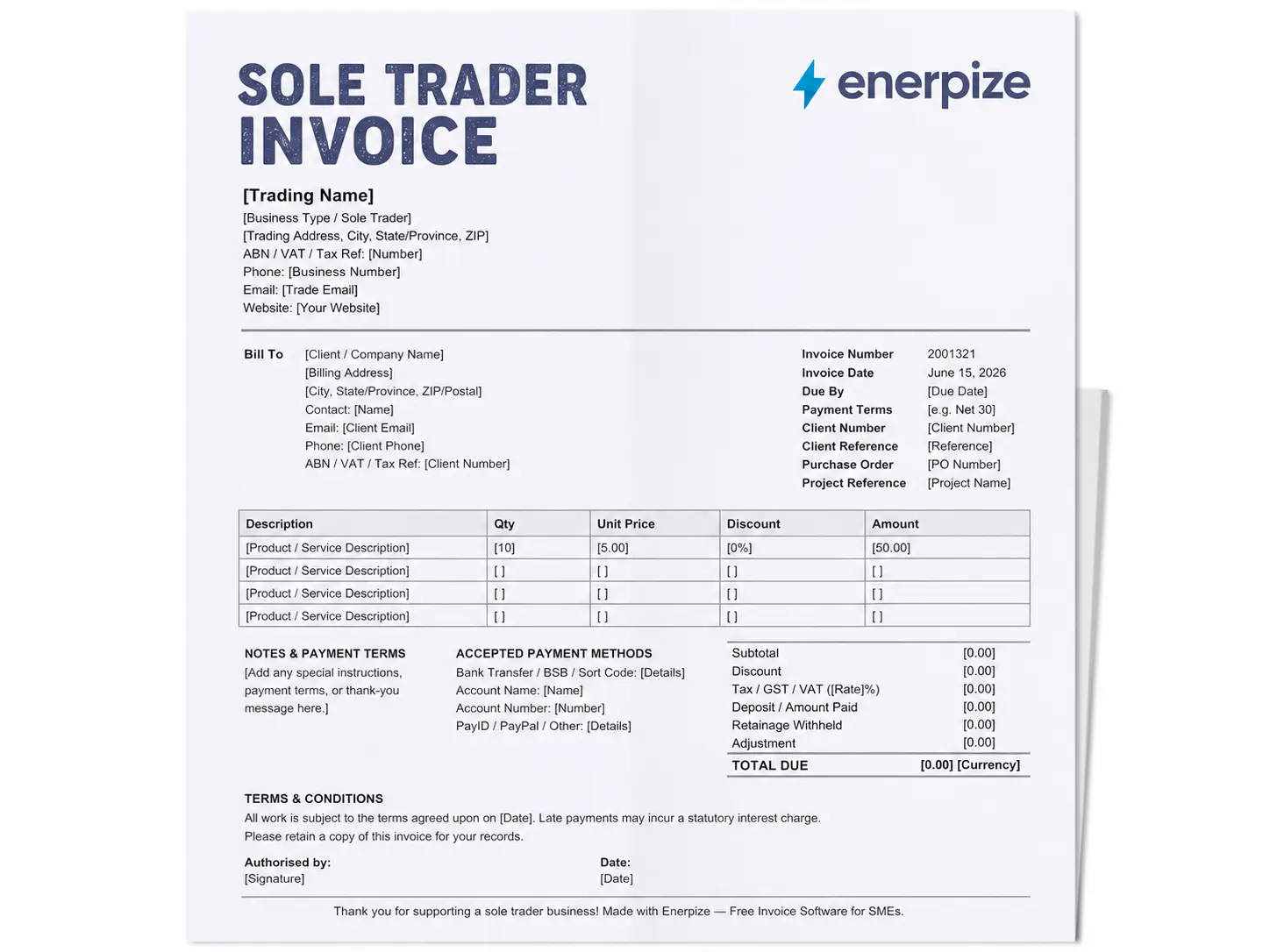
Seller Block (Top Left)
This is where your identity as a sole trader lives. The template includes separate fields for your trading name, your business type (Sole Trader), your registered trading address, and your tax reference number, labeled as ABN, VAT, or Tax Ref so it adapts to your country without requiring you to redesign the header. There is also a field for your phone number, email, and website.
Why does the business type field matter? Because in the UK, HMRC requires that your own legal name appear on every invoice alongside any trading name. The template prompts you for both, so the compliance piece is built into the layout rather than something you have to remember.
Logo Placeholder (Top Right)
A clearly marked placeholder box where you drop in your business logo. No hunting around in the layout to figure out where it should go.
Bill To Block
Client name, billing address, contact name, email, phone, and a field specifically for the client's ABN, VAT registration number, or tax reference. That last field is one most free templates leave out entirely. It matters if your client needs to claim back GST or VAT on their end.
Invoice Meta Fields
A complete set of reference fields: invoice number, invoice date, due by date, payment terms, client number, client reference, purchase order number, and project reference. All editable. All in one place.
Line Item Table
Each row has five columns: description, quantity, unit price, discount percentage, and amount. The amount column calculates automatically in the Excel and Google Sheets versions using the formula: quantity multiplied by unit price, multiplied by one minus the discount percentage. You can add as many rows as the job requires.
Totals Block
This is where the Enerpize template pulls away from a standard blank invoice. The totals block includes:
- Subtotal (auto-calculated from line items)
- Overall discount percentage (applied to the subtotal)
- Subtotal after discount
- Tax rate field (enter your GST, VAT, or sales tax percentage)
- Tax amount (auto-calculated)
- Deposit or amount already paid
- Retainage withheld (for construction and project-based work)
- Adjustment (for rounding or minor corrections)
- Total due (auto-calculated across all of the above)
That is nine rows in the totals block, compared to the two or three you will find in most free templates. Every row is there because real sole trader jobs produce billing scenarios that a simple subtotal and total cannot handle.
Payment Methods Block
Fields for bank transfer details, BSB or sort code, account name, account number, and PayID or PayPal. Clients pay faster when they do not have to reply to the invoice asking how to send the money.
Notes and Terms and Conditions
Two separate free-text areas. Notes for job-specific instructions or a thank-you message. Terms and conditions for your standard payment policy, late fee language, or dispute process.
Signature Block
A signature line and a date line, side by side. Simple. Professional.
The template is available as a free download in Word, Excel, PDF, Google Docs, and Google Sheets. The Excel and Google Sheets versions are formula-driven. The Word, Google Docs, and PDF versions are formatted for manual entry or printing.
What Must a Sole Trader Invoice Include?
Short answer: it depends on where you are registered and whether you are past the tax registration threshold. Here is the version that covers every market.
Every sole trader invoice, regardless of country, needs these fields:
- The word "Invoice" or "Tax Invoice" as the document title
- A unique, sequential invoice number
- The date the invoice was issued
- The date payment is due
- Your name, trading name if different, and business address
- Your client's name and contact details
- A description of the goods or services provided
- The quantity and unit price of each line item
- The total amount due
If you are registered for VAT (UK), GST (Australia or New Zealand), or sales tax (US), you also need:
- Your registration number (VAT number, ABN, NZBN, or EIN)
- The applicable tax rate
- The tax amount, broken out separately from the subtotal
- The document title must read "Tax Invoice" in Australia and New Zealand once you are GST-registered
That is the full compliance baseline. The Enerpize Sole Trader Invoice Template includes all of these fields out of the box, labeled so you know exactly which ones apply to your situation.
How to Fill Out a Sole Trader Invoice
Step 1: Add Your Business Details
Fill in your trading name and, if you operate under a business name, your legal personal name alongside it. Add your address, phone, email, and your tax reference number (ABN, VAT number, or equivalent). Drop in your logo.
Step 2: Fill In the Bill To Block
Add your client's full name or company name, their billing address, a contact name, email, and phone. If your client is also registered for GST or VAT, add their registration number. This helps them reconcile the invoice on their end.
Step 3: Complete the Invoice Meta Fields
Give the invoice a unique number. If this is your first invoice, start at 001. Never reuse or skip numbers, because gaps in your invoice sequence can create issues during a tax audit. Add today's date as the issue date, and add your due date based on your agreed payment terms.
Step 4: List Your Line Items
Add one row per product or service. Write a clear, specific description. Enter the quantity, your unit price, and any line-level discount. The amount calculates automatically in the Excel and Google Sheets versions.
Step 5: Apply Tax and Review the Totals Block
Enter your tax rate in the tax rate field. The template calculates the tax amount and the total due. If you received a deposit, enter it in the deposit field. If retainage was agreed, enter that too. Review the total due before sending.
Step 6: Add Payment Details and Notes
Fill in your bank details in the payment methods block. Add any job-specific notes or your standard terms and conditions in the relevant text areas.
Step 7: Save, Export, and Send
Save the completed invoice as a PDF before sending. The Word and Google Docs versions can be exported to PDF directly. The Excel version can be printed or saved as PDF from the File menu. Send it on the day the job is completed, not later.
Seven steps is all it takes on paper. In Enerpize, it is two. Your business details are saved, your tax rate is set, and your client information pulls in automatically. All you do is add the line items and hit send. Start for free.
Sole Trader Invoice Template by Country
Sole Trader Invoice Template for Australia
Australia has some of the most specific invoicing rules for sole traders of any English-speaking market.
Here is what the ATO requires:
Your ABN must appear on every invoice you issue, whether you are GST-registered or not. If a client makes a payment to a supplier who has not provided an ABN, they are legally required to withhold 47% of the payment and remit it to the ATO. That is not a theoretical risk. It is a rule that gets enforced.
If you are registered for GST (mandatory once your annual turnover crosses A$75,000), the document title must read "Tax Invoice." You must also show the GST amount, either per line item or as a single total. For invoices of A$1,000 or more, the GST amount must be shown per line item.
If you are not registered for GST, you still need the ABN on the invoice. You do not include GST and do not use the "Tax Invoice" title. The document is simply an "Invoice."
The Enerpize Australian GST Invoice Template includes separate layout options for GST-registered and non-GST-registered sole traders.
Westpac's guide on sole trader invoicing in Australia is also worth reading for a bank-side view of what good invoicing looks like for Australian small businesses.
Sole Trader Invoice Template for the United Kingdom
The compliance rules here have a nuance that catches sole traders out more than any other single issue.
HMRC requires that your legal personal name appears on every invoice alongside any business trading name. A business name alone is not sufficient. If you operate as "Bright Cleaning Solutions" but your legal name is Jane Smith, your invoice must show both. The standard format is: "Jane Smith, trading as Bright Cleaning Solutions."
A few other things worth noting for UK sole traders:
You do not have a Company Registration Number (CRN). Do not add a CRN field to your invoice. That is for limited companies.
Your Unique Taxpayer Reference (UTR) is confidential. It must never appear on an invoice. The UTR is for your personal tax records only.
If your annual turnover exceeds £90,000, VAT registration becomes mandatory. Once registered, your invoice must show your VAT registration number, the VAT rate applied to each item, the VAT amount, and both the net and gross totals. The standard VAT rate in the UK is 20%.
UK sole traders also have a statutory right to charge interest on late commercial payments at the Bank of England base rate plus 8%, under the Late Payment of Commercial Debts (Interest) Act 1998. Adding a line in your terms and conditions citing this right changes payment behavior without requiring you to ever actually invoke it.
Sole Trader Invoice Template for New Zealand
New Zealand sole traders follow rules similar to Australia, administered by Inland Revenue. The GST registration threshold in New Zealand is NZD 60,000 in annual turnover. The GST rate is 15%.
Once registered, the document must be titled "Tax Invoice" and must include your GST registration number, the GST amount, and the GST-exclusive price alongside the GST-inclusive total.
Below the threshold, the invoice is a standard invoice with no GST fields required.
Your New Zealand Business Number (NZBN) is not legally required on invoices in the same way an ABN is in Australia, but including it is good practice for business-to-business transactions.
Sole Trader Invoice Template for the United States (Sole Proprietor)
In the US, the equivalent of a sole trader is a sole proprietor. The terms refer to the same business structure: one person, personally liable for the business, no formal incorporation.
There is no federal invoicing format requirement in the US. If you have an EIN (Employer Identification Number), you can include it, but it is not legally required on invoices. Sales tax is applied at the state level and varies significantly by state, so the rate in your invoice will depend on where you and your client are located and whether the goods or services you provide are taxable in that jurisdiction.
The Enerpize template's tax rate field handles this. Enter whatever percentage applies to your specific situation and the template calculates the amount.
Enerpize auto-applies the right tax format whether you are invoicing in Australia, the UK, New Zealand, or the US. One template. Every market. Start for free.
How to Write "Trading As" on a Sole Trader Invoice
This is one of those details that sounds small and turns out to matter more than expected.
When you operate a sole trader business under a name that is not your own legal name, you are "trading as" that name. UK HMRC rules require that your personal legal name appear on the invoice alongside the business name. The ATO in Australia does not have the same explicit personal name requirement, but your ABN links back to you as an individual, so the trading name is effectively connected to your identity already.
The standard format looks like this:
Jane Smith, trading as Bright Cleaning Solutions
Some sole traders abbreviate it:
Jane Smith T/A Bright Cleaning Solutions
Both are acceptable. The key is that the personal name comes first and the trading name follows. Do not reverse the order, and do not omit the personal name on UK invoices.
If you trade under your own name, you do not need a "trading as" line at all. Your name is both the legal identifier and the business name in that case.
The Enerpize Sole Trader Invoice Template includes a separate field for both your personal name and your trading name in the seller block, so the layout handles this automatically without requiring you to remember to type it a specific way each time.
Sole Trader vs. Sole Proprietor: What Changes on the Invoice?
Nothing structural. Everything cosmetic.
"Sole trader" is the term used in the UK, Australia, New Zealand, and most Commonwealth countries. "Sole proprietor" is the term used in the US. They describe the same business structure: one individual who owns and operates the business and is personally responsible for all of its liabilities.
The invoicing requirements differ by country, not by what the structure is called. A US sole proprietor follows IRS guidance and state-level sales tax rules. An Australian sole trader follows ATO guidance and the GST framework. A UK sole trader follows HMRC guidance and the VAT framework.
The Enerpize Sole Trader Invoice Template works for all of them. The tax reference field is labeled generically enough to accept an ABN, a VAT number, an EIN, or any other identifier. The tax rate field is blank so you enter the rate that applies to your jurisdiction.
If you work across multiple markets, the freelance invoice template and the contractor invoice template cover related invoicing scenarios where the line between sole trader, freelancer, and independent contractor blurs in practice.
Common Sole Trader Invoice Mistakes by Country
Australia: No ABN on the Invoice
This is the most expensive blank field in Australian small business invoicing. Without your ABN on the invoice, your client is legally required to withhold 47% of the payment and send it to the ATO. You will eventually get it back through your tax return, but the cash flow hit in the meantime is real and entirely avoidable.
Australia: Calling a GST Invoice Just "Invoice"
Once you are registered for GST, the document must be titled "Tax Invoice." If you send an invoice without that title, your client cannot claim the GST credit, which may cause them to reject the invoice and request a corrected one. That delays your payment.
United Kingdom: Only Showing the Trading Name
If your invoice shows "Bright Cleaning Solutions" at the top and nothing else, it does not comply with HMRC rules for sole traders. Your legal personal name must appear. The fix takes thirty seconds in the template.
United Kingdom: Putting Your UTR on the Invoice
Your Unique Taxpayer Reference is confidential. It is used for self-assessment and tax correspondence between you and HMRC. It is not a business identifier and it should never appear on a document you send to clients.
All Markets: Broken Invoice Number Sequences
Gaps in your invoice numbers, reused numbers, or invoices numbered out of order look suspicious during a tax audit. They are also just confusing for your own records. Start a sequence, stick to it, and never reuse a number even if you cancel an invoice. A cancelled invoice gets a "void" notation, not deletion.
All Markets: No Payment Details on the Invoice
You finished the job. The client wants to pay. They reply to the invoice email asking for your bank details. You reply with the details. Two days pass. They have lost the email. They ask again. You send it again. This is entirely preventable. Put your bank details on the invoice the first time.
From Template to Automated Invoicing: How Enerpize Works for Sole Traders
A downloadable template gets you paid once. Enerpize gets you paid every time, without rebuilding the invoice from scratch.
Here is what the invoicing module inside Enerpize does that a Word or Excel file cannot:
Enerpize supports recurring invoices with configurable dates and intervals. If you bill a client the same amount each month, you set it up once and Enerpize sends it automatically. You can send invoices by email, WhatsApp, or SMS directly from the platform. You can clone a previous invoice and update only the fields that changed. You can issue a credit note against an existing invoice without leaving the system.
The client portal lets your clients view their invoice, approve estimates, and pay directly through the portal without you chasing them. Auto payment reminders go out at intervals you configure, so the awkward follow-up email is no longer your job.
The quotation template connects to the invoicing workflow. When a client approves a quote, you convert it to an invoice in one click.
Enerpize supports 135+ currencies, connects to 40+ banks, and has processed over 66 million monthly transactions across more than 40,000 businesses. The invoicing module covers 50+ industries, which means whether you are a sole trader in cleaning, consulting, construction, or graphic design, the line item fields and tax logic already understand your context.
Key Takeaways
- A sole trader invoice template must include your legal name alongside any trading name, a unique sequential invoice number, issue and due dates, a line item breakdown, and the total due. Tax fields (ABN, VAT, GST) become mandatory once you cross the registration threshold in your country.
- In Australia, your ABN must appear on every invoice regardless of GST registration. Without it, clients are legally required to withhold 47% of the payment under ATO rules. Once GST-registered (A$75,000 threshold), the document must be titled "Tax Invoice."
- UK sole traders must display their legal personal name alongside any business trading name on every invoice per HMRC requirements. Your UTR is confidential and must never appear on a client-facing document.
- The Enerpize Sole Trader Invoice Template is the only free sole trader invoice template that includes a nine-row totals block covering subtotal, overall discount, tax, deposit, retainage, and adjustment, alongside separate fields for both the personal name and trading name required by UK and Australian regulators.
- Moving from a downloadable template to Enerpize means recurring invoices, auto payment reminders, a client portal for self-payment, WhatsApp and SMS sending, and credit note issuance without rebuilding anything from scratch.
- Enerpize's invoicing plans start free, with the full module covering 50+ industries, 135+ currencies, and over 40,000 businesses globally.
FAQ: Sole Trader Invoice Template
What must a sole trader invoice include?
Every sole trader invoice needs a unique invoice number, issue date, due date, your name and address, your client's details, a description of services, and the total amount due. If you are registered for GST or VAT, you also need your registration number, the applicable tax rate, and the tax amount shown separately. In the UK, your legal personal name must appear alongside your trading name per HMRC rules.
Do sole traders need to charge GST in Australia?
GST registration becomes mandatory once your annual turnover reaches A$75,000, as set by the ATO. Below that threshold, you do not charge GST and your invoice does not need GST fields. Your ABN, however, must appear on every invoice regardless of whether you are GST-registered.
Can a sole trader invoice without an ABN in Australia?
You can issue an invoice without an ABN, but your client is required by law to withhold 47% of the payment and remit it to the ATO. You would eventually receive this through your tax return, but the cash flow impact is significant. Registering for an ABN through the Australian Business Register is free and takes around fifteen minutes.
Does my legal name have to appear on a UK sole trader invoice?
Yes. HMRC requires that your legal personal name appears on every invoice alongside any business trading name. A business name alone is not compliant. The format is: "[Your Name], trading as [Business Name]."
What is the difference between a sole trader invoice and a tax invoice?
A sole trader invoice is the general term for any invoice issued by a self-employed individual. A "Tax Invoice" is a specific document title required by the ATO in Australia and Inland Revenue in New Zealand when the supplier is registered for GST. If you are not GST-registered, you issue a standard invoice, not a tax invoice.
What is "trading as" on a sole trader invoice?
"Trading as" (sometimes written as T/A) indicates that the legal individual named on the invoice operates under a different business name. In the UK, HMRC requires both names to appear. In Australia, the ABN links the trading name to the individual, but showing both is best practice. The format is: "Jane Smith, trading as Bright Cleaning Solutions."
Is a sole trader the same as a sole proprietor?
Yes. The two terms describe the same business structure. "Sole trader" is used in the UK, Australia, and New Zealand. "Sole proprietor" is the equivalent term in the US. Both refer to a single individual who owns and operates the business without incorporation and who is personally liable for all business obligations.
Can I use this sole trader invoice template in Word and Excel?
Yes. The Enerpize Sole Trader Invoice Template is available in Word, Excel, PDF, Google Docs, and Google Sheets. The Excel and Google Sheets versions include live formulas that calculate line item amounts, tax, discounts, and the total due automatically. The Word, Google Docs, and PDF versions are formatted for manual entry or printing.
Ready to move beyond the spreadsheet? Enerpize turns your sole trader invoice template into a fully automated invoicing workflow, with recurring invoices, payment reminders, and a client portal. Start for free.
About the Author
Omar El Bahr is a Senior Digital Growth Specialist at Enerpize, where he leads SEO, content strategy, and organic growth across international markets. He is a Forbes Communications Council contributor and has written for Entrepreneur on business communication and digital strategy.
Disclaimer: The country-specific rules in this article are for general guidance only. Tax thresholds, rates, and invoicing requirements can change. Always verify current rules with your local tax authority before issuing invoices to clients.