Posted on 27 April 2026
Payment Tracker Template Excel & Sheets
- The payment tracker template is available in Excel and Google Sheets.
- It eliminates scattered records by consolidating invoices, payments, and balances into a single, easy-to-read system.
- Helps businesses instantly see what is paid, pending, and overdue to support better liquidity management.
- Minimizes inconsistencies in financial records by enforcing a standardized tracking format across all transactions.


What is the Payment Tracker Template?
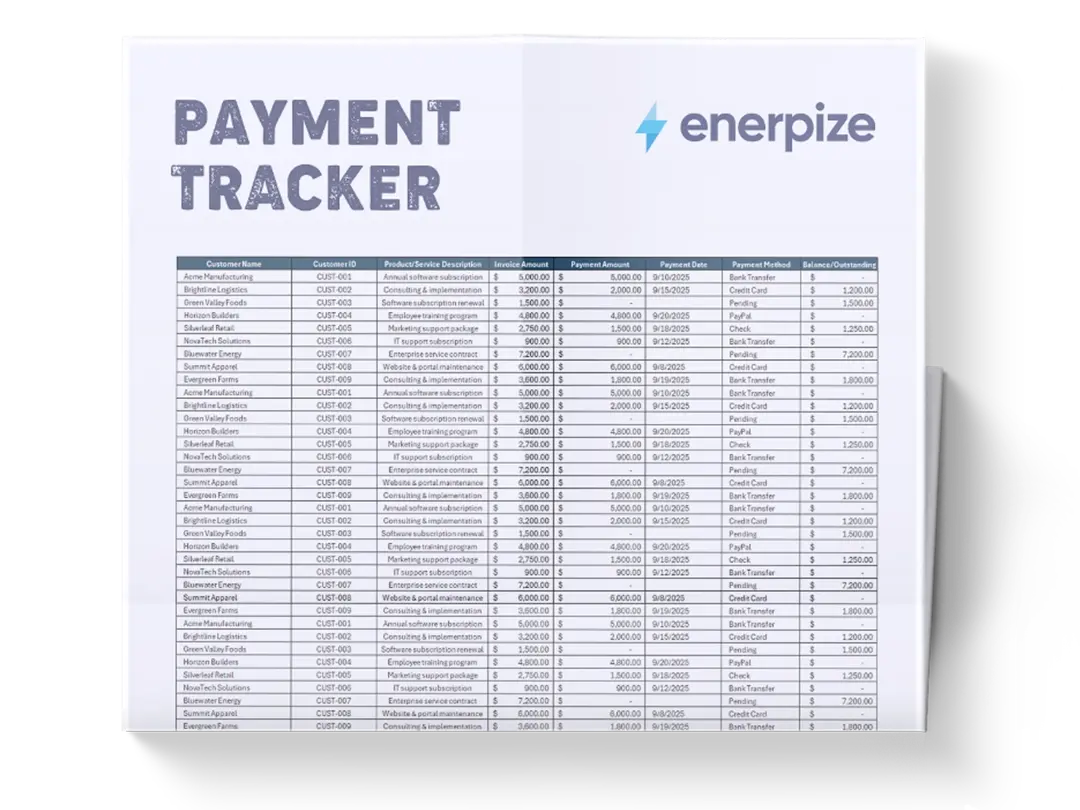
A Payment Tracker Template helps businesses monitor the full lifecycle of invoices and payments in a clear, organized format. It allows users to record essential transaction details such as invoice IDs, customer information, billed amounts, payments received, payment methods, and remaining balances.
What Does the Payment Tracker Template Contain?
Invoice/Payment ID
A unique identifier assigned to each invoice or payment record. It ensures every transaction can be easily traced, referenced, and matched with supporting documents during audits or reconciliations.
Customer Name
The name of the client or business responsible for the payment. This field helps organize receivables by customer and supports relationship-level financial tracking.
Customer ID
A unique code assigned to each customer for systematic identification. It reduces confusion when multiple clients share similar names and improves database accuracy.
Product/Service Description
A brief explanation of what was billed, such as services rendered or products delivered. This provides context for each transaction and supports dispute resolution if needed.
Invoice Amount
The total value billed to the customer before or without considering payments made. It serves as the baseline figure for tracking receivables.
Payment Amount
The actual amount received from the customer. This field helps track partial payments and compare expected vs. received revenue.
Payment Date
The exact date the payment was received or recorded. It is essential for cash flow analysis and financial reporting accuracy.
Payment Method
Specifies how the payment was made, such as bank transfer, credit card, PayPal, or cheque. This supports reconciliation with financial institutions.
Balance/Outstanding
The remaining unpaid amount after deducting received payments from the invoice total. It highlights overdue or partially paid invoices for follow-up.
How to Use the Payment Tracker Template
1- Set Up Customer and Invoice Information
Begin by entering all customer details, including Customer Name and Customer ID, along with each Invoice/Payment ID. This creates a structured foundation for tracking all financial interactions. Ensure every invoice issued is logged consistently to avoid missing records.
2- Record Invoice Amounts and Service Details
Input the Invoice Amount along with a clear Product/Service Description. This step ensures that every financial entry is tied to a real business activity, making it easier to verify charges and resolve disputes later.
3- Log Payments as They Are Received
As payments come in, fill in the Payment Amount, Payment Date, and Payment Method. This allows real-time tracking of cash inflows and helps identify partial or completed payments without delay.
4- Monitor Outstanding Balances
Use the Balance/Outstanding field to track unpaid amounts. This helps prioritize collections and follow-ups, especially for overdue invoices that affect cash flow stability.
5- Review and Reconcile Regularly
Periodically compare your tracker with bank statements or accounting records. This ensures accuracy, highlights discrepancies, and keeps financial data aligned with actual cash movements.
6- Use Data for Financial Decision-Making
Leverage the structured data to analyze payment trends, customer behavior, and revenue performance. This helps improve forecasting and strengthens financial planning.
Related Templates
Importance of the Payment Tracker Template
Improves Cash Flow Visibility and Control
A structured payment tracker gives businesses a clear overview of money coming in and money still pending. Instead of guessing or manually checking multiple sources, finance teams can instantly identify outstanding balances and expected inflows. This visibility helps prevent liquidity shortages and ensures better short-term financial planning. When decision-makers understand real-time cash positions, they can allocate resources more effectively and avoid unnecessary borrowing or delays in payments to suppliers.
Reduces Payment Errors and Missed Invoices
Without a structured system, invoices can easily be overlooked or misrecorded, leading to revenue leakage. A payment tracker standardizes all entries, ensuring that every invoice issued is accounted for and followed up. This reduces the risk of human error in manual tracking systems and ensures consistency across financial records. Businesses benefit from fewer disputes with clients and more reliable revenue reporting, which strengthens overall financial integrity.
Strengthens Client Accountability and Follow-Ups
By clearly displaying outstanding balances per customer, the template makes it easier to identify who has paid and who hasn’t. This transparency improves communication with clients and supports timely follow-ups on overdue payments. It also helps businesses prioritize collections based on value or aging invoices. As a result, organizations can reduce payment delays and maintain healthier customer relationships while improving collection efficiency.
Supports Better Financial Reporting and Planning
Accurate payment tracking feeds directly into financial reports such as cash flow statements and revenue summaries. With structured data available, finance teams can generate more reliable insights and forecasts. This enables better budgeting, investment planning, and strategic decision-making. Over time, businesses gain a clearer understanding of payment cycles and customer behavior, which improves long-term financial stability.
Who Can Use the Payment Tracker Template?
Small Business Owners and Entrepreneurs
Small business owners often manage multiple financial responsibilities without dedicated accounting teams. This template helps them track invoices, monitor payments, and identify overdue accounts without complex systems. It simplifies financial organization, allowing them to focus on growth rather than manual bookkeeping. By maintaining clear payment records, they can also improve cash flow stability and reduce financial uncertainty in daily operations.
Finance Teams and Accountants
Finance professionals rely on structured data for accurate reporting and reconciliation. This template provides a standardized format that ensures all payment data is consistently recorded and easy to audit. It reduces time spent on manual corrections and allows accountants to focus on analysis and compliance. With clear visibility into receivables, finance teams can also improve reporting accuracy and financial forecasting.
Freelancers and Service Providers
Freelancers often deal with multiple clients and irregular payment schedules. A payment tracker helps them stay organized by clearly showing which clients have paid and which invoices are still pending. This ensures they maintain steady cash flow and avoid missed payments. It also adds a level of professionalism when managing client billing cycles and follow-ups.
Operations and Revenue Managers
Operations and revenue teams need accurate financial data to monitor business performance. This template provides a real-time view of incoming payments and outstanding revenue. It supports better forecasting, budgeting, and performance tracking across departments. With improved visibility, managers can make faster and more informed operational decisions.
Looking for Beyond Just Payment Tracking?
While a Payment Tracker Template helps you organize invoices, monitor payments, and manage outstanding balances, growing businesses often need more advanced automation, accuracy, and financial control. That’s where Enerpize, our all-in-one business management platform, comes in.
With Enerpize online expense management software, you can:
- Automatically track and categorize expenses in real time using AI-powered data extraction from invoices and receipts
- Eliminate manual reconciliation by automatically matching and organizing financial records across your accounts
- Generate detailed financial reports and dashboards for better cash flow visibility, compliance, and decision-making
If you’re ready to move beyond spreadsheets, Enerpize brings enterprise-grade financial control, automation, and accuracy to growing teams, helping you manage your entire financial ecosystem in one place.