Posted on 27 April 2026
Bill Tracker Template Excel & Sheets
- The bill tracker template is available in Excel and Google Sheets.
- It ensures every payment obligation is recorded, monitored, and settled on time, reducing financial stress and missed deadlines.
- Tracks minimum payments, interest, and remaining balances, you can prioritize spending and avoid unnecessary penalties.
- Centralizes all bill-related data in one organized system.


What is the Bill Tracker Template?
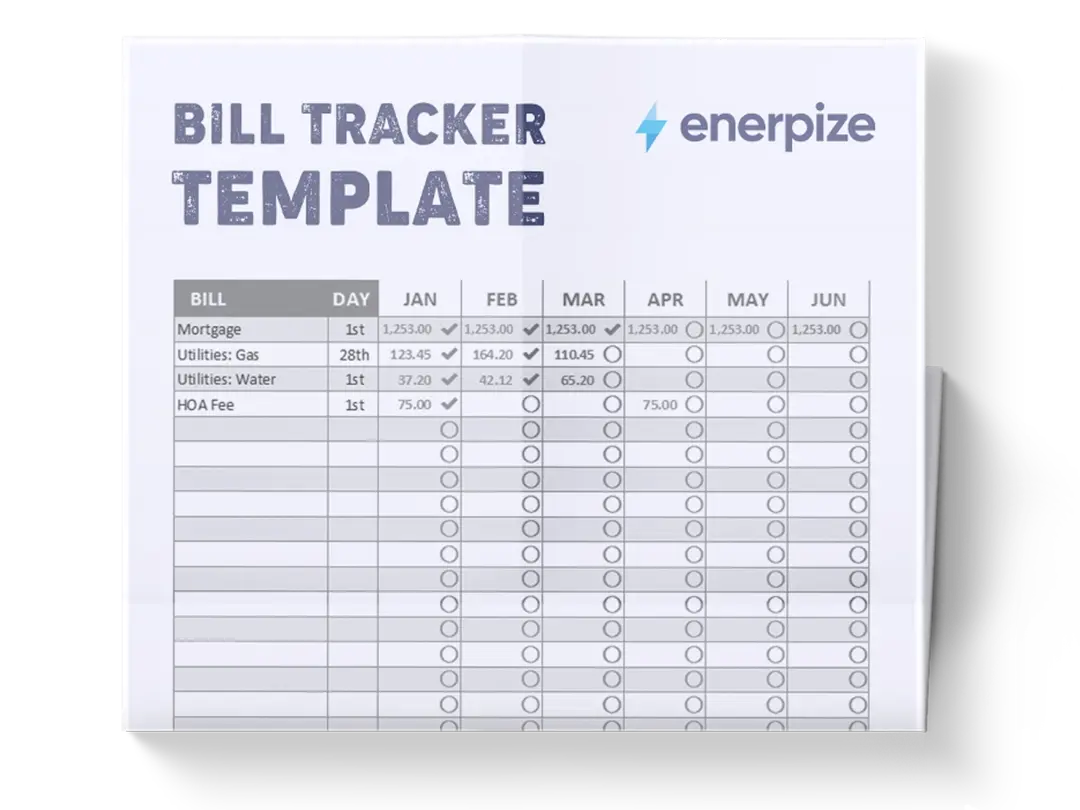
A Bill Tracker Template helps individuals, freelancers, and businesses systematically record, monitor, and manage all recurring and one-time payment obligations. It functions as a centralized ledger for tracking bills such as utilities, subscriptions, rent, loans, and service payments, ensuring that no due date or financial obligation is overlooked.
What Does The Bill Tracker Template Contain?
Due Date
This field records the exact date each bill must be paid. It is essential for prioritizing payments and avoiding late fees or service interruptions.
Pay To
This section identifies the recipient of the payment, such as a utility provider, landlord, vendor, or service company. It ensures clarity on where each payment is directed.
Amount Due
This captures the total amount that must be paid for the billing cycle. It provides a clear snapshot of outstanding obligations.
Minimum Payment
This field specifies the minimum required payment, often used for loans or credit-based obligations. It helps users manage cash flow when full payment is not possible.
Interest Due
This tracks any interest charges associated with overdue or installment-based payments. It highlights the cost of delayed or partial payments.
Date Paid
This records the actual date the payment was made. It helps verify timeliness and supports financial reconciliation.
Amount Paid
This field documents the exact amount paid toward the bill, which may be full or partial depending on the payment structure.
Method of Payment
This specifies how the payment was made,such as bank transfer, cash, autopay, or digital wallet, helping track payment behavior and preferences.
Remaining Balance
This shows any outstanding amount left after payment. It is critical for monitoring partial payments or unpaid dues.
Notes
This section allows users to add additional context, such as payment issues, reminders, disputes, or special conditions related to the bill.
Total
This summarizes overall financial activity in the tracker, providing a consolidated view of total due, paid, and outstanding amounts.
How to Use The Bill Tracker Template
1. Gather All Your Bills and Financial Obligations
Start by collecting all relevant documents, including invoices, subscription notices, utility bills, loan statements, and service charges. Organize them by frequency and due date so you can systematically input them into the template without missing any obligations.
2. Enter Core Bill Information
Begin filling the template by adding essential details such as Due Date, Pay To, and Amount Due. This step builds the foundation of your tracker and ensures every financial obligation is properly recorded in chronological order.
3. Add Payment Structure Details
Input Minimum Payment and Interest Due (if applicable). These fields are especially important for loans, credit cards, or installment-based services where partial payments or penalties may apply.
4. Record Payment Activity
Once a bill is paid, update the Date Paid, Amount Paid, and Method of Payment fields. This ensures your tracker reflects real-time financial activity and helps prevent duplicate or missed payments.
5. Monitor Remaining Balances
After each update, check the Remaining Balance column to identify outstanding amounts. This step ensures you maintain visibility over unpaid or partially paid obligations.
6. Use Notes for Context
Add important details such as disputes, payment arrangements, or reminders. This helps maintain clarity, especially when dealing with multiple vendors or recurring payments.
7. Review the Total Summary Regularly
At the bottom of the template, review the Total section to understand your overall financial position. This helps you assess how much you owe versus how much you’ve paid over time.
Related Templates
Importance of Bill Tracker Template
Prevents missed payments and costly late fees
A Bill Tracker Template ensures that every financial obligation is documented with a clear due date, reducing the risk of forgetting or overlooking important payments. Late fees, service disruptions, and penalty charges often arise from disorganized tracking systems or reliance on memory alone. By centralizing all bills in one structured format, users can proactively plan payments and avoid unnecessary financial penalties. Over time, this creates a more disciplined payment routine that protects both personal and business credit standing.
Improves cash flow planning and financial control
Understanding exactly when money is going out is just as important as knowing when it is coming in. This template provides visibility into recurring and one-time expenses, allowing users to plan their budgets more effectively. By tracking minimum payments, remaining balances, and total obligations, individuals and businesses can prioritize essential payments and maintain liquidity. This leads to better financial stability and fewer unexpected shortfalls during critical periods.
Enhances transparency and financial accountability
With every bill recorded in detail, the template creates a transparent financial record that can be reviewed at any time. This is particularly useful for small businesses managing multiple vendors or households sharing expenses. It reduces confusion about whether a bill has been paid, partially paid, or still pending. The structured format also supports internal accountability, ensuring that financial responsibilities are clearly tracked and managed.
Supports better financial decision-making over time
By consistently using a bill tracker, users begin to identify spending patterns, recurring obligations, and high-cost categories. This insight helps in making informed financial decisions such as renegotiating contracts, eliminating unnecessary subscriptions, or optimizing payment schedules. Instead of reacting to financial pressure, users gain a proactive understanding of their obligations, enabling smarter long-term planning.
Who Can Use Bill Tracker Template?
Individuals managing personal finances
Individuals benefit from the Bill Tracker Template by gaining full visibility into monthly obligations such as rent, utilities, subscriptions, and loan payments. This structured approach helps prevent missed due dates and supports better budgeting decisions. Instead of relying on scattered reminders or memory, users can see all financial commitments in one place. This is especially useful for people managing tight budgets or multiple recurring payments, as it ensures greater financial discipline and stability.
Freelancers and self-employed professionals
Freelancers often deal with irregular income and multiple expenses, making bill tracking essential for maintaining financial balance. The template helps them align incoming payments with outgoing obligations, ensuring they always have enough liquidity to cover essential costs. It also helps in tracking business-related expenses separately from personal ones. This clarity supports better tax preparation and financial planning, which are critical for independent professionals.
Small business owners and startup founders
For small businesses, managing operational expenses is crucial for survival and growth. The Bill Tracker Template provides a clear system for monitoring vendor payments, utilities, subscriptions, and loan obligations. It helps founders avoid cash flow gaps and ensures that financial commitments are met on time. By maintaining organized records, businesses can also improve financial reporting and maintain stronger relationships with suppliers and service providers.
Finance teams and operations managers
In more structured organizations, finance teams use bill tracking systems to oversee multiple payment streams across departments. The template ensures consistency in how financial data is recorded and reviewed. It supports reconciliation processes, budgeting accuracy, and audit readiness. Operations managers also benefit by having a clear overview of upcoming liabilities, enabling them to plan expenditures and allocate resources more effectively.
Looking for Beyond Just Bill Tracking?
While a Bill Tracker Template helps you stay organized with due dates, payments, and balances, growing businesses often need more advanced financial control, automation, and integration across their entire operation. That’s where Enerpize, our all-in-one ERP platform, comes in.
With Enerpize Online Invoicing & Billing Software, you can:
- Automate invoicing and billing cycles, ensuring payments and reminders are handled without manual tracking
- Manage payments across multiple methods and currencies while keeping financial data synchronized in real time
- Generate detailed financial reports and insights that connect billing, expenses, and overall business performance
If you’re ready to move beyond spreadsheets, Enerpize brings enterprise-grade control to growing teams.