Posted on 7 July 2026
Free Budget vs Actual Excel Template Download: Excel & Google Sheets
- Available in Word, Excel, PDF, Google Docs, and Google Sheets, free to download with no sign up required
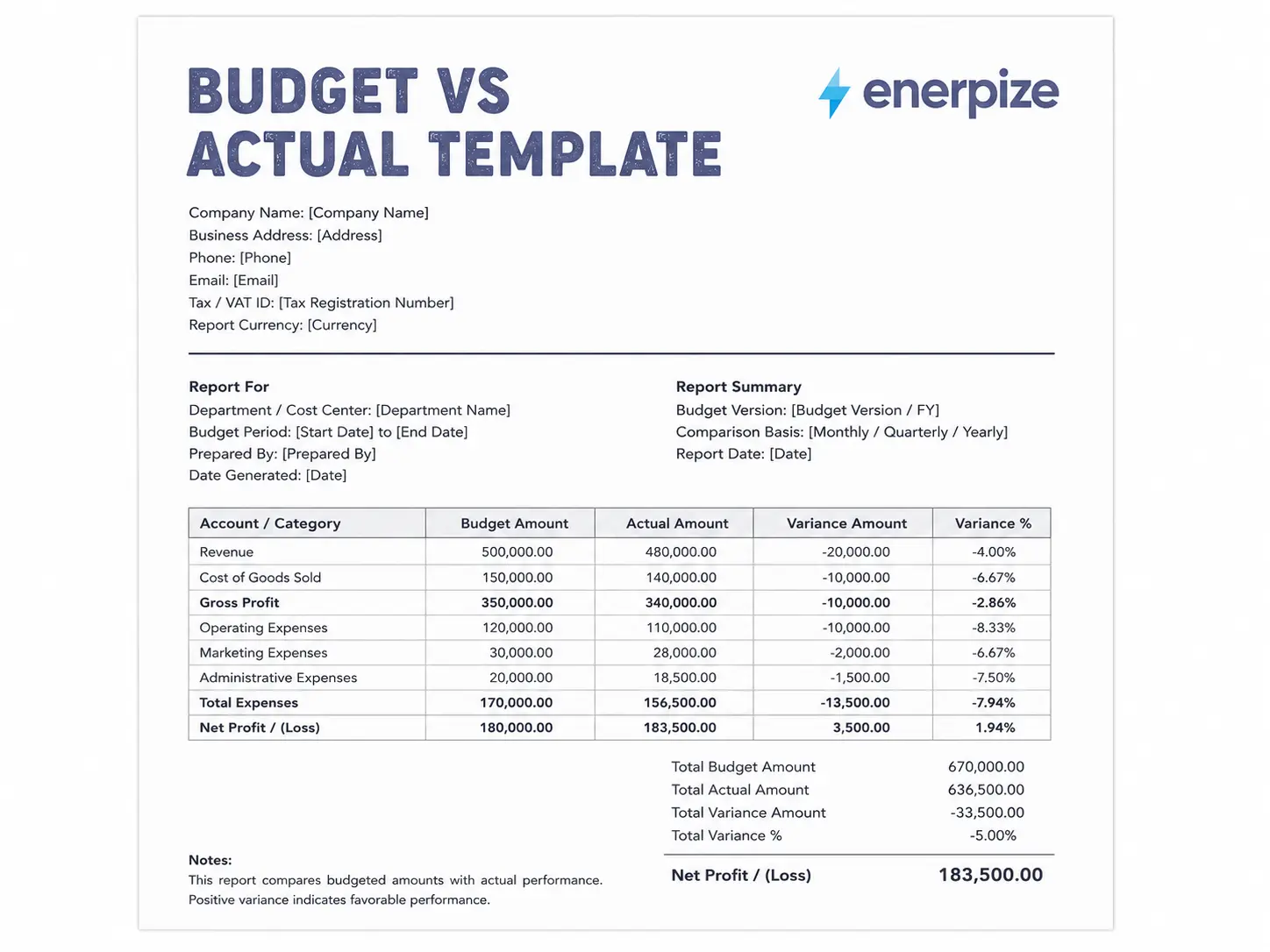
- Covers monthly and year to date columns for Budget, Actual, Variance dollar amount, and Variance percentage in one structured workbook
- Built with country specific context for the United States, Canada, the Philippines, and Australia in one template
- Calculates variance and net income automatically in Excel and Google Sheets, no manual math required
A budget vs actual excel template is a spreadsheet that places your planned numbers next to what really happened, month by month, so you can see the gap the moment it shows up instead of finding out at year end.


What Is a Budget vs Actual Report?
Think about the last time you planned a road trip budget. You set aside a number for gas, a number for food, maybe a little cushion for the inevitable flat tire. Then the trip happens, and reality hands you a receipt that looks nothing like your plan. That gap between what you expected and what actually happened is the entire idea behind a budget vs actual report, just dressed up in business clothes.
A budget vs actual report takes your planned income and expenses for a period and lines them up next to your actual results for that same period. The difference between the two is called variance, and variance is really the only number in this whole exercise that matters. Everything else is just context for that one number.
People often lump three terms together that actually mean three different things. Your budget is the plan you set before the period started. Your forecast is an updated version of that plan, revised once you have fresh information partway through the year. Your actuals are simply what happened, no opinions attached. A budget vs actual report compares the first and third of those. A forecast vs actual comparison would compare the second and third. Most small businesses only need the first one, and that is exactly what this template gives you.
The Formula Behind It
The math here is not complicated, and honestly, that is the whole point.
Variance in dollars is Actual minus Budget.
Variance in percentage is Variance divided by Budget.
Here is the part almost every free template online gets wrong or leaves confusing. For income, a positive variance is good news, since you brought in more than you planned. For expenses, a positive variance is bad news, since you spent more than you planned. Flip the direction and the whole report becomes unreadable at a glance, which is exactly why our template flips the formula automatically depending on whether the row is income or an expense, so green always means favorable and red always means something worth a closer look.
What to Include in a Budget vs Actual Template
A lot of the templates floating around online are just a category column and two number columns. That works fine for a single snapshot. It falls apart the moment you want to see a trend, catch a pattern, or explain a number to someone else in the room.
Here is what a complete template actually needs.
| Field | Why It Matters |
|---|---|
| Category and Subcategory | Groups line items into Revenue, Personnel, Office, and so on, so the report reads like a story instead of a list |
| Monthly Budget | What you planned to earn or spend that specific month |
| Monthly Actual | What actually happened that month |
| Monthly Variance ($ and %) | The gap, shown both in raw dollars and as a percentage of budget |
| YTD Budget and YTD Actual | The running total from January through the current month |
| YTD Variance | Whether you are still on track for the year, not just the month |
| Net Income row | Total Income minus Total Expenses, for both budget and actual, so you see the bottom line, not just the pieces |
| Notes column | A place to explain why a variance happened, since a number without context just raises more questions |
Most templates stop at YTD Actual and YTD Budget. They almost never include a Net Income row, which means you can see that Marketing overspent and Sales underspent, but nobody adds those pieces together to tell you whether the business, as a whole, actually made or lost money that quarter. That is the gap we closed.
What the Enerpize Budget vs Actual Template Includes
Monthly Columns, Not Just a YTD Snapshot
Every single month gets its own Budget, Actual, Variance dollar, and Variance percent columns, all the way from January to December, not just a single flat YTD snapshot. That means you can actually spot a pattern. If Travel keeps running over budget every single month, that is a structural problem with your budget, not bad luck. If it spiked once in March because of a conference, that is a timing difference and nothing to lose sleep over. A single YTD column cannot tell you which one you are looking at. Twelve months of columns can.
A Variance Percentage Formula That Is Actually Correct
We fixed something that almost every free template gets wrong without anyone noticing. The Total Expenses variance percentage on most templates is calculated by adding up each row's individual percentage, which is a math error, not a shortcut. Adding percentages together does not give you an overall percentage, it gives you a meaningless number that happens to look like one. Our Total Expenses variance percentage recalculates properly from the actual dollar totals, every time.
A Net Income Row Most Templates Skip
We added a Net Income row that most templates skip entirely. Your Total Income and Total Expenses are useful on their own, but the number that actually tells you how the business did is what is left after you subtract one from the other, and compare that bottom line figure against what you had budgeted.
A Notes Column for Context
We added a Notes column, because a variance without an explanation is just a red flag with no next step. When Marketing runs 25 percent over budget in one month because of a conference sponsorship, that note is the difference between a five minute conversation and a twenty minute one where everybody is guessing.
Color Coding That Actually Points the Right Direction
Every Variance column, monthly and YTD both, is color coded automatically. Green for favorable, red for unfavorable, and the direction flips correctly between income rows and expense rows so you are never staring at green wondering if that is actually good news or not.
A Built In Chart
There is a built in chart comparing YTD Budget against YTD Actual by line item, so you do not have to build one yourself before your next meeting.
Yours to Reshape, No Locks
No protected cells and no rows frozen, because it is yours to reshape however your business actually works.
The Piece Almost Nobody Else Covers
This is the piece almost nobody else covers. A budget vs actual report inside a standalone spreadsheet is a snapshot of a moment that already passed. Inside Enerpize, your actuals are not something you re-type from memory, they come directly from the invoices your Sales team already issued, the expenses your team already logged, and the Chart of Accounts your books already run on. The report is not a rebuild every month, it is a reflection of work that already happened somewhere else in the system.
Want your budget vs actual numbers to pull straight from your invoices and expenses instead of manual re-entry? Start for free.
How to Use the Template
Step 1: Enter Your Monthly Budget Figures
Go through each category, Revenue, Personnel, Office, and so on, and fill in what you planned to earn or spend for each month. This is the number you agreed on before the year started, not a moving target.
Step 2: Enter Your Monthly Actual Figures
As each month closes, pull your real numbers from your accounting records or bank statements and enter them next to the budget figure for that same month. Do this consistently, right after month end, not three months later when you have forgotten the context behind half the numbers.
Step 3: Let Variance Calculate Automatically
The Variance dollar and Variance percent columns update themselves the moment you enter Actual figures. You do not touch a single formula.
Step 4: Review the YTD Columns
Any single month can look alarming in isolation. A YTD view tells you whether that one bad month is actually a trend or just noise that will smooth out by the time the year closes.
Step 5: Check the Net Income Row
This is the number that actually matters to the business as a whole. Total Income minus Total Expenses, compared against what you budgeted for the same thing. Everything above this row is detail. This row is the story.
Step 6: Add Notes Where the Numbers Need Context
If Salaries ran under budget because two roles sat unfilled for two months, write that down. That is not automatically good news, since unfilled roles can slow down everything else the business needs to get done, and the note is what keeps that nuance from getting lost.
Step 7: Recheck Monthly and Compare Trends
Set a recurring date, right after month close, to update the template and glance back at the last three months together. A variance that shows up once is a data point. A variance that shows up three months running is a pattern that needs a decision.
Tired of rebuilding this every month by hand? Enerpize pulls your actuals directly from invoicing, expenses, and your Chart of Accounts, so the report updates itself. Start for free.
Budget vs Actual Template for Businesses in the United States
For most small businesses in the US, a budget vs actual report is not a regulatory requirement, it is a management habit that happens to make tax season and audits considerably less painful when you already have clean, organized numbers.
The IRS generally recommends that taxpayers keep supporting records for at least three years, and a good recordkeeping system, in the IRS's own words, includes a summary of all business transactions, which is precisely what your monthly and YTD budget vs actual figures give you. Your budget vs actual template is not itself a tax document, but the underlying actual figures it pulls from should trace back to the same books you would use to substantiate a return if the IRS ever asked.
What US businesses should watch for in their budget vs actual reports specifically is quarterly estimated tax timing. If your business pays quarterly estimated taxes, a variance in one quarter can shift your effective tax liability for that quarter even if the annual total looks fine, so reviewing YTD alongside the current month matters more here than in a lot of other places.
Budget vs Actual Template for Businesses in Canada
Canadian businesses have one extra wrinkle that a generic template never accounts for, and that is GST and HST.
If your business is GST or HST registered, the Canada Revenue Agency requires you to keep records supporting your returns for at least six years from the end of the tax year those records relate to. That includes the sales invoices and purchase records your Actual figures are built from, so when you are filling in your monthly Actuals, keep in mind that those same source documents need to survive in your files for years, not just until next quarter's review.
A practical note for a Canadian budget vs actual setup, keep your GST or HST collected and remitted as its own line rather than folding it into Revenue or Expenses. Tax that passes through your business and is owed to the CRA is not really income or an expense of the business, and blending it into either category quietly distorts your variance numbers in a way that is hard to spot later.
Budget vs Actual Template for Businesses in the Philippines
The Philippines has one of the stricter bookkeeping regimes covered in this template, and it is worth knowing before you build your reporting habit around it.
Under Bureau of Internal Revenue Revenue Regulations No. 17-2013, businesses are generally required to preserve their books of accounts and other accounting records for ten years from the date of the last entry, with financial statements audited by an independent CPA subject to their own separate retention rule. That is a meaningfully longer window than the US or Australia, and it changes how you should think about archiving the actual figures feeding your budget vs actual report, since those source records need to survive far longer than the report itself will feel relevant.
A practical note for businesses in the Philippines, if your budget vs actual report pulls actuals from BIR registered books of accounts, whether manual, loose leaf, or computerized, make sure the categories in your template mirror the categories in those books exactly. A mismatch between what your template calls a category and what your books call the same thing is a small annoyance in a quiet month and a real headache the one time BIR asks a question about it.
Budget vs Actual Template for Businesses in Australia
Australia keeps things comparatively straightforward, five years, one clear rule, minimal exceptions for most small businesses.
The Australian Taxation Office requires businesses to keep records for five years, generally starting from when the record was prepared or the transaction it relates to was completed, and this covers the sales invoices, purchase receipts, and GST records that your Actual figures are ultimately built from.
The one Australian specific angle worth building into your template is GST. If your business is registered for GST, keep GST collected and GST paid as a distinct line from your core Revenue and Expense categories, for the same reason it matters in Canada, tax that flows through your business on its way to the ATO is not really part of your operating performance, and folding it into your other categories will quietly skew every variance calculation downstream.
How Enerpize Connects Budget vs Actual to Your Entire Operation
Here is the honest version of this section, because I would rather tell you exactly what exists than dress up something that does not.
Enerpize does not currently ship a dedicated, one click budget vs actual report as a standalone feature. What it does have, and what genuinely feeds a report like this one without a rebuild every month, is Cost Centers, which let you track profitability per department, product, or employee, so the categories in your budget vs actual template can map directly onto structures you already track inside the system.
The Expenses module lets you track and report expense budgets by category, and reconcile expenses in real time, which means the Actual side of your Expense rows can come straight from what your team has already logged, not from a separate spreadsheet somebody rebuilds from memory at month end.
Your Chart of Accounts mirrors every transaction into a General Ledger automatically, which is the underlying data source your Actual figures should trace back to regardless of which template you use to present them.
Put together, that means your budget vs actual numbers do not have to live in isolation from the rest of your books. The categories match your Cost Centers, the actuals come from expenses and income you have already recorded, and the General Ledger underneath it all stays the single source of truth.
Want your Cost Centers, Expenses, and Chart of Accounts working together instead of living in separate spreadsheets? Start for free.
Budget vs Actual by Industry
The categories that matter shift a lot depending on what kind of business you run, and a generic template rarely accounts for that.
A gym or fitness business is going to care about membership revenue against equipment maintenance and trainer payroll, categories that barely exist in a construction firm's version of this same report. A construction business, on the other hand, is watching materials cost against labor cost on a project by project basis, closer to how a payment application tracks a schedule of values than how a retail budget tracks monthly sales. A retail business is watching inventory cost against seasonal revenue swings that a services business never has to think about at all.
The categories in this template are a starting point, not a ceiling. Rename them, add rows, remove what does not apply. The structure holds regardless of what you put inside it.
Key Takeaways
A budget vs actual report compares your planned numbers to your real results for the same period, and the variance between them is the number that actually matters.
Most free templates online give you a single YTD snapshot. Monthly columns let you tell the difference between a one time timing issue and a genuine recurring problem, and that difference changes what you actually do about it.
Variance direction flips between income and expenses. A positive variance is good for income and bad for expenses, and a template that does not account for that will have you reading green as bad news at some point.
A Net Income row, comparing budgeted profit against actual profit, is the one number that tells you how the business did as a whole, and it is missing from most templates you will find for free.
Retention rules differ sharply by country. Ten years in the Philippines, six in Canada, five in Australia, and generally three years for supporting IRS records in the US, so match your filing habits to wherever your business actually operates.
If your business is GST or HST registered, keep that tax as its own line rather than folding it into Revenue or Expenses, since blending it in quietly distorts every variance number downstream.
FAQs
What is the difference between budget and actual?
Budget is the plan you set before the period started. Actual is what genuinely happened once the period closed. Variance is simply the gap between the two, expressed in dollars and as a percentage.
What is a good variance percentage?
There is no universal number, and anyone who tells you there is one is oversimplifying. A five percent variance on your total budget is often fine to shrug off. A five percent variance concentrated entirely in one small category can be a much bigger deal than a much larger dollar variance spread thinly across a dozen categories. Look at the pattern, not just the single percentage.
Is budget vs actual the same as variance analysis?
Close enough that most people use the terms interchangeably. Budget vs actual is the comparison itself. Variance analysis is the deeper dig into why a particular gap showed up, which usually happens after you have already spotted it in the budget vs actual report.
Can I use this template in Google Sheets?
Yes. Download the Excel version and open it directly in Google Sheets, or use the Google Sheets link above. All formulas carry over.
How often should I update a budget vs actual report?
Monthly, right after your books close for the month, is the practical rhythm for most small businesses. Waiting until quarter end means you are reacting to a problem that has already had three months to compound.
What is the difference between budget vs actual and forecast vs actual?
Budget vs actual compares your original plan to what happened. Forecast vs actual compares an updated, revised plan, made partway through the period once you had fresher information, to what happened. Most small businesses only need budget vs actual. Forecast vs actual becomes more useful once your business is large enough that the original annual budget stops being a realistic yardstick by June.
Does Enerpize automate budget vs actual reporting?
Not as a single dedicated report today. What Enerpize does give you is Cost Centers for tracking profitability by department or product, Expense budget tracking by category, and a Chart of Accounts that mirrors every transaction into your General Ledger automatically, all of which feed the actual figures a budget vs actual report needs, without you re-entering numbers from a separate system.
About the Author
Omar El Bahr is a Senior Digital Growth Specialist at Enerpize, where he leads SEO, content strategy, and organic growth across international markets. He is a Forbes Communications Council contributor and has written for Entrepreneur on business communication and digital strategy.
Disclaimer: This article is for general informational purposes and does not constitute tax, legal, or accounting advice. Tax rules and retention requirements change, so confirm current obligations with the IRS, CRA, BIR, ATO, or a licensed professional in your jurisdiction before relying on any figure above.