Posted on 1 February 2026
Salesman Report Template Excel & Google Sheets
- The salesman report template is available in Excel and Google Sheets.
- It tracks item-level sales with quantities, tax rates, and totals.
- Generate accurate sales totals and tax calculations automatically.
- Create clear, professional sales reports for review and record-keeping.


What Is a Salesman Report Template?
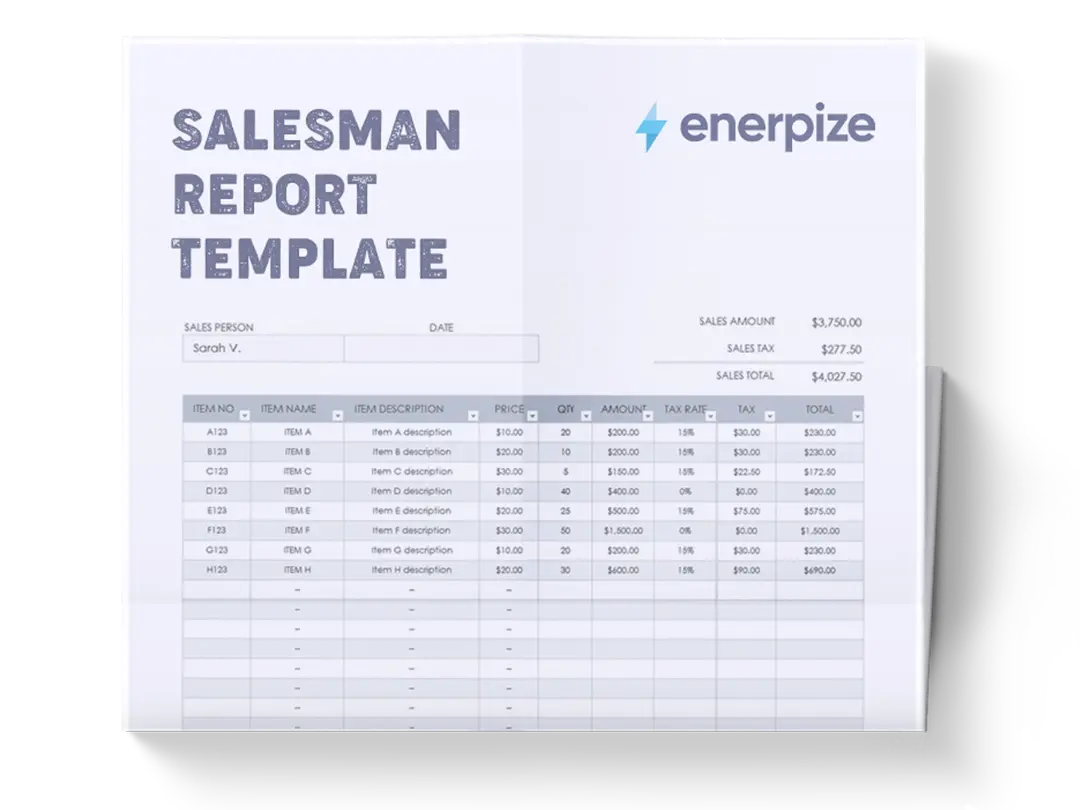
A Salesman Report Template records, calculates, and summarizes an individual salesperson’s sales activity within a specific period. It captures both high-level sales totals and detailed, item-level transaction data in a single, standardized format. Rather than relying on informal notes or disconnected invoices, the template provides a clear breakdown of what was sold, in what quantities, at what price, and under which tax conditions. This makes it suitable for internal reporting, managerial review, and financial reconciliation.
By consolidating salesperson identity, transaction date, itemized sales lines, and calculated totals, the template acts as an operational bridge between daily selling activity and accurate financial reporting.
What Does the Salesman Report Template Contain?
Salesman Details
Identifies the salesperson responsible for the reported sales. This ensures accountability and allows reports to be reviewed, compared, or archived by individual contributors.
Date
Records the date the sales activity took place or was reported. This anchors the report to a specific time period for tracking and reconciliation.
Sales Amount
Displays the subtotal of all item amounts before tax. This represents the total value of goods sold, excluding any applicable taxes.
Sales Tax
Summarizes the total tax amount calculated across all taxable items listed in the report.
Sales Total
Shows the final total amount, combining Sales Amount and Sales Tax. This reflects the full value of the sales transaction(s).
Item No
Provides a unique identifier for each product or item sold. This supports product tracking and avoids ambiguity in reporting.
Item Name
Name the product or item sold. This allows reviewers to understand what was included in the transaction at a glance.
Item Description
Offers additional context or specifications for each item. This can clarify variations, bundles, or product details.
Price
Indicates the unit price of each item sold.
Qty
Records the quantity sold for each item. This field drives calculation of item-level totals.
Amount
Calculates the total value for each item before tax, based on Price multiplied by Qty.
Tax Rate
Specifies the applicable tax percentage for each item. This accommodates mixed tax scenarios within a single report.
Tax
Shows the calculated tax amount per item, derived from the Amount and Tax Rate.
Total
Displays the final total per item, including tax where applicable.
How to Use the Salesman Report Template
1- Enter Salesman's Details and The Date
Begin by filling in the Salesman Name and Date at the top of the report. This establishes ownership and time context before any financial data is entered.
2- Review The Summary Fields Structure
Note the placement of Sales Amount, Sales Tax, and Sales Total. These fields summarize the detailed item data below and should reflect the totals generated from the table.
3- List Each Sold Item As a Separate Row
Enter one line per item sold. Use the Item No and Item Name fields consistently to avoid confusion or duplication.
4- Describe Items Clearly
Fill in the Item Description to provide clarity, especially if similar products or variants exist.
5- Enter Unit Price and Quantity
Populate the Price and Qty columns carefully. These two inputs determine the Amount calculation and directly affect totals.
6- Verify Item-Level Amount Calculations
Ensure the Amount reflects Price multiplied by Qty for each row before moving on to tax-related fields.
7- Apply The Correct Tax Rate Per Item
Enter the appropriate Tax Rate for each item. Some items may be taxable, while others may be zero-rated.
8- Review Tax And Total Per Item
Confirm that the Tax and Total columns accurately reflect the applied tax rate and calculated amounts.
9- Validate Summary Totals
Once all items are entered, verify that Sales Amount equals the sum of all item Amounts, Sales Tax equals the sum of all item Tax values, and Sales Total reflects their combined total.
Related Templates
Importance of a Salesman Report Template
Ensures Accurate Sales and Tax Reporting
A Salesman Report Template creates a controlled environment for calculating sales values and taxes at the item level. By structuring price, quantity, tax rate, and totals in clearly defined columns, it minimizes arithmetic errors that commonly occur with manual calculations. This is especially important when different items carry different tax rates, as the template allows each item to be treated correctly. Accurate reporting protects businesses from discrepancies during audits or financial reviews. Over time, this consistency builds trust between sales, finance, and management teams.
Creates Clear Accountability for Individual Sales Performance
By tying every report to a specific salesperson and date, the template establishes transparent ownership of reported sales. Managers can review performance based on documented transactions rather than verbal updates or estimates. This clarity supports fair evaluation and reduces disputes over numbers. Salespeople also benefit, as they can confidently stand behind their reported figures. Accountability becomes a built-in feature rather than an afterthought.
Simplifies Review and Approval Processes
The structured layout allows supervisors or finance teams to quickly scan itemized details and summary totals without chasing additional context. Discrepancies between item totals and summary fields are easy to spot. This speeds up approvals and reduces back-and-forth communication. When reports follow a consistent format, reviewers know exactly where to look for critical information. The result is faster reporting cycles and fewer bottlenecks.
Supports Reliable Financial Record-Keeping
Salesman reports often serve as source documents for accounting entries or revenue tracking. A standardized template ensures records are complete, legible, and comparable over time. This makes historical analysis and reconciliation far easier. When sales data is captured correctly at the source, downstream systems and reports become more reliable. Consistent documentation also strengthens internal controls.
Who Can Use a Salesman Report Template?
Sales Representatives and Field Salespeople
Sales reps use the template to formally document what they sold during a given period. It provides a clear structure for reporting itemized transactions without relying on memory or informal notes. This helps reps submit accurate reports and reduces the risk of missing or misreporting sales. The clarity of the template also protects them in case of later questions or audits. It becomes a personal record of completed sales activity.
Sales Managers and Supervisors
Managers rely on salespeople's reports to review performance and validate reported figures. The item-level breakdown allows them to understand not just how much was sold, but what was sold. This insight supports better coaching and performance discussions. The standardized format also makes it easier to compare reports across team members. Managers gain visibility without micromanagement.
Finance and Accounting Teams
Accounting teams use the template as a reliable input for revenue recognition and tax reporting. Because sales amounts and taxes are clearly separated and calculated, reconciliation becomes more straightforward. The template reduces the need for follow-up questions or corrections. Consistent reporting supports accurate books and compliance. Finance teams benefit from clean, auditable documentation.
Small Business Owners and Operators
Owners who oversee both sales and finances benefit from having a single document that summarizes transactions clearly. The template provides immediate visibility into daily or periodic sales performance. It helps owners monitor cash flow and tax obligations without complex systems. For small teams, it offers control without administrative overload. Decision-making becomes easier with accurate data in hand.
Looking for Beyond Just Recording Sales in a Spreadsheet?
While this Salesman Report Template helps you document itemized sales, calculate taxes, and generate clear summaries, growing businesses often need more advanced capabilities. That’s where Enerpize, our all-in-one ERP platform, comes in.
With Enerpize Sale Management Software, you can:
- Centralize sales reports, invoices, and customer records
- Automate calculations, approvals, and reporting workflows
- Connect sales data directly with accounting and operations
- Gain real-time visibility across teams and transactions
If you’re ready to move beyond spreadsheets, Enerpize brings enterprise-grade control to growing teams.