Posted on 22 December 2025
Employee Evaluation Form Word & Google Docs
- The employee evaluation form template is available in Word and Google Docs.
- It reviews performance across core competencies, capturing ratings, comments, and development goals.
- Follows a clear, sequential workflow, from entering employee details to rating performance, summarizing results, and setting actionable goals.
- Brings objectivity, consistency, and clarity to performance reviews, and supports professional growth.


What Is the Employee Evaluation Template?
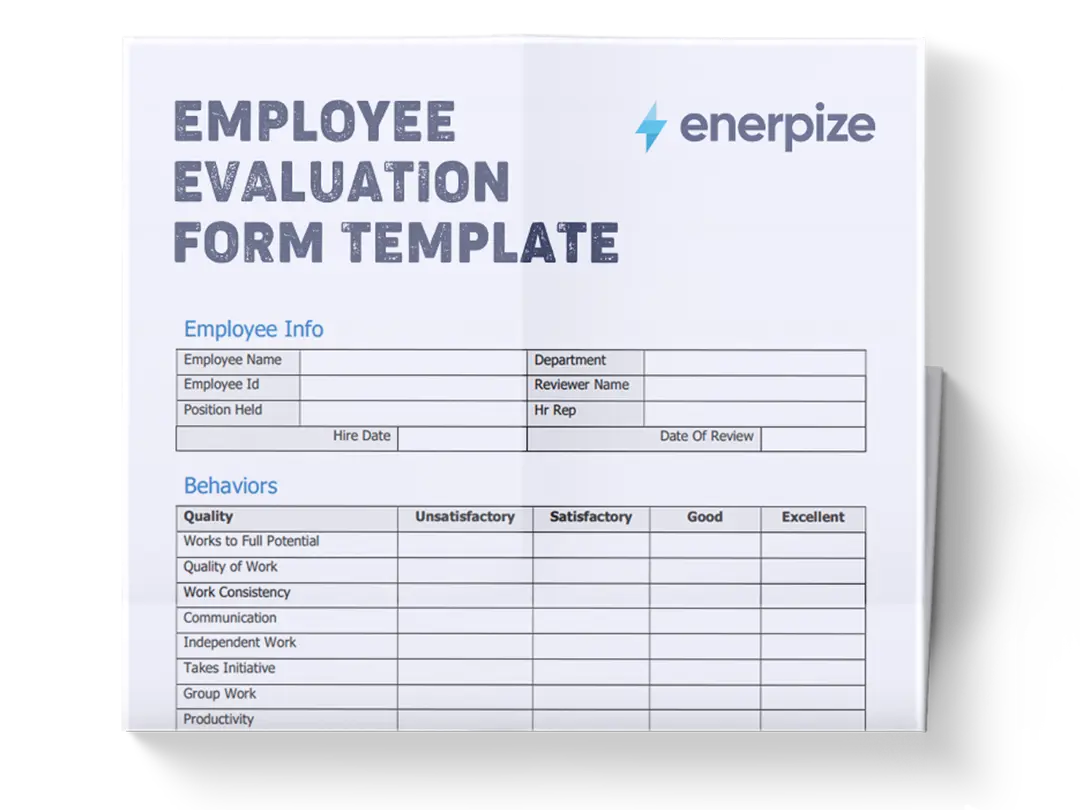
An employee evaluation form template assesses an individual employee’s effectiveness and contributions over a defined period. It structures the evaluation around key performance dimensions using consistent rating scales and comment fields to capture evidence and context.
Far more than a collection of checkboxes, this form anchors discussions in clear criteria, minimizes subjective bias, and creates a record that supports development planning, compensation decisions, and organizational benchmarking.
What Does the Employee Evaluation Contain Template?
Employee Details
- Employee Name, Job Title, Department: Identifies the person being evaluated and contextualizes performance expectations relative to the role and team.
- Evaluator Name: Records who completed the assessment for accountability and follow‑up.
- Evaluation Period: Defines the period covered by the review to ensure clarity on performance expectations.
- Date of Evaluation: Marks when the discussion and ratings were finalized.
Job Knowledge & Skills
- Criteria (Understands job responsibilities; Demonstrates required skills; Keeps knowledge up to date): Measures how well the employee comprehends the role and applies necessary competencies.
- Rating (1‑5): Quantifies performance on each criterion.
- Comments: Space for evidence‑based observations.
Work Quality
- Criteria (Accuracy and thoroughness; Consistency of output; Meets quality standards): Assesses precision, reliability, and adherence to expected standards.
- Rating (1‑5) & Comments: Captures quantitative and qualitative feedback.
Productivity & Efficiency
- Criteria (Completes work on time; Manages workload effectively; Prioritizes tasks appropriately): Evaluates timeliness and effectiveness in handling assignments.
- Rating & Comments: Supports nuanced evaluation of output relative to expectations.
Communication & Teamwork
- Criteria (Communicates effectively; Collaborates with colleagues; Handles conflict constructively): Gauges interpersonal skills and contribution to a positive team dynamic.
- Rating & Comments: Provides space to document behaviors that support collaboration.
Initiative & Problem Solving
- Criteria (Takes initiative; Shows creativity in problem‑solving; Seeks opportunities for improvement): Measures proactive behavior and ability to navigate challenges.
- Rating & Comments: Encourages recognition of resourcefulness.
Attendance & Punctuality
- Criteria (Consistent attendance; Arrives on time; Adheres to schedule): Reflects reliability and professional discipline.
- Rating & Comments: Documents attendance patterns and timeliness.
Overall Performance Rating
- Rating Scale & Definitions (1‑5): Summarizes performance level with clear descriptors from “Unsatisfactory” to “Excellent.”
- Overall Rating: Final composite score.
- Evaluator Comments: Space for summary insights.
Employee Feedback & Goals
- Employee Comments: Encourages the employee’s perspective on their performance and experience.
- Goals for Next Evaluation Period: Establishes targeted areas of growth.
- Signatures & Dates: Formalizes the review with the evaluator's and employee's acknowledgment.
How to Use the Employee Evaluation Form Template?
1- Prepare for the Review
Before opening the form, gather performance data from the evaluation period: project results, task logs, attendance records, feedback from peers or clients, and self‑assessments if available.
2- Enter Basic Information
Complete the Employee Details section first. Accurate identification establishes context and ensures the form is properly archived.
3- Rate Each Performance Category
Start with Job Knowledge & Skills. For each criterion, assign a rating from 1 (Unsatisfactory) to 5 (Excellent) based on documented behaviors and outcomes. Use the comment field to justify ratings with specific examples.
Proceed sequentially through Work Quality, Productivity & Efficiency, Communication & Teamwork, Initiative & Problem Solving, and Attendance & Punctuality. This ordered approach prevents skipped sections and ensures consistent evaluation.
4- Use Comments to Clarify
For every rating, especially low or high scores, provide objective comments. For instance, note how often deadlines were missed or cite examples of successful collaboration.
5- Determine Overall Rating
Review individual category ratings. While not a strict average, the Overall Performance Rating should reflect the general trend across sections. Use the provided definitions to align your judgment with the template’s scale.
6- Evaluator Summary
In the Evaluator Comments field, synthesize the review into key takeaways: major strengths, areas for improvement, and evidence supporting the overall rating.
7- Employee Response & Goal Setting
Share the completed form with the employee. Invite them to add Employee Comments to capture their perspective and reactions.
Collaborate to define Goals for the Next Evaluation Period that are specific, measurable, achievable, relevant, and time‑bound (SMART).
8- Finalize with Signatures
Both evaluator and employee sign and date the form. This confirms mutual understanding and creates a formal record.
Related Templates
Employment Separation Agreement Template
Employee Weekly Report Template
Importance of the Employee Evaluation Form
Promotes Objectivity and Consistency
An evaluation form standardizes performance assessment across employees, minimizing subjective bias. By using the same criteria, rating scales, and documentation requirements across all reviewers, the template ensures that evaluations are fair, comparable, and grounded in observable behaviors—not personal opinions or office politics.
Supports Professional Development
The comments and goal-setting sections create a clear, structured roadmap for employee growth. Instead of vague feedback like “do better,” managers can point to specific examples and measurable outcomes. Employees leave the review with a clear understanding of which skills to strengthen, which behaviors to continue, and what success will look like in their next cycle.
Strengthens Communication
The form creates a shared framework for dialogue. Because both parties reference the same criteria and evidence, difficult conversations become more constructive. It reduces defensiveness by focusing on facts (“You missed three deadlines in Q2”) rather than character (“You’re unreliable”).
Informs HR Decisions
Aggregated data from completed forms helps HR identify patterns, such as training gaps, high-potential talent, or teams needing leadership support. This evidence-based insight guides promotions, compensation adjustments, succession planning, and even organizational restructuring. Consistent documentation also ensures decisions withstand scrutiny during audits or disputes.
Enhances Accountability
Requiring signatures from the evaluator and the employee formalizes the process. It signals that performance management is a two-way commitment—not a top-down decree. Employees acknowledge they’ve seen the feedback; managers confirm they’ve delivered it fairly. This shared ownership reinforces a culture of responsibility, transparency, and continuous improvement across the entire organization.
Who Can Use the Employee Evaluation Template?
HR Professionals
HR teams use this template to roll out consistent, scalable reviews across all departments. It helps them enforce policy compliance, reduce legal risk, and generate performance analytics for strategic workforce planning. With a standardized format, they can easily compare teams, track year-over-year progress, and identify systemic issues early.
Direct Managers and Supervisors
Frontline leaders rely on the form to structure meaningful conversations, document performance fairly, and set clear expectations. It saves time by providing a ready-made framework—so they can focus on coaching rather than scrambling to design reviews from scratch. The sequential layout also ensures they don’t overlook critical areas such as initiative and teamwork.
Team Leads
Even in flat organizations or agile squads without formal managers, team leads can use this template to give peer-based feedback. It adds professionalism to informal settings and helps maintain performance standards without hierarchical pressure. The goal-setting section is especially useful for aligning individual contributions with sprint or project objectives.
Small Business Owners
For solo founders or small teams without HR support, this template provides structure to an often-overlooked process. It ensures that employee feedback is thoughtful, documented, and tied to business outcomes—helping retain top talent and scale culture intentionally as the company grows.
Employees (Self-Assessment Process)
Employees can proactively complete the form before formal reviews to reflect on their achievements, challenges, and aspirations. This self-evaluation builds confidence, encourages ownership, and prepares them to engage as active participants—not passive recipients—in their development. It also helps them articulate their value during compensation or promotion discussions.
Freelancers, Nonprofits, and Remote Teams
Contractors managing virtual assistants, nonprofit coordinators reviewing volunteers, or remote team leads can all adapt this template for non-traditional work relationships. Its clarity and neutrality make it ideal for settings where face-to-face feedback is limited, ensuring everyone, regardless of role or location, receives consistent, actionable input.