Posted on 23 December 2025
Time Off Request Template Word, PDF & Excel
- The time off request template is available in Word, Excel, PDF, Google Docs, and Google Sheets.
- It centralizes all employee leave requests in one structured, easy-to-review format.
- Helps managers track leave status, approvals, and dates with clarity and accountability.
- Ideal for HR teams, managers, and growing businesses that need consistent time-off documentation.


What is the Time Off Request Template?
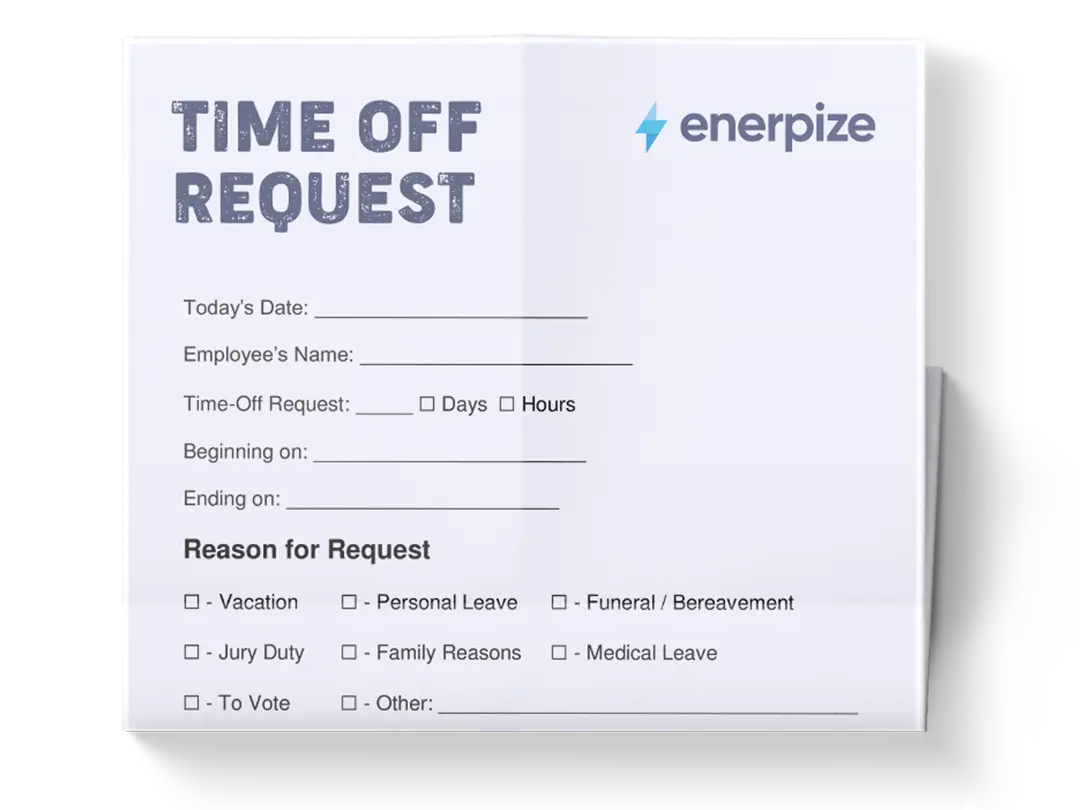
A time off request form template is a formal process for reviewing and approving employee leave requests. It enables employees to submit time-off details while allowing managers and HR teams to track decisions, approvals, and records in a consistent, auditable format.
By centralizing all relevant information in clearly defined fields, the template removes ambiguity, reduces back-and-forth, and ensures every request follows the same internal process.
What Does The Time Off Request Template Contain?
Request ID
A unique identifier is assigned to each time-off request to distinguish it from others and enable easy tracking, referencing, and record management.
Employee Name
Identifies the employee submitting the request to ensure accountability and clarity.
Employee ID
Provides a formal internal reference tied to the employee’s record within the organization.
Department
Indicates the employee’s department, allowing managers and HR to assess team availability and workload impact.
Leave Type / Type of Leave
Specifies the leave category requested, such as Annual Leave, Sick Leave, Personal Leave, Unpaid Leave, Emergency Leave, or Other.
Start Date
The first day of the requested time off.
End Date
The final day of the requested time off.
Total Days / Total Number of Days Requested
Records the total duration of the leave period, typically expressed in working days unless otherwise specified.
Paid / Unpaid
Indicates whether the requested leave is compensated or unpaid.
Reason / Reason for Leave (Optional)
Allows the employee to provide context or explanation for the request, if necessary.
Handover / Coverage Plan (If Applicable)
Documents how responsibilities will be managed during the employee’s absence.
Request Date
Captures the date on which the employee submitted the request.
Manager / Supervisor Name
Identifies the individual responsible for reviewing and deciding on the request.
Decision / Status
Shows whether the request is Approved, Rejected, or Needs Revision.
Approval Date
Records the date on which the decision was finalized.
Manager Comments / Notes
Provides space for additional remarks, clarifications, or internal comments related to the decision.
Employee Declaration
A confirmation statement in which the employee acknowledges the accuracy of the information and their understanding of company policy.
Employee Signature and Date
Formalizes the submission and confirms employee accountability.
HR Use Only
A dedicated administrative section for internal recording and processing.
Recorded By
Identifies the HR representative or administrator who logged the request.
Date Recorded
Confirms when the request was officially entered into records.
Optional Notes (Internal)
Reserved for internal documentation that is not required for employee-facing communication.
How to Use The Time Off Request Template
1- Begin with Employee Identification
The employee first completes the Employee Information section by entering their name, employee ID, department, and (if applicable) job title. This establishes ownership of the request and ensures it can be accurately matched to internal records.
2- Select the Appropriate Leave Type
Under Leave Details, the employee selects the relevant Type of Leave by checking the appropriate option. This step defines how the request will be interpreted with respect to policy and entitlement.
3- Enter the Requested Dates
The employee enters the Start Date and End Date for the requested time off. These dates define the scope and duration of the absence.
4- Specify the Total Number of Days Requested
Based on the selected dates, the employee enters the Total Number of Days Requested. This field summarizes the duration and supports review and planning.
5- Indicate Paid or Unpaid Status
The employee selects whether the leave is paid or unpaid, clarifying compensation expectations.
6- Provide Optional Context and Coverage Details
If relevant, the employee completes the Reason for Leave and Handover / Coverage Plan sections to provide additional clarity.
7- Submit the Request For Review
The employee confirms the accuracy of the information by completing the Employee Declaration, signing, and dating the form.
8- Manager Reviews and Decides
The Manager / Supervisor reviews the request, selects a Decision (Approved, Rejected, or Needs Revision), adds comments if needed, and records the Approval Date.
9- HR Records the Request
The HR Use Only section is completed, including Request ID, Recorded By, and Date Recorded, ensuring the request is officially logged and traceable.
10- Update Status and Retain Records
The final Status and any Notes are maintained in the organization’s leave records for reference and reporting.
Importance of the Time Off Request Template
Standardizes leave documentation
A structured time off request template eliminates variation in how leave requests are submitted across the organization. Instead of employees sending informal messages, emails, or incomplete forms, every request is captured using the same fields and terminology.
Improves workforce planning
Capturing departments, start and end dates, and total days requested allows managers and HR teams to visualize upcoming absences more clearly. This makes it easier to anticipate staffing gaps, coordinate coverage, and avoid overlapping absences within the same team. Over time, these records also help identify patterns—such as peak leave periods or frequently impacted departments—enabling more informed scheduling and resource planning decisions.
Reduces administrative friction
The template minimizes back-and-forth communication by prompting employees to provide all required details upfront. Optional sections like reason for leave and handover plans help address common follow-up questions before they arise. For managers and HR, this translates into faster reviews, fewer corrections, and smoother processing, especially when handling multiple requests simultaneously.
Keeps accurate historical records
With request IDs, recorded dates, and internal notes, the template functions as a reliable historical log of employee leave. These records support internal audits, policy reviews, and reference checks, and they provide continuity even when management or HR personnel change.
Who Can Use The Time Off Request Template?
Employees
Employees benefit from a straightforward, structured process for requesting time off, with clear requirements for the information needed. The template guides them through the process step by step, reducing the risk of requests being rejected or delayed due to missing details. It also gives employees confidence that their request is formally documented and that it is fairly reviewed using the same criteria as others.
Managers and supervisors
Managers use the template as a decision-making aid rather than a simple approval form. With all relevant details—dates, leave type, duration, and coverage considerations—presented in one place, managers can assess requests more objectively and consistently. The built-in decision and comments fields also allow them to document reasoning, which is valuable for transparency and future reference.
HR teams
For HR, the template serves as an operational control tool. It standardizes how leave data is collected, recorded, and stored, making it easier to maintain clean records across departments. The “HR Use Only” section clearly separates administrative tasks from employee-facing information, helping HR teams manage documentation without altering the original request.
Small and growing businesses
Organizations without dedicated HR software can use this template as a practical employee time-off request form to bring structure to leave management. It provides many of the controls of a formal system—tracking, approvals, documentation—without added complexity or cost.