Posted on 17 December 2025
Employee Weekly Report Template Excel & Word
- The employee weekly report template is available in Excel, Word, Google Sheets, and Google Docs.
- It tracks weekly tasks, outputs, focus areas, issues, and priorities in one structured report.
- Used for performance monitoring, workload visibility, and weekly alignment between employees and managers.
- Ideal for individual contributors, team leads, managers, and operations teams seeking consistent, data-backed weekly reporting.


What is an Employee Weekly Report Template?
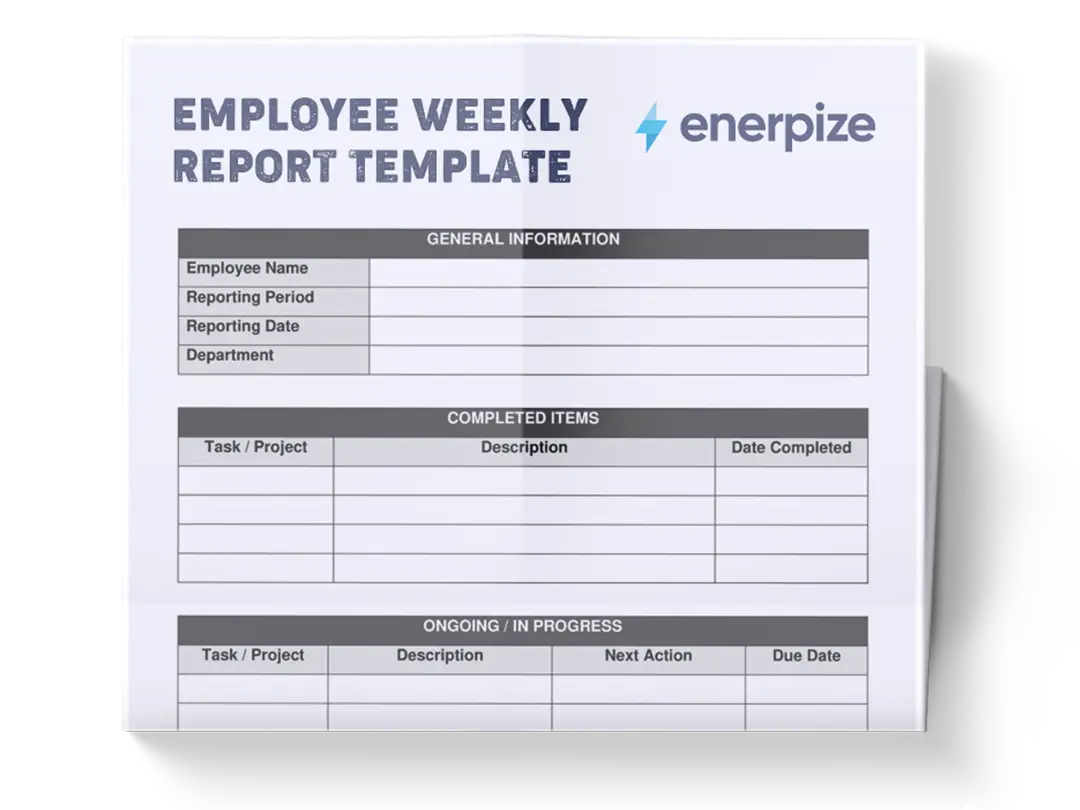
An employee weekly report template captures planned work, completed work, work in progress, and the results of that work. It connects activity (tasks and focus areas) with outcomes (metrics and variances), while also documenting constraints, support needs, and forward-looking priorities.
Rather than relying on informal updates or narrative status emails, the template enforces a repeatable format that makes weekly performance measurable, comparable, and actionable. When used consistently, it becomes a practical management tool to help employees self-assess their output, managers quickly identify risks or bottlenecks, and teams maintain alignment without excessive meetings.
What Does the Employee Weekly Report Template Contain?
Work Summary
This section provides a quantitative overview of weekly execution. It compares planned, completed, and in-progress tasks and calculates a completion rate. Its layout implies performance tracking across multiple task groupings rather than a single total, enabling trend comparison within the same week.
- Tasks Planned: The number of tasks scheduled or committed for the week.
- Tasks Completed: Indicates how many planned tasks were fully completed during the reporting period.
- Tasks In Progress: Captures work that was started but not completed, signaling carryover into the following week.
- Completion Rate: Expresses completed work as a percentage, making execution efficiency immediately visible.
Key Outputs / Results
This section translates activity into measurable outcomes. It pairs actual results with predefined targets and calculates variance, reinforcing accountability and outcome-focused reporting.
- Metric: Defines the specific output being measured (e.g., production, performance, or delivery indicators).
- Actual: Records what was achieved during the week.
- Target: Represents the expected or planned benchmark for the same period.
- Variance: Highlights the difference between actual performance and the target, signaling overperformance or shortfall.
Focus Areas
This section lists the main areas of effort during the week. Its simple, unquantified format implies prioritization and directional focus rather than task-level tracking.
Issues / Blockers / Support Needed
This section documents obstacles that affected execution and explicitly links them to required support, reinforcing problem visibility rather than silent failure.
- Issue: Describes the specific problem encountered.
- Impact: Explains how the issue affected progress, timelines, or results.
- Support Needed: States the action, decision, or resource required to resolve the issue.
Priorities for Next Week
This section shifts the report from retrospective to forward-looking planning. The numbered structure implies ranked importance.
- Priority: Indicates order or importance level.
- Description: Defines the objective or outcome to be achieved in the coming week.
Self-Check
This section introduces qualitative reflection, balancing numeric performance data with personal assessment.
- Item: Frames the reflection prompt (e.g., performance strengths, gaps, or workload state).
- Response: Captures the employee’s evaluation or observation.
How to Use the Employee Weekly Report Template
1- Complete the Work Summary First
Begin by filling in the rows for planned, completed, and in-progress tasks. These numbers should reflect actual execution for the week, not effort or time spent. Once entered, calculate the completion rate to quantify execution efficiency. This section sets the performance baseline for the entire report.
2- Record Measurable Outcomes in Key Outputs / Results
Next, move to key outputs/results. For each listed metric, enter the actual result achieved during the week and the corresponding target. Calculate the variance to clearly show performance gaps or wins. This step ensures the report captures results, not just activity.
3- List Weekly Focus Areas
Populate the focus areas section with the primary areas you concentrated on during the week. These should align logically with both the tasks tracked earlier and the metrics reported above, reinforcing coherence across the report.
4- Document Issues, Blockers, and Support Needs
In issues/blockers/support needed, record any factor that slowed progress or reduced effectiveness. For each issue, explicitly state its impact, then clearly define the support needed. This transforms the report into a problem-solving tool rather than a passive update.
5- Define Priorities for Next Week
Fill in priorities for next week by ranking upcoming objectives in order of importance. Each description should be outcome-oriented and realistically achievable, informed by unfinished work, performance gaps, or upcoming deliverables.
6- Complete the Self-Check
Finish with the self-check section. reflect honestly on what went well, what needs attention, and how manageable the workload felt. This final step encourages ownership and continuous improvement.
Importance of Employee Weekly Report Template
Creates Immediate Performance Visibility
By presenting planned work, completed tasks, and measurable outcomes side by side, the template makes performance visible at a glance. Completion rates and metric variances eliminate ambiguity and reduce reliance on subjective status updates.
Connects Effort to Results
The separation between Work Summary and Key Outputs ensures activity is evaluated through outcomes. This prevents teams from equating busyness with effectiveness and keeps attention on results that matter.
Surfaces Risks Before They Escalate
The Issues / Blockers / Support Needed section forces early documentation of constraints. Managers can intervene sooner, reducing downstream delays or missed targets.
Improves Weekly Alignment
By ending with Priorities for Next Week, the template creates a clear handoff from review to planning. This continuity supports smoother weekly execution and fewer misaligned expectations.
Encourages Accountability and Self-Reflection
The Self-Check section balances quantitative data with reflection, reinforcing personal responsibility for performance while highlighting workload sustainability.
Who Can Use the Employee Weekly Report Template?
Individual Contributors
Individual contributors can use the template as a structured self-management and communication tool. By documenting planned tasks, completed work, and in-progress items, employees gain clearer visibility into how their time and effort translate into tangible outcomes.
Team Leads
Team leads benefit from the template as a standardized reporting format across multiple team members. Because everyone reports using the same structure—tasks, outputs, issues, and next-week priorities—leads can quickly compare execution levels, spot uneven workloads, and identify recurring blockers without manually interpreting different reporting styles.
Managers
For managers, the template functions as a high-signal performance snapshot rather than a detailed task log. Completion rates, output variances, and ranked priorities enable managers to quickly assess progress and risk, reducing the need for frequent status meetings.
Operations and Performance Teams
Operations and performance teams can use the template as a lightweight, consistent data source for weekly reports across teams and departments. Over time, the Work Summary and Key Outputs sections support trend analysis of execution efficiency, recurring bottlenecks, and performance gaps.