Posted on 23 March 2025
Free Income and Expense Statement Template for Excel, Google Sheets, Word and PDF
- Free to download in Excel, Google Sheets, Word and PDF, with a filled sample
- Turns one transaction list into a monthly income and expense statement with budget
- Averages three months of income, expenses and surplus for lenders and debt advisers
- Checks every row and matches your account balances to your bank statements
An income and expense statement template is a free spreadsheet that records the money you receive and spend over a set period, sorts both into categories and subtracts expenses from income to show a surplus or deficit. Businesses, households and nonprofits use it to track performance, plan budgets and show lenders monthly figures.


Last updated: November 12, 2026
What it is
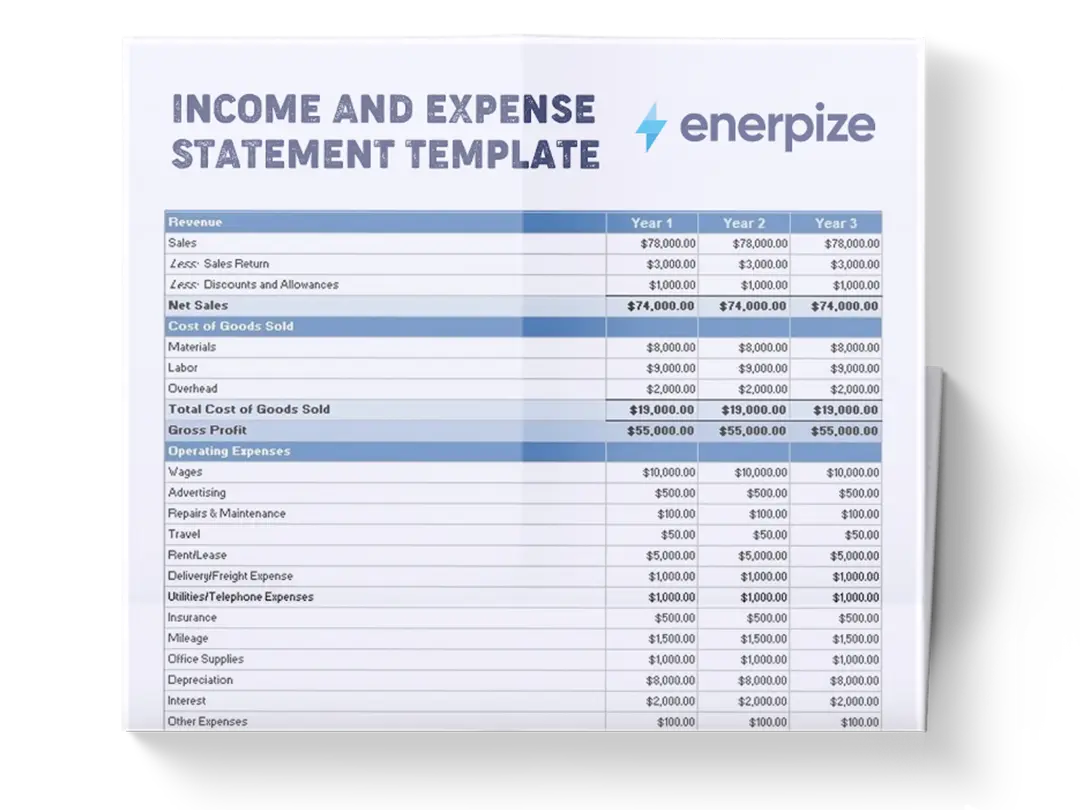
An income and expense statement template that turns one list of transactions into a monthly statement, a 12-month view, a 3-month average and account balances.
When you need it
At month end, before a loan or debt review, when a board or treasurer asks for figures, or when you simply want to know where the money went.
What's inside
Settings, Transactions, Monthly Statement, 12-Month Summary, 3-Month Average and Account Balances, plus a one-page printable income and expenditure form.
Formats
Excel, Google Sheets, Word and PDF. Free to download.
Want to see it filled in first?
Make your own copy of the filled sample in Google Sheets.
What Is an Income and Expense Statement Template?
Your bank balance went up this month. Good news?
Maybe. Maybe a customer paid three invoices early, and next month is already spent.
An income and expense statement template is a ready-made spreadsheet that lists the money you received and the money you spent over a period, sorts both into categories and subtracts one from the other. The result is a surplus or a deficit. Businesses, households and nonprofits use it to see performance, plan budgets and show figures to lenders.
It goes by plenty of names. An income and expenditure statement. An income and expenditure template. An I&E form. A statement of income and expenses. An income and expenses template. An income and expense worksheet. Lenders and debt advisers often just say “your financial statement”. Same idea every time: money in, money out, what's left.
every amount, once
rent, sales, fuel
totals by month
what's left
What it isn't: a full set of accounts. It records money when it moves, so it won't show unpaid invoices, depreciation or what you owe a supplier next month. For that, you need an accrual income statement.
Income and Expense Statement vs Income Statement vs Receipts and Payments Account
Search for one and you'll get all three. They overlap, but they don't answer the same question.
| Document | Records amounts | Main question | Usually prepared by |
|---|---|---|---|
| Income and expense statement | When money moves | How much came in, went out and is left? | Small businesses, households, landlords |
| Income statement (profit and loss) | When income is earned and costs are incurred | Did the business make a profit? | Companies and their accountants |
| Receipts and payments account | When money moves, by fund | What did the organization receive and pay? | Small charities and clubs |
| Income and expenditure account | When earned or incurred | Is the organization running a surplus? | Nonprofits with audited accounts |
| Budget | Before anything happens | What do we expect to spend? | Anyone planning ahead |
| Cash flow statement | When money moves, by activity | Where did the cash come from and go? | Companies with full accounts |
An income and expense statement tells you what happened to your money. An income statement tells you whether you made a profit. They match only when every sale is paid in the month it's made.
Need the accrual version for a company? Use the income statement template and read our guide to the profit and loss statement.
Which Income and Expenditure Template Fits You?
Start with the person who will read your income and expense statement template. A bank, a board and you at your kitchen table want different things.
| If your situation is... | Use this | Where to find it |
|---|---|---|
| You run a small business and want monthly figures | Monthly Statement with budget and variance | Excel or Google Sheets |
| A lender, landlord or debt adviser wants three months of figures | 3-Month Average | Excel or Google Sheets |
| You want to fill in one month by hand | Printable income and expenditure form | Word and PDF files |
| You're a treasurer reporting to a committee | 12-Month Summary with groups set to your funds | Excel or Google Sheets |
| Two people keep the books together | The same workbook, shared online | Google Sheets copy |
| You only need to watch spending | A dedicated business expenses template | A separate download |
| You need to forecast cash for the months ahead | A dedicated cash flow statement template | A separate download |
What Does the Income and Expense Statement Template Contain?
Every row on the Transactions sheet, the income and expense worksheet at the heart of the file, carries the same fields. These are the ones that do the work.
| Field | What goes in it | Why it matters |
|---|---|---|
| Date | The day the money moved | Decides which month the amount lands in |
| Account | Bank, cash, card or mobile money | Keeps a running balance you can check against a statement |
| Description | Who paid you or who you paid, and why | Answers the question your accountant will ask in six months |
| Category | Rent, product sales, fuel and so on | Turns a list of amounts into a statement |
| Money In / Money Out | One amount, in one column | Sets the direction, so you never type a minus sign |
| Account Balance | Calculated after every row | Spots a missing entry the day it happens |
| Overall Balance | Calculated across all accounts | Shows your total position at a glance |
| Check | OK, OK (refund) or what to fix | Keeps wrong rows out of your totals |
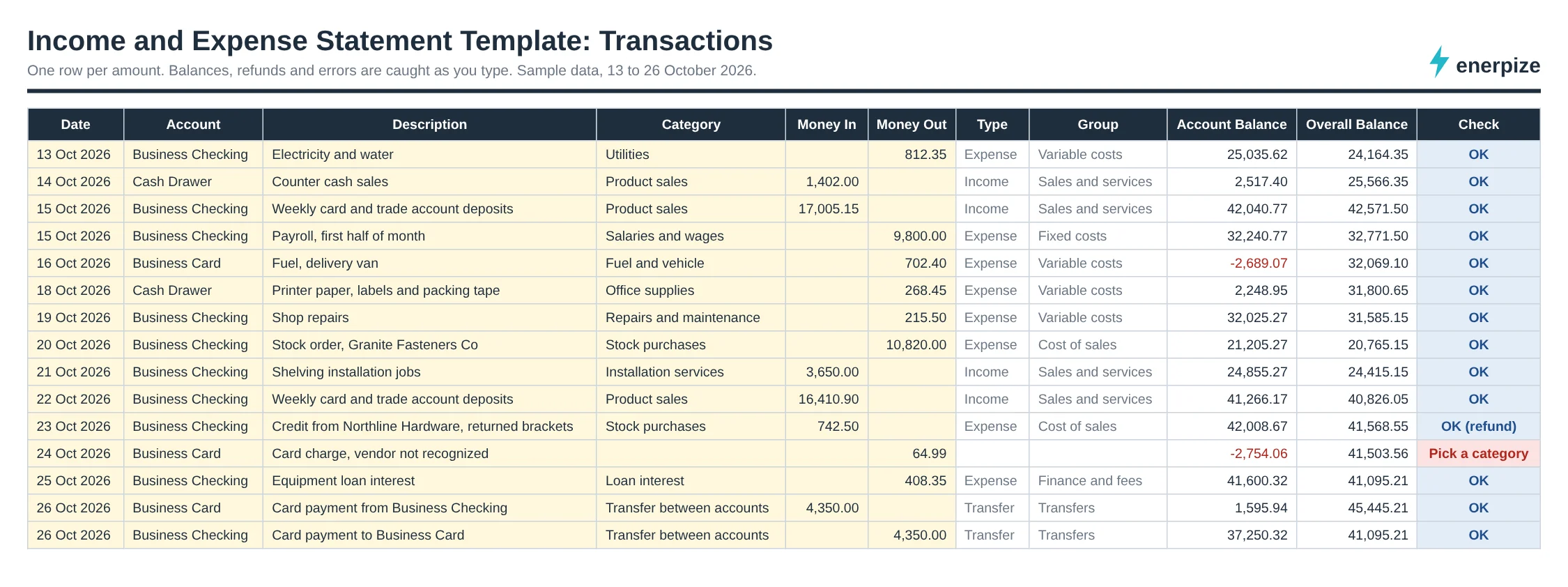
The field that matters most is Category. Leave it blank and the amount still moves your bank balance, but it never reaches your statement. In our sample, one $64.99 card charge with no category sits outside October's figures until someone works out what it was.
What the Enerpize Income and Expense Statement Template Includes
The old version of this page offered a transaction list with running balances. That list is still here, field for field. What it never did was add up to a statement. So we built the rest: one list feeding five views, with formulas only and no macros, so it opens in Excel and Google Sheets without a warning. Yellow cells are the only ones you type in.
It holds 1,500 transaction rows, 8 accounts, 8 groups and 40 categories, and your year can start in any month.
One List, Every Statement
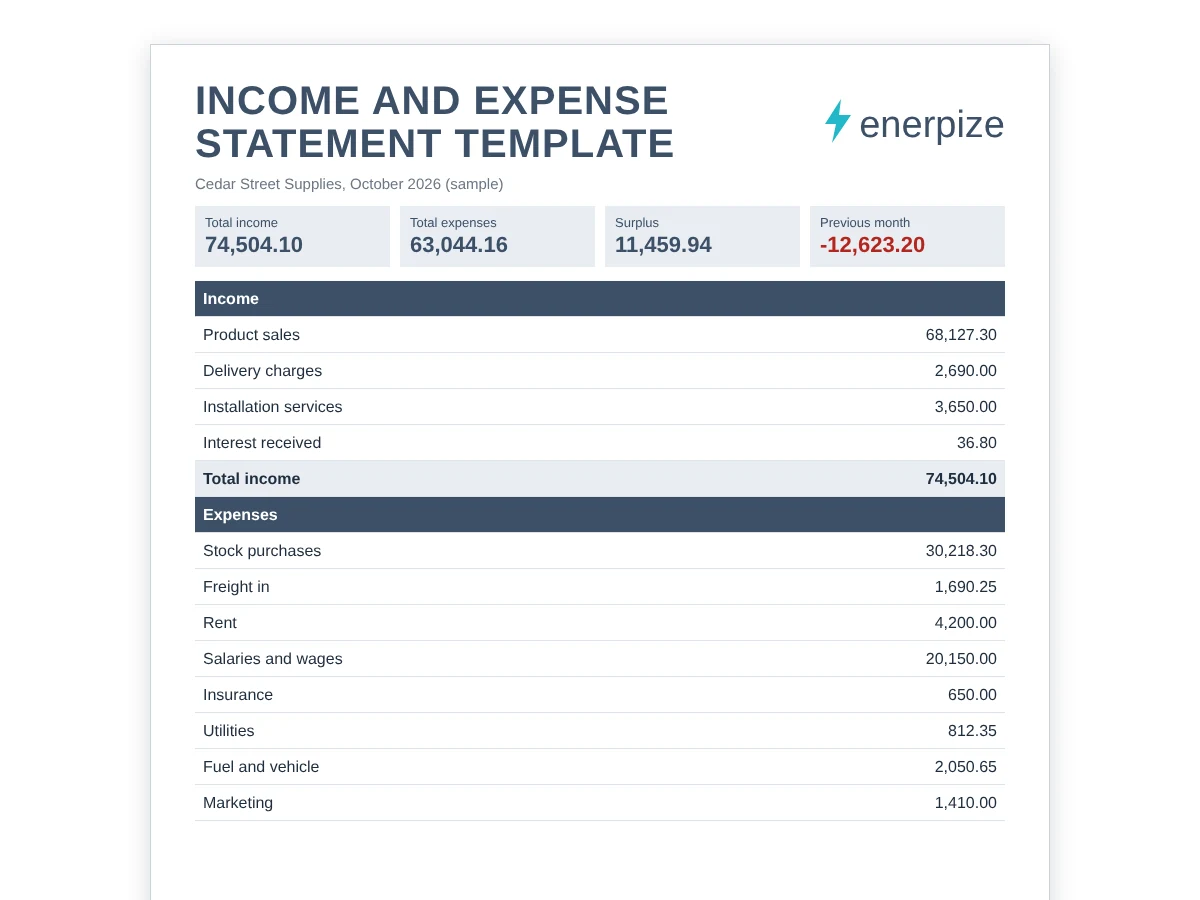
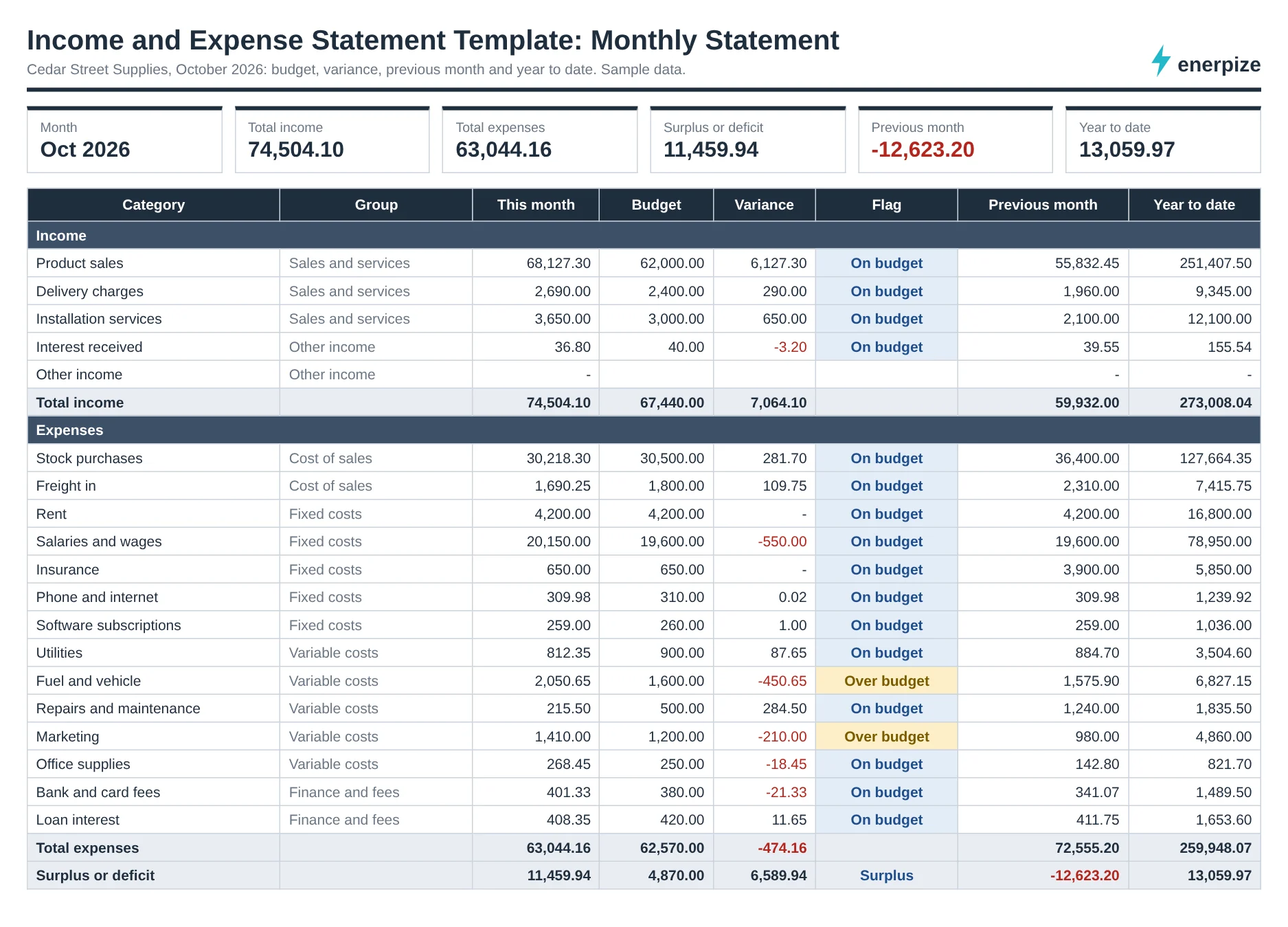
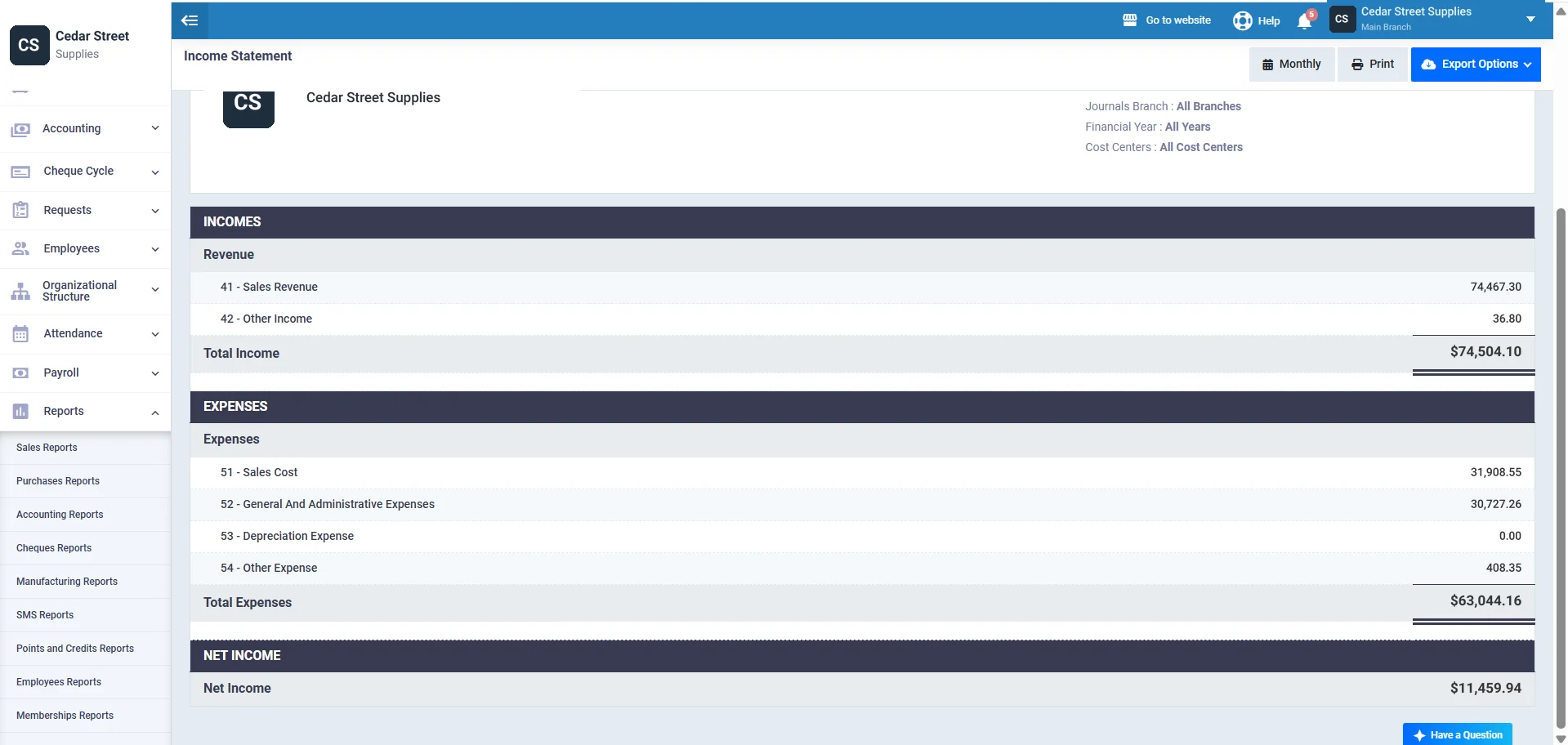
Type each amount once on Transactions. Pick a month on Monthly Statement and you get every category with budget, variance, previous month and year to date. The sample business, Cedar Street Supplies, shows $74,504.10 in and $63,044.16 out for October 2026, a surplus of $11,459.94.
A Spellchecker for Money
The Check column reads every row. Both amount columns filled? A word in the amount cell? A date outside your year? It tells you, and that row stays out of the statements until it's fixed. Money In on an expense category reads as a refund, so a supplier credit of $742.50 lowers Stock purchases instead of inflating income.
The Year on One Screen
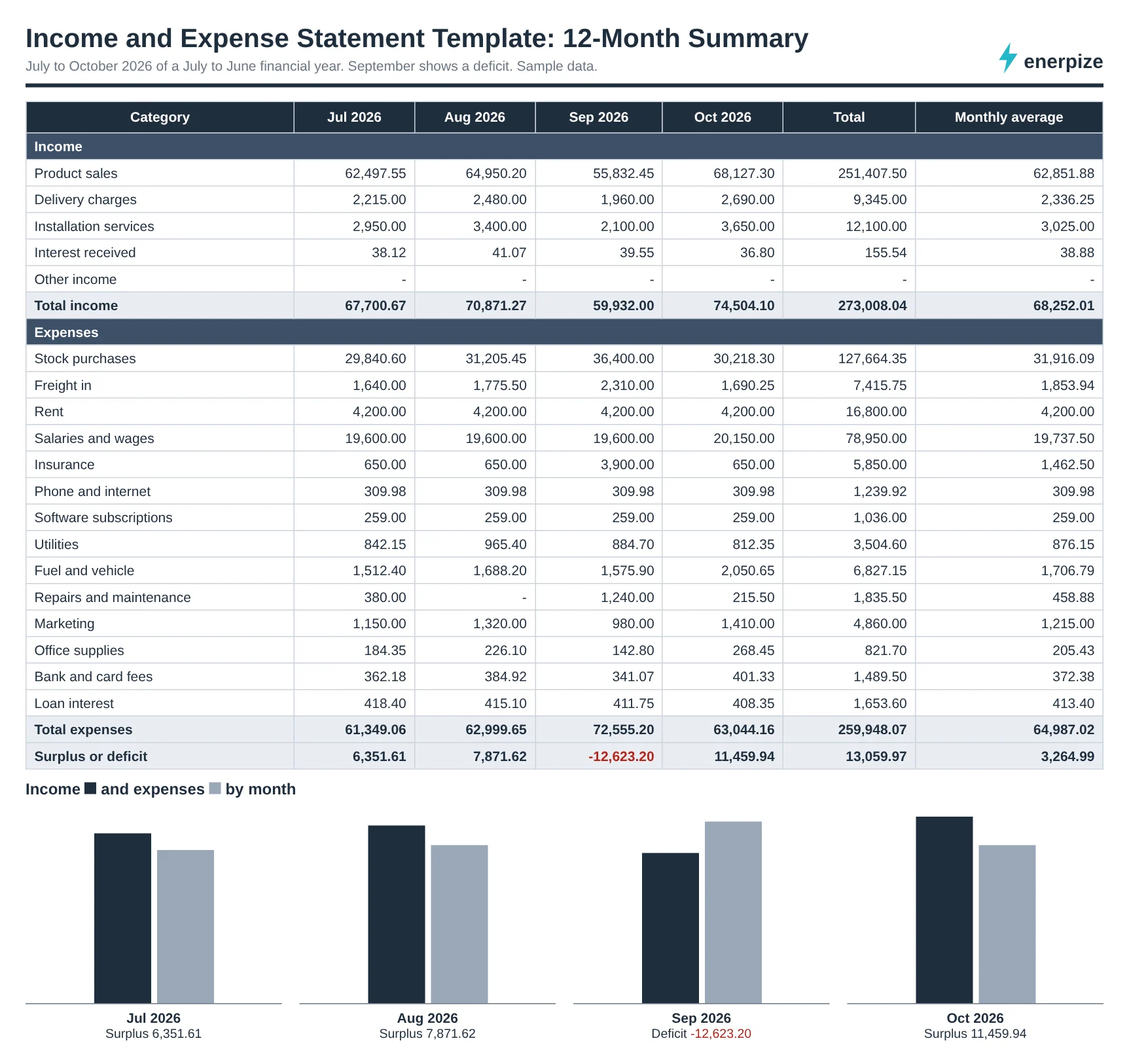
12-Month Summary lays every category across your financial year with totals, a monthly average and a chart. One glance shows Cedar Street's September: a deficit of $12,623.20, caused by a holiday stock order and a $3,250 annual insurance renewal landing in the same month.
The View a Lender Asks For
Pick a month and 3-Month Average shows income, expenses and surplus by group for that month and the two before it, then averages them. For August to October, the sample averages a $2,236.12 surplus with 1 deficit month out of 3. That's an honest answer to “what can you afford?”
A Balance That Argues Back
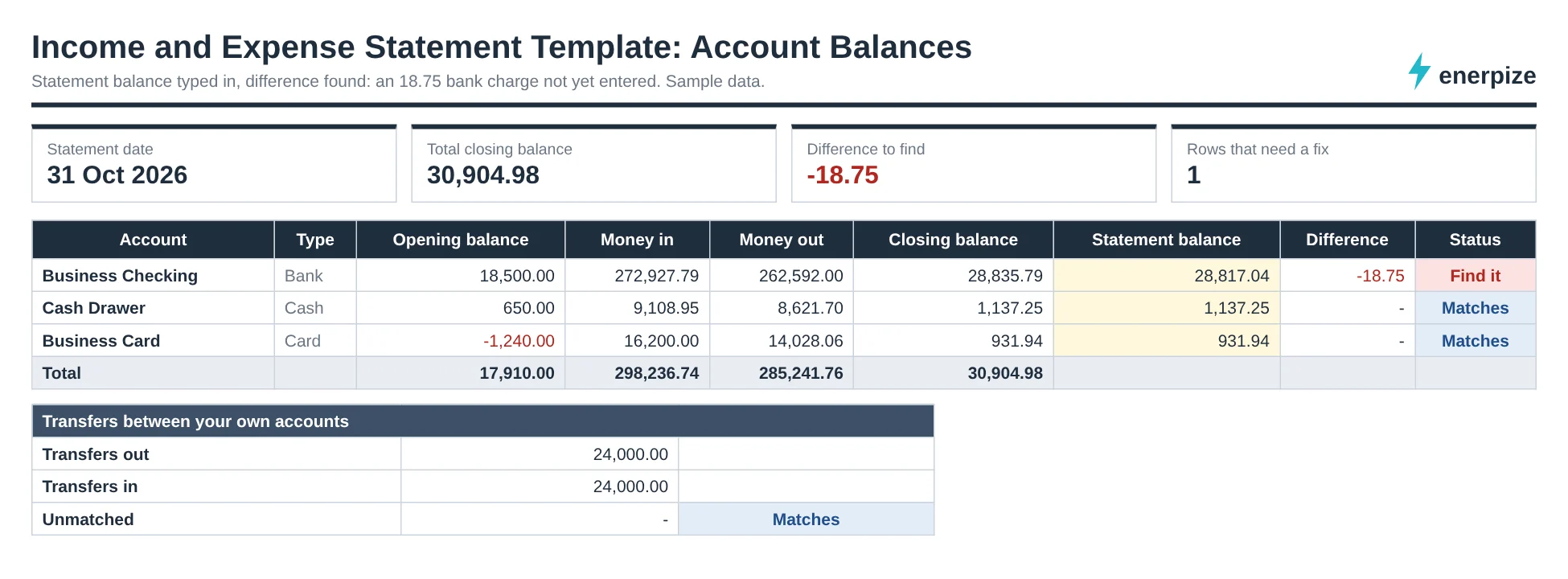
Type the closing balance from each bank or card statement. Account Balances compares it with your records and shows the gap. In the sample, Business Checking is $18.75 short: a bank charge nobody entered. Transfers between your own accounts are checked too, so a card payment logged on only one side shows up.
Fixed, Variable and Priority Expenses
Every category belongs to a group, and groups are what the 3-Month Average and the group totals read. Use the business set or switch to a household set.
| Group | Business example | Household example | What it tells a reader |
|---|---|---|---|
| Fixed | Rent, salaries, insurance | Rent or mortgage, rates, insurance | What you owe before you sell anything |
| Variable | Fuel, utilities, marketing | Groceries, transport, phone | What moves with activity or choice |
| Cost of sales | Stock purchases, freight in | Not used | What each sale costs you |
| Priority | Loan interest, tax payments | Rent arrears, energy, court fines | What has serious consequences if missed |
| Transfers | Card payment from checking | Moving money to savings | Nothing: excluded from income and expense |
Why bother with groups? Because “expenses rose by $9,500” says nothing. “Cost of sales rose by $5,700 while fixed costs held” tells you to look at the stock order.
Sample Income and Expenditure Statement (Filled Sample)
Want to see a sample income and expenditure statement before you type a thing? Make your own copy of the filled sample in Google Sheets. It holds four months of a fictional supplies business, Cedar Street Supplies, with a July to June financial year.
How to Read the October Sample
- Start with the bottom line. A $11,459.94 surplus against a budgeted $4,870.00, so the month beat plan by $6,589.94.
- Then the flags. Fuel came in at $2,050.65 against a $1,600.00 budget and Marketing at $1,410.00 against $1,200.00. Both are more than 10% over, so both say Over budget.
- Then what didn't flag. Salaries ran $550.00 over, but that's 2.8% of budget, so it stays On budget. The alert percentage in Settings decides where that line sits.
- Then the previous month. September shows a $12,623.20 deficit. Year to date is still a $13,059.97 surplus.
- Finally the note at the top. One row needs a fix and is left out. That's the unknown card charge.
Business numbers not your situation? The Word and PDF form is laid out for a household: income, priority bills, living costs, other spending, debt repayments and a signature line.
Income and Expense Statement Formulas
Five calculations do all the work. Here they are in plain English, each with a number from the sample.
Surplus or Deficit
Surplus or deficit = Total income − Total expenses
October: 74,504.10 − 63,044.16 = 11,459.94. A negative result is a deficit, shown in red.
Expense Variance
Expense variance = Budget − Actual
Fuel: 1,600.00 − 2,050.65 = −450.65. For income it runs the other way, Actual − Budget, so a negative variance is always bad news.
Over Budget Flag
Over budget when Actual > Budget × (1 + Alert %)
With a 10% alert: 1,600.00 × 1.10 = 1,760.00. Fuel at 2,050.65 passes it, so it flags.
3-Month Average Surplus
Average surplus = (Month 1 + Month 2 + Month 3) ÷ 3
August to October: (7,871.62 − 12,623.20 + 11,459.94) ÷ 3 = 2,236.12.
Closing Balance
Closing balance = Opening balance + Money in − Money out
Business Checking: 18,500.00 + 272,927.79 − 262,592.00 = 28,835.79. The bank says 28,817.04, which is where the $18.75 gap comes from.
How to Use the Income and Expense Statement Template
1- Set Your Year and Currency
Open Settings, type your name and currency, and pick the month your financial year starts. Every month list in the file follows that choice.
⚡ Tip: Running July to June, or April to March? Set it here first. Changing it later is fine, but rows outside the new year will be flagged. Any income and expenses template works better when the year is right from day one.
2- List Your Accounts With Opening Balances
Add each bank account, cash box, card and mobile money wallet with the balance on day one of the year. A card you owe money on starts as a negative number.
⚡ Tip: Take opening balances from the statement dated the day before your year starts, not from memory.
3- Check Groups and Categories
Keep the business set or switch to household groups such as Priority bills and Living costs. Give each category a type, a group and, if you want flags, a monthly budget.
⚡ Tip: Fewer categories beat more. Twelve you actually use will tell you more than forty you guess between.
4- Log Every Amount Once
On Transactions, add the date, account, description, category and one amount. Move money between your own accounts with two rows using the transfer category: one out, one in.
⚡ Tip: Log weekly. Ten minutes on Friday beats a whole Sunday at month end.
5- Fix Every Check Message
Anything other than OK stays out of the statements. Clear the messages before you read a single total.
⚡ Tip: Filter the Check column for anything that isn't OK. It's faster than scrolling.
6- Reconcile, Then Read the Statement
Type each statement balance on Account Balances. Once the differences are zero, open Monthly Statement and pick the month.
⚡ Tip: A difference of a few dollars is almost always a bank fee or interest you haven't logged.
Common Mistakes With an Income and Expense Statement
✕ Counting transfers as income
Why it matters: Paying your card from checking looks like money out and money in. Count both and your statement inflates on both sides.
Fix: Use the transfer category for both rows. Account Balances shows any one-sided transfer.
✕ Typing negative amounts for refunds
Why it matters: A minus sign in Money Out turns a refund into a confusing double negative.
Fix: Put a supplier refund in Money In on the expense category. The sheet reads it as a refund.
✕ Mixing personal and business money
Why it matters: One family grocery run in the business list distorts every average after it.
Fix: Keep separate files, or at least separate accounts and categories.
✕ Reading the month before reconciling
Why it matters: A missing bank charge or a double entry changes the bottom line.
Fix: Clear Account Balances to zero first, then read the statement.
✕ Calling a cash surplus a profit
Why it matters: An income and expense statement ignores unpaid invoices and bills you owe.
Fix: Use an accrual income statement when someone asks about profit.
✕ Lumping annual bills into one month
Why it matters: A yearly insurance renewal makes September look like a crisis.
Fix: Budget a monthly share for annual bills, and read the 12-Month Summary, not one month.
Why an Income and Expense Statement Matters
Half of small employers say their cash comes in unevenly. In the Federal Reserve Banks' 2025 Small Business Credit Survey report on employer firms, 51% of 7,653 firms surveyed from September to November 2024 named uneven cash flows as a financial challenge, and 56% named paying operating expenses.
So what? A monthly statement is where uneven shows up early, while there's still time to do something about it.
It Shows the Month Before the Bank Does
A falling balance tells you something went wrong. A statement tells you what: a stock order, a renewal, a slow month of sales.
It Makes a Budget Honest
A budget is a guess. A budget beside an actual, with a flag at 10%, is a decision waiting to be made.
It Answers the Lender's First Question
Banks, landlords and debt advisers ask what comes in and what goes out every month. Three months of clean figures get you through that conversation faster.
It Gives Your Accountant Something to Work With
Categorized, dated, reconciled rows are the raw material for a tax return or a set of accounts. Our guide on how to track business expenses covers the habits that keep them clean.
Income and Expense Spreadsheet vs Accounting Software
An income and expense statement template is enough until the rows start piling up. Here's where each one fits.
| Spreadsheet template | Enerpize | |
|---|---|---|
| Cost | Free | Free to start, no credit card |
| Entering expenses | Type each row | Type it, import from Excel, or upload an invoice or receipt for AI to read |
| Repeating bills | Copy the row each month | Recurring daily, weekly or monthly expenses |
| Bank and cash accounts | A row per account in Settings | Treasuries and bank accounts, each with its balance |
| Statement | Monthly Statement sheet | Income statement report by date range, branch and cost center |
| Sharing | Send the file | Print or export to CSV, Excel or PDF |
| Best for | A few hundred rows a year | A business that sells, buys and pays staff every week |
How Enerpize Handles Income and Expenses
What if the statement wrote itself while you got on with the work? In Enerpize, incomes and expenses are records, not spreadsheet rows, and the income statement reads them directly. The screens below use sample data.
Incomes: Every Receipt in One List
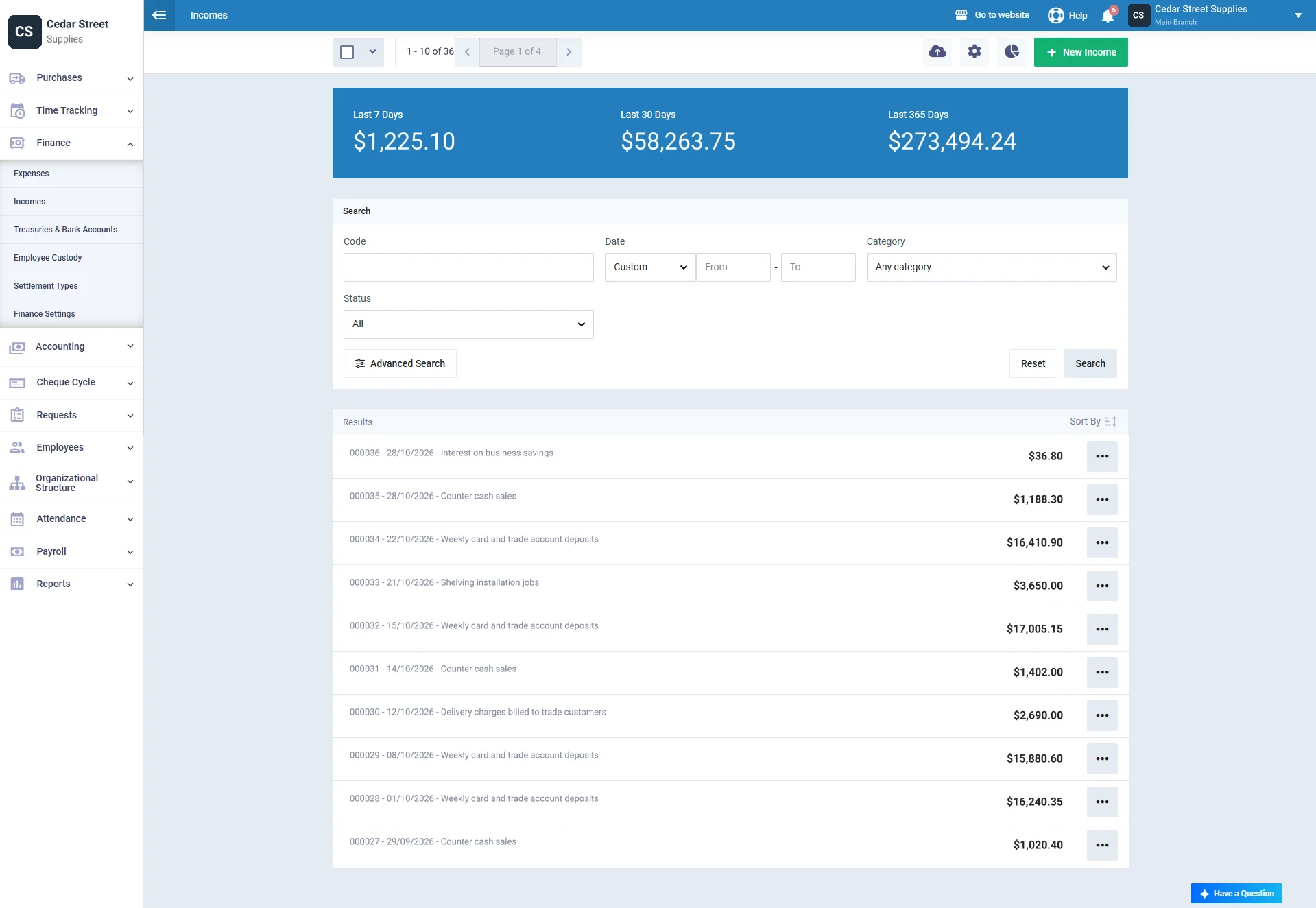
Under Finance, Incomes lists every income voucher with its code and date, and shows your totals for the last 7, 30 and 365 days above the list. Search by code, date, category or status.
Expenses: The Same View for Money Out
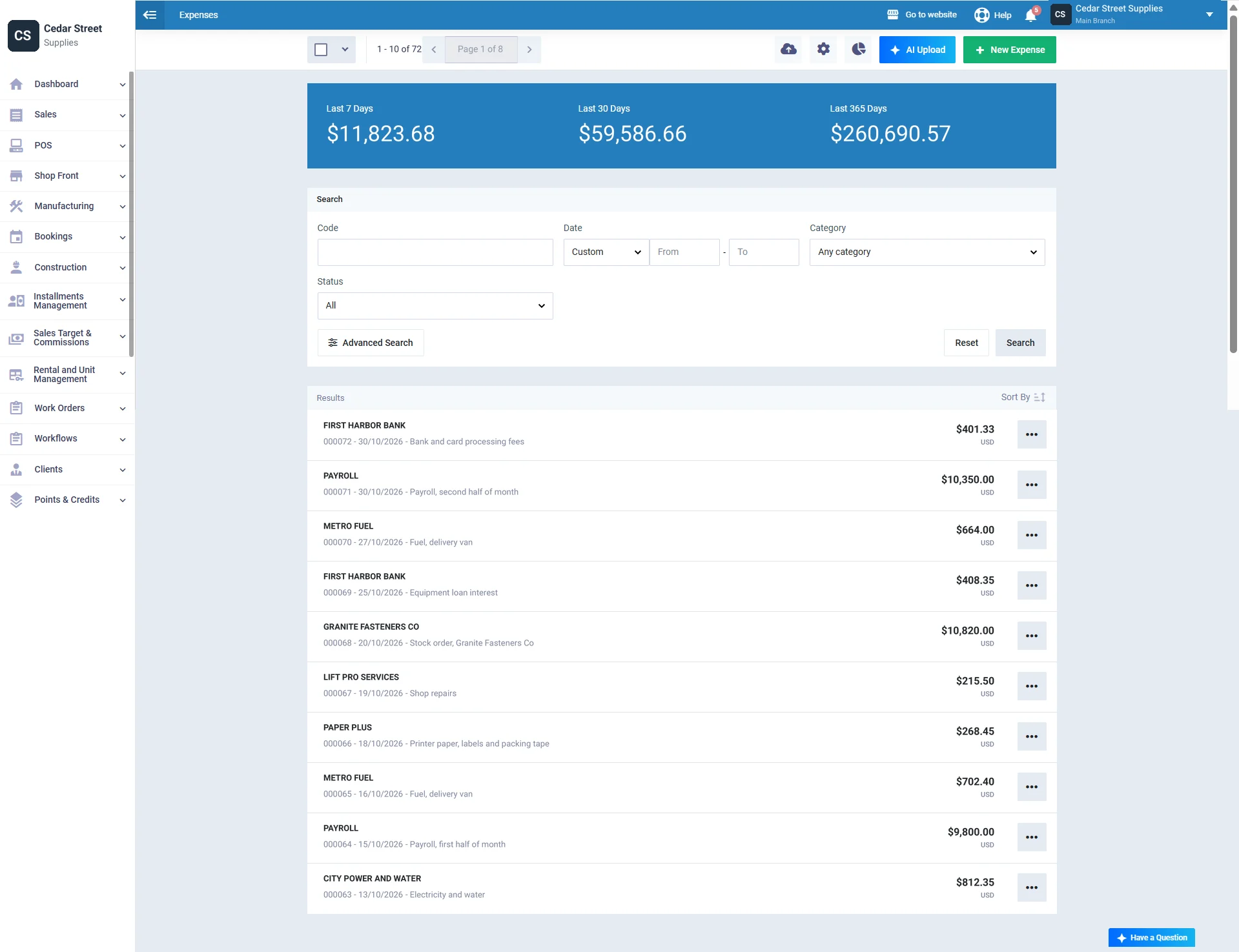
The expense management software lets you create your own expense categories, add attachments from any mobile device and set up recurring daily, weekly or monthly expenses. You can also split spending across cost centers.
AI Upload: The Receipt Fills the Form
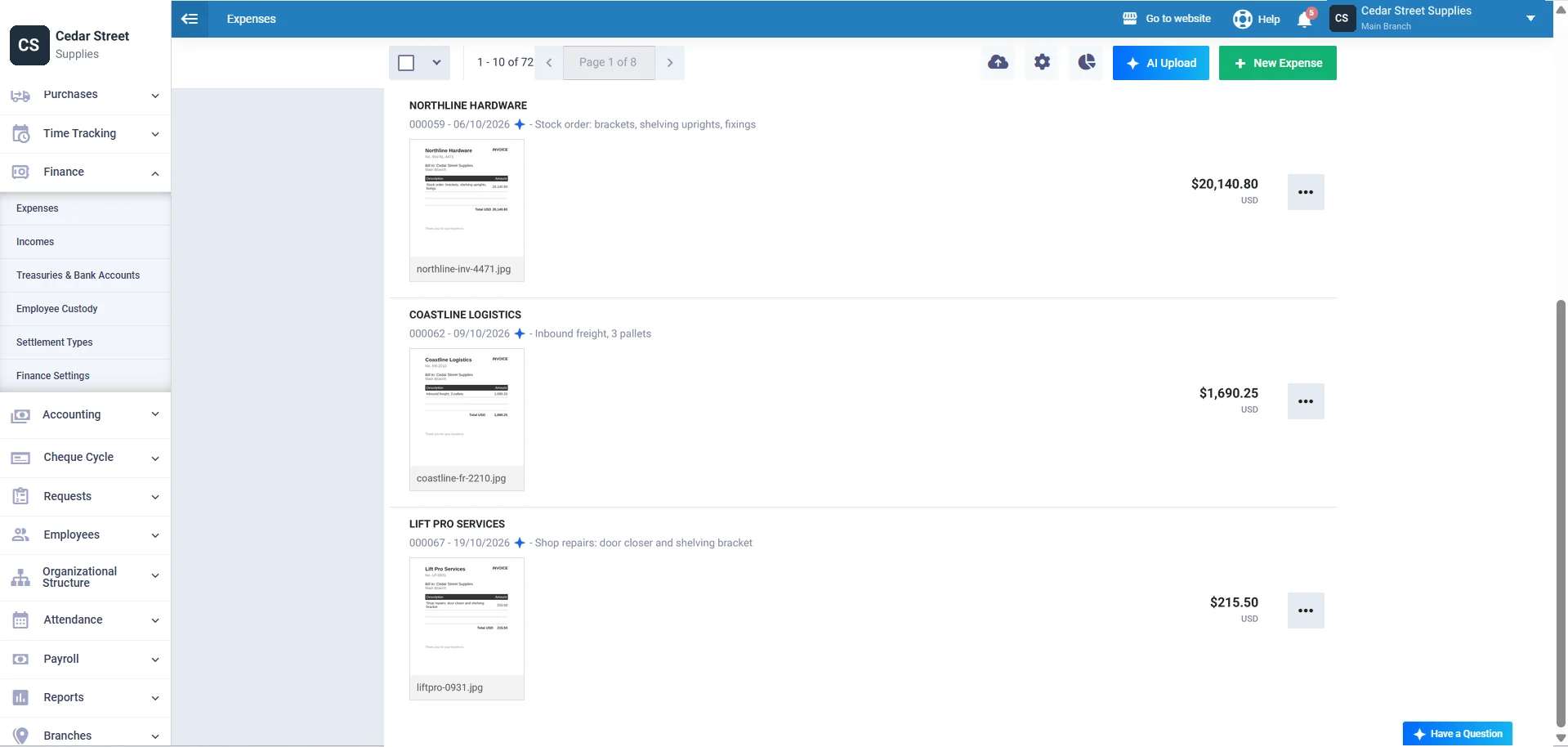
Click AI Upload and drop in PDF, PNG, JPG or XLSX files. Enerpize reads the amount, description and date, matches the vendor and tax, and stops at Ready for Review so you check each one before saving.
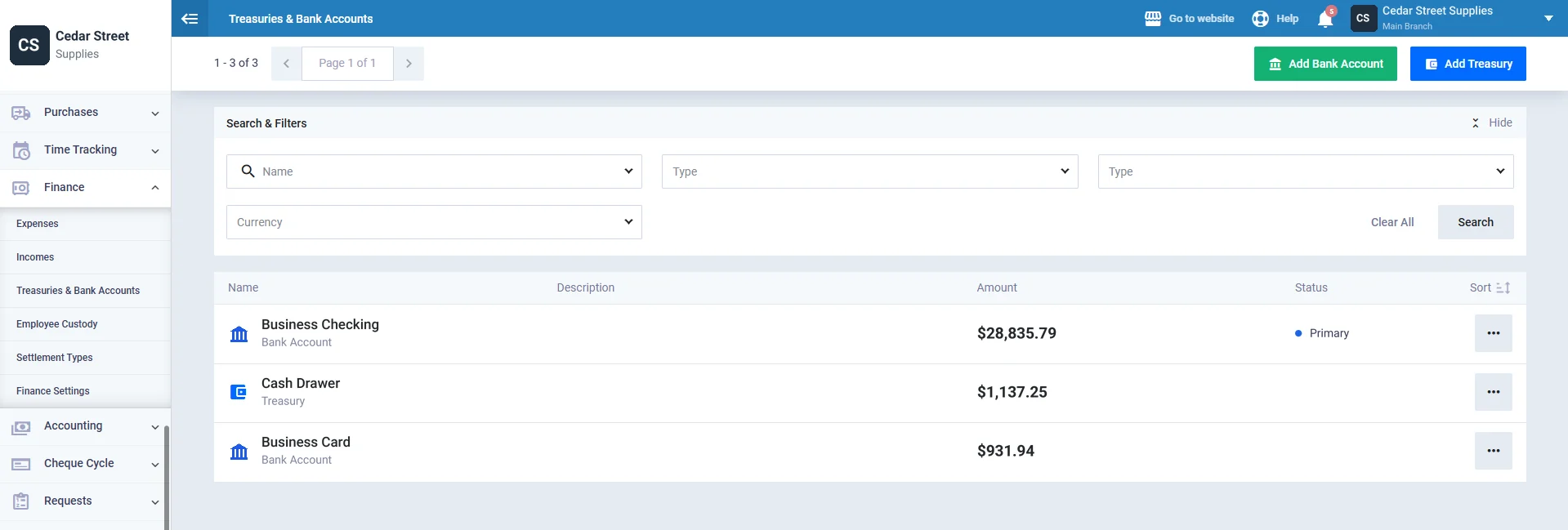
Treasuries and Bank Accounts: Balances You Don't Calculate
Add each bank account and cash treasury once, then see every balance in one list. The sample shows the checking account, the cash drawer and the business card side by side.
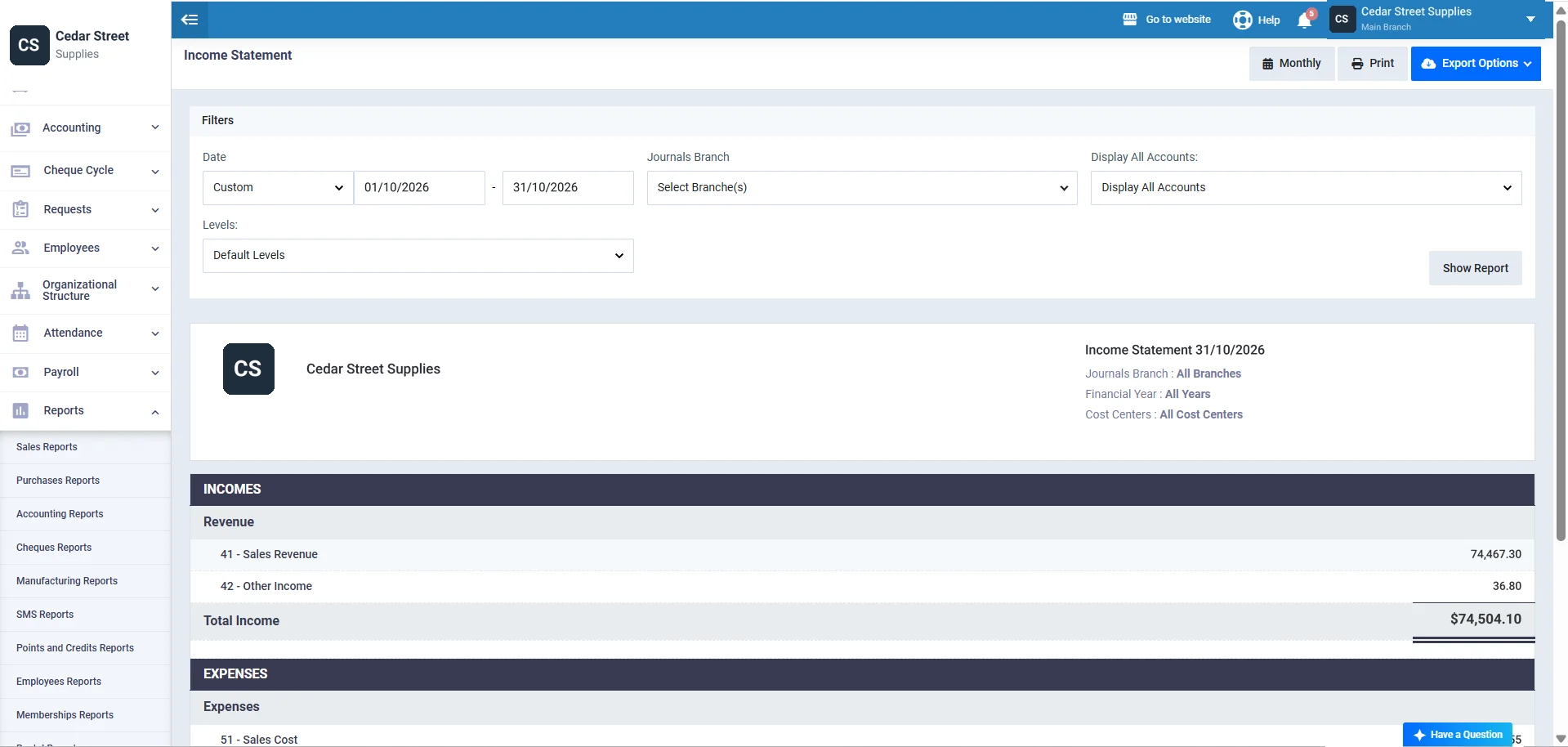
Income Statement: The Report That Replaces the Spreadsheet
The accounting software turns those records into an income statement. Under Reports, then Accounting Reports, pick a date range, branch and account level, view it by month, quarter or year, then print it or export it to CSV, Excel or PDF.
Income and Expenditure Statement Template for South Africa
Applying for credit in South Africa? The lender isn't guessing about your income. The rules tell them how to check it.
Regulation 23A of the National Credit Regulations, Government Notice R. 202 of 13 March 2015 requires credit providers to validate gross income with the three latest payslips or bank statements showing three salary deposits. Self-employed consumers can give three months of bank statements or their latest financial statements. Where income varies, the provider uses the average over at least three periods, then applies minimum expense norms by income band.
What to add:
- Three complete months of figures, then the 3-Month Average sheet for that period
- Every debt instalment as its own category, since the lender sees your credit bureau profile anyway
- Bank statements for the same three months, matched on Account Balances
- ZAR as the currency and March as the start month if you follow the tax year
⚑ Practical note: A draft amendment to Regulation 23A was published for comment on 13 August 2025, including a proposal that the expense norms table would not apply to small business. Check whether it has been finalized before you rely on the current rules. This template is not the lender's own form.
Income and Expense Statement Template for the United States
In the United States, “income and expense statement” is often the name of a court form, not just a spreadsheet.
The Hawaii Family Court Income and Expense Statement (1F-P-081) asks for gross pay per pay period, payroll deductions and monthly housing, transportation, debt and personal expenses. It says not to list expenses paid by payroll deduction, and if expenses exceed income, it asks who provides the funds. Landlords in New York City meet the term too: owners of income-producing property with an actual assessed value over $40,000 file a Real Property Income and Expense statement, and the RPIE-2025 filing was due June 1, 2026.
What to add:
- Monthly figures for at least three months before you copy them onto a court form
- Payroll deductions left out of expenses, so they aren't counted twice
- One account or group per rental property if you own more than one
- Receipts and leases kept with the file
⚑ Practical note: NYC penalties for not filing an RPIE run from $300 up to $100,000, depending on assessed value. Courts and city agencies want their own forms, so use this template to work out the numbers, then copy them across.
Income and Expenditure Account Format in Excel for India
In India, the income and expenditure account is the statement nonprofits are judged on.
Trusts and institutions registered as non-profit organizations file their audit report on Form 112 under section 348 of the Income-tax Act, 2025, according to the Income Tax Department's Form 112 FAQs. Form 112 replaces Forms 10B and 10BB from the 1961 rules, and it's due one month before the due date of the return of income. The audited financials behind it typically include a receipts and payments account and an income and expenditure account.
What to add:
- April as the start month, to match the Indian financial year
- Income groups for grants, donations and membership fees
- Expense groups for program costs and administration
- INR as the currency
⚑ Practical note: This template records cash as it moves, which is close to a receipts and payments account. Your auditor will adjust it for outstanding expenses, income due and depreciation before it becomes an income and expenditure account.
Income and Expenditure Statement Template for the United Kingdom
Small UK charities just got more room to keep things simple.
Under the Charity Commission's accounts rules for trusts and unincorporated associations, a charity can prepare receipts and payments accounts if its gross income is £250,000 or less. For financial years ending on or after 30 September 2026, that limit rises to £500,000, and the point where an independent examination is needed rises from £25,000 to £40,000. Households in debt meet a different version: the Standard Financial Statement from the Money and Pensions Service is a universal income and expenditure statement with one set of spending guidelines.
What to add:
- Groups that match your funds, if you're a charity treasurer
- Household groups such as Priority bills and Living costs, if you're preparing for a debt adviser
- GBP as the currency and your own year start month
- The 12-Month Summary for the annual report to trustees
⚑ Practical note: Check which year end you're reporting on before using the new £500,000 limit. Debt advisers complete the Standard Financial Statement with you, so bring this template's figures to the appointment rather than sending it instead.
Who Can Use the Income and Expense Statement Template?
Small Business Owners
A shop, a workshop or a cleaning company with one bank account and a card. Monthly Statement shows whether last month paid for itself before the accountant does.
Households Preparing for a Lender or Debt Adviser
Switch the groups in the income and expense statement template to Priority bills, Living costs and Debt repayments, log three months, and walk in with the 3-Month Average printed.
Treasurers of Clubs and Small Charities
Set the year to your financial year, use groups for funds, and hand the committee the 12-Month Summary. It reads like the receipts and payments account they're used to.
Landlords
Give each property its own group or account. Rent in, repairs, rates and insurance out, and a surplus per property at year end.
Freelancers and Sole Traders
A free income and expenses template for the business account keeps tax time to a morning. Pair it with a petty cash reconciliation form if you pay small bills in cash.
Income and Expense Glossary
| Term | Meaning |
|---|---|
| Surplus | Income higher than expenses for the period. |
| Deficit | Expenses higher than income for the period. |
| Cash basis | Recording amounts when money moves, as this template does. |
| Accrual basis | Recording income when earned and costs when incurred, paid or not. |
| Variance | The gap between budget and actual. Negative is always bad news in this template. |
| Reconciliation | Matching your records to a bank or card statement until the difference is zero. |
| Transfer | Money moving between your own accounts. It changes balances, not income or expense. |
| Financial year | The 12 months you report on. It doesn't have to start in January. |
| Receipts and payments account | A cash summary used by small charities and clubs. |
Key Takeaways
- An income and expense statement lists money in and money out by category and ends in a surplus or deficit.
- It records cash as it moves, so it isn't the same as an accrual income statement or profit and loss.
- The sample business made a $11,459.94 surplus in October against a $4,870.00 budget.
- One month can mislead: September's $12,623.20 deficit came from a stock order and a $3,250 annual renewal.
- Lenders read averages. The sample's 3-month average surplus is $2,236.12, with 1 deficit month out of 3.
- Reconcile before you read. An $18.75 bank charge was the only gap between records and statement.
- South African lenders validate income with three months of payslips or bank statements under Regulation 23A.
- UK charities can use receipts and payments accounts up to £500,000 of income for years ending on or after 30 September 2026.
Frequently Asked Questions
What is an income and expense statement?
An income and expense statement is a summary of the money received and the money spent over a period, grouped by category, with the difference shown as a surplus or deficit. It usually records amounts when money moves, which makes it simpler than a full income statement.
Is an income and expense statement the same as an income statement?
Not quite. An income and expense statement usually records cash when it moves. An income statement, or profit and loss, records income when it's earned and costs when they're incurred, even if unpaid. The two match only when everything is paid in the same month.
What should an income and expenditure statement include?
Your name and the period, every source of income, expenses grouped into fixed, variable and priority costs, debt repayments, totals for income and expenses, and the surplus or deficit. For a lender or debt adviser, add three months of figures and the matching bank statements.
What is the difference between an income and expenditure account and a receipts and payments account?
A receipts and payments account lists cash received and paid in the year. An income and expenditure account adjusts for amounts due but not yet paid or received, and for depreciation. Small charities and clubs often prepare the first, while audited nonprofits prepare the second.
How do I make an income and expense statement in Excel?
List transactions with a date, category and one amount, then total each category for the month with SUMIFS and subtract expenses from income. Add a budget column and a variance. Or download our income and expense statement template, which already does this with no macros.
How often should I prepare an income and expense statement?
Monthly works best for most businesses and households, because problems show up while there's still time to act. Review three months together before applying for credit, and the full year at your financial year end.
What does a surplus or deficit mean?
A surplus means income was higher than expenses for the period. A deficit means you spent more than came in. One deficit month can be normal, such as an annual bill, so read the 12-month view before deciding anything.
Can I use this template for a loan, debt review or court case?
Yes, to work out your figures, but it isn't an official form. Lenders, courts and debt advisers usually ask for their own form and supporting documents, such as three months of bank statements. Copy the totals across and keep this file as your working record.
About the Author
Omar El Bahr is a Senior Digital Growth Specialist at Enerpize, where he leads SEO, content strategy, and organic growth across international markets. He is a Forbes Communications Council contributor and has written for Entrepreneur on business communication and digital strategy.
Disclaimer
This template and the information on this page are for general guidance only and are not accounting, tax, legal or financial advice. Rules for credit applications, court filings and charity accounts differ by country and change over time, so confirm your position with a qualified adviser. This template is not an official form.