Posted on 8 November 2026
Free GST Reconciliation Template Download in Excel, Google Sheets, Word and PDF
- Available for download in Excel, Google Sheets, Word and PDF
- Ties your GST ledger to BAS labels G1, G10, G11, 1A and 1B, quarter by quarter
- Tells you whether an error goes on a later BAS or needs the original revised
- Proves your 30 June GST balance to the cent, with a cash basis bridge built in
A GST reconciliation template compares the GST in your accounting records with your lodged Business Activity Statements, period by period. It shows where G1, 1A and 1B differ, explains each difference, and proves that the GST balance on your balance sheet matches what you owe the ATO.


What it is
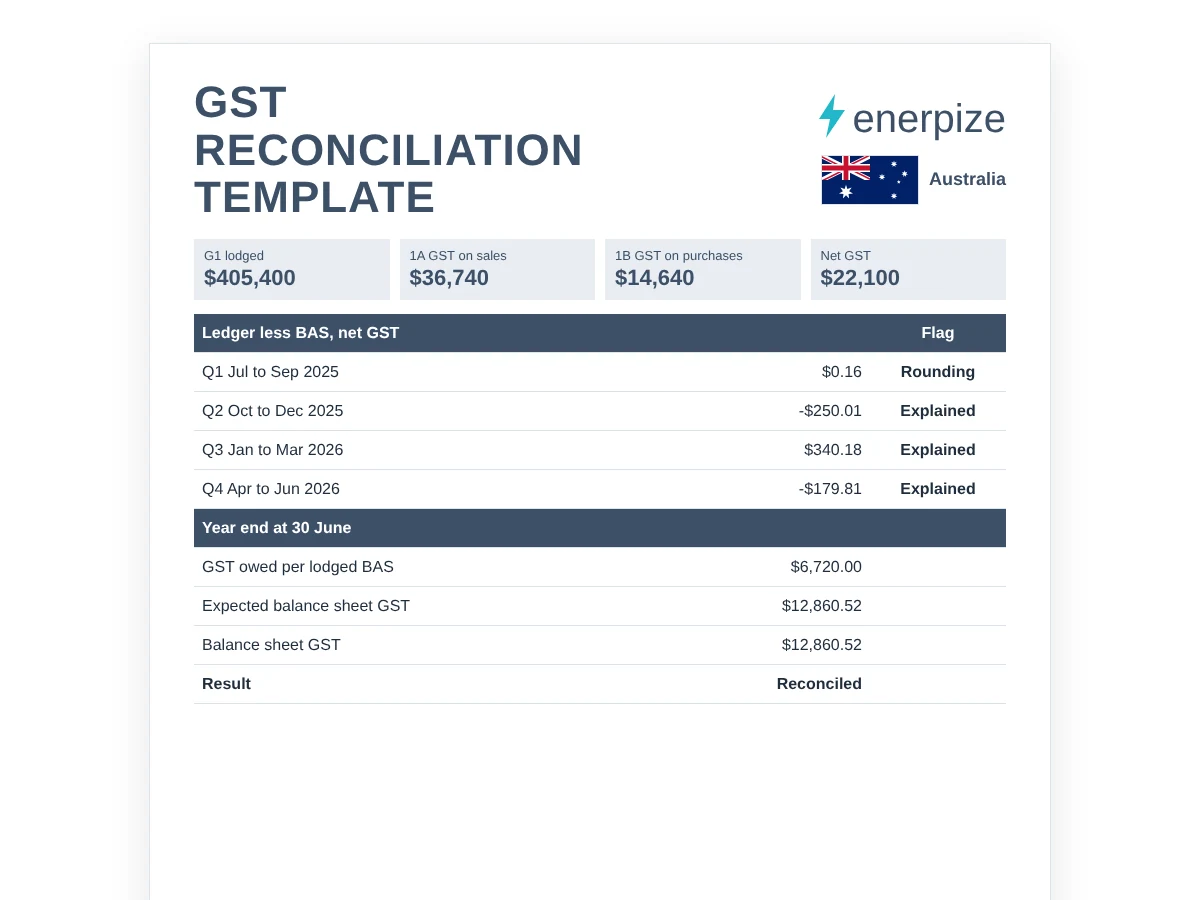
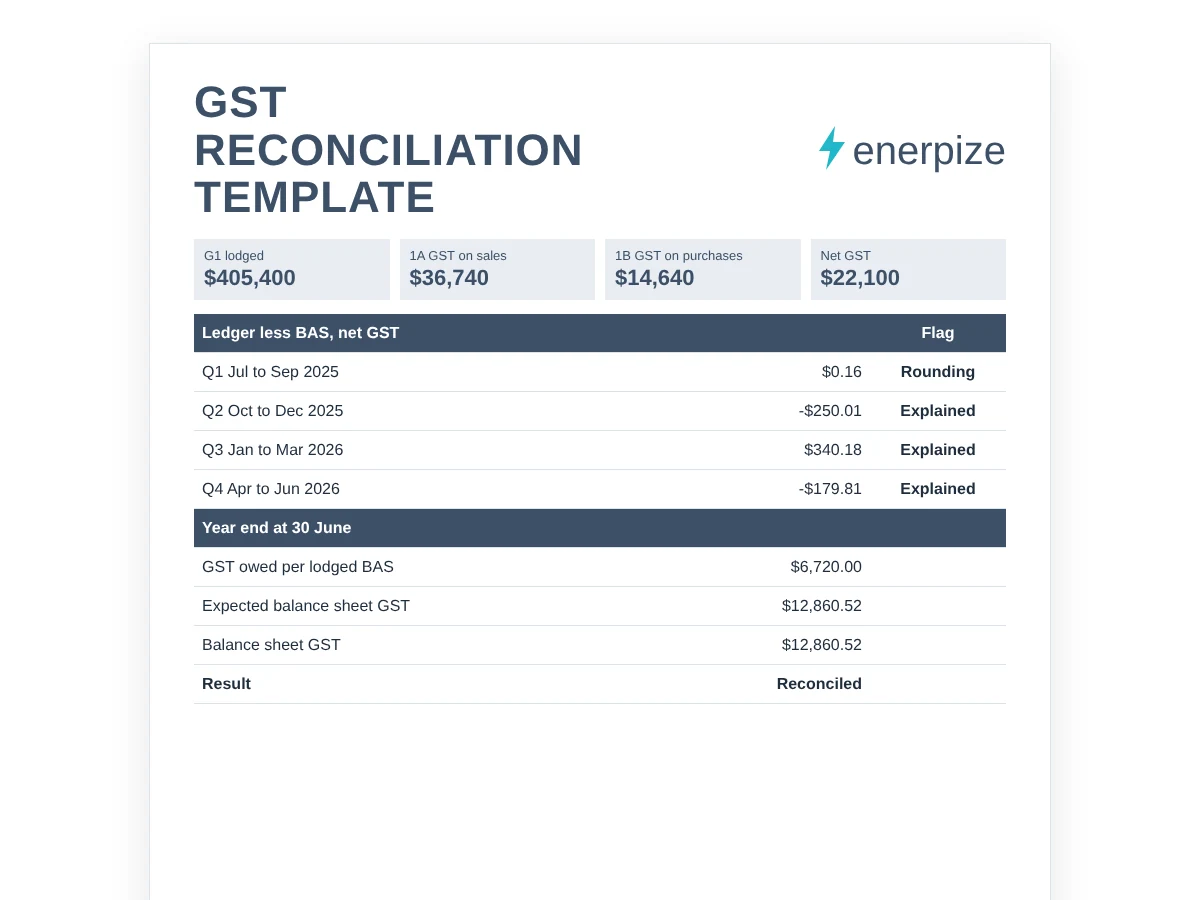
A GST reconciliation template that ties your GST ledger to the BAS you lodged, label by label, then proves the GST balance on your balance sheet at 30 June.
When you need it
Before you lodge each BAS, when a GST report and a lodged BAS refuse to agree, and at year end, before your accountant asks.
What's inside
BAS and ledger figures for G1, G10, G11, 1A, 1B, W1 and W2, variance flags, a G1 bridge, an error log with the ATO correction limits, a year end roll-forward and a one-page summary.
Formats
Excel, Google Sheets, Word and PDF. The Word and PDF files are a printable worksheet with a pre-lodgment checklist.
Want to see it filled in first?
Make your own copy of the filled sample in Google Sheets.
What Is a GST Reconciliation Template?
Your GST report says $4,940. The BAS you lodged in February says $5,190.
Same quarter. Same business. Same software. So which one is lying?
Usually neither. Something changed after you pressed lodge, and nobody wrote it down.
A GST reconciliation template is a working paper that compares your GST ledger with the figures on your lodged Business Activity Statements, period by period. It shows where G1, 1A and 1B differ, explains each difference, and proves that the GST balance on your balance sheet matches what you owe the ATO.
Bookkeepers call it a GST rec. Accountants call it a GST reconciliation workpaper. Some practices file it as a BAS reconciliation worksheet. The job underneath is the same: make two sets of numbers agree, or explain exactly why they don't.
GST report today
G1, 1A, 1B
every label
errors, timing
30 June balance
What it isn't: a form you lodge. The ATO never sees this file. It also isn't a bank reconciliation, although a clean bank rec is the first thing it relies on.
GST Reconciliation vs BAS Reconciliation vs Bank Reconciliation
Three reconciliations, three different questions. Mix them up and you'll check the wrong thing at the wrong time.
| Reconciliation | The question it answers | What it compares | When |
|---|---|---|---|
| GST reconciliation | Does the GST in my books match the GST I reported? | Ledger GST against BAS labels G1, 1A and 1B, and the GST balance at 30 June | Every BAS period, and at year end |
| BAS reconciliation | Does every figure on the BAS match its source? | GST plus W1 and W2 against payroll, PAYG instalments and the amount paid to the ATO | Before each lodgment |
| Bank reconciliation | Do my books match my bank? | Ledger transactions against bank statements | Weekly or monthly |
A bank reconciliation proves the money moved, a GST reconciliation proves you taxed it correctly, and a BAS reconciliation proves you reported all of it.
GST reconciliation sits inside BAS reconciliation, which is why our workbook checks W1 and W2 as well. Start with a clean bank reconciliation, and if you want to see what a finished statement looks like label by label, open our BAS statement example.
Which Sheet Fits Your Situation?
You don't need to fill in all nine sheets every time. Start with the question you're trying to answer.
| If your situation is... | Use this | Where to find it |
|---|---|---|
| You're about to lodge and want a final check | Ledger against BAS, label by label | BAS Lodged, Ledger and Variance sheets |
| Your GST report and your lodged BAS disagree | Variance flags plus the first period to check | Variance sheet |
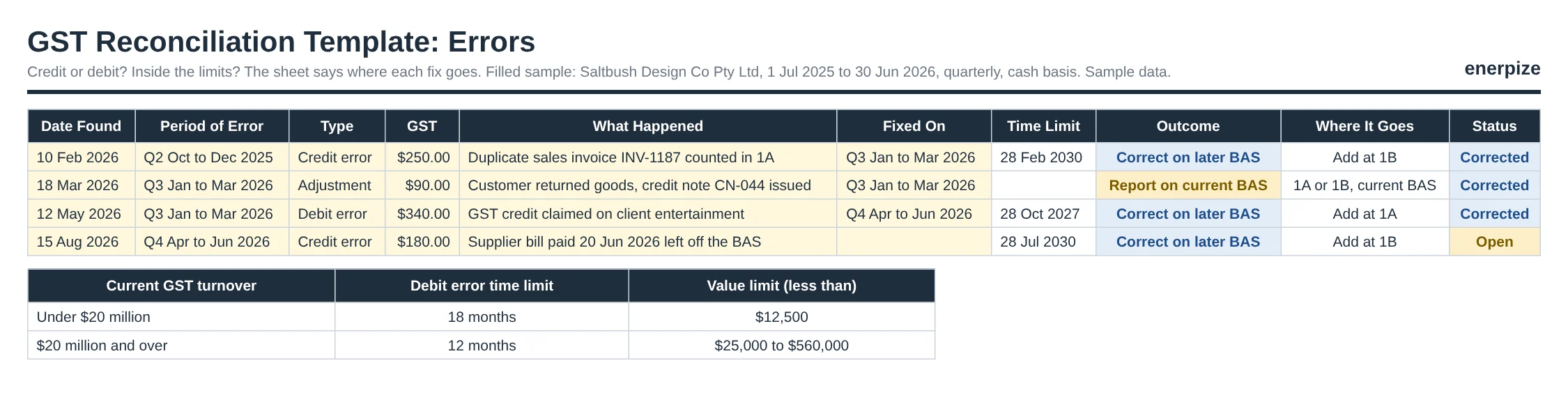
| You found a mistake on an earlier BAS | Credit or debit error test with the ATO limits | Errors sheet |
| Your accountant wants the 30 June GST balance proved | Year end roll-forward | Year End sheet |
| G1 never matches your profit and loss sales | Sales to G1 walk | G1 Bridge sheet |
| W1 and W2 look wrong | Payroll check inside the same workbook, plus a clean Australian payslip record | Variance sheet, PAYG flag |
| You'd rather work on paper | Printable BAS reconciliation worksheet and checklist | Word and PDF files |
What Does the GST Reconciliation Template Contain?
Every column earns its place. Here's what each one does for you.
| Field | What goes in it | Why it matters |
|---|---|---|
| GST basis | Cash or accrual, as set on your BAS | The ledger report must use the same basis, or nothing will ever match |
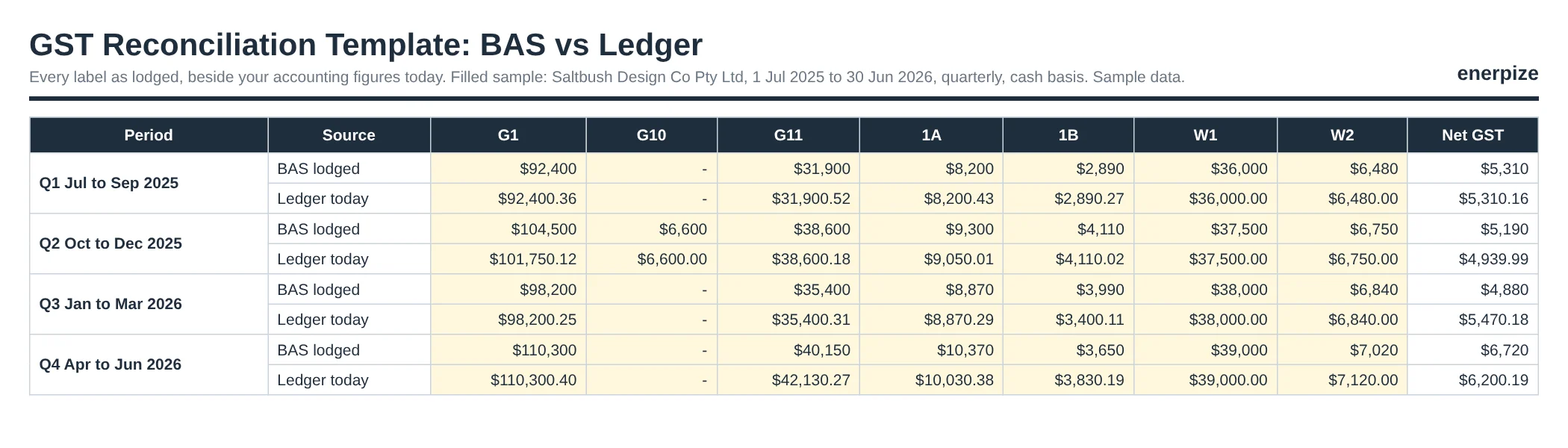
| G1, G10, G11 | Sales and purchases as lodged, and as your ledger shows them today | Where most differences start |
| 1A and 1B | GST on sales and GST on purchases | The two numbers that decide what you pay |
| W1 and W2 | Wages and PAYG withheld, against payroll | A BAS can be right on GST and wrong on wages |
| Date lodged and GST settled | When you lodged, and what you paid or got back | Feeds the late and part settled flags, and the 30 June roll-forward |
| Changed after lodgment? | Yes or No, plus a note | Edits after lodgment are the most common reason a report stops matching |
| Error log | Date found, period, type, amount and where it was fixed | Turns a variance into an explanation |
| Balance sheet GST | The GST account balance at 30 June | The final test of the whole year |
The field people skip is the one that solves most mysteries: Changed after lodgment. Deleting one duplicate invoice in February moved our sample's Q2 ledger by $250 after the BAS had already gone in. One Yes in that column, and the hunt takes five minutes instead of an afternoon.
What the Enerpize GST Reconciliation Template Includes
We built it the way a careful bookkeeper works through a GST rec: one period at a time, every label, nothing forced to balance. It runs on formulas only, with no macros, so it opens cleanly in Excel and Google Sheets. Yellow cells are the only ones you type in.
A Fence Around Every Quarter
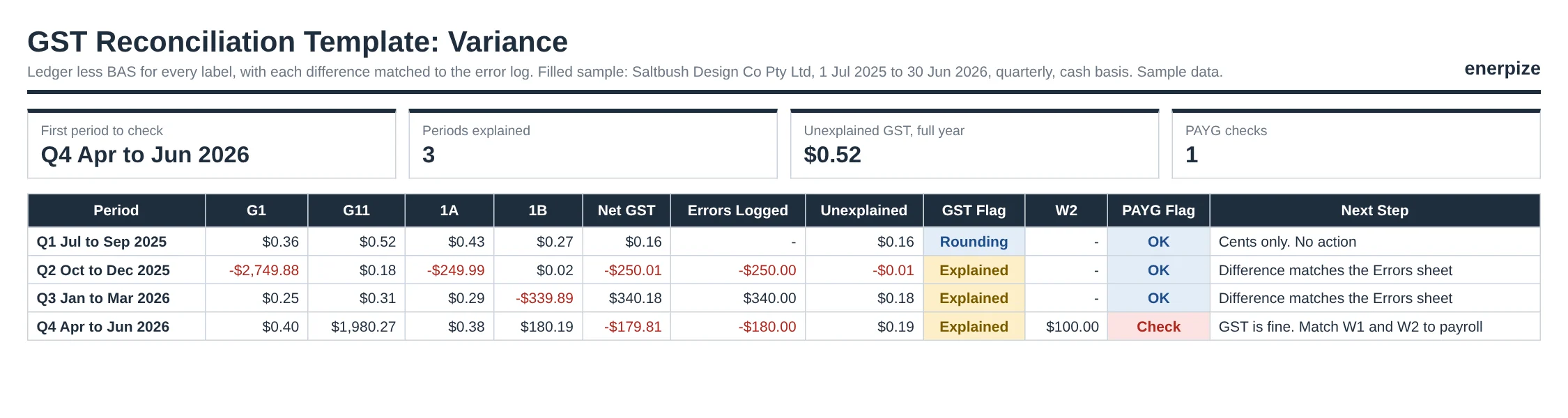
The Variance sheet compares ledger and BAS for every label in every period, then names the first period that needs a look. Corrections that belong to another period are taken out first, so each quarter is judged on its own work. Why does that matter? Because you search one quarter's transactions, not twelve months of them.
An Error Log That Knows the Rules
Log a mistake and pick its type. The sheet works out the time limit from the original due date, adds up the debit errors going on the same BAS, checks them against your turnover band, and tells you the outcome: correct it on a later BAS, or revise the original. It even says whether the fix goes at 1A or 1B.
30 June, Proved to the Cent
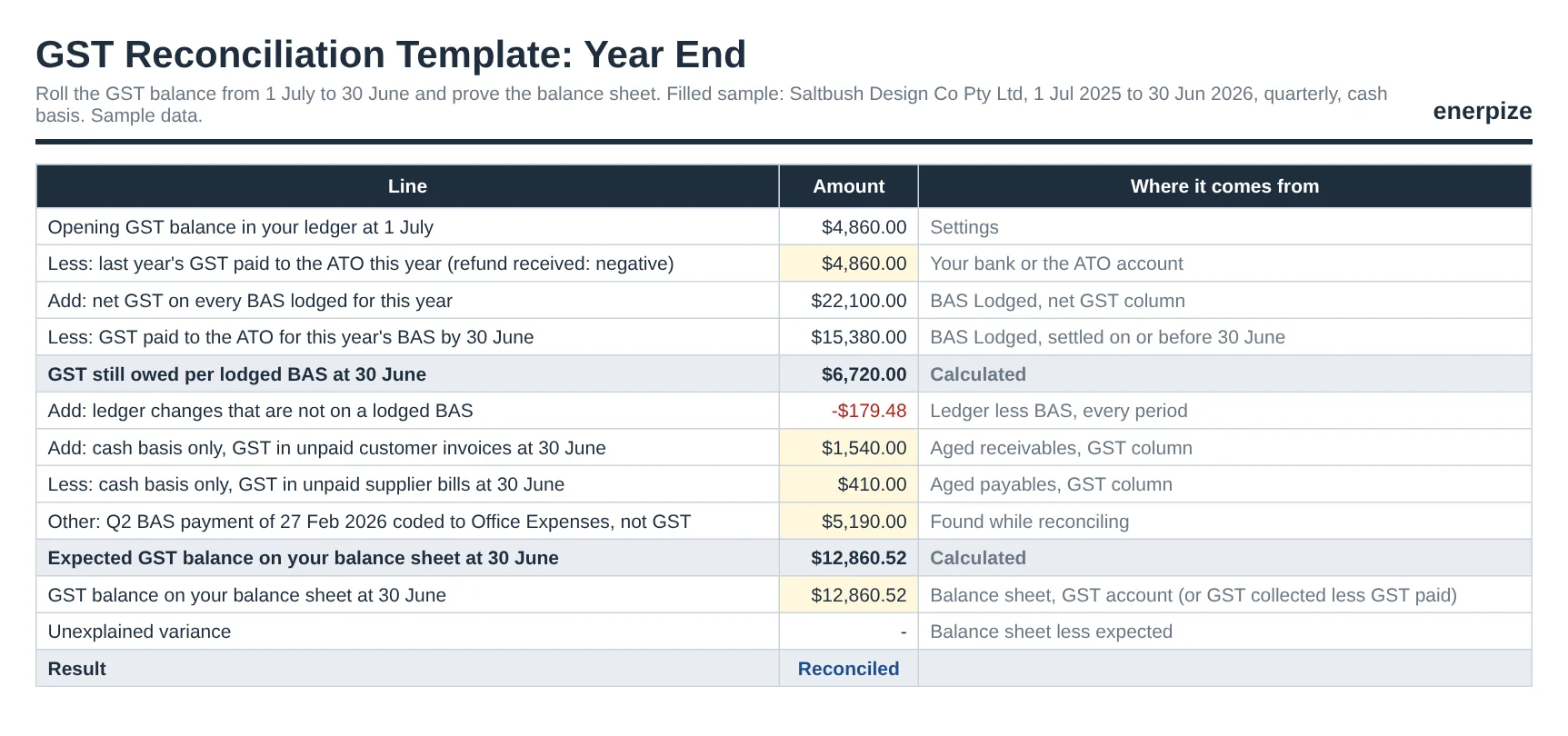
The Year End sheet rolls your GST balance forward from 1 July: opening balance, plus net GST lodged, minus what you paid the ATO, plus ledger changes, plus the cash basis bridge. Then it compares the expected balance with your balance sheet. Anything left over has nowhere to hide.
The Sales Figure That Never Matches
G1 includes GST, GST-free sales, input-taxed sales and assets you sold. Your profit and loss shows none of that the same way. The G1 Bridge walks one into the other, so the gap becomes a list of reasons instead of a shrug.
One Page for the Person Who Signs Off
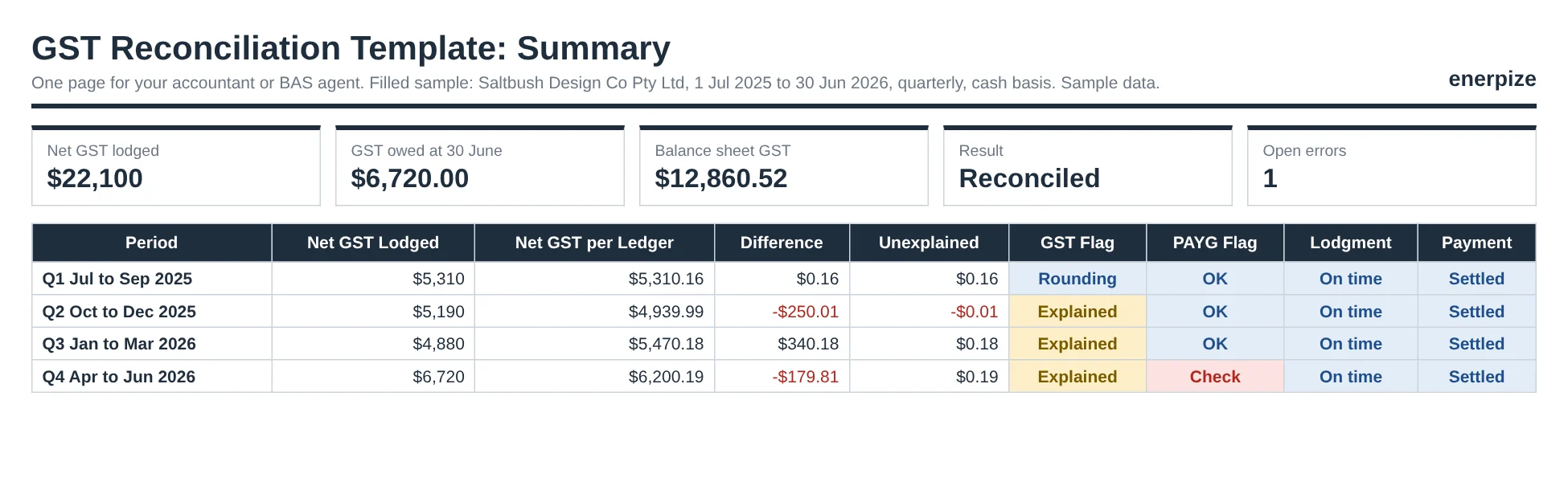
Summary pulls every period, every flag, the 30 June result and the open errors onto one printable page. Hand it to your accountant or BAS agent before they ask.
The BAS Labels This Template Ties Together
Every check in the workbook comes back to these seven labels. Know what each one holds and half the reconciliation is done.
| Label | What it reports | The usual reason it drifts |
|---|---|---|
| G1 | Total sales, including GST | GST-free sales, asset sales or platform fees treated differently in the books |
| G10 | Capital purchases | An asset bought on finance, coded as an expense |
| G11 | Non-capital purchases | A bill entered late, or a private cost coded as business |
| 1A | GST on sales | A deleted, duplicated or backdated invoice |
| 1B | GST on purchases | A credit claimed without a tax invoice, or on entertainment |
| W1 | Total salary and wages | A pay run finalized after lodgment |
| W2 | PAYG withheld | A payroll correction not carried to the BAS |
GST Collected vs GST Paid, in One Line
GST collected is the 10% you charge customers, reported at 1A. GST paid is the GST in your business purchases, claimed as credits at 1B. The difference is your net GST: owed to the ATO when it's positive, refunded when it's negative.
Net GST = 1A GST on sales - 1B GST on purchases
Across our sample year, that's $36,740 collected less $14,640 paid, or $22,100 of net GST lodged over four quarters.
Example: A Filled GST Reconciliation Template
Want to watch it work before you enter a cent? Make your own copy of the filled sample in Google Sheets. The sample follows a fictional Brisbane studio, Saltbush Design Co Pty Ltd, from 1 July 2025 to 30 June 2026. It lodges quarterly, reports GST on a cash basis and keeps its books on accruals. The screens on this page use the same figures.
How to Read the Sample
Open Variance first. Q1 differs by 16 cents, so it reads Rounding. Then follow the money.
minus $250.01
plus $340.18
minus $179.81
$12,860.52
Reconciled
Q2 is a duplicate invoice, INV-1187, deleted after lodgment. That's a $250 credit error, fixed on the Q3 BAS at 1B. Q3 claimed $340 of GST on client entertainment. That's a debit error, fixed on the Q4 BAS at 1A, well inside the 18 month and $12,500 limits. Q4 holds a supplier bill for $1,980 that was entered in August, so its $180 credit error is still open.
Every one of those reads Explained, because the error log accounts for it. So why does Variance still say the first period to check is Q4? Look at the PAYG flag. W2 was lodged at $7,020, while payroll shows $7,120. The GST is fine. The wages aren't.
Then open Year End. The expected balance was out by $5,190 until the bookkeeper found the Q2 BAS payment coded to Office Expenses. Logged as an explained item, the balance sheet and the roll-forward meet at $12,860.52.
GST Reconciliation Formulas Explained
Every formula is built into the Excel file. If you're making a GST reconciliation spreadsheet of your own, these five do the heavy lifting.
Label Variance
Variance = Ledger today - (BAS lodged - corrections for other periods)
In plain English: what your books say now, less what you reported for that period alone. Q3 1B gives $3,400.11 less ($3,990 less the $250 correction) = minus $339.89.
Unexplained GST
Unexplained = Net GST variance - (debit errors - credit errors logged for the period)
Q3's net variance of $340.18, less the $340 debit error, leaves 18 cents. Within your $1 tolerance, so it reads Explained.
Year End Roll-Forward
Expected balance = Opening GST - last year's GST paid + net GST lodged - GST paid this year + ledger changes + cash basis bridge + explained items
In the sample: $4,860 less $4,860, plus $22,100, less $15,380, gives $6,720 still owed at 30 June.
Cash Basis Bridge
Bridge = GST in unpaid customer invoices - GST in unpaid supplier bills
A cash basis BAS ignores unpaid invoices. Accrual books don't. The sample adds $1,540 and takes off $410, a net $1,130.
Debit Error Test
Correct on a later BAS if: correcting BAS lodged by (original due date + 18 months) AND debit errors on that BAS < $12,500
Those are the limits for GST turnover under $20 million. Pick a bigger band in Settings and the sheet switches to 12 months and the matching value limit.
How to Reconcile GST Before Lodging Your BAS
A quarterly GST rec takes about an hour once the bank is clean. Here's the order that saves the most time.
1- Reconcile Every Account First
Bring every bank account, card and payment platform up to the last day of the period. Unreconciled transactions are where missing sales and duplicate bills hide.
⚡ Tip: Do the bank weekly. Then the GST rec checks coding, not chaos.
2- Set Up the Workbook Once
Enter the business, financial year, GST basis, reporting cycle, turnover band and opening GST balance in Settings. Periods and due dates fill in from there.
⚡ Tip: Pick the turnover band carefully. It sets the debit error limits for the whole year.
3- Run the GST Report on the BAS Basis
Run your GST report for the period on the same basis as your BAS, cash or accrual. Copy G1, G10, G11, 1A and 1B into Ledger, and W1 and W2 from payroll.
⚡ Tip: Most accounting systems default to accrual. Switch it before you trust a single number.
4- Check Coding Before You Check Totals
Scan sales for anything that isn't a sale, and purchases for GST claimed without a tax invoice, on private costs or on entertainment.
⚡ Tip: The ATO says you need a tax invoice to claim credits on purchases of $82.50 or more, including GST.
5- Copy the BAS Exactly as Lodged
Enter whole dollars from the BAS in BAS Lodged, with the date lodged and the GST you paid or got back.
⚡ Tip: Use the BAS itself, not your draft. The draft is what you meant to lodge.
6- Read the Flags, Then the Errors
Start with the first period marked Check. Log every mistake you find on the Errors sheet and let it tell you where the fix goes.
⚡ Tip: Mark Changed after lodgment as soon as you edit an old period. Future you will be grateful.
7- Lodge, Then Lock the Period
Lodge through Online services for business, your software or your agent, then lock the period in your books so nobody edits it.
⚡ Tip: A locked period is the cheapest reconciliation you'll ever do.
Why Your GST Report Doesn't Match Your BAS
It's almost never a software bug. It's nearly always one of these four.
Different basis
The BAS is on a cash basis and the report is on accrual, or the other way round. Unpaid invoices then sit in one and not the other.
Edits after lodgment
An invoice deleted, a bill backdated or a GST code changed after the BAS went in. The report moves. The lodged BAS doesn't.
Manual journals to the GST account
A journal posted straight to GST collected or GST paid changes the balance without touching the GST report.
A BAS payment coded elsewhere
The ATO payment lands in an expense or suspense account, so the GST balance never comes down.
The first two show up on the Variance sheet. The last two show up at year end, which is why the template checks both.
Correcting a GST Error: Next BAS or Revision?
Found a mistake on a BAS you already lodged? Don't panic, and don't revise anything yet. Ask two questions first.
The ATO separates the two cases. An error relates to an amount that was incorrect at the time of lodgment. An adjustment covers a sale or purchase that was correct then, but changed later, such as a price change or returned goods. Adjustments generally go on your current BAS.
paid too much or too little
from the original due date
net debit errors
1A or 1B
A credit error means you paid too much GST. A debit error means you paid too little. Under the Correcting GST Errors Determination 2023, a debit error can go on a later BAS only within these limits:
| Current GST turnover | Time limit from the original due date | Net debit errors must be less than |
|---|---|---|
| Under $20 million | 18 months | $12,500 |
| $20 million to under $100 million | 12 months | $25,000 |
| $100 million to under $500 million | 12 months | $50,000 |
| $500 million to under $1 billion | 12 months | $100,000 |
| $1 billion and over | 12 months | $560,000 |
The error also can't come from recklessness or intentional disregard, or relate to an ATO compliance activity. The ATO's guide to correcting GST errors says corrections go at 1A or 1B on the later BAS. Outside the limits, you revise the original BAS instead, and the ATO may charge interest on any shortfall.
Common GST Reconciliation Mistakes
None of these feel like mistakes at the time. That's what makes them expensive.
✕ Forcing the ledger to match the BAS
Why it matters: A plug journal hides the real error, and it comes back bigger next year.
Fix: Find the cause, log it, and fix it on a later BAS or a revision.
✕ Comparing different bases
Why it matters: A cash basis BAS will never match an accrual report, however long you stare.
Fix: Run every report on the basis shown in Settings.
✕ Editing a lodged period
Why it matters: The books and the BAS drift apart with no trail.
Fix: Lock periods after lodgment, and mark any edit as Changed after lodgment.
✕ Recording platform sales net of fees
Why it matters: G1 is understated and fees disappear from expenses.
Fix: Record the gross sale and the fee separately.
✕ Skipping the year end check
Why it matters: Small quarterly gaps add up, and the 30 June balance stops making sense.
Fix: Run the roll-forward every June, before the tax return.
Importance of GST Reconciliation
How much GST goes missing across Australia each year? The ATO's latest estimate puts the net GST gap for 2024 to 2025 at 7.6% of theoretical GST, about $7.3 billion. The same page says small business has consistently contributed more than 70% of the gap.
So what? Not all of that is deliberate. A good share is the stuff this template catches: a credit claimed twice, a sale coded twice, a payment posted to the wrong place.
Catches Errors While They're Cheap
A $340 debit error found in May fixes itself on the next BAS. Found three years later, it means a revision and possible interest.
Keeps Your Balance Sheet Honest
The GST account is money you owe or are owed. If it's wrong, your liabilities are wrong, and so is every decision built on them.
Makes Year End Faster
The ATO's own BAS and GST tips say lodging all your BAS before your tax return helps with reconciling your figures. Four reconciled quarters turn June into a check, not a rebuild.
Gives You an Audit Trail
The ATO asks you to keep tax invoices and other GST records for 5 years. A saved GST reconciliation workpaper for every period shows exactly how each figure was reached.
Spreadsheet vs Software for GST Reconciliation
A spreadsheet is a fine place to reconcile. It's a poor place to keep the records you're reconciling.
| What you need | GST reconciliation template | Enerpize |
|---|---|---|
| Cost | Free | Free trial, then a paid plan |
| GST ledger against BAS checks | Built in, label by label | Keep doing these in the template |
| GST on each transaction | Typed in from reports | Posted automatically to GST collected and GST paid |
| Cash or accrual view | Depends on how you run your report | Tax report by issued or fully paid invoices |
| Edits after a period closes | Tracked by hand in a column | Journal entries listed and searchable by account and date |
Most businesses end up with both. The books hold the transactions, and the GST reconciliation template proves them.
How Enerpize Handles GST Records
Where did that $250 come from? In a spreadsheet, you go digging. In Enerpize accounting software, every invoice, bill and expense posts its own GST entry, so the trail is already there. The screens below use sample data.
Tax Settings: GST Set Up Once
Add GST once with its rate and whether prices include it. Enerpize creates a GST Payable account with GST Collected and GST Paid beneath it the first time you use it. Create a separate zero rate tax for GST-free sales, so they show on their own line in the tax return rather than vanishing into untaxed sales.
Tax Report: Issued or Fully Paid
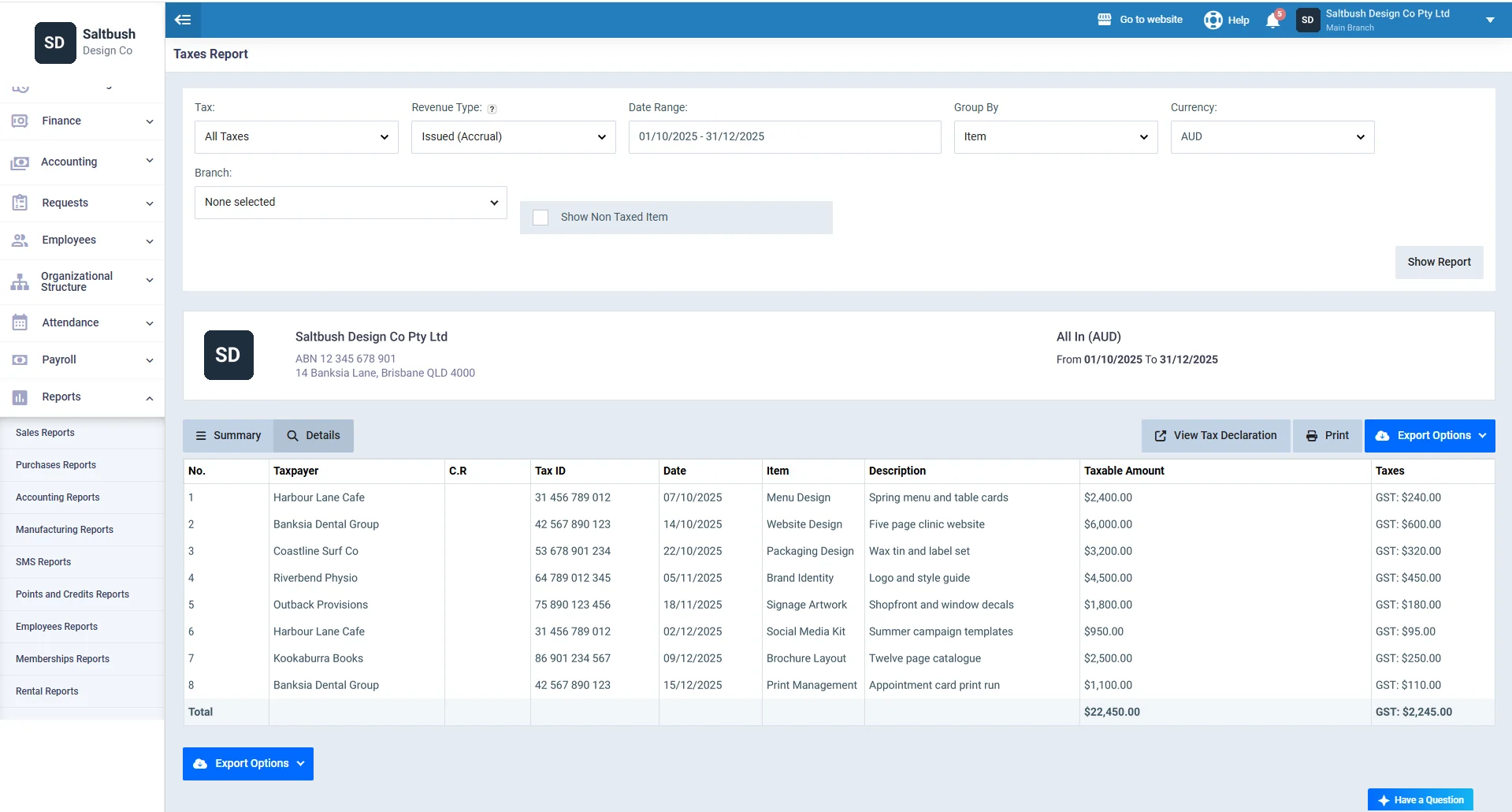
Run the tax report in summary or detail, filtered by tax, period, branch and currency. The revenue type filter shows either all issued invoices or fully paid invoices only, by payment date. That's how you line the report up with the basis on your BAS. Export it to Excel, CSV or PDF, ready for the Ledger sheet.
Tax Declaration: Sales and Purchases Side by Side
One click from the tax report opens the tax declaration with the same filters applied. It shows sales, adjustments and tax due, with the tax paid on purchases below, one line per tax.
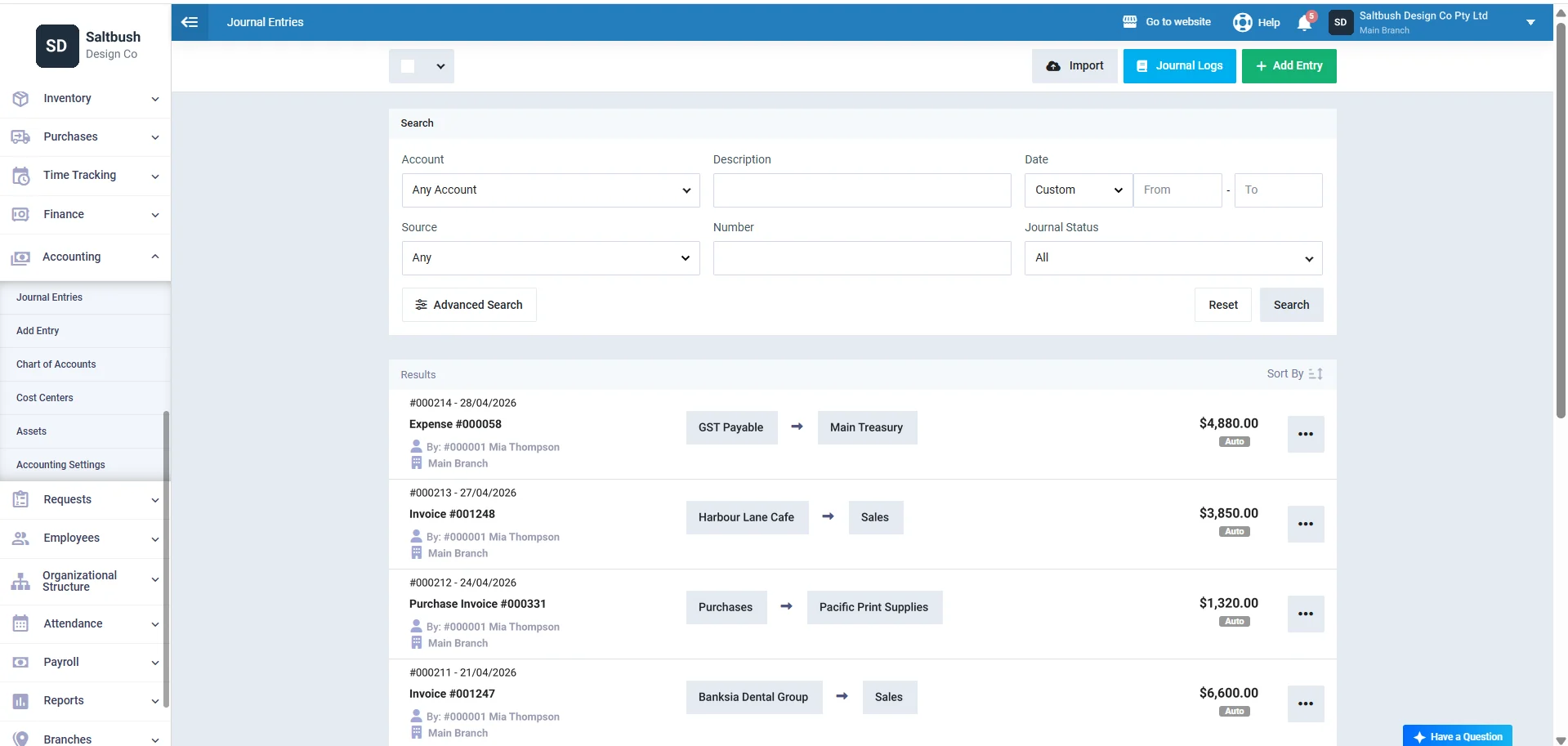
Journal Entries: Every GST Posting, Searchable
Invoices, purchase invoices and expenses create their journal entries automatically. Search them by account, source, number or date, and a BAS payment posted to the wrong account stands out in seconds.
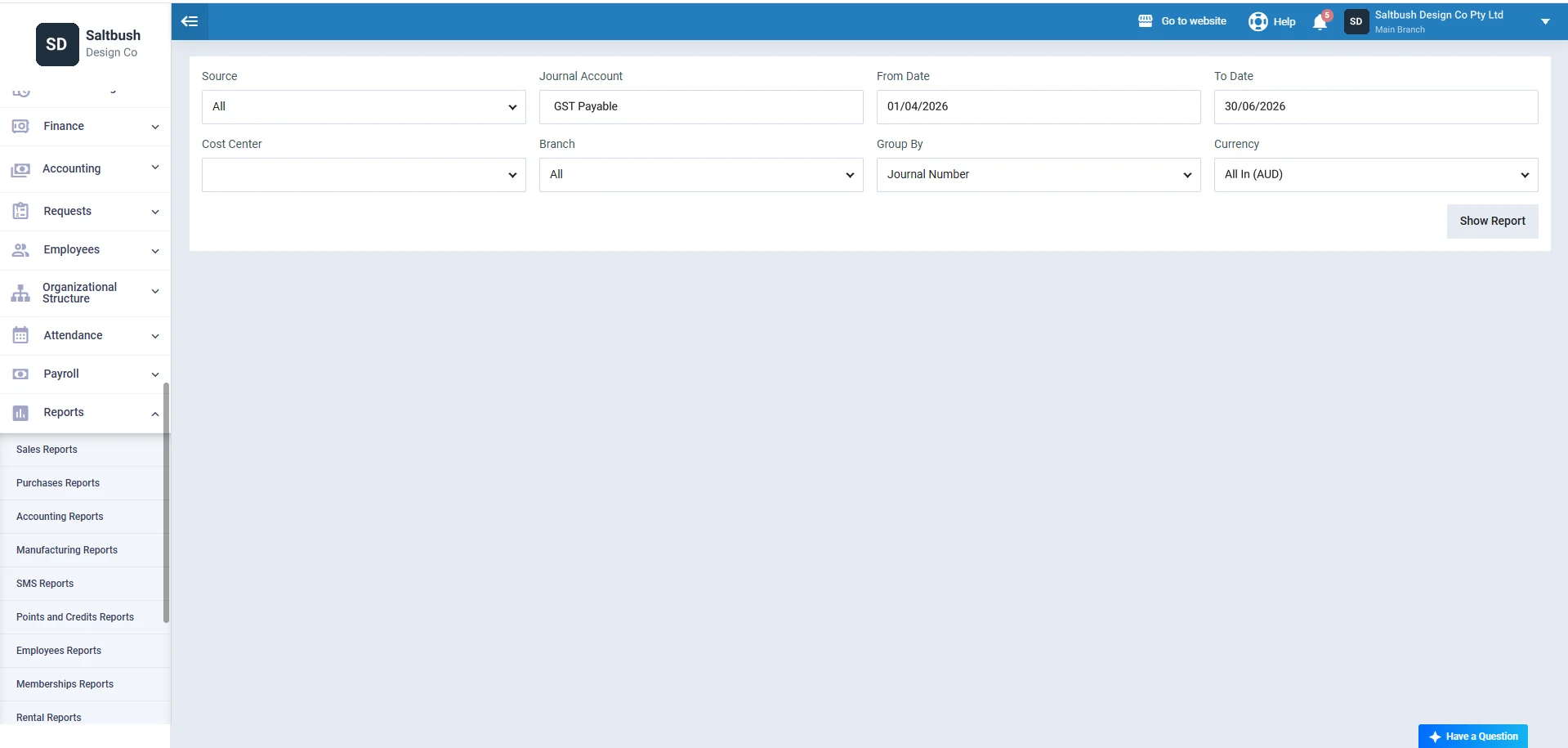
Journal Report: Just the GST Account
Filter the journal report by account, date range, branch or cost center, and group it by journal number. Pick GST Payable and the quarter, and you have the movement your Year End sheet needs.
GST Reconciliation Template for Australia
Every rule in this workbook is Australian, because the BAS is.
You must register for GST once your GST turnover reaches $75,000, or $150,000 for a non-profit. Most businesses lodge quarterly. The ATO's due dates for lodging and paying your BAS are 28 October, 28 February, 28 April and 28 July for the four quarters, and the 21st of the following month for monthly lodgers. The ATO also confirms that small businesses can account for GST on a cash basis, which is the setting our sample uses.
What to add:
- Your GST basis exactly as registered with the ATO
- A due date in the override column if your agent has a later lodgment date
- Your GST turnover band, so the debit error limits are right
- Whole dollars from the BAS, with cents left out, as the ATO asks
⚑ Practical note: Unclaimed GST credits aren't errors at all. You generally have 4 years to claim a credit, so a missed bill can go on a later BAS without touching the debit error limits.
Who Can Use the GST Reconciliation Template?
Sole Traders Doing Their Own BAS
You lodge it yourself, so nobody else is checking it. One hour a quarter to reconcile GST before lodging is the second pair of eyes you don't have.
Bookkeepers and BAS Agents
Give each client a copy and a standard trail. When a client asks why the refund was $250 smaller, the answer is one row on the Errors sheet.
Accountants Closing the Year
The Year End sheet is the GST reconciliation workpaper you need before the financial statements, with the cash basis bridge already built.
Agencies and Studios
Project work means deposits, progress invoices and rebilled costs, all of which tangle G1. Firms running consulting and service businesses will get the most from the G1 Bridge.
Growing Businesses Moving to Monthly
Switch the cycle to Monthly and the workbook gives you 12 periods with 21st due dates. Same checks, smaller haystacks.
Looking for other Australian forms? Browse our Australian templates collection.
GST Reconciliation Glossary
| Term | What it means |
|---|---|
| Credit error | A mistake that made you pay too much GST. |
| Debit error | A mistake that made you pay too little GST. |
| Adjustment | A change after lodgment to a sale or purchase that was correct at the time, such as a return. |
| Cash basis | GST counted when money is received or paid. |
| Accrual basis | GST counted when an invoice is issued or received, or when you are paid, whichever comes first. |
| Roll-forward | Opening balance plus movements, compared with the closing balance. |
| Unexplained variance | The difference left after every known cause has been accounted for. |
Key Takeaways
- A GST reconciliation template compares your GST ledger with the lodged BAS, label by label, then proves the 30 June GST balance.
- Run every ledger report on the same basis as your BAS. Cash against accrual never matches.
- Check one period at a time. In our sample, Q1 differs by 16 cents and reads Rounding, while Q4 is flagged for a $100 W2 gap.
- Track edits after lodgment. One deleted duplicate invoice moved the sample's Q2 ledger by $250.
- For GST turnover under $20 million, a debit error can go on a later BAS within 18 months and below $12,500.
- Corrections go at 1A for debit errors and 1B for credit errors on the later BAS.
- A BAS payment coded to the wrong account shows up only at year end. In the sample, it was $5,190.
- The ATO puts the 2024 to 2025 net GST gap at 7.6%, about $7.3 billion, with small business above 70% of it.
Frequently Asked Questions
How do I reconcile GST before lodging a BAS?
Reconcile your bank accounts, then run your GST report for the period on the same basis as your BAS. Compare G1, G10, G11, 1A and 1B with your draft, check coding on any large items, and confirm W1 and W2 against payroll. Log any errors from earlier periods and include allowed corrections at 1A or 1B.
Why doesn't my GST report match my BAS?
The usual causes are a different basis, cash against accrual, and changes made after the BAS was lodged, such as a deleted or backdated invoice. Manual journals posted straight to a GST account and ATO payments coded elsewhere also cause gaps. The Variance sheet shows which period broke first.
What is the difference between GST collected and GST paid?
GST collected is the GST you charge on taxable sales, reported at 1A. GST paid is the GST included in your business purchases, claimed as credits at 1B. Collected less paid is your net GST. A positive result is paid to the ATO, and a negative one is refunded.
How do I fix a GST error on a previous BAS?
Work out whether it's a credit error or a debit error. Credit errors can usually go on a later BAS within the period of review. Debit errors can go on a later BAS only within the time and value limits for your turnover, such as 18 months and under $12,500 below $20 million. Otherwise, revise the original BAS.
How often should I reconcile GST?
Reconcile before every BAS you lodge, quarterly or monthly, and again at 30 June for the year. Reconciling your bank weekly or monthly in between makes each GST rec far shorter. The longer you wait, the more transactions you have to search.
What is the difference between GST reconciliation and BAS reconciliation?
GST reconciliation checks the GST labels, mainly G1, 1A and 1B, against your ledger. BAS reconciliation checks every figure on the statement, including W1 and W2 against payroll, PAYG instalments and what you paid the ATO. This GST reconciliation template covers the GST labels plus W1 and W2.
How do I reconcile GST on a cash basis?
Run your GST report on a cash basis so it matches the BAS. At year end, add the GST in unpaid customer invoices and take off the GST in unpaid supplier bills, because accrual books hold both. Our Year End sheet does this bridge only when Settings says Cash.
Can I download a free GST reconciliation template in Excel?
Yes. You can download a free GST reconciliation template in Excel, with a Google Sheets copy and a printable Word and PDF worksheet. The Excel file runs on formulas with no macros, and includes a filled sample so you can see every sheet working first.
About the Author
Omar El Bahr is a Senior Digital Growth Specialist at Enerpize, where he leads SEO, content strategy, and organic growth across international markets. He is a Forbes Communications Council contributor and has written for Entrepreneur on business communication and digital strategy.
Disclaimer
This template and the information on this page are general guidance, not tax, legal or accounting advice. GST rules and limits change, so confirm your position with the ATO, a registered tax agent or a BAS agent. This template is a working paper, not an ATO form, and does not lodge anything for you.