Posted on 4 October 2026
Invoice Template with Sales Tax Calculation (US)
- Available in Excel, Word, PDF, Google Sheets, and Google Docs, free to download with no sign-up required
- Marks every line as taxable or non-taxable, so one invoice template with sales tax handles mixed orders without side math
- Builds your combined sales tax rate from state, county, city, and special district layers, then splits the tax by jurisdiction for your return
- Calculates the taxable amount, sales tax rounded to the cent, total, and balance due automatically in Excel and Google Sheets
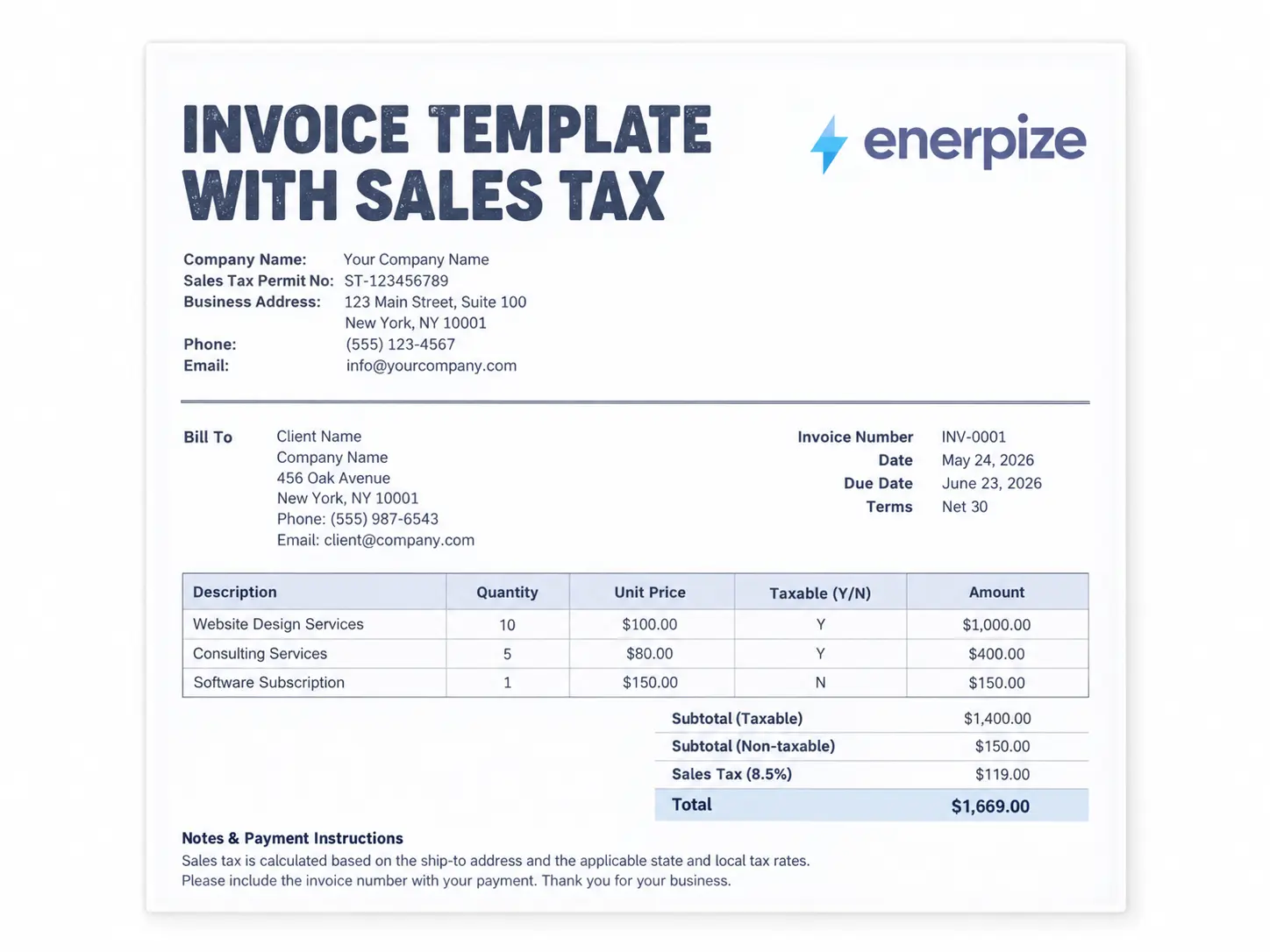
An invoice template with tax calculation is a prebuilt billing document that lists what you sold, flags which lines are taxable, applies the combined state and local sales tax rate, and totals everything automatically, so your customer sees exactly what they owe and you keep a clean record for your sales tax return.


What Is an Invoice Template with Sales Tax?
Enerpize is headquartered in Delaware, one of five states with no sales tax at the state level. The other four are Alaska, Montana, New Hampshire, and Oregon.
So you would think sales tax barely crosses our minds.
It is the opposite. Our customers sell into the other 45 states and Washington, D.C., and each one writes its own rules about what is taxable, at what rate, and how it looks on paper.
A sales tax invoice is where those rules meet your customer. It lists each item, separates taxable lines from exempt ones, applies the rate for the delivery location, and shows the tax as its own number. In many states, that number is not a courtesy. It is how the state sees what you collected on its behalf.
Here is what it is not. It is not a VAT invoice with the word "VAT" crossed out.
Sales Tax Invoice vs. VAT or GST Tax Invoice
The United States has no federal sales tax and no VAT. Sales tax is charged once, at the final retail sale, and a business that buys goods to resell them hands the seller a resale certificate instead of paying tax and claiming it back later.
VAT and GST work the other way around. Tax is charged at every stage, registered businesses reclaim the tax they paid on purchases, and the invoice often has to meet strict format rules first. If you bill customers in Australia, the UK, or the UAE, our tax invoice template is built for that world.
A sales tax invoice template for the US has a different job. Nobody downstream reclaims the tax, so the invoice is your proof that the right amount was charged, on the right items, at the right rate.
What to Include on an Invoice with Sales Tax
An invoice with sales tax is like a recipe card. Skip one ingredient and the dish looks fine until someone tastes it. Here, that someone is a state auditor.
| Field | Why It Matters |
|---|---|
| Seller name, address, and sales tax permit number | Shows you are registered to collect tax in the state you are charging it for |
| Invoice number and date | Ties the sale to the right filing period |
| Bill To and Ship To | The delivery address usually decides which local rate applies |
| Customer tax status | A certificate number, type, issuing state, and expiry date back up every exempt sale |
| Line items with a taxable flag | Lets one invoice carry taxable and non-taxable items side by side |
| Separately stated charges | Delivery, installation, and handling on their own lines, since their taxability can change |
| Rate breakdown | The state, county, city, and district layers behind your combined sales tax rate |
| Sales tax as its own amount | Makes the tax visible to your customer and traceable on your return |
| Totals, amount paid, and balance due | Closes the loop so payment and tax line up |
If I had to pick the one field doing the heaviest lifting, it would be Ship To.
Two identical orders can carry different tax just because they ship to different addresses.
What the Enerpize Invoice Template with Sales Tax Includes
We designed this template around three orders that break a single rate invoice: a retail sale with a delivery fee, a contractor job that mixes materials and labor, and a wholesale order from a buyer who plans to resell. Every feature below exists because one of those orders needed it.
In short, the Enerpize template treats sales tax as a line by line decision with a layered rate and a filing trail, not one percentage parked at the bottom of the page.
A Taxable Switch on Every Line
Each line has its own Y or N dropdown. Flip a line to N and it still counts toward the total, it just skips the tax, so taxable and non-taxable items can share one invoice.
Small switch. Big difference between taxing a whole order and taxing only what the law covers.
A Rate Built in Layers
Your rate is rarely one number. The template stacks the state rate, county rate, city rate, and special district rate into a combined figure, so you can see exactly where your local sales tax rate comes from instead of trusting a single cell.
A "rate verified on" date tells future you whether the number is still fresh.
Room for the Charges That Change the Math
Labor or installation and shipping or delivery each get their own line, with their own taxable switch. In several states, a charge listed on its own is treated differently from the same charge folded into the item price.
An Exemption Block With an Alarm
When you mark a sale as exempt, the template asks for the exemption certificate details: type, number, issuing state, and expiry. Leave the number blank, or enter a certificate that expired before the invoice date, and a warning appears right on the invoice.
Think of it as a smoke detector for your resale certificate file.
Pennies That Add Up
Sales tax rounds to the cent, and the Excel version uses the standard half-up method. It then splits the tax into state, county, city, and district amounts, which is the breakdown you report.
A second tab, the Sales Tax Log, rolls every invoice into a monthly summary by jurisdiction, so filing day starts sorted.
How Your Invoice Layout Changes What You Owe
Nobody warns you about this part. The way you write an invoice can change the tax due on it.
Why Separate Lines Matter
Picture two invoices for the same refrigerator. One shows $800 with delivery baked in. The other shows $750 for the fridge and $50 for delivery on its own line.
In California, that second invoice can carry less tax, because separately stated delivery by a common carrier is not taxable when it does not exceed your actual shipping cost. Same fridge. Same customer. Different number on the return.
That is why the template keeps delivery and labor apart by default.
Bundled Prices and the True Object Test
When one price covers a product and a service, many states ask what the customer was really buying. If the product is the point, the whole bundle is usually taxed. If the service is the point, it often is not.
Itemize what you can, and let each line tell the truth about itself.
How to Calculate Sales Tax on an Invoice
Add up your taxable lines, subtract any discounts on those lines, multiply by the combined rate for the delivery address, and round to the nearest cent. Non-taxable lines go into the total without tax. That is the whole formula, and it is exactly what an invoice template with tax calculation does for you while you type.
Here is a real example from our sample file:
| Line | Amount | Taxable |
|---|---|---|
| 4 ergonomic chairs at $189 | $756.00 | Yes |
| 2 standing desks at $425 | $850.00 | Yes |
| 3 hours of design consultation at $95 | $285.00 | No |
| Installation | $150.00 | Yes |
| Delivery | $60.00 | Yes |
Taxable amount: $1,816.00. At an example combined rate of 8.25%, the sales tax is $149.82, and the invoice total comes to $2,250.82. The consultation line never touches the tax.
For context, the national population weighted average combined rate was 7.53% at the start of 2026, according to the Tax Foundation. In Louisiana, the average combined rate reached 10.13% by midyear. A rate that "feels about right" can be off by more than two points depending on where you ship.
Finding Your Combined Sales Tax Rate
Local governments can add their own sales taxes in 38 states, per the Tax Foundation. That is why your rate is a stack, not a single figure.
Start with the state department of revenue's rate lookup for the exact delivery address, then enter each layer in the template. If you want a quick number first, our free sales tax calculator works as an invoice tax calculator in seconds.
Rounding Sales Tax to the Cent
Rounding sounds trivial. Until it is not.
States in the Streamlined Sales Tax agreement, 23 full members plus Tennessee as an associate member, follow one rule: calculate tax to the third decimal place, round up to the next cent when that third decimal is greater than four, and choose whether to round per item or per invoice.
So $47.30 at 8.875% gives $4.197875, which becomes $4.20. Get that wrong across thousands of invoices and your return stops matching your books.
Do You Charge Sales Tax on Services?
It depends on the state. Five states have no statewide sales tax, four (Hawaii, New Mexico, South Dakota, and West Virginia) tax services by default, and the other 41 plus Washington, D.C. tax only the services their laws list by name.
Sales tax on services tends to show up in the same places: repairs to tangible property, cleaning, landscaping, and pest control. Professional services like legal and accounting work are exempt in most states.
So the honest answer is a question back to you. Which service, and which state? The state sections further down show how differently Texas, California, and Florida answer it.
Sales Tax Invoice vs. Sales Invoice vs. VAT Invoice vs. Receipt
Four documents, four jobs:
| Attribute | Sales Tax Invoice (US) | Sales Invoice | VAT or GST Invoice | Receipt |
|---|---|---|---|---|
| Main job | Bill a customer and show sales tax by line | Bill a customer for goods sold | Bill a customer and support the buyer's tax credit | Confirm a payment already made |
| Sent before payment? | Yes | Yes | Yes | No |
| Tax shown | Sales tax on taxable lines only | Optional | VAT or GST, often required by law | Usually the total tax paid |
| Buyer reclaims tax? | No | Depends on the system | Yes, if registered | No |
If you sell goods without sales tax complexity, a standard sales invoice does the job. The moment tax enters the picture, switch to a sales tax invoice template, because if your customer pays sales tax, the invoice has to prove it.
How to Use an Invoice Template with Tax Calculation
Step 1: Add Your Business Details and Permit Number
Enter your details and the sales tax permit number your state issued. It proves you are allowed to collect the tax you charge.
Step 2: Fill In Bill To and Ship To
Bill To is who pays. Ship To is where the goods land, and in most cases it decides your rate. Keep them separate even when they match.
Step 3: Check the Customer's Tax Status
Buying for resale? Exempt organization? Mark the sale as exempt and record the exemption certificate type, number, issuing state, and expiry date. An exempt sale with no certificate on file usually becomes your problem at audit time, not your customer's.
Step 4: List Items and Flag Each Line
Add each product or service and set Taxable to Y or N. Tax only lands on the Y lines.
Step 5: Put Delivery and Labor on Their Own Lines
Use the separately stated charges section for installation and shipping, and set each taxable switch by your state's rules, not habit.
Step 6: Build the Combined Rate
Enter the state, county, city, and district rates for the delivery address, then the date you checked them. Many local rate changes take effect on January 1 or July 1, so a rate from last spring may already be stale.
Step 7: Apply Discounts Before Tax
Enter discounts on taxable and non-taxable items separately. A discount on taxable lines shrinks the taxable amount before the rate applies.
Step 8: Review the Split and Log It
Check the tax by jurisdiction box, then copy the totals into the Sales Tax Log tab, so the month is already added up at filing time.
How Enerpize Handles Sales Tax on Your Invoices
What happens when you send 40 invoices a month to customers in six states?
A spreadsheet invoice template with tax calculation is perfect for a handful of orders. At volume, the copying and checking eat your week. That is where Enerpize, used by more than 40,000 businesses, takes over.
Set Up Every Tax Once
In Tax Settings, you add each tax you charge with its name, percentage, and whether it is inclusive or exclusive of the price. When you create an invoice, you pick the tax for each line, and items that already carry a tax fill it in automatically.
Behind the scenes, Enerpize creates accounts for collected and payable tax in your chart of accounts, because the tax you collect was never your money. Our guide to tax liabilities explains why it sits on the balance sheet, not in revenue.
Create Invoices in Seconds
Our free invoice maker builds one in your browser. Inside Enerpize, you can convert an approved estimate into an invoice in one click, schedule recurring invoices, and let clients pay through their portal.
Fix Mistakes Without Rewriting History
Charged tax on an exempt order? Issue a credit note. It reverses the tax and leaves an audit trail, instead of a quietly edited invoice.
Reports Ready for Filing Day
Under Accounting Reports, the tax report and tax declaration show what you collected for any tax and any period you choose.
One honest note. Enerpize applies the rates you set up. It does not look up rates by address or file your returns for you. We would rather tell you now than have you discover it on filing day.
Sales Tax Invoice Rules in Texas, California, and Florida
These three states draw the most questions about taxing services, and each treats invoices its own way.
Texas
Texas taxes more services than most people expect.
The state rate is 6.25%, and local jurisdictions can add up to 2% more. The Texas Comptroller requires remote sellers to collect once their total Texas revenue passes $500,000 over the previous 12 calendar months. Those remote sellers can also elect a single local use tax rate of 1.75% instead of tracking every local rate.
On services, Texas sales and use tax reaches janitorial work on nonresidential property, landscaping, pest control, security services, and repair of tangible property, among others. Data processing is taxable too, with 20% of the charge exempt. Repair and remodeling of nonresidential real property is taxable, while residential repair and remodeling is not.
What to add for Texas invoices:
- Your Texas sales tax permit number
- A clear split between residential and nonresidential work
- Separate lines for taxable services and non-taxable labor
- The local rates that apply to the sale, or the 1.75% single local rate if you are a remote seller who elected it
Practical note for Texas businesses: for most in-state sales, Texas local tax follows where your business is located rather than the delivery address. Check which rule applies to you before you copy the Ship To rate into every invoice.
California
California has the highest statewide rate in the country at 7.25%, and district taxes push the total above 10% in some cities.
Services are mostly untaxed, with one big exception: labor that fabricates or produces a physical product is taxable. The CDTFA's guidance on shipping and delivery charges is where invoices really matter. Delivery by common carrier or U.S. Mail is not taxable when it is separately stated and does not exceed your actual cost. Deliver with your own vehicle and the charge becomes taxable. Label a fee "handling" and it is taxable no matter how you list it.
Remote sellers register once their California sales exceed $500,000 in a year.
What to add for California invoices:
- Your CDTFA seller's permit number
- Delivery charges on their own line, labeled as delivery
- No separate "handling" line unless you plan to tax it
- Records of your actual shipping cost, kept with the invoice
Practical note for California businesses: a few words on an invoice decide whether a delivery charge is taxable. "Shipping, $18" and "Shipping and handling, $18" can land very differently on your return.
Florida
Florida starts at a 6% state rate, then most counties add a discretionary sales surtax between 0.5% and 2%.
According to the Florida Department of Revenue, the surtax follows the county where you deliver the goods or services, and it applies only to the first $5,000 of any single item of tangible property. Sell a $7,000 machine into a county with a 1% surtax and you charge $420 in state tax plus $50 in surtax, not $70.
The state's guide to Florida's sales and use tax treats every retail sale, rental, and admission as taxable unless an exemption applies. Some services are taxable too, including nonresidential cleaning and nonresidential pest control. Remote sellers must collect once their taxable sales into Florida pass $100,000 in the previous calendar year.
What to add for Florida invoices:
- The delivery county and its surtax rate
- A separate surtax amount for items priced above $5,000
- A note on whether cleaning or pest control work is residential or nonresidential
- Your Florida sales tax certificate of registration number
Practical note for Florida businesses: the $5,000 cap is about single items, and items sold together as a set or working unit can count as one. Check the Department's rules before you price a big multi-item order.
Billing US Customers from Outside the US
Plenty of Enerpize users run businesses in Australia, South Africa, and Kenya and sell to American customers.
Since the 2018 Supreme Court decision in South Dakota v. Wayfair, states can require sellers with no physical presence to collect sales tax once they cross an economic nexus threshold. Those thresholds count your sales into the state, not where your company is registered. Sell through a marketplace and it usually collects the tax for you. Sell directly, and the job is yours.
Sales Tax Invoicing by Industry
Enerpize supports more than 50 industries, and sales tax lands differently in each.
Retail Stores
Retailers usually skip tax on inventory by giving suppliers a certificate showing the goods are for resale, then collect tax from shoppers. Our retail store management software keeps POS sales and invoices together, so counter tax and invoice tax land in one report.
Online Stores
An online store selling into a dozen states has to track sales per state against each threshold, and keep shipping on its own line for states like California.
Construction Companies
In Texas, the residential versus nonresidential split alone changes the tax on a remodel. Construction company software in Enerpize handles invoicing and retention on long projects while each line keeps its own tax treatment.
HVAC and Repair Services
Parts are almost always taxable. Repair labor depends on the state. So never lump them into one line. Our HVAC services software invoices installation, maintenance, and parts separately and tracks inventory by brand or model.
Cleaning Companies
Texas taxes janitorial work on commercial property, and Florida taxes nonresidential cleaning while leaving homes alone. Cleaning business software records each client and job, so residential and commercial work never blur.
Equipment Rental
Renting out tangible property is taxable in many states, often at the same rate as a sale. Equipment rental software handles the rental periods and invoicing, so a long rental doesn't turn into a long list of manual tax entries.
Key Takeaways
- A US sales tax invoice shows tax on taxable lines only, so every line needs its own taxable flag.
- Your combined rate is a stack of state, county, city, and district rates, usually based on the delivery address.
- How you itemize matters: separately stated delivery or labor can be taxed differently from the same charge bundled into a price.
- Exempt sales need a valid certificate on file, with the number and expiry recorded on the invoice.
- Texas, California, and Florida each tax services and delivery differently, so check the state before you copy a rate.
- The Enerpize template handles per line tax, rounding, and the jurisdiction split, and Enerpize takes over as volume grows.
Frequently Asked Questions
How do I add sales tax to an invoice?
List each item, mark whether it is taxable, add up the taxable lines, multiply by the combined rate for the delivery address, and show the result as its own line before the total. An invoice template with tax calculation does all of this automatically once you enter the rate.
Do I have to show sales tax separately on an invoice?
In many states, yes. A separate tax amount tells your customer what went to the state and gives you a clean record. It is the safer habit everywhere.
Do I charge sales tax on services?
It depends on the state and the service. Five states have no statewide sales tax, four tax most services by default, and the rest tax only the services their laws list. Sales tax on services is most common for repairs, cleaning, landscaping, and pest control.
Which states have no sales tax?
Alaska, Delaware, Montana, New Hampshire, and Oregon are the states with no sales tax at the state level. Alaska lets local governments charge their own, so some Alaskan towns still have one.
Do I charge sales tax to out of state customers?
Only if you have nexus in the customer's state, either through a physical presence or by crossing that state's economic nexus threshold. Many states use $100,000 in sales, while Texas and California use $500,000.
Is shipping taxable on an invoice?
It depends on the state and on how you list it. In California, delivery by common carrier is not taxable when it is separately stated and does not exceed your cost, while delivery in your own vehicle is taxable.
Do I owe sales tax on an invoice the customer hasn't paid?
Usually, yes. In many states you report the tax for the period you made the sale, whether or not you have been paid. Many states then let you take a bad debt deduction if the invoice is never collected.
What is the difference between a sales tax invoice and a VAT invoice?
A sales tax invoice charges tax once, at the final sale, and the buyer cannot reclaim it. A VAT invoice charges tax at every stage and lets registered buyers reclaim it, which is why VAT invoices follow stricter format rules.
About the Author
Omar El Bahr is a Senior Digital Growth Specialist at Enerpize, where he leads SEO, content strategy, and organic growth across international markets. He is a Forbes Communications Council contributor and has written for Entrepreneur on business communication and digital strategy.
Disclaimer: This template and article are for general information only and are not tax or legal advice. Sales tax rules and rates change often, so confirm requirements with your state's department of revenue or a tax professional.