Posted on 9 June 2026
Free Credit Note Template Download: Excel, Word, PDF & Google Sheets
- Corrects or cancels a previously issued invoice without deleting it from your financial records.
- Adjusts both the net amount and the tax amount on the original invoice, keeping your accounts receivable and VAT or GST records accurate.
- Required under HMRC rules for UK VAT corrections and under ATO rules for Australian GST adjustment notes.
- The credit note template is available in Word, Excel, PDF, Google Sheets, and Google Docs.
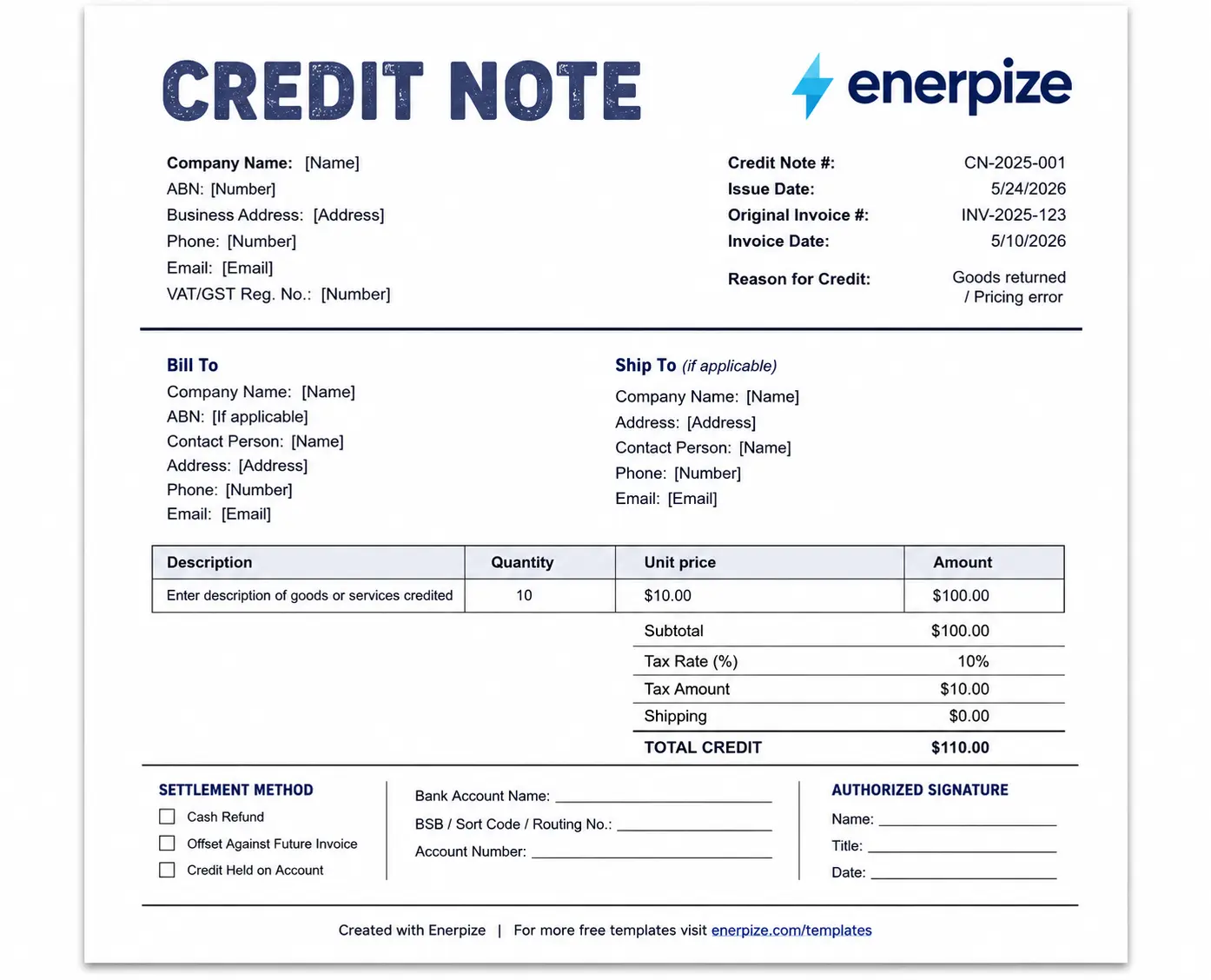
A credit note template is a pre-formatted document used by businesses to issue refunds, adjustments, or corrections to an invoice that has already been sent. It includes the original invoice reference, the reason for the credit, the adjusted net amount, the corresponding tax adjustment, and the total credit being issued.


What Is a Credit Note?
You sent the invoice. It went out. Then something went wrong. The price was wrong, the goods came back, the scope got cut, or the client overpaid. You cannot delete the original invoice. That creates a gap in your records and, in most jurisdictions, it is not legally permitted once the document has been issued.
That is exactly what a credit note is for.
A credit note, sometimes called a credit memo or credit memorandum, is a document issued by the seller to the buyer that formally reduces or cancels the amount owed on a previous invoice. It does not replace the invoice. It sits alongside it, references it, and corrects the record. Both documents remain in your books. The net result is accurate.
Think of it as the undo button for invoicing. Not a delete. Not an edit. A proper, traceable correction.
Issue Credit Notes in Seconds with Enerpize. Start for free, No Credit Card.
Credit Note vs Invoice: What Is the Difference?
People sometimes confuse the two because they look similar. They are not the same document and they do not do the same job.
| Invoice | Credit Note | |
|---|---|---|
| Purpose | Requests payment from the buyer | Reduces or cancels an amount previously invoiced |
| Direction | Seller to buyer | Seller to buyer |
| Amount | Positive | Negative or corrective |
| References | New transaction | Must reference original invoice |
| Accounting entry | Debit accounts receivable, credit sales | Debit sales returns, credit accounts receivable |
| Tax impact | Increases output VAT or GST | Reduces output VAT or GST |
The invoice says: you owe me this. The credit note says: you owe me less than I said, or nothing at all. Both are legally binding documents. Both must be retained.
Credit Note vs Refund: What Is the Difference?
A credit note and a refund are not the same thing. A credit note is a document. A refund is a transaction. The credit note records that an adjustment has been agreed. What happens next, whether the buyer gets cash back, whether the credit offsets a future invoice, or whether it sits on account, is a separate decision. We cover that in detail in the settlement section below.
What Must a Credit Note Include?
Every jurisdiction has its own rules, but there is a core set of fields that every credit note needs regardless of where you are issuing it. The original template we reviewed earlier was missing several of these. Here is what a complete credit note must contain.
Mandatory Fields
| Field | What It Means |
|---|---|
| Document label: "Credit Note" | Must appear as the title. Not in the footer. At the top, clearly visible. |
| Unique credit note number | Sequential, with no gaps. Format: CN-YYYY-001. Gaps in your sequence create audit flags. |
| Date of issue | The date the credit note is being issued, not the date of the original invoice. |
| Reference to original invoice | The invoice number and date of the invoice being corrected. This is the single most critical field. Without it, the credit note cannot be legally tied to the transaction. |
| Supplier details | Business name, address, and tax registration number (VAT number in the UK, ABN in Australia, EIN or equivalent elsewhere). |
| Customer details | Business name, address, and tax registration number where applicable. |
| Reason for the credit | A clear description: goods returned, pricing error, retrospective discount, cancellation of supply, etc. |
| Adjusted net amount | The change to the taxable amount compared with the original invoice. |
| Adjusted tax amount | The corresponding change in VAT or GST. Shown as a separate line, not folded into the net. |
| Tax rate | Must match the rate on the original invoice exactly. |
| Total credit amount | The final amount being credited, net plus tax. |
Recommended Additional Fields
These are not always legally required, but they prevent disputes and make the document more useful in practice.
| Field | Why It Matters |
|---|---|
| Settlement method | Cash refund, offset against future invoice, or credit held on account. If you do not specify, the buyer will assume the option that suits them. |
| Bank details | Account name, routing or sort code, and account number. Needed if the settlement method is a cash refund. |
| Purchase order reference | Helps the buyer match the credit to the original transaction in their system. |
| Authorized signature | Not always required, but adds credibility and is standard practice for B2B documents. |
What to Check Before You Use Any Credit Note Template
This is where most template downloads fall short, and it is worth knowing before you download ours or anyone else's.
The original credit note template we audited for this page had the following problems: the "Credit Note" label appeared at the bottom of the document as a footer. There was no field for the original invoice number. There was no reason for credit field. The tax section had hardcoded rates that could not be adjusted to match the original invoice. No VAT or ABN registration number fields existed for either party. No settlement method. No bank details.
A credit note missing the original invoice reference is not a valid correction document. It is just a piece of paper. Our template, available in all formats above, fixes every one of these gaps.
How to Issue a Credit Note: Step by Step
Issuing a credit note is straightforward once you know the sequence. Here it is, start to finish.
Step 1: Identify the original invoice and confirm exactly what needs correcting. Is it the full amount, a line item, a pricing error, or a tax miscalculation?
Step 2: Assign a unique sequential credit note number. If your last credit note was CN-2025-004, this one is CN-2025-005. No gaps. No reuse of numbers.
Step 3: Reference the original invoice number and the original invoice date on the credit note. Both fields are mandatory.
Step 4: State the reason clearly. "Goods returned on 12 June 2025 per client email" is useful. "Adjustment" is not.
Step 5: Calculate the adjusted net amount and the corresponding tax adjustment as separate figures. Do not combine them.
Step 6: Confirm the settlement method with the buyer before issuing the document where possible, then include it on the credit note.
Step 7: Deliver the credit note to the buyer and retain a copy in your records.
Step 8: Post the double-entry in your accounting system. If you are using Enerpize, this step happens automatically when you save the credit note.
Credit Note Accounting Entry
This is the section most template pages skip, and it is the one your accountant will care most about.
A credit note generates a double-entry in your books. The entries reverse part of the original sale. Here is what that looks like at three different amounts.
Example 1: Full Invoice Reversal
Original invoice: $1,000 net, $100 GST, $1,100 total. Credit note issued for the full amount.
| Account | Debit | Credit |
|---|---|---|
| Sales Returns | $1,000 | |
| GST/VAT Payable | $100 | |
| Accounts Receivable | $1,100 |
Your sales figure drops by $1,000. Your output tax liability drops by $100. The amount your customer owes you drops by $1,100. Clean.
Example 2: Partial Reversal
Original invoice: $2,000 net, $200 GST, $2,200 total. Customer returns goods worth $500 net. Credit note issued for $550 ($500 net, $50 GST).
| Account | Debit | Credit |
|---|---|---|
| Sales Returns | $500 | |
| GST/VAT Payable | $50 | |
| Accounts Receivable | $550 |
The original invoice stays in your records at $2,200. The credit note sits alongside it. The net position is $1,650 owed.
Example 3: Pricing Error Correction
Original invoice: $3,000 net, $300 GST, $3,300 total. Correct price was $2,700 net. Credit note for the difference: $300 net, $30 GST, $330 total.
| Account | Debit | Credit |
|---|---|---|
| Sales Returns | $300 | |
| GST/VAT Payable | $30 | |
| Accounts Receivable | $330 |
With Enerpize, these entries post automatically when the credit note is saved. You do not go back to your chart of accounts and post them manually. The system links the credit note to the original invoice and updates accounts receivable in the same step.
When to Issue a Credit Note: 5 Real Scenarios
Every competitor page lists abstract reasons. Goods returned. Pricing error. Discount applied. Here are five concrete scenarios from the kinds of businesses that use Enerpize, with numbers.
Scenario 1: Gym Cancels a Membership Mid-Month
A gym invoices a member $220 for a full month of membership on June 1. The member cancels on June 15, having used exactly half the month. The gym issues a credit note for $110, referencing the original invoice, citing "partial cancellation of membership." The remaining $110 is either refunded or offset against a future enrollment.
Scenario 2: Consulting Firm Corrects an Hourly Rate
A consulting firm invoices a client at $200 per hour for 20 hours, total $4,000 net. The agreed rate was $180 per hour. The firm issues a credit note for the $400 difference ($20 x 20 hours), referencing the original invoice and citing "billing rate correction per signed agreement." A corrected invoice is issued simultaneously for $3,600.
Scenario 3: Contractor Reduces Billing After Scope Change
A contractor invoices $15,000 for a scope of work. Before payment, the client formally removes two line items worth $3,200. The contractor issues a credit note for $3,200 plus applicable tax, updates the contractor invoice, and resubmits. Both documents stay on file as part of the payment application record.
Scenario 4: Wholesaler Issues a Retrospective Discount
A wholesale supplier invoices a retailer $8,000 for a bulk order. At the end of the quarter, the retailer qualifies for a 5% volume discount that was not applied at the time of invoicing. The supplier issues a credit note for $400 net, citing "Q2 volume discount applied per distributor agreement." The credit offsets the retailer's next order.
Scenario 5: Freelancer Corrects an Overbilled Project
A freelance consultant invoices 40 hours at $90 per hour for a project. The client disputes 5 hours, providing timestamped records. Both parties agree. The freelancer issues a credit note for $450 plus applicable tax, citing "agreed reduction per project review on 18 June 2025."
What Happens When a Credit Note Is Issued Against a Paid Invoice?
Most templates do not answer this question. Here is the full picture.
If the original invoice has already been paid in full and you then issue a credit note, you cannot simply apply the credit to an invoice that is already closed. You have three options.
Option 1: Cash refund. You return the credited amount to the buyer via bank transfer. The credit note documents the adjustment. Your accounts receivable is reduced by the credit amount and you record the cash outflow against it. Include your bank details on the credit note if this is the settlement method.
Option 2: Offset against a future invoice. The buyer has a credit on account. When their next invoice is issued, the credit is applied and they pay the net difference. This is common in ongoing supplier relationships. State clearly on the credit note: "Credit to be applied to next invoice."
Option 3: Credit held on account. The credit sits as a balance in your accounts receivable until the buyer decides how to use it. Useful for clients with irregular purchase cycles. Some businesses prefer this because it maintains the relationship without requiring immediate cash movement.
All three are legitimate. The important thing is that the settlement method is agreed, documented on the credit note, and reflected accurately in your books.
Credit Note Numbering: How to Sequence and Track Them
Nobody talks about this. It matters more than people realize.
Your credit note numbers need to follow a sequential format with no gaps. A standard approach is CN-YYYY-XXX, for example CN-2025-001, CN-2025-002, and so on. Some businesses use the original invoice number as a reference within the credit note number itself, for example CN-INV-2025-047, making it immediately obvious which invoice each credit note corrects.
Why do gaps matter? In a tax audit, gaps in document numbering sequences raise questions. An auditor seeing CN-2025-003 and then CN-2025-007 will ask where 004, 005, and 006 are. Even if the answer is innocent, it creates work. Sequential numbering with no gaps is the cleanest approach.
If you issue credit notes in Enerpize, the system handles sequencing automatically. You never end up with a gap because a draft was abandoned or a document was accidentally skipped. Start for free.
UK Credit Note Requirements
If you are VAT-registered in the UK, credit notes carry specific legal requirements under UK VAT legislation and HMRC guidance.
VAT Credit Notes Under HMRC Rules
A credit note that adjusts VAT is also treated as a VAT adjustment note. It must include all the fields of a standard VAT invoice, plus the reason for the adjustment and a clear reference to the original VAT invoice being corrected.
Under HMRC VAT Notice 700, when you issue a credit note that reduces your output VAT, you must adjust your VAT return for the period in which the credit note was issued. You cannot hold the adjustment and apply it to a later period. The buyer is also required to reduce their input tax credit claim in the same period.
Key mandatory fields for a UK VAT credit note:
- The words "Credit Note" as the document title
- Your VAT registration number
- The buyer's VAT registration number (for B2B transactions)
- The original invoice number and date
- The reason for the credit
- The net amount being adjusted
- The VAT amount being adjusted
- The VAT rate applied (must match the original invoice)
- The date of the adjustment, which is the tax point
What the 14-Day Rule Means for Basic Tax Invoices
Under the Regulation 38 rules that came into force in September 2019, there is a 14-day rule for issuing a credit note following a price reduction. The 14-day clock starts from the date the refund payment is made to the customer. If no refund is being made and the credit is being offset against a future invoice, confirm the specific documentation timing with your accountant or refer to HMRC VAT Notice 700. For full VAT invoices in B2B transactions, the requirement is to issue the credit note promptly and reflect it in the VAT return for the period it was issued. Consult the ICAEW invoicing guidance or your accountant for the specifics of your situation.
Australia: Adjustment Notes Under GST
If you are a GST-registered business in Australia, the terminology changes and so do the rules.
What the ATO Requires
In Australia, a credit note that adjusts a GST amount is not called a credit note under the law. It is called an adjustment note. The distinction matters because the ATO has specific rules about when an adjustment note is required, what it must contain, and when it can be omitted.
An adjustment event, which is the trigger for issuing an adjustment note, includes a price reduction, the return of goods, the cancellation of a supply, or any change that alters the GST amount on the original tax invoice. When an adjustment event occurs, the supplier must issue an adjustment note unless the GST adjustment is $75 or less and the recipient does not request one.
Under the ATO's adjustment note requirements, a valid Australian adjustment note must include:
- The words "Adjustment Note" clearly on the document
- Your Australian Business Number (ABN)
- The date the adjustment note is issued
- The name of the supplier
- A brief explanation of the adjustment
- The amount of the GST adjustment
- Either the original GST amount, or the difference between the original and the corrected GST amount
- A reference to the original tax invoice
GST Adjustment Note Example for Australian SMBs
A Sydney-based IT services firm issues a consulting invoice for $2,200 (including $200 GST) for a project. The client disputes one day of work, worth $550 (including $50 GST). Both parties agree.
The supplier issues an adjustment note for $550, referencing the original invoice, showing the $50 GST adjustment separately, including their ABN, and citing "agreed reduction for disputed day of work per client communication 3 July 2025."
The supplier reduces their output tax by $50 in their next BAS. The client reduces their input tax credit claim by $50 in the same period. Both parties retain the adjustment note and the original invoice.
For Australian businesses issuing tax invoices with GST, our Australian GST invoice template covers the full compliance requirements for the original invoice side of this process.
Credit Note Template Fields Explained
Every field in the downloadable template, explained in plain language.
| Field | What It Means |
|---|---|
| Credit Note Number | Your unique sequential reference. Format: CN-YYYY-001. Never reuse a number. |
| Issue Date | The date you are issuing the credit note. This is the tax point for VAT/GST purposes. |
| Original Invoice Number | The invoice number this credit note is correcting. Mandatory in every jurisdiction. |
| Original Invoice Date | The date of the invoice being corrected. Helps the buyer locate the transaction in their system. |
| Reason for Credit | A specific, written reason. "Goods returned," "pricing error," "retrospective discount." Not just "adjustment." |
| Supplier Name and Address | Your legal business name and registered address. |
| Supplier VAT/GST/ABN Number | Your tax registration number. Mandatory for VAT and GST compliance. |
| Customer Name and Address | The buyer's legal business name and registered address. |
| Customer VAT/GST/ABN Number | The buyer's tax registration number for B2B transactions. |
| Item ID | Reference to the specific product or service line being credited. |
| Description | What is being credited. Match the language from the original invoice. |
| Quantity | The quantity being returned or corrected. |
| Unit Price | The unit price from the original invoice. |
| Line Total | Quantity multiplied by unit price. Calculated automatically in the Excel version. |
| Subtotal | The sum of all line totals before tax. |
| Tax Rate | The rate from the original invoice. Not to be changed to match current rates. |
| Tax Amount | Subtotal multiplied by the tax rate. Shown separately, never folded into the net. |
| Shipping | Any shipping or handling being reversed, if applicable. |
| Total Credit | The final amount being credited. This is what the buyer's balance is reduced by. |
| Settlement Method | Cash refund, offset against future invoice, or credit held on account. |
| Bank Details | Required if settlement is a cash refund. |
| Authorized Signature | Name, title, and date of the person authorizing the credit. |
How Enerpize Handles Credit Notes
A template works fine when you issue one credit note a month. It starts to break down when you are running multiple clients, tracking credits against outstanding invoices, reconciling your accounts receivable at month-end, and filing your VAT or BAS return.
Enerpize handles the full workflow inside one system. When a credit note is issued, it is automatically linked to the original invoice. Accounts receivable updates in the same step. The journal entries post to your chart of accounts without a separate manual entry. If the settlement method is offset against a future invoice, the credit sits on the client's account and applies automatically when the next invoice is generated.
The client portal updates too. When your client logs in, they see their corrected balance, the credit note, and the original invoice, all in one place. No email threads. No disputes about what was agreed.
Stop Correcting Invoices Manually. Enerpize Links Every Credit Note to the Original Invoice Automatically. Start for free.
Key Takeaways
- A credit note corrects or cancels a previously issued invoice without deleting it from your financial records, keeping both documents in your books as a traceable pair.
- In Australia, a credit note that adjusts GST is legally called an adjustment note under ATO rules, and must include specific fields including your ABN, the GST amount being adjusted, and the words "Adjustment Note."
- In the UK, a VAT credit note must adjust output VAT in the period it is issued, the buyer must reduce their input VAT claim in the same period, and all VAT invoice fields apply.
- Credit note numbering should follow a sequential format with no gaps, because gaps in document sequences create audit risk and require explanation.
- When a credit note is issued against an already paid invoice, it can be resolved as a cash refund, offset against a future invoice, or held as a credit on account, and the chosen method must be documented on the credit note itself.
- An online invoicing software like Enerpize auto-links every credit note to the original invoice, posts the accounting entries automatically, and updates the client's balance in the same step, removing the manual reconciliation work entirely.
Frequently Asked Questions
What is the difference between a credit note and a credit memo?
Nothing, practically speaking. They are the same document. "Credit note" is the term used in the UK, Australia, and most of the Commonwealth. "Credit memo" or "credit memorandum" is more common in the United States and Canada. The legal function, the required fields, and the accounting treatment are identical regardless of what you call it.
Is a credit note the same as a refund?
No. A credit note is a document that records an agreed adjustment to a previously issued invoice. A refund is the actual return of money. A credit note may lead to a refund, but it does not have to. The credit can also be applied to a future invoice or held on account. The credit note is always issued first. The settlement method determines what happens to the money.
What is an adjustment note in Australia?
An adjustment note is the Australian legal term, under the GST Act, for a document that corrects the GST amount on a previously issued tax invoice. It is functionally the same as a credit note, but the terminology and some of the mandatory fields are specific to Australian GST law. The document must include your ABN, the words "Adjustment Note," the GST amount being adjusted, and a reference to the original tax invoice.
Can you issue more than one credit note against the same invoice?
Yes. There is no rule limiting the number of credit notes against a single invoice, as long as the total credits do not exceed the original invoice value. Each credit note carries its own unique sequential number and references the same original invoice. You would typically do this when corrections happen in stages, for example, if goods are returned in two separate shipments on different dates.
Does a credit note need to reference the original invoice number?
Yes, always. The original invoice number is the link that ties the credit note to the transaction it is correcting. Without it, the document has no legal standing as a correction. It is just a standalone piece of paper. Every jurisdiction and every accounting standard treats this as a mandatory field.
What accounting entries does a credit note generate?
A credit note debits your sales returns account (or the original sales account) and credits accounts receivable. If VAT or GST is involved, it also debits your output tax payable account. The net effect is a reduction in both your sales figure and the amount the customer owes you. See the full worked examples in the accounting entry section above.
Can a credit note be issued for a partial amount?
Yes. A credit note can cover the full invoice amount or any portion of it. A partial credit note corrects one or more line items without reversing the entire transaction. The credit note shows only the lines or amounts being adjusted, not the full original invoice.
What is the time limit for issuing a credit note in the UK?
HMRC does not set a fixed statutory deadline for issuing a VAT credit note, but the adjustment must be reflected in the VAT return for the period in which the credit note is issued. The practical implication is that you should issue the credit note as soon as the adjustment event occurs. Delays can create discrepancies between your VAT return and your buyer's input tax records.
Do I need to issue a credit note if the invoice has already been paid?
Yes, if the amount paid was incorrect. Payment does not close the record. If your customer paid an amount that was higher than what was actually owed, a credit note is still required to correct the financial records for both parties. The settlement then becomes a cash refund or a credit against future invoices, as agreed between you.
How does Enerpize handle credit notes?
In Enerpize, a credit note is issued directly from the original invoice. The system copies the relevant details, you adjust the lines or amounts being credited, state the reason, and save. The journal entries post automatically to your chart of accounts. Accounts receivable updates immediately. The client portal reflects the corrected balance. If the credit is to be offset against a future invoice, it sits on the client's account and applies when their next invoice is generated.
About the Author
Omar El Bahr is a Senior Digital Growth Specialist at Enerpize, where he leads SEO, content strategy, and organic growth across international markets. He is a Forbes Communications Council contributor and has written for Entrepreneur on business communication and digital strategy.
Disclaimer
The information on this page is provided for general guidance only. It does not constitute legal, tax, or accounting advice. Credit note requirements, VAT rules, and GST regulations vary by jurisdiction and can change. Always verify the current requirements with your local tax authority or a qualified professional before issuing credit notes for compliance purposes.