Posted on 14 June 2026
Free HVAC Invoice Template Download— Word, Excel, PDF & Google Sheets and Docs
- Available in Word, Excel, PDF, Google Docs, and Google Sheets, free to download with no sign-up required
- Covers labor hours, parts and materials, call-out fees, emergency surcharges, permit fees, and disposal charges in one structured document
- Built with country-specific tax fields for GST (Australia), VAT (UK), HST (Canada), and sales tax (US) in one template
- Calculates labor subtotal, materials subtotal, and balance due automatically in Excel and Google Sheets
An HVAC invoice template is a pre-formatted billing document that records every service delivered, rate charged, and part used, giving both the contractor and the client a clean paper trail for every job.


What Is an HVAC Invoice Template?
Picture the scenario. You just finished a four-hour installation in 95-degree heat. The condenser is running. The client is happy. And then someone on the admin side sends over a handwritten invoice with the wrong labor rate, the missing serial number, and no tax line.
That is the moment an HVAC invoice template saves the job.
An HVAC invoice template is a pre-structured billing document used by heating, ventilation, and air conditioning contractors to request payment after completing installation, repair, maintenance, or emergency service work. It replaces blank-page billing with a ready-made format that captures every billable item in the right place.
A proper hvac invoice template separates labor from parts, lists each component by name and quantity, applies the correct tax rate for the job location, and delivers the total to the client in a format they can actually read and pay without calling you back for clarification.
The Bureau of Labor Statistics puts the HVAC technician workforce at over 400,000 in the US alone, with a projected growth rate of 13 percent through 2028. That is a lot of jobs being invoiced every day. Getting the billing document right is not a formality. It is the difference between getting paid on time and chasing a client for three weeks over a line item they could not understand.
Skip the manual work. Enerpize generates, sends, and tracks HVAC invoices automatically, with tax, recurring billing, and client payments built in. Start for free on Enerpize.
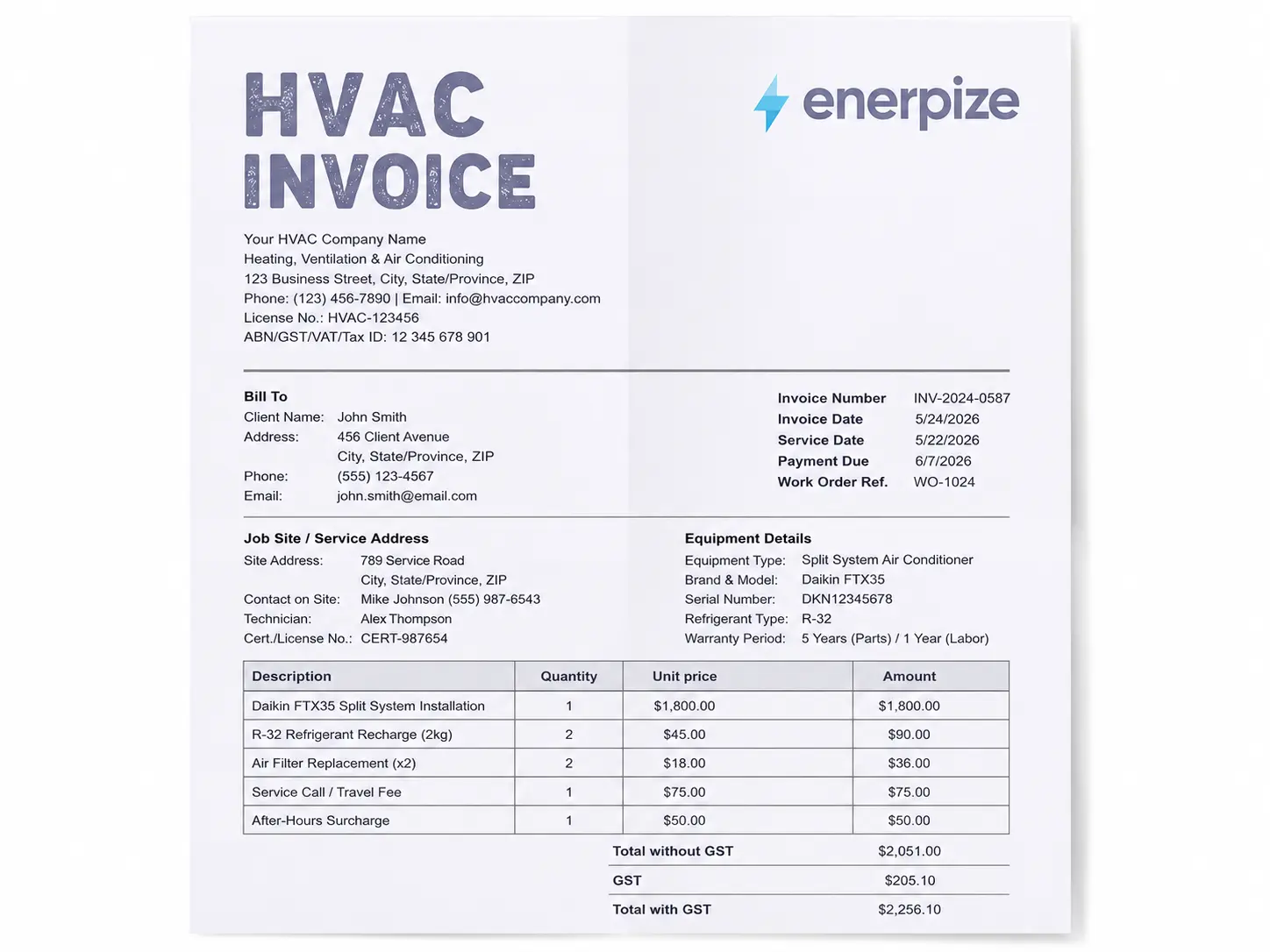
What the Enerpize HVAC Invoice Template Includes
Most free templates give you a box for "service" and a box for "total." That works for invoice number one. By invoice number fifty, you are manually re-entering the same client address, the same equipment models, and the same tax rate, and wondering why two different technicians billed the same job at two different labor rates.
The Enerpize HVAC Invoice Template is built differently. It maps to the actual workflow of an HVAC job, from the first service call to the final client signature, and every field connects to a real billing decision you make on site.
Here is exactly what is inside.
Company Details and Contractor License Number
Your business name, address, phone, email, and contractor license number sit in the header of every invoice. This is not cosmetic. In most US states, displaying your license number on billing documents is a legal requirement under contractor licensing law. In the UK, Gas Safe registered engineers must include their registration number on any invoice involving gas work. In Australia, ARCtick licence holders are required to document refrigerant handling on every job record.
The Enerpize template includes a dedicated field for ABN, GST number, VAT registration, HST number, or US Tax ID depending on your market.
Invoice Number, Invoice Date, Service Date, and Payment Due Date
Four separate date and reference fields. Not one.
The invoice date and the service date are often different in HVAC work. You finish a job on a Tuesday and send the invoice on Thursday. For tax compliance in Canada, the Canada Revenue Agency requires the "date of supply" to appear separately from the invoice issue date. In Australia, the ATO has its own requirements for what a valid tax invoice must show. Having both dates in the right field protects you in both markets.
The Work Order Reference field sits alongside these, so every invoice traces back to the job it belongs to.
Bill To and Job Site Address
Two separate address blocks. Because the client who pays the invoice and the address where you did the work are not always the same person or the same location. Property managers, landlords, commercial accounts, multi-site businesses. The Enerpize template keeps billing address and service address separate so your paperwork never creates confusion on the client's end.
Equipment Details Section
Brand, model number, serial number, refrigerant type, and warranty period for every piece of equipment on the job.
Serial numbers are not optional detail. They are the paper trail for manufacturer warranty claims, for ARCtick compliance in Australia, and for HMRC CIS documentation in the UK when HVAC work is part of a larger construction project. The Enerpize template is one of the only free hvac invoice templates that includes a dedicated equipment table with all five fields.
Labor Section with Hours and Rate
A dedicated labor section, separate from parts and materials, where you list what was done, how long it took, and what you charged per hour or per flat rate. No more lumping a four-hour installation into a single "service" line item and hoping the client does not ask questions.
Parts and Materials Section
Every component listed by name, quantity, unit price, and line total. Condenser coils, refrigerant by kilogram, air filters, capacitors, copper tubing. If it came off the truck and went into the job, it gets its own line.
Service Call and Travel Fees
A third billing category that most templates skip entirely. Call-out fees, after-hours surcharges, emergency response premiums, and travel charges are all standard practice in HVAC billing. The Enerpize template gives them their own section so they are clearly communicated to the client rather than buried in a notes field.
Per-Line Discount and Tax Fields
Item-level discounts and per-line tax rates, not a single tax rate applied to the whole invoice. This matters because in some US states, labor and materials are taxed differently. In others, HVAC installation may be exempt from sales tax while repair work is not. The Sales Tax Institute tracks these state-by-state variations, and the Enerpize template gives you the flexibility to apply the right rate to the right line rather than a one-size average.
Totals Block with Automatic Calculation
Subtotal, total discount, subtotal after discount, total tax, shipping and travel fees, and balance due. In the Excel and Google Sheets versions, every total calculates automatically the moment you enter your line items. No manual addition. No rounding errors. No "I think the total should be this" conversations with a client.
Warranty Terms and Notes
Structured warranty fields for parts and labor, not a freeform notes section where warranty information gets lost. Parts warranty period. Labor warranty period. Room for follow-up dates and maintenance plan offers. These are the details that turn a one-time repair call into a recurring maintenance client.
Payment Methods and Bank Details
A dedicated payment section listing accepted methods and bank details. Clients who know how to pay, pay faster. It is that simple.
Technician Signature and Client Acceptance
Two signature blocks. One for the technician to certify the work was completed. One for the client to acknowledge and accept the invoice. Client signature on completion is protection against payment disputes and, in some markets, a legal requirement for certain types of installation work.
The Enerpize HVAC Invoice Template connects to something larger too. Inside Enerpize's HVAC Services Management Software, the invoice links directly to the work order, the inventory record, the client profile, and the technician log. The invoice does not exist in isolation. It connects to the full business operation. You can start with the free template and upgrade to the connected system when you are ready.
Managing Your HVAC Business Beyond the Invoice
The invoice is the end of the job. But the job starts long before that.
It starts with a client call, a scheduled appointment, a technician dispatched to a site. It moves through parts pulled from inventory, work orders created, maintenance records updated, and follow-up reminders sent. By the time the invoice goes out, ten other things have already happened, and if any of them were handled on a sticky note or a separate spreadsheet, something has already slipped.
Enerpize's HVAC Services Management Software connects every one of those steps in a single system. Here is what that looks like in practice.
Financials That Run Themselves
Enerpize automates bookkeeping across every HVAC transaction. Invoices with taxes and shipping fees. Income and expense tracking. Net profit reports per job category. Sales analysis by equipment brand or model so you know which units you sell most and which cost you the most to service. The financial picture of your HVAC business updates in real time without someone manually entering numbers at the end of the week.
Complete Customer Records in One Place
Every client in Enerpize carries a full history. The AC units they own, the maintenance visits on record, the payments made, and the follow-up dates scheduled. When a client calls about a warranty issue six months after installation, you open their profile and every detail is already there. No digging through paper files. No calling the technician who did the job.
Enerpize also schedules maintenance, receipt, and delivery dates directly from the client record, and sends appointment reminders and service updates via SMS or email automatically.
Technician and Staff Management
Add every technician to the system with their own activity log. Assign specialists to specific clients. Track performance through reporting. When a job comes in, you know who is available, who has the right certifications, and who has worked with that client before.
Inventory That Knows What You Have
Parts run out at the worst possible moments. Enerpize tracks every product movement across your inventory, sends low-stock alerts before you run short, and lets you issue purchase orders directly from the alert. Stocktaking compares actual quantities against system records. Inventory reports show expected profit on remaining stock.
When you use a part on an HVAC job, the inventory count updates. The invoice reflects what was used. The purchase order for the replacement goes out before the next job needs it.
Work Orders Connected to Every Invoice
Every HVAC operation in Enerpize has its own job file. Sales invoices, purchase invoices, labor costs, parts costs, revenue, expenses, and net profit per job. When you create a work order and convert it to an invoice, nothing needs to be re-entered. The client details, the equipment, the line items, they all carry through. The work order template and the HVAC invoice template are the free entry point. The full Enerpize system is what happens when you are ready to connect everything.
Asset Management for Your Own Equipment
HVAC businesses own equipment too. Vehicles, tools, machinery, office assets. Enerpize tracks every asset with depreciation calculated annually, revaluation at the end of the operating period, and full disposal records when something is sold or retired.
Reporting That Tells You the Truth
Sales reports. Purchase reports. Expense breakdowns. Profit and loss by category. Chart of accounts with every transaction logged automatically from every financial operation in the system. Enerpize gives HVAC business owners the financial position of their company without waiting for an accountant to compile it.
The template gets you started. The platform gets you organized.
Types of HVAC Invoices
Not every HVAC job is the same, and not every HVAC invoice form looks the same either. The structure of your invoice should follow the type of work you are billing for.
HVAC Repair Invoice
Used after diagnosing and fixing a fault. The repair invoice leads with the diagnostic fee, then lists each part replaced with its unit price, and closes with labor hours and total. For residential repair work, most contractors in the US charge a flat service call fee between $75 and $150 before any parts or labor, according to industry pricing data compiled by HomeAdvisor. That flat fee should appear as its own line item.
HVAC Installation Invoice
Used for new system installations, whether that is a split system, ducted central air, heat pump, or commercial rooftop unit. The installation invoice is typically the largest document in your billing cycle. It should itemize every component installed (with model number and serial number), show labor separately from equipment, and include any permit fees or disposal charges for the old system.
HVAC Maintenance and Service Contract Invoice
The invoice format for recurring maintenance agreements. Annual tune-ups, filter replacement schedules, bi-annual system checks. These invoices are typically simpler in structure because the scope is agreed in advance, but they need clear service dates and contract reference numbers so the client can match the invoice to their service agreement.
HVAC Emergency Services Invoice
After-hours emergency calls carry premium pricing, and the invoice needs to make that transparent. An emergency HVAC invoice form should clearly show the base rate, the after-hours surcharge, and any minimum call-out fee so the client understands what they agreed to before the technician arrived.
AC Repair Invoice Template
Air conditioning repair invoices often have specific billing patterns around refrigerant. When you add refrigerant to a system, list the type (R-410A, R-32, R-22), the quantity in kilograms or pounds, and the per-unit cost as separate line items. In Australia, refrigerant handling must be documented under the Ozone Protection and Synthetic Greenhouse Gas Management Act, and the invoice serves as part of that record.
Refrigeration Invoice Template
Commercial refrigeration invoicing follows similar logic but often involves larger equipment values, longer service windows, and different warranty structures. The Enerpize template's equipment section handles refrigeration work with the same fields, just scaled to the job.
HVAC Service Order Invoice Template
The service order invoice bridges the work order and the final billing document. It starts as a job record and converts to a payment request when the work is complete.
What to Include on an HVAC Invoice
Every HVAC service invoice template, regardless of format, needs the same core fields to hold up legally and get paid without delays.
A complete HVAC invoice includes:
- Your business name, address, phone, and email
- Contractor license number (required in most US states, the UK, and Australia)
- ABN, VAT number, GST number, or HST number depending on your market
- Client name and billing address
- Job site address (if different from billing address)
- Invoice number
- Invoice date
- Service date (separate from invoice date)
- Payment due date
- Work order or job reference number
- Description of each service provided
- Labor hours, hourly rate, or flat-rate fee per task
- Parts and materials listed individually with quantity and unit price
- Equipment brand, model number, and serial number for anything installed
- Refrigerant type and quantity if applicable
- Discount per line item if applicable
- Tax rate per line item
- Subtotal, total tax, and balance due
- Parts warranty period
- Labor warranty period
- Accepted payment methods and bank details
- Technician signature and client acceptance
That list looks long. It is not as long as the conversation you will have with a client who disputes an invoice that does not have half of those fields.
How to Write an HVAC Invoice
The Enerpize HVAC invoice template fills in the structure for you. Your job is to fill in the details accurately and send it before you leave the job site.
Step 1: Add Your Company Details
Business name, address, phone, email, and license number go in the header. If you are GST, VAT, or HST registered, include your registration number here too. This makes the document a valid tax invoice in Australia, the UK, and Canada respectively.
Step 2: Enter the Client and Job Site Information
Name, billing address, and contact details for the person or company paying the invoice. Then the job site address separately if the work was at a different location. For commercial accounts, add the accounts payable contact name so the invoice lands on the right desk.
Step 3: Record the Invoice Number, Dates, and Work Order Reference
Invoice number first. Then the invoice date, the actual service date, and the payment due date. Reference your work order number so every document in the job file is connected.
Step 4: Document the Equipment
Before you leave the site, write down the brand, model number, and serial number of every piece of equipment you installed or serviced. Add the refrigerant type and quantity if you touched the refrigerant circuit. This information disappears fast once you are on the next job.
Step 5: List Labor First
Every task performed, the time it took, and the rate charged. If you work flat rate, list the service name and the agreed price. If you work hourly, list the hours and your hourly rate. Separate tasks get separate lines. A diagnostic and a repair are two different things.
Step 6: List Parts and Materials
Every component that came off the truck. Product name, quantity, unit price, and line total. If you applied a discount on a particular part, note it on that line. Do not absorb discounts into the total without showing the client what they saved.
Step 7: Add Call-Out and Travel Fees
Service call fee, after-hours surcharge, or travel charge if applicable. Put them in their own section so they are visible and clearly explained rather than appearing as a line item the client cannot identify.
Step 8: Apply Tax and Calculate Totals
Apply the correct tax rate per line. In the Excel and Google Sheets versions of the Enerpize template, the totals calculate automatically. For the Word and PDF versions, add the line totals manually, apply your applicable rate, and confirm the balance due before sending.
Step 9: Add Warranty Terms and Payment Details
Fill in the parts and labor warranty periods. List your accepted payment methods. Add bank details or a payment portal link if you have one. Clients who have everything they need to pay, pay faster.
Step 10: Sign and Get Client Sign-Off
Sign the technician section before you leave. Ask the client to sign the acceptance section. Keep a copy. Send the signed invoice within 24 hours of job completion.
Running HVAC jobs across the US, Canada, Australia, or the UK? Enerpize handles multi-currency invoicing and country-specific tax in one account. Start for free on Enerpize.
HVAC Invoice Template by Country
The structure of an HVAC invoice is the same everywhere. The tax rules, license requirements, and compliance fields are not.
HVAC Invoice Template for the United States
The US represents the majority of global search for HVAC invoice template, and the billing rules vary significantly from state to state. There is no federal sales tax on HVAC services. Instead, each state sets its own rules, and those rules treat labor and materials differently. In Texas, HVAC repairs are generally taxable as a service. In California, the rules depend on whether the job is repair or new construction. The Sales Tax Institute maintains state-by-state guidance for service businesses navigating these variations.
For US contractors, the invoice must show your state contractor license number. Requirements differ by state. Florida contractors are required by law to display their license number on all invoices and contracts. California, Texas, and New York each have their own contractor licensing boards with their own compliance rules.
For commercial HVAC work, purchase order numbers and W-9 status often affect how quickly accounts payable teams will process an invoice. Adding a PO number field and noting your tax status can cut payment time significantly.
The Enerpize contractor invoice template is a companion format for independent HVAC contractors billing on a project basis. For HVAC contractors working as subcontractors on commercial construction projects, the job often sits inside a larger AIA billing cycle. The general contractor above you is submitting payment applications on AIA G702/G703 forms to the owner. Your HVAC invoice needs to align with that schedule, reference the correct purchase order, and document retainage withheld if your subcontract includes it.
HVAC Invoice Template for Canada
Canada accounts for 22 percent of global search volume for this keyword, which tells you how active the Canadian HVAC market is.
Canadian HVAC contractors registered for GST or HST must include their Business Number (BN) on every invoice and show the tax amount separately from the pre-tax total. The threshold for mandatory GST/HST registration is $30,000 CAD in annual taxable supplies, per Canada Revenue Agency guidance. Once you cross that threshold, registration is not optional and your invoices must be compliant tax documents.
The combined tax rate depends on province. Ontario charges 13 percent HST. British Columbia applies 5 percent GST plus 7 percent PST separately. Quebec adds QST at 9.975 percent on top of 5 percent GST, and Revenue Quebec has its own formatting requirements for supplier invoices.
The date of supply matters in Canada too. For HVAC services, the date of supply is typically the date the work was completed, not the date the invoice was issued. Both dates must appear on the invoice.
For Quebec contractors, the RBQ (Régie du bâtiment du Québec) licence number must appear on invoices and contracts for work covered under the building act.
HVAC Invoice Template for the United Kingdom
UK HVAC contractors above the VAT registration threshold (currently £90,000 in taxable turnover per year) must issue a valid VAT invoice for every transaction. HMRC's VAT invoicing requirements are specific: your VAT registration number must appear on the invoice, the VAT rate and VAT amount must be shown separately, and the document must be issued within 30 days of the date of supply.
The standard VAT rate on HVAC services in the UK is 20 percent. Reduced rates may apply for certain energy-saving equipment installations in residential properties, but these rules have changed over recent years and contractors should verify the current position with HMRC before applying a reduced rate.
For HVAC engineers working on gas systems, the Gas Safe registration number must appear on every invoice involving gas work. This is a legal requirement, not a recommendation.
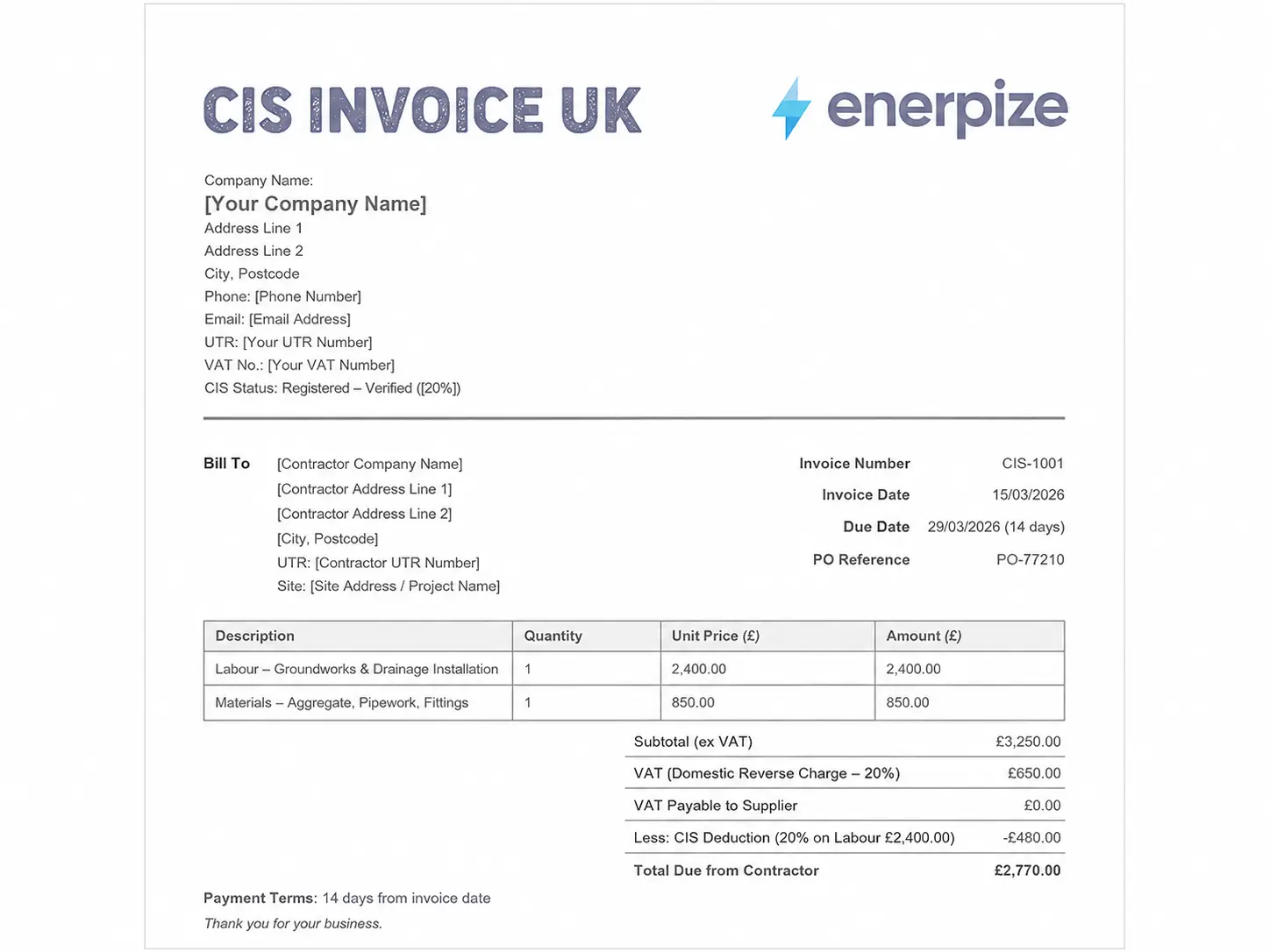
For HVAC work performed as a subcontractor on a construction project, the Construction Industry Scheme (CIS) applies. Under CIS, the paying contractor deducts a percentage from your invoice and passes it to HMRC. Your invoice must show your Unique Taxpayer Reference (UTR) and clearly distinguish gross and net amounts. Full guidance is available through HMRC's CIS documentation.
The construction invoice template covers HVAC work that falls under CIS on larger building projects.
HVAC Invoice Template for Australia
Australian HVAC contractors above $75,000 AUD in annual turnover must register for GST and issue tax invoices that comply with ATO requirements. A full tax invoice (required for sales over $1,000 AUD) must include your ABN, the words "Tax Invoice" at the top, the GST amount shown separately, the date of issue, and a description of the services provided.
For invoices under $1,000, a simplified tax invoice is acceptable and does not need to include the buyer's details.
HVAC contractors who handle refrigerants must hold an ARCtick licence issued by the Australian Refrigeration Council. Your ARCtick licence number must appear on any invoice involving refrigerant work. This is a compliance requirement under the Ozone Protection and Synthetic Greenhouse Gas Management Act, and the invoice is part of the refrigerant handling record.
State-specific contractor licensing also applies. Victoria requires a Mechanical Services licence. New South Wales requires an air conditioning and refrigeration licence from NSW Fair Trading. Queensland requires a QBCC mechanical services licence. Your relevant licence number should appear on the invoice header.
The Enerpize Australian GST invoice template is built specifically for Australian businesses that need ATO-compliant formatting. For HVAC businesses providing services to NDIS participants, the NDIS invoice template covers the additional pricing and documentation requirements under the NDIS price guide.
Common HVAC Invoicing Mistakes That Delay Payment
Every HVAC contractor has a version of this story. The job was done well. The client was happy. The invoice sat unpaid for six weeks because of something that had nothing to do with the quality of the work.
Here is what actually delays HVAC payments.
Sending the Invoice Days After the Job
Research compiled by field service management platforms consistently shows that invoices sent within 24 to 48 hours of job completion are paid significantly faster than invoices sent a week later. The client remembers the job. The technician is fresh in their mind. The invoice feels connected to a real event they experienced. Wait three weeks and suddenly they need to "check what this is for."
Send it the same day. The Enerpize template is designed to be completed on site so nothing is left for later.
Missing Equipment Model Numbers and Serial Numbers
This is the single most common dispute trigger in HVAC invoicing. The client's warranty claim gets rejected because the invoice does not show what was installed. The manufacturer asks for a serial number that does not exist on any document. The contractor has to go back through job photos, call the supplier, and reconstruct a paper trail that should have existed from day one.
Write down the serial number before the equipment leaves the truck. It takes 30 seconds and it saves hours.
Bundling Labor and Materials Into One Line
"HVAC Service: $1,240" is not an invoice. It is a number with no context, and it invites the client to question everything about it. Separate labor from parts. Show the hours. Show the rates. Show the materials. When a client can see the breakdown, they trust the total. When they cannot, they do not.
No Warranty Information on the Document
A client who has a problem six months after the job will ask two questions. What was installed? And is it under warranty? If neither answer is on the invoice, you are having that conversation without documentation. The Enerpize HVAC Invoice Template has a structured warranty field so both answers are always in writing.
Using a Template That Is Not Connected to Your Other Systems
A PDF template is a billing document. A work order template connected to an invoice template connected to an inventory system is a business operation. The difference matters as you scale. Parts used on a job should reduce your stock count automatically. An invoice generated from a work order should not require re-entering the client's address.
Key Takeaways
- An HVAC invoice template must separate labor, parts and materials, and call-out fees into distinct line items. Bundling everything into one number is the fastest way to trigger a client dispute and delay payment.
- Real HVAC invoicing inside an ERP connects the invoice to work orders, inventory, and purchase records. A standalone Word or PDF template cannot do any of that.
- Country-specific compliance fields are not optional in the US, Canada, UK, and Australia. License numbers, GST/VAT/HST registration numbers, and date of supply are legal requirements that most generic templates ignore entirely.
- The Enerpize HVAC Invoice Template includes recurring invoice settings, per-line tax fields, equipment serial number documentation, and a client portal link, making it the most complete free hvac invoicing template available for multi-market HVAC businesses.
- Equipment serial numbers on the invoice are not optional detail. They are the paper trail for warranty claims, ARCtick compliance in Australia, and CIS deductions in the UK.
- Enerpize is free to start, supports 135 plus currencies, and handles HVAC invoicing across residential, commercial, and maintenance contract billing types from a single account.
Download the free template above, or take the next step and run your HVAC invoicing inside Enerpize. It takes two minutes to set up and costs nothing to start. Start for free on Enerpize.
Frequently Asked Questions
What is an HVAC invoice?
An HVAC invoice is a billing document issued by a heating, ventilation, and air conditioning contractor after completing installation, repair, maintenance, or emergency service work. It records every service delivered, part used, rate charged, and tax applied, and formally requests payment from the client or property owner.
What should be on an HVAC invoice?
A complete HVAC invoice includes your business name and contractor license number, the client billing address and job site address, the invoice number and service date, an itemized list of labor hours and rates, every part and material used with individual pricing, the equipment brand, model, and serial number for anything installed, the applicable tax rate per line, the total amount due, warranty terms for parts and labor, accepted payment methods, and signature fields for the technician and client.
What is the difference between an HVAC service order and an HVAC invoice?
A service order is issued before or during the job. It documents what work was authorized and what the technician was dispatched to do. An HVAC invoice is issued after the job is complete. It records what was actually done, what parts were used, and what payment is now due. Many contractors use a work order first, then convert it to an invoice at completion.
When should I send an HVAC invoice to my client?
For residential repair and maintenance calls, send the invoice on the day the job is completed, ideally before the technician leaves the site. For larger installation projects, send it within 24 hours of completion. For commercial accounts with recurring service agreements, monthly invoicing on a consistent schedule works well because it aligns with the client's accounts payable cycle.
What tax applies to HVAC services in the United States?
There is no federal sales tax on HVAC services in the US. Tax rules are set at the state level, and they vary significantly. Some states tax HVAC labor, some tax parts only, and some apply different rules to repair work versus new construction installation. Texas, Florida, and New York each have distinct rules. The Sales Tax Institute provides state-by-state guidance for HVAC contractors navigating these differences.
Do UK HVAC contractors need to charge VAT?
Yes, if your business is registered for VAT. The current threshold for mandatory VAT registration in the UK is £90,000 in taxable turnover in a 12-month period. Above that threshold, you must charge VAT on HVAC services at the standard rate of 20 percent, show the VAT amount separately on the invoice, and include your VAT registration number. HMRC sets out all the requirements for a valid VAT invoice on its website.
What is an HVAC maintenance invoice for a recurring contract?
An HVAC maintenance invoice covers scheduled service visits under a maintenance agreement, such as annual tune-ups, seasonal checks, or filter replacement schedules. The invoice typically shows the service plan name, the service date, a description of tasks completed, and the agreed contract rate. Inside Enerpize, these invoices are generated automatically on a recurring schedule so no maintenance client ever falls through the billing gaps.
Can I use the Enerpize HVAC Invoice Template for refrigeration work?
Yes. The equipment section includes a refrigerant type field that covers R-410A, R-32, R-22, and any other refrigerant type. For Australian contractors, the ARCtick licence number field in the company header makes the invoice suitable for refrigerant handling documentation under Australian law. The template works for commercial refrigeration, split systems, and any other refrigerant-based equipment.
What is the difference between an HVAC invoice and an HVAC receipt?
An HVAC invoice is a request for payment sent before or at the time payment is due. An HVAC receipt is a confirmation of payment that has already been made. You issue an invoice first. Once the client pays, you issue a receipt as proof of that payment. The Enerpize receipt template is the companion document to the invoice for that final step.
How do I invoice for HVAC installation versus a repair call?
The structure is similar but the content is different. An installation invoice leads with the equipment section (brand, model, serial number), followed by a detailed parts list for every component installed, then labor. A repair invoice leads with the diagnostic fee and service call fee, then lists the fault identified, the parts replaced, and the labor time. For installation work on construction projects, you may also need to reference a purchase order number and show permit fees as a separate line item.
About the Author
Omar El Bahr is a Senior Digital Growth Specialist at Enerpize, where he leads SEO, content strategy, and organic growth across international markets. He is a Forbes Communications Council contributor and has written for Entrepreneur on business communication and digital strategy.
Disclaimer: The information on this page is for general guidance only and does not constitute legal, tax, or financial advice. Tax rates, licensing requirements, and invoicing obligations vary by country and change over time. Always verify current requirements with your local tax authority or a qualified professional before issuing invoices.