Posted on 7 June 2026
Free Work Order Template Download — Excel, Word, PDF & Google Sheets
- Covers all seven stages of a work order: request information, assignment and scheduling, materials and parts, labor costs, cost summary, work completed, and authorization signatures.
- Calculates line totals, materials subtotal, labor subtotal, tax amount, and total amount due automatically using your entered quantities, rates, and hours.
- Creates a complete paper trail for supervisor authorization, client acknowledgment, technician sign-off, and compliance documentation.
- The work order template is available in Word, Excel, PDF, Google Sheets, and Google Docs.
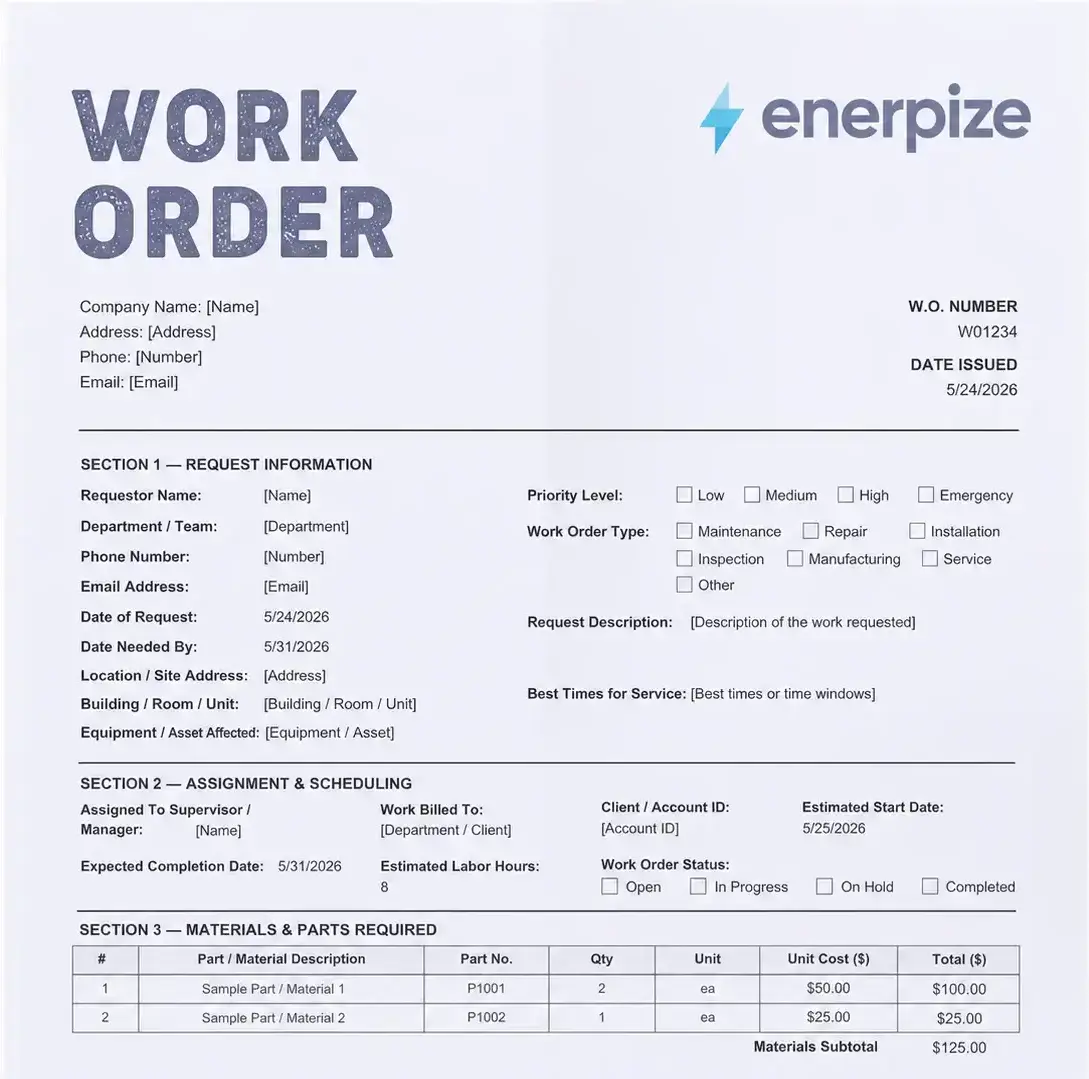
A work order template is a structured authorization document used by maintenance teams, service businesses, manufacturers, and contractors to assign jobs, track materials and labor, and record completion with formal sign-off at every stage.


What Is a Work Order?
A work order is a formal document that authorizes a specific job to be done. It is the paper trail, or digital trail, that moves a maintenance problem, a production task, or a client service request from a verbal mention into an accountable, trackable assignment.
You may have also seen it called a job order, job ticket, service ticket, repair order, or work ticket. The name changes depending on the industry. The purpose does not.
At its core, a work order answers four questions: What needs to be done? Who is doing it? When does it need to be finished? What will it cost? If your current system cannot answer all four of those questions at a glance, you do not have a work order process. You have a conversation with no record.
Work orders are used across every major industry. Manufacturing facilities use them to authorize production runs and track material consumption. Maintenance teams use them to log equipment repairs and schedule preventive inspections. Construction companies use them to assign subcontractor tasks and document progress against a project schedule. Service businesses use them to confirm client requests before a technician ever leaves the office.
The difference between a business that scales and one that scrambles is often this simple: one team knows what was done, by whom, and what it cost. The other team is guessing.
Stop filling out work orders by hand. Enerpize generates, tracks, and converts work orders into invoices automatically, with full cost and budget visibility per project. Start for free.
What Does a Work Order Template Include?
Most work order templates you find online cover the basics and stop there. Name, date, description of work. What they miss is the financial layer, and that missing layer is exactly where uninvoiced labor hours disappear, where material costs go untracked, and where disputes with clients begin.
The Enerpize work order template is built in seven sections. Every field earns its place.
Section 1: Request Information
This is where the job begins. Every work order starts with someone identifying a problem or a need, and this section captures everything about that moment.
Fields included: requestor name, department or team, phone number, email address, date of request, date needed by, location or site address, building or room number, equipment or asset affected, priority level (low, medium, high, emergency), work order type (maintenance, repair, installation, inspection, manufacturing, service, or other), request description, and best times for service.
The priority field is more than a checkbox. A team that triages properly knows the difference between a faulty light fixture and a broken conveyor belt. One can wait. The other cannot. Getting this right in writing protects your scheduling decisions later.
Section 2: Assignment and Scheduling
Once a request is submitted, someone needs to own it. This section makes ownership explicit.
Fields included: assigned technician or worker, supervisor or manager, work billed to, client or account ID, estimated start date, expected completion date, estimated labor hours, and work order status (open, in progress, on hold, completed).
The status field is what most paper-based templates skip entirely. Without it, you have no visibility into your open work order queue. You are chasing people down for updates instead of reading a dashboard. The status field is small. The operational clarity it creates is not.
Section 3: Materials and Parts Required
This is the section that saves you money, repeatedly, if you fill it in every time.
Fields included: item number, part or material description, part number, quantity, unit, unit cost, and line total. A materials subtotal calculates at the bottom.
In the Excel version, the line totals and subtotal calculate automatically. In the Word and PDF versions, you fill them in manually. Either way, having a formal record of every part used against a work order gives you three things: accurate billing, a reorder trigger when stock runs low, and a historical record for asset maintenance planning.
How many times has a repair job run over budget because someone grabbed parts without logging them? This section closes that gap.
Section 4: Labor Costs
Uninvoiced labor is the silent margin killer of every service business. A technician spends three hours on a job. Nobody writes it down. The invoice goes out short.
Fields included: item number, technician or worker name, role, hours worked, hourly rate, and labor total per worker. A labor subtotal calculates at the bottom.
The Excel version multiplies hours by rate and sums the total automatically. You fill in the hours and the rate. The math does not lie.
Section 5: Cost Summary
This section pulls everything together into one clean financial picture before the work order closes.
Fields included: materials subtotal, labor subtotal, additional charges (travel, equipment, and similar), subtotal before tax, tax rate, tax amount, and total amount due.
In the Excel version, the subtotal, tax amount, and total calculate live as you fill in the sections above. The tax rate field is editable. Enter your applicable rate and the rest updates automatically.
This section is what converts a completed work order into a billable document. In Enerpize, this conversion happens with one click, directly from the work order into an invoice, without retyping a single figure.
Section 6: Work Completed
This section closes the loop on what was actually done versus what was requested. It is your compliance record, your audit trail, and your evidence of delivery.
Fields included: actual start date, actual completion date, actual hours worked, work completed by, description of work completed, explanation of incomplete work (if applicable), and notes or follow-up actions.
The explanation of incomplete work field is one most templates omit entirely. It matters. If a job runs over a billing period or a part is on back-order, the client needs to understand why the work is not fully signed off. Leaving this blank creates disputes. Filling it in creates transparency.
Section 7: Authorization and Signatures
A work order without a signature is a suggestion. A work order with signatures is a record.
This section includes four signature blocks: work requested by (the person submitting the job), work approved by (the supervisor or manager authorizing it), work completed by (the technician who executed it), and client or customer acknowledgment (the person on the receiving end confirming delivery).
Four signatures. Four points of accountability. No ambiguity about who authorized what and when.
Types of Work Order Templates
Work orders are not one-size-fits-all. The fields that matter for a plumbing repair are different from the fields that matter for a production run. Here is how the Enerpize work order template adapts across the most common use cases.
Maintenance Work Order Template
Maintenance work orders cover both planned and unplanned maintenance. Planned maintenance includes routine inspections, scheduled servicing, and preventive upkeep on equipment or infrastructure. Unplanned maintenance kicks in when something breaks without warning and someone needs to be dispatched fast.
The key fields for a maintenance work order are the asset affected, the priority level, the assigned technician, and the actual completion date. When a maintenance record is filed consistently against every asset, you build a history. That history tells you when a piece of equipment has cost more in repairs than it is worth to keep running.
Repair Work Order Template
Repair work orders are reactive by nature. Something is broken. Someone needs to fix it. The clock is running.
The most important section in a repair work order is the materials and parts log. Every component replaced needs to be recorded with its part number, quantity, and cost. Without this record, you cannot bill accurately, you cannot track warranty coverage, and you cannot identify whether a recurring repair points to a deeper asset problem.
Construction Work Order Template
In construction, a work order is often how general contractors communicate task-specific scope to subcontractors. It defines what a plumber, electrician, or framing crew needs to do within a larger project, separate from the overall contract.
Construction work orders need clear scope boundaries, start and end dates, and a formal approval signature before work begins. The cost summary section is particularly important here because construction cost overruns almost always start with undocumented material substitutions or unreported labor hours.
Service Work Order Template
Service work orders bridge the gap between a client request and a billable delivery. A client contacts you, describes a problem or a need, and your team creates a work order to formalize the scope, the timeline, and the cost before anyone does anything.
For service businesses, the client acknowledgment signature in Section 7 is not a formality. It is proof of scope agreement. If the client later disputes what was delivered, the signed work order is your evidence.
Manufacturing Work Order Template
A manufacturing work order is different from all the others. It does not respond to a problem. It initiates production.
In a manufacturing context, the work order connects a customer order or a production plan to specific workstations, bill of materials components, and labor resources. It tracks material consumption in real time as raw inputs move through production stages toward a finished good.
This is where a standalone template reaches its limit. A manufacturing work order that lives in a spreadsheet cannot talk to your inventory levels, cannot update your material requisitions, and cannot feed your cost of goods sold automatically. Enerpize's manufacturing management software handles all of this natively, connecting work orders to BOM tracking, workstation assignment, and real-time inventory consumption inside one platform.
HVAC Work Order Template
HVAC work orders are used for installations, repairs, and scheduled maintenance across multiple client sites. The location field and equipment or asset field are critical here because a technician dispatched to the wrong unit in a multi-site property wastes everyone's time.
The best times for service field in Section 1 is particularly useful for HVAC teams. Many HVAC maintenance calls need to happen during specific operational windows so as not to disrupt a client's business.
Work Order Template for US and Canadian Businesses
Work orders are not just operational documents. In the United States and Canada, they are also compliance records.
United States: OSHA Documentation Requirements
The Occupational Safety and Health Administration (OSHA) requires employers to maintain records of equipment maintenance and repair activities under 29 CFR 1910.147, the lockout/tagout standard. When maintenance or servicing work involves energy isolation on equipment, a documented work order is part of the evidence that proper procedures were followed.
For manufacturing facilities, construction sites, and facilities management operations in the US, a consistently completed work order is not bureaucracy. It is legal protection. An OSHA audit that finds no maintenance records is an audit that finds a citation. The external reference standard is available directly from OSHA's published regulations.
Beyond OSHA, many US state-level workers' compensation programs use maintenance and repair documentation to assess liability in workplace injury claims. A completed work order that shows proper authorization, qualified personnel, and documented completion is a meaningful defense.
Canada: Provincial OHS Obligations
In Canada, occupational health and safety is regulated at the provincial and territorial level. Alberta's OHS Code and Ontario's Occupational Health and Safety Act both require documented records of equipment inspection, maintenance, and repair for regulated equipment categories. The Canadian Centre for Occupational Health and Safety (CCOHS) provides guidance applicable across all provinces.
For Canadian SMBs in manufacturing, construction, and facilities management, a consistent work order process satisfies multiple obligations at once: maintenance records, equipment inspection logs, and worker assignment documentation can all be captured in a single completed work order file.
Whether you are operating out of Toronto, Calgary, or Vancouver, the compliance argument for a formal work order process is the same. Document what was done, who did it, and when. A template is the starting point. A system is what keeps it consistent.
How to Use a Work Order Template
Step 1: Identify and Categorize the Job
Before anything is written down, determine whether this is a planned job or an unplanned one. Planned jobs include scheduled maintenance, routine inspections, and production runs. Unplanned jobs include emergency repairs and reactive maintenance responses.
The job type determines the priority level. Emergency work goes to the front of the queue. Routine maintenance gets scheduled. Getting this categorization right before you open the template saves you from triaging priorities after the fact.
Step 2: Fill In the Request Information
Section 1 of the template covers everything about the person making the request and what they need. Fill in every field. The location and equipment fields matter more than most people realize. A technician dispatched to a job site without a specific location or asset name is a technician who arrives unprepared.
Step 3: Assign the Work and Set the Schedule
Section 2 locks in who is responsible and what the timeline looks like. Assign a specific person, not a department. Set a realistic completion date based on priority and available resources. If the job requires materials that need to be ordered, factor that into the timeline before the work order is issued.
Step 4: Log Materials and Parts
Section 3 is filled in either before the job starts (if you know what will be needed) or as the job progresses. Every part used gets logged with its part number, quantity, unit cost, and line total. No part leaves your inventory unaccounted for.
Step 5: Record Labor Hours and Costs
Section 4 is completed as the work is done. Each technician or worker logs their hours against the work order. The hourly rate is pre-filled if you have standard rates, or it is entered at the time of completion. The labor subtotal flows into Section 5 automatically if you are using the Excel version.
Step 6: Complete the Cost Summary
Section 5 pulls everything together. Review the materials subtotal, the labor subtotal, and any additional charges. Enter the applicable tax rate. Confirm the total amount due before the work order is closed.
For US businesses, the applicable tax treatment depends on whether the work order involves goods, services, or both. Canada has GST and HST considerations that vary by province. Consult your tax advisor for jurisdiction-specific guidance.
Step 7: Close, Sign, and Archive
Section 6 captures what was actually done. Section 7 collects the signatures that make the document a formal record. Once all four signature blocks are completed, the work order is closed. File it, whether digitally or physically, and retain it. In both the US and Canada, maintenance records for regulated equipment categories should be kept for a minimum of three years, though specific retention requirements vary by jurisdiction and industry.
Your work orders deserve more than a spreadsheet. Connect every job to your inventory, payroll, and accounting in one place with Enerpize. Start for free.
Work Order vs. Purchase Order vs. Service Order
These three documents get used interchangeably in conversations and never interchangeably in practice. Here is the actual difference.
A work order authorizes a job. It tells a technician, a production team, or a contractor what to do, by when, and under what terms. It is internally focused and operationally specific.
A purchase order authorizes a purchase. It tells a supplier what materials or goods you need, in what quantity, at what price. A work order often triggers a purchase order when materials need to be sourced. The two documents are related but separate. You can read more about the difference in our purchase order template guide.
A service order is similar to a work order but typically used in a customer-facing context, where an external client requests a service rather than an internal team authorizing a task. The Docusign overview of work orders outlines the distinction between these document types clearly for service-based businesses.
The simplest way to keep them straight: a work order is for getting work done, a purchase order is for buying what you need to get work done, and a service order is for confirming what a client is paying you to get done.
The Real Cost of Managing Work Orders on Paper
Paper-based work order management is not just slow. It is expensive in ways that never show up as a line item.
Consider what happens in a typical week at a small manufacturing company with no formal work order system. A machine goes down. Someone tells the maintenance manager in the hallway. The maintenance manager tells a technician verbally. The technician fixes the machine, grabs a few parts from inventory without logging them, and moves on to the next job. No record of the repair. No record of the parts used. No labor hours captured against the asset. The machine breaks down again six weeks later. Nobody knows this is the third time it has happened this quarter because nobody was tracking it.
That is not a hypothetical. That is Tuesday morning at thousands of SMBs across the US and Canada.
The financial impact compounds quickly. Uninvoiced labor hours represent margin that was earned but never billed. Untracked parts represent inventory that was consumed but never accounted for. Missed maintenance records represent compliance exposure that only becomes visible during an OSHA audit or an insurance claim.
Research published by ProjectManager on work order management highlights that organizations using structured work order processes report measurably faster job completion and fewer repeat failures on the same assets, specifically because the documentation creates accountability and a maintenance history.
A template is the first step out of this. A connected system is what makes it sustainable.
From Template to Automation: How Enerpize Manages Work Orders
A completed template is a record. A connected work order system is an operation.
Enerpize's Work Orders module is built around the same seven-section structure as this template, but every field connects to the rest of your business automatically.
When you create a work order in Enerpize, you are not filling out a form and filing it away. You are opening a centralized project file that holds every related transaction, appointment, and document in one place. The budget you set at the start deducts automatically as expenses and invoices are generated against the work order. You know, at any point in the project, exactly how much of your budget has been used and how much remains.
The financial transactions linked to each work order flow directly into your accounting records without manual re-entry. Labor hours logged by your team feed into the cost summary automatically. Materials pulled from inventory update your stock levels in real time. When the job is complete, you convert the work order into an invoice with one click. No retyping. No reconciliation. No missing line items.
Client notifications are built in. You can set automatic SMS or email reminders that update your client on the status of their work order as it moves through your workflow stages. You define the stages. You define the actions. Enerpize's workflow management engine adapts to how your business actually operates, not a generic process someone else designed.
For manufacturing businesses specifically, Enerpize connects work orders to BOM components, workstation assignments, and real-time material consumption tracking. Every production run is documented, costed, and reconciled inside your operations management platform without a separate system or a manual export.
Profitability reports show you, across all open and closed work orders, which projects are performing and which are running thin. You see the full picture by client, by project type, or by time period. That is the difference between running a business on spreadsheets and running it on data.
Key Takeaways
- A work order is a formal authorization document that takes a job from request to completion, with every step recorded and accountable.
- A complete work order template covers seven areas: request details, assignment and scheduling, materials and parts, labor costs, cost summary, work completed, and authorization signatures.
- In the US, OSHA's 29 CFR 1910.147 standard and state workers' compensation frameworks make documented work orders a compliance requirement for maintenance and repair operations, not just an operational preference.
- In Canada, provincial OHS codes in Alberta, Ontario, and other provinces require documented equipment maintenance and inspection records, which a properly completed work order satisfies.
- The three most expensive gaps in informal work order management are uninvoiced labor hours, untracked material consumption, and missing maintenance records that create compliance exposure.
- A template gets you started. Enerpize connects your work orders to your inventory, payroll, accounting, and client management so the process stays consistent as your business grows.
Frequently Asked Questions
What is a work order template?
A work order template is a structured, reusable document used to authorize, assign, and track a specific job from the moment it is requested through to its completion and sign-off. It captures everything a team needs to execute the work and everything a business needs to bill for it, stay compliant, and build a maintenance history.
What should a work order include?
A complete work order should include the requestor's details and contact information, a description of the work needed, the location and asset affected, the priority level, the person assigned to the job, the estimated and actual dates, an itemized list of materials and parts used, labor hours and cost per worker, a full cost summary with tax and total, a description of work completed, and authorization signatures from the requestor, the approving supervisor, the technician, and the client.
What is the difference between a work order and a purchase order?
A work order authorizes a job to be done. A purchase order authorizes a purchase from a supplier. The two are often connected because completing a work order sometimes requires ordering materials, but they are separate documents with separate purposes. A work order is internally focused. A purchase order is vendor-focused.
What is the difference between a work order and a service order?
A work order typically originates internally, from a maintenance manager, a production supervisor, or a facilities team. A service order originates externally, from a client requesting a service from your business. Both documents serve a similar structural purpose, but the relationship they represent is different.
Is a work order a legally binding contract?
A signed work order can function as a binding agreement. When both parties, the service provider and the client or the employer and the technician, sign the document, it creates a documented record of agreed scope, pricing, and delivery terms. The authorization and signatures section of the Enerpize work order template includes four signature blocks specifically to support this. For complex engagements, a separate service contract or statement of work may be advisable alongside the work order.
What are the types of work orders?
The most common types are maintenance work orders (planned and unplanned), repair work orders, construction work orders, service work orders, manufacturing work orders, and inspection work orders. Each type has different priority criteria and different required fields, though they all share the core structure of request, assignment, materials, labor, cost, completion, and authorization.
Do US businesses need to document maintenance work orders for OSHA compliance?
For operations covered under OSHA's 29 CFR 1910.147 standard, specifically maintenance and servicing work involving energy control procedures, documented records are required. A completed work order that identifies the equipment, the technician, the work performed, and the authorization is the standard form that satisfies this requirement. Businesses in manufacturing, construction, and facilities management are most directly affected.
Can a work order be converted into an invoice?
Yes. Once a work order is completed and signed off, the cost summary section contains everything needed to generate an invoice: itemized materials, labor costs, additional charges, tax, and the total amount due. In Enerpize, this conversion is a single click from within the work order file, with no manual re-entry of figures.
What is a manufacturing work order?
A manufacturing work order authorizes and documents a production run. It connects a customer order or a production plan to specific workstations, raw materials, and labor resources. Unlike a maintenance or service work order, a manufacturing work order initiates production rather than responding to a problem. It tracks material consumption from raw input to finished good and feeds cost data into your product costing and inventory records.
How long should work orders be retained?
Retention requirements vary by jurisdiction, industry, and the type of work covered. For OSHA-regulated maintenance activities in the US, records are typically retained for a minimum of three years. In Canada, provincial OHS retention requirements vary but generally follow a similar timeframe for equipment maintenance documentation. Always confirm the applicable requirement with a compliance advisor for your specific industry and location.
Ready to go beyond the template? Enerpize gives you a full work order management system built inside a complete ERP, free to start. Start for free.
Author Bio
Omar El Bahr is a Senior Digital Growth Specialist at Enerpize, where he leads SEO, content strategy, and organic growth across international markets. He is a Forbes Communications Council contributor and has written for Entrepreneur on business communication and digital strategy.