Posted on 17 August 2026
CIS Invoice Template UK Free Download: Word, Excel, PDF & Google Sheets
- Available in Word, Excel, PDF, Google Sheets, and Google Docs: a free CIS invoice template UK subcontractors can download without signing up
- Auto calculates the CIS deduction at 20%, 30%, or 0% for gross payment status directly in the Excel and Google Sheets versions
- Separates labour from materials on its own lines, so the deduction only ever touches the labour figure, never the whole invoice
- Built with a UTR field, a verification reference field, and pre written domestic reverse charge wording, so nothing gets left off by accident
A CIS invoice template is a pre formatted billing document that UK subcontractors use to bill a contractor for construction work, showing the labour and materials split, the UTR, and the CIS deduction taken off before payment.


What Is a CIS Invoice Template
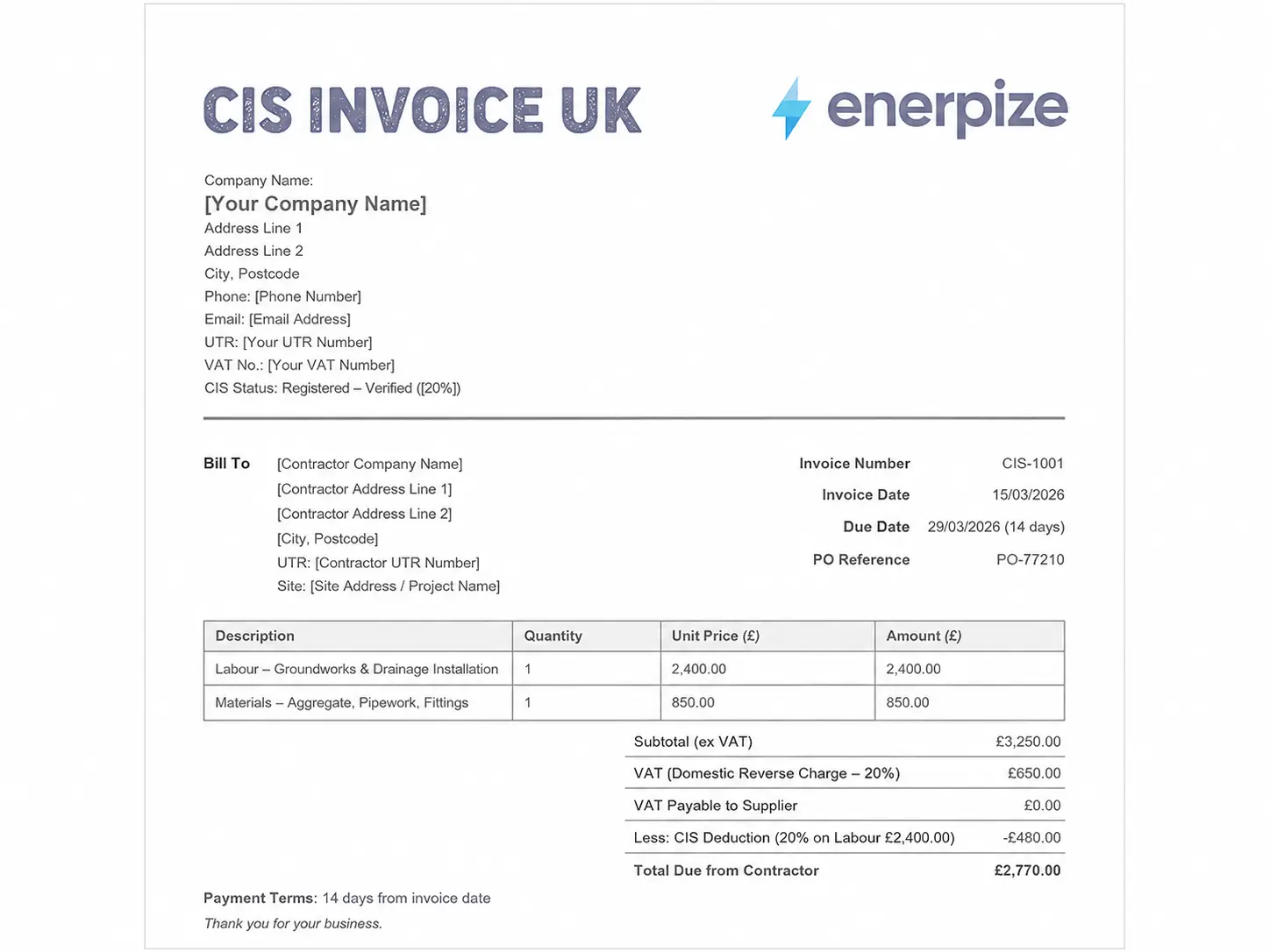
A CIS invoice template is built around one job: getting a subcontractor paid correctly under the Construction Industry Scheme. It looks like a normal invoice on the surface, name, address, invoice number, description of work, but it carries a handful of fields a standard invoice never needs. A UTR. A labour and materials split. A deduction rate. A net total after that deduction has already been taken out.
People use the terms loosely, so it's worth being precise. A CIS invoice is issued by the subcontractor to request payment. A payment and deduction statement is issued by the contractor afterwards, showing what was actually paid and what was deducted for that tax month. They cover the same transaction from opposite sides, and mixing them up is one of the more common admin mistakes on a construction site.
It's also not the same thing as a subcontractor invoice template for a job outside CIS. If you invoice a homeowner directly for a bathroom refit with no main contractor in the chain, CIS doesn't apply and a standard UK invoice is fine. This CIS invoice template only comes into play once you're being paid by a contractor for construction operations under the scheme.
Under HMRC's rules, a contractor pays a subcontractor's labour at 20% for registered and verified subcontractors, 30% for anyone unregistered or unverified, or 0% for subcontractors holding gross payment status. Those numbers are set by HMRC, not negotiable, and they only apply to the labour portion of the bill, not materials, plant hire, or fuel.
What to Include in a CIS Invoice Template
A basic template gives you a total and a signature line. That's not enough once you're invoicing regularly under CIS, because a missing field is exactly what gets an invoice queried and payment delayed. Meeting HMRC's CIS invoice requirements starts with two fields most templates get wrong before you even get to the deduction maths: the UTR, and the labour and materials split.
Here's what a complete CIS invoice template needs, and why:
| Field | Why It Matters |
|---|---|
| Invoice Number | Sequential reference for your own records and for matching against payment |
| Invoice Date and Due Date | Sets the payment clock, usually 7 or 14 days in construction |
| Subcontractor Name, Address, Contact | Must match exactly what was given at CIS registration, or verification can fail |
| Subcontractor UTR | Required on every CIS invoice. Without it, the contractor has to deduct at 30% |
| Contractor Name and Address | The business being billed |
| Description of Work | Site, dates, and what was actually done, not a one word summary |
| Labour Amount | The only portion the CIS deduction is calculated against |
| Materials Amount | Kept on a separate line, excluded from the CIS deduction entirely |
| VAT Treatment | Standard rate, zero rate, or a note that the domestic reverse charge applies |
| CIS Deduction Rate and Amount | 20%, 30%, or 0%, shown as a distinct line, not folded into the total |
| Net Total Payable | What the contractor actually pays after CIS has come off |
If you landed here looking for a CIS subcontractor invoice template UK contractors will actually accept without querying it, those last three rows are where the friction usually is. Two fields cause more delayed payments than everything else on the list combined: the UTR and the labour and materials split. Leave the UTR off and the contractor is legally required to deduct at the higher 30% rate, whatever your actual status is. Combine labour and materials into one figure and the deduction gets calculated against the wrong number, which either overcharges you or underpays HMRC, and someone has to catch it and correct it later.
Want CIS deductions calculated automatically on every invoice? Start Free with Enerpize
What Enerpize Template Includes
Search HMRC CIS invoice template and most of what comes back is a blank form with no calculation behind it, or a generic invoice with CIS bolted on as an afterthought. This CIS invoice template free download covers every format, built the other way round from most: start from what actually causes CIS invoices to get queried, corrected, or paid late, and close those gaps directly in the structure instead of leaving them for the person filling it in to remember.
A UTR Field That Sits Where the Contractor Expects It
The UTR isn't buried in a notes box. It has its own labelled field next to the subcontractor's details, right where a contractor checking the invoice would look for it first.
Labour and Materials Split by Design, Not by Discipline
The template forces labour and materials onto separate lines from the start. You're not relying on remembering to split them each time you invoice, the structure does it for you, which is exactly where most manual CIS invoice template mistakes happen.
Auto Calculating Deduction in the Excel and Google Sheets Versions
Set your CIS rate to 20%, 30%, or 0% and the deduction recalculates against the labour figure only. Change the labour amount and the net total updates with it. This is what separates our CIS invoice template excel version from a static spreadsheet: no separate calculator, no manual multiplication, no rounding slip carried through to the total.
A Reverse Charge Notice Already Written In
Most competitor templates leave you to write your own reverse charge wording, if they mention it at all. Getting the CIS and VAT invoice treatment right in the same document is where most manual templates fall down, since the two calculations happen independently of each other. Ours has the statement pre built, referencing the domestic reverse charge under the VAT Act, so you're not drafting compliance language from scratch on a job that's already running late.
A Verification Reference Field
Space to record that the subcontractor was actually verified with HMRC before the first payment, and at what rate. It's a small field, but it's the one piece of paper trail most templates skip entirely, and the one HMRC asks for first if a deduction rate is ever queried.
It's available as a CIS invoice template word file, an Excel workbook with the formulas already built in, a PDF, a Google Doc, and a Google Sheet, so whichever tool your bookkeeper already uses, this fits into it rather than asking them to change habits. That's what makes this CIS invoice template UK ready straight out of the box, not a generic form with CIS fields bolted on afterwards.
CIS Invoice vs Standard VAT Invoice vs Payment & Deduction Statement
These three documents get confused constantly, usually because they cover overlapping ground on the same job.
| Document | Issued By | Shows CIS Deduction? | Shows VAT? | Triggers Payment? |
|---|---|---|---|---|
| CIS Invoice | Subcontractor | Yes | Yes, or reverse charge notice | Yes |
| Standard VAT Invoice | Either party, non CIS work | No | Yes | Yes |
| Payment and Deduction Statement | Contractor | Yes, confirms what was deducted | No | No |
The rule that keeps this simple: the subcontractor's invoice asks for money, the contractor's statement confirms what was actually taken off. If you're only issuing one and not the other, one side of the paper trail is missing.
How to Use the CIS Invoice Template
Step 1: Add Your Business Details and UTR
Fill in your business name exactly as registered for CIS, your address, and your 10 digit UTR. This is the field contractors check first, and the one most likely to be missing on a rushed invoice.
Step 2: Add the Contractor's Details and a Reference
Name, address, and a PO or contract reference if one was issued. A vague reference is a common reason invoices sit in a query queue for longer than the job itself took.
Step 3: Describe the Work Specifically
Site address, what was done, and the dates it covered. "Labour" on its own tells a contractor nothing and usually gets bounced back for clarification, which costs you more time than writing two extra sentences would have.
Step 4: Enter Labour on Its Own Line
This is the only figure the CIS deduction gets calculated against. Keep it accurate and separate from everything else on the invoice, including any discount or retention figure.
Step 5: Enter Materials on a Separate Line
Materials, plant hire, and fuel are excluded from the CIS deduction. If you don't have any materials on this job, put a zero here rather than leaving the line out, so the split is explicit and not just assumed.
Step 6: Apply VAT or the Domestic Reverse Charge
If you're VAT registered and both you and the contractor are within CIS, the domestic reverse charge usually applies, meaning you note it on the invoice instead of charging VAT in the normal way. Check this before you send anything, since applying it wrongly in either direction is one of the more common queries a contractor's accounts team raises. Getting your CIS and VAT invoice figures to agree with each other before you send it saves a back and forth that neither side has time for mid month.
Step 7: Apply the CIS Deduction
Set the rate, 20% for registered and verified, 30% for unregistered or unverified, 0% for gross payment status, and apply it to the labour figure only. Show it as its own line, not folded into the total.
Step 8: Check the Net Total and Send
The net total is what the contractor actually pays you. Keep a copy for your own records. HMRC expects CIS records to be kept for a minimum of three years from the end of the tax year the work was carried out in, which is a shorter window than most subcontractors assume. Download this CIS invoice template free and you're not just getting a blank form, you're getting the calculation built in, so this step is a check rather than a manual sum.
Skip the manual CIS maths. Generate compliant invoices in seconds. Start Free with Enerpize
How Enerpize Handles CIS Invoicing
A CIS invoice template gets you through one invoice. What happens to the deduction once you've sent it is a separate problem, and it's the part most invoicing tools leave you to sort out yourself with a second spreadsheet running alongside the first. Enerpize connects the invoice, the deduction, and the accounting entry into one place, so filling in this template is the start of the workflow rather than a one off task disconnected from everything else.
Accounting
Enerpize keeps CIS labour and CIS materials on their own ledger accounts, so the deduction is recorded against the right figure automatically instead of being calculated once on an invoice and then re-entered by hand into your books. When the monthly CIS return is due, the numbers are already sitting where they need to be, rather than being rebuilt from a folder of PDFs the week it's due.
Invoicing
Every construction invoice template UK raised through Enerpize carries the same labour and materials structure as this template, so a subcontractor working across several contractor invoice jobs isn't rebuilding the split from scratch on every single one.
Expenses
Materials bought for a job get logged against the right project without pulling them into the CIS calculation, so labour and materials stay separated the way HMRC expects, from the purchase right through to the invoice that eventually goes out.
For subcontractors who also invoice outside CIS, for instance a sole trader doing both contractor and homeowner work, the same account handles a standard invoice and a CIS one side by side, without needing two separate systems open at once.
CIS Invoice Template for UK Businesses
CIS only applies in the UK, so this section is specifically about what HMRC expects on the ground, sourced directly from HMRC's own guidance rather than paraphrased from another site.
Verification Comes Before Payment, Not After
Before a contractor pays a subcontractor for the first time, they're required to verify that subcontractor with HMRC and confirm the correct deduction rate. This isn't optional and it isn't a formality: according to HMRC's guidance for contractors, the rate they're told to apply comes directly from that verification, and it's the contractor who carries the liability if it's skipped.
Deduction Rates and Gross Payment Status
The three rates are fixed by HMRC: 20% for registered and verified subcontractors, 30% for anyone unregistered or unverified, and 0% for subcontractors holding gross payment status, according to HMRC's guidance for subcontractors. Gross payment status has to be applied for separately and isn't automatic just because you're CIS registered, so don't assume it applies without checking your own status first.
The Domestic Reverse Charge
For VAT registered subcontractors working within CIS, the domestic reverse charge usually applies, which means the subcontractor doesn't charge VAT on the invoice at all. Instead the contractor accounts for it directly to HMRC. Per HMRC's guidance on the reverse charge, this only applies between VAT registered businesses where the customer isn't the end user of the building work, so it's worth confirming your customer's status before assuming it applies by default.
Record Keeping and the Monthly Return
Contractors have to give subcontractors a payment and deduction statement within 14 days of the end of each tax month, and file a CIS return with HMRC by the 19th of the following month. HMRC's minimum retention period for CIS records specifically is three years from the end of the relevant tax year, which is shorter than the general six year VAT record rule and worth keeping separate in your own filing system rather than lumping every document into one folder. These CIS invoice requirements around retention are easy to miss, since most people assume the general VAT rule covers everything, and it doesn't. Full detail on registration and scope is in HMRC's overview of the Construction Industry Scheme.
CIS Invoicing by Trade
The labour and materials split plays out differently depending on what's being billed, even though the deduction rules themselves don't change.
Electricians and Plumbers
Labour is usually the larger share of the invoice, with materials like cable, fittings, and pipework kept to a supporting line. Getting the split wrong here has the biggest cash flow impact, since it's mostly labour the deduction is coming off, and a combined figure inflates the amount withheld more than it would on a materials heavy job.
Groundworkers and Scaffolders
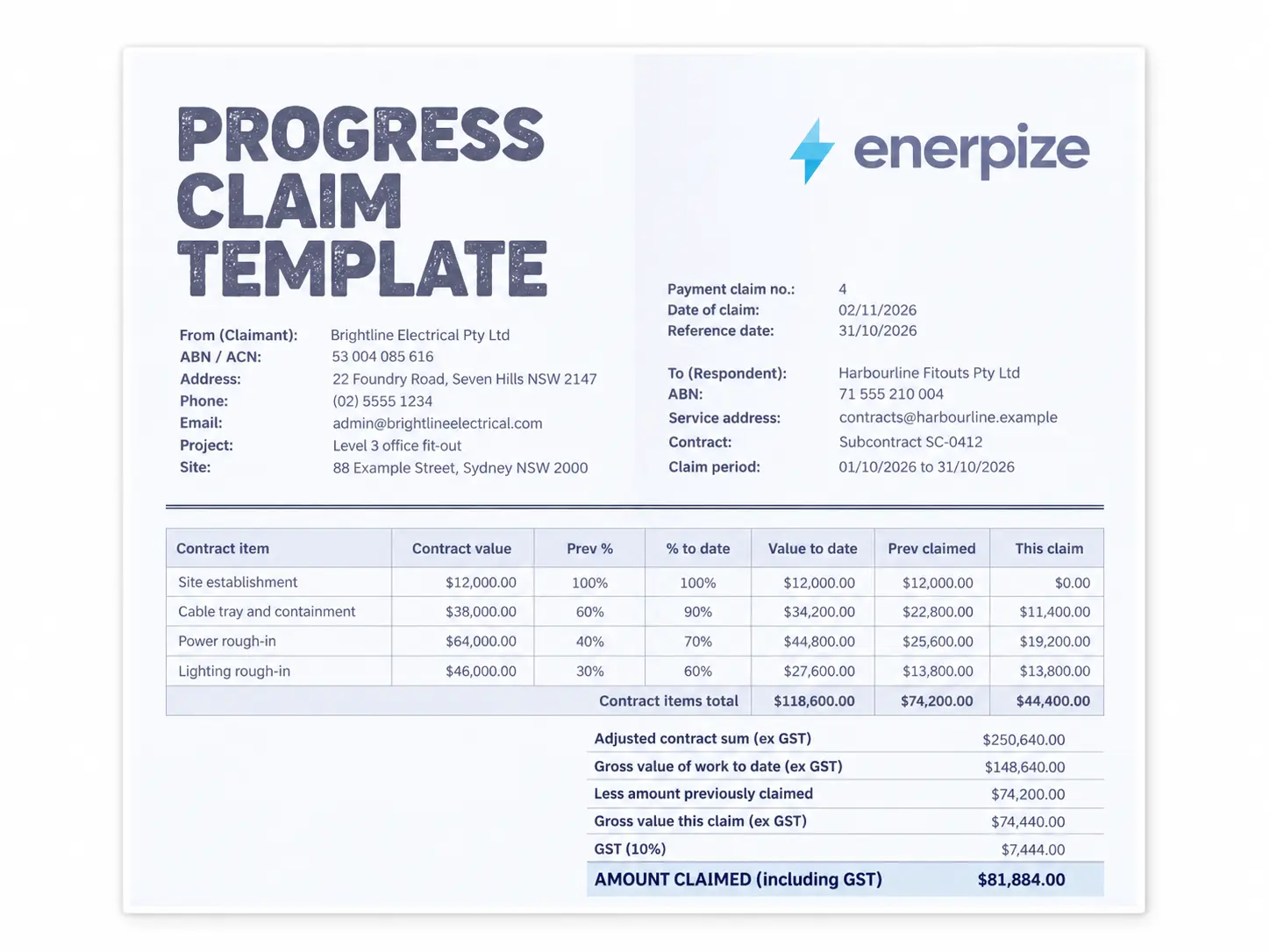
Plant hire and fuel often sit alongside materials on these jobs, and all three are excluded from the CIS deduction the same way. Keeping them itemised separately from labour avoids overstating what gets deducted, which matters more on larger contracts where the numbers involved are bigger to begin with. On bigger groundworks contracts billed in stages, this invoice usually runs alongside an AIA style payment application for the progress claim itself, with the CIS invoice covering the labour and materials once that stage is certified.
Roofers and Painters
Smaller material costs relative to labour, but frequent short jobs mean the UTR and verification status matter more here, since a missing UTR on invoice after invoice compounds the 30% deduction hit fast across a busy month rather than on a single large job.
Key Takeaways
- A CIS invoice template is for subcontractors billing a contractor for construction work under the scheme, not for standard invoicing outside it.
- The UTR and the labour and materials split cause more delayed payments than any other fields on the invoice.
- Deduction rates are fixed by HMRC at 20%, 30%, or 0%, and only ever apply to labour, never to materials, plant hire, or fuel.
- A CIS invoice and a payment and deduction statement are two different documents covering the same transaction from opposite sides.
- The domestic reverse charge applies to most VAT registered CIS work, meaning the subcontractor doesn't charge VAT directly.
- Verification with HMRC has to happen before the first payment, not after, and it's what sets the deduction rate.
- HMRC's minimum retention period for CIS records is three years, separate from the general six year VAT rule.
- Every CIS subcontractor invoice template UK contractors will accept needs the UTR field filled in, not left blank, since that's the first thing checked before payment goes out.
- This CIS invoice template is free across Excel, Word, PDF, and Google Sheets, with the deduction calculating automatically in the spreadsheet versions.
Frequently Asked Questions
What is CIS on an invoice?
CIS on an invoice refers to the deduction a contractor takes from a subcontractor's labour payment under the Construction Industry Scheme, at 20%, 30%, or 0% depending on registration and verification status. It's shown as its own line, separate from materials and VAT.
What should a CIS invoice template include?
At minimum: your UTR, the contractor's details, a description of the work, labour and materials on separate lines, the VAT treatment, the CIS deduction rate and amount, and the net total payable. Missing the UTR is the single most common reason a deduction defaults to the higher 30% rate.
Does CIS apply to materials?
No. The deduction is calculated on labour only. Materials, plant hire, and fuel are excluded, which is exactly why a CIS invoice template needs labour and materials kept on separate lines rather than combined into one total.
Can I use a free CIS invoice template in Excel?
Yes, and it's the more practical format if you're invoicing regularly. A CIS invoice template excel version can carry a live formula, so entering the labour figure and deduction rate calculates the net total automatically rather than by hand, and it updates itself if either number changes later.
What's the difference between a CIS invoice and a payment and deduction statement?
The subcontractor issues the CIS invoice to request payment. The contractor issues the payment and deduction statement afterwards, confirming what was paid and what was deducted for that tax month. Both relate to the same job, from opposite sides of the transaction.
Do I need a UTR on a CIS invoice template UK subcontractors use?
Yes, always. Without it, the contractor is required to deduct at the higher 30% rate regardless of your actual registration status, since they have no way to confirm it on the face of the invoice.
Is a subcontractor invoice template the same as a CIS invoice template?
Not quite. A general subcontractor invoice template covers any invoice from a subcontractor to a client, CIS or not. A CIS invoice template is specifically built for construction work under the scheme, with the UTR, labour and materials split, and deduction fields a general one doesn't need.
Where can I get a CIS invoice template word document or PDF?
This page has it as a CIS invoice template word document, PDF, Excel, Google Sheets, and Google Docs, free to download with no sign up required. The Excel and Google Sheets versions include the auto calculating deduction formula built in.
Still doing this by hand every month? Enerpize applies the right CIS rate, keeps labour and materials separated, and reconciles it into your accounts without a second spreadsheet running alongside the first. Start Free with Enerpize, no credit card required.
Related Templates
Disclaimer
This template and guide are provided for general information only and don't constitute tax, legal, or accounting advice. CIS rules can change, so check current requirements with HMRC or a qualified accountant before relying on this for your own filings.
About the Author
Omar El Bahr is Senior Digital Growth Specialist at Enerpize, a cloud ERP platform serving 40,000+ SMBs. He covers organic growth strategy, construction invoicing systems, and SMB finance workflows. Forbes Communications Council contributor.