Posted on 12 August 2026
Goods Received Note (GRN) Template: Free Download Excel & Google Sheets
- Available in Excel, and Google Sheets, free to download with no sign up required
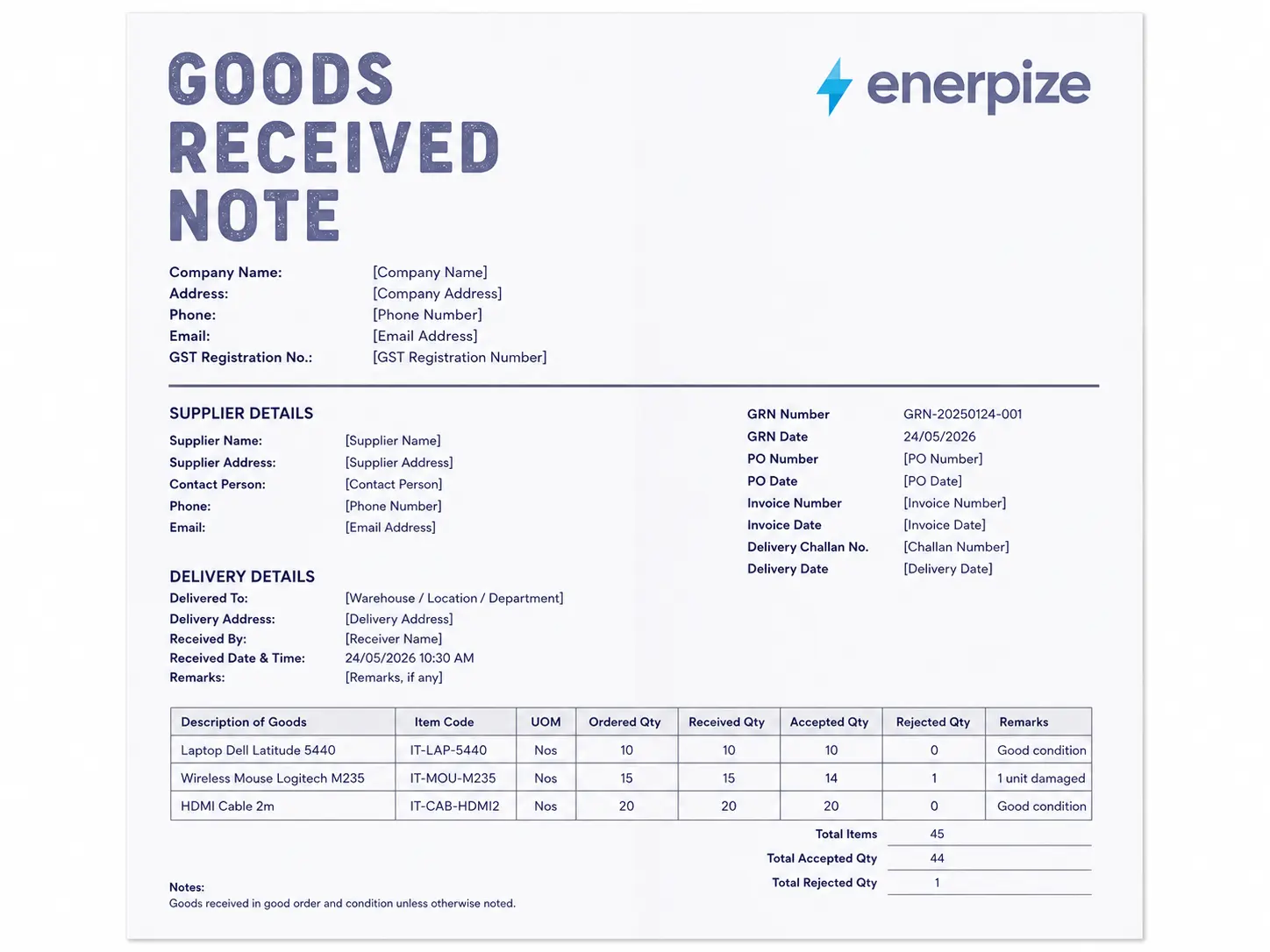
- Covers the PO reference, invoice matching, batch and lot tracking, and condition notes in one structured goods received note
- Built with compliance notes for India's GST input credit rule, the UK's six year VAT retention window, US GRNI accrual accounting, and Kenya's eTIMS cross reference
- Calculates the balance outstanding and the line value automatically in the Excel and Google Sheets versions
A goods received note is the document a warehouse team fills out the moment a delivery arrives, confirming what showed up against what was ordered, so nothing gets paid for until someone has actually checked it against the box.


What Is a Goods Received Note?
A truck pulls up. Someone unloads a pallet. Now what?
That's the gap a goods received note fills. Before the pallet gets shelved and before the supplier gets paid, someone on the receiving end has to answer a plain question. Does this match what we ordered? A goods received note is where that answer gets written down, item by item, so it's not just a memory that fades by Friday.
Most people shorten it to GRN, and once you've said "goods received note" twice in a meeting, everyone switches to the abbreviation for the rest of the conversation. Some businesses, especially anyone running SAP, call it a goods receipt note instead. Same document. The name just depends on which system your finance team grew up on.
If someone asks what is GRN in a meeting and you're the one who has to answer, this is it. The GRN meaning doesn't shift from country to country, only the compliance wrapped around it does, which is exactly what the country sections further down cover.
Here's the part most explainers skip, and it's the real goods received note definition when it actually matters. A GRN isn't proof that a delivery happened. It's proof that someone checked it. Those are different things, and the difference is exactly why a GRN carries weight in a dispute that a delivery note alone never will.
Stop chasing warehouse staff to confirm a delivery arrived. Enerpize logs every receipt against the PO automatically. Start free with Enerpize
Goods Received Note vs Purchase Order vs Delivery Note vs Invoice
Four documents, one shipment, and everyone mixes them up, including whether to call this one a goods received note or a goods receipt note. Here's the difference without the jargon.
| Document | Created By | Purpose | Includes Prices |
|---|---|---|---|
| Purchase Order | The buyer | Authorizes the purchase before anything ships | Yes |
| Delivery Note | The supplier | Travels with the goods, lists what the supplier says they shipped | Sometimes |
| Goods Received Note | The buyer | Confirms what was actually received and its condition | Sometimes |
| Invoice | The supplier | Requests payment | Yes |
The purchase order says what you asked for. The delivery note says what the supplier claims they sent. The invoice says what they want paid. The goods received note is the only one of the four that's independent of the party asking to get paid, since your own receiving team fills it out after counting the boxes themselves. Worth separating too: a packing slip is closer to the supplier's internal picking list than a commercial document, and it's often confused with both the delivery note and the GRN even though it's neither. If you need the document that starts the process rather than confirms the middle of it, our requisition form is the one for that. And if what you're actually holding is the supplier's own shipping paperwork rather than your internal receipt, that's a delivery note, not a GRN at all.
What to Include in a Goods Received Note
That's the goods received note explained in plain terms. Here's what actually needs to be on one.
A lot of free goods received note templates give you a supplier name, a quantity field, and a signature line. Fine for a single small delivery. It falls apart the moment you're running multiple warehouses, paying in more than one currency, or trying to survive a GST or VAT audit. Here's what a complete goods received note template actually needs.
| Field | Why It Matters |
|---|---|
| GRN Number | Unique reference that ties the receipt to a specific PO and invoice in three way matching |
| Date of Receipt | Anchors the transaction to the right accounting period, separate from the invoice date |
| Supplier Name and Contact | Identifies who shipped it |
| Purchase Order Number | The single field that makes matching possible at all |
| Invoice Number | Closes the third leg of the match, missing on almost every free template we reviewed |
| Delivery Note Reference | Cross references the supplier's own shipping paperwork |
| Item Description and Code | Matched against the PO line by line |
| Batch or Lot Number | Needed for regulated goods and for installment deliveries |
| Quantity Ordered vs Quantity Received | The core comparison that catches shortages the day they happen, not weeks later |
| Unit Price and Line Value | Needed to book the receipt at the right dollar amount, not just the right quantity |
| Condition | Good, damaged, or rejected, recorded before goods move further into the warehouse |
| Receiver Signature | Names the person accountable for the count |
| Authorizer Signature | A second person, separate from the receiver |
| Currency | Needed the moment a supplier bills in anything other than your base currency |
Three-way matching without the spreadsheet. Enerpize checks your GRN against the PO and invoice the moment it's entered. Start free with Enerpize
What Enerpize's Goods Received Note Template Includes
We pulled apart the field lists from twenty different guides on goods received notes, including the actual downloadable template that ranks first on Google for this exact search. Here's what we found. Everyone agrees on why a GRN matters. Almost nobody's template actually does the job.
No Invoice Field
Every single guide we read explains three way matching like it's the whole point of a GRN. Not one of the templates behind those guides, including the one currently ranking first, has an invoice number field. You can't match three documents with a form that only references two.
No Line Value
Quantity ordered, quantity received, sure. But no unit price and no total. Which means the GRN can confirm the count and still be useless for the one thing accounting actually needs from it, the dollar amount to accrue.
No Accrual Flag
This is the biggest one. Half the guides we read wrote entire sections about goods received, not invoiced, the accounting rule that says you book the liability the day goods arrive, not the day the invoice shows up. Not one template we found has a field marking that a receipt is sitting in that exact state.
No Country Rules at All
Every guide treats a GRN like the paperwork is identical everywhere. It isn't. India ties this document to a specific tax code section. Kenya ties it to a government invoicing system. Not one of the twenty guides we reviewed mentions either.
What Ours Has Instead
Ours has all four. An invoice field that actually closes the three way match. A line value column that calculates itself. A GRNI status flag so nothing gets missed at month end. And compliance notes for the four countries where this document carries real legal weight, not just warehouse habit.
That's the difference between a goods received note that gets filed and one that actually does the job it was built for.
How to Use the Goods Received Note Template
Step 1: Fill In the GRN Information
Give it a GRN number, log the date, and note who received it. Leave the Overall Status blank until inspection is actually done. Don't mark it Accepted before you've checked the boxes.
Step 2: Enter the Supplier and Order Details
Pull up the PO and copy the number across. Once the supplier's invoice lands, come back and fill in the invoice number and date too, that's the field most templates forget and it's the one that makes matching possible.
Step 3: Log Delivery and Transport Details
Carrier name, tracking number, how many packages arrived. Skip this if you're picking up from the supplier yourself. Don't skip it if a freight company is involved and something might go wrong in transit.
Step 4: Count Every Line Item
One line per item. Quantity ordered, quantity received, and let the balance calculate itself. Add a batch or lot number for anything traceable. Don't take the supplier's delivery note count on faith, count it yourself.
Step 5: Mark Condition and Note Anything Wrong
Good, damaged, or rejected, for every single line. If it's anything other than good, write down what's wrong in enough detail that someone reading it next month understands the problem without asking you.
Step 6: Route for Sign Off
The person who received the goods signs first. A different person authorizes it. If the same person does both, you've removed the one control that catches counting mistakes and stops fraud before it starts.
Step 7: Hand It to Finance
Set the GRNI status to Pending Invoice the moment goods arrive but the invoice hasn't. That single flag is what keeps the liability from getting missed at month end.
Goods Received Note Rules in India
Under Section 16 of the CGST Act, you cannot claim Input Tax Credit on a purchase until the goods have actually arrived. Not invoiced. Not paid for. Arrived. The CGST Act's own text, published by the Central Board of Indirect Taxes and Customs, says it plainly: credit is only available once the recipient "has received the goods or services or both."
That single line is why a goods received note carries more legal weight in India than almost anywhere else on this page. Claim input tax credit on an invoice before the goods show up, and a GST audit can reverse that credit with interest attached. And if a supplier ships in stages against one invoice, the rule tightens further. Credit only becomes available once the last lot has arrived, not proportionally as each shipment lands.
What to Add to Your Goods Received Note (India)
- A lot tracking field for any supplier shipping in installments against a single invoice, since input tax credit depends on the final lot being confirmed
- A note cross referencing the GST portal, since credit can be blocked if the supplier's invoice details haven't been communicated there yet, even when the goods arrived exactly as ordered
- An e-way bill reference field for any shipment that needed one in transit, so the goods received note and the transport paperwork tell the same story
Goods Received Note Rules in the United Kingdom
A goods received note isn't a VAT document on its own. It doesn't create a tax liability the way a VAT invoice does. What it does is back up the evidence trail HMRC expects a VAT registered business to keep. If an input VAT claim ever gets questioned, a signed GRN that lines up with the supplier's invoice date is what turns "we're pretty sure this arrived" into proof.
HMRC's own guidance requires VAT registered businesses to keep supporting records, and under Making Tax Digital those records need to be held digitally, not scribbled on paper and shoved in a drawer. Retention runs six years from the date of the transaction, the same window HMRC applies to VAT invoices themselves.
What to Add to Your Goods Received Note (United Kingdom)
- A digital first format, since Making Tax Digital pushes toward records that can be produced electronically on request, not a stack of paper nobody can search
- A retention date set six years out from receipt, matching HMRC's own window
- A clear line between the GRN and the VAT invoice, since blurring the two is exactly the kind of thing an HMRC compliance check looks for
Goods Received Note Rules in the United States
There's no single government form that governs a goods received note here the way tax codes do in the other three countries on this page. What the US brings instead is a timing problem. In GRN accounting, it's called Goods Received, Not Invoiced, or GRNI. Under accrual accounting, if goods arrive before the supplier's invoice does, you still have to book the liability in the period the goods actually showed up. Not the period the paperwork finally catches up.
Skip that step and your books understate what you owe for however long the invoice takes to arrive, sometimes right across a month end close. It's also one of the specific things external auditors check under Sarbanes-Oxley internal control reviews. Is there a documented, timestamped receipt for every liability the books recognize? For businesses required to keep supporting records for tax purposes, the IRS's guidance on recordkeeping sets out the general expectation that documents like a goods received note back up what a business claims on its return.
What to Add to Your Goods Received Note (United States)
- A GRNI flag marking that a receipt has posted but no invoice has arrived yet, so month end close doesn't understate what's owed
- A timestamp and receiver ID strong enough to survive a SOX internal controls review, not just a signature line
- A retention note consistent with how long the business keeps its other supporting tax records
Goods Received Note Rules in Kenya
Kenya's KRA has pushed hard toward digital tax verification since the eTIMS mandate took effect, and a goods received note plays a specific role in that system that people miss. eTIMS confirms the electronic tax invoice side of a purchase. It does not, on its own, confirm that the goods on that invoice actually showed up. That gap is exactly what a signed, dated GRN fills.
Since January 2026, KRA has been validating declared income and expenses directly against eTIMS data. KRA's own guidance treats a goods received note as part of the supporting documentation a VAT registered business needs on hand when input VAT is claimed. A goods received note that confirms the same item, quantity, and date as the matching eTIMS invoice closes that loop cleanly. A mismatch between what eTIMS shows and what your GRN says actually arrived is precisely the kind of gap KRA's validation system is built to catch.
What to Add to Your Goods Received Note (Kenya)
- The seller's KRA PIN, creating a direct cross reference to the matching eTIMS invoice
- An eTIMS invoice number field on the GRN itself, so the physical receipt and the electronic tax record trace back to each other
- Item descriptions that match the eTIMS invoice line items exactly, since a mismatch here is a specific trigger under KRA's validation framework, the same pattern our Kenya invoice template already documents, and the same reason our UK invoice template matters for businesses trading both sides
Whether it's GST input credit in India or eTIMS in Kenya, Enerpize keeps your receiving records audit-ready everywhere you operate. Start free with Enerpize
How Enerpize Handles Goods Received Notes
A goods received note answers one question. Did what we ordered actually show up. It doesn't answer what happens after that on its own. Does the stock count update. Does the purchase order close. Does the supplier get paid for what they actually delivered and not what they invoiced for. That's where a paper GRN stops and where the rest of the system has to pick it up.
Inventory
The moment a GRN is confirmed, Enerpize's inventory management software updates stock in real time, tracked by serial number, lot number, or expiry date depending on what the product needs. That's the same batch and lot field our template flags for India's installment delivery rule, except here it's live, not a cell someone has to remember to fill in. Warehouses stay under control too. Permissions are granted per warehouse or per employee, and barcode scanning identifies products on the way in without anyone typing a SKU by hand.
Stocktaking
Once goods are logged, Enerpize's stocktaking software does the comparison our GRN's balance column can only flag manually. It checks actual stock against registered stock automatically, across every warehouse and every product line. Set a low stock threshold once, and the system reminds you before a shortfall turns into a stockout, instead of someone noticing during the next physical count.
Purchase Management
This is where three way matching stops being three separate documents chasing each other. Enerpize's purchase management software confirms inbound quantities as received and updates the requisition on its own, closing the loop between the purchase order and what actually arrived. The AI purchase invoice processing goes further. Upload the supplier's invoice and the system pulls out the supplier name, invoice number, date, items, quantities, prices, and taxes automatically, then sits that data right next to the confirmed receipt for the match, instead of someone checking three documents against each other by hand.
Stop matching purchase orders, invoices, and deliveries by hand. Enerpize confirms the receipt, closes the requisition, and updates stock the moment goods arrive. Start free with Enerpize.
Key Takeaways
- A goods received note confirms what actually arrived, not what the supplier says they shipped, that distinction is the entire reason the document exists
- The fields most free templates skip: an invoice number, a line value column, a GRNI accrual flag, and any country specific compliance note
- In India, input tax credit depends on goods actually being received under Section 16 of the CGST Act, and installment deliveries only qualify once the last lot arrives
- In the UK, HMRC expects supporting records kept for six years, held digitally under Making Tax Digital
- In the US, Goods Received Not Invoiced is an accrual accounting rule that books the liability the day goods arrive, not the day the invoice does
- In Kenya, a goods received note closes the physical verification gap that eTIMS alone can't cover, and KRA has been validating against that gap since January 2026
- Two signatures, not one, receiver and authorizer, is what keeps a goods received note from becoming a single point of failure
FAQs
What is a goods received note?
A goods received note is a document a business's receiving team fills out to confirm that goods from a supplier arrived, in what quantity, and in what condition. It's checked against the purchase order and later against the supplier's invoice before payment goes out.
What is the difference between a goods received note and a delivery note?
A delivery note is created by the supplier and travels with the shipment, listing what they say they sent. A goods received note is created by the buyer after actually counting and inspecting what arrived. They can disagree, and when they do, the GRN is the buyer's own evidence.
What does GRN stand for?
GRN stands for goods received note, also called a goods receipt note depending on which accounting system a business runs. Both terms mean the same document.
What is a goods received note used for?
It's used to confirm a delivery matches the purchase order, to update inventory the moment stock physically arrives, and to support three way matching before a supplier invoice gets paid.
Is a goods received note the same as a purchase order?
No. A purchase order is created by the buyer before anything ships, authorizing the purchase. A goods received note is created after the goods arrive, confirming what actually showed up. You need both, and they serve opposite ends of the same transaction.
What is three way matching and how does the GRN fit in?
Three way matching compares the purchase order, the goods received note, and the supplier invoice before a payment gets approved. The GRN is the middle document, since it's the only one of the three that's independent of the supplier being paid.
Can I use a goods received note template in Excel?
Yes, and it's the most practical format if you're processing more than the occasional delivery. Ours is available as an Excel file with live formulas, alongside Word, PDF, Google Docs, and Google Sheets versions, so pick whichever your team already works in.
About the Author
Omar El Bahr is a Senior Digital Growth Specialist at Enerpize, where he leads SEO, content strategy, and organic growth across international markets. He is a Forbes Communications Council contributor and has written for Entrepreneur on business communication and digital strategy.
Disclaimer: This page is for general information only and is not tax, legal, or accounting advice. Rules and thresholds mentioned above change periodically. Confirm the current requirement with the relevant authority before applying it to a real transaction.