Posted on 14 June 2026
Free Restaurant Invoice Template Download (Word, Excel, PDF)
- Available in Word, Excel, and PDF, free to download with no sign-up required
- Built with a dedicated event details block covering table number, guest count, server name, event type, and event date — fields most generic templates leave out entirely
- Includes service charge, tip/gratuity, sales tax/VAT/GST, and delivery fee as separate named lines so every charge is visible and dispute-proof
- Calculates each line item amount, food subtotal, beverage subtotal, and total due automatically in the Excel version
A restaurant invoice template is a pre-formatted billing document that records food and beverage orders, fees, and applicable taxes, giving restaurants, catering companies, and food service businesses a clear, professional record of every order and event.


What Is a Restaurant Invoice?
Picture the last time a catering company delivered lunch for your entire office. Fifty people. Three courses. A service team. Nobody handed over cash at the door. Instead, the caterer sent a document a few days later, itemized down to the last bread roll, with a due date and bank transfer details at the bottom. That document is a restaurant invoice.
It is not the same as the bill your waiter drops on the table at the end of a meal. That is a receipt for a completed transaction. A restaurant invoice is a formal payment request, usually issued for catering orders, corporate accounts, bulk deliveries, or large-scale events where payment is settled after the fact.
The distinction matters more than most people think. Receipts confirm payment. Invoices request it. And for any food service business billing a corporate client, an event organizer, or a recurring account, getting that document right is the difference between a healthy receivables ledger and a very awkward phone call three weeks later.
Ready to go beyond the template? Start invoicing your restaurant and catering clients automatically with Enerpize. Start for free.
What the Enerpize Restaurant Invoice Template Includes
Most restaurant invoice templates floating around the internet are repurposed generic invoice files with a food-related label slapped on top. They give you a name field, an item column, and a total. That is about it.
The Enerpize restaurant invoice template was built specifically for how food service businesses actually bill. Here is what is inside.
Business and Customer Information Fields
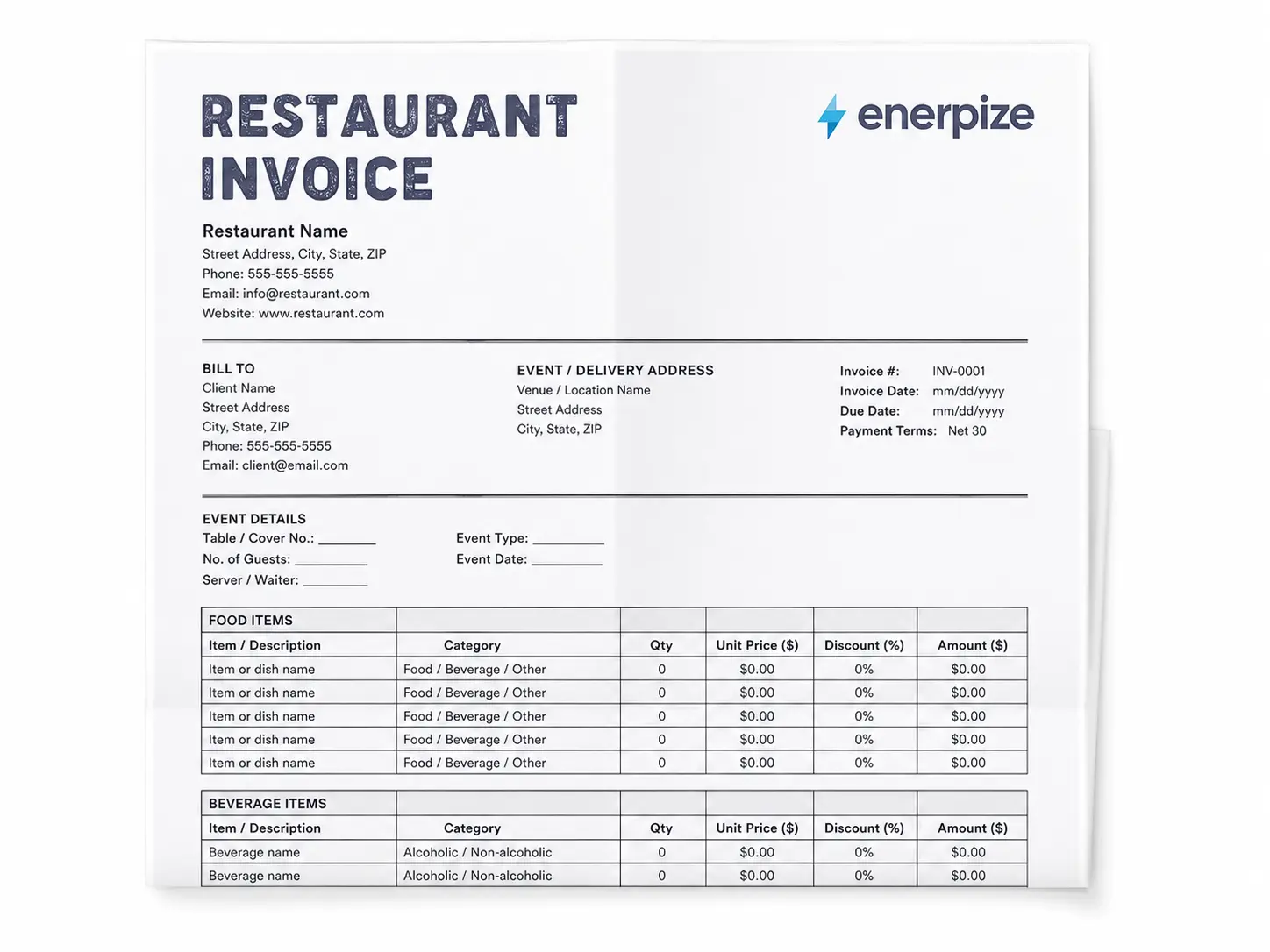
The top of the template carries your restaurant name, address, phone, email, and website on the left. Invoice number, invoice date, due date, and payment terms sit neatly on the right. Below that, the billing block has separate sections for your client's name, address, and contact, the event or delivery address, and a dedicated event details block that most templates forget entirely.
Event Details Block
This is where the Enerpize restaurant invoice template earns its keep over a generic file. There are labeled fields for table or cover number, number of guests, server or waiter name, event type, and event date. If you are running a restaurant, a catering company, or a banquet hall, these fields are not optional. They are how you track what happened, when, and for whom.
Food Items Table
A full itemized table for food orders, with columns for item or dish name, category (food, beverage, or other), quantity, unit price, item-level discount percentage, and the calculated amount. Every line calculates automatically in the Excel version. Seven rows included by default, expandable as needed.
Beverage Items Table
A completely separate table for beverages, with the same column structure as the food table and its own subtotal. Keeping food and beverage separated is not just tidy. It is how most restaurant P&L reporting works, and it is how corporate clients often need expenses categorized on their end.
Service Charge, Tip, Gratuity, and Tax Lines
Each charge appears as a named, separate line in the totals block. Service charge percentage, service charge amount, tip or gratuity, sales tax or VAT or GST percentage, calculated tax amount, shipping and delivery fee, and a total discount field. No bundling, no guessing. Your client sees every charge labeled and explained.
Payment Details and Bank Transfer Block
A section specifically for payment method, bank name, account name, account number or IBAN, BSB or routing number, and currency selection. This field is almost universally missing from competitor templates. For restaurants invoicing international corporate clients or handling bank transfers, it is not optional.
Notes and Terms and Conditions
Two side-by-side fields at the bottom for a client-facing message and your formal payment terms. Late payment policies, cancellation clauses, and deposit terms all live here.
Restaurant Invoice vs. Restaurant Receipt: What Is the Difference?
Short answer: a receipt is past tense. An invoice is future tense.
A restaurant receipt confirms a transaction that has already been paid, usually at the point of sale. A restaurant invoice is a formal request for payment that has not yet been made, with a due date, payment terms, and a paper trail that shows up in your accounts receivable.
For dine-in service at the table, you issue a receipt. For catering an event, supplying a corporate lunch account, or delivering bulk food orders to a business, you issue an invoice. The two documents serve completely different legal and accounting functions. Mixing them up is a surprisingly common mistake for small food service businesses, and it tends to cause problems at tax time.
Restaurant Bill Format by Country
Tax rules for restaurant invoices are not universal. What is required on a food service invoice in Sydney looks nothing like what is required in Mumbai, Toronto, or London. Here is what you need to know for each of the four biggest markets.
Restaurant Invoice Template for the United States
In the US, restaurant invoices must include applicable state sales tax, which varies by state and by what you are selling. Most states tax restaurant food and catering services, but prepared food, takeout, delivery, and catering for specific event types are sometimes taxed at different rates. States including Texas, California, and New York all handle food service tax differently.
For corporate clients, you will often be asked to include a purchase order number before delivering service. Net 15 or Net 30 are the standard payment terms for established business accounts. The IRS guidance on food and beverage tax treatment for businesses is your starting point for understanding what is taxable in your category.
The most searched variations for this market include restaurant invoice template, food bill format, and restaurant bill template, with "Due Upon Delivery" being the standard term for individual and event clients.
Restaurant Invoice Template for Canada
Canadian restaurant and catering invoices must display the GST or HST registration number of the business. The rate depends on the province: Ontario charges 13% HST, British Columbia charges 5% GST plus 7% PST, and Quebec charges GST at 5% plus QST at 9.975%. Catering services are generally fully taxable under GST/HST.
For corporate accounts in Canada, Net 15 to Net 30 is standard, and Interac e-Transfer is widely used as a payment method alongside credit cards and bank transfers. The Canada Revenue Agency's guide on GST/HST for food service businesses covers the specifics.
Restaurant Invoice Template for India (Restaurant Bill Format)
India drives the largest search volume for this page, and for good reason. The queries "restaurant bill format," "food bill format," "food bill format in word," and "dhaba bill format" all point to a very specific need: a correctly formatted restaurant invoice that complies with India's GST framework.
Under Indian GST, restaurant invoices must include the GSTIN of the restaurant, the SAC code for the service (SAC 996331 for restaurant services with dining, SAC 996332 for takeaway and delivery), and the applicable GST rate. Restaurants without input tax credit eligibility charge 5% GST. Air-conditioned restaurants and those serving alcohol typically charge 18% GST.
This applies to dhabas, hotel food services, lunch counters, catering companies, and any food business registered under GST. The "restaurant bill format in word" query is one of the highest-volume terms for this page because most small food businesses in India want an editable document they can customize in Word without starting from scratch. The Enerpize restaurant invoice template in Word does exactly that.
The GST Council of India and the CBIC's guidance on food service SAC codes are the authoritative references for compliance.
Restaurant Invoice Template for the United Kingdom
UK restaurants and catering companies registered for VAT must issue a VAT invoice for any B2B transaction. Full VAT invoices are required for amounts over £250 and must include the VAT registration number, a description of the supply, the date of supply (which may differ from the invoice date), the VAT rate applied, and the VAT amount as a separate line.
The standard VAT rate for restaurant and catering services in the UK is 20%. Cold takeaway food is zero-rated under HMRC rules, but hot food and hot drinks are standard-rated at 20%. Delivery charges follow the VAT treatment of the food being delivered. HMRC requires VAT invoices to be issued within 30 days of the supply date.
For catering businesses handling events over £250, a simplified invoice is not sufficient. You need a full VAT invoice. HMRC's VAT Notice 709/1 for catering and takeaway food is the definitive reference.
How to Fill Out a Restaurant Invoice Template
Step 1: Add Your Restaurant or Business Information
Fill in your restaurant name, address, phone number, email, and website at the top of the template. If you are in the UK, India, Canada, or Australia, also add your VAT, GSTIN, GST, or ABN registration number here. Save this as your master file so you never have to re-enter it.
Step 2: Enter the Client and Event Details
Add the client's name, billing address, and contact information. Fill in the event or delivery address separately if different. Complete the event details block: table or cover number, number of guests, server name, event type, and event date. These fields protect you in any payment dispute.
Step 3: Fill in the Invoice Metadata
Give the invoice a unique number. Sequential numbering (INV-001, INV-002) is standard and makes your records easy to follow. Enter the invoice date and due date. For individual clients, "Due Upon Delivery" is standard. For corporate accounts, Net 15 or Net 30 is typical.
Step 4: Itemize Food and Beverage Orders Separately
List every food item in the food table with quantity, unit price, and any item-level discount. List every beverage in the beverage table the same way. Each table calculates its own subtotal. Keep food and drink separated. It matters for your reporting and often for the client's expense categorization too.
Step 5: Add Fees, Tax, and Calculate the Total
Fill in your delivery or shipping fee, service charge percentage, tip or gratuity if applicable, and tax rate. The totals block calculates everything automatically in the Excel version. The total due line adds it all up: subtotal minus discount, plus tax, plus service charge, plus tip, plus delivery.
Automate your entire restaurant invoicing workflow with Enerpize. Start for free.
Who Uses a Restaurant Invoice Template?
Dine-In Restaurants and Fine Dining Establishments
For most table-service restaurants, receipts handle the day-to-day. But the moment a corporate client books a private dining room, a business lunch account, or a recurring weekly order, an invoice enters the picture. Fine dining venues billing for private events, wine pairings, and multi-course set menus need an itemized invoice format that reflects the quality of the experience.
Catering Companies and Event Caterers
This is the primary use case. A catering company billing a 200-person wedding reception, a corporate awards dinner, or a government conference needs a document that captures food, beverages, staffing, setup, delivery, and service charges separately. A receipt does not cut it. A formal restaurant invoice with event details, deposit tracking, and payment terms is the minimum.
Food Trucks and Pop-Up Kitchens
Food trucks billing event organizers for festival appearances or corporate catering gigs need a clean, professional invoice. Many event organizers require a formal invoice before they will release payment or process it through accounts payable. A food truck using a handwritten receipt risks not getting paid on time.
Hotel Food and Beverage Services and Dhabas (India)
Hotel restaurants and dhabas in India have a specific billing requirement: GST-compliant invoices with GSTIN, SAC codes, and the correct tax rate. The "hotel food bill format" and "dhaba bill format" queries consistently rank among the highest-volume searches for this page. The Enerpize restaurant invoice template in Word handles this format cleanly and is fully editable for Indian food service compliance.
Corporate Meal Delivery and Bulk Food Service
Companies supplying office lunches, hospital cafeteria contracts, or school meal programs on a recurring account basis need a formal invoicing system. Net 30 terms, PO numbers, and monthly statements are standard in this space. A downloadable restaurant invoice template in Excel or Word is the starting point for getting this right.
Best Practices for Restaurant Invoicing
Invoice the same day. The longer you wait after delivering food or completing an event, the longer you wait to get paid. Same-day invoicing is the single most effective thing you can do for your cash flow.
Require a deposit on large orders. Standard practice is 25% to 50% upfront for catering orders over a set threshold. State the deposit amount as a separate line on the invoice and note how it will be applied to the final balance.
Itemize everything. Wings per pound. Cake per slice. Server hours. Setup fee. Cleanup fee. Every item on a separate line with a clear description. Vague invoices create disputes. Detailed invoices create trust.
Set a clear cutoff for headcount and menu changes. Most caterers lock the final count 48 to 72 hours before the event. Put that policy in the Terms and Conditions field on every invoice.
State your late payment terms explicitly. Whether it is a 2% monthly fee or a fixed charge, write it on the invoice. Most clients pay on time when they know there is a consequence for not doing so.
Use separate food and beverage subtotals. Many corporate clients need to categorize their expenses separately for accounting. Giving them that breakdown on your invoice makes their lives easier and makes yours look more professional.
Keep dietary and allergy notes on the invoice. If a client has specified gluten-free, halal, kosher, or nut-free requirements, put it in writing on the invoice. It protects you legally and ensures the kitchen sees it.
Why Enerpize Instead of a Static Restaurant Invoice Template
A downloaded template is a starting point. What most restaurant and catering businesses actually need is a system that does the remembering for them.
Enerpize is a cloud ERP platform that helps restaurants, catering businesses, and food service SMEs manage invoicing, billing, client accounts, and payments in one place. Here is what that looks like in practice.
Catering and Event Management Built In
Enerpize's catering and event management software lets you manage bookings, assign coordinators, organize logistics and venues, track food and equipment inventory, and generate invoices all within the same system. You are not switching between a booking spreadsheet, a Word template, and a banking portal. It is one flow.
Recurring Invoices for Standing Accounts
If you supply a corporate office with lunch every Tuesday, you should not be rebuilding the same invoice every week. Enerpize lets you set up recurring invoices on a fixed schedule, auto-sent to the client at whatever interval you choose.
Client Portal and Online Payments
Your clients can view, approve, and pay invoices through the Enerpize client portal without a phone call or a bank visit. Online payments mean faster settlement. Faster settlement means better cash flow. That is the math.
POS Integration for Restaurant Billing
Enerpize's POS software integrates directly with the billing module. Sessions, sales, and payments recorded at the counter flow into your invoicing and accounting automatically. No manual re-entry, no reconciliation headaches.
Inventory and Supplier Management
Running low on stock before a catering event is a disaster. Enerpize tracks your kitchen and equipment inventory, sends low-stock alerts, and lets you raise purchase orders to suppliers directly from the platform. Your inventory management is connected to your billing in a way that a static template simply cannot be.
Sales Reports by Client, Period, and Category
See which clients are your highest revenue accounts, which event types generate the best margins, and which months spike your catering volume. Enerpize's sales reports give you that visibility without building a custom spreadsheet from scratch each quarter.
Key Takeaways
- A restaurant invoice is a formal payment request issued for catering orders, corporate accounts, and bulk food service, not a receipt for a completed table transaction. The two documents serve different legal and accounting functions.
- The Enerpize restaurant invoice template separates food and beverage into two distinct itemized tables with individual subtotals, a structure that most generic templates do not include and that corporate clients and accountants specifically need.
- Tax treatment varies significantly by country: US restaurants apply state sales tax (rates vary), Canadian businesses show GST/HST with their registration number, Indian restaurants must include GSTIN and SAC codes under GST at 5% or 18%, and UK VAT-registered restaurants issue full VAT invoices at 20% for hot food and catering.
- Enerpize is a cloud ERP platform that helps restaurants, catering businesses, and food service SMEs manage invoicing, billing, client accounts, and payments in one place, going well beyond what any static template can do.
- Requiring 25% to 50% deposits on large catering orders, stated as a named line item on the invoice with cancellation terms in the T&C field, is the single most effective way to protect a restaurant business from last-minute cancellations.
- The Enerpize restaurant invoice template is free to download in Word, Excel, and PDF, with auto-calculating formulas in the Excel version covering food subtotal, beverage subtotal, tax, service charge, tip, delivery fee, and total due.
Start invoicing your restaurant or catering clients professionally. Start for free.
Frequently Asked Questions
What should a restaurant invoice include?
A complete restaurant invoice should include your business name, address, and contact details, the client name and billing address, a unique invoice number and date, a due date and payment terms, itemized food and beverage line items with quantities and unit prices, item-level discounts if applicable, service charge and gratuity as separate lines, the applicable tax (sales tax, VAT, or GST) as a named line with the rate shown, a delivery or shipping fee if relevant, payment method details including bank or card information, and a notes or T&C section covering your policies. Event details including table number, cover count, server name, and event date are also recommended for catering and event billing.
What is the difference between a restaurant invoice and a restaurant receipt?
A receipt confirms a payment that has already been made. An invoice requests a payment that has not yet been made. Receipts are issued at the point of sale. Invoices are issued for catering orders, corporate accounts, and event billing where payment follows delivery, typically within Net 15 or Net 30 terms.
How do I format a restaurant bill in Word?
Download the Enerpize restaurant invoice template in Word. Open it, replace the placeholder text with your restaurant name, address, and contact details, add the client information and event details, fill in your food and beverage line items, enter your tax rate and any fees, and save a copy for each client. The Word version is fully editable and ready to email or print.
Do restaurants in India need to issue GST invoices?
Yes. Any restaurant or food service business in India registered under GST must issue a GST-compliant invoice for B2B transactions. The invoice must include the restaurant's GSTIN, the applicable SAC code (996331 for dine-in, 996332 for takeaway and delivery), and the correct GST rate, either 5% without ITC or 18% with ITC depending on the restaurant category. This applies to dhabas, hotel food services, catering companies, and cloud kitchens.
What VAT rate applies to restaurant invoices in the UK?
Hot food and hot drinks served by UK restaurants and caterers are taxed at the standard VAT rate of 20%. Cold takeaway food is generally zero-rated. Catering services for events are taxed at 20%. UK VAT-registered businesses must issue a full VAT invoice for B2B transactions over £250, including the VAT registration number, the supply date, the VAT rate, and the VAT amount as a separate line.
How do I add a service charge and tip to a restaurant invoice?
Add them as two separate line items in the totals block. Service charge is typically a fixed percentage of the subtotal (15% to 20% for catering) and covers setup, staffing, and coordination. Tip or gratuity is optional and client-determined. Never bundle them into the subtotal or the tax line. Transparency on these charges builds trust and avoids disputes.
Can I use a restaurant invoice template for catering orders?
Yes, and in fact catering is the primary use case for a formal restaurant invoice. Catering invoices should include the event name, event date, event location, food and beverage line items, delivery fee, setup and cleanup charges, service charge, tip, tax, deposit received, and balance due. The Enerpize restaurant invoice template includes a dedicated event details block and a payment details section built for exactly this purpose.
What payment terms are standard on a restaurant invoice?
For individual customers and event clients, "Due Upon Delivery" or "Due Upon Receipt" is standard. For established corporate accounts, Net 15 to Net 30 is typical. For large catering orders, a 25% to 50% deposit at booking with the balance due on the event date is widely used. Always state payment terms clearly on every invoice, including any late payment fee.
What is the difference between a dhaba bill format and a standard restaurant invoice?
A dhaba bill format is a restaurant invoice adapted for Indian regulatory requirements, specifically GST compliance. It must include the GSTIN of the establishment, the SAC code for the food service type, and the correct GST rate. The layout may also follow Indian formatting conventions including rupee amounts, Hindi or regional language headers, and fields common to tax authorities in India. The Enerpize restaurant invoice template in Word is editable and can be adapted for dhaba and hotel food service billing in India.
How does Enerpize automate restaurant invoicing beyond a static template?
Enerpize connects your catering bookings, POS sessions, inventory, client accounts, and invoicing into one platform. Recurring invoices send automatically to standing accounts. Clients pay online through the client portal. Sales reports show your revenue by client, event type, and period without any manual effort. It is the difference between filling in a form every time and running a billing system that works while you are focused on the food.
About the Author
Omar El Bahr is a Senior Digital Growth Specialist at Enerpize, where he leads SEO, content strategy, and organic growth across international markets. He is a Forbes Communications Council contributor and has written for Entrepreneur on business communication and digital strategy.
Disclaimer: This template and the information on this page are provided for general guidance only. Tax rates, invoice requirements, and legal obligations vary by country, region, and business type. Always consult a qualified accountant or tax advisor to ensure your invoices comply with the rules that apply to your specific situation.