Posted on 15 July 2026
Free Invoice Maker Download: PDF, Word, Excel & Google Sheets and Docs
- Available in Word, Excel, PDF, Google Docs, and Google Sheets, free to download with no signup required
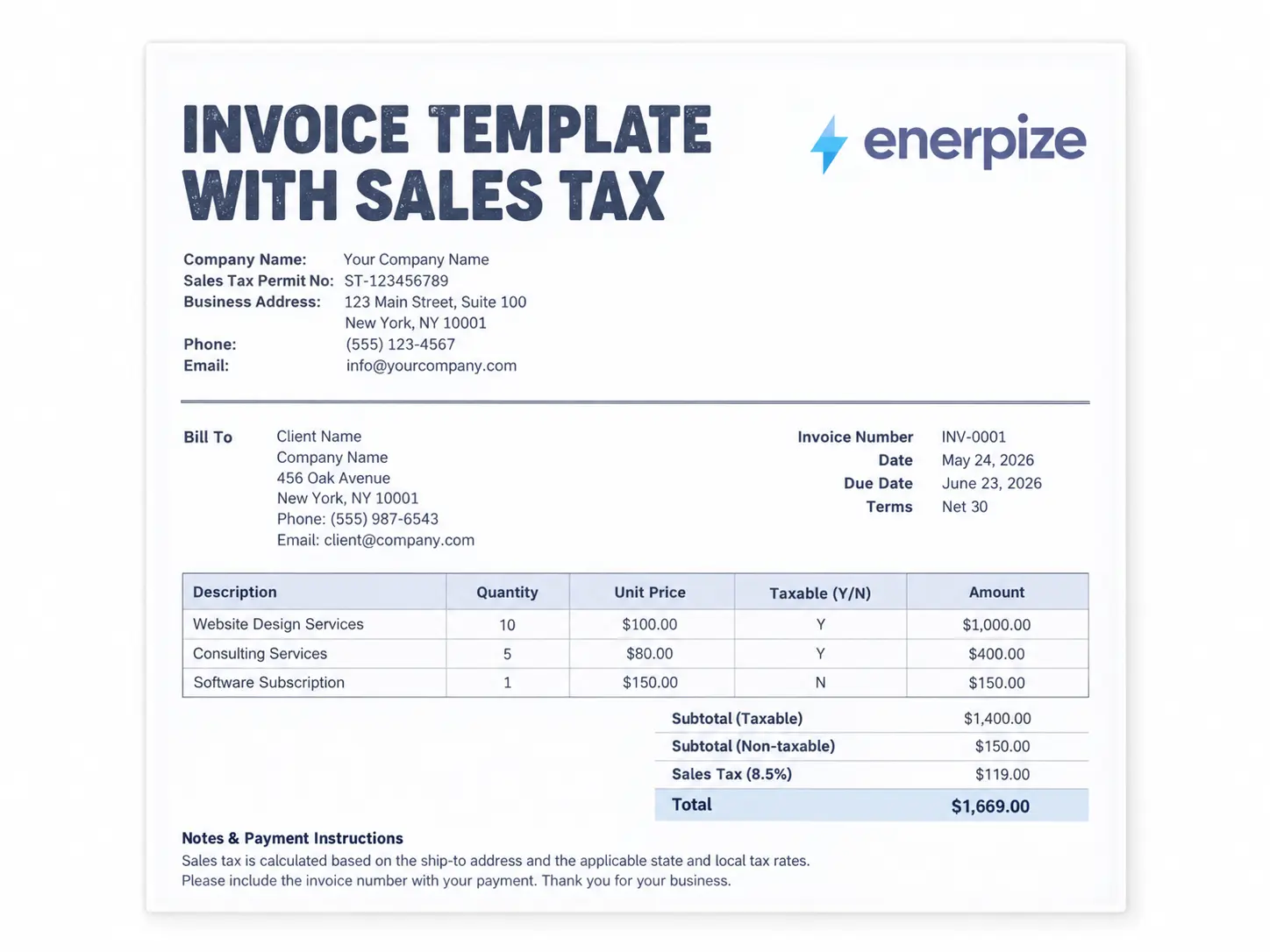
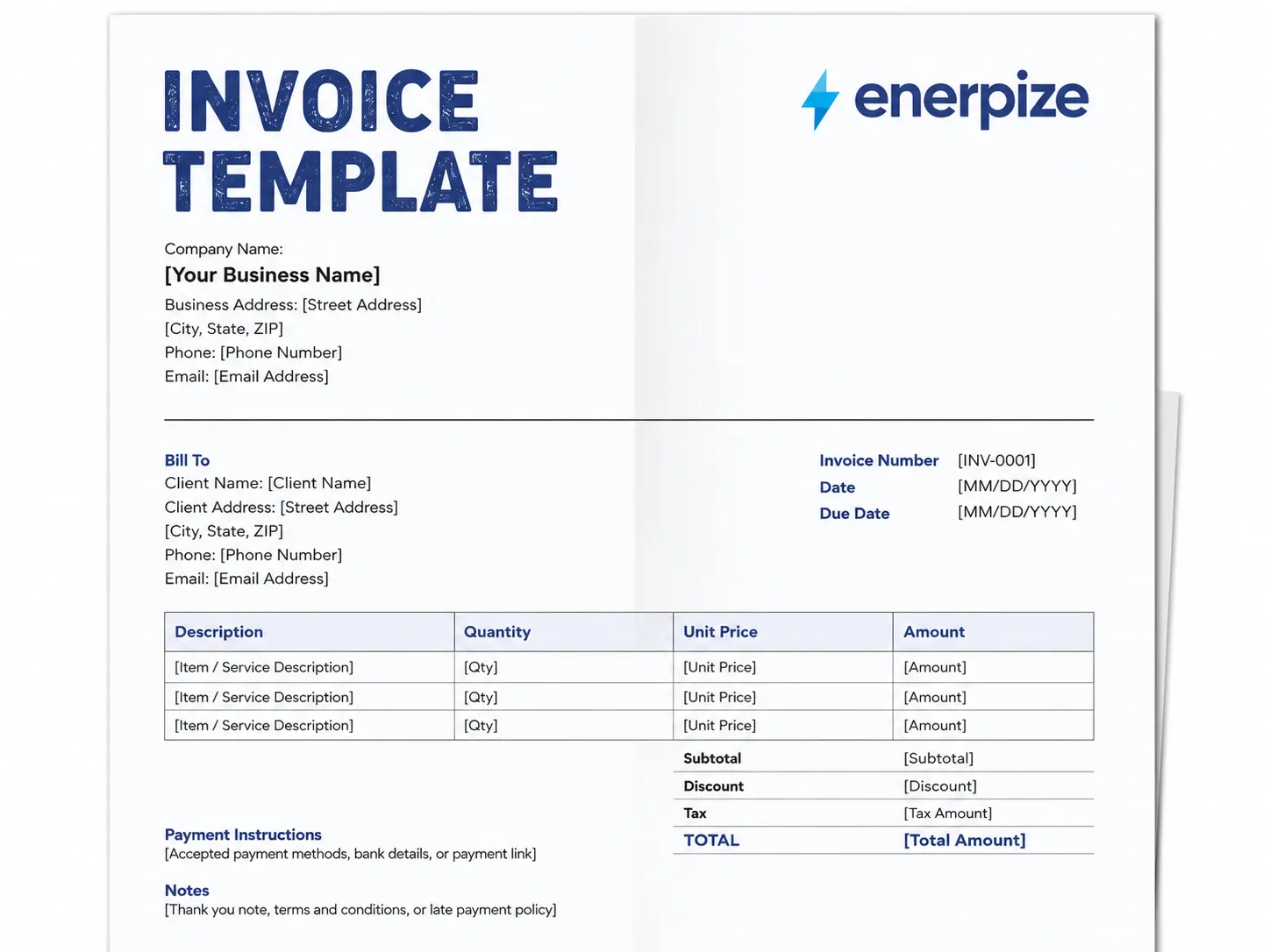
- Covers business details, client details, itemized line items, tax, discount, and total in one structured document
- Excel and Google Sheets versions calculate line totals, subtotal, tax amount, and balance due automatically
- Made by Enerpize, the same team behind the invoicing software that takes over once a free generator stops being enough
An invoice maker free template is a pre-formatted billing document you fill in with your business details, your client's details, and what you are charging them for, then send as a request for payment.


What Is a Free Invoice Maker
A free invoice maker gets used to describe two genuinely different things, and mixing them up is where most of the confusion in this category comes from.
Sometimes it means a browser-based tool where you type your details into a live form and the page builds the invoice for you on screen, then lets you download a PDF at the end. Sometimes it means a downloadable template, a file that already has the invoice structure built in, that you open in Word or Excel and fill in yourself. Both get called "free invoice maker," both get called "invoice generator," and both solve the same basic need, getting a professional invoice out the door without paying for software you do not need yet.
This page gives you the second kind, a real downloadable template. If you want the interactive version, the mechanics are similar either way, you are filling in the same fields regardless of whether a webpage does the typing for you or you do it yourself in a spreadsheet.
Skip the download and the manual math. Enerpize generates the invoice, calculates the tax, and remembers your client for next time. Start free with Enerpize
Free Invoice Generator vs Free Invoice Template vs Invoicing Software
Here is the honest version of a comparison most vendors get wrong, usually because they are trying to sell you the third column.
A free invoice generator is quick. You open a page, fill in a form, get a PDF. There is nothing to install and nothing to learn. What you lose is memory, close the tab and it forgets your client's details, your last invoice number, everything. Send that same client an invoice next month and you are starting from a blank form again.
A free invoice template, what you are downloading on this page, gives you the file itself. You can save it, duplicate it for the next invoice, and build your own numbering system across copies. It is more durable than a generator in that sense, but the math is manual unless you are using the Excel or Google Sheets version, and there is still no record of who owes you what once you have sent a dozen of these out.
Invoicing software is the third option, and it is not automatically the right one just because it does more. It becomes the right one once you are sending enough invoices that manually tracking payment status, chasing overdue clients, and re-entering the same customer details every time starts eating real hours out of your week.
| Free Generator | Free Template | Invoicing Software | |
|---|---|---|---|
| Cost | Free | Free | Free to start |
| Requires signup | Usually no | No | Sometimes |
| Remembers client details | No | No | Yes |
| Calculates tax automatically | Sometimes | Only Excel or Sheets versions | Yes |
| Tracks payment status | No | No | Yes |
| Sends automatic reminders | No | No | Yes |
| Converts to accounting records | No | No | Yes |
Invoice Requirements in the United States
The United States does not have one national invoice law the way many countries do. Sales tax is governed at the state level, not federally, which means what belongs on an invoice depends heavily on where your business and your customer are located.
Since the 2018 Wayfair Supreme Court decision, most states apply economic nexus rules, meaning you can owe sales tax in a state based purely on sales volume there, typically $100,000 in annual sales, with no physical presence required. If you sell across state lines, that is worth checking before you assume your home state's rules are the only ones that apply.
A US invoice should still include the basics regardless of state, your business name and contact details, the client's name and billing details, a unique invoice number, an itemized description of goods or services, the sales tax rate and amount shown separately when tax applies, the total due, and accepted payment methods. The IRS recommends keeping invoice records for at least seven years in case of an audit, longer than many business owners assume.
Invoice Requirements in South Africa
If your business is VAT registered in South Africa, SARS operates a three tier system based on transaction value. Above R5,000, you need a full tax invoice showing both your details and the buyer's, including both VAT registration numbers. Between R50 and R5,000, an abridged tax invoice is acceptable, and it does not need the buyer's name, address, or VAT number. At R50 or under, no formal tax invoice is required at all, though a till slip showing VAT charged is still needed if the buyer wants to claim it back.
Every tax invoice must carry the words "Tax Invoice," "VAT Invoice," or "Invoice" prominently, your name, address, and VAT registration number, a description of the goods or services, and the value, VAT amount, and total shown separately. SARS requires this within 21 days of completing the sale. The standard VAT rate remains 15 percent, and the VAT registration threshold rose from R1 million to R2.3 million as of April 2026, so check where your turnover actually sits before assuming you need to charge VAT at all.
Invoice Requirements in the United Kingdom
If you are VAT registered in the UK and invoicing another VAT registered business, HMRC requires a full VAT invoice containing 14 specific fields, including a unique sequential invoice number, your VAT registration number, the tax point (the date of supply, which is not always the same as the invoice date), a description of the goods or services, and the net, VAT, and gross totals shown separately.
The standard UK VAT rate is 20 percent, with a reduced 5 percent rate on specific supplies and a 0 percent rate on items like most food, books, and children's clothing, which still must be shown on the invoice even though no VAT is actually charged. For retail transactions or invoices under £250 including VAT, a simplified VAT invoice is acceptable and does not need the customer's name and address. HMRC's own guidance confirms a VAT invoice must normally be issued within 30 days of the tax point, and businesses must generally keep VAT records for at least 6 years.
QuickBooks Stopped Selling Desktop Pro to New Customers, Here Is What That Actually Means
This is worth knowing plainly, because a lot of invoicing comparisons online still talk about QuickBooks Desktop Pro as if it is a straightforward option a new business can just go buy.
It is not, not anymore. Intuit stopped selling new QuickBooks Desktop Pro Plus subscriptions to new US customers after September 30, 2024. If you already had a subscription before that date, you can keep renewing it. If you are a new business shopping for invoicing software today, Desktop Pro is not something you can walk in and purchase, Intuit has been actively moving new customers toward QuickBooks Online instead.
That matters for this comparison specifically, because a genuinely fair look at "free invoice maker versus quickbooks desktop pro" now has to acknowledge that one side of that comparison is not fully available to new buyers anymore. If Desktop Pro is what you were picturing as the eventual upgrade path from a free tool, that path has narrowed considerably, and it is worth knowing that before you build a plan around it.
When a Free Invoice Maker Is Not Enough Anymore
Here is the moment this always happens. You send the same client an invoice in March. They pay. Great. Then April rolls around and you are back at the same free generator, re-typing their name, their address, the same three line items with slightly different numbers, because nothing you filled in last month was saved anywhere.
That is not a failure of the tool. A free generator was never built to remember you. It was built to produce one document, one time, and it does that well. The problem shows up the second you need to do it again, and again, and again, for the same handful of clients you actually work with every month.
At low volume, a handful of invoices sent occasionally, this genuinely does not matter. The retyping costs you two minutes, not two hours. But once you are sending real recurring invoices to real recurring clients, that two minutes becomes a real cost, multiplied by every client, every month, forever, unless something changes.
What This Enerpize Template Includes
I want to be direct about what makes this specific page different from the fifteen other free invoice generators you have probably already had open in other tabs, because the honest answer is not that this template has fancier fields.
It is that this is the one place in that search results page where the same company that gives you the free template also gives you a real, working answer for what happens after you outgrow it. Every other free generator or template you will find is either a standalone tool with nothing behind it, or a marketing funnel for accounting software built for enterprises with a finance department, not a business sending fifteen invoices a month. This template sits between those two extremes on purpose. It is genuinely free, genuinely yours to keep and reuse, and it is built by a company whose actual product picks up exactly where the free version stops working, not a different, unrelated product wearing an invoice generator as a lead magnet.
Ready to stop retyping the same client details every month? See what an invoice looks like when it remembers. Start free with Enerpize
How Enerpize Replaces Your Free Invoice Generator
Once you are past the template stage, this is what actually changes.
One-Click Generation and Sending
Enerpize's invoicing and billing software generates and sends invoices in one click, with automatic due payment reminders that go out without you having to remember to chase anyone. There is no separate step where you build the document, save it, then open your email to send it. The invoice goes out the moment it is ready, and the reminder cycle around it runs on its own from there.
Quote to Invoice Without Retyping Anything
If you have already sent a client a quotation and they accepted it, converting that quote into a payable invoice takes one click too, no retyping the line items you already agreed on. This is the exact gap a free generator cannot close, since a generator has no memory of the quote you sent last week, so you end up rebuilding the same line items twice, once as a quote and again as an invoice, checking both times that the numbers still match.
Recurring Invoices Solve the Problem Permanently, Not Once
Recurring invoices are where this actually pays off. You set the date and the interval once, and Enerpize generates and sends the same invoice automatically every cycle, with reminders included. That is the exact problem this page just described, the March client who comes back in April, solved permanently instead of solved once. You are not opening a free generator every month and starting from a blank form. The invoice already exists, on a schedule, and it goes out whether or not you remembered to think about it that day.
Getting Paid in the Client's Own Currency
If you are billing clients across borders, Enerpize supports more than 135 currencies and payment methods, so an international client pays in their own currency without you doing the conversion by hand. A free generator built for a single-currency market leaves that math to you, invoice in your currency, hope the client's bank sorts out the rest, and sometimes discover later that a fee or a rounding difference ate into what you were actually paid.
A Self-Service Option for Clients Who Want One
For businesses working with clients who need a self-service option, a client portal lets them approve estimates, view invoices, and pay directly, without another email back and forth. Some clients want to log in and handle it themselves rather than replying to a PDF attachment every time. That option does not exist with a standalone generator, since there is nothing behind the PDF for a client to log into.
Where Accounting Software Takes Over From a Free Generator
This is the part a free generator was never going to do, no matter how good its PDF export is.
Every Invoice Becomes a Journal Entry Automatically
Enerpize's accounting software takes every invoice you generate and turns it into a journal entry automatically. There is no export step, no reconciling a folder of PDFs against a separate bookkeeping file at the end of the month. The invoice and the accounting record are the same event, not two things you have to keep in sync yourself.
Net Profit, Calculated, Not Reconstructed
Choose income from invoices, set a date range, and you get a calculated net profit report without touching a spreadsheet. That is the actual gap between a free invoice tool and real invoicing software, a PDF sitting in your downloads folder does not know what your business made last quarter. An invoice that flows straight into your chart of accounts does. The difference shows up exactly when you need an answer quickly, tax season, a loan application, a moment where someone asks what your business actually earned and you do not have weeks to reconstruct it by hand.
The Honest Test for Whether You Need This Yet
For a freelancer or small business owner still deciding whether that gap matters yet, here is the honest test. If you could answer "what did I actually earn last month" without opening every invoice you sent and adding it up by hand, you do not need this yet. If you cannot, that is the signal. This is not a sales pitch dressed up as a quiz, it is genuinely fine to stay on a free generator or template until that specific moment arrives. The point of this whole page has been telling you when it does, not convincing you it already has.
Every invoice you send should already know where it belongs in your books. See how that actually works. Start free with Enerpize
FAQs
Is this invoice maker really free?
Yes. The template downloads in Word, Excel, PDF, Google Docs, and Google Sheets with no signup and no credit card required. There is no locked version behind a paywall, what you download is the complete, usable document.
What is the difference between an invoice generator and an invoice template?
A generator is a browser-based tool that builds the invoice for you as you type into a live form, then lets you download a PDF. A template is the file itself, one you download, save, and fill in yourself, which you can then duplicate and reuse for future invoices without starting from a blank page each time.
Can I use this to invoice international clients?
The template itself works for any currency, you simply enter the amounts and currency symbol that apply to your transaction. If you are regularly invoicing clients in multiple currencies and want automatic conversion and multi-currency payment support built in, that is where invoicing software like Enerpize, which supports more than 135 currencies and payment methods, takes over from a static template.
Is QuickBooks Desktop Pro still available?
Existing subscribers can continue renewing, but Intuit stopped selling new QuickBooks Desktop Pro Plus subscriptions to new US customers after September 30, 2024. If you are shopping for invoicing software today rather than already using Desktop Pro, it is not a straightforward new purchase the way it used to be.
When should I switch from a free invoice generator to invoicing software?
The honest signal is repetition, not volume. The moment you are sending invoices to the same clients on a recurring basis and manually retyping their details every time, or you cannot say what you earned last month without adding up every invoice by hand, a free generator is costing you more time than invoicing software would cost you in fees.
About the Author
Omar El Bahr is a Senior Digital Growth Specialist at Enerpize, where he leads SEO, content strategy, and organic growth across international markets. He is a Forbes Communications Council contributor and has written for Entrepreneur on business communication and digital strategy.
Disclaimer: This template and article are for informational purposes only and do not constitute legal, tax, or accounting advice. Invoice requirements vary by jurisdiction and business type. Consult a qualified professional for advice specific to your situation.