Posted on 10 November 2026
Free HMRC Mileage Log Template in Excel, Google Sheets, Word and PDF
- Applies 45p or 55p by journey date, and splits the trip that passes 10,000 miles between 55p and 25p
- Fills in form P87 boxes 5.1 to 5.13 and estimates your tax back
- Flags commutes, company cars, missing postcodes and round-number miles before HMRC does
- Available to download for free in Excel, Google Sheets, Word and PDF
An HMRC mileage log template is a ready-made record of business journeys in a vehicle you own, listing the date, start and end postcodes, purpose and miles for each trip. HMRC asks for this log before it pays mileage allowance relief on form P87, and the same record backs up employer mileage payments and sole trader claims.


Last updated: November 10, 2026
What it is
An HMRC mileage log template that records every business journey with its date, postcodes and reason, then applies the right HMRC rate to each trip by date.
When you need it
When you drive your own car for work and want the tax back, pay staff mileage, or claim the flat rate as a sole trader.
What's inside
Settings, a 1,000 row mileage log, a Check column, a monthly summary, P87 boxes 5.1 to 5.13, a printable claim form and a rates table.
Formats
Excel, Google Sheets, Word and PDF. The Word and PDF files are a printable log book page and a claim form.
Want to see it filled in first?
Make your own copy of the filled sample in Google Sheets.
What Is an HMRC Mileage Log Template?
Picture the envelope. You know the one. Fuel receipts, a parking ticket from Swindon, a sticky note that says "Bath, Tuesday, about 30?"
Now HMRC wants postcodes.
An HMRC mileage log template is a ready-made record of business journeys in a vehicle you own, listing the date, start and end postcodes, purpose and miles for each trip. HMRC asks for this log before it pays mileage allowance relief on form P87, and the same record backs up employer mileage payments and sole trader claims.
You'll hear it called a mileage log book, a business mileage log, a mileage tracker spreadsheet or a mileage log template UK. Employers often call the monthly version a mileage claim form. The record underneath is the same.
a business journey
date, postcodes, reason, miles
55p or 25p by date
employer, P87 or tax return
What it isn't: an HMRC form. HMRC doesn't publish an official mileage log, so any format works as long as it holds the details. And it isn't your V5C logbook, which proves who owns the car, not where it went.
Mileage Log vs Mileage Claim Form vs P87 vs Expense Report
Four documents, four readers. Mix them up and you end up rebuilding the same numbers twice.
| Document | What it proves | Who reads it | How often |
|---|---|---|---|
| Mileage log | Each journey happened, and why | You, your employer, HMRC if asked | Every trip |
| Mileage claim form | How much you're owed for a period | Your manager or payroll | Monthly |
| Form P87 | The relief you want back from HMRC | HMRC | Once a tax year |
| Expense report | All out of pocket spending, receipts included | Finance | Monthly or per trip |
| V5C logbook | Who the registered keeper is | DVLA | When the car changes hands |
The log is the evidence. The claim form, the P87 and the tax return are just different ways of adding it up.
Which Mileage Record Fits Your Situation?
Start with who pays you back, because that decides where the total ends up.
| If your situation is... | Use this | Where to find it |
|---|---|---|
| You drive your own car for your employer and want tax back | Mileage Log plus P87 boxes | Mileage Log and P87 and Tax Return sheets |
| Your manager wants a signed monthly claim | Printable mileage claim form | Claim Form sheet, or the Word and PDF files |
| You prefer a paper mileage log book in the glovebox | Printable log page with 18 journeys | Word and PDF files |
| You're self-employed and claim the flat rate | Same log, sole trader setting | Settings, then the Self Assessment total |
| Mileage is one line among hotels, meals and parking | An expense report template | A separate download |
| You reimburse staff for one-off costs | A reimbursement form | A separate download |
What Does the HMRC Mileage Log Template Contain?
Every column in the log is there because HMRC, your employer or the maths needs it.
| Field | What goes in it | Why it matters |
|---|---|---|
| Date | The day you drove | Picks the rate: 45p before 6 April 2026, 55p from then |
| Vehicle | Picked from your Settings list | Company vehicles and bicycles follow different rules |
| Start and end postcode | For example BS2 0FR to GL1 2EH | HMRC asks for both on every P87 journey |
| Places visited | Client or site name | Lets you, or an inspector, check the distance |
| Business reason | Why the trip happened | Separates a client visit from a commute |
| Journey type | Business, Temporary workplace, Ordinary commute or Private | Only the first two count |
| Odometer or miles | Start and end readings, or the miles | Fill whichever you have |
| Passengers | Colleagues on the same work trip | Adds up to 5p per passenger per mile |
| Check | A formula, not an input | Flags anything HMRC would question |
The field people skip is the one HMRC reads first: the business reason. "Meeting" tells nobody anything. "Overdue order follow-up with Severn Trade Centre" tells the whole story in six words.
What the Enerpize HMRC Mileage Log Template Includes
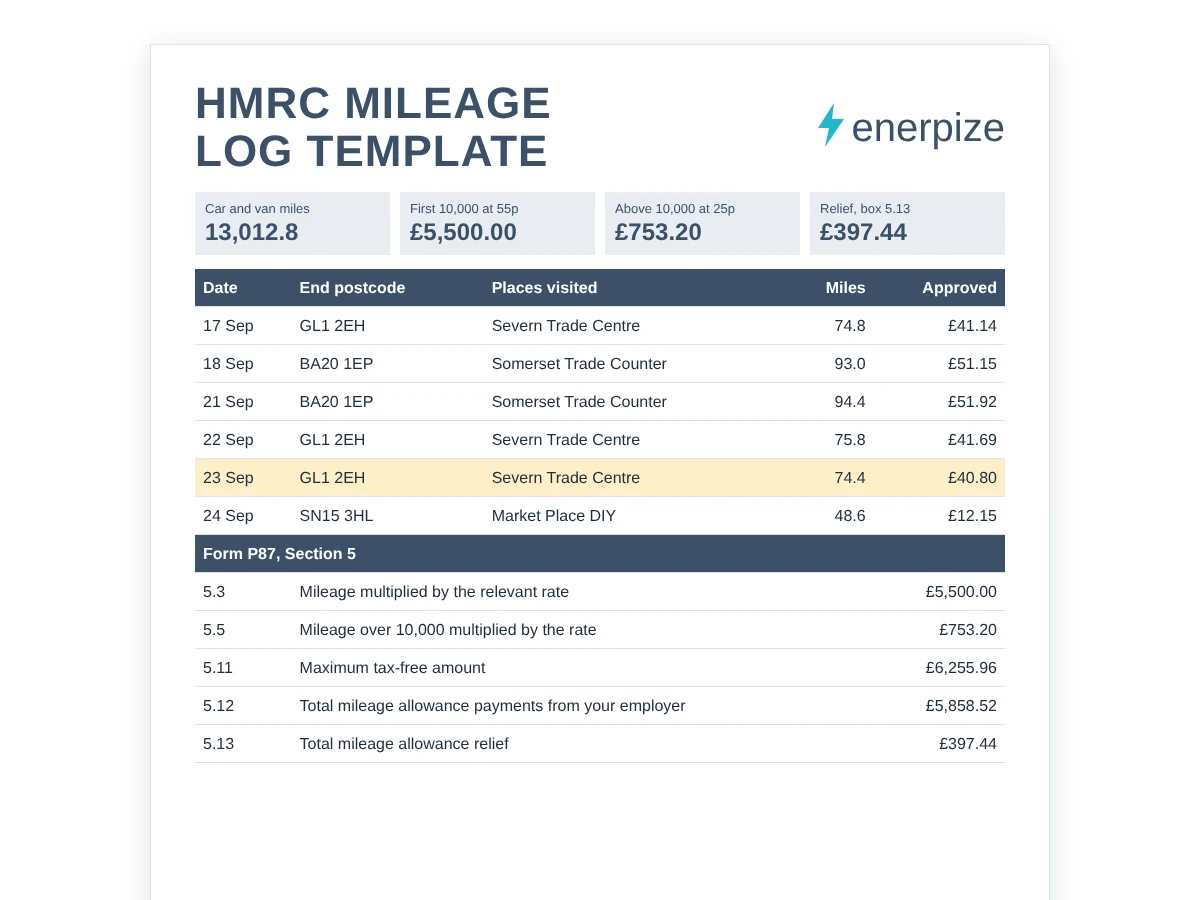
We built this HMRC mileage log template around one awkward fact. The approved mileage rate changed mid-claim. On 21 May 2026, HMRC raised the car and van rate from 45p to 55p for the first 10,000 business miles, and backdated the increase to 6 April 2026. That was the first change since 2011. So a log that applies one rate to the whole year is now wrong for anyone driving across that date. Yours won't be. The workbook runs on formulas with no macros, and yellow cells are the only ones you touch.
The Rate Follows the Calendar
Every journey looks up its own rate on the Rates sheet, by date. In the sample, six March trips covering 382.6 miles stay at 45p, worth £172.17, and land in the 2025/26 tax year. Everything from 6 April onward gets 55p. You never retype a rate.
One Journey, Two Prices
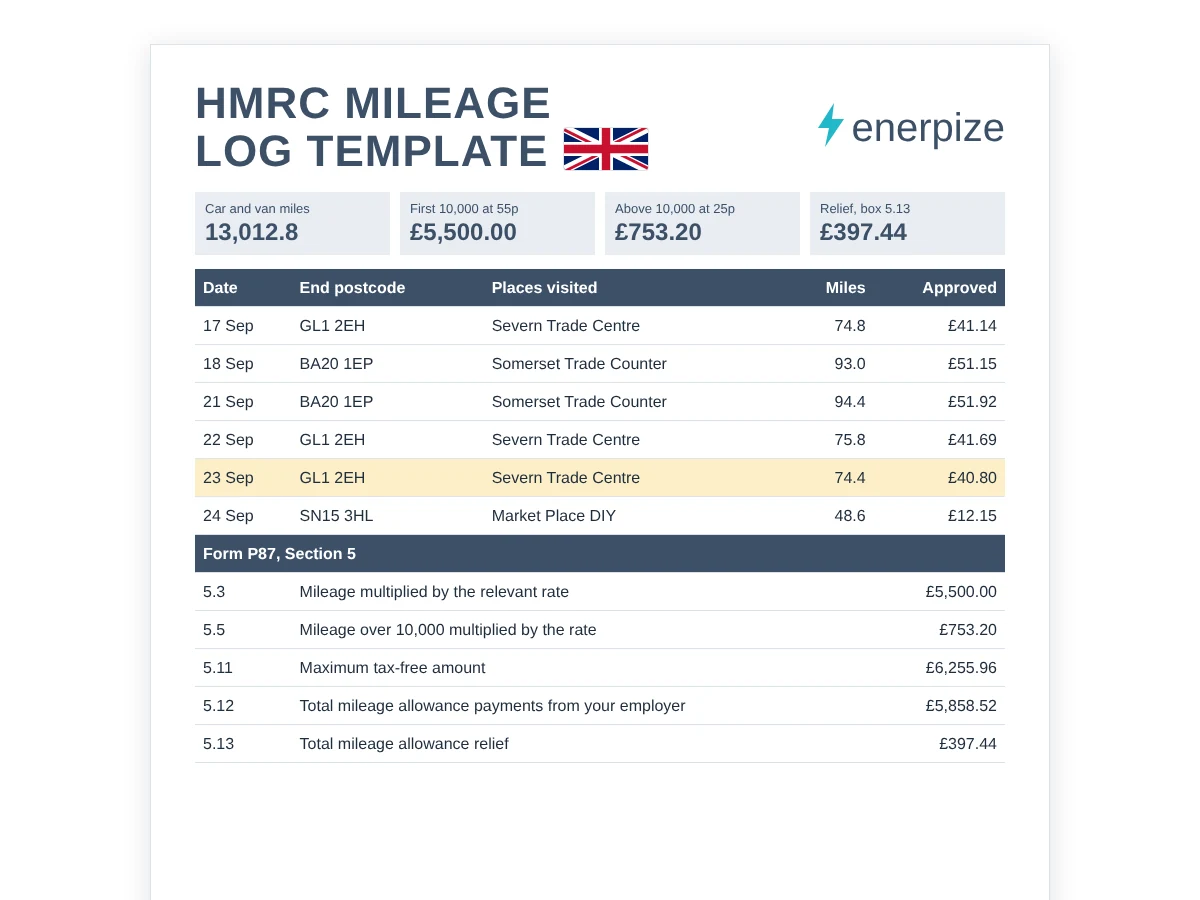
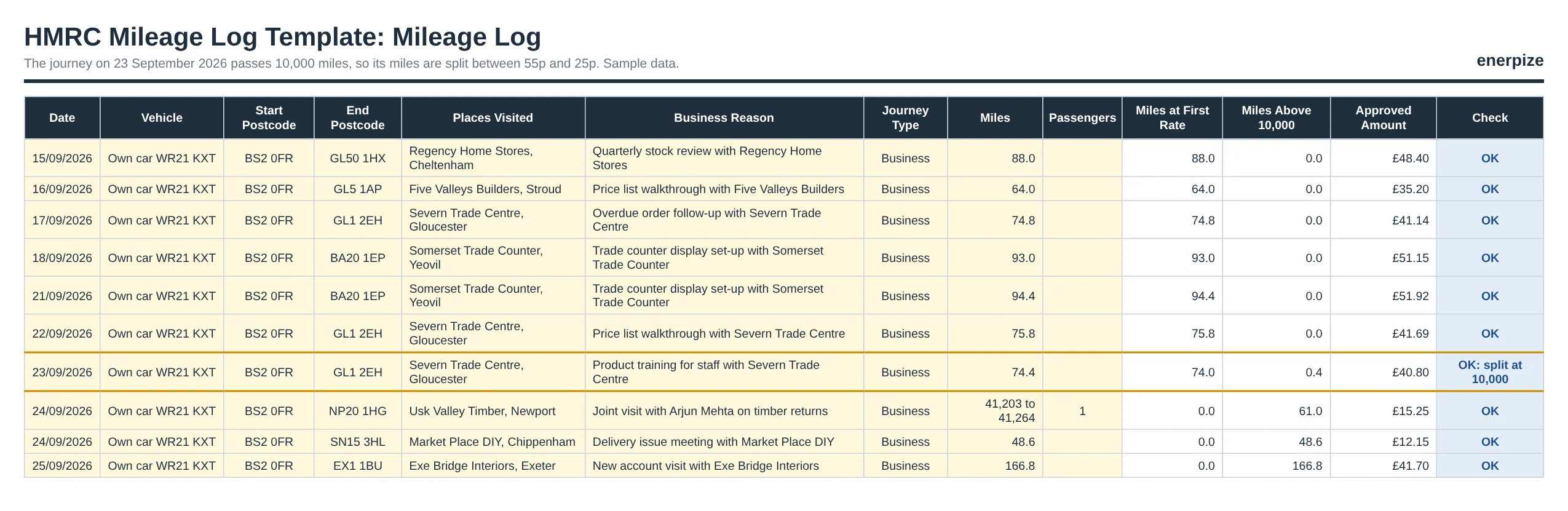
The 10,000 mile threshold almost never falls neatly between two trips. It falls in the middle of one. On 23 September 2026, our sample driver had 9,926.0 miles behind him and drove 74.4 more. The log prices 74.0 miles at 55p and 0.4 miles at 25p, for £40.80. The order you type the rows in doesn't matter either, because the running total sorts by date.
A Column That Argues Back
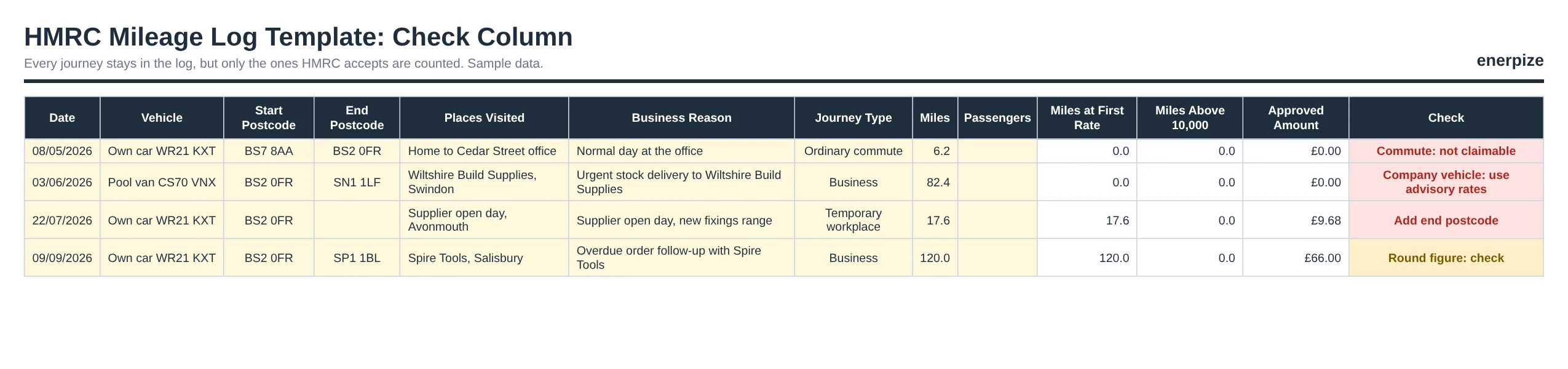
The Check column reads every row the way an inspector would. A commute, a pool van, a missing postcode and a suspiciously round 120.0 miles each get flagged in plain words. Commutes and company vehicles stay in your log but count for nothing, so the record stays complete and the claim stays clean.
The Month You Crossed the Line
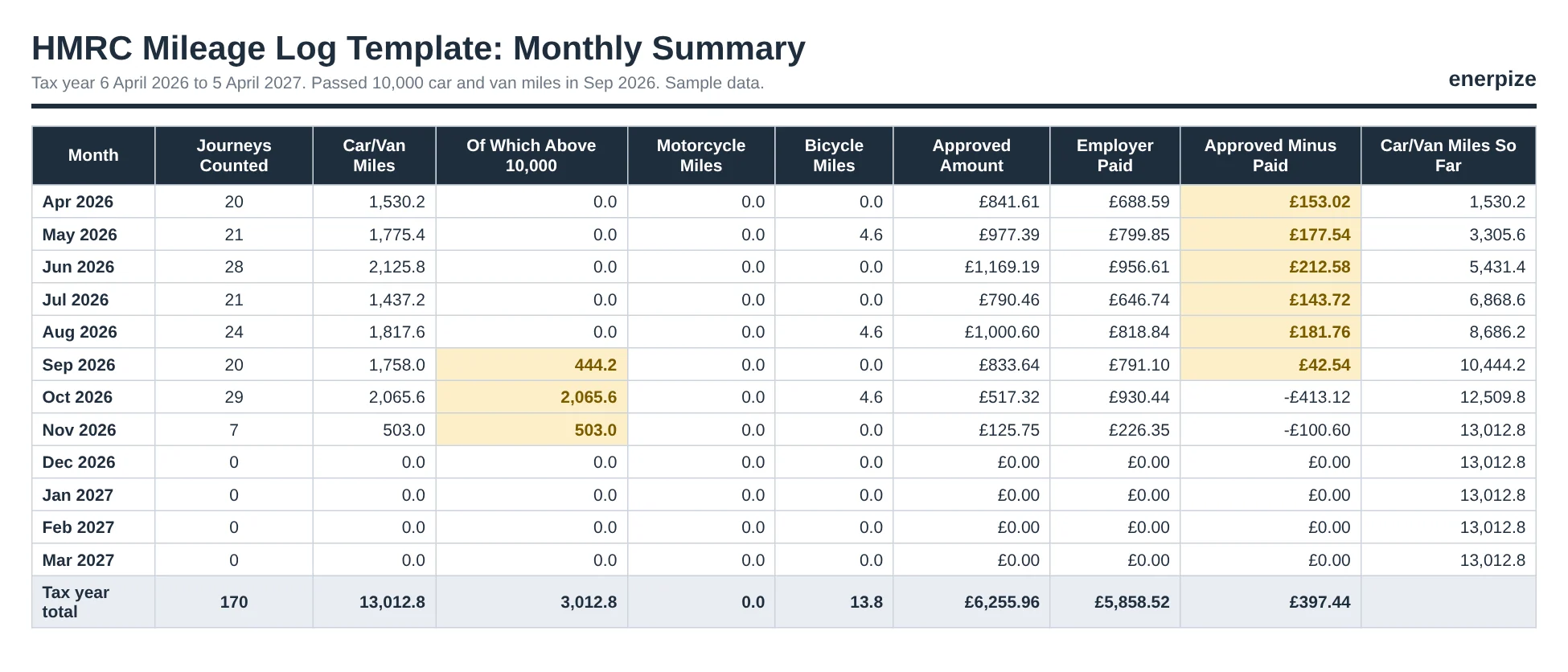
The Monthly Summary runs on the tax year, not the calendar, so April starts on the 6th and March ends on 5 April. It shows miles, approved amounts and what your employer paid, month by month, and names the month you passed 10,000. In the sample, that's September 2026.
P87 Boxes, Already Added Up
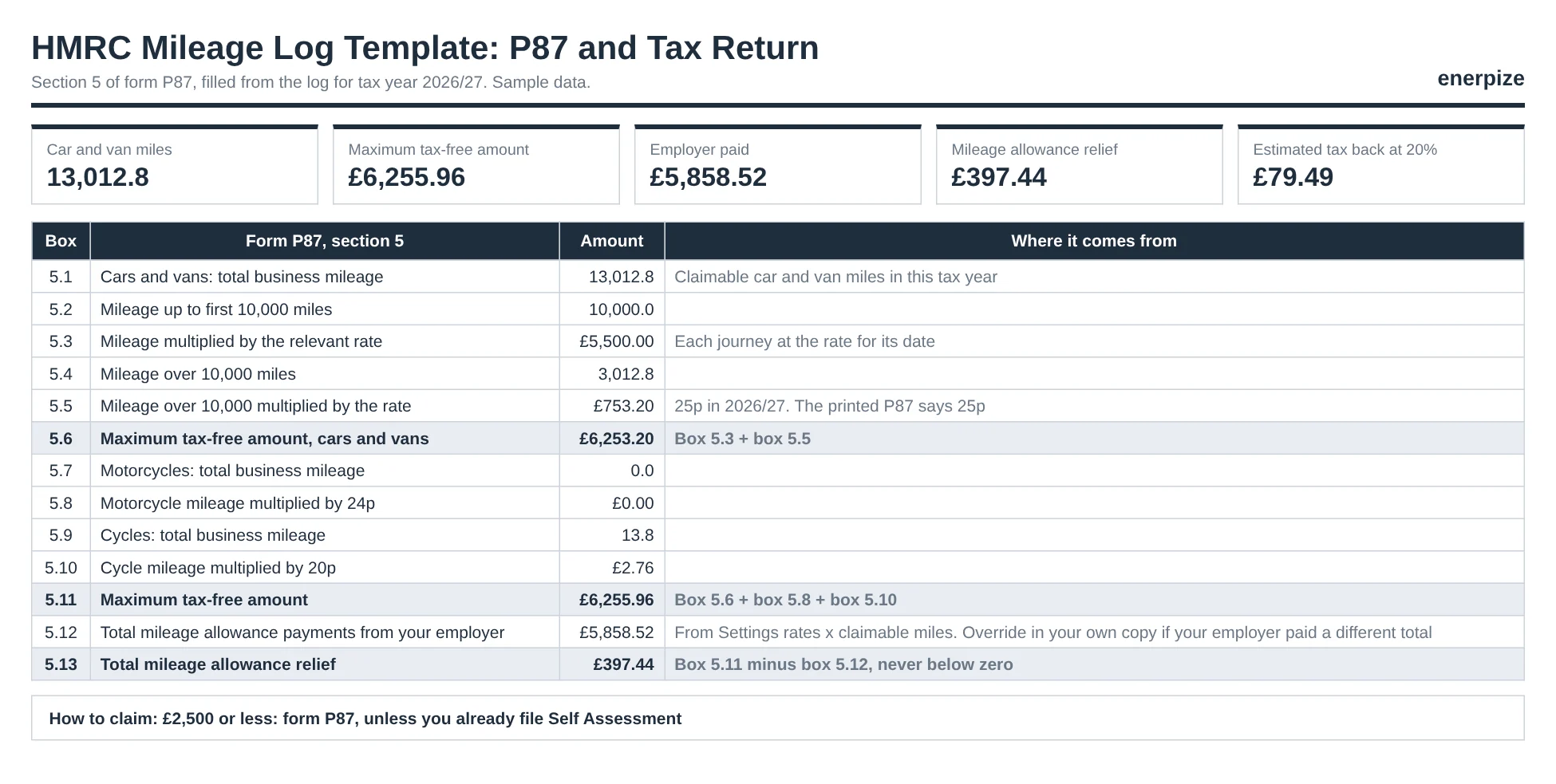
The P87 and Tax Return sheet mirrors section 5 of form P87 (version HMRC 06/26), box by box from 5.1 to 5.13. It also estimates your tax back at your rate and tells you which route to use. Sole traders get a separate Self Assessment total, and employers see any taxable excess.
A Claim Form Your Manager Can Sign
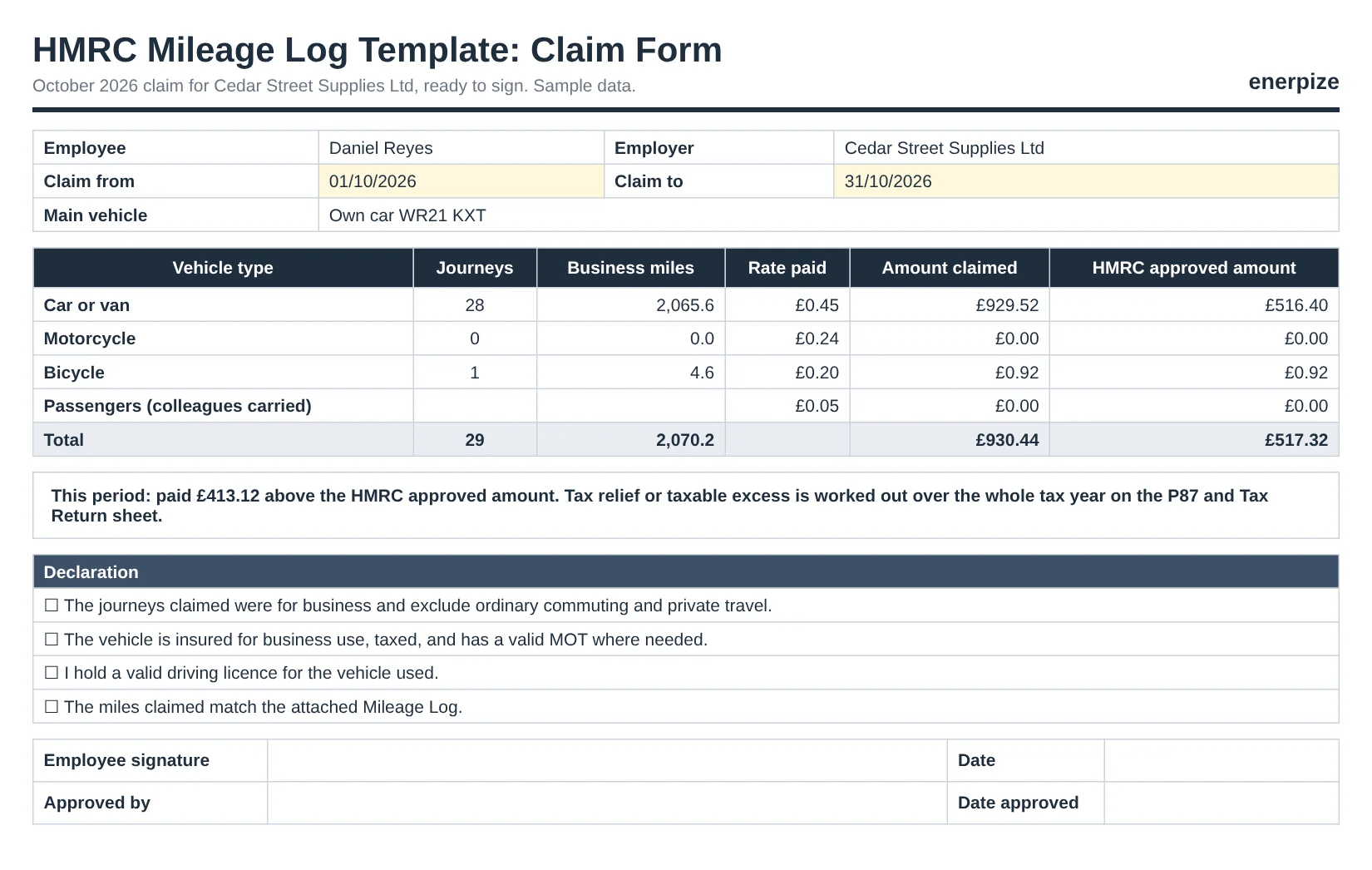
Pick any period and the Claim Form totals journeys, miles, the rate your employer pays and the HMRC approved amount, by vehicle type. A four-line declaration and two signature lines finish it. Print it, sign it, attach the log rows.
Rates You Can Update Yourself
HMRC changes rates by announcement, not on a schedule. When it does, you add one row on the Rates sheet and every journey after that date reprices itself. The expected 35p rate above 10,000 miles from 6 April 2027 is already there, marked Expected.
HMRC Mileage Log Requirements vs Common Myths
Most of what people "know" about mileage records came from a colleague, not from HMRC.
| What people believe | What actually applies |
|---|---|
| HMRC has an official mileage log form | It doesn't. Any format works if it holds the details HMRC asks for |
| A rough monthly total is enough | HMRC asks for the reason and start and end postcodes of every journey on a P87 claim |
| The 10,000 miles reset for each car | They count every car and van business mile you drive in the tax year |
| Driving to the office counts if you take calls | Ordinary commuting never counts, whatever you do on the way |
| Company car drivers claim 55p | They use advisory fuel rates, which cover fuel only |
| Sole traders can claim 20p for a bike | The simplified flat rate covers cars, goods vehicles and motorcycles only |
Check Column Codes and What to Do
Blue means counted. Amber means counted, but look again. Red means fix it, or accept it won't count.
| Code | What triggered it | What to do |
|---|---|---|
| OK | Counted, with date, postcodes and reason present | Nothing |
| OK: split at 10,000 | This trip crosses the threshold | Nothing. The miles are already split |
| Round figure: check | 50 miles or more, ending in 0 | Confirm against a route planner or the odometer |
| Add end postcode | The postcode is missing | Add it. The trip still counts in the totals |
| Commute: not claimable | Journey type is Ordinary commute | Leave it. It never counts |
| Company vehicle: use advisory rates | The vehicle is company owned | Claim fuel at advisory fuel rates instead |
| Sole traders: no bicycle rate | Bicycle on a sole trader log | Claim actual costs instead |
| Date is in the future | A typo in the date | Correct the date |
Example: Cedar Street Supplies Mileage Log (Filled Sample)
Daniel Reyes sells trade supplies for Cedar Street Supplies Ltd, a fictional Bristol business. He drives his own petrol car, WR21 KXT, to customers across the South West, and his employer pays him 45p a mile all year. Open the filled sample in Google Sheets and follow along.
How to Read the Sample
- 178 rows, 170 counted. Six March trips belong to 2025/26. A commute on 8 May and a pool van trip on 3 June stay in the log but count for nothing.
- 13,012.8 car miles in 2026/27 so far: 10,000 at 55p (£5,500.00) and 3,012.8 at 25p (£753.20).
- 13.8 bicycle miles across three town centre visits, worth £2.76 at 20p.
- Maximum tax-free amount £6,255.96 against £5,858.52 paid by the employer.
- Relief £397.44 in box 5.13, which is roughly £79.49 back for a basic rate taxpayer.
- Two passenger trips with a colleague, paid at 5p a mile: £7.45 in total.
Here's the twist. In October alone, Cedar Street paid £930.44 against an approved amount of £517.32, because 45p beats the 25p rate above 10,000 miles. Is that £413.12 taxable? No. HMRC compares the whole tax year, and over the year Daniel is still £397.44 under the approved amount.
Mileage Formulas Explained
Five formulas do all the work. Here they are in plain English, each with a real number from the sample.
Miles at the higher rate
First-rate miles = MAX(0, MIN(claimable miles, 10,000 − car miles before this trip))
On 23 September: 10,000 − 9,926.0 = 74.0 miles at 55p. The other 0.4 miles go to 25p.
Approved amount for a journey
Approved = first-rate miles × rate for the date + miles above 10,000 × lower rate
74.0 × £0.55 + 0.4 × £0.25 = £40.70 + £0.10 = £40.80.
Passenger payment
Tax-free passenger maximum = miles × passengers × £0.05
18 June: 88.0 × 1 × £0.05 = £4.40.
Mileage allowance relief (box 5.13)
Relief = MAX(0, maximum tax-free amount − employer payments)
£6,255.96 − £5,858.52 = £397.44.
Tax back
Tax back = relief × your Income Tax rate
£397.44 × 20% = £79.49. Relief reduces taxable income, so the cash you see is the relief times your rate, not the relief itself.
How to Use the HMRC Mileage Log Template
Ten minutes to set up, about twenty seconds a journey after that.
1- Fill In Settings Once
Enter your name, choose Employee, Company director, Sole trader or Employer reimbursing staff, then the tax year start and your Income Tax rate. Add what your employer pays per mile for each vehicle type, and list up to 10 vehicles with who owns each.
⚡ Tip: Sole traders, leave the employer rates blank. Nobody reimburses you, so the sheet skips that comparison.
2- Log Each Journey on the Day
Date, vehicle, both postcodes, the place, the reason and the journey type. Memory fades fast, and a log written in March about last August reads exactly like that.
⚡ Tip: Save your regular routes. Copy a past row and change the date, so the same trip always shows the same miles.
3- Enter Miles or Odometer Readings
Type the miles, or the start and end odometer readings and let the sheet subtract. Add colleagues in Passengers if they travelled on the same work trip.
⚡ Tip: Check one long trip a month against a route planner. It keeps the whole log believable.
4- Clear the Check Column
Fix every red and amber flag before month end. A missing postcode takes seconds to add today and an afternoon to rebuild next year.
⚡ Tip: Filter the Check column to anything that isn't OK. On a clean log, that list is empty.
5- Print the Monthly Claim
On the Claim Form, set the period dates. The totals by vehicle type fill in, ready to sign and send to payroll with the log rows for the same dates.
⚡ Tip: Use the same period as your payroll month, so payments match claims line by line.
6- Copy the P87 Boxes at Year End
After 5 April, open P87 and Tax Return and copy boxes 5.1 to 5.13. If box 5.12 doesn't match your employer's records, type their figure in your own copy. That's your HMRC mileage claim, added up.
⚡ Tip: Claims over £2,500, or anyone already filing Self Assessment, use the tax return route instead.
Common Mileage Log Mistakes
✕ Logging your commute
Why it matters: Home to your permanent workplace is ordinary commuting and never qualifies, even with calls on the way.
Fix: Log it as Ordinary commute, or leave it out.
✕ Using 55p for March 2026 trips
Why it matters: The new rate starts on 6 April 2026. Earlier trips belong to 2025/26 at 45p.
Fix: Let the date pick the rate.
✕ Resetting 10,000 for each car
Why it matters: The threshold counts every car and van business mile in the tax year.
Fix: Log all vehicles in one file.
✕ Round numbers everywhere
Why it matters: A month of 50s and 100s looks estimated, and estimates are what HMRC challenges.
Fix: Use odometer readings or a route planner.
✕ Claiming 55p in a company car
Why it matters: Approved mileage rates are for vehicles you own. Company cars use advisory fuel rates.
Fix: Mark the vehicle Company in Settings.
✕ Forgetting what your employer paid
Why it matters: Relief is the approved amount minus what you received, so skipping box 5.12 overstates the claim.
Fix: Enter your employer's rate in Settings.
Why a Mileage Log Matters More Than Ever
Since 14 October 2024, HMRC has refused to progress P87 claims without evidence. For an HMRC mileage claim, that means a log with the reason for every journey and the postcodes for the start and finishing points. No log, no relief.
The Rate Gap Is Bigger Now
At 55p, the gap between what many employers pay and what HMRC approves widened by 10p a mile overnight. An employee paid 45p for 10,000 miles now has £1,000 of relief to claim. At the 20% basic rate, that's £200 back.
Employers Carry the Other Side
Pay more than the approved amount and the excess becomes taxable for the employee. Pay less and you're handing your staff a P87 job. A shared log means both sides argue from the same numbers.
Self-Employed Claims Live or Die on Records
A sole trader claiming the flat rate has nothing to show HMRC except the log. With the simplified rate at 55p for the first 10,000 miles, 8,000 business miles is a £4,400 expense. That's worth a few seconds per trip.
Mileage Spreadsheet vs Software
A free HMRC mileage log template covers one driver well. Pay five drivers every month and the question shifts from "what are the HMRC mileage rates?" to "who keyed all this into the books?"
| Need | Mileage log spreadsheet | Software such as Enerpize |
|---|---|---|
| Cost | Free | Subscription after the free start |
| 10,000 mile split by date | Built into this workbook | You set the rate per mileage expense |
| Check for missing details | Check column | Required fields on the form |
| Approval and payment | Print and sign | Recorded as an expense in your accounts |
| Bulk entry | Copy and paste rows | Import mileage from Excel or CSV |
| Best for | One driver, one tax return | A business paying several drivers |
How Enerpize Handles Mileage Expenses
What happens to a mileage claim after your manager signs it? In most small businesses, someone retypes it into the accounts. Enerpize skips the retyping.
Turn On Mileage Tracking
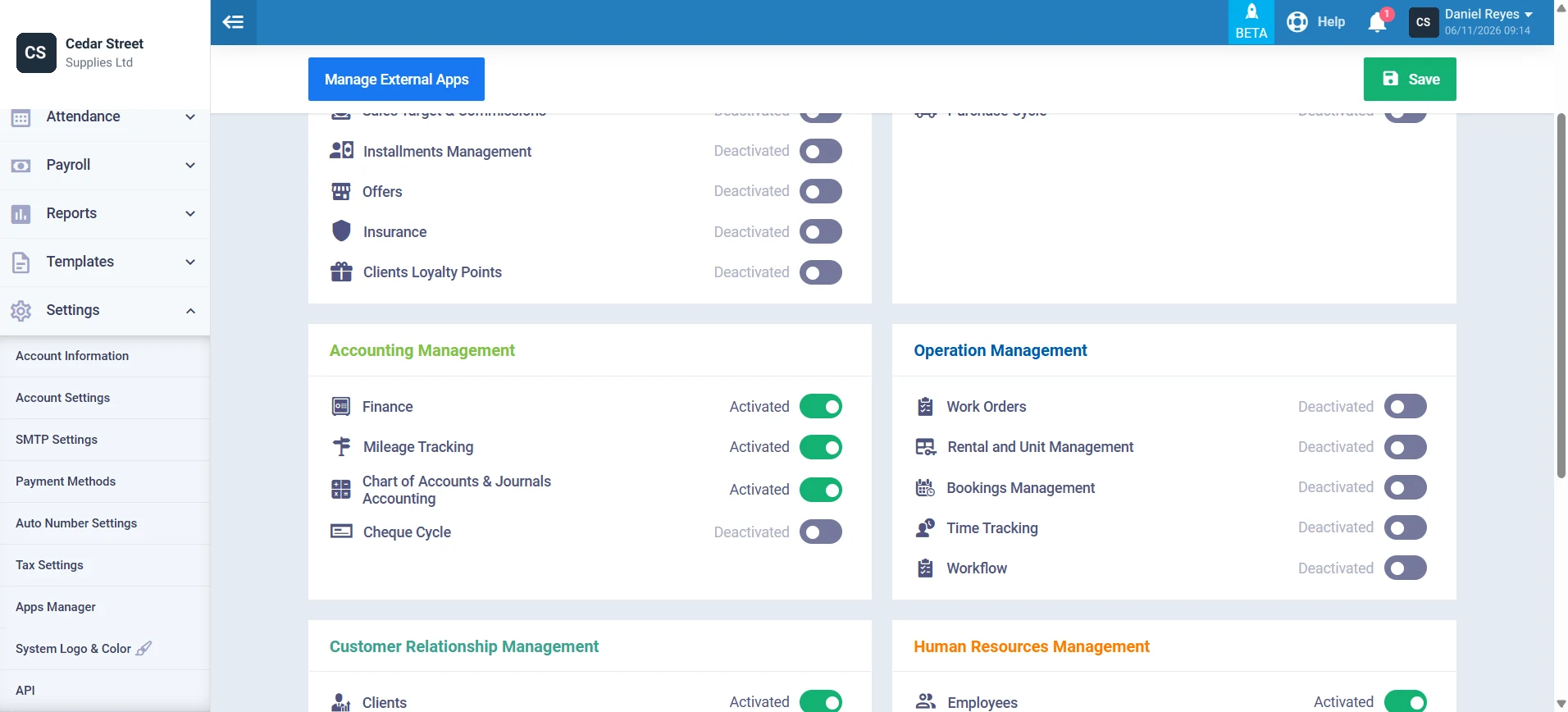
Mileage Tracking is an app you switch on under Settings, then Apps Manager, in the Accounting Management group. Once it's on, mileage joins your expenses as its own type. The mileage tracking guide walks through it.
Add a Mileage Expense
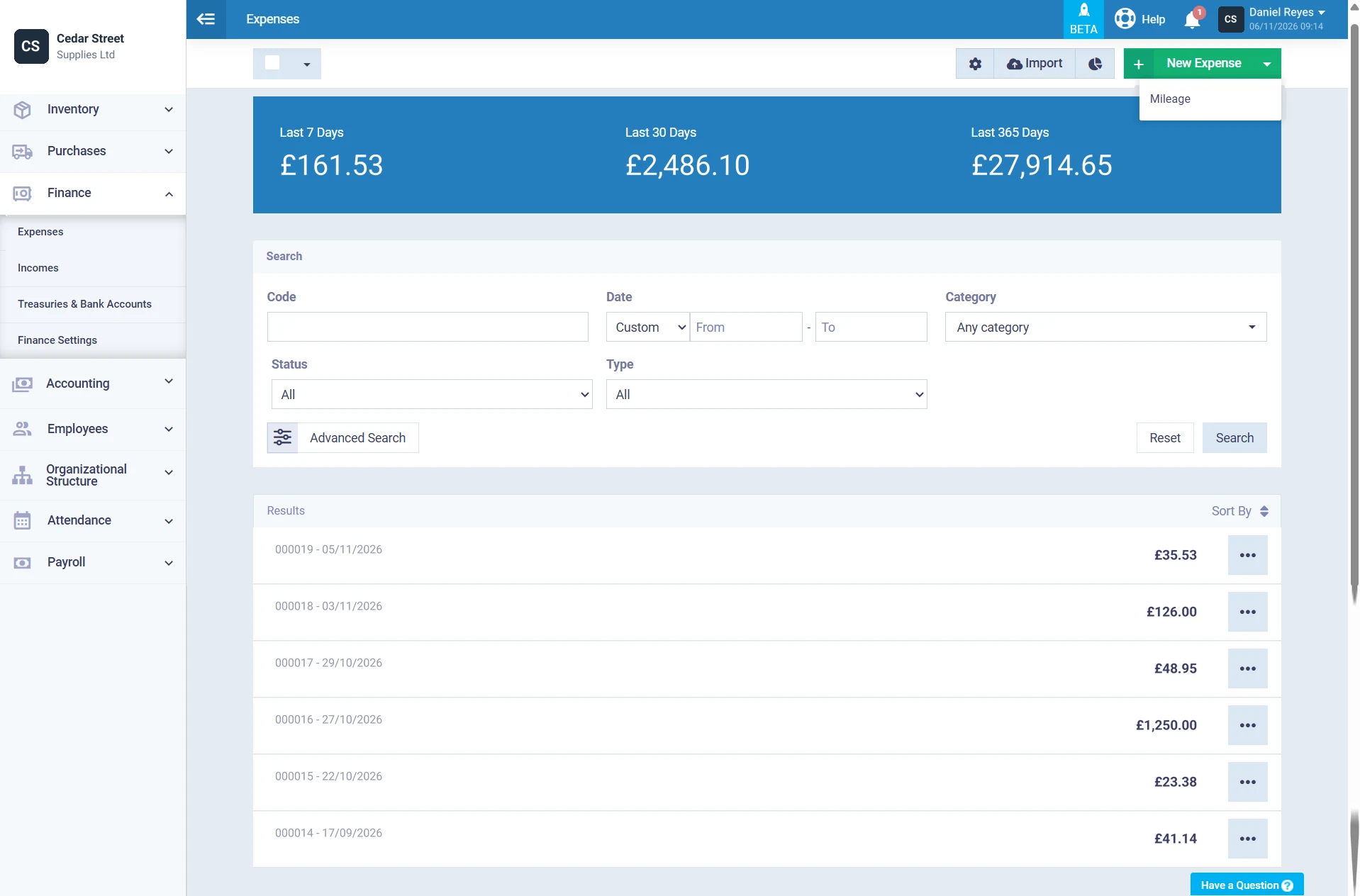
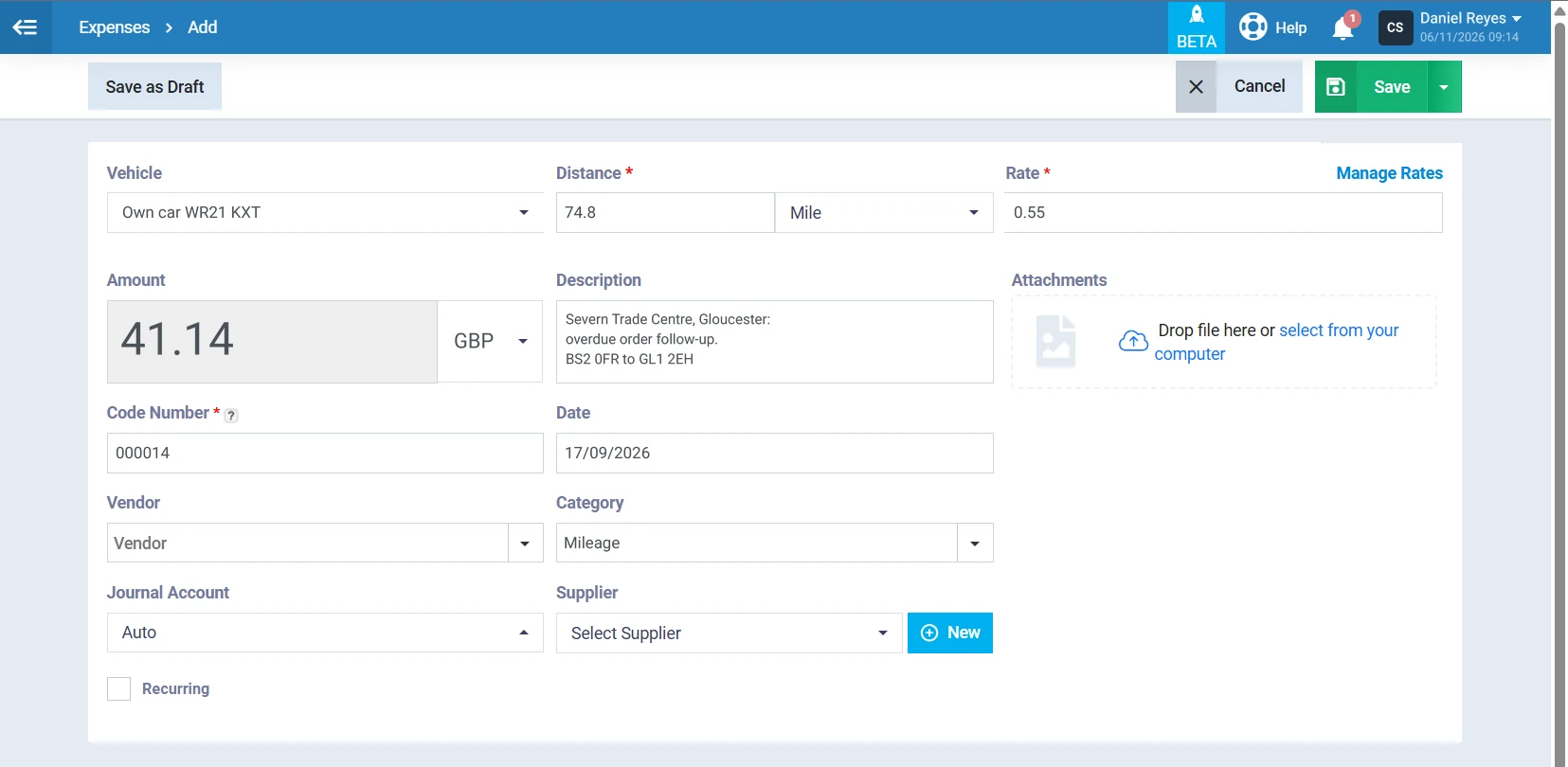
From Finance, then Expenses, choose New Expense and pick Mileage from the dropdown. The list keeps every expense code, date and amount in one place, with totals for the last 7, 30 and 365 days.
Distance Times Rate, Done for You
Pick the vehicle, enter the distance in miles or kilometers and the rate. Enerpize multiplies them for the amount. 74.8 miles at 0.55 becomes £41.14. Manage Rates keeps your rates in one list, so 55p is a pick, not a retype. Add the route in the description and attach a map or receipt.
A Record With a Journal Behind It
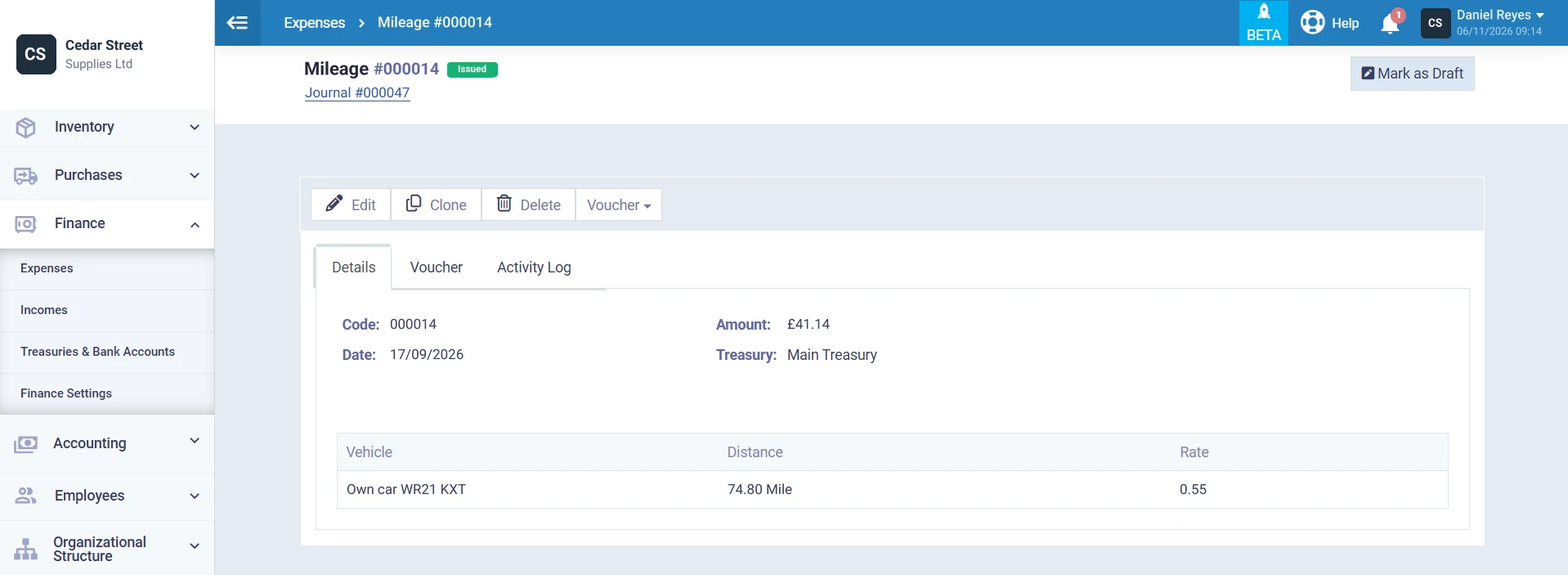
Every saved mileage expense gets its own code, with the vehicle, distance and rate on one screen and a link to its journal entry. Have a month of trips in a spreadsheet already? Import them from Excel or CSV, mapping the distance, rate and vehicle columns.
Mileage is one part of tracking business expenses properly, alongside receipts, suppliers and reimbursements.
Employees Claiming Mileage Allowance Relief
Your employer pays 45p. HMRC approves 55p. The 10p in between is yours to claim.
The HMRC mileage rates, officially the approved mileage rates, for 2026/27 are 55p a mile for the first 10,000 business miles in a car or van, then 25p, plus 24p for motorcycles and 20p for bicycles. If you receive less, you claim mileage allowance relief on the difference. Claims up to £2,500 can go through PAYE on form P87, and since October 2024 HMRC asks for a mileage log with the reason and postcodes for every journey.
What to add:
- Claimant type Employee in Settings
- Your employer's rate per mile for each vehicle type
- Start and end postcodes on every row
- Passenger miles only if you were paid for carrying colleagues
⚑ Practical note: P87 covers the current tax year and up to the last 4 completed years, so an old log can still be worth money.
Employers Paying Approved Mileage Allowance Payments
You choose the rate. HMRC chooses what's tax-free.
Approved mileage allowance payments up to the approved amount are free of Income Tax for your employee. Pay more and the excess is taxable. For National Insurance, the government set the disregard at a flat 55p per mile from 6 April 2026, so above 10,000 miles a 45p payment can be NIC-free while 20p of it is still taxable. Passenger payments up to 5p per colleague per mile are tax-free too.
What to add:
- Claimant type Employer reimbursing staff
- One log per employee, since the threshold is per person
- Your actual rates in Settings, so the taxable excess shows
- A signed claim form each month
⚑ Practical note: Check the year-end figure, not the monthly one. A month above the approved amount may vanish once the whole tax year is compared.
Sole Traders Using the Self Employed Mileage Allowance
No employer, no P87. The log goes straight into your tax return.
Under HMRC's simplified expenses rules, sole traders and partnerships can claim 55p a mile for the first 10,000 business miles in a car or goods vehicle in 2026/27, then 25p, and 24p for motorcycles. Bicycles aren't covered. Once you use the flat rate for a vehicle, you keep using it for as long as you have that vehicle, and you can't use it at all if you've claimed capital allowances on it.
What to add:
- Claimant type Sole trader
- Leave employer rates blank
- Every vehicle you use for the business
- The Self Assessment total from the P87 and Tax Return sheet
⚑ Practical note: Billing clients for travel? Add it as a line on your sole trader invoice and keep the log row as backup.
Company Directors and Company Cars
Who owns the car? That one question decides the whole claim.
A director driving their own car on company business follows the same approved mileage rates as any employee, and the company can pay up to the approved amount tax-free. Many directors already file Self Assessment, so the relief goes on the return, not a P87. In a company car, approved rates don't apply. From 1 September 2026 the advisory fuel rates run from 14p to 27p for petrol, 15p to 22p for diesel, and 7p or 15p for electric, depending on where you charge.
What to add:
- Claimant type Company director
- Company cars marked Company in Settings
- Advisory rates claimed separately, as fuel only
- Your Self Assessment figures, not P87
⚑ Practical note: A higher rate above 10,000 miles of 35p is expected from 6 April 2027. The Rates sheet already has the row, marked Expected.
Who Can Use the HMRC Mileage Log Template?
Anyone who drives a vehicle they own for work. If you came looking for a mileage log template UK rules actually fit, these are the people we had in mind.
Field Sales Reps
Daily client visits fill a business mileage log fast. Our sample rep passed 10,000 miles by late September.
Care Workers and Home Visit Staff
Many short trips between homes, each one needing its own postcodes. The log keeps them straight.
Tradespeople and Contractors
Site to merchant to site again. Temporary workplace trips count, and the Check column knows the difference.
Payroll and HR Teams
One claim form per person per month, with the HMRC approved amount next to what you pay. Mileage often sits beside other pay items on the UK payslip.
Accountants and Bookkeepers
Send it to clients in October, collect a clean log in April, copy the boxes.
Mileage Glossary
| Term | What it means |
|---|---|
| AMAP | Approved mileage allowance payments: the tax-free amount an employer can pay per business mile |
| MAR | Mileage allowance relief: tax relief when your employer pays less than the approved amount |
| Form P87 | HMRC's form for claiming employment expenses up to £2,500 without Self Assessment |
| Advisory fuel rates | Pence per mile rates for fuel in company cars, reviewed four times a year |
| Ordinary commuting | Travel between home and your permanent workplace, never claimable |
| Temporary workplace | A place you go for a limited task or period, which you can claim travel to |
| Simplified expenses | Flat rates sole traders can use instead of actual vehicle costs |
| Passenger payment | Up to 5p per mile for each colleague you carry on a work trip |
| NIC disregard | The mileage payment that's free of National Insurance, a flat 55p from 6 April 2026 |
Key Takeaways
- An HMRC mileage log template records the date, start and end postcodes, reason and miles of every business journey.
- Since 14 October 2024, HMRC needs that log before it progresses a P87 mileage claim.
- For 2026/27, cars and vans get 55p a mile for the first 10,000 business miles and 25p after that.
- Trips before 6 April 2026 stay at 45p. In the sample, six March trips are worth £172.17.
- One journey can cross 10,000 miles. On 23 September, 74.0 miles went at 55p and 0.4 miles at 25p.
- Relief is approved amount minus employer payments: £6,255.96 minus £5,858.52 gives £397.44.
- At a 20% tax rate, £397.44 of relief is about £79.49 back in your pocket.
- Sole traders claim the same 55p flat rate on Self Assessment, but never for a bicycle.
Frequently Asked Questions
What does HMRC require in a mileage log?
For a P87 claim, HMRC asks for a mileage log showing the reason for every journey and the postcodes of the start and finishing points. Add the date and the miles, and say which vehicle you used. HMRC doesn't prescribe a format, so a spreadsheet works.
What is the HMRC mileage rate for 2026/27?
For cars and vans, 55p per mile for the first 10,000 business miles in the tax year and 25p after that. Motorcycles get 24p, bicycles 20p, and passengers 5p per colleague per mile. The 55p rate was backdated to 6 April 2026.
Can I claim mileage for commuting?
No. Travel between home and your permanent workplace is ordinary commuting, and it never qualifies. Journeys to a temporary workplace or between business sites do count. The template keeps commutes in the log but leaves them out of every total.
What if my employer pays less than the HMRC rate?
You can claim mileage allowance relief on the difference. Work out the approved amount for the year, subtract what your employer paid, and claim the rest on form P87 or your tax return. Relief reduces taxable income, so you get back the relief times your tax rate.
How do I claim mileage allowance relief?
If your claim is £2,500 or less and you don't file Self Assessment, use form P87 with your mileage log attached. Above £2,500, or if you already file a return, claim through Self Assessment. The P87 and Tax Return sheet tells you which route applies.
Should I claim mileage or actual car costs as self-employed?
The flat rate is simpler and only needs a mileage log. Actual costs can be higher for an expensive car but need every receipt plus capital allowances. Once you choose the flat rate for a vehicle, you must stay with it for as long as you keep that vehicle.
Does HMRC accept a spreadsheet mileage log?
Yes. HMRC doesn't publish an official mileage log form, so a spreadsheet, an app or a paper book all work if they hold the details. Keep each entry close to the day you drove, because records written months later are harder to defend.
How far back can I claim mileage?
Form P87 covers the current tax year and up to the last 4 completed tax years. You'll need records for each year, so keep your mileage logs. Remember that trips before 6 April 2026 use 45p, not 55p.
About the Author
Omar El Bahr is a Senior Digital Growth Specialist at Enerpize, where he leads SEO, content strategy, and organic growth across international markets. He is a Forbes Communications Council contributor and has written for Entrepreneur on business communication and digital strategy.
Disclaimer
This template and the information on this page are for general guidance only and are not tax advice. Mileage rates and HMRC rules change, so check the current rates on GOV.UK and confirm your position with HMRC or a qualified adviser before you claim. This template is not an HMRC form and does not submit anything to HMRC.