


Posted on 11 August 2026
Reimbursement Form Template: Free Download Excel, Word, PDF, Google Sheets & Docs
- Available in Word, Excel, PDF, Google Docs, and Google Sheets, free to download with no sign up required
- Covers employee details, expense categories, mileage, per diem, and receipts in one structured expense reimbursement form
- Built with country specific compliance notes for the US accountable plan, the UK mileage allowance, the Australian cents per kilometre method, and the Kenyan per diem threshold
- Calculates the subtotal, advance deduction, and total reimbursement due automatically in the Excel and Google Sheets versions
A reimbursement form is a document an employee fills out to get repaid for a business expense they paid for with their own money, giving the employee and the finance team a clear record of what was spent, why it was spent, and how much the business now owes back.


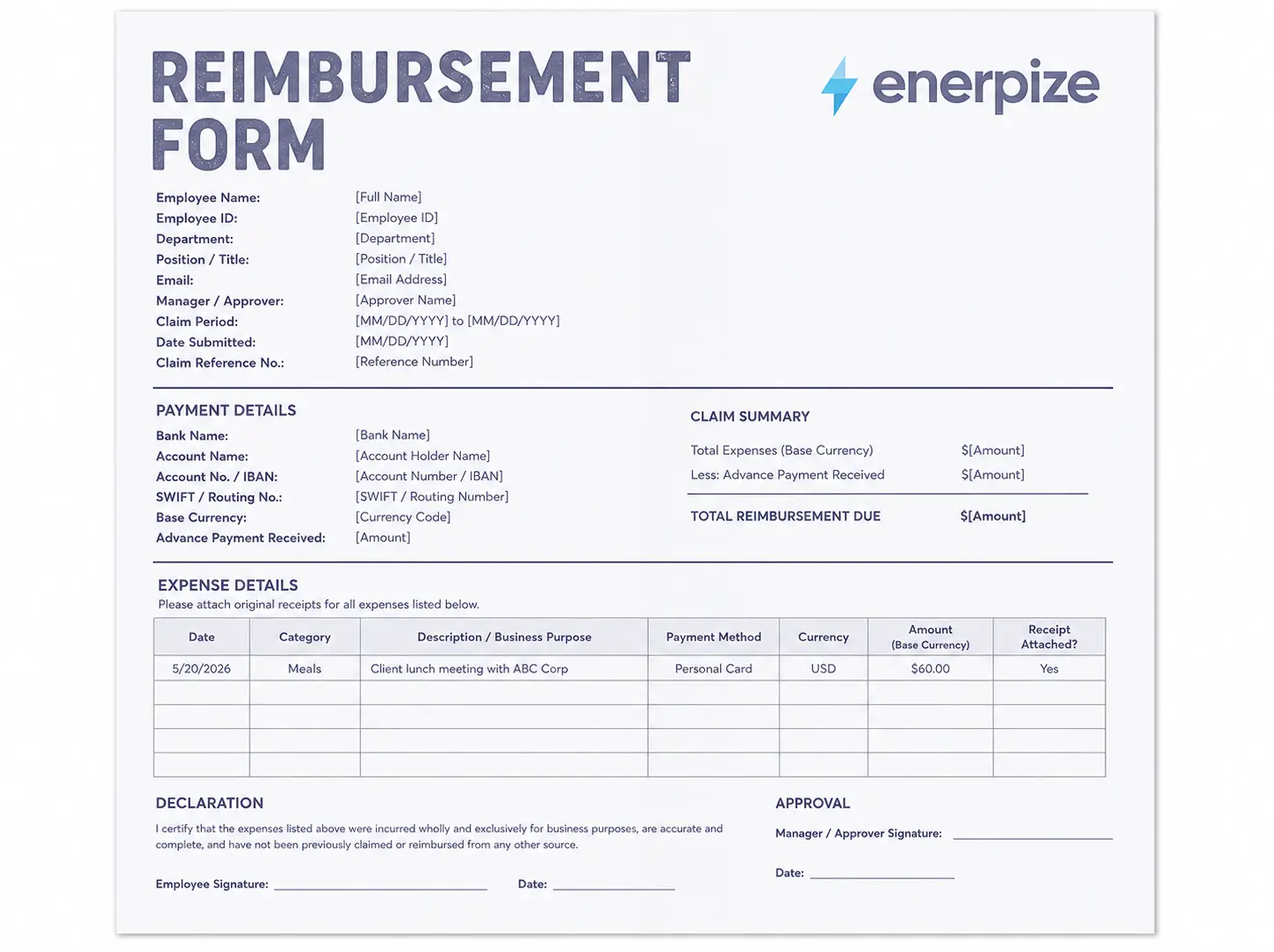
What Is a Reimbursement Form?
A reimbursement form is the document that turns an employee's own spending into money the business owes them. Someone buys something for work, a client dinner, a box of printer cartridges, a tank of fuel for a delivery run, pays for it out of pocket, then fills out the form to get that money back. The form does three jobs at once. It records what was bought. It proves the purchase was for business use, not personal use. And it gives whoever approves it something concrete to check before the payment goes out.
People use reimbursement form and expense reimbursement form to mean the same thing, and that's accurate, they are the same document. Some companies use employee reimbursement form specifically when the claim comes from staff rather than a contractor or a board member, and a few label it a reimbursement request form instead. None of that changes what's inside it. The fields stay the same no matter what the header says.
Want reimbursements that route straight into your books? Start free with Enerpize
Reimbursement Form vs Expense Report vs Invoice
People mix these three up all the time, so here is the difference without the jargon.
| Document | Purpose | Requires Signature | Who Initiates It |
|---|---|---|---|
| Reimbursement Form | Requests repayment for money an employee already spent | Yes, employee and approver | The employee |
| Expense Report | Tracks every cost over a period, some reimbursable, some not | Sometimes | The employee or finance team |
| Invoice | Requests payment from a customer for goods or services rendered | No | The business selling something |
| Petty Cash Voucher | Records a small cash payout already made from a fixed float | Yes | Whoever draws the cash |
A reimbursement form stays narrow on purpose. One employee, one claim, one approval chain. An expense report is the wider net that catches everything a department spent over a month, reimbursable or not. If you need to track spend across a whole team over time rather than one person's claim, our expense report template does that job better than a reimbursement form ever will. And if a small, fixed cash float is what's being tracked instead of a personal expense, that's what our petty cash template is built for.
What to Include in a Reimbursement Form Template
Most free reimbursement form templates give you a name field, an amount field, and a signature line. That covers a one off claim. It falls apart the moment a business pays claims every week, works across more than one currency, or needs a clean trail for a tax authority. Here is what a complete expense reimbursement form actually needs, whether you run it as a single employee reimbursement form or a wider employee expense reimbursement form template covering several departments.
| Field | Why It Matters |
|---|---|
| Employee Name / ID | Identifies who is owed the money |
| Department / Manager | Routes the claim to the right approver and cost center |
| Reimbursement Period | Groups several expenses into one payment run |
| Date of Expense | Anchors the claim to the correct tax period and mileage rate |
| Expense Category | Travel, meals, mileage, supplies, training, drives the accounting code |
| Description / Business Purpose | Proves the expense was for work, which is what keeps it tax free |
| Payment Method | Cash, personal card, corporate card, flags anything already covered |
| Amount Claimed | The figure being requested, per line and as a subtotal |
| Less: Advance Payment | Deducts any travel advance already paid out |
| Total Reimbursement Due | Subtotal minus advance, the actual transfer amount |
| Receipt Attached | Required proof, most jurisdictions expect this above a low threshold |
| Employee Signature | Certifies the claim is accurate |
| Approver Signature | Authorizes the payment and creates the audit trail |
| Currency | Needed the moment your team crosses a border |
What Enerpize's Reimbursement Form Template Includes
We built this reimbursement form after pulling apart four real forms already in use: a university travel settlement sheet, a simple employee reimbursement spreadsheet, a professional association's travel reimbursement form, and a medical insurance claim form. None of the four solved the same three or four problems. So we built one that does.
No Receipt Tracking Per Line
Every one of those forms either assumes receipts are attached somewhere or mentions it once in an instruction line at the top. Ours has a Receipt Attached column on every single row, so a reviewer can see exactly which line is missing proof before it holds up the whole claim.
No Claim Reference Number
Not one of the four forms could be tracked through a workflow. Ours has a Claim Reference No. field and a Payment Status field at the top, so a claim is always somewhere specific: submitted, approved, paid, or rejected.
No Live Currency Conversion
Two of the four mention currency. None of them convert it. Our Excel version multiplies the original amount by the exchange rate automatically, so the base currency total is never a manual calculation someone gets wrong on a Friday afternoon.
No Automated Policy Check
Every one of those forms states its spending limits somewhere else on the page, as a paragraph of prose. Ours checks the entered amount against an editable Policy Limits table and flags anything over the line, right there on the row, before it ever reaches an approver.
One Signature Line Instead of a Proper Sign Off Chain
One of the forms we reviewed had a single signature line for an accountable advance worth thousands of dollars. Ours has three: the employee who's claiming, the manager who approves, and finance who authorizes payment, which is closer to how a real approval chain actually runs.
That's the difference between a reimbursement form you fill in and one that catches its own mistakes before they become your problem.
How to Use the Reimbursement Form Template
Step 1: Fill In Your Claim and Employee Details
Add your name, employee ID, department, and the manager who needs to approve the claim. Give the form a claim reference number so it can be tracked from submission to payment.
Step 2: List One Expense Per Line
Enter one receipt per row: the date, the category, a short business purpose, and the amount. Do not combine two receipts into a single line, it breaks the audit trail the moment anyone asks a question about it.
Step 3: Convert Any Foreign Currency
If an expense was paid in a currency other than your base currency, record the exchange rate you used. In the Excel version, the base currency amount calculates on its own.
Step 4: Mark Whether a Receipt Is Attached
Tick yes or no for every single line. Most tax authorities will not treat a payment as a tax free reimbursement without one, so this column matters more than it looks like it does.
Step 5: Check the Policy Limit Flag
Compare each line against your company's spending limits before you submit. Anything over the limit gets flagged automatically in the Excel version, so fix it before it slows down approval.
Step 6: Sign and Route for Approval
Sign as the claimant, then send it to your manager and finance for their sign off. If most of what you're claiming is travel related, the same layout doubles as a travel reimbursement form without needing a separate document, and if the trip also needs a timesheet, our timesheet template covers that side of the paperwork.
Step 7: Log the Payment
Once it's paid, record the payment method, date, and reference number in the office use section. That's what closes the loop for whoever reconciles the books at month end.
That's seven manual steps every time someone submits a claim. Enerpize scans the receipt, converts the currency, checks the policy limit, and sends it for approval automatically. Start free with Enerpize
Reimbursement Form Rules in the United States
Under IRS rules, how a reimbursement gets taxed comes down to one thing: whether it runs through an accountable plan. Require an employee to substantiate the expense with a receipt, return any leftover advance, and submit the claim within a reasonable time, and the reimbursement stays off their taxable wages. Skip any one of those three conditions and the payment gets added to their W-2 like ordinary pay. The rules are laid out in full in IRS Publication 463.
Mileage reimbursement moved twice in 2026, which is unusual. The standard business mileage rate opened the year at 72.5 cents per mile, then the IRS issued a mid year correction pushing it to 76 cents per mile from July 1 through December 31, 2026, in response to fuel prices. A business reimbursing mileage for the full year needs both rates on the same reimbursement form, not one.
What to Add to Your Reimbursement Form (United States)
- An accountable plan certification line, a signature confirming the expense was business related and backed by a receipt, since that's what keeps the payment off the W-2
- Split mileage columns for travel before and after July 1, if the claim spans the rate change
- A written submission window, most businesses use 60 days as the safe harbor for what counts as "reasonable time" under an accountable plan
- If any part of the claim relates to a contractor rather than an employee, pair the reimbursement with our W9 form template for the tax paperwork
Reimbursement Form Rules in the United Kingdom
HMRC's Approved Mileage Allowance Payments, usually shortened to AMAP, set the tax free rate a UK employer can pay staff for using a personal vehicle on business travel. Pay at or below the approved rate and there's nothing to report or tax. Pay above it and the difference becomes a taxable benefit that goes through payroll or a P11D. For the 2026/27 tax year, HMRC raised the car and van rate from 45p to 55p per mile for the first 10,000 business miles, dropping to 25p per mile after that, the first change to this rate since 2011. Full detail sits on GOV.UK's mileage rate page.
What to Add to Your Reimbursement Form (United Kingdom)
- A mileage band field separating the first 10,000 miles from anything claimed after it, since the rate drops from 55p to 25p once an employee crosses that line
- A passenger payment line, employers can add 5p per mile for a colleague who is also travelling on business, and it's the add on most reimbursement forms forget
- A note excluding ordinary commuting, travel between home and a permanent workplace does not qualify, and it's the single most common finding in an HMRC compliance check
Reimbursement Form Rules in Australia
The ATO's cents per kilometre method lets an employee or sole trader claim a flat rate per work kilometre without keeping a logbook, capped at 5,000 kilometres per car each year. For the 2026 to 27 income year, starting 1 July 2026, that rate rose to 91 cents per kilometre, an indexed base of 89 cents plus a temporary 2 cent uplift the ATO attributes to a sharp, late in the year fuel price spike. That caps the maximum claim at $4,550 per car for the year. Full detail is on the ATO's cents per kilometre method page.
What to Add to Your Reimbursement Form (Australia)
- A running total field tracking kilometres per vehicle per financial year, since the cap resets on 1 July and applies per car, not per employee
- A simple evidence field, a diary, calendar, or appointment record showing how the kilometres were worked out, since a formal logbook is not required for this method
- A separate section for vans, utes, and motorbikes, since none of those use the cents per kilometre method and need to be reimbursed against actual receipts instead
Reimbursement Form Rules in Kenya
Kenya's Finance Act made a real change here. The tax free daily per diem for private sector employees on official duty away from their usual workplace jumped from KES 2,000 to KES 10,000 per day, and that threshold is still current through 2026. Anything paid above that daily amount counts as taxable employment income and needs to go through PAYE. KRA's own guidance on cash allowances confirms per diem is treated as a reimbursement of expenses up to that exempt limit, not as pay.
What to Add to Your Reimbursement Form (Kenya)
- A KES 10,000 per day threshold check on the per diem line, so payroll can route anything above it through PAYE instead of paying it out tax free by mistake
- An official duty location field, the exemption only applies when the employee is away from their usual workplace, and that needs to be explicit for a KRA audit
- If the reimbursed expense was itself a KRA registered supply, an eTIMS invoice reference, which is the same matching logic our Kenya invoice template already documents
Track mileage rates, per diem thresholds, and approvals automatically across every country you operate in. Start free with Enerpize
How Enerpize Handles Reimbursement Claims
A reimbursement form answers one question. How much does the business owe this employee. It does not answer what happens after that: which cost center absorbs it, whether it broke company policy, or how the payment reconciles against the bank statement once it's actually paid. That is where a static form stops and where an ERP takes over.
Expense Management
With Enerpize's expense management software, receipts get scanned instead of typed. The Quick Expense Scanner app lets an employee scan or attach a receipt from any device, online or offline, and the built in OCR pulls out the amount, date, vendor, and tax detail automatically. Claims then move through multi layer approval workflows with custom statuses and permissions, so employee, manager, and finance sign off is an actual tracked workflow instead of three blank signature lines. Treasuries and spend limits enforce the policy caps a paper form can only flag. Multi currency setups replace the manual exchange rate cell with automatic conversion and reporting in whatever currency you need. And audit trail reports check every transaction for fraud and exchange rate accuracy, which turns a printed declaration clause into something actually monitored.
Accounting
Once a claim is approved, it does not sit in a spreadsheet waiting to be re-entered somewhere else. Enerpize's accounting software posts it straight into the right account, with cost center assignment by department, employee, or product, and rolls it into profit and loss reporting without anyone touching a keyboard twice.
Chart of Accounts
Every approved reimbursement mirrors automatically into the general ledger the moment it posts, through Enerpize's chart of accounts. No manual journal entry, no risk of the claim and the ledger drifting apart. Categorized main and sub accounts carry the credit, debit, and balance entries on their own, closing the loop from the original claim to the financial statement.
Stop reconciling reimbursement claims by hand. Enerpize's Expenses module matches every claim to the right cost center, currency, and approval step on its own. Start free with Enerpize.
Stop reconciling reimbursement claims by hand. Enerpize's Expenses module matches every claim to the right cost center and payroll cycle. Start free with Enerpize
Key Takeaways
- A reimbursement form, whether you run it as a single employee reimbursement form or a wider employee expense reimbursement form, is not an expense report and not an invoice, it requests repayment for money already spent, nothing more
- The fields most free templates skip: a receipt tracking column, a claim reference number, live currency conversion, and an automated policy limit check
- In the US, a reimbursement stays tax free only under an accountable plan, and the mileage rate changed twice in 2026
- In the UK, the mileage allowance jumped from 45p to 55p per mile in April 2026, the first change since 2011
- In Australia, the cents per kilometre rate is 91 cents for the 2026 to 27 year, capped at 5,000 kilometres per car
- In Kenya, per diem stays tax free up to KES 10,000 per day, up from KES 2,000 under the Finance Act
- Three signatures, not one: employee, manager, and finance, is what makes a reimbursement form hold up to scrutiny later
FAQs
What is a reimbursement form?
A reimbursement form is a document an employee submits to request repayment for a business expense they paid for out of pocket. It records the amount, the date, the business purpose, and usually a receipt, then routes to a manager or finance for approval before the money is paid back.
What's the difference between a reimbursement form and an expense report?
A reimbursement form, sometimes called an employee reimbursement form, is one employee's claim for money already spent. An expense report is the wider record of everything a department or project spent over a period, some of which needs reimbursing and some of which does not. If you're tracking ongoing team spend rather than a single claim, use an expense report instead.
What is expense reimbursement?
Expense reimbursement is the process of a business paying an employee back for a cost they covered personally on the company's behalf. The reimbursement form is the document that starts that process and creates the record for it.
How long does reimbursement take?
It depends entirely on the company's internal approval chain. A claim with a clean reimbursement form, correct receipts, and no policy flags usually clears faster than one that needs to bounce back to the employee for missing information.
What is an accountable plan?
An accountable plan is the set of IRS conditions that keeps a US reimbursement tax free: the employee substantiates the expense with a receipt, returns any excess advance, and submits the claim within a reasonable time. Meet all three and the payment never touches the employee's taxable wages.
Do I need a receipt for every reimbursement claim?
Most tax authorities expect one above a fairly low threshold, and it's good practice to require one for every line regardless of amount. A reimbursement claim form without supporting receipts is much harder to defend if a tax authority or an internal audit ever asks about it.
Can I use a reimbursement form template in Excel?
Yes, and it's the most practical format for a business processing more than the occasional claim. Ours is available as an Excel file with live formulas, alongside Word, PDF, Google Docs, and Google Sheets versions. Whether you're looking for a reimbursement form template excel file, a reimbursement form pdf, or a reimbursement form template word file, all three sit on the same download page, so pick whichever your team already works in.
About the Author
Omar El Bahr is a Senior Digital Growth Specialist at Enerpize, where he leads SEO, content strategy, and organic growth across international markets. He is a Forbes Communications Council contributor and has written for Entrepreneur on business communication and digital strategy.
Disclaimer: This page is for general information only and is not tax, legal, or accounting advice. Rates and thresholds mentioned above change periodically. Confirm the current figure with the relevant tax authority before applying it to a real
Similar templates



Modules
- Billing & Invoicing
- Point of Sale (POS)
- Offers & Discounts
- Installments
- Targets & Commissions
- Insurance Management
- Accounting Software
- Chart of Accounts
- Expenses
- Assets Management
- Cost Centers
- Cheque Cycle
- Inventory Management
- Product Management
- Purchases & Suppliers
- Purchase Cycle
- Requisitions
- Stocktaking
- Employees Management
- Organizational Structure
- Attendance & Leaves
- Contracts
- Payroll
- Requests
- Manufacturing
- Work Orders
- Bookings Management
- Rental & Unit Management
- Time Tracking
- Clients Management
- Clients Follow-Up
- Memberships
- Points & Credits

Industries
- Law Firms
- Consulting Service
- Travel and Tourism
- Accounting Firms
- Outsourcing & Consulting
- International Trade
- Retail
- Optical Shop
- Maintenance
- Car Workshop
- Cleaning
- Plumbing
- Beauty Salon
- Laundry
- Gym
- School
- Paint Shop
- Perfume Store
- Online Store
- Stationeries
- Jewelry Store
- Translation Agency
- Printing & Advertising
- Website Hosting & Development
- Marketing Services
- Pediatric Clinic
- Pharmacy
- Hotel Management
- Repair Shop Management
Support
Mobile Apps

