Posted on 9 November 2026
Free Change Order Template (Word, Excel, PDF) with Change Order Log
- Available to download in Excel, Word and PDF formats
- Price each change line by line in an AIA G701-style form, with overhead, profit and bond added for you
- Log every potential change from first spotted to fully signed, flagged at 30 and 60 days
Contract sum and completion date update from signed changes only
A change order template is a ready-made form contractors use to change a signed construction contract. It records what changed, what it costs, how many days it adds and the new contract sum. Once the owner, contractor and architect sign it, the change becomes part of the contract.


Last updated: November 9, 2026
What it is: A form that changes a signed construction contract, plus a log that tracks every change from first spotted to fully signed.
When you need it: Any time the scope, price or schedule moves after the contract is signed. Before the work starts, not after.
What's inside: A printable change order with a cost build-up, a change order log, a contract summary that updates itself, and a settings sheet.
Formats: Excel, Word and PDF.
Sample: A filled office fit-out with 9 changes. Make a copy in Google Sheets.
What Is a Change Order Template?
"Can you also move that outlet?"
Six words. No paper. Two weeks later it is $1,800 of labor nobody agreed to pay for.
A change order template stops that. It is a ready-made form you fill in every time the scope, price or schedule of a signed contract moves. It records what changed, what it costs, how many days it adds and what the new contract sum is. Then all three parties sign it.
You will hear it called a change order form, a contract change order, a construction change order form, a CO, or a variation in some markets. Same job.
Looking for an AIA change order form? The official AIA G701 is a paid document. The Enerpize form uses the same G701-style contract sum wording, free, and adds a log and a summary around it.
What Is a Change Order in Construction?
A change order in construction is a written agreement between the owner and the contractor, usually also signed by the architect, that changes the original contract. It can add work, delete work, change the price, change the time, or all four. Once signed, it becomes part of the contract.
Most changes start life as a potential change order (PCO). Someone spots the issue, the contractor prices it in a change order request, the owner reviews it, and only then does it become an executed change order.
PCO logged
Price sent for review
Owner agrees
All three sign
Line on next pay app
What a Change Order Is Not
It is not an invoice. It changes what you are allowed to bill. The bill comes later.
It is not a request either. The request is your price. The change order is the signed agreement.
And it is not a legal form. Your contract decides who signs, how much notice you owe and how changes are priced. The template just makes sure nothing is missing when you sit down to sign.
Change Order vs Construction Change Directive, Amendment and Change Order Request
Four documents. They look alike. They do very different jobs.
| Document | Who signs | Price agreed? | Changes the contract? | Use it when |
|---|---|---|---|---|
| Change order | Owner, contractor, architect | Yes | Yes, the moment all sign | Everyone agrees on scope, cost and time |
| Construction change directive | Owner and architect | Not yet | Orders the work now, price settled later | The work cannot wait for the price |
| Change order request | Contractor sends it | Proposed only | No | You are pricing a change for review |
| Contract amendment | Both contract parties | Varies | Yes, often terms beyond scope | Payment terms, parties or legal terms change |
Change order vs amendment comes down to scope. A change order adjusts the work, price or time inside the contract you already have. An amendment rewrites the contract terms themselves.
A change directive lets the work start. Only a change order settles the money.
Which Change Order Form Fits Your Situation?
| If your situation is... | Use this |
|---|---|
| You agreed a change and need it signed before work starts | The Change Order sheet or the printable Word form |
| You have 10 open changes and lost track of which are signed | The change order log template, which ages every open item |
| The owner wants the current contract value before the meeting | The Contract Summary sheet |
| You need to bill approved changes on the next pay application | The Contract Summary lines, then the AIA-style payment application template |
| You got paid for a change and the owner wants a waiver | The lien waiver form |
| The job is done and you are billing a lump sum or deposit | A construction invoice template |
| You are still pricing the original job | A construction quote template |
Printing for the site trailer? The change order template Word file gives you one page to fill by hand, plus a blank log page.
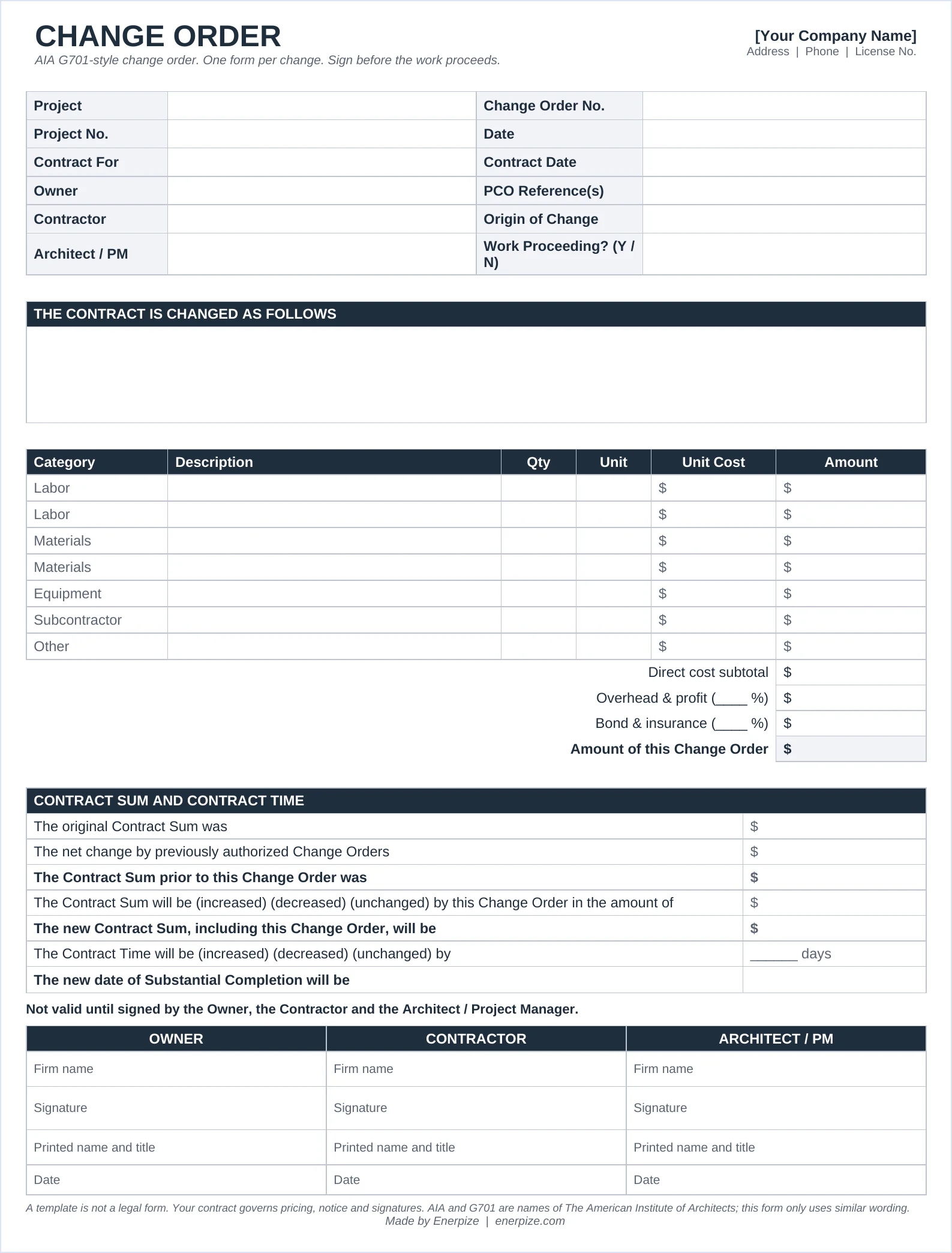
What Does a Change Order Form Contain?
| Field | Why it matters |
|---|---|
| Project, owner, contractor, architect | Ties the change to one contract. No guessing which job it belongs to. |
| Change order number and date | Numbers in sequence. Gaps look like hidden changes in a dispute. |
| PCO reference | Links the signed change back to the day it was first spotted. |
| Description of the change | Scope in plain words, with drawing or RFI references. Vague scope means a second argument later. |
| Cost build-up | Labor, materials, equipment and subcontractor lines, then overhead, profit and bond. Owners approve faster when they see the math. |
| Contract sum block | Original sum, prior changes, sum before this change, this change, new sum. |
| Contract time | Days added or removed, and the new substantial completion date. |
| Signatures | Owner, contractor and architect or PM. Not valid until all sign. |
The Field That Matters Most: The Contract Sum Block
Anyone can describe a change. The contract sum block is what stops the money drifting.
It forces five numbers onto one page: where the contract started, what earlier signed changes added, where it stood before this one, what this one adds, and where it lands. If those five lines don't add up, nobody should sign.
What the Enerpize Change Order Template Includes
We built it around one question: what does the contract say right now?
The result is a construction change order template with four connected sheets. Settings holds the project once. The form, the log and the summary all read from it. Change one number and every sheet follows. The change order template Excel workbook comes blank, plus a filled sample on separate tabs.
The Receipt Behind Every Number
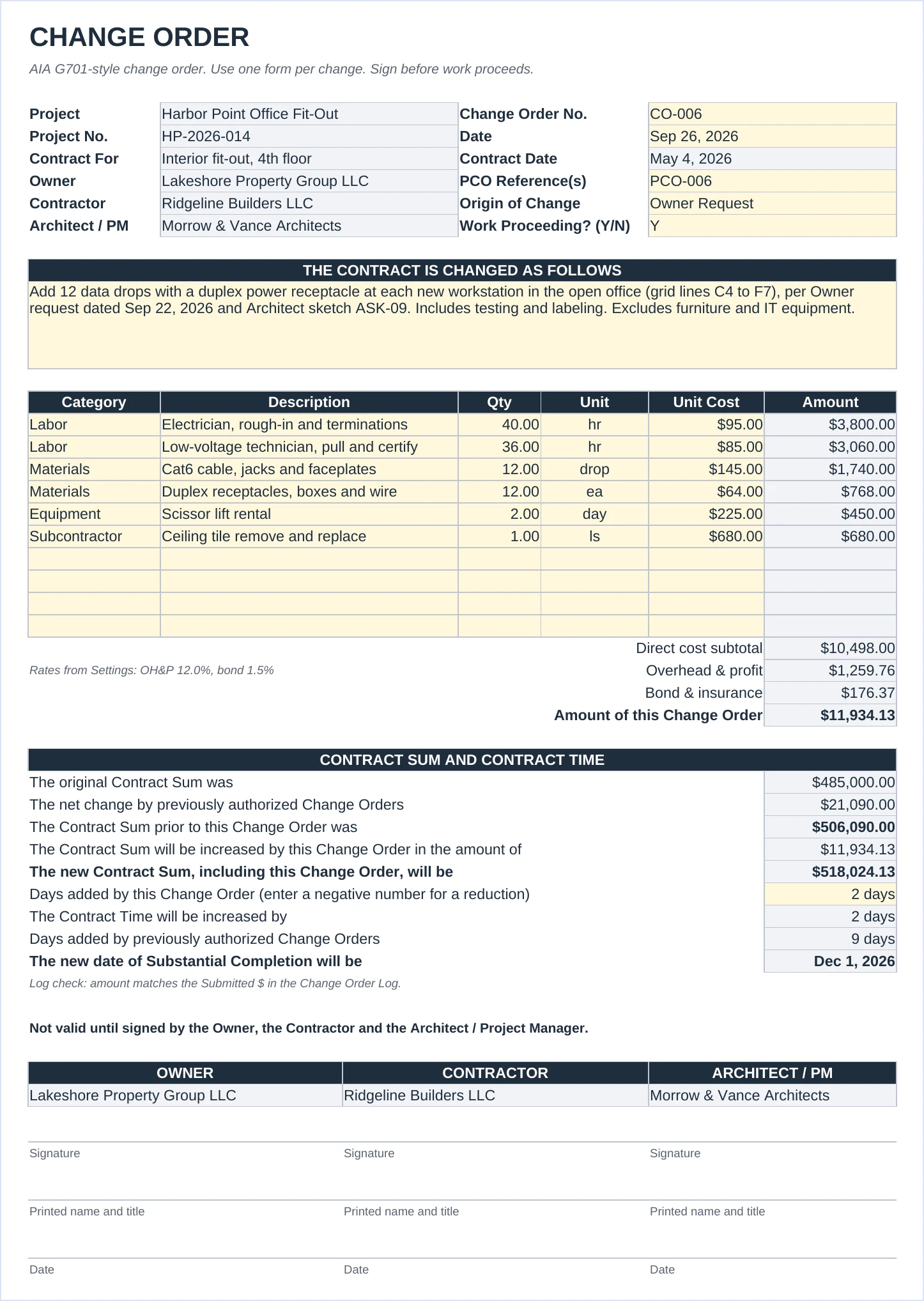
The form prices a change line by line: labor, materials, equipment, subcontractors. Overhead and profit and bond come from Settings, so every change uses the same rates.
Deleting work? Enter negative quantities and the form says "decreased." You decide in Settings whether markup applies to credits.
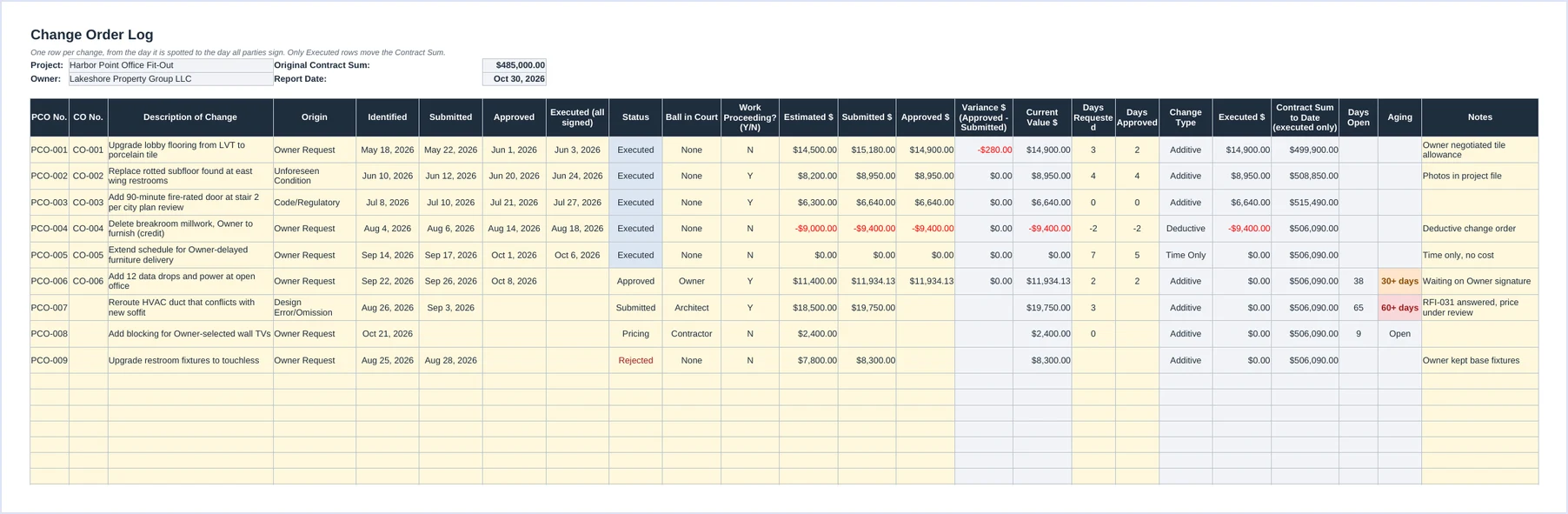
One Ledger From First Whisper to Final Signature
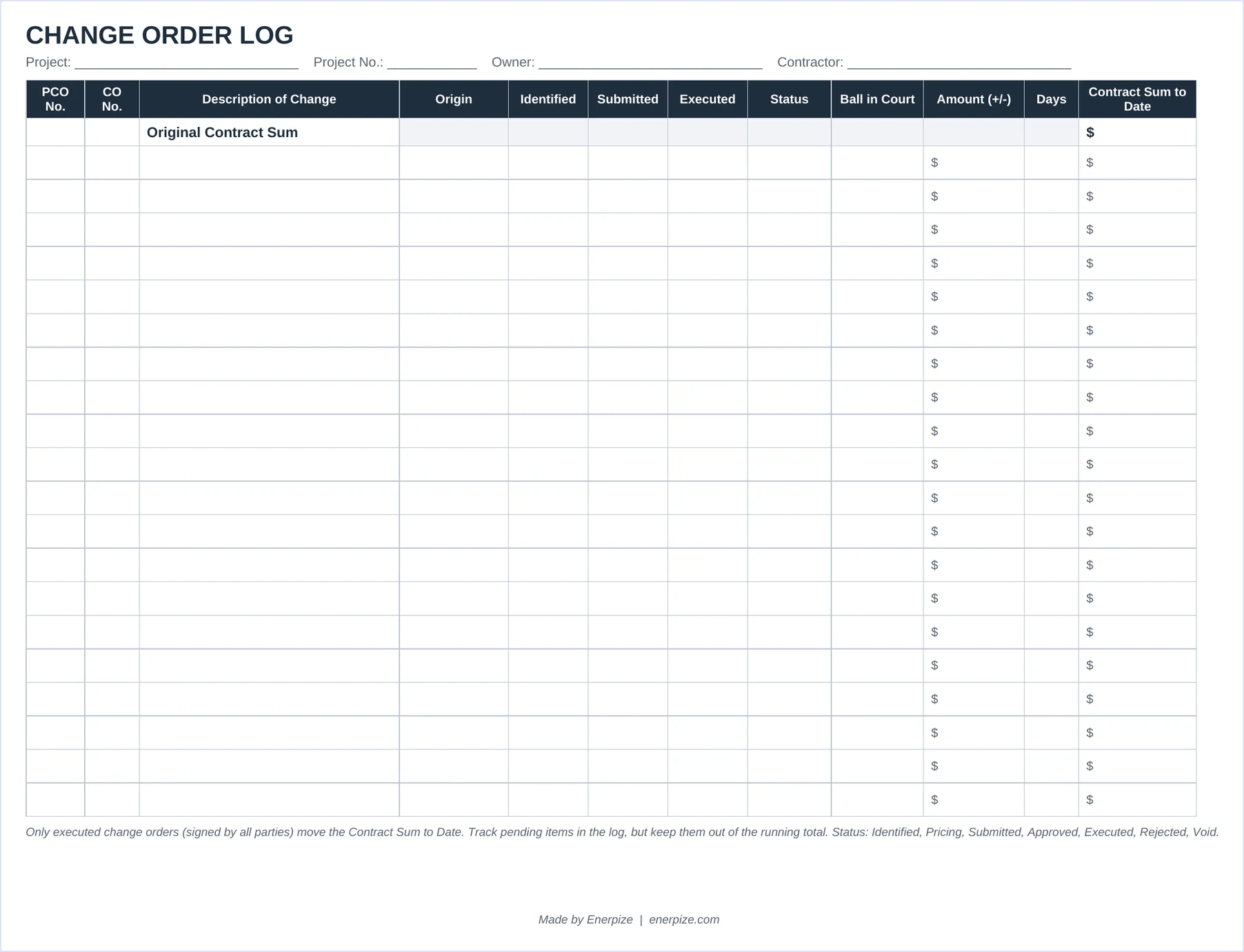
The change order log template tracks every change from the day it is spotted. PCO number, CO number, origin, ball in court, estimated, submitted and approved amounts, days requested and approved.
Open items age on their own. Orange at 30 days. Red at 60. You see who is holding the ball before the meeting, not after it.
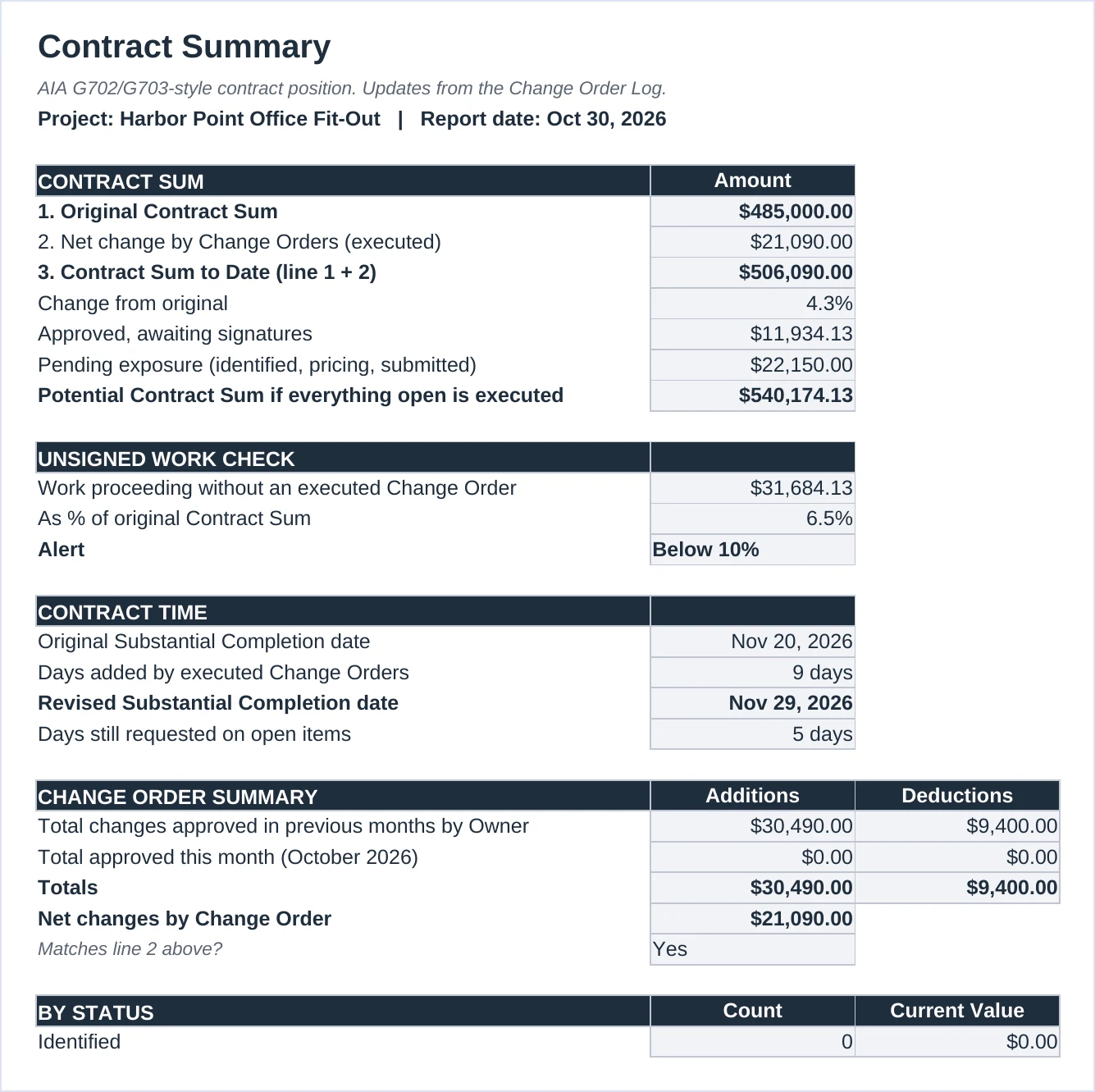
A Scoreboard That Only Counts Signed Points
Approved is not executed. The Contract Summary keeps them apart.
Only fully signed changes move the contract sum to date. Approved changes waiting for signatures and pending changes sit in their own lines, so you can show the owner the real number and the possible number side by side.
It also adds up any work going ahead without a signed change and warns you when it passes 10% of the original contract. You can change that line in Settings.
A Clipboard Copy for the Site Trailer
Not every change happens next to a laptop. The Word and PDF files print a one-page change order and a 20-row log on landscape paper.
Fill it on site, sign it on site, type it into the workbook back at the office.
Additive, Deductive, No-Cost and Time-Only Change Orders
Not every change order adds money. The workbook labels each one from the numbers you enter, so you never pick the wrong type by hand.
| Type | What happens | Sample change | Amount | Days |
|---|---|---|---|---|
| Additive | Price goes up | CO-001 lobby tile upgrade | +$14,900 | +2 |
| Deductive | Price goes down, a credit to the owner | CO-004 delete breakroom millwork | −$9,400 | −2 |
| Time Only | Schedule moves, price does not | CO-005 owner-delayed furniture | $0 | +5 |
| No Cost | Scope swap at equal value | None in the sample | $0 | 0 |
A deductive change order is still a change order. It needs the same signatures. Owners love credits until the paperwork is missing at closeout.
Change Order Example (Filled Sample)
Want to see the formulas working before you type anything? Open the filled change order example in Google Sheets and make a copy.
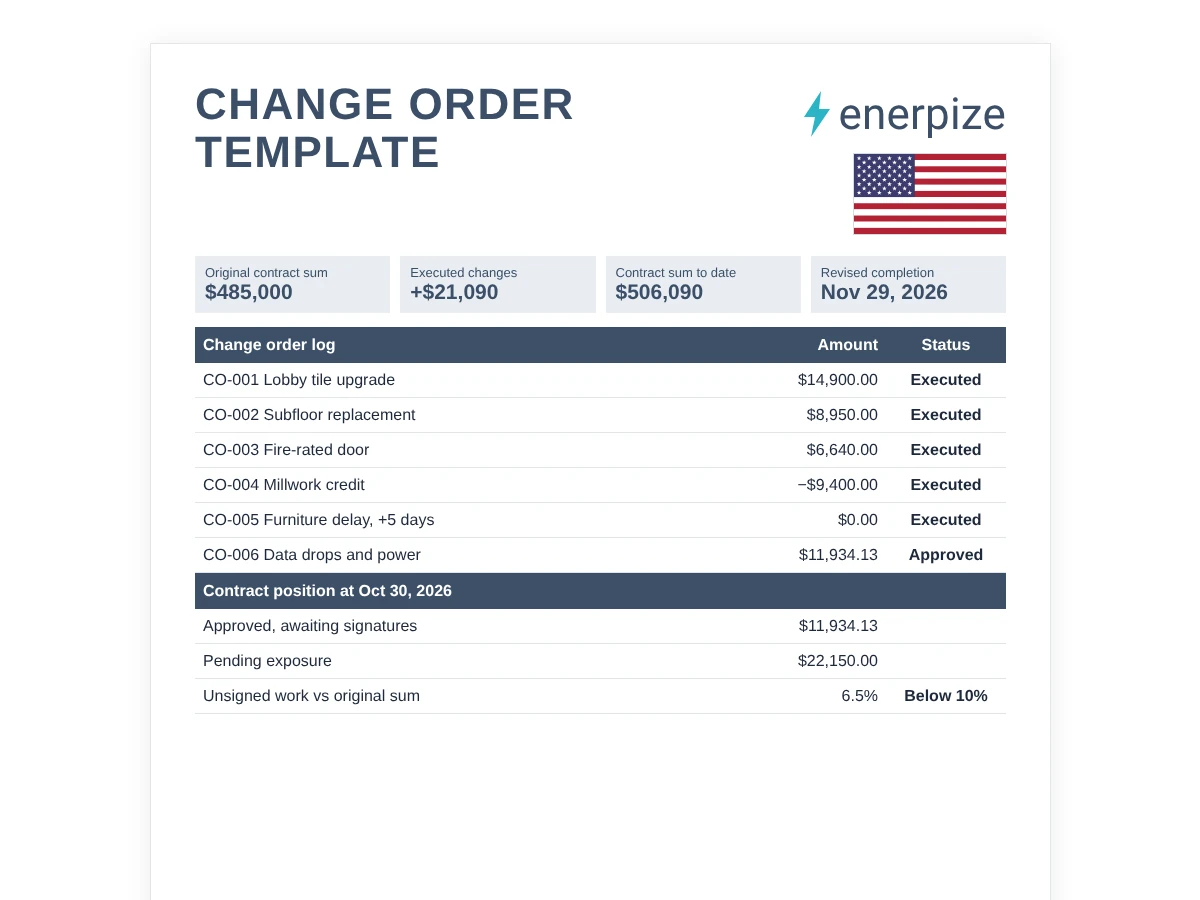
The sample is a fictional $485,000 office fit-out in Austin, Texas, built by Ridgeline Builders LLC for Lakeshore Property Group LLC. It runs from May 4, 2026, with substantial completion set for November 20, 2026.
How to Read the Sample
- 9 changes in the change order log template. 5 executed, 1 approved and waiting for the owner's signature, 1 submitted, 1 still being priced, 1 rejected.
- Executed changes add $21,090. That is 4.3% on top of the original, so the contract sum to date is $506,090.
- The schedule moved 9 days. Substantial completion is now November 29, 2026.
- CO-006 is the form on display. Data drops at $11,934.13 and 2 days. Once signed, the contract sum becomes $518,024.13 and completion moves to December 1, 2026.
- PCO-007 is 65 days old. It is flagged red, and the architect is holding it.
- $31,684.13 of work is going ahead unsigned. That is 6.5% of the original contract, under the 10% alert line.
Change Order Formulas
New Contract Sum
Original Contract Sum + Executed Changes + This Change Order
Start where the contract started. Add only signed changes. Then add this one.
Worked number: $485,000 + $21,090 + $11,934.13 = $518,024.13
Amount of This Change Order
Direct Cost + (Direct Cost × OH&P %) + (Subtotal × Bond %)
Price the work, add your markup, then add bond and insurance on the marked-up total.
Worked number: $10,498 + $1,259.76 + $176.37 = $11,934.13 at 12% and 1.5%
New Substantial Completion Date
Original Date + Days From Executed Changes + Days From This Change
Calendar days, added straight onto the original date.
Worked number: November 20 + 9 + 2 = December 1, 2026
Change From Original
Executed Changes ÷ Original Contract Sum
Shows how far the job has grown. Watch this number climb.
Worked number: $21,090 ÷ $485,000 = 4.3%
Unsigned Work Check
Work Proceeding Without an Executed Change ÷ Original Contract Sum
Everything marked as proceeding that is not signed, rejected or void.
Worked number: $31,684.13 ÷ $485,000 = 6.5%, below the 10% alert
How to Write a Change Order
1- Log It the Day You Spot It
The clock on notice often starts when the change is discovered, not when it is priced. A dated log row is your record.
⚡ Tip: Give it a PCO number even before you have a price. A row with no number gets forgotten.
2- Price It Line by Line
Owners argue with lump sums. They rarely argue with 40 hours at $95.
⚡ Tip: Attach quotes from subs and suppliers. The form has room for 10 lines, which covers most changes.
3- Send It and Set the Ball in Court
The log only ages items fairly if you record the date you submitted.
⚡ Tip: Change Ball in Court to Owner or Architect the moment the price leaves your desk.
4- Fill In the Form
Enter the CO number and the contract sum block fills itself from executed changes in the log.
⚡ Tip: Read the log check line under the form. If it says the amounts differ, fix one before anyone signs.
5- Get All Three Signatures First
An approved change with no signatures is a promise. Executed means signed by the owner, contractor and architect or PM.
⚡ Tip: If the work cannot wait, mark Work Proceeding as Y and watch the unsigned work check.
6- Mark It Executed and Bill It
Only executed rows move the contract sum and appear in the pay application lines.
⚡ Tip: Copy the executed lines from the Contract Summary straight onto your next schedule of values.
Common Change Order Mistakes
✕ Counting pending changes in the contract sum
Why it matters: You bill money the owner never agreed to. That is how disputes start.
Fix: Keep pending and approved changes out of the running total until they are executed.
✕ Starting work on a handshake
Why it matters: Without a signature, getting paid depends on memory and goodwill.
Fix: Sign first. If you can't, log it as proceeding and chase the signature that week.
✕ Pricing a lump sum with no breakdown
Why it matters: The owner can't check the number, so they question all of it.
Fix: Use the cost build-up: labor, materials, equipment, subs, then markup.
✕ Forgetting the days
Why it matters: A $1,200 change that adds 5 days can cost more in site overhead than it pays.
Fix: Ask for time on every change, even if the answer is zero.
✕ Skipping or reusing CO numbers
Why it matters: Gaps and duplicates look like hidden changes in a dispute.
Fix: Number in sequence and keep rejected and void items in the log.
Why Change Orders Matter
A change order in construction is not paperwork. It is money you have already spent.
In its July 2019 report GAO-19-500, the U.S. Government Accountability Office found that federal agencies spent more than $36 billion on construction contracts in fiscal year 2018, with more than 45% going to small businesses. It also found that neither the Army Corps of Engineers nor GSA regularly monitored how long contract changes took to finalize. GAO recommended both agencies start.
So what? If federal agencies needed to be told to track change timing, your own log is the only clock you can count on.
Margin
Most jobs are won on thin margins. Unpriced changes eat them quietly, one outlet and one paint color at a time.
Cash Flow
A change you can't bill sits on your books while you pay the crew. Aging flags show you which signature to chase first.
Schedule
Days you didn't ask for are days you can be charged for. The revised completion date is your defense.
Pay Applications
Executed changes become new lines on the next pay application. No signed change, no line, no payment.
Change Order Spreadsheet vs Construction Software
| What you need | Spreadsheet template | Enerpize construction app |
|---|---|---|
| Price a change | Cost build-up on the form | Bill of quantities on a construction quotation |
| Approve and send | Print, sign, scan | Email the quotation as a PDF and approve it in the system |
| Track status | Log with aging flags | Quotation statuses: Issued, Approved, Rejected |
| Link to the contract | Manual CO numbers | Contracts linked to approved quotations |
| Bill the work | Copy lines to your pay app | Payment certificates by work item |
| Track project cost | Not included | Cost centers on purchase invoices created from the contract |
| Best for | One job, one PM | Several jobs, shared team, accounting in one place |
How Enerpize Handles Change Orders and Construction Billing
What happens to a signed change after it leaves the spreadsheet? In most offices, someone types it again. Then again for the invoice.
In the Enerpize construction management software, a priced change is just another construction quotation tied to the same client and project. Here is how the pieces connect. The screens below use sample data.
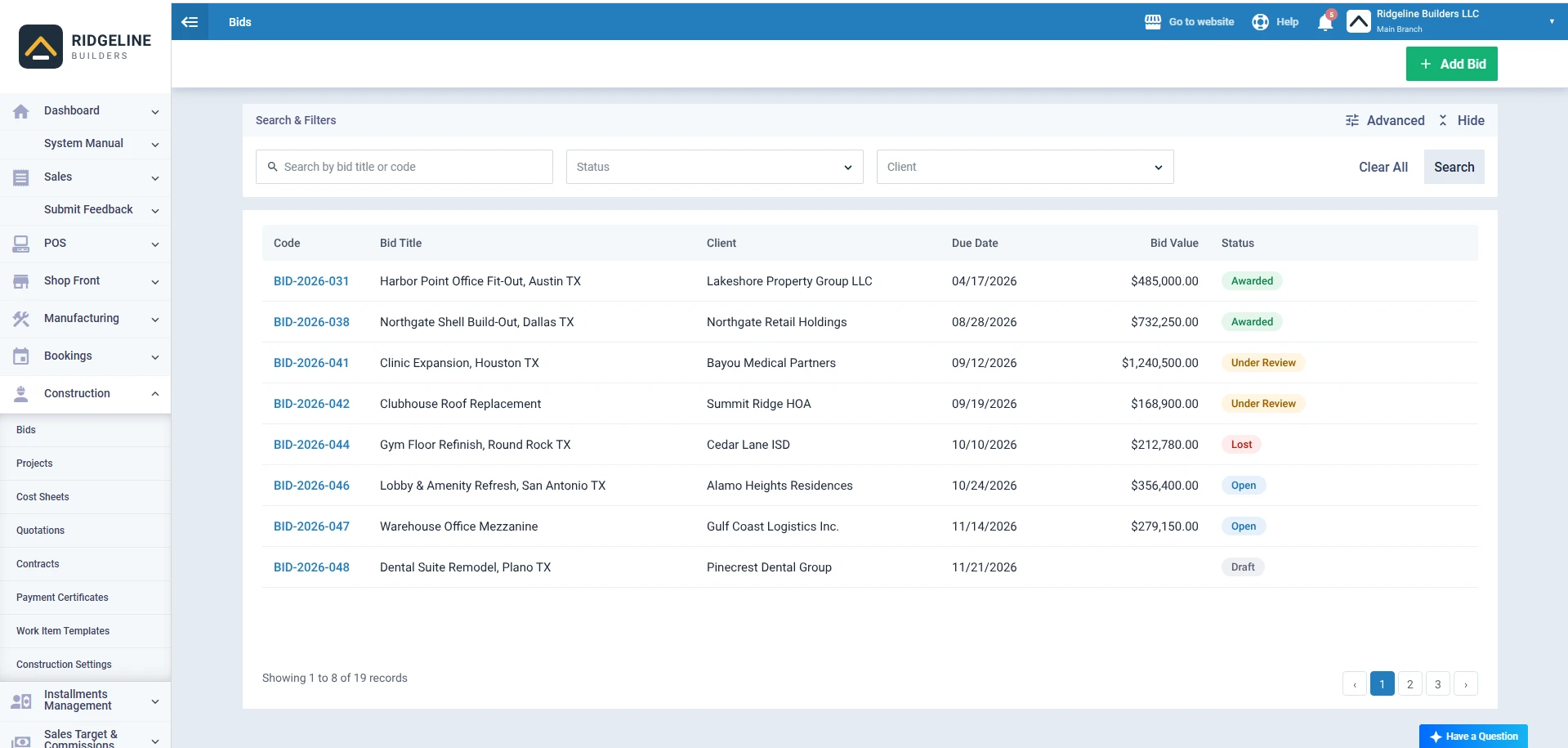
Bids
Every job starts as a bid with its bill of quantities. When a quotation on a bid is approved, the bid status becomes Awarded, and you can create the project from it.
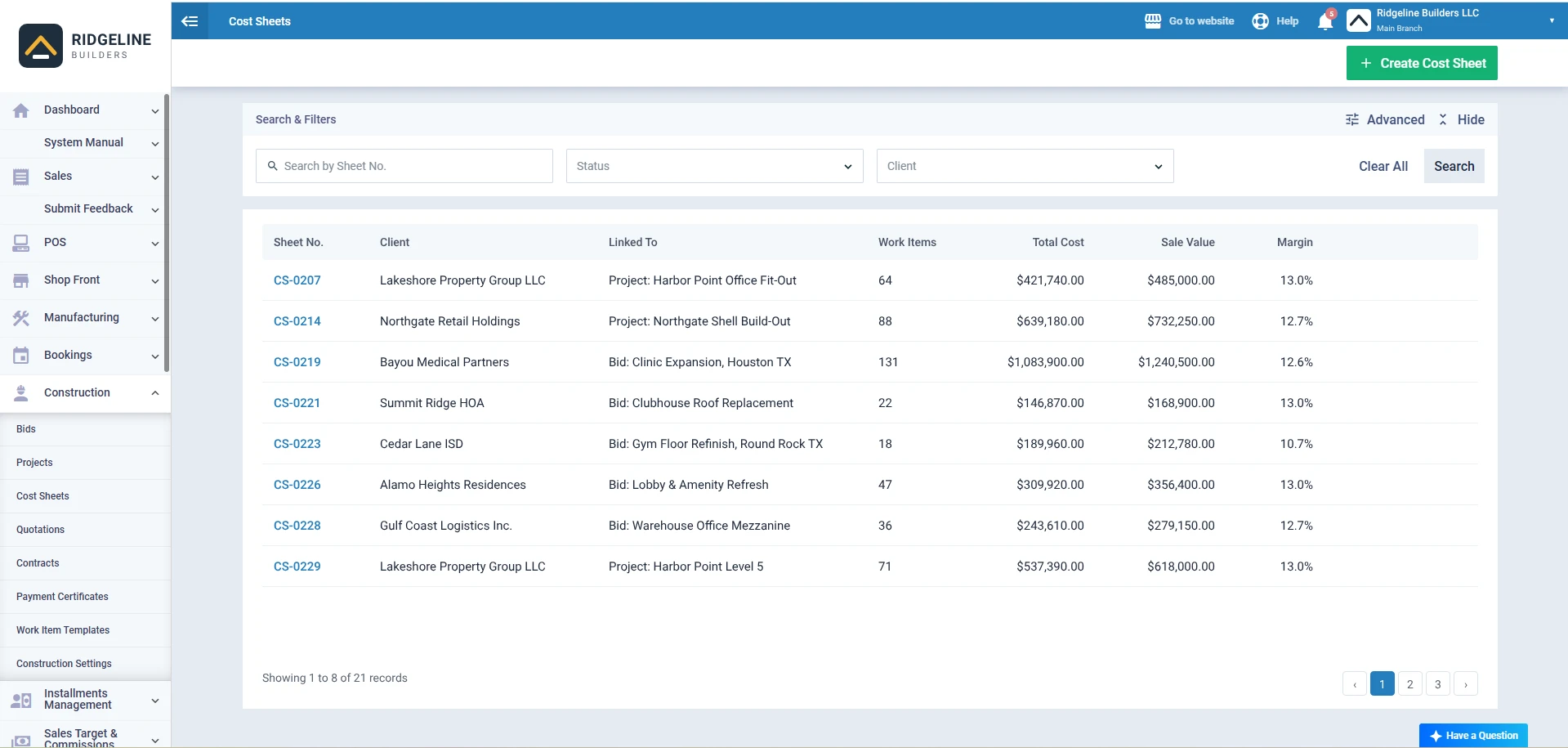
Cost Sheets
Cost sheets hold the work items and unit costs behind a price. You can create one from a bid or straight from a project file, then create a construction quotation from the cost sheet's action bar.
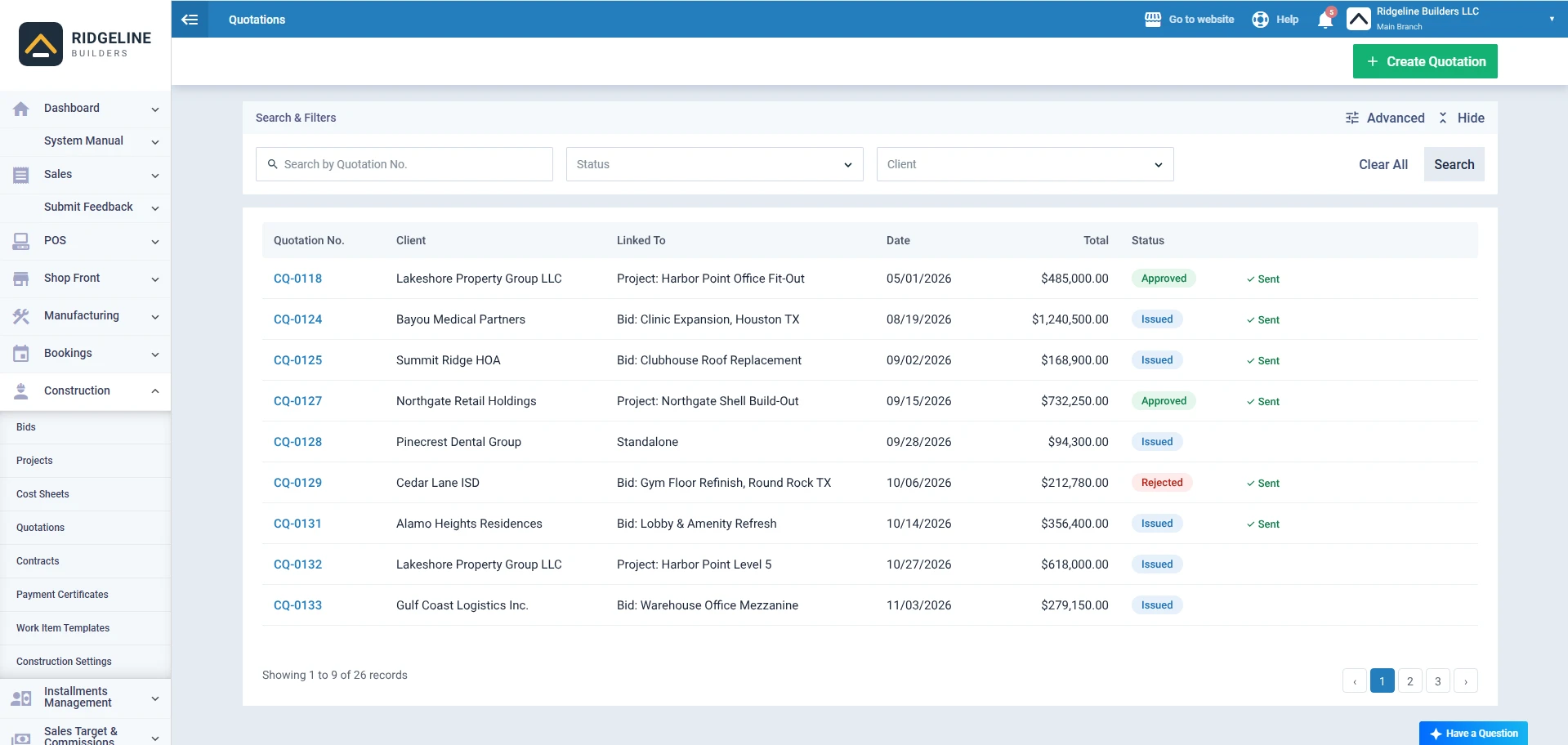
Construction Quotations
A quotation can link to a bid, a project, or stand alone. Pick the cost sheet and the bill of quantities fills itself, with quantity, sale rate and up to two taxes per work item. Save it and it is Issued. Send it by email as a PDF and a Sent label appears. Approve it and the linked cost sheet updates with the quotation's changes. Approved quotations are locked, so the price you agreed is the price on record.
Contracts
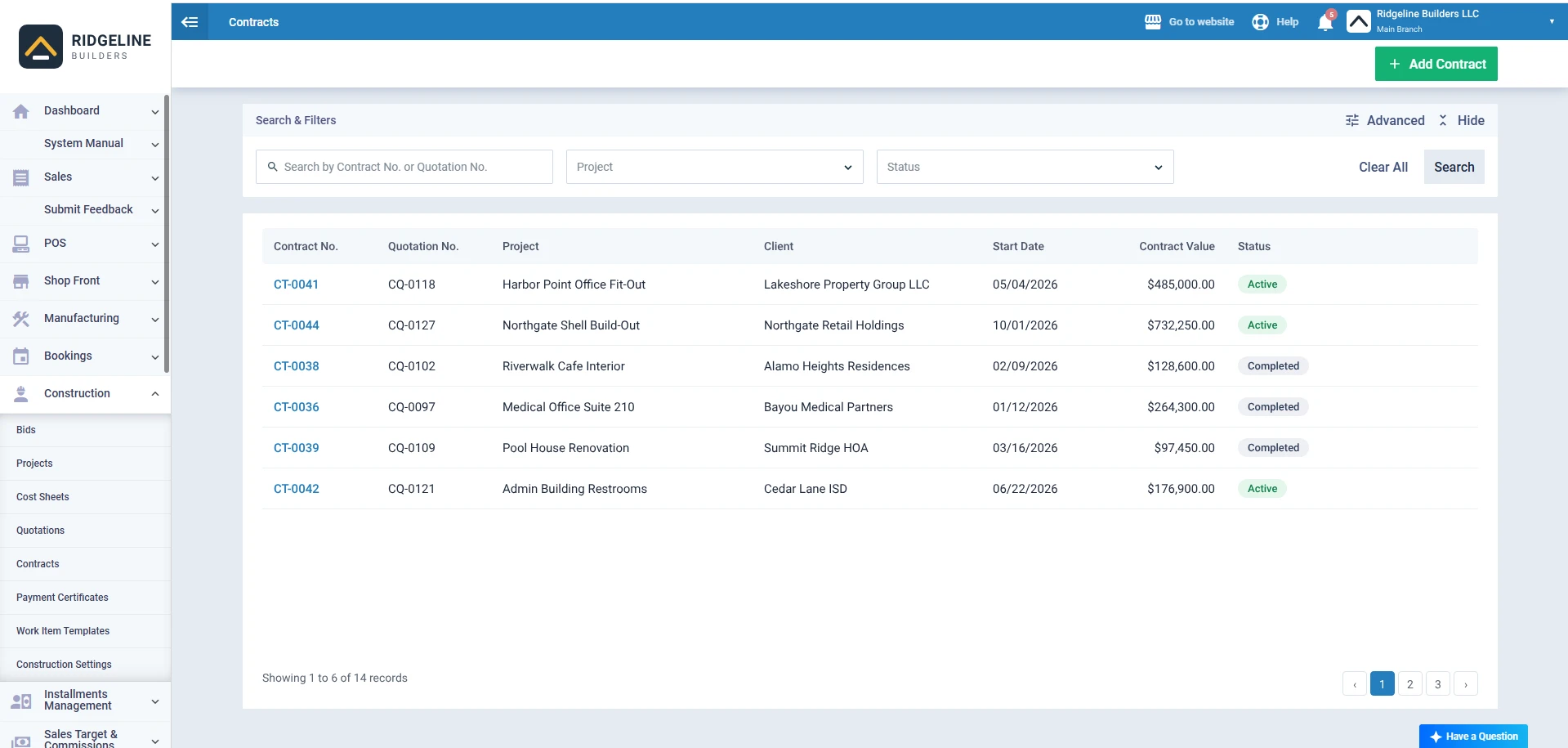
Create a contract and link it to the approved quotation. From the contract's work items you can create purchase documents, and purchase invoices created from the contract are distributed to cost centers automatically.
Want to see how cost centers keep each job's numbers separate? Read the cost centers guide.
Payment Certificates
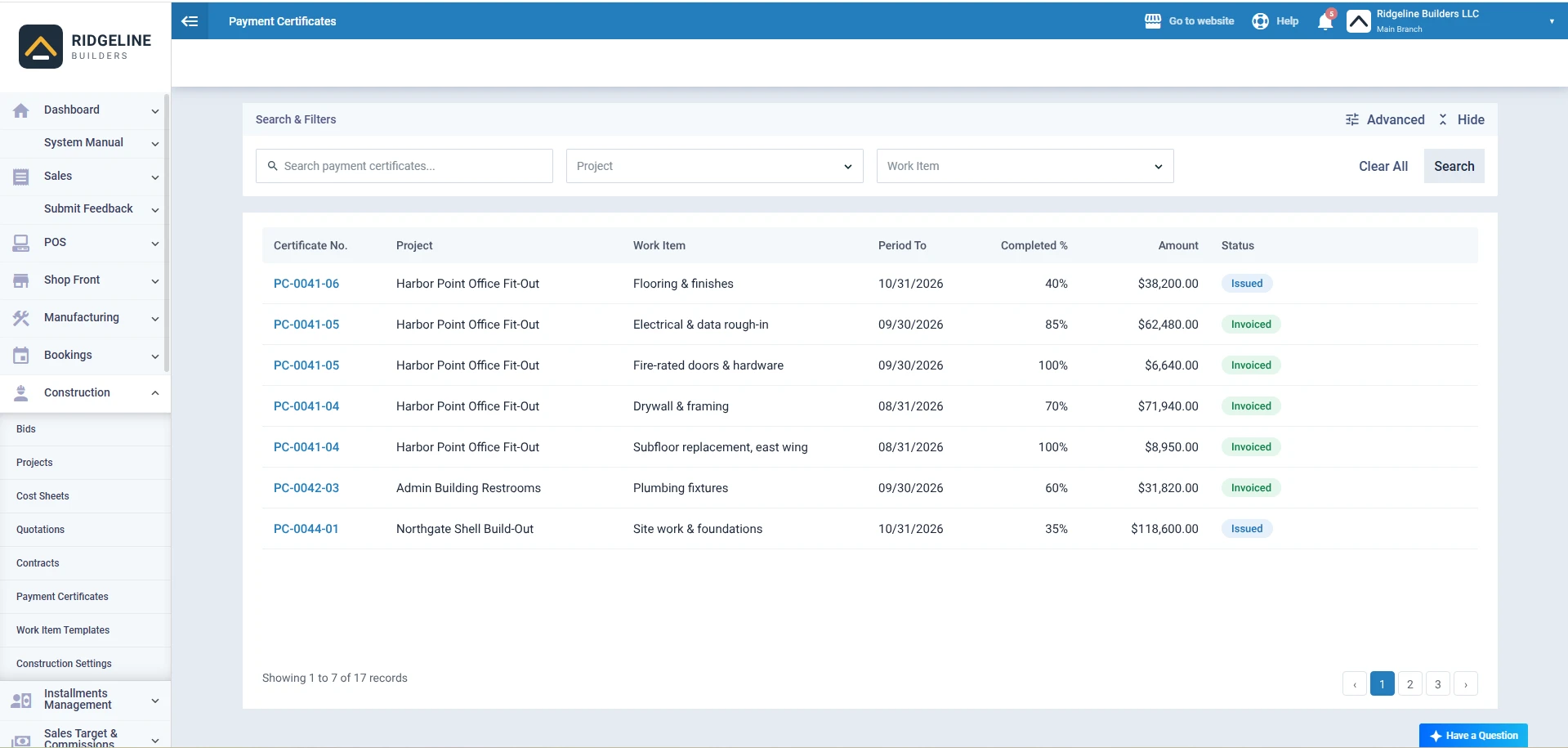
Payment certificates are created from inside the project. You select the work items being certified, and the certificate feeds your invoicing. Contractor invoices can show retention discounts on the invoice items.
Change Orders in Texas
Texas gave contractors a stop button.
Under House Bill 3485, which added Property Code Section 28.0091 for private projects and Government Code Section 2251.0521 for public work, a contractor or subcontractor may choose not to proceed with owner-directed additional work when two things are true. First, there is no written, fully executed change order for it. Second, that work plus earlier unsigned owner-directed work exceeds 10% of the original contract amount. A contractor who stops under the rule is not responsible for damages caused by stopping. It applies to contracts entered into on or after September 1, 2023.
What to add:
- Mark every owner-directed change as Work Proceeding Y or N.
- Keep the unsigned work alert at 10% in Settings.
- Record the date each change order is fully executed, not just approved.
⚑ Practical note: The workbook adds up unsigned work for you. Whether you stop is a contract decision, so talk to your attorney before you do.
Change Orders on Florida Local Government Projects
Waiting on a city to answer your price? Florida put a clock on it.
Florida Statutes Section 218.755 covers construction services contracts with local governmental entities entered into on or after July 1, 2025. When the entity receives your price quote for a change order, and the quote meets all statutory and contract requirements, it must approve or deny it in writing within 35 days. A denial must name the deficiencies and how to fix them. Miss the deadline and the change order and price quote are deemed approved, payable when the change order work is complete.
What to add:
- The date the local government received your quote, in the Submitted column.
- A note of how you delivered it.
- The day count, which the Days Open column already gives you.
⚑ Practical note: Day 35 is a date, not a feeling. Log the receipt date the day you send it.
Change Orders on California Home Improvement Jobs
In California homes, a vague change order can be unenforceable against the homeowner.
Business and Professions Code Section 7159.6 says an extra work or change order is not enforceable against a buyer unless it sets out the scope of work, the amount added to or subtracted from the contract, and the effect on progress payments or the completion date. The buyer also may not require extra or change order work without written authorization.
A residential construction change order form needs all three, every time.
What to add:
- A full scope description, not "misc. extras."
- The plus or minus amount, which the form states as increased or decreased.
- The new completion date and a note on how progress payments change.
⚑ Practical note: The statute says missing items don't bar every recovery for work performed. You still don't want to be arguing it.
Change Orders on New York Home Improvement Jobs
New York wants it in writing. All of it.
General Business Law Section 771 says every home improvement contract covered by the article, and all amendments to it, must be evidenced by a writing signed by all parties. The owner must also get a copy of the written agreement signed by the contractor before any work is done.
What to add:
- Signatures from every party to the contract on each change.
- A signed copy handed to the owner before the changed work starts.
- The updated progress payment schedule if the change moves it.
⚑ Practical note: Treat every change as an amendment that needs signatures. The log's Executed date is your proof of when that happened.
Who Can Use a Change Order Template?
General Contractors
You run the log for the whole job. Owner changes, design fixes and code changes all land on your desk, and your margin depends on pricing each one.
Subcontractors
Your change order goes up to the GC, not the owner. Same form, same math, one level down.
Remodelers and Home Builders
Homeowners change their minds often. A signed form with the new price and date keeps the friendship and the payment schedule intact.
Owners and Project Managers
The Contract Summary tells you exactly where the budget stands before the OAC meeting. Running several sites? See how Enerpize supports construction companies from bid to payment certificate.
Architects
You review the price, check the scope against the drawings and sign as the third party.
Change Order Glossary
| Term | Meaning |
|---|---|
| PCO | Potential change order. A change that has been spotted but not priced or approved yet. |
| Change order request | The contractor's priced proposal for a change, sent for review. |
| Executed change order | Signed by the owner, contractor and architect or PM. Only these change the contract sum. |
| Construction change directive | A written order to start a change before the price and time are agreed. |
| Deductive change order | A change that lowers the contract sum. A credit to the owner. |
| Contract sum | The total contract price, including all executed change orders to date. |
| Substantial completion | The stage when the work is complete enough for the owner to use it. |
| Ball in court | Whoever must act next on an open change. |
| Schedule of values | The line-by-line breakdown of the contract used to bill progress payments. |
| OH&P | Overhead and profit, the markup added to the direct cost of a change. |
Key Takeaways
- A change order changes the contract only when the owner, contractor and architect or PM have all signed it.
- Log every change the day it is spotted. The sample logs 9 changes, from first spotted to rejected or executed.
- Only executed changes move the contract sum. In the sample that is $21,090, taking $485,000 to $506,090.
- Price every change line by line. CO-006 shows $10,498 of direct cost becoming $11,934.13 at 12% OH&P and 1.5% bond.
- Ask for days on every change. The sample moved substantial completion 9 days, to November 29, 2026.
- Chase open items before they age. The log flags them orange at 30 days and red at 60.
- Texas lets contractors stop owner-directed work once unsigned additional work passes 10% of the original contract.
- Florida local governments must answer a compliant change order price quote within 35 days or it is deemed approved.
Frequently Asked Questions
Who signs a change order?
Usually the owner, the contractor and the architect or project manager. Your contract names the signers. The change is not valid until all of them sign.
Is a change order legally binding?
Once signed by the parties named in your contract, it becomes part of that contract and binds them the same way. Some states add content rules, such as California for home improvement jobs. A template is not a legal form, so check your contract and state law.
How do you price a change order?
Add the direct costs line by line: labor, materials, equipment and subcontractors. Then add the overhead and profit and bond rates your contract allows. The sample prices CO-006 at $10,498 of direct cost and $11,934.13 in total.
Who pays for change orders in construction?
Whoever caused the change, under the contract terms. Owner requests and design changes are usually the owner's cost. Contractor errors usually are not. Unforeseen conditions depend on your contract's clauses.
Do you have to accept a change order?
It depends on your contract. Many contracts let the owner direct changes within the general scope. In Texas, a contractor may choose not to proceed with owner-directed work once unsigned additional work passes 10% of the original contract.
What is the difference between a change order and a construction change directive?
A change order is signed by all parties with the price and time agreed. A directive orders the work to start before the price and time are agreed. A change order later replaces it.
What is a PCO in construction?
A PCO in construction is a potential change order: a change that has been spotted but not yet priced or approved. Log it with a PCO number right away, then give it a CO number once it becomes a change order.
What is a deductive change order?
A deductive change order lowers the contract sum because work is removed or replaced with something cheaper. It needs the same signatures as any other change. In the sample, CO-004 credits the owner $9,400 and removes 2 days.
About the Author
Omar El Bahr is a Senior Digital Growth Specialist at Enerpize, where he leads SEO, content strategy, and organic growth across international markets. He is a Forbes Communications Council contributor and has written for Entrepreneur on business communication and digital strategy.
Disclaimer
This template is for general information only and is not legal advice. It is not an official AIA change order form, is not an AIA document and is not affiliated with The American Institute of Architects. State rules and contract terms vary, so check your contract and speak to a licensed attorney before relying on any form. The sample business and figures are fictional.