Posted on 16 June 2026
Free Timesheet Template Download: Excel, Word, PDF & Google Sheets and Docs
- Available in Excel, Word, PDF, Google Docs, and Google Sheets, free to download with no sign-up required
- Covers ordinary hours, overtime, breaks, leave, and project or client allocation in one structured document
- Built with a public holiday flag column and country-specific compliance notes for the US, UK, Australia, and Canada
- Calculates total ordinary hours, total overtime hours, and gross pay automatically in Excel and Google Sheets
A timesheet template is a pre-formatted document that records an employee's work hours, break times, leave taken, and overtime for a defined pay period, giving both employer and employee a clear, verifiable record of every working day.


What Is a Timesheet Template?
There is a version of this story almost every small business owner knows. Friday afternoon. Someone in payroll is reconstructing Tuesday from memory because the spreadsheet was not filled in, the shift supervisor is not answering, and the pay run goes out Monday morning. The timesheet template exists to prevent exactly that.
A timesheet template is a structured document that captures start and end times, break durations, overtime, and leave for each employee across a pay period. It is the simplest reliable system for making sure compensation reflects what was actually worked, not what someone guesses was worked.
The difference between a good timesheet and a bad one is not the format. It is what the template captures. Most free templates online record start time and finish time and stop there. They miss the public holiday flag. They miss the project or client column. They miss the manager sign-off. And then a payroll dispute happens, and there is no paper trail that holds up.
The Enerpize free timesheet template is built around what actually goes wrong.
Stop filling in spreadsheets by hand. Enerpize records attendance, calculates pay, and generates timesheets automatically. Start for free.
Why Standardized Timesheets Matter for SMBs
When a business has three employees, everyone knows who worked what. When it has fifteen, spread across two sites and three shift patterns, that certainty disappears. A consistent timesheet format means every record follows the same structure, whether it is filled in by a site manager in the field or an office administrator at a desk.
Consistency also matters when something is disputed. A timesheet with a manager signature, a dated pay period, an hourly rate, and an itemized leave breakdown is a document. A hastily typed email from Friday is not.
What the Enerpize Timesheet Template Includes
Most free timesheet templates give you a table with seven columns and a signature line at the bottom. They record that someone worked. They do not record enough to actually process payroll, handle a compliance audit, or send an accurate client invoice.
Here is what the Enerpize template includes that others do not.
Employee and Business Details
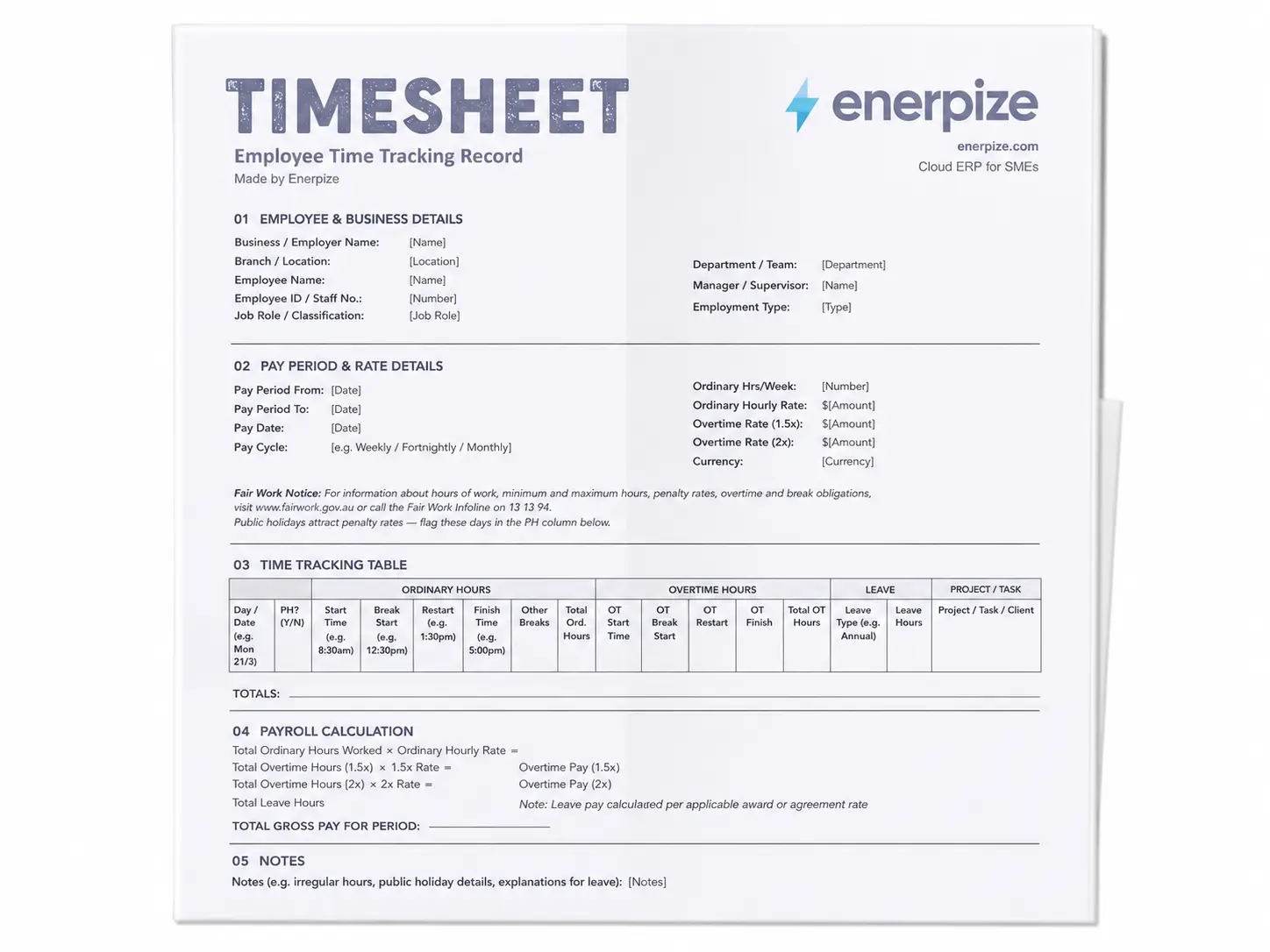
Every timesheet starts with identity. The Enerpize template captures the business name, branch or location, employee name, employee ID or staff number, job role or classification, department or team, manager or supervisor name, and employment type. That last field matters more than it looks. Whether someone is full-time, part-time, casual, or a contractor changes the rules that apply to their hours.
Pay Period and Rate Details
This is the section that separates a record-keeping document from a payroll document. The template captures the pay period start and end dates, pay date, pay cycle, ordinary hours per week, ordinary hourly rate, overtime rate at 1.5x, overtime rate at 2x, and the currency in use. Once those rates are entered, the Excel and Google Sheets versions calculate gross pay automatically.
Time Tracking Table
Sixteen columns. This is where the template earns its differentiation.
The time tracking table captures the day and date, a public holiday flag (Y/N), start time, break start, restart time, finish time, any other breaks, total ordinary hours, overtime start, overtime break start, overtime restart, overtime finish, total overtime hours, leave type, leave hours, and project or task or client name.
The public holiday flag is the column every other free template skips. Public holidays carry penalty rates in most jurisdictions. If a timesheet has no way to identify a public holiday, there is no way to apply the correct rate, and that error compounds across every employee who worked that day.
The project or task column turns the timesheet into a billable hours record. A freelance consultant, a construction subcontractor, or a cleaning business billing three clients across one week needs hours allocated by job, not just totalled across the period. That column makes client invoicing possible directly from the timesheet.
Payroll Calculation Fields
The Excel and Google Sheets versions calculate total ordinary pay, total overtime pay at 1.5x, total overtime pay at 2x, and total gross pay for the period automatically. The rate fields are highlighted in yellow, which is the standard convention for user-input cells. Enter the rates once. The formulas handle the rest.
Leave pay is flagged as a manual entry because it is award-dependent. What an employee receives for a sick day versus an annual leave day versus a public holiday varies by employment agreement, modern award, and jurisdiction. The template captures the hours; the rate is yours to apply.
Notes Section
Space for irregular hours, public holiday explanations, partial day details, and anything else that a payroll processor needs to understand before running the pay. Every experienced HR manager knows that the notes section is where disputes get resolved.
Dual Approval and Signature Block
One signature block for the employee. One for the manager or supervisor. Both include signature, print name, and date. The original Fair Work template that most Australian businesses use has only the employee signature. The manager sign-off is what converts a timesheet from a submission into an approved record. That distinction matters in a compliance audit or an employment dispute.
Timesheet Template Formats Available for Download
Excel Timesheet Template
The Excel version includes live formulas for total hours and gross pay. No macros. No setup. Enter hours, enter rates, and the totals calculate. Formatted for landscape A4. Grid lines off for a clean, professional look. No frozen rows.
Google Sheets Timesheet Template
The same structure as Excel, optimized for real-time collaboration. Multiple team members can update the same document simultaneously. Managers can review without waiting for a file to be emailed. The formulas work identically to the Excel version.
Word Timesheet Template
For businesses that prefer a printable format with manual entry. Clean layout designed for printing, signing, and physical filing. No formulas, but all fields are present.
Google Docs Timesheet Template
Open it in your browser, upload to Google Drive, and go to File then Make a copy. Every field is there. No formulas, no software to install, fully editable from anywhere.
PDF Timesheet Template
For field environments, job sites, or anywhere digital access is limited. Print, hand to the employee, collect at the end of the week. Same column structure as all other versions, so data is consistent whether you are moving from paper to digital or running both simultaneously.
Timesheet Templates by Pay Period
Different pay cycles suit different types of businesses. The right format is the one that matches how your payroll actually runs.
Daily Timesheet Template
Used when hours change significantly day to day, when employees work across multiple clients or job sites in a single week, or when the business needs a same-day record for compliance. Common in healthcare, hospitality, and field services.
Weekly Timesheet Template
The standard for businesses with regular weekly payroll. Captures one full seven-day period. Simple enough for any employee to fill in. Detailed enough for payroll processing and client billing.
Biweekly Timesheet Template
The most common payroll cycle in the United States. Two weeks in a single document, with Week 1 and Week 2 clearly separated. Enerpize has a dedicated biweekly timesheet template that covers both weeks in full, including all sixteen columns from the standard template.
Monthly Timesheet Template
For salaried employees, long-term contractors, or businesses that process payroll monthly. Captures all working days of the month in one view. Useful for finance teams generating month-end reports and for consultants on retainer billing.
How to Use the Enerpize Timesheet Template
Step 1: Fill In the Header Fields
Start with the business name, branch, employee name, employee ID, role, department, manager name, and employment type. Do this before the pay period starts, not after. A timesheet filled in retrospectively is a liability, not a record.
Step 2: Enter Pay Period and Rate Details
Set the pay period start and end dates. Enter the pay date, pay cycle, and ordinary hours per week. In the Excel or Google Sheets version, enter the ordinary hourly rate and both overtime rates now. Every pay calculation for the period flows from these figures.
Step 3: Record Daily Hours in the Time Tracking Table
For each working day, enter the day and date, mark the PH column Y if it is a public holiday, then log start time, break start, restart time, and finish time. If overtime was worked, log the overtime start and finish separately. Enter the leave type and hours for any leave taken. Add the project or client name in the final column.
Total ordinary hours and total overtime hours calculate automatically in the Excel and Google Sheets versions.
Step 4: Review the Payroll Calculation Section
Check that the gross pay figure reflects what you expect. If something looks off, the first place to check is the rate fields. Then check that overtime hours have been allocated to the correct column, not counted in ordinary hours.
Step 5: Add Notes for Anything That Needs Explaining
Irregular hours, a public holiday where penalty rates apply, a partial day due to an appointment, a leave request that was approved verbally but not yet in writing. Put it in the notes. A payroll processor who was not on site needs context.
Step 6: Sign and Submit for Approval
Employee signs first. Manager or supervisor reviews and signs second. Both fields include a date. The manager sign-off is what makes this a verified record, not just a claim.
Timesheet Compliance by Country
This is the section that almost no free timesheet template page covers. Knowing the format is useful. Knowing what your records must contain to be legally defensible is what keeps you out of trouble.
United States: FLSA Requirements
The Fair Labor Standards Act sets out exactly what employers must record for non-exempt employees. Time cards and work schedules must be kept for at least two years. Payroll records must be kept for at least three years.
Every timesheet must capture the employee's full name, the start date of the workweek, total daily hours, total weekly hours, total overtime hours worked beyond 40 in a workweek, and the hourly rate for the period. The FLSA does not mandate a specific timekeeping method, which means a paper timesheet is as valid as software, provided the records are accurate and complete.
US employers running a biweekly pay cycle, which is the most common payroll schedule in the country, can use the Enerpize biweekly timesheet template to meet these requirements across both weeks in a single document.
United Kingdom: Working Time Regulations
The Working Time Regulations 1998 cap the average working week at 48 hours, measured over a 17-week reference period, unless an employee has signed a written opt-out. Employers must ensure workers receive at least 11 consecutive hours of rest in any 24-hour period, and a minimum 20-minute break for any shift over six hours.
UK employers are not required to record precise daily start and end times under the Working Time Regulations, but HMRC expects accurate payroll records for PAYE purposes, and any dispute about working hours defaults to the records held by the employer. A timesheet with daily start, finish, and break times is the cleanest evidence available.
Australia: Fair Work Act
The Fair Work Act 2009 and the National Employment Standards require employers to keep time and wages records for seven years. Records must include the employee's name and classification, hours worked each day, overtime payments, and leave balances.
Australian modern awards set pay rates by classification, which is why the job role or classification field in the Enerpize template matters here specifically. The public holiday flag column also serves a direct purpose under Australian law: most modern awards require penalty rates for work on public holidays, and a timesheet that does not identify public holiday hours cannot support those rate calculations.
For businesses managing NDIS clients or issuing invoices under the Australian tax system, Enerpize's template library also covers the Australian GST invoice template and the NDIS invoice template.
Canada: Canada Labour Code
The Canada Labour Code governs federally regulated employees. Most workers in Canada fall under provincial employment standards, which vary by jurisdiction. At the federal level, overtime applies after 8 hours per day or 40 hours per week. Ontario's Employment Standards Act 2000 sets the same daily threshold. Alberta allows up to 8 hours per day or 44 hours per week before overtime rates apply.
Most Canadian provinces require employers to retain time records for a minimum of 36 months. A timesheet that separates regular hours from overtime hours and carries both employee and manager signatures meets the minimum documentation standard across all provinces.
Enerpize records attendance, syncs with payroll, and generates compliant timesheets without the manual entry. Start for free.
Who Uses Timesheet Templates?
HR and Payroll Teams
The people who process pay every fortnight are the ones most exposed to timesheet errors. A missing rate field, an unsigned approval, an unmarked public holiday: each one adds time to the pay run and introduces risk. The Enerpize template is built to give payroll teams a complete record from the moment the employee submits.
Project Managers
Project managers need to know where hours went, not just that hours were worked. The project and task column in the Enerpize template breaks time down by deliverable, so a manager running three concurrent client projects can see exactly how hours were allocated across the period.
Freelancers and Consultants
Billing by the hour requires a record that a client will accept without dispute. A completed timesheet attached to a freelance invoice shows exactly what was worked, when, and against which project. That transparency shortens the payment cycle and eliminates most billing conversations before they start.
Construction and Field Crews
Construction timesheets need to handle multiple job sites, mixed ordinary and overtime hours, and public holiday penalty rates, all on the same document. The Enerpize template's public holiday flag and project column handle this directly. For billing, a completed timesheet pairs naturally with a construction invoice to give clients a fully documented record of labor and time.
Small Business Owners
A payroll spreadsheet that works when you have three employees starts causing problems at ten. The Enerpize template is structured to scale: add employees, add pay periods, and the format stays consistent. When the business is ready to move beyond spreadsheets.
How Enerpize Replaces the Manual Timesheet
A cleaning business with twelve staff across three sites cannot run meaningful timesheets in a spreadsheet. A shift change on Tuesday affects that week's hours, the overtime threshold, and the client invoice for that site. In Enerpize, that update flows through automatically: attendance adjusts, payroll recalculates, the client billing record updates. No one has to remember to change three separate things.
The timesheet template is the right starting point for a business of three people. For a business of twelve, the manual version is where margin leaks.
Attendance That Records Itself
Most timesheet problems are not calculation problems. They are collection problems. The shift ended. No one filled in the form. By Friday, no one remembers exactly when.
Enerpize's Attendance and Leave Management module removes that gap entirely. On-site employees clock in via fingerprint device or time kiosk. Remote and field workers check in through the ESS app using geofencing, IP validation, or live photo capture. Logs sync in real time and work offline too, so a worker on a construction site with no signal still gets their hours captured the moment connection returns.
The result is over 20 million attendance logs recorded every month across more than 27,000 businesses. Those logs flow directly into timesheet records without anyone typing a single start time.
Shifts, Delays, and Grace Periods Handled Automatically
Manual timesheets treat every day like a blank slate. Enerpize does not. You define the shift: workdays, off days, daily hours, clock-in windows, grace periods, and rules for delays and early dismissals. When an employee clocks in late, the system already knows what late means for that shift and applies the rule accordingly.
Shift rosters are managed in the same place. Assign a primary shift to a team. Allocate a temporary secondary shift when cover is needed. Track actual attendance against the roster in real time. No separate spreadsheet. No email chain to figure out who covered what.
Payroll That Runs From the Attendance Record
Here is the part that matters most. Once attendance is captured, Enerpize's HR management platform takes it the rest of the way. Salary components are configured once: ordinary rates, overtime rates, deductions, bonuses, allowances. Over 200 built-in formulas handle the calculations. Six payroll cycles are supported, from weekly to monthly.
When the pay period closes, Enerpize generates payslips automatically, complete with every component, every deduction, and every leave adjustment. Managers can add notes and attach documents to individual payslips. The pay run does not require anyone to reconcile a spreadsheet against a timesheet against a leave record. It is already reconciled.
Enerpize users report a 75% reduction in HR effort spent on manual tasks. That number lives in the payroll-to-timesheet loop.
Employee Records That Stay Current Across Every Module
The other place timesheets break down is when something about an employee changes mid-period. A pay rate increase. A role change. A contract amendment. In a manual system, someone has to remember to update the spreadsheet, the payroll file, and the leave tracker separately.
Enerpize's Employee Management platform centralises employee records, contract terms, pay rates, and role classifications in one place. Change a pay grade and it flows through to attendance, payroll, and reporting automatically. There is no version of the Friday afternoon problem where the wrong rate was applied because someone's contract changed mid-month and no one updated the sheet.
The platform stores over 5TB of employee records and processes over 230,000 monthly requests, from leave approvals to loan applications, all within the same system that runs payroll. Permissions are set by role and department, so sensitive records stay visible only to the people who need them.
Leave, Requests, and Approvals Without the Chase
Every HR team knows the approval chain. Employee submits a leave request. It sits in an inbox. Someone approves it three days later. By then, the shift roster has already been built without accounting for it.
Enerpize automates that cycle. Leave requests submitted via the ESS app or web portal route to the right approver automatically, based on department or branch rules. Single-level or multi-level approval, whichever the business requires. Managers approve on the go. The leave balance updates. The attendance record reflects it. The payroll calculation already knows.
The platform handles more than leave too: loan requests, expense claims, document requests, and compliance cases all run through the same automated workflow. Over 1.5 million employees are served through Enerpize's HR platform every month.
From Timesheet to Invoice Without the Middle Step
For businesses tracking billable time by project, the connection between hours worked and revenue billed is where money gets lost. A consultant works ten hours on a client project, fills in a timesheet, and someone later has to cross-reference that timesheet against the invoice manually.
Enerpize connects time data to invoicing directly. Hours recorded against a client project flow into the invoice without an export, a copy-paste, or a month-end reconciliation. The project is in the system. The time is in the system. The invoice follows.
Key Takeaways
- A timesheet template standardizes how hours are recorded across a team, making payroll accurate and compliance defensible.
- Different pay cycles suit different businesses: daily and weekly templates work for variable-hours workers, biweekly templates suit the most common US payroll cycle, and monthly templates suit salaried or retainer-based arrangements.
- Under the US Fair Labor Standards Act, time cards and work schedules must be kept for a minimum of two years, and payroll records for three years.
- UK Working Time Regulations cap the average week at 48 hours over a 17-week reference period; Australian employers must retain time and wages records for seven years under the Fair Work Act.
- The Enerpize timesheet template adds what most free templates miss: a public holiday flag, a project or client column, hourly rate and gross pay calculations, and a dual signature block for employee and manager approval.
- When manual timesheets become the bottleneck, Enerpize's Attendance and Leave Management module records logs automatically and feeds them directly into payroll, removing the manual entry step entirely.
Frequently Asked Questions
What is a timesheet template?
A timesheet template is a pre-formatted document used to record an employee's work hours, break times, overtime, and leave for a defined pay period. It gives both employer and employee a clear record of what was worked and forms the basis for payroll calculations.
What should be included in a timesheet?
At minimum: employee name and ID, pay period dates, daily start and finish times, break durations, total ordinary hours, overtime hours, leave type and hours, hourly rate, and a manager sign-off. The Enerpize template also includes a public holiday flag and a project or client column for billable hour tracking.
What is the difference between a daily, weekly, and biweekly timesheet?
A daily timesheet records hours for one workday and suits variable schedules and multi-client billing. A weekly timesheet covers a seven-day period and aligns with weekly payroll. A biweekly timesheet covers two consecutive weeks and is the most common format in the United States.
How do I calculate overtime on a timesheet?
In the US, overtime applies to any hours worked beyond 40 in a workweek under the FLSA, at a rate of at least 1.5 times the regular rate. In Australia, most modern awards set overtime rates at 1.5x for the first two or three hours and 2x beyond that. The Enerpize template includes separate overtime rate fields for 1.5x and 2x so both can be calculated in the same document.
Are timesheet records legally required?
In the US, yes, for non-exempt employees under the FLSA. In Australia, yes, under the Fair Work Act, with a seven-year retention requirement. In the UK, employers must retain adequate payroll records for PAYE purposes. In Canada, retention requirements vary by province but are typically 36 months. The specific records required differ by jurisdiction; consult your applicable employment law or a qualified advisor.
What is the difference between a timesheet and a time card?
A time card records when an employee clocked in and out. A timesheet records that data plus what was worked on, which project hours were allocated to, what leave was taken, and the pay calculation for the period. A timesheet is a payroll and billing document. A time card is an attendance record.
Can I use a timesheet template for client billing?
Yes. The project or client column in the Enerpize template allocates hours by job, which supports client invoicing directly from timesheet data. Many freelancers and consultants attach the completed timesheet as supporting documentation when sending an invoice.
How does Enerpize generate timesheets automatically?
Enerpize's Attendance and Leave Management module records attendance logs via fingerprint device, time kiosk, IP validation, geofencing, or the ESS mobile app. Those logs sync to the employee's timesheet record automatically. When the pay period closes, the data is ready for payroll without manual entry.
Track time, run payroll, and invoice clients from one platform. Start for free.
About the Author
Omar El Bahr is a Senior Digital Growth Specialist at Enerpize, where he leads SEO, content strategy, and organic growth across international markets. He is a Forbes Communications Council contributor and has written for Entrepreneur on business communication and digital strategy.
Disclaimer: This page and the templates available for download are provided for general information and record-keeping purposes only. They do not constitute legal, payroll, or financial advice. Employment law requirements vary by jurisdiction and may change. Consult a qualified legal or HR professional for advice specific to your business and location.