Posted on 23 December 2024
Free Payroll Template: Excel, Word, PDF & Google Sheets
- The payroll template is available for download in Excel, Word, PDF, Google Sheets, and Google Docs.
- Enables accurate salary calculations, deductions, and tax compliance for each pay period.
- Automates repetitive tasks like tax withholdings, overtime, and net pay calculations to enhance efficiency.
- Provides clear records, supports tax filing, and boosts employee confidence with accurate and timely payments.
A payroll template is a structured document used to calculate employee salaries, apply tax withholdings and deductions, and determine net pay for each pay period.


What is The Payroll Template?
A payroll template is a pre-structured document that organizes employee compensation for a specific pay period — capturing base salary, overtime, deductions, tax withholdings, and final net pay in one place. It gives HR managers and employers a consistent, error-free format for managing payroll data without starting from scratch each cycle.
With automated formulas and structured fields, it minimizes errors, enhances efficiency, and saves time, allowing you to focus on strategic business activities. Beyond calculation accuracy, a payroll template supports tax compliance by capturing the data needed for filings like IRS Form 941, and provides employees with a clear record of how their compensation was calculated.
A template organizes payroll. Enerpize runs it — salaries, overtime, taxes, and payslips processed automatically every pay period. Start for free.
Importance of Payroll Template
Streamlined Payroll Management
A payroll template helps businesses automate repetitive tasks like salary calculations and deductions. By using a structured format, you reduce manual errors, ensure timely payroll processing, and enhance employee trust.
Improved Accuracy
With predefined fields and automated calculations, payroll templates minimize errors in computing deductions, tax withholdings, and net pay. This accuracy ensures compliance with legal and tax regulations while providing clear records for audits.
Enhanced Employee Satisfaction
Accurate and timely salary payments boost employee trust and morale, creating a positive work environment. Employees are assured that their compensation is handled reliably and professionally.
Cost Efficiency
By automating payroll processes, the template reduces administrative costs and the risk of penalties for non-compliance. This allows businesses to allocate resources effectively and manage cash flow efficiently.
Compliance Made Easy
It simplifies tax filing and reporting by capturing essential details like employee earnings, tax withholdings, and deductions. This ensures the timely submission of forms like IRS Form 941 and compliance with labor laws.
What Does the Enerpize Payroll Template Contain?
1- Employee Information
- Name, contact details, and hire date
- Social Security number and employment ID
2- Salary and Pay Rates
- Hourly, weekly, or monthly pay rates
- Overtime and additional pay calculations
3- Work Hours and Leave
- Regular, vacation, and sick hours
- Holiday and personal leave tracking
4- Deductions and Contributions
- Tax withholdings (federal, state, and local)
- Insurance premiums and retirement contributions
5- Net Pay and Reports
- Final salary after deductions
- Detailed payslips for employees
Employee info, pay rates, hours, deductions, net pay — Enerpize captures and calculates all of it automatically, so nothing gets missed on payday. Start for free.
How to Use Payroll Template
In the blank payroll template, start by:
1- Inputting Employee Information
Enter employee details, including names, addresses, Social Security numbers, and hire dates.
2- Set Pay Rates
Define regular, overtime, and other pay rates based on the employee’s compensation structure.
3- Track Work Hours
Use the timesheet section to log daily hours, including overtime, vacation, and sick leave.
4- Calculate Taxes and Deductions
Automate tax withholdings and deductions using the template’s built-in formulas.
5- Generate Payslips
Review the net pay calculations and create payslips for employee distribution.
6- Maintain Records
Save the completed payroll data for reference, audits, and tax filing purposes.
A Worked Payroll Example
Numbers make this easier to follow than steps alone. Here's one full pay period, start to finish.
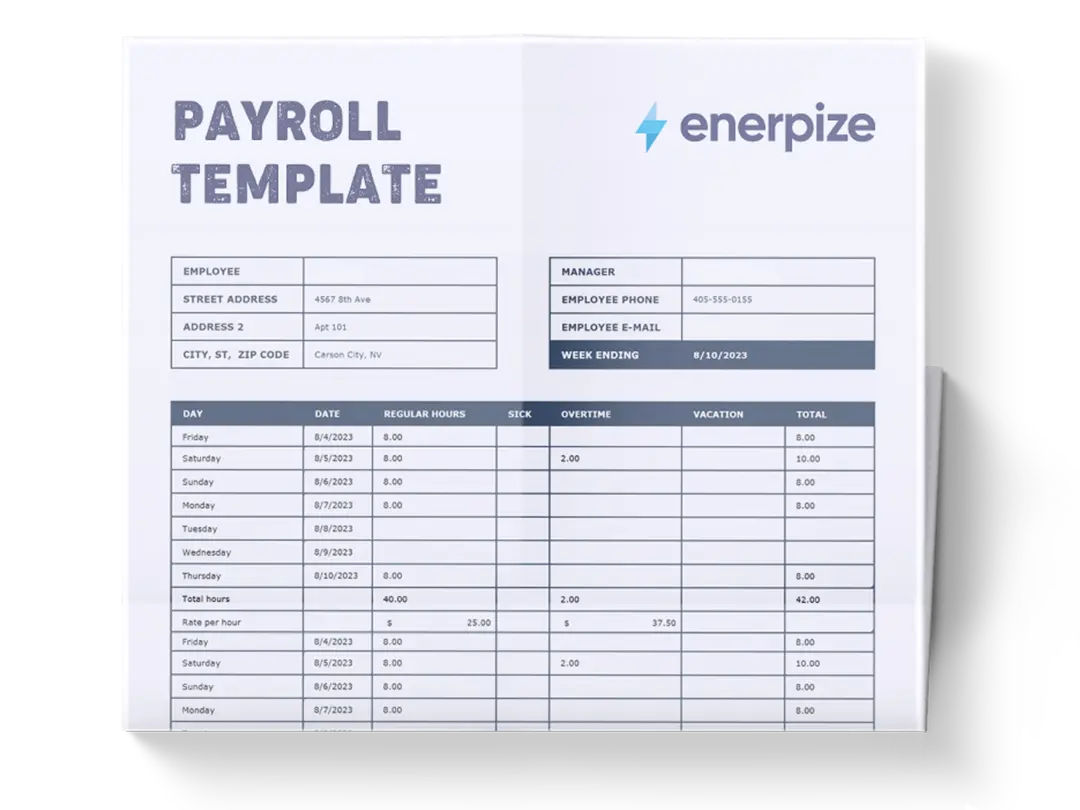
An employee earns $20 an hour and works 42 hours in the week, 40 regular hours and 2 hours of overtime at 1.5x. Regular pay comes to $800 (40 × $20). Overtime pay comes to $60 (2 × $30). Gross pay for the week is $860.
From there, deductions come out: say 12% federal tax ($103.20), 4% state tax ($34.40), and 7.65% for Social Security and Medicare combined ($65.79). Total deductions come to $203.39.
Subtract that from gross pay, and net pay lands at $656.61, the amount that actually reaches the employee's account.
The template above runs this exact sequence automatically for every employee, every pay period, so this same math never has to be worked out by hand twice.
Six steps to process one payroll manually. Enerpize does it in one — automatically accurate, compliant, and ready on time. Start for free.
When a Spreadsheet Stops Being Enough
A template works well until payroll stops being simple. That threshold looks different for every business, but it usually shows up as the same feeling: recalculating the same formulas every pay period, second-guessing a deduction because a rule changed, or reconstructing last month's numbers because nothing carried over automatically. Once that feeling becomes routine, the spreadsheet has quietly turned into the slowest part of the process rather than the fastest.
Building Salary Rules Without Writing Formulas
Most payroll spreadsheets break the same way. Someone adds a one-off bonus condition, a tenure-based raise, or a department-specific deduction, and the formula that used to be simple turns into a nested IF statement nobody else on the team wants to touch. Enerpize handles this differently. Instead of writing the formula yourself, you describe the rule in plain language, for example, "add a 10% bonus for anyone with over two years of tenure," and the system builds the underlying calculation automatically, covering bonuses and deductions alike. Before it touches a real pay run, you can test it against an actual employee's numbers and review the result, so nothing goes live until you've seen exactly what it produces.
Payslips Tied to Attendance, Automatically
A template only calculates what you type into it. If someone was late three times, took unpaid leave, or logged overtime last week, that information has to be manually pulled from a separate attendance sheet and entered by hand, and it's an easy step to get wrong or skip under deadline pressure. Enerpize links payroll directly to attendance and leave records, so delays, absences, and overtime feed into the pay run automatically rather than through a second manual step. Pay runs can be generated for a whole branch, a department, or specific employees in a few clicks, and payslips are generated, approved, and adjusted in bulk or individually, with bonuses and commissions routed through manager approval before anything moves to disbursement.
Handling Advances, Loans, and Reimbursements
Salary advances, staff loans, and expense reimbursements are usually where a spreadsheet-based process starts to fall apart, since none of them fit neatly into a single pay period. Enerpize tracks salary advances and loan requests against future pay periods directly, letting you set the amount and the installment schedule and decide whether the deduction comes out of a future payslip or gets managed separately. Petty cash, company card settlements, and travel or expense reimbursements consolidate into the same payslip rather than living in a separate reconciliation spreadsheet that has to be manually matched up at month-end.
Where Payroll Meets Accounting
The last mile of most manual payroll processes is re-entering the same numbers into the accounting system once payroll is done, once to pay people, once to book it. Enerpize closes that gap: every payroll transaction ties back into the chart of accounts automatically, payroll ledger entries can be allocated to specific cost centers, and tax journal accounts stay tracked without a second manual entry. Pay run currencies, payout accounts, and payment dates are configured once rather than re-checked every cycle.
If you're managing employee records and attendance in separate tools right now, this is usually where consolidating starts paying for itself, not because the template stops working, but because the manual reconciliation around it starts costing more time than the calculations ever did. Explore the full payroll and contracts management system if that sounds like where you're headed. And if you're not there yet, that's fine too, the free template above still covers straightforward payroll for a small, stable team.
Payroll Statutory Deductions by Country
United States
US payroll runs on FICA, the combined Social Security and Medicare tax, at a fixed 7.65% split evenly between employer and employee (6.2% Social Security, 1.45% Medicare), plus federal income tax withholding and, in most states, a state income tax withholding on top. Social Security tax only applies up to an annual wage base, $184,500 for 2026, after which it stops for the rest of the year, while Medicare tax applies to all wages with no cap, according to the Social Security Administration. Unlike the Philippines, Kenya, South Africa, or Nigeria, there's no single national agency handling this, employers remit federal withholding to the IRS and state withholding separately to their state's revenue department, so a payroll template used for US employees needs to track federal and state tax as distinct lines, not one combined "tax" figure, since the rates, rules, and filing deadlines for each come from different authorities entirely.
Philippines
Payroll in the Philippines runs on three mandatory government contributions on top of income tax withholding: SSS (retirement, disability, and death benefits), PhilHealth (national health insurance), and Pag-IBIG, also called HDMF (a housing savings fund). Each is split between employer and employee and remitted monthly, and businesses hiring in the Philippines need all three set up correctly before the first payroll run, according to the Social Security System. A payroll template built for the Philippines should have separate deduction rows for each of these three, they're distinct contributions with different rates and ceilings, not one combined line item.
Kenya
Kenyan payroll currently runs on four statutory deductions: NSSF (the national pension scheme), SHIF (the health insurance contribution that replaced NHIF), the Affordable Housing Levy, and PAYE income tax, all remitted through the Kenya Revenue Authority's iTax platform by the 9th of the following month, per KRA's own guidance. If your payroll template still has a line labeled NHIF, that's outdated, SHIF replaced it, and payslips need to reflect the new name and calculation to stay accurate.
South Africa
South African payroll includes UIF, the Unemployment Insurance Fund, alongside PAYE. UIF is calculated at 1% of an employee's earnings from both the employer and the employee, up to a monthly earnings cap, and remitted to SARS alongside PAYE through the monthly EMP201 return, as confirmed by SARS. It's a smaller deduction than payroll taxes in many other countries, but it's mandatory for effectively every employee working more than 24 hours a month, so it belongs in the deductions section of any template used for South African payroll.
Nigeria
Nigerian payroll centers on PAYE income tax and a mandatory pension contribution regulated by PenCom, typically a minimum of 10% from the employer and 8% from the employee, paid into a licensed Pension Fund Administrator. Many employers also handle the National Housing Fund, a 2.5% deduction from basic salary. Registration with PenCom and consistent monthly remittance are the two areas Nigeria's Pension Commission flags most often as compliance risks for growing businesses, so a payroll template used in Nigeria should track pension and NHF as separate, clearly labeled lines rather than folding them into a generic "deductions" total.
FAQs
What is a payroll template?
A payroll template is a pre-designed document used to calculate and record employee compensation for a pay period — including base salary, overtime, tax withholdings, deductions, and net pay. It helps businesses process payroll accurately and consistently without manual calculations.
What should a payroll template include?
A complete payroll template should include: employee name and ID, pay period dates, hourly rate or monthly salary, regular and overtime hours, gross pay, tax withholdings (federal, state, local), other deductions (insurance, pension), and final net pay. For automated payroll processing.
How do I create a payroll template in Excel?
Start with columns for employee name, pay rate, hours worked, gross pay, deductions, and net pay. Use Excel formulas to automate calculations — for example, gross pay = hours × rate, and net pay = gross pay − total deductions. Or download our free Excel payroll template above and customize it directly.
What is the difference between a payroll template and a payslip?
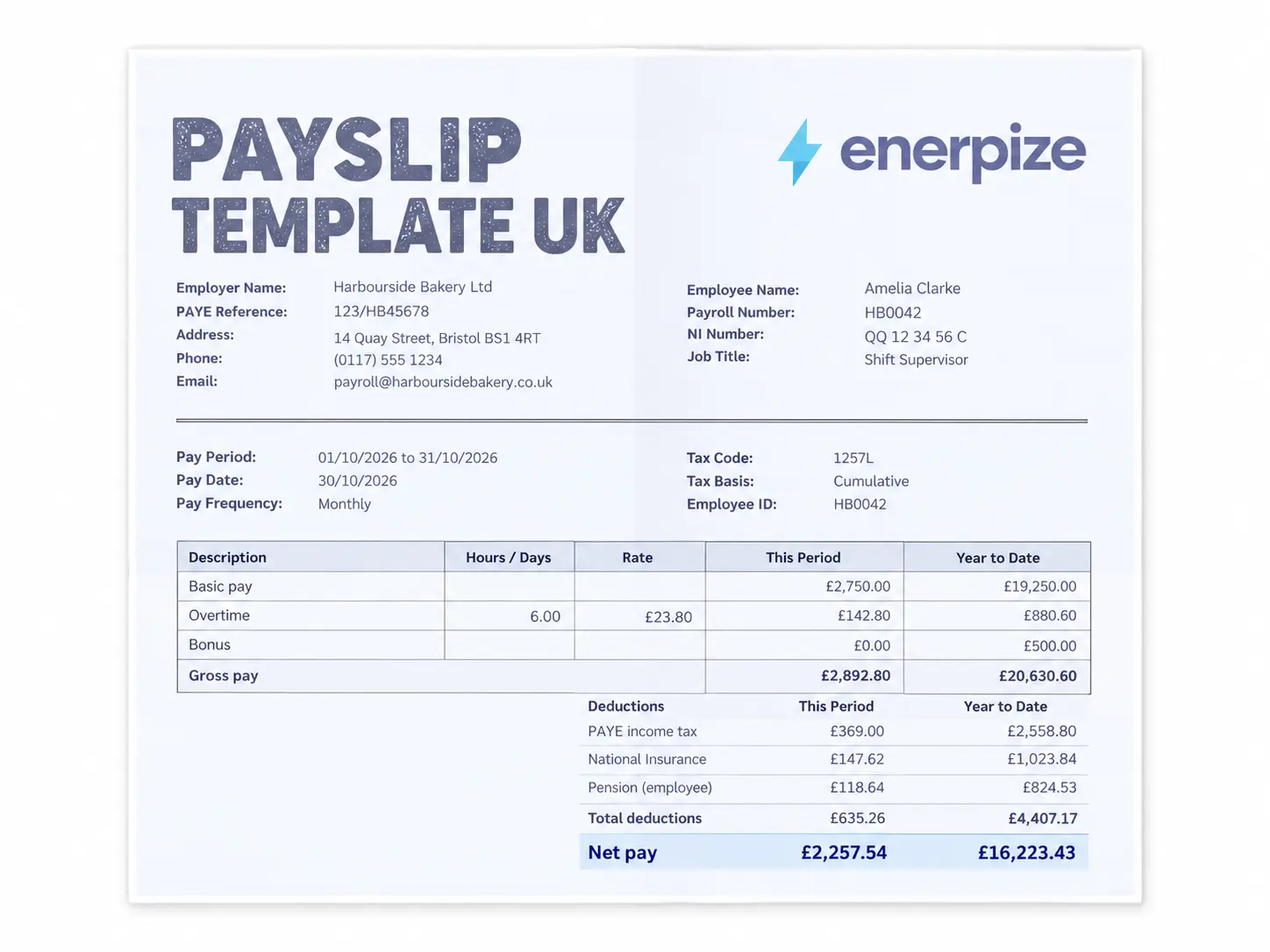
A payroll template is used by HR or employers to calculate and process compensation for all employees in a pay period. A payslip is the individual document given to each employee showing their specific earnings and deductions. Download our free payslip template to see what employees receive.
How do I calculate overtime in a payroll template?
Overtime pay = (Hourly Rate × Overtime Multiplier) × Overtime Hours. The standard multiplier is 1.5x for time-and-a-half. Use our free overtime calculator to verify overtime amounts before entering them into the payroll template.
When should I switch from a payroll template to payroll software?
A template works well as long as payroll stays simple, one pay rate structure, one country, no attendance-linked deductions or salary advances to track. Once you're managing bonuses tied to conditions like tenure, salary advances against future pay periods, or payroll that needs to sync automatically with attendance and accounting, manual recalculation usually starts costing more time than it saves.
Do payroll deductions differ by country?
Yes, significantly. The US runs on FICA (Social Security and Medicare) plus separate federal and state tax withholding. The Philippines requires three separate contributions, SSS, PhilHealth, and Pag-IBIG, on top of income tax. Kenya requires NSSF, SHIF, the Affordable Housing Levy, and PAYE. South Africa adds UIF alongside PAYE. Nigeria centers on PAYE and a PenCom-regulated pension contribution, often alongside the National Housing Fund. A payroll template used across multiple countries needs separate, clearly labeled deduction rows for each country's specific requirements rather than one generic "deductions" line, see the country breakdown above for the specifics.
How much should I withhold for Social Security and Medicare in the US?
For 2026, the combined FICA rate is 7.65%, split evenly between employer and employee, 6.2% for Social Security and 1.45% for Medicare. Social Security tax stops once an employee's wages for the year reach $184,500, the annual wage base, while Medicare tax continues on all earnings with no cap. Federal and state income tax withholding are calculated and remitted separately from FICA.
One placement note: since these tie directly to content we added earlier in the page (the software section and the country breakdown), I'd put them right after the existing "How do I calculate overtime" question rather than at the very end of the FAQ list, that keeps the FAQ order roughly mirroring the order topics appear in the body.
About the Author
Omar El Bahr is a Senior Digital Growth Specialist at Enerpize, where he leads SEO, content strategy, and organic growth across international markets. He is a Forbes Communications Council contributor and has written for Entrepreneur on business communication and digital strategy.