Posted on 5 March 2026
Earnings Statement Template Excel & Word
- The earnings statement template is available in Excel, Word, Google Sheets, Google Docs, and PDF.
- It accurately tracks employee earnings and deductions and shows how base salary, overtime, bonuses, and all deductions combine to calculate net pay.
- Simplify compliance and ensure payroll follows federal, state, and benefit regulations while maintaining a clear audit trail.
- Enhance payroll transparency with a standardized layout to reduce manual errors and make payroll review faster for both HR teams and employees.


What Is an Earning Statement Template?
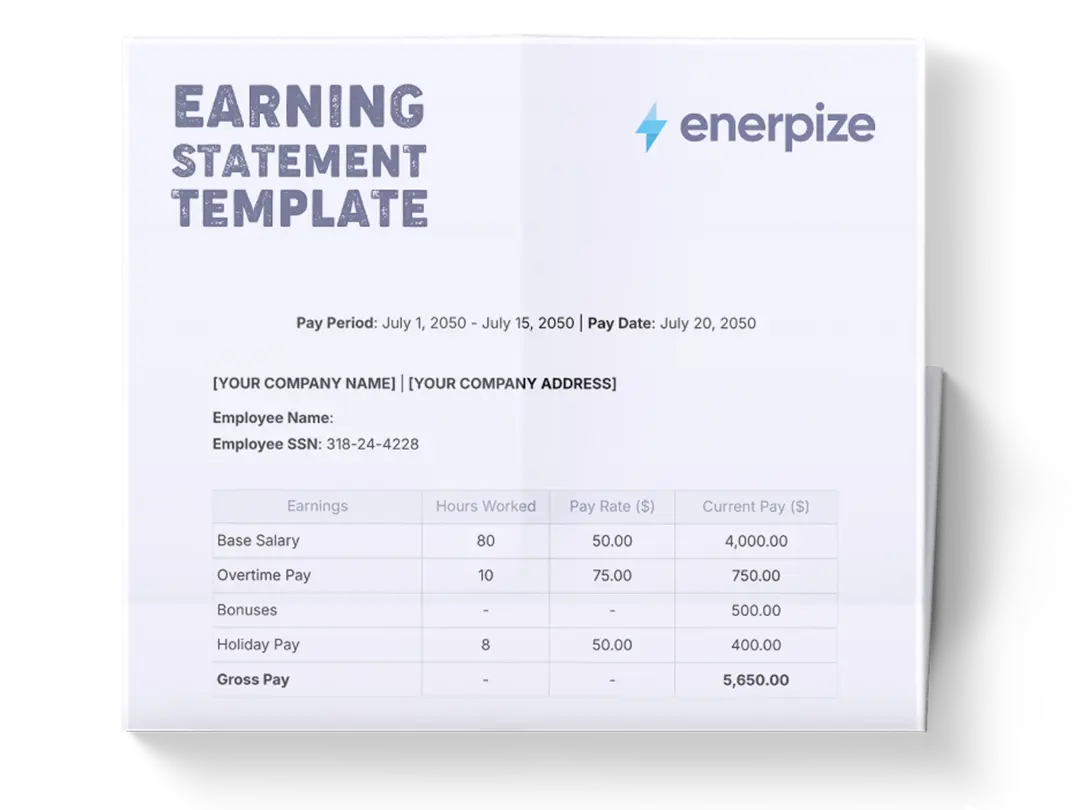
An earning statement template calculates an employee’s gross earnings, itemizes deductions, and determines net pay for a given pay period. It serves as a standardized format for organizing different pay components alongside mandatory and voluntary deductions like taxes, insurance, and retirement contributions. It also provides clarity, consistency, and transparency in payroll documentation, ensuring that pay calculations are systematic and auditable.
What Does the Earning Statement Template Contain?
Gross Earning
Group all earnings before deductions. It organizes earning components so users can see how total pay is built from individual parts.
Base Salary
The core compensation for work performed during the period, excluding bonuses or overtime, serves as the foundation for total gross pay.
Overtime
Extra earnings are calculated when employees work beyond standard hours, paid at a higher rate as defined by labor rules or company policy.
Bonuses
Additional variable earnings awarded for performance, incentives, or discretionary reasons; contribute to the total gross.
Total Gross Pay
The sum of all earnings (base salary + overtime + bonuses) represents the employee’s total income before deductions.
Deductions
All items are subtracted from gross pay. This section is essential for calculating net pay after legally required and voluntary deductions.
Federal Tax
The amount withheld for national income tax, typically determined by withholding allowances and tax tables.
State Tax
Income tax withheld for the employee’s state of residence; applied where state income tax is relevant.
Social Security
Mandatory contribution withheld for the federal Social Security program.
Medicare
Mandatory Medicare tax withheld to fund the federal health insurance program for retirees.
Health Insurance
Voluntary or employer‑sponsored insurance premiums are deducted based on the employee’s participation in benefits.
Retirement (401k)
Voluntary retirement plan contributions are withheld from the employee’s pay; typically, pre‑tax.
Other Deductions
Any additional deductions not covered above, such as union dues or wage garnishments.
Total Deductions
The sum of all withholding amounts; this figure is subtracted from the total gross pay.
Net Pay
The final amount the employee receives after all deductions, often referred to as “take‑home pay.”
How to Use the Earning Statement Template
1- Gather Employee and Pay Period Information
Start by noting which employee the statement is for and the relevant pay period (e.g., calendar year or specific pay cycle). Ensure you have accurate base salary, overtime records, and bonus details before entering any numbers.
2- Enter Gross Earnings
Begin with the Gross Earnings block:
- Base Salary: Input the regular earnings for the period
- Overtime: Add any overtime pay earned
- Bonuses: Enter bonus amounts paid during the period
After all earning line items are entered, sum them to calculate Total Gross Pay
3- Populate Deductions
- Federal Tax: Input tax withheld based on payroll calculations
- State Tax: Enter applicable state income tax
- Social Security & Medicare: Add mandated contributions
- Health Insurance, Retirement (401k), Other Deductions: Include voluntary or additional deductions as applicable.
Once individual deductions are listed, total them to compute Total Deductions
4- Calculate Net Pay
Subtracts Total Deductions from Total Gross Pay.
5- Review for Accuracy
Double‑check all figures to ensure gross earnings components are correctly recorded.
6- Document and Communicate
Save or export the completed earning statement for record‑keeping. Provide a copy to the employee if required by your payroll policy or local labor regulations. Maintain a consistent filing structure so past earnings statements can be referenced easily.
Related Templates
Importance of the Earnings Statement Template
Ensures precise payroll calculations that build trust with employees
An earning statement template forces payroll professionals to document each pay component and each deduction systematically. This precision reduces disputes and builds transparency, which employees rely on to understand their pay. Instead of verbally explaining differences or manually calculating each record, the template ensures consistency across pay periods, so employees know how figures were derived.
Supports legal and tax compliance
Payroll is tightly regulated, and errors can lead to penalties. By breaking down earnings and all required withholdings, the template acts as a compliance checklist. Each line item helps you verify that you've correctly applied current tax and labor rules. This standardized format aids in audit readiness and can be referenced easily when responding to regulatory inquiries.
Streamlines financial planning and reporting
Earning statements are not just payroll tools; they are inputs into broader financial reporting. When gross and net pay figures are accurately recorded, finance teams can better forecast labor costs, budget for benefits, and analyze compensation trends. A template that clearly separates earnings and deductions provides clean data for payroll journals, balance sheets, and expense tracking.
Reduces manual errors and rework
Manual payroll calculations invite mistakes, especially when juggling multiple deductions and pay components. The template’s structured layout minimizes manual inputs and highlights missing or mismatched figures before they become costly errors. By using a consistent format, payroll teams spend less time correcting mistakes and more time on value‑added tasks like analyzing payroll trends or advising on compensation strategy.
Who Can Use the Earning Statement Template?
Payroll Specialists and HR Administrators
Payroll specialists and HR admins are the primary users of earning statement templates because they manage employee compensation and legal withholdings every pay period. The template provides a standardized structure that simplifies routine calculations and ensures compliance with tax and labor requirements. It helps them document adjustments like overtime or bonuses without losing track of individual components. For HR professionals who must field questions from employees about specific pay figures, the template’s transparent line items make explanations straightforward and defensible.
Small Business Owners Managing Payroll Internally
Small business owners who handle payroll without dedicated software benefit greatly from an earnings statement template. It gives them a consistent format for calculating pay and deductions, reducing the cognitive load of manual math. By working from a template, they can avoid costly errors and maintain better documentation for tax filings or when seeking loans and financial audits. This structure ensures that even complex pay elements, like overtime or multiple deductions, are recorded clearly and accurately.
Accountants Preparing Financial Records
Accountants rely on accurate payroll figures to prepare broader financial statements and compliance reports. An earning statement template feeds dependable data into ledger entries and accounting systems. With each gross and net pay figure clearly documented, accountants can reconcile payroll records with bank statements, tax filings, and benefit contributions. This clarity aids in year‑end closing, audit reviews, and strategic financial planning.
Employees Seeking Transparency in Their Pay
While not usually responsible for filling out the template, employees benefit from the clarity it provides. When shared as a pay stub or internal report, the template shows exactly how gross earnings and deductions contribute to net pay. This transparency helps employees verify correct withholdings and understand contributions to benefits like retirement or health insurance. It also fosters trust and reduces payroll inquiries.
Looking for Beyond Just Basic Payroll Calculations?
While this Earning Statement Template helps you compute gross pay and net pay accurately, businesses often need more advanced capabilities. That’s where Enerpize, our all‑in‑one ERP platform, comes in.
With the Enerpize payroll management system, you can:
- Automate payroll integration with time tracking and HR data
- Streamline tax compliance with built‑in regulatory updates and reporting
- Gain comprehensive workforce analytics tied to operational performance
If you’re ready to move beyond spreadsheets, Enerpize brings enterprise‑grade control to growing teams.