Posted on 25 January 2026
Sales Pipeline Template Excel & Google Sheets
- The sales pipeline template is available in Excel and Google Sheets.
- It tracks every active deal with clear ownership, value, and status.
- Forecast quarterly revenue using deal size and win probability.
- Prioritize sales efforts based on urgency, likelihood, and impact.


What Is a Sales Pipeline Template?
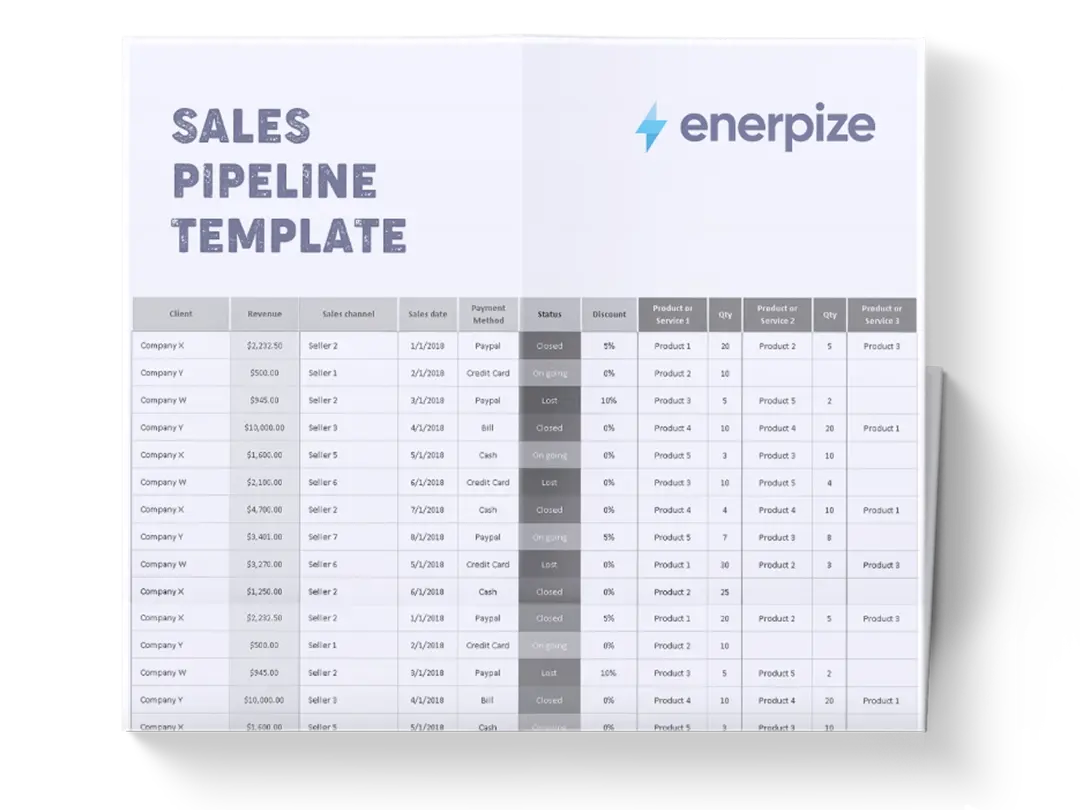
A sales pipeline management template is a tracking tool that visually organizes sales opportunities as they move through defined deal statuses within a specific time period. It provides a single, consistent view of all deals, including who owns them, how much they are worth, how likely they are to close, and where they currently stand.
Rather than relying on scattered notes, inbox follow-ups, or memory, the template creates an operational system for managing sales activity.
What Does the Sales Pipeline Template Contain?
Quarter Header (e.g., Quarter One)
Defines the time period covered by the pipeline. This ensures all deals listed contribute to a specific forecasting window, supporting quarterly planning and performance review.
Deal Name
Identifies each sales opportunity. This is typically the company name, project name, or opportunity label used to distinguish one deal from another.
Contact Person
Records the primary individual associated with the deal. This ensures accountability in communication and prevents confusion over who the active buyer or decision-maker is.
Assignee
Specifies the salesperson or account owner responsible for advancing the deal. This column establishes ownership and makes follow-ups and performance tracking possible.
Deal Size
Captures the monetary value of the deal. This figure feeds directly into revenue forecasting and prioritization decisions.
Win Probability
Represents the estimated likelihood of closing the deal, expressed as a percentage. This enables weighted forecasting rather than relying on raw deal values alone.
Deal Status
Indicates the current stage or condition of the deal, such as Complete, In Progress, Overdue, On Hold, or Not Started. This column shows pipeline movement and stagnation at a glance.
Priority
Flags the urgency or importance of the deal (High, Medium, Low). This helps sales teams focus their time on opportunities that matter most.
Comments
Provides space for contextual notes, updates, objections, next steps, or risks. This ensures important deal intelligence is captured alongside quantitative data.
Quarter Total Row
Summarizes total deal value for the period. This row provides a snapshot of pipeline size and supports high-level revenue discussions.
How to Use the Sales Pipeline Template
1- Start by confirming the sales period
Begin by ensuring the quarter label reflects the correct time frame. All deals entered should realistically be expected to progress or close within that period.
2- Enter each deal as a separate row
Add one row per opportunity. Use consistent naming conventions for Deal Name to avoid duplicates or confusion during reviews.
3- Assign ownership immediately
Populate the Assignee column as soon as a deal is added. Every deal should have a clear owner responsible for movement and updates.
4- Estimate deal value and probability
Enter the Deal Size based on the expected contract value, then assign a Win Probability that reflects the deal’s maturity. These two fields together form the basis of forecasting.
5- Set the current deal status
Select the most accurate Deal Status based on real progress—not optimism. This is critical for identifying stalled or overdue deals.
6- Apply priority intentionally
Use the Priority column to signal where attention is required. High-priority deals should justify their status through size, urgency, or strategic value.
7- Document context in comments
Use the Comments column to log next steps, objections, decision timelines, or blockers. This prevents loss of information between check-ins.
8- Review totals and patterns regularly
Use the Quarter Total and visible status distribution to identify gaps, bottlenecks, or overreliance on low-probability deals.
Related Templates
Importance of a Sales Pipeline Template
Improves Revenue Forecast Accuracy
A sales pipeline report template replaces guesswork with structured forecasting. Combining deal size with win probability, it allows teams to estimate expected revenue rather than optimistic totals. This is especially important for businesses planning hiring, marketing spend, or cash flow. Without a pipeline, forecasts are often inflated and unreliable. With it, leadership gains a realistic view of what revenue is likely to materialize within the quarter.
Creates Accountability Across the Sales Team
By assigning every deal to a specific owner, the template removes ambiguity around responsibility. Stalled or overdue deals are visible, making inaction immediately apparent. This encourages consistent follow-up and disciplined deal management. Over time, it also enables fair performance evaluation based on pipeline quality and movement, not just closed deals.
Helps Prioritize Sales Effort Effectively
Sales teams often waste time on low-impact or unlikely deals. The Priority, Status, and Probability fields work together to guide focus toward opportunities that justify effort. This prevents reactive selling and supports intentional time allocation. As a result, teams close more valuable deals with less burnout.
Provides Visibility Into Pipeline Health
The template makes patterns obvious—such as too many deals stuck “In Progress” or an overreliance on low-probability opportunities. These insights allow managers to intervene early with coaching, strategy adjustments, or resource reallocation. Healthy pipelines don’t just grow; they move consistently.
Who Can Use a Sales Pipeline Template?
Startup Founders and Small Business Owners
Founders often manage sales alongside multiple responsibilities. This template gives them a clear, lightweight system to track opportunities without complex CRM tools. It helps founders understand revenue outlook, identify risks early, and maintain control as deal volume grows.
Sales Representatives and Account Executives
Individual contributors use the template as a personal operating system. It clarifies daily priorities, ensures no deal is forgotten, and provides structure for follow-ups. The comments and status fields help reps manage conversations strategically rather than reactively.
Sales Managers and Team Leads
Managers rely on the pipeline to assess performance beyond closed revenue. It reveals pipeline coverage, deal velocity, and rep effectiveness. This supports better coaching, forecasting, and resource planning during weekly or monthly reviews.
Service-Based Businesses and Agencies
Agencies and consultants with longer sales cycles benefit from tracking deal progress over time. The template helps manage proposals, negotiations, and decision delays while keeping revenue expectations realistic.
Teams Transitioning From Spreadsheets to Systems
For organizations not ready for a full CRM, this template provides structure and discipline. It builds sales process maturity and prepares teams for future system adoption without overwhelming them.
Looking for Beyond Just Tracking Deals in a Spreadsheet?
While this sales pipeline template helps you organize opportunities, forecast revenue, and prioritize deals, growing businesses often need more advanced capabilities. That’s where Enerpize, our all-in-one ERP platform, comes in.
With Enerpize Online Sales Management Software, you can:
- Centralize sales pipelines, customer data, and deal history
- Automate sales workflows, reminders, and reporting
- Connect sales performance with finance, operations, and forecasting
- Gain real-time visibility across teams and growth stages
If you’re ready to move beyond spreadsheets, Enerpize brings enterprise-grade control to growing teams.