Posted on 4 June 2026
Free Pay Stub Template Download for US, Canada and Australia
- Downloads instantly in Excel, Word, and PDF with country-specific compliance fields for the US, Canada, and Australia.
- Calculates gross pay, total deductions, and net pay automatically using built-in formulas tied to your earnings and withholding inputs.
- Covers FICA, Social Security, and state tax for US payroll. CPP, CPP2, and EI for Canadian payroll. Super, PAYG, and allowances for Australian payslips.
- The free pay stub template is available in Excel, Word, PDF, Google Sheets, and Google Docs.
The free pay stub template is a pre-formatted payroll document used by employers and self-employed individuals in the US, Canada, and Australia to record gross earnings, itemized deductions, and net pay for each pay period, with year-to-date totals that reconcile against annual tax filings.


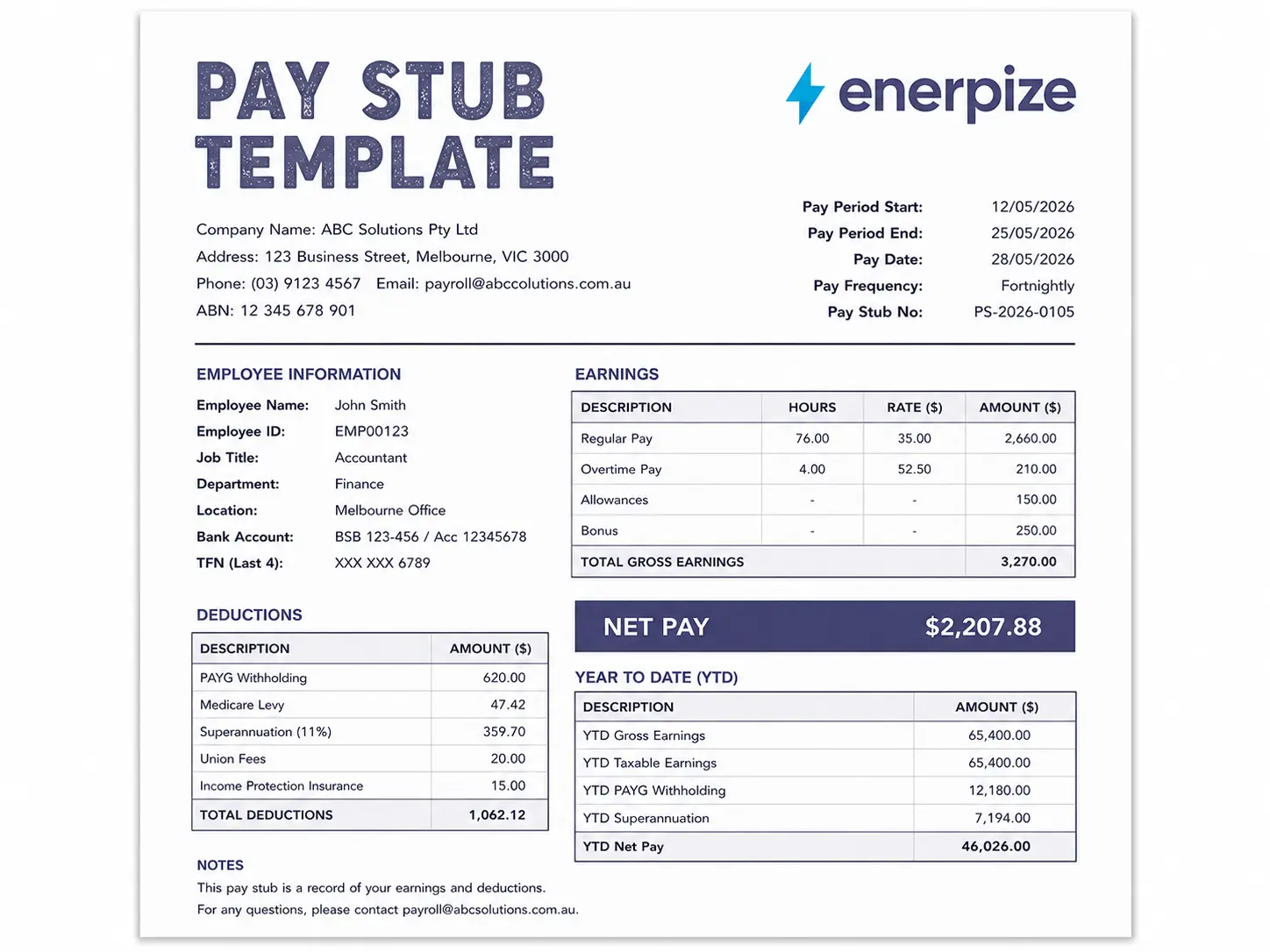
Most people discover what a pay stub actually needs to contain at the worst possible moment. Their employee needs proof of income for an apartment application. The landlord rejects it. Nobody gets what they want.
This page fixes that before it happens. Download a free pay stub template in Excel, Word, or PDF. Understand what goes on it, how to calculate every number correctly, and what the rules look like if you are running payroll in the US, Canada, or Australia. Then, when you are ready to stop doing this by hand, Enerpize does it for you automatically.
What Is a Pay Stub?
A pay stub is a document that breaks down exactly how an employee's gross pay was calculated and what was deducted before the net amount reached their account. It is also called a paycheck stub, earnings statement, payslip, wage statement, or salary slip. The name changes. The purpose does not.
Here is what most people get wrong. A pay stub is not the same as a paycheck. A paycheck delivers the money. A pay stub delivers the explanation behind it. When someone receives direct deposit, there is no physical check at all. The pay stub is the only record that exists.
Why does that matter? Because employees need pay stubs to prove income for apartment applications, mortgage approvals, and financial aid reviews. Employers need them as a legal paper trail that holds up against underpayment claims and payroll audits. A missing or inaccurate pay stub is not just an administrative inconvenience. It is a liability.
Most US states require employers to provide pay stubs. Nine states currently do not: Alabama, Arkansas, Florida, Georgia, Louisiana, Mississippi, Ohio, South Dakota, and Tennessee. Even in those eight, issuing them is standard practice. In Australia, payslips are legally mandatory under the Fair Work Act 2009. In Canada, most provincial employment standards acts require written pay statements.
The document you issue every payday is a small thing. What it represents for the person receiving it is not.
No spreadsheets. No formula errors. Compliant pay stubs in one click. Generate Pay Stubs Automatically. Try Enerpize Free.
What Should a Pay Stub Include?
Not every field on a pay stub is legally required. But the difference between the minimum and the complete picture is the difference between a pay stub that passes a landlord's review and one that gets rejected. Here is how to think about it.
Legal Minimum
The fields most states and countries require on every pay stub:
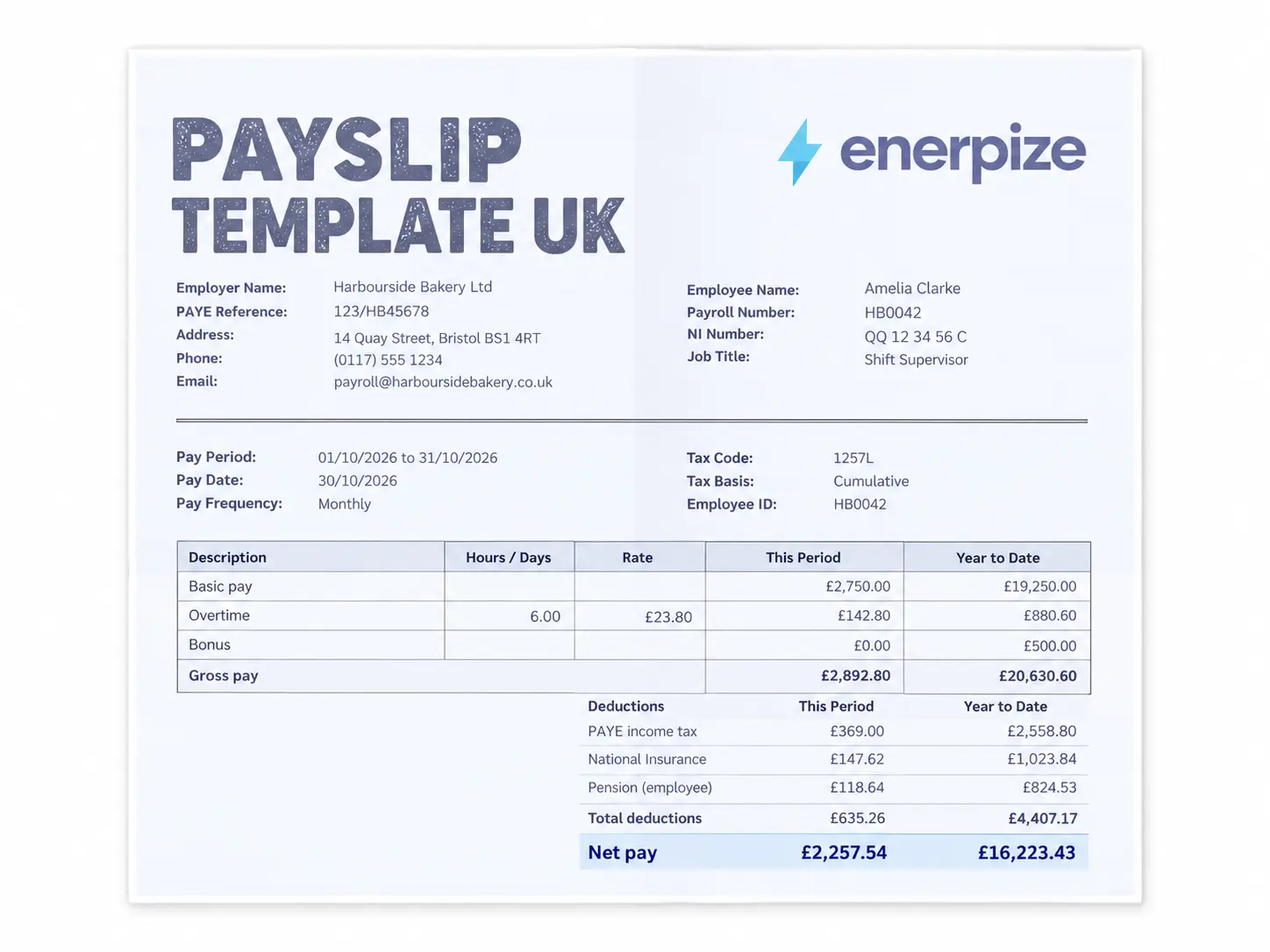
Employer name and address. Employee full legal name and employee ID. Pay period start and end dates. Pay date. Gross earnings. Itemized deductions, including federal tax, state tax, and FICA (Social Security plus Medicare). Net pay.
That is the floor. It keeps you compliant. It does not protect you from disputes.
Best Practice
Fields that protect employers and employees when questions arise:
Employee last four digits of Social Security Number. Job title and department. Pay type (hourly vs salary). Exempt or non-exempt status under the FLSA. Check or reference number. Regular hours and overtime hours shown separately. Hourly rate or annual salary rate.
Full Audit-Ready
Fields that Enerpize generates automatically, and that hold up to IRS and state agency review:
Year-to-date gross earnings. Year-to-date deductions. Year-to-date net pay. Local or city tax line (required in cities like New York City and Philadelphia). FSA and HSA contributions. Garnishments. 401k and IRA contributions. Dental and vision listed separately from health insurance. PTO and vacation payout as a standalone earnings line.
The three-tier difference is not theory. It is what separates a pay stub that works from one that creates a problem you find out about later.
How to Fill Out a Pay Stub Template
Step 1: Enter Employer Details
To fill out the pay stub template, start with the Legal business name, EIN (format: XX-XXXXXXX), address. If you are a sole proprietor without an EIN, use your Social Security Number. A pay stub without an EIN will be flagged on most loan and apartment applications.
Step 2: Enter Employee Details
Full legal name, last four digits of SSN, employee ID, job title, department, pay type, and exempt status. These are the fields that make a pay stub usable as proof of employment, not just proof of income.
Step 3: Set the Pay Period
Period start date, period end date, pay date, and check or reference number. Pay date is typically three to five business days after the period end date for direct deposit processing. Document it. Inconsistencies between stated pay dates and actual deposit dates are a common trigger for state wage audits.
Step 4: Calculate Gross Earnings
For hourly employees: regular hours multiplied by rate, plus overtime. The Federal overtime formula is: Regular Rate x 1.5 x Overtime Hours. Note that California has a daily overtime thresholds in addition to the standard weekly 40-hour rule. Colorado has a daily overtime, but the threshold is 12 hours per day, not 8. Per the 2026 COMPS Order from Colorado CDLE: overtime at 1.5x kicks in after 40 weekly hours or after 12 daily hours. Always confirm your state's rules before calculating.
For salaried employees: Annual Salary divided by number of pay periods in the year. For biweekly pay, that is 26 periods. For semimonthly, 24. Do not estimate. Get this number right before you issue a single stub.
Add bonuses, PTO payouts, and commissions as separate line items. Commingling them inside gross pay is a common audit trigger.
Step 5: Calculate Deductions
Federal income tax: based on employee's W-4 withholding elections.
State income tax: varies by state. Nine states have no state income tax on wages: Alaska, Florida, Nevada, New Hampshire, South Dakota, Tennessee, Texas, Washington, and Wyoming.
Social Security: 6.2% of gross wages up to the 2026 wage base of $184,500 per the IRS Employer's Tax Guide Publication 15. Once an employee's cumulative gross crosses $184,500 in the calendar year, Social Security withholding stops. Most manual templates do not account for this threshold. That is how businesses end up over-withholding and owing money back.
Medicare: 1.45% of all gross wages with no cap. An additional 0.9% applies to wages above $200,000 for single filers.
Then voluntary deductions: health, dental, vision, 401k, FSA, HSA. List every one as a separate line.
Step 6: Calculate Net Pay
Gross Earnings minus Total Deductions equals Net Pay. That is what hits the employee's account. Confirm the number before issuing.
Step 7: Update Year-to-Date Totals
Add current period gross to previous YTD gross. Do the same for deductions and net. This is what the IRS reconciles against the W-2 at year end. If your pay stubs show one YTD gross and your W-2 shows another, you have a problem.
Step 8: Save a Copy
One copy per employee per pay period. The IRS recommends keeping payroll records for at least three years. For employment tax records, four years is the standard. The DOL requires employers to retain payroll records for a minimum of three years under the Fair Labor Standards Act.
Done filling out pay stub templates by hand? Automate Your Pay Stub with Enerpize. Try Enerpize Free.
The Two Calculations That Trip Up Small Businesses
Overtime. Federal law sets the overtime rate at 1.5 times the regular rate for hours over 40 in a workweek. Some states apply daily thresholds. Per the California Department of Industrial Relations overtime rules, California requires 1.5 times for all hours over eight in a day, and double time for all hours over 12 in a day. If you have employees in California and you are only calculating weekly overtime, you are underpaying.
The Social Security wage base cutoff. The 2026 Social Security wage base is $184,500. The moment an employee's cumulative earnings for the year cross that number, you stop withholding the 6.2% Social Security tax for the rest of the calendar year. Manual templates do not flag this. Payroll software does. Per IRS Publication 15, the Employer's Tax Guide for 2026, there is no wage base limit for Medicare, but Social Security withholding stops at $184,500 without exception. If you have a salaried employee earning above that threshold annually, you need to track this monthly or you will over-withhold through Q4 every year.
Pay Stub Template Variants
Not every business needs the same template. Here is how to match the right one to your situation.
| Template Variant | Best for | The mistake it prevents |
|---|---|---|
| Basic, no calculator | Quick print-and-fill for simple payrolls | Blank fields and missing structure |
| With calculator | Any business processing payroll in Excel | Arithmetic errors on deductions and net pay |
| With PTO and Overtime | Retail, hospitality, healthcare hourly teams | Counting PTO hours as worked hours inside gross pay |
| Salaried, no hours | Office workers on fixed annual compensation | Displaying an hourly rate on a salaried stub, which creates legal ambiguity |
| Contractor (1099) | Freelancers, gig workers, subcontractors | Withholding taxes the contractor is responsible for themselves |
| ADP-style | Mid-market teams replicating existing software format | Format mismatch when exporting from payroll software |
Pay Stub Requirements by Country
United States
The US has no federal pay stub mandate. The Fair Labor Standards Act requires employers to keep accurate payroll records, but it does not specify a required format or delivery method. The state level is where the rules actually live.
Forty-two states require some form of written or electronic pay statement. The strictest by far is California. California pay stubs must show the total hours worked, all applicable hourly rates in effect during the pay period, the corresponding number of hours worked at each rate, all deductions itemized, the inclusive dates of the pay period, the employee's full name and last four digits of SSN, the name and address of the legal employer entity, and the accrued available paid sick leave balance. A single missing field exposes an employer to a civil penalty of $50 per employee for the first violation and $100 per employee for each subsequent violation.
New York requires wage rate notice at hire and a written statement every pay period. Digital delivery is compliant as long as employees can access and print their own copy. Texas requires access plus print capability. Electronic delivery works only if the employee can download and print independently.
The nine no-income-tax states (Alaska, Florida, Nevada, New Hampshire, South Dakota, Tennessee, Texas, Washington, Wyoming) still require the full FICA deductions. No state income tax does not mean no deductions.
For the authoritative state-by-state breakdown, the Department of Labor FLSA record-keeping requirements set the federal baseline every employer needs to understand before looking at state law.
Canada
In Canada, pay stub requirements are set by provincial employment standards legislation for most workers, and by the Canada Labour Code for federally regulated industries including banking, telecommunications, and interprovincial transportation.
Every province requires some form of written pay statement. The fields that must appear:
Pay period dates. Gross earnings. Regular hours and overtime hours shown separately. CPP (Canada Pension Plan) deduction. EI (Employment Insurance) premium. Federal income tax. Provincial income tax. Net pay.
The 2026 rates you need to know:
CPP employee contribution rate: 5.95% on pensionable earnings between $3,500 and $74,600. There is also CPP2, which applies to earnings between $74,600 and $85,000 at 4%. EI employee premium rate for 2026: 1.63% of insurable earnings. Employer EI rate: 1.4 times the employee rate. All rates are confirmed on the CRA CPP contribution rates page.
Quebec operates separately. Quebec employees contribute to the Quebec Pension Plan (QPP) instead of CPP. The QPP employee rate for 2026 is 6.40%. Quebec also has its own provincial parental insurance plan (QPIP) with separate employee and employer premiums. A single generic Canadian template does not cover Quebec without a separate variant.
The T4 reconciliation risk that nobody talks about: every Canadian employee gets a T4 at year end. The T4 boxes reconcile against what your pay stubs showed as YTD gross and YTD deductions all year. If those two numbers do not match, the CRA notices. Not in an email. In an audit. Keeping accurate YTD totals on every pay stub issued throughout the year is not just good practice. It is your first line of defense against that conversation.
Australia
Australia does not call it a pay stub. The correct term is payslip. And unlike the US, there is no grey area here.
Under section 536 of the Fair Work Act 2009, employers must give every employee a payslip within one working day of payday, even if the employee is on leave. Electronic or paper, either is accepted. A late, missing, or incomplete payslip is a breach of the National Employment Standards and can attract a civil penalty as Per the Fair Work Ombudsman litigation page, penalties were updated from January 1, 2025. Current maximum civil penalty for an individual is up to $19,800 per contravention, and up to $99,000 for a serious contravention.
The fields the Fair Work Ombudsman payslip requirements mandate on every Australian payslip:
Employer name and ABN. Employee name. Pay period dates. Date of payment. Gross pay. Net pay. Each separate base rate of pay. Loadings, penalty rates, overtime rates, and allowances, if applicable, each shown separately. The name of the superannuation fund receiving employer contributions. The amount of super contributed for the period. The employee's super fund member number.
The superannuation (super) employer contribution rate is now 12% of ordinary time earnings, having increased from 11.5% as of July 1, 2025. This is the legislated final rate under the Superannuation Guarantee scheme, confirmed by the ATO Super Guarantee rates page. From July 1, 2026, under the new Payday Super rules, super contributions must be paid with every pay run and reach the employee's super fund within seven business days of the pay date. The old quarterly payment schedule is being phased out entirely.
The field that almost every generic payslip template misses: the super fund name and the employee's member number. They are legally mandatory. If an employee cannot see which fund is receiving their super on their payslip, they cannot verify it is being paid. The ATO runs active compliance campaigns on unpaid and underpaid super, specifically because it is one of the most common forms of wage theft in Australia.
Modern Awards add another layer. An employee under the General Retail Industry Award and an employee under the Clerks Private Sector Award have different entitlements for penalties, loadings, and overtime. A generic payslip template captures neither correctly. If your business is covered by a Modern Award, the template is a starting point. The Award is the law.
Pay Stub vs. Paycheck
People use the terms interchangeably. They are not the same thing.
A paycheck is the payment itself. It says: here is the amount you are receiving. A pay stub is the breakdown behind it. It says: here is how we got to that number, where every dollar went, and what your cumulative totals look like for the year.
When an employee receives direct deposit, there is no paycheck at all. There is only the pay stub. The pay stub is the record.
| Pay Stub | Paycheck | |
|---|---|---|
| What it is | Earnings breakdown document | Payment instrument |
| What it contains | Gross pay, deductions, net pay, YTD | Net payment amount only |
| Legal standing | Required in most US states and all of Australia | Required only where paper checks are still in use |
| Practical use | Proof of income, tax filing, audit defence | Depositing or cashing a payment |
Stop Filling Templates by Hand. Let Enerpize Run Your Payroll
A downloaded template works for one employee on a good day. It starts breaking at five. At ten, someone changed their 401k contribution mid-cycle and nobody updated the YTD. At twenty, you are spending more time reconciling spreadsheets than running your business.
That is the problem Enerpize was built to solve.
Enerpize Payroll and Contracts Management automates every step of the pay stub process from the moment an employee clocks in to the moment the payslip lands in their hands. No manual calculations. No copy-pasting YTD figures from last period. No formula errors hiding inside a cell you forgot to check.
Here is what that looks like in practice.
Salary Structures That Calculate Themselves
Associate a salary structure to an employee, department, or branch once. Define the components: base pay, allowances, bonuses, commissions, deductions. Enerpize runs the calculation every pay cycle automatically, using your own predefined conditions, not a generic formula someone built in 2019.
Payslips Generated From Attendance
The Enerpize HR Management system connects attendance data directly to payroll. Overtime hours, late deductions, leave balances, and absenteeism all flow into the payslip without a single manual entry. What your employee worked is what gets paid. The payslip reflects it precisely.
Contracts Tied to Compensation
Every time an employee is hired, promoted, or relocated, Enerpize generates a compliant contract with the updated salary components built in. The payslip follows the contract. There is no gap between what the contract says and what the employee receives.
Financial Claims Inside the Payslip
Travel reimbursements, petty cash settlements, salary advances, and loan installments all consolidate directly into the payslip. Your finance team sees one number. Your employee sees a complete breakdown. Nothing falls through the gap between HR and accounting.
Bulk and Individual Pay Runs
Run payroll for an entire branch, a single department, or one specific employee. Generate payslips in bulk, route them for manager approval, and push them to accounting for disbursement in clicks. The system handles the journal entries, cost center allocations, and tax tracking automatically.
Payslip Generation That is Actually Compliant
Whether you are running payroll in Australia under Fair Work Act requirements, in Canada with CPP and EI deductions, or in the US with FICA withholding and state tax rules, Enerpize generates payslips that reflect the right fields, the right deductions, and the right YTD totals for every pay period.
The templates on this page are the right starting point for a business that is not yet ready for software. When you are ready, Enerpize is the next step.
Automate Your Payroll with Enerpize. Start Free. 14-day free trial. No credit card. No setup fees. All features included.
Key Takeaways
- A pay stub and a paycheck are not the same thing. One delivers the money. The other explains where every dollar went.
- Eight states in the US have no pay stub requirement. Forty-two do. Australia makes payslips mandatory within one working day of payday. Canada requires written pay statements in virtually every province.
- The 2026 Social Security wage base is $184,500 per IRS Publication 15. Once an employee crosses that threshold in the calendar year, you stop withholding. Most manual templates never flag this.
- Australia's superannuation rate is now 12% of ordinary time earnings as of July 1, 2025. The fund name and employee member number must appear on every payslip. Most generic templates leave both fields out.
- Canada has two CPP tiers in 2026. CPP applies at 5.95% up to $74,600. CPP2 kicks in at 4% on earnings between $74,600 and $85,000. A single-rate template will under-deduct for higher earners.
- A pay stub used as proof of income for a loan or apartment application must be accurate. An inaccurate one submitted for financial gain is fraud in every US state and Canadian province.
- Year-to-date totals are not optional. They are what the IRS reconciles against your W-2 and what the CRA reconciles against your T4. A mismatch triggers scrutiny.
Frequently Asked Questions
Is a pay stub the same as a paycheck?
No. A paycheck delivers the payment, by check or direct deposit. A pay stub documents how that payment was calculated: gross earnings, every deduction itemized, and the resulting net pay. If your employees receive direct deposit, the pay stub is the only record of payment they receive.
Are employers required to provide pay stubs?
In most US states, yes. Federal law does not mandate pay stubs, but 42 states require some form of written pay statement. Nine states have no requirement: Alabama, Arkansas, Florida, Ohio. Georgia, Louisiana, Mississippi, South Dakota, and Tennessee. In Australia, payslips are mandatory within one working day of payday under the Fair Work Act 2009. In Canada, provincial employment standards legislation requires written pay statements in virtually every province.
Can I make my own pay stub for free?
Yes. Download the free template above in Excel, Word, or PDF. Fill in employer details, employee information, pay period, earnings, deductions, and net pay. Use the Excel version for automatic calculations. If the pay stub will be used as proof of income, every field must be accurate. Submitting an inaccurate pay stub on a loan or apartment application is considered fraud in every US state and Canadian province.
What is the difference between a pay stub and an invoice?
An invoice is issued by a contractor to request payment for services provided. A pay stub is issued by an employer to document payment already made to an employee. Contractors and freelancers can use a contractor pay stub template as an earnings record for proof of income purposes. It is not the same document as the invoice they sent to their client to request payment.
How long should I keep pay stubs?
The IRS recommends keeping payroll records for at least three years. For employment tax records specifically, four years is the standard. Employees should keep their personal pay stubs until they receive and verify their annual W-2 in the US, T4 in Canada, or income statement in Australia.
What is the 2026 Social Security wage base?
The 2026 Social Security wage base is $184,500, per IRS Publication 15. Employers and employees each contribute 6.2% on wages up to this limit. Once an employee's cumulative gross earnings reach $184,500 in the calendar year, Social Security withholding stops for the remainder of the year. Medicare has no wage base limit and applies at 1.45% on all earnings.
Do independent contractors need pay stubs?
Employers are not required to issue pay stubs to 1099 contractors. However, contractors frequently need proof of income for loans, visa applications, and rental agreements. A contractor pay stub template provides that documentation. Unlike employee pay stubs, it does not show employer-side tax withholding. Contractors are responsible for calculating and paying their own taxes quarterly through estimated tax payments.
What is superannuation on an Australian payslip?
Superannuation is Australia's mandatory employer-funded retirement contribution. The current Superannuation Guarantee rate is 12% of ordinary time earnings, effective July 1, 2025. Employers must list the super fund name, the amount contributed for the period, and the employee's member number on every payslip. From July 1, 2026, Payday Super rules require super contributions to be paid alongside wages and reach the fund within seven business days. Missing or understated super is one of the ATO's top enforcement priorities.
About the Author
Omar El Bahr is Senior Digital Growth Specialist at Enerpize, a cloud ERP platform serving 40,000+ SMBs across Australia, Kenya, and global markets. He covers organic growth strategy, construction invoicing systems, and SMB finance workflows. Forbes Communications Council contributor.
Disclaimer
This page is for general informational purposes only and does not constitute legal, tax, or payroll advice. Rates and requirements change regularly and vary by jurisdiction. Always consult a qualified professional before making payroll or compliance decisions. For the most current rules, refer directly to IRS.gov, Canada.ca, and FairWork.gov.au.