Posted on 27 April 2026
Warehouse Inventory Template Excel & Sheets
- The warehouse inventory template is available in Excel and Google Sheets.
- It centralizes all inventory data in one structured system to eliminate stock confusion and duplicate records
- Track stock levels, valuation, and reorder points to prevent overstocking or costly shortages
- Improve warehouse decision-making with real-time visibility into inventory movement and supplier cycles


What Is the Warehouse Inventory Template?
A Warehouse Inventory Template records, monitors, and manages goods stored across one or more warehouse locations. Unlike a single-location stock sheet, it's built around the problem that shows up the moment you have more than one storage area: the same product can exist in different quantities in different places, and "how much do we have" stops being a single number.
Tracking Inventory Across Multiple Warehouse Locations
This is the core difference between a warehouse inventory template and a general small business inventory sheet. A single-location sheet only needs to answer "how many do we have." A warehouse template needs to answer "how many do we have, and where."
Here's what that looks like with two locations:
| Item | Warehouse A – Shelf B2 | Warehouse B – Shelf C1 | Total Stock |
|---|---|---|---|
| Item #1042 | 40 units | 15 units | 55 units |
| Item #1043 | 0 units | 30 units | 30 units |
Item #1043 shows as fully stocked at the total level, but Warehouse A is actually out. A team working from Warehouse A who only checks the total figure will assume stock is available and get caught out at pick time. This is exactly what the Location field in this template is for: every row is tied to a specific warehouse and shelf position, not just a product name, so a stockout in one location doesn't hide behind healthy numbers somewhere else.
When stock needs to move between locations to fix an imbalance like this, that transfer should be logged as its own line, not a silent edit to two numbers. Record the date, quantity, source warehouse, and destination warehouse for every transfer, the same way you'd log any other stock movement.
Cycle Counting by Zone
A single-location business can usually count everything at once. Once you're managing multiple warehouses, or even multiple zones within one warehouse, a full count on a fixed schedule stops being practical, so most warehouse operations move to cycle counting instead: counting a subset of locations on a rotating basis rather than everything at once.
A simple rotation looks like this: split your storage into zones (by aisle, by shelf range, or by warehouse if you operate more than one), and count one zone per week rather than the whole warehouse once a quarter. High-turnover zones, fast-moving SKUs near the pick face, get counted more often than slow-moving zones in back storage. Over a full cycle, every zone gets counted, but no single count event shuts down a whole warehouse for a day.
This template's Location field is what makes zone-based counting possible in a spreadsheet: filter by warehouse or shelf range, count just that slice, and reconcile it against the Quantity in Stock column for that zone only.
Cycle counting in a spreadsheet still means manually filtering rows and cross-checking totals by hand. Enerpize's stocktaking tools let you count by warehouse or zone directly, with an auto-saved draft if you get interrupted mid-count. Start for free.
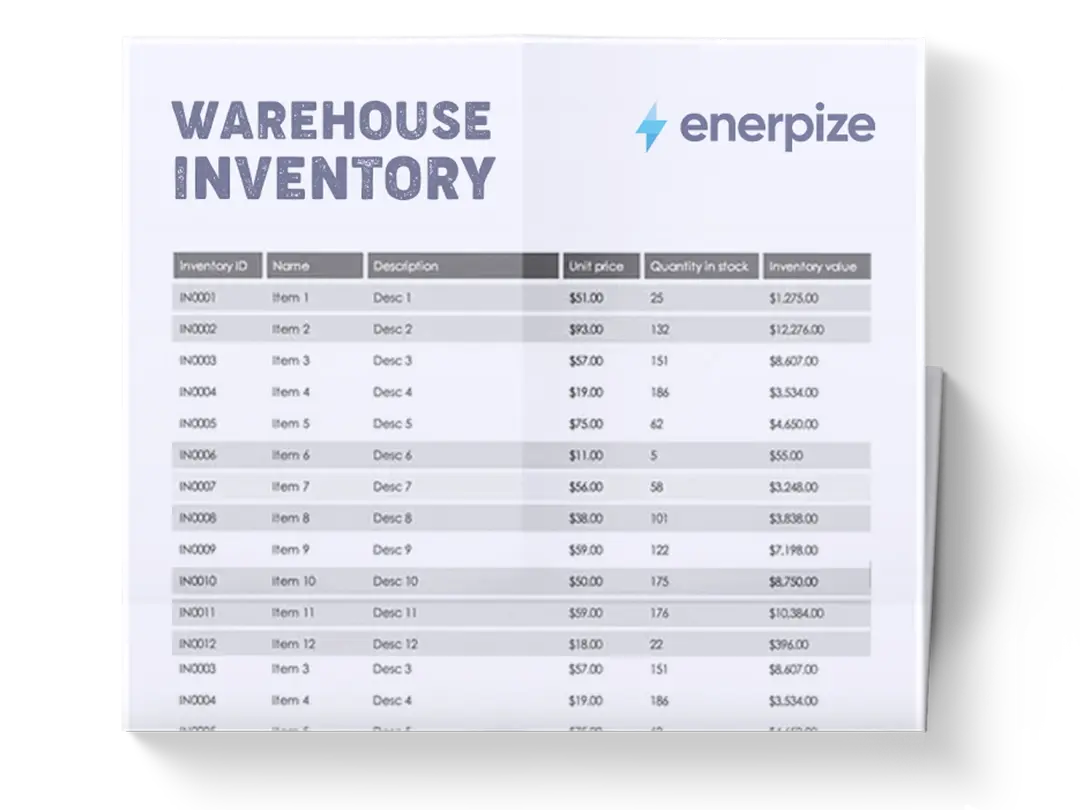
What Does The Warehouse Inventory Template Contain?
Inventory #
A unique identifier assigned to each product for easy tracking and referencing across warehouse records and systems.
Name
The official name of the inventory item used for identification in reports, procurement, and operational workflows.
Description
A brief explanation of the item, including its purpose or usage, helping teams quickly understand its role in operations.
Location
Specifies the exact storage area within the warehouse (e.g., Warehouse A, Shelf B2), ensuring fast retrieval and organization.
Unit of Measurement
Defines how the item is counted or measured (e.g., units, sheets, bottles, bags), standardizing inventory consistency.
Unit Price
The cost per single unit of the item, used for valuation and financial reporting.
Quantity in Stock
The current available amount of the item in the warehouse at any given time.
Inventory Price
The total value of the stock based on unit price multiplied by quantity in stock.
Last Restock Date
Records the most recent date the item was replenished, helping track supply cycles.
Supplier
Identifies the vendor responsible for supplying the item, supporting procurement and reordering decisions.
Reorder
A yes/no indicator showing whether the item should be reordered when it reaches a defined threshold.
Reorder Level
The minimum stock quantity at which replenishment should be triggered.
Reorder Time/Days
The estimated time required for the supplier to deliver a new order after placement.
Quantity in Reorder
The standard amount requested when placing a replenishment order.
Discontinued?
Indicates whether the item is still active or has been removed from production or procurement cycles.
How to Use The Warehouse Inventory Template
1- Set Up Your Inventory Structure
Begin by defining all warehouse locations and organizing them into clear storage zones (e.g., Warehouse A, Shelf B2, Tool Room). This ensures every item has a defined place from the start, reducing misplacement and improving retrieval speed.
2- Input Core Item Information
Enter the basic product details, including Inventory #, Name, Description, Unit of Measurement, and Supplier. This step builds the foundational catalog of your warehouse and ensures every item is uniquely identifiable.
3- Record Stock and Financial Data
Fill in Unit Price, Quantity in Stock, and Inventory Price. These fields provide both operational and financial visibility, allowing you to understand not just what you have, but what it is worth.
4- Define Reorder Rules
Set Reorder status, Reorder Level, Reorder Time/Days, and Quantity in Reorder. This step is critical for automating replenishment decisions and avoiding stock shortages or over-purchasing.
5- Track Movement and Restocking
Update Last Restock Date every time inventory is replenished. This helps you analyze supplier performance and predict future demand cycles more accurately.
6- Monitor Stock Continuously
Regularly update Quantity in Stock based on usage or sales. This ensures your warehouse data reflects real-time conditions and supports accurate decision-making.
7- Review Discontinued Items
Mark items as discontinued when they are no longer in use. This prevents unnecessary reordering and keeps your inventory system clean and relevant.
Importance of Warehouse Inventory Template
Reduces Stock Discrepancies and Operational Errors
A structured inventory template eliminates inconsistencies caused by manual tracking or fragmented spreadsheets. By standardizing how stock data is recorded, it ensures that every item is accounted for accurately across all warehouse locations. This significantly reduces errors such as duplicate entries, missing stock, or incorrect valuations. In real warehouse environments where hundreds or thousands of items are managed, even small discrepancies can lead to costly disruptions in supply chains. The template provides a single source of truth that teams can rely on for daily operations, audits, and procurement planning. As a result, businesses gain stronger control over their physical inventory and reduce financial leakage caused by mismanagement.
Improves Reordering Efficiency and Prevents Stockouts
By clearly defining reorder levels, supplier details, and replenishment timelines, the template enables proactive inventory management instead of reactive decision-making. This ensures that critical items are reordered before they run out, avoiding production delays or missed sales opportunities. At the same time, it prevents overstocking, which ties up working capital unnecessarily. Warehouse managers can easily identify which items are approaching depletion and act immediately based on predefined thresholds. This structured approach transforms procurement from guesswork into a predictable, data-driven process that improves overall operational stability.
Enhances Financial Visibility of Inventory Assets
The inclusion of unit price and inventory valuation fields provides real-time insight into the financial worth of stored goods. This helps businesses understand how much capital is tied up in inventory at any moment. It also supports better financial forecasting, budgeting, and reporting. When leadership teams have access to accurate inventory valuation, they can make more informed decisions regarding purchasing, pricing, and cash flow management. This level of visibility is especially important for growing businesses where inventory often represents a major portion of total assets.
Strengthens Warehouse Organization and Operational Flow
By assigning clear storage locations and standardized product identifiers, the template improves physical organization within the warehouse. Employees can quickly locate items, reducing picking time and improving fulfillment speed. It also supports better space utilization by showing where stock is concentrated and how efficiently storage areas are being used. This structured visibility reduces operational friction and improves overall warehouse productivity.
How Enerpize Handles Warehouse Inventory
A spreadsheet gets one warehouse's stock organized. It doesn't solve what happens once a second warehouse enters the picture, or once you need to know not just what you have, but who's authorized to move it and where it came from.
Assign Products and Stock Per Warehouse
Enerpize's inventory management system lets you add and assign unlimited products across warehouses, so a distributed product mix stays optimized for fulfillment and pricing rather than getting flattened into one combined number. Employees can be granted permissions per warehouse or location, so a manager at Warehouse A isn't wading through Warehouse B's stock to find their own.
Track Stock by Serial, Lot, or Expiry, Not Just Quantity
Where a spreadsheet's Location field tells you which shelf something sits on, Enerpize's real-time stock tracking goes a level deeper: by serial number, lot number, or expiry date, with barcode scanning to move products within and across warehouses without manual re-entry. For anything perishable, warrantied, or regulated, that's the difference between "we have 30 units" and "we have 30 units, and here's exactly which batch expires first."
Automate Stocktaking Instead of Counting by Hand
Enerpize's stocktaking software automates the count-and-compare process this template does manually: actual stock against registered stock, per warehouse or zone, with results saved automatically so an interrupted count doesn't mean starting over. Low-stock thresholds trigger reminders per product, so restocking decisions happen before a shelf actually empties, not after a picker reports it.
Purchase Orders and Supplier Tracking Tied to Stock Levels
Reordering in this template is a manual threshold check. Enerpize's purchase management connects the two directly: generate and forward purchase orders to a supplier straight from a low-stock alert, and track each order from placement through to received quantity. Supplier invoices can be uploaded individually or in bulk, with AI extracting supplier details, line items, and taxes automatically instead of retyping them, and a supplier-level report shows sourcing and payment history so restocking decisions aren't made blind.
One Mobile App Across Every Warehouse
Enerpize's mobile app identifies barcoded products within and across every warehouse from a single device, so a stocktake, a transfer, or a receiving check doesn't require being at a desktop or reconciling paper counts back into the system later.
Multiple warehouses, one system, real-time stock by location instead of a spreadsheet you're manually keeping in sync. Start for free.
Who Can Use the Warehouse Inventory Template?
Warehouse Managers and Inventory Controllers
Warehouse managers rely on structured inventory tracking to oversee stock movement, storage efficiency, and replenishment cycles. This template provides them with a centralized system to monitor quantities, locations, and reorder triggers in real time. Instead of relying on fragmented logs or manual counts, they can make faster operational decisions based on accurate data. It also helps them coordinate teams more effectively by providing clear visibility into where each item is stored and when it needs to be replenished. For inventory controllers, it becomes a critical tool for maintaining stock accuracy and ensuring that all warehouse records align with physical inventory.
Procurement and Supply Chain Professionals
Procurement teams use inventory templates to determine when and how much stock to order. With access to reorder levels, supplier details, and restock history, they can plan purchases more strategically and avoid emergency orders. This reduces procurement costs and improves leverage in supplier negotiations. Supply chain professionals also benefit from improved forecasting and alignment between supply and demand, ensuring a smoother operational flow across the entire logistics network.
E-commerce and Retail Operators
Businesses selling physical products depend heavily on accurate inventory tracking to fulfill customer orders efficiently. This template helps them prevent overselling, track fast-moving items, and maintain optimal stock levels across multiple storage locations. For e-commerce operators, it ensures that inventory data aligns with online listings, reducing order cancellations and delivery delays. Retailers can also use it to monitor seasonal demand patterns and adjust purchasing strategies accordingly.
Manufacturing and Production Teams
Manufacturers require strict control over raw materials, components, and finished goods. This template enables them to track material availability, monitor production input levels, and prevent production downtime caused by shortages. It also supports cost tracking by providing visibility into inventory valuation and consumption rates. As a result, production planning becomes more accurate and resource-efficient.
Looking for More Than Just Manual Inventory Tracking?
While the Warehouse Inventory Template helps you structure stock data, track inventory levels, and manage reorder points effectively, growing businesses often need a more connected and automated system to manage operations at scale. That’s where Enerpize, our all-in-one ERP platform, comes in.
With Enerpize online inventory management, you can:
- Centralize inventory management with integrated Stocktaking, Inventory, and Purchase Management modules for real-time operational control
- Automate procurement workflows by connecting inventory levels directly to purchasing and supplier management systems
- Gain full visibility across operations using integrated cost centers, accounting, and reporting tools for smarter decision-making
If you’re ready to move beyond spreadsheets, Enerpize brings enterprise-grade control to growing teams.
Frequently Asked Questions
How is a warehouse inventory template different from a regular inventory sheet?
A regular inventory sheet tracks one number per item: how many you have. A warehouse inventory template ties every quantity to a specific location, so the same product can show different counts in different warehouses or shelf zones, and the total is a sum of those, not a single figure you update in one place.
Can I use this template for more than one warehouse?
Yes, that's what it's built for. Add a row per item per location rather than one row per item overall, so Warehouse A and Warehouse B each carry their own quantity, reorder level, and last restock date for the same product.
What is cycle counting, and do I need to use it?
Cycle counting means counting a subset of your inventory on a rotating schedule instead of counting everything at once. It's not required for a single small warehouse, but once you're managing multiple locations or a large SKU count, it's the practical alternative to shutting down operations for a full physical count. This template's Location field lets you filter and count one zone or warehouse at a time.
How do I handle stock transfers between warehouses in this template?
Log the transfer as its own entry: date, quantity, source warehouse, and destination warehouse. Don't just edit the two location totals directly, since that leaves no record of why the numbers moved, which makes discrepancies impossible to trace later.
What's the difference between this and the small business inventory template?
They share the same core fields, but this one adds location-level tracking for businesses operating across more than one storage area. If you only have a single stockroom or shop floor, the small business inventory template is simpler and covers the same ground without the extra location column.
Can Enerpize track inventory across multiple warehouses automatically?
Yes. Enerpize's inventory system tracks stock per warehouse in real time, by serial number, lot, or expiry date, with barcode scanning to move products between locations without manual re-entry, and permissions so each warehouse's staff only sees their own stock.
About the Author
Omar El Bahr is a Senior Digital Growth Specialist at Enerpize, where he leads SEO, content strategy, and organic growth across international markets. He is a Forbes Communications Council contributor and has written for Entrepreneur on business communication and digital strategy.