Posted on 22 July 2026
Free Requisition Form Download: Excel, Word, PDF & Google Sheets & Docs
- Available in Word, Excel, PDF, Google Docs, and Google Sheets, free to download with no sign up required
- Covers material requests, service requests, and store issues in one structured document with a full approval trail
- Built with country specific compliance context for the US, India, Canada, and South Africa
- Tracks requested versus issued versus outstanding quantities automatically, so nothing gets lost between the ask and the delivery
A requisition form is the internal paperwork a business uses to ask for something before it spends any money on it. Not the invoice. Not the purchase order. The step before all of that, where someone simply says, "I need this, here is why, please approve it."


What Is a Requisition Form?
A requisition form is an internal document an employee or department fills out to formally request materials, services, or supplies before a purchase order or work order is created. It records who is asking, what they need, how much, and why, so a manager or storekeeper can review and approve the request before any money leaves the business.
Think of it as the difference between thinking out loud and putting your name on something. Anyone can say "we probably need more cement" in a hallway conversation. A requisition form makes that person write it down, attach a quantity, and hand it to someone who has the authority to say yes or no.
That single shift, from a spoken assumption to a signed request, is what turns a chaotic supply chain into a controlled one.
Build and approve requisition forms directly inside Enerpize. Start for free.
Requisition Form Vs Purchase Order Vs Work Order Vs Store Issue
People use these four terms almost interchangeably in daily conversation, and that is exactly where confusion creeps in. Each one belongs to a different moment in the same story.
| Document | Who sees it | What it commits you to | When it happens |
|---|---|---|---|
| Requisition form | Internal only | Nothing binding yet | Before anything is ordered |
| Purchase order | Sent to a supplier | A commercial commitment to buy | After the requisition is approved |
| Work order | Sent to a subcontractor or internal team | A commitment to perform work | After a service requisition is approved |
| Store issue | Internal only | Confirms what actually left the shelf | After materials are physically handed over |
The requisition form is the only one of the four with no legal weight behind it. That is its whole purpose. It gives everyone one last honest look at the request before it becomes something that costs the business money or locks in a supplier.
Types of Requisition Forms
Not every requisition looks the same, because not every request is the same. A business asking for forty bags of cement is not asking for the same kind of approval as a business asking for a specialist inspection service.
Material Requisition
A material requisition covers a physical item, whether it is already sitting in a warehouse or needs to be purchased from a supplier. Item code, description, quantity, unit, and required date usually sit at the center of this version.
Service Requisition
A service requisition covers work, not goods. Scope of the work, location, duration, and the activity it supports usually replace the quantity and unit fields you would see on a material version.
Store Issue or Internal Issue Requisition
This one is quieter than the other two. It does not ask for a purchase. It asks for something the business already owns to be moved from the shelf to the person who needs it.
Purchase Requisition
Some businesses use this term specifically to flag that the request is very likely to lead to an outside purchase, as opposed to being pulled from existing stock. In practice, many companies just fold this into the material requisition form and let the stock check decide the outcome.
What to Include in a Requisition Form Template
A requisition form that only asks "what do you need" is a form that fails the moment two people request the same item for two different reasons. Here is what a template actually needs to hold up under real use.
| Field | Why it matters |
|---|---|
| Requisition number | Gives every request a traceable identity, so nothing gets approved twice or lost in an inbox |
| Requester name and department | Establishes who is accountable for the request |
| Project or site location | Tells the storekeeper or supplier where this is actually going |
| Warehouse or source | Names exactly which stock this pulls from, if it pulls from stock at all |
| Required by date | Separates "urgent" from "eventually" |
| Item or service description | The actual ask, written clearly enough that no one has to guess |
| Quantity and unit | Removes ambiguity around how much is being requested |
| Stock on hand | Forces a check before anyone approves a purchase for something already sitting on a shelf |
| Cost center or activity allocation | Ties the request to a budget line, not just a good intention |
| Suggested supplier | Speeds up procurement without forcing them to start from zero |
| Priority level | Tells the approver how quickly this needs a decision |
| Approval chain | Shows exactly who reviewed the request and when |
| Status | Tracks the request from pending to approved to fulfilled |
Most free templates online stop at name, item, and quantity. That gets you a wish list, not a control document.
What the Enerpize Requisition Form Template Includes
We built this one the way we would want to receive it if we were the storekeeper trying to make sense of it at nine in the morning.
Pending Requests Versus Approved Requisitions
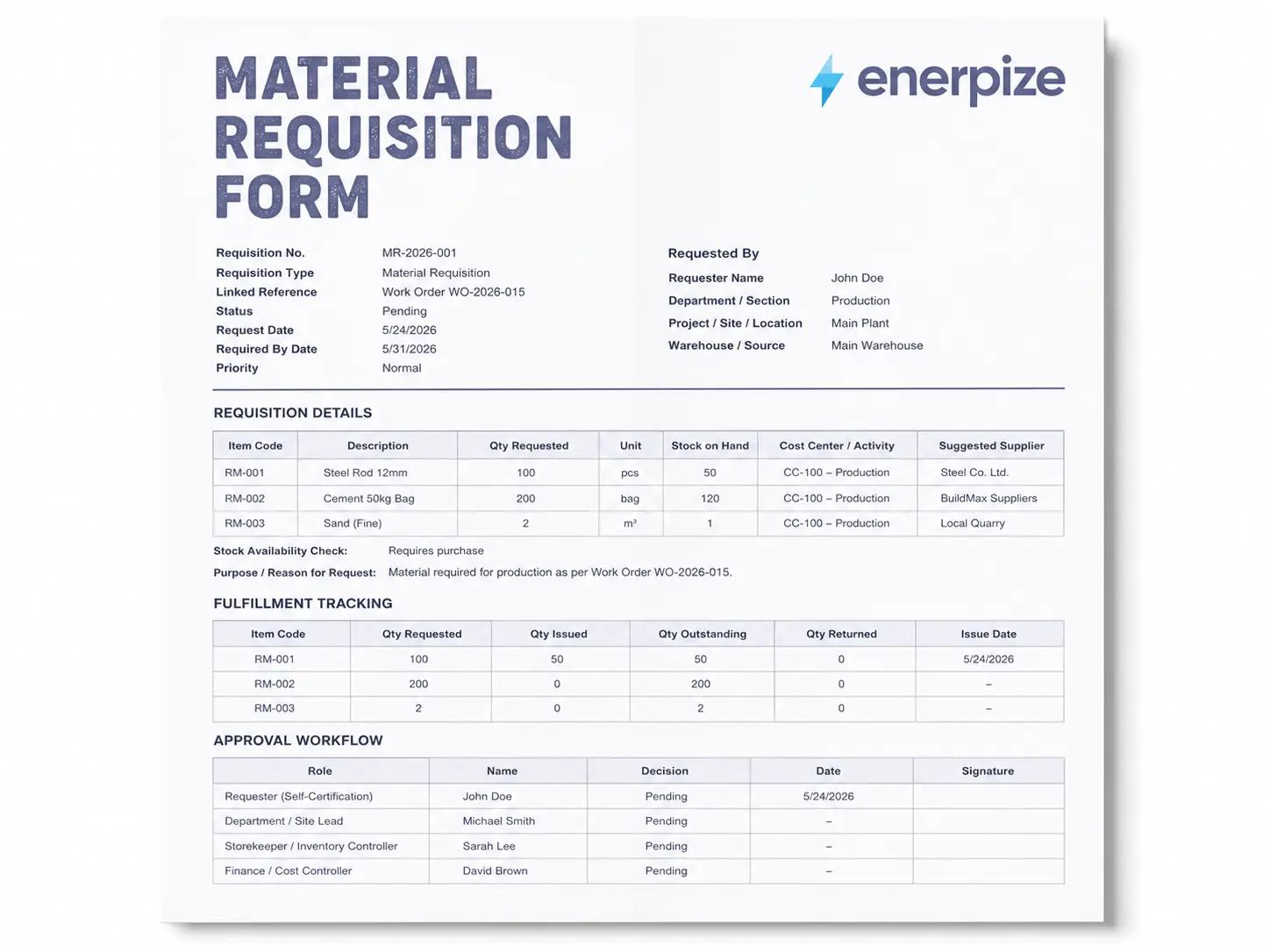
The Enerpize requisition form template does not treat "requisition" as one flat status. It separates a material request, which is still waiting on a decision, from a material requisition, which has already been approved and is ready to move. That distinction matters more than it sounds, because a warehouse that treats every request as already approved is a warehouse that eventually over orders or under checks its own shelves.
A Fulfillment Table, Not Just an Approval Box
It also carries a full fulfillment table, not just an approval box. Requested quantity, issued quantity, outstanding quantity, and returned quantity all sit side by side, because almost nothing in a real business gets delivered in one clean shipment. Half the cement shows up Tuesday, the rest arrives Thursday, and someone needs a document that shows that without three separate spreadsheets.
An Approval Chain, Not a Single Signature Line
The approval section is built as a chain, not a single signature line. Requester, department or site lead, storekeeper, finance or cost controller, and final approver each get their own row, because each of those people is checking something different. A storekeeper is asking "do we already have this." A finance reviewer is asking "does this match the budget we allocated." Squeezing both questions into one signature line is how businesses end up approving requests nobody actually reviewed.
Cost Center and Spec References on Every Line
Every line item also carries a cost center and activity allocation field, and a spec or drawing reference field, so the request stays tied to the actual work it is meant to support, not just a vague department name.
Why This Template Is Different
That is the differentiator worth naming plainly. This is not a generic fill in the blank form repurposed from a general office supplies template. It is built around how a requisition actually moves through a business, from a pending request, through stock and budget review, to an approved and partially or fully fulfilled requisition, with returns accounted for along the way.
Run your requisitions this way instead of chasing them across spreadsheets and email. Start for free.
How Enerpize Handles Material Requisitions
A template solves the paperwork problem. It does not solve the tracking problem on its own. That second part is where most businesses quietly lose control, not because they lack a form, but because the form and the actual stock movement live in two different places.
Automated Inbound and Outbound Requisitions
Enerpize automates the stock update tied to received quantities on the inbound side, and shipped products on the outbound side. A requisition does not sit as a static piece of paper once it is approved. It updates what the system believes is on the shelf, and that same live stock picture is what feeds a delivery note the moment goods actually go out the door.
Manual Requisitions and Quick Entry
Not everything needs automation, and Enerpize does not force it. You can move between automated and manual inbound or outbound stock entries depending on the situation, and if you are working from a list already built in a spreadsheet, you can copy the items and quantities directly from Excel and paste them straight into the system instead of retyping each line.
Stock Transfers Between Warehouses
If a requisition is really about moving stock from one warehouse to another rather than buying anything new, Enerpize handles that as its own manual stock transfer, with the current stock level in each warehouse kept visible after the move.
Approval Permissions by Role
Staff permissions control who can issue a requisition, who can approve it, and who can reject it, and those three duties do not have to sit with the same person. That separation is exactly what the approval chain in the template is describing on paper.
Requisitions Linked to Manufacturing Orders
This is where the connection between a requisition and real production work becomes concrete. Receiving raw materials for a manufacturing order functions as a stock requisition for those materials, and Enerpize gives you two paths into it. Most manufacturing orders start from a bill of materials that already defines what the order needs, so the requisition is really just pulling against a plan that was set before the request was ever raised.
You can create the requisition directly from the manufacturing order screen, which gets automatically approved, or you can first raise a material request that stays pending until someone approves or rejects it, and only then converts into an actual requisition. That is the pending versus approved distinction from the template, built directly into the software.
Materials can be received all at once or across multiple stages, which matters because deliveries rarely arrive in one clean batch. If you try to receive more than the manufacturing order originally specified without first enabling that option in the general settings, the system stops you with a direct message telling you the requested quantity has already been reached. That is a small detail, but it is exactly the kind of guardrail that keeps a requisition honest.
Every confirmed material requisition automatically creates the matching journal entry, so accounting is not left reconstructing what happened from memory. And if materials need to go back, whether the whole batch or part of it, a return is treated as its own inbound requisition that increases stock again, fully separate from the original outbound record. Once the requisition converts into an actual purchase, that same trail carries through to a purchase order and, on the service side, to a work order if the requisition was for labor rather than materials.
Searching and Reporting on Requisitions
You can filter and search requisition entries by their source, whether that is an inbound, an outbound, an invoice, or a purchase, and by requisition or reference number. Stock level reports sit alongside this, comparing what stocktaking finds physically on the shelf against what the system has registered, and the system creates the correcting inbound or outbound requisitions automatically when a shortage or overage turns up.
None of this replaces the requisition form itself. It replaces the version of the process where that form gets filled out, approved, and then quietly disconnected from what actually happens in the warehouse three days later. If you want to see exactly how the automated and manual sides of this work inside the system, the Enerpize requisition management features page walks through it screen by screen.
How to Use the Requisition Form Template
Fill Out the Requester and Reference Details
Start with requisition number, requester name, department, project or site, warehouse, request date, required by date, and priority. This is the section that tells everyone downstream who is asking and how urgent it is.
List the Materials or Services Needed
For each line, enter the item code or service description, quantity or scope, unit if applicable, and the cost center or activity it supports. Be specific here. "Cement" is not the same as "Portland Cement Type I," and the person fulfilling the request should not have to guess which one you meant.
Check Stock Before Requesting a Purchase
Mark whether the item is available from existing stock, needs to be purchased, or is only partially available. Skipping this step is the single fastest way to end up with duplicate stock sitting in two different corners of the same warehouse.
Route the Request Through Approval
Send the form through the requester self-certification, department or site lead, storekeeper, finance or cost controller, and final approver, in that order. Each person is checking a different thing, so do not skip a row just because someone is in a hurry.
Track Fulfillment as It Happens
As materials arrive or services begin, update the quantity issued, quantity outstanding, and quantity returned fields. A requisition that is marked "approved" and never touched again is a requisition nobody is actually tracking.
File It With the Related Documents
Keep the requisition linked to its resulting purchase order, work order, or store issue reference. That link is what makes an audit or a budget review take twenty minutes instead of two days.
Intended Allocation Versus Actual Usage
Here is something almost nobody talks about, and it quietly wrecks budget accuracy in businesses that never account for it.
When you request cement for a tiling job, you are recording an intended activity allocation. That is what you expect the material to be used for at the moment you ask for it. But materials, especially common ones like cement, blocks, cable, or pipe, often get redirected once they hit the site or the shop floor. The tiling job might only need part of what was ordered, and the rest quietly ends up supporting plastering instead.
If your records only ever show the intended allocation, your budget for tiling looks wrong, and your budget for plastering looks wrong in the opposite direction, even though the business spent exactly what it needed to spend overall.
The fix is not complicated. Track what was actually issued to each activity separately from what was originally requested for it. A simple way to think about the value currently sitting against any one activity is this: what was received for that activity, minus what was spent from that activity, plus what was actually used for it. Do that consistently, and your cost centers stay honest even when the materials themselves get shared across more than one job.
Requisition Form Approval Workflow
A signature is not a review. A real approval workflow means each person in the chain is checking something the person before them was not positioned to catch.
The requester is responsible for writing a clear, specific request tied to a real need, not a vague "just in case" order. The department or site lead checks whether the quantity and timing actually match current progress, and whether there is even room to receive and store what is being asked for. The storekeeper checks existing stock first, because the cheapest item to buy is the one you already own. Finance or the cost controller checks the request against budget and against how that activity has performed so far, flagging it if spend already looks high relative to progress. The final approver confirms that every earlier step actually happened and that nothing was rushed past without a proper look.
Skip any one of these checks often enough, and the requisition form stops being a control document. It becomes a formality nobody actually reads.
Requisition Forms in the United States
In the United States, a requisition form carries no direct filing requirement with the IRS on its own, but it becomes part of the paper trail that supports the deductions and expenses a business later claims. The IRS recordkeeping guidance is clear that businesses need to keep records supporting income, deductions, and credits, and a signed requisition tied to a purchase order and an eventual invoice is exactly the kind of supporting evidence that makes an expense easy to defend if it is ever questioned.
For larger organizations, the requisition stage also tends to be where internal controls actually live, since it is the point where someone other than the person making the purchase gets a chance to review it before money moves.
Requisition Forms in India
India's GST framework changes what a business needs to be careful about when it comes to input tax credit. A requisition form itself does not create or block input tax credit, since it is an internal document, not a tax invoice. But CBIC's rules on claiming input tax credit are clear that credit depends on proper invoices and matching documentation, which means the requisition needs to stay clearly linked to the purchase order and the tax invoice that eventually follows it.
Businesses operating across states or with multiple warehouses tend to lean on the requisition form as the first internal checkpoint before a purchase order triggers any GST relevant paperwork.
Requisition Forms in Canada
In Canada, the CRA expects businesses to retain records supporting income and expense claims, and its guide on keeping records confirms that records generally need to be kept for six years from the end of the last tax year they relate to. A requisition form on its own is not a tax document, but it forms part of the trail connecting a business need to the eventual purchase and the GST or HST treatment applied to it.
For Canadian businesses managing multiple cost centers or provinces, tying the requisition to the correct cost center at the point of request makes year end reconciliation considerably less painful.
Requisition Forms in South Africa
South Africa's VAT system is governed by the Tax Administration Act and administered by SARS, and SARS's own record keeping guidance sets out a retention period of five years for most business records supporting a submitted return. A requisition form is purely internal and does not create an input VAT claim on its own. What it does is support the audit trail SARS may ask for when reviewing whether a claimed purchase was genuinely needed and properly authorized before it happened.
South African businesses managing tight budgets often use the requisition stage specifically to catch requests that would push a cost center over its allocated spend before that spend becomes a completed, VAT bearing purchase.
Common Mistakes to Avoid
A vague description is the most common failure, since "supplies" tells a storekeeper nothing they can act on. Skipping the stock check is a close second, and it is how businesses end up buying more of something they already have sitting in a back corner. Missing the cost center or activity field turns budget review into guesswork later. Requesting too late forces urgent, often more expensive buying. Requesting too early increases the risk of damage, theft, or simple waste while the item sits around unused. And not linking the requisition to the purchase order or store issue that eventually follows it breaks the one thing that makes an audit fast instead of painful.
Stop losing track of requests between approval and delivery. Manage requisitions inside Enerpize. Start for free.
Key Takeaways
- A requisition form is the internal request that happens before a purchase order or work order exists, and it carries no legal commitment on its own.
- Material, service, store issue, and purchase requisitions each serve a slightly different purpose, even though many businesses use one form to cover all four.
- A complete requisition form needs a requisition number, cost center allocation, stock check, and a real multi-step approval chain, not just a name and a quantity.
- Tracking issued, outstanding, and returned quantities separately from the original request is what keeps a requisition useful after the first delivery arrives.
- Compliance expectations around requisitions differ by country, but in the US, India, Canada, and South Africa, the requisition form consistently plays the role of supporting evidence rather than a tax document itself.
- Connecting the requisition to inventory and manufacturing systems, rather than leaving it as a standalone PDF, is what actually keeps stock records and budgets accurate over time.
FAQs
What Is a Requisition Form Used For?
A requisition form is used to formally request materials, services, or store issued items before a purchase order or work order is created, giving a business a chance to review need, quantity, timing, and budget before committing to spend anything.
Is a Requisition Form the Same as a Purchase Order?
No. A requisition form is an internal request with no legal commitment attached to it. A purchase order is sent to a supplier and creates a binding commercial commitment. The requisition typically comes first and, once approved, can lead to a purchase order being issued.
Is a Requisition Form Legally Binding?
No. A requisition form is strictly internal and creates no obligation to any outside party. The purchase order or work order that may follow it is the document that creates a binding commitment.
What Is the Difference Between a Requisition and a Job Requisition?
A material or service requisition asks for goods or services. A job requisition is a completely different document used in hiring, requesting approval to fill an open position, and typically includes the role details, required qualifications, and sometimes the target salary range. The two share a name but serve entirely different departments.
Can I Manage Requisitions in Excel?
Yes. Many businesses run their requisition process in Excel effectively, especially at a smaller scale. What actually matters is not the software, it is whether the form captures the right fields, links clearly to the purchase order or store issue that follows, and gets reviewed by more than one person before approval.
What Happens After a Requisition Form Is Approved?
Once approved, a material requisition either gets fulfilled from existing stock or moves forward into a purchase order sent to a supplier. A service requisition typically moves into a work order. The requisition form itself does not disappear at that point, it stays as the internal record supporting whatever document comes next.
About the Author
Omar El Bahr is a Senior Digital Growth Specialist at Enerpize, where he leads SEO, content strategy, and organic growth across international markets. He is a Forbes Communications Council contributor and has written for Entrepreneur on business communication and digital strategy.
Disclaimer: This article is for general informational purposes only and does not constitute legal, tax, or accounting advice. Requirements vary by country and by business, so consult a qualified professional before relying on this content for compliance decisions.