Posted on 9 June 2026
Free Graphic Design Invoice Template Download (Word, Excel, PDF)
- Covers freelance, branding, logo, web design, packaging, and social media projects.
- Includes fields for revision rounds, licensing rights, file deliverables, and deposit tracking.
- Available for US, UK, Australian, New Zealand, and Canadian billing requirements.
- Download a free graphic design invoice template in Word, Excel, PDF, and Google Sheets.
A graphic design invoice template is a structured billing document used by freelance designers, creative studios, and design agencies to request payment for completed work, define deliverables, specify usage rights, and document revision scope for every project.


You finished the project. The logo looks exactly right. The client loved the presentation. Then a week goes by. Two weeks. Radio silence on payment.
Sound familiar? Over 60% of freelancers report receiving late payments from clients. And in most of those cases, the invoice had something missing. A vague description. No due date. No usage rights clause. Nothing stopping the client from asking for "one more revision" before they pay.
A professional graphic design invoice template does not just ask for money. It defines the scope, locks the deliverables, documents the rights, and removes every excuse a client could invent to delay payment.
This page gives you a free graphic design invoice template in Word, Excel, PDF, and Google Sheets, built for freelancers, branding specialists, illustrators, web designers, and creative agencies, and if you also do freelance work across other disciplines, see the freelance invoice template as well. Download it, fill it in, and get paid.
Start invoicing your design clients today. Create your free Enerpize account and generate professional invoices in minutes. Start for free.
What Is a Graphic Design Invoice?
A graphic design invoice is a formal payment request sent by a designer or creative studio to a client after completing a project or reaching a billing milestone. It documents exactly what work was done, what it costs, what files are being delivered, and when payment is due.
It sounds simple. Most designers treat it as an afterthought. That is the mistake.
The graphic design invoice is the single document that defines the entire commercial relationship between you and your client. It is your scope record, your rights transfer document, your revision tracker, and your legal paper trail. If a client disputes what was agreed, the invoice is what you point to.
A generic invoice template does not cover this. A graphic designer's invoice is different from a plumber's invoice or a consultant's invoice because it carries obligations that other professions do not: licensing rights, deliverable specifications, revision limits, source file policies, and intellectual property transfer terms. Each one needs its own field on the document.
Who uses a graphic design invoice? Freelance graphic designers. Branding specialists. UI/UX designers. Web designers. Illustrators. Packaging designers. Motion graphics artists. Creative agencies billing project clients. If your output is a visual asset and a client is paying for it, you need this document.
What to Include on a Graphic Design Invoice
Most invoice guides give you a six-item checklist and call it done. Here is the full picture, including the fields that prevent disputes, not just the ones that request payment.
Business and Client Details
Your name or studio name, address, phone, email, and website go in the header. Your client's name, company, billing contact, and address go in the Bill To section. This sounds obvious until you send an invoice to the wrong person at a company and spend three weeks chasing the correct accounts payable contact.
Always confirm the billing contact before you send. Corporate clients especially route invoices through finance departments, not the creative director who commissioned the work.
Invoice Number, Date, and Due Date
Every invoice needs a unique invoice number. A simple sequential format works: INV-0001, INV-0002. Some designers include the client code: INV-ACME-001. Whatever format you choose, use it consistently. It makes every future conversation about a specific invoice instant and unambiguous.
The invoice date is when you issued the document. The due date is when payment must be cleared. These are two different fields and both must be present. "Net 30" in a notes section is not a due date. A specific date is a due date.
Service Description and Deliverables
Describe each service specifically. "Design work" is not a description. "Logo design, three initial concepts, two revision rounds, final files in PNG, SVG, and PDF" is a description.
Every line item should have a quantity, a rate, and a calculated amount. A logo designer billing ten hours at $75 per hour needs those three numbers visible on every row. A fixed-fee branding package still needs a quantity of 1 and the flat rate stated. Clients read line items. Vague line items generate questions. Questions delay payment.
File Formats and Handoff Specifications
This is the section competitors do not include. And it is the section that prevents the most common post-delivery dispute in graphic design.
The dispute goes like this: you deliver the final files, the client pays, and three months later they come back asking for the editable Illustrator source file because their internal team needs to make changes. Was that included? You say no. They say they assumed yes.
Put it on the invoice. Every single time.
List exactly what is being delivered: PNG at 300dpi, SVG vector, print-ready PDF with bleed, web-optimized JPG, dark and light versions. Then list what is not included by default: AI source file, PSD working file, Figma editable layers. If source files are available as an add-on, say that too. One sentence on the invoice eliminates an entire category of dispute.
Revision Rounds and Scope Terms
State the number of revision rounds included in the project price. Two rounds is the industry standard for most projects. Define what counts as a revision: minor adjustments to an approved direction. Redefine it as out-of-scope: a new creative direction, a complete redesign, or client-side brief changes after work has begun.
Any revision round beyond the included number becomes a separate billable line item on the invoice, with an approval date noted. This is not punitive. It is professional. It sets expectations before work starts, not after the third "quick change" request arrives.
Licensing and Usage Rights
This is the field most graphic design invoice templates either omit entirely or bury in a generic notes section. It should be its own clearly labeled block.
State the license type: exclusive or non-exclusive. State the territory: worldwide, or specific regions. State the permitted media: digital only, print only, or all media. State the duration: perpetual or a defined term.
Why does this matter on an invoice? Because the invoice is the document that transfers rights. No payment, no rights. If usage rights are undefined on the invoice, you have no legal basis for enforcement if a client uses your work outside the agreed scope. A branding client who paid for a logo for their website should not be using it on broadcast advertising without renegotiating the license.
Write it out. Every time.
Payment Terms and Due Date
The most common payment terms for graphic designers are Net 14 and Net 30. Many freelancers use a 50% deposit upfront with the balance due on final delivery. Some designers working on long projects use milestone billing: 30% at kickoff, 30% at concept approval, 40% at final delivery.
Whatever your terms are, they must be stated explicitly on the invoice. And if you took a deposit, the deposit must appear as a deducted line on the final invoice so the client can see exactly what they already paid and what remains.
Tax Information
Tax requirements vary by country, business type, and revenue threshold. The relevant fields depend on where you are based and where your client is located. The country-specific section further below covers this in detail for US, UK, Australian, New Zealand, and Canadian designers.
Types of Graphic Design Invoices
Not every design project bills the same way. The invoice structure changes depending on how the work is scoped and priced.
Project-Based Invoice (Fixed Fee)
The most common format for logo design, branding packages, web design, and one-off creative projects. The invoice lists the agreed project price, the deliverables, the revision scope, and the payment terms. If a deposit was taken at kickoff, it appears as a credit line deducted from the total.
Hourly Rate Invoice
Used for ongoing work, consulting, creative direction, or projects where scope is open-ended. If you bill primarily for creative consulting rather than deliverables, the consulting invoice template may be a better fit. Each line item shows the service, the hours worked, the hourly rate, and the calculated amount. A timesheet attached to the invoice as a supporting document is good practice for hourly billing.
Package Invoice
For bundled service offerings: a Brand Identity Package that includes logo, color palette, typography guidelines, and a business card design. Each component of the bundle can be listed as its own line item at $0 (included) or the package can be listed as a single line with a detailed description of what is included.
Deposit Invoice and Final Invoice
This is the flow most freelancers use and most invoice templates handle poorly.
Here is how it works with real numbers. You agree on a $2,000 branding project. You send a deposit invoice for $1,000 (50%) before work begins. The client pays. Work proceeds. You deliver the final files. Now you send the final invoice.
The final invoice shows the full project value of $2,000. Below the subtotal, a separate line reads: "Deposit received [date]: $1,000." That deduction brings the balance due to $1,000. The client sees the full scope of what they paid for and exactly what remains. No confusion, no "I thought I already paid for this."
Never issue a final invoice for only the remaining balance without showing the original total. It removes context and creates questions.
Revision and Change Order Invoice
When a client requests work outside the original scope, that work gets its own invoice or a clearly labeled additional line item on the running invoice. Include the date the additional work was approved in writing, the description of the change, and the agreed rate.
Rush Fee Invoice
For urgent projects where a client needs delivery in 24 to 48 hours, a rush fee applies. The standard rate is 25% to 50% above the normal project fee. State it as a separate line item with the agreed surcharge clearly labeled.
How to Use Your Invoice to Prevent Scope Creep
Every working designer knows this is the real issue.
Scope creep is not a client being difficult. It is a documentation failure. When the invoice does not define the boundaries of the project, every new request from the client feels reasonable to them and unpaid to you.
The invoice is not just a payment request. It is a scope record.
When you list "Logo design, three initial concepts, two revision rounds" as a line item, you have created a written record of exactly what was agreed. When revision round three arrives with a request to start over in a completely different direction, you have a document to point to. The conversation changes from "you are being difficult" to "here is what we agreed, here is what falls outside it, and here is the rate for the additional work."
The same logic applies to file formats. When "AI source file not included" is written on the invoice, the client cannot later claim they assumed it was part of the package. You documented it. The document was signed off with payment.
Three things to add to every invoice specifically to prevent scope creep:
First, the number of revision rounds included, stated as a number not a general commitment. "Two revision rounds" is enforceable. "Revisions as needed" is not.
Second, the definition of a revision in plain language. Minor adjustments to an approved direction. Not a new direction, not a change to the brief, not a structural redesign.
Third, the rate for out-of-scope work. State it on the invoice before the project starts. When additional work is requested, you reference the rate the client already saw and agreed to.
Document the scope. Bill what falls outside it. Do not apologize for either.
Ready to stop managing invoices in spreadsheets? Enerpize tracks every invoice, payment, and client automatically. Start for free.
How to Fill Out the Graphic Design Invoice Template
Follow these steps every time you issue a graphic design invoice.
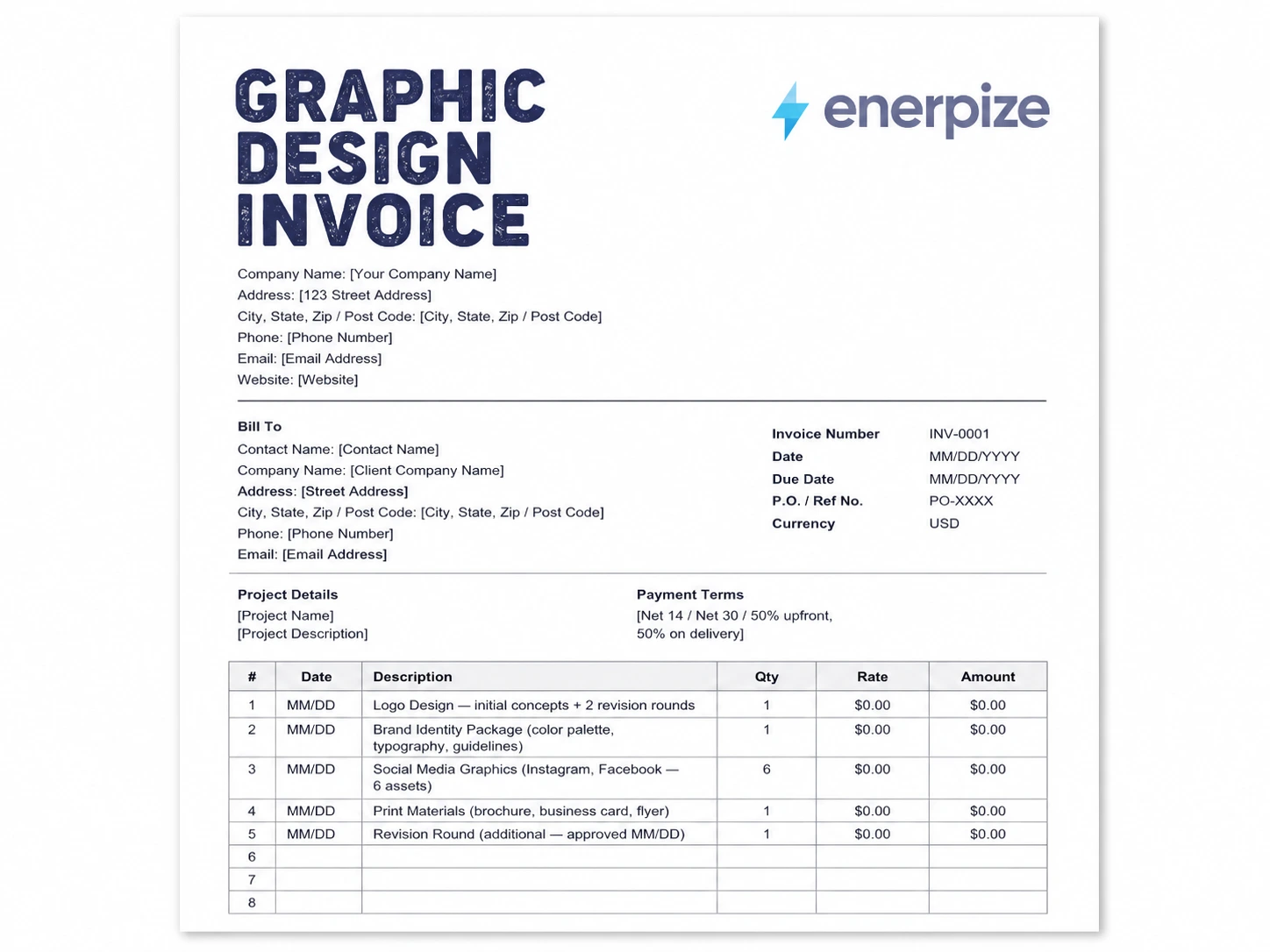
Step 1: Add your business details to the header. Name, address, phone, email, website. If you have a logo, place it in the top right corner.
Step 2: Fill in the invoice number, invoice date, due date, purchase order or reference number if the client provided one, and the currency.
Step 3: Add the client's billing details. Confirm the exact name, company, address, and billing contact before you send.
Step 4: Name the project and add a brief description. "Brand Identity Package, June 2026" is sufficient. Specific enough to match the client's own records.
Step 5: Add each service as a line item with a quantity, rate, and amount. Logo design, revision rounds, rush fees, stock asset purchases, and consulting time each get their own row.
Step 6: Complete the File Deliverables section. List every file format being delivered. State what is not included.
Step 7: Complete the Licensing and Usage Rights section. Type, territory, media, duration. Four fields. Fill all four.
Step 8: Apply any discount and add your deposit received line if applicable. Calculate subtotal, tax, and balance due.
Step 9: Add your payment methods and banking details. The more frictionless the payment process, the faster you get paid.
Step 10: Before the invoice stage, use the quotation template to lock in project scope and pricing with the client before work begins. Review every field before sending. Send immediately upon project delivery or milestone completion. The longer you wait to send the invoice, the longer you wait to receive payment.
Graphic Design Invoice Template by Format
Graphic Design Invoice Template in Excel
The Excel version includes formula-driven calculations for quantity times rate, automatic subtotal, discount, deposit deduction, tax calculation, and balance due. Every number updates automatically as you fill in the line items.
Best for designers who manage multiple projects and want a running record with formula automation. Excel also makes it easy to create multiple tabs for separate clients or billing periods.
Graphic Design Invoice Template in Word
The Word version is the simplest to customize. Change fonts, colors, and layout to match your brand. Add your logo. Adjust the line item rows for the specific project. No formula knowledge required.
Best for designers who bill fixed-fee projects and want a clean, printable document they can send as a PDF.
Graphic Design Invoice Template in PDF
The PDF version maintains a consistent layout on every device and prevents accidental editing by the client. Fill in the fields, save as a protected PDF, send.
Best for designers who want a locked, professional document that looks identical on every screen and in print.
Graphic Design Invoice Template in Google Sheets
The Google Sheets version lives in the cloud and updates in real time. Share a view-only link with the client so they can see the current balance without you sending a new attachment every time.
Best for designers working with long-term retainer clients or ongoing project billing.
Graphic Design Invoice Requirements by Country
Before adding country-specific content to your invoices, check your own GSC or analytics data to confirm which countries your clients are actually based in. These sections cover the five countries where graphic design invoice queries are most active.
United States
There is no federal invoicing law in the US that applies to freelance designers. You are not required by federal law to include specific fields beyond what constitutes a valid commercial agreement.
However, if you charge sales tax, the rules vary by state. Some states tax graphic design services. Others do not. New York taxes design services rendered to advertising agencies in certain contexts. Texas taxes custom web design. California generally does not tax design services but taxes tangible products.
If you are a US-based designer and your annual revenue crosses the self-employment threshold, you are required to file a Schedule C and make quarterly estimated tax payments to the IRS. Your invoices are your revenue records. Number them sequentially. Keep copies of every one.
For clients issuing you a 1099-NEC at year end, your invoice total must match the amount they report. Any discrepancy creates a reconciliation problem during tax season.
United Kingdom
UK-based graphic designers and creative freelancers must include specific information on invoices under HMRC requirements.
Every invoice must include a unique invoice number, the date of issue, your name and address, the client's name and address, a description of the services, the total amount charged, and the date of supply.
If your taxable turnover exceeds the VAT registration threshold (currently £90,000 per year), you must register for VAT. Once registered, your invoices must also show your VAT registration number, the net amount, the VAT rate applied (currently 20% standard rate), the VAT amount, and the gross total.
Late payment law in the UK gives you the right to charge statutory interest on overdue invoices at 8% above the Bank of England base rate. You can also claim a fixed late payment compensation fee of £40, £70, or £100 depending on the invoice value. State your right to charge this in your payment terms.
Australia
Australian designers and creative freelancers dealing in taxable supplies are required to register for GST once their annual turnover exceeds AUD 75,000. Below that threshold, registration is optional.
If you are GST-registered, your invoices must be tax invoices. A valid Australian tax invoice must include the words "Tax Invoice" prominently, your Australian Business Number (ABN), the date of issue, a description of the supply, the GST amount either shown separately or a statement that the total includes GST, and the total price.
If your client is also GST-registered, they need your ABN to claim the GST credit. An invoice without an ABN means your client must withhold 47% of the payment under the no-ABN withholding rules. Put your ABN on every invoice.
For designers billing below the GST registration threshold, invoices should state "No GST has been charged. Supplier not registered for GST."
The Enerpize Australian GST invoice template and Australian invoice without GST template both cover these requirements with the correct field structure.
New Zealand
New Zealand graphic designers must register for GST once their turnover exceeds NZD 60,000 per year. Once registered, the current GST rate is 15%.
A valid New Zealand tax invoice must include the words "Tax Invoice," your GST registration number (IRD number), the date of supply, the buyer's name and address, a description of the services, the quantity or volume of the supply, the total amount payable, and either the GST content or a statement that GST is included at 15%.
If you have a New Zealand Business Number (NZBN), include it on your invoices. It is not legally required for tax invoices but it is standard practice and helps your clients reconcile payments against your business records.
Canada
Canadian designers operate under a GST/HST framework administered by the Canada Revenue Agency. The small supplier threshold is $30,000 in annual revenue. Below that, you are not required to register for GST/HST. Above it, registration is mandatory.
The HST rate varies by province. Ontario is 13%. Nova Scotia is 15%. Alberta has no provincial sales tax, so only the 5% federal GST applies. British Columbia, Manitoba, Saskatchewan, and Quebec have separate provincial sales taxes (PST or QST) that operate independently of the federal GST.
If you are GST/HST registered, your invoices must include your Business Number with the RT designation, the total amount charged, the GST/HST amount, and the rate applied. For invoices over $150, you must also include your full business name or trading name.
What Enerpize Can Do for Your Design Business
A template handles the document. Enerpize handles everything behind it.
When you invoice five clients a month, a Word template is sufficient. When you invoice 25 clients across multiple projects, different billing structures, and different tax jurisdictions, a static template creates more administrative work than it saves.
Enerpize gives graphic designers and creative studios a complete invoicing and business management system that replaces the template workflow entirely.
Invoice clients and track every payment in one place
Issue invoices directly from Enerpize and provide clients with a portal to view invoices, check balances, and download attachments. Accept payments via credit card, PayPal, or manual bank transfer. Every payment reconciles automatically against the invoice it belongs to.
Manage client records and project history without a spreadsheet
Create a file for each design client, assign projects, and track the full transaction history, payment dates, and outstanding balances. Share and attach project files directly to client records. No more hunting through email threads for the invoice you sent six weeks ago.
Set recurring invoices for retainer clients
If you have clients on a monthly retainer, Enerpize automates the invoice cycle. The invoice generates, sends, and tracks payment without you touching it each month.
Automate payment reminders without the awkward follow-up email
Set reminder rules by SMS or email. Clients who miss a due date get an automatic reminder on the schedule you define. You do not have to write the "just checking in on that invoice" email anymore.
Track income, expenses, and profitability per project
Add project expenses (stock assets, font licenses, print production costs) directly to the project file. Enerpize calculates net profit per client and generates profit and loss reports across your entire business.
Handle multiple tax jurisdictions
Billing an Australian client with a GST invoice and a UK client with a VAT invoice in the same week? Enerpize manages multiple tax configurations without you reconfiguring a template each time.
Key Takeaways
- A graphic design invoice template is not just a payment request. It is a scope document, a rights transfer record, and a revision tracker.
- Include file deliverables and handoff specifications on every invoice. Listing what is and is not included eliminates the most common post-delivery dispute in design.
- The deposit invoice and final invoice are two separate documents. The final invoice must show the original total and the deposit deducted, not just the remaining balance.
- Licensing and usage rights belong in a clearly labeled section on the invoice, not buried in a general notes field.
- Country-specific tax requirements vary significantly. Australian designers need their ABN on every tax invoice. UK designers registered for VAT must show the VAT number, rate, and amount. US designers need to check state-level sales tax rules for design services.
- Moving from a static template to invoicing software becomes necessary when client volume grows, tax jurisdictions multiply, or chasing payments manually starts costing more time than the templates save.
Frequently Asked Questions
What should be on a graphic design invoice?
A complete graphic design invoice should include your business details, the client's billing information, a unique invoice number, the invoice date, the due date, a currency field, a purchase order or reference number if applicable, line items with quantity, rate, and amount for each service, a file deliverables section, a licensing and usage rights section, discount and deposit lines, tax information, the balance due, and your accepted payment methods.
How do I make an invoice for graphic design work?
Download a graphic design invoice template in your preferred format (Word, Excel, or PDF), fill in your business and client details, add each service as a line item with quantity, rate, and amount, specify your file deliverables, complete the licensing section, apply your tax rate, deduct any deposit already received, and state your due date and payment methods. Send the invoice immediately upon project delivery or milestone completion.
How do I charge for revision rounds on a graphic design project?
State the number of revision rounds included in your project price before work begins. Two rounds is the standard for most projects. Define what constitutes a revision (minor adjustments to an approved direction) versus what falls outside scope (a new creative direction or structural redesign). Bill additional rounds as separate line items on the invoice, noting the date the additional work was approved.
Should I include licensing terms on my graphic design invoice?
Yes, every time. The invoice is the document that transfers usage rights from you to the client. Specify the license type (exclusive or non-exclusive), territory, permitted media, and duration. Without these terms on the invoice, you have no enforceable record of what the client is and is not permitted to do with your work.
What is the difference between a deposit invoice and a final invoice?
A deposit invoice is issued at project kickoff for an agreed upfront payment, typically 25% to 50% of the total project fee. The final invoice is issued upon delivery and shows the full project value, with the deposit received listed as a credit line that reduces the balance due. The final invoice should always show the original total, not just the remaining amount.
How much should a freelance graphic designer charge per hour?
Hourly rates for freelance graphic designers vary based on experience, specialization, and market. Entry-level designers typically charge $25 to $50 per hour. Mid-level designers with three to five years of experience charge $50 to $100. Senior designers and specialists in areas like UI/UX or brand strategy charge $100 to $200 or more. Research rates in your specific market and factor in your overhead costs, tax obligations, and the value of the work, not just the time.
Do graphic designers charge GST or VAT?
It depends on your country and your revenue. In Australia, GST registration is required once your turnover exceeds AUD 75,000. In the UK, VAT registration is required once your taxable turnover exceeds £90,000. In New Zealand, GST registration is required above NZD 60,000. In Canada, GST/HST registration is required above $30,000. In the US, sales tax on design services varies by state. Check the requirements for your specific jurisdiction.
What file formats should I list on my design invoice?
List every format you are delivering: PNG at the appropriate resolution, SVG vector, print-ready PDF with bleed and crop marks, web-optimized JPG, and any size or color variants. Also state what is not included by default, such as AI source files, PSD working files, or Figma editable layers. Clients who need source files should request them as a separate add-on before project completion.
Can I use a graphic design invoice template for a branding project?
Yes. A branding project invoice uses the same structure but typically includes more line items: logo design, color palette development, typography selection, brand guidelines document, business card design, and any other deliverables in the scope. Each component is listed as its own line item. The licensing section is especially important for branding work, where clients need to understand the full scope of usage rights they are receiving.
What payment terms are standard for graphic designers?
The most common payment terms for graphic design work are Net 14, Net 30, and a 50% deposit with the balance due on final delivery. For larger projects, milestone billing is common: a percentage at kickoff, a percentage at concept approval, and the final balance at delivery. Always agree on payment terms before work begins and state them explicitly on every invoice. Late payment clauses are legal in most countries and worth including.
Ready to spend less time on invoices and more time on design? Start for free.
About the Author
Omar El Bahr is a Senior Digital Growth Specialist at Enerpize, where he leads SEO, content strategy, and organic growth across international markets. He is a Forbes Communications Council contributor and has written for Entrepreneur on business communication and digital strategy.
Disclaimer: The information on this page is provided for general guidance only and does not constitute legal, tax, or financial advice. Invoicing requirements, tax thresholds, and rates change regularly. Verify current requirements with a qualified accountant or the relevant tax authority in your jurisdiction before issuing invoices to clients.