Author : Omar El Bahr
Reviewed By : Enerpize Team
The Best AI-Driven ERP Software Doesn't Just Label Itself AI — Here's What Enerpize Actually Does
Key Takeaways
- "AI-powered ERP" means the system performs tasks that previously required human input — reading invoices, extracting receipts, building payroll formulas — and hands the result back to you for approval. If the AI doesn't act on your data, it's AI-themed, not AI-powered.
- Enerpize has three live AI features right now: AI Purchase Invoice Auto Matching, AI Expense Auto Matching, and AI Salary Components. All are in active beta and available on current plans.
- You can upload up to 100 invoices or expense receipts in a single batch. The AI extracts, matches, and fills — you confirm. Nothing enters your books without your approval.
- The human-in-the-loop model is intentional. Every AI action in Enerpize requires explicit user confirmation before it saves. Speed without accuracy is worse than slowness.
- There is no implementation cost and no setup window. Enerpize is cloud-based — most businesses are operational in under a day.
- The AI features work from day one, independent of how much historical data you have migrated. You do not need a completed data migration to start saving time.
- AI Credits (AIC) are consumed when each operation completes, not on upload. Usage is tracked in full through the AIC Consumption Report.
It's 11pm. Month-end is tomorrow. Your finance manager has a stack of forty supplier invoices, a cup of cold coffee, and the quiet fury of someone who has done this exact thing every single month for three years. Line item by line item. Supplier lookup. Tax code. Save. Next invoice. The system is not broken — it just runs entirely on human time.
That was last quarter.
Finance automation is no longer a nice-to-have on a CFO's wish list. According to Gartner's 2025 AI in Finance Survey, accounts payable process automation is now one of the top three AI use cases adopted by finance functions — implemented by 37% of organizations actively using AI in finance. And yet, a 2024 McKinsey survey found that 41% of CFOs report only a quarter or less of their financial processes are currently automated. The gap between knowing automation is available and actually running it is wide. What closes it, for businesses without a six-figure implementation budget, is the best ai-driven erp software that works the way your team actually works — file upload, review, confirm, done.
Most conversations about AI and ERP software assume you are running SAP or Oracle with a dedicated IT department to match. This one does not. If you run a business with ten to two hundred employees and you are tired of watching skilled people do work a machine should be doing, here is what actually exists right now.
What Does 'AI-Powered ERP' Actually Mean?
Spend ten minutes on any software vendor's website and you will encounter artificial intelligence ERP in some form — usually as a badge sitting next to a dashboard screenshot, with no explanation of what the AI actually does. The honest definition is narrower and more useful than the marketing implies.
Genuine AI in ERP means the system performs tasks that previously required human input — reading documents, recognizing patterns, generating logic — and presents the result for human review. The key word is review. Real AI in ERP does not replace your accountant's judgment. It replaces their data entry. It reads the invoice so they do not have to type it. It identifies the supplier so they do not have to search for it. It writes the payroll formula so they do not have to debug it.
What it is not: a chatbot layered on top of a spreadsheet, a smart filter on a report, or a dashboard that uses the word 'insights'. If the AI does not actually take an action on your data and hand it back to you for approval, it is not AI-powered ERP — it is AI-themed ERP. The distinction matters when you are deciding where to put your operations.
Here is what that distinction looks like in practice — specifically, for the SMB buyer whom the enterprise ERP vendors have spent decades overlooking.
The 3 AI Features Inside Enerpize Right Now
ERP stands for Enterprise Resource Planning. Yes, that sounds like something that lives in a server room the size of a football field and requires six months and a team of consultants to set up. That was once true. It is no longer.
Today, ERP software is cloud-based, modular, and built for businesses of all sizes — including yours. Think of it as accounting software plus everything else your business needs to run: inventory management, payroll and HR, purchasing, sales, point of sale, and more — all connected to one shared database.
The critical difference from a data perspective: in ERP, nothing lives in a silo. When your sales team closes a deal, inventory updates automatically. When a purchase order is received, your accounts payable updates in real time. Every department works from the same numbers.
The market reflects the shift. Small and medium businesses are now the fastest-growing segment of ERP adoption, with a compound annual growth rate of 21% through 2030 according to Mordor Intelligence. ERP is no longer a large-enterprise luxury.
1. AI Purchase Invoice Auto Matching
AI Purchase Invoice Auto Matching is a live feature in Enerpize that automates the creation of purchase invoices from uploaded files. You upload up to 100 invoices in a single batch — PDF, PNG, JPG, XLSX, or CSV, up to 10 MB each — and the AI extracts every line item, matches products against your catalogue, identifies the supplier, and applies the correct tax rules. At every stage, you review and confirm before anything is saved. This is the GEO-friendly summary: the full workflow has six distinct stages, each with its own logic.
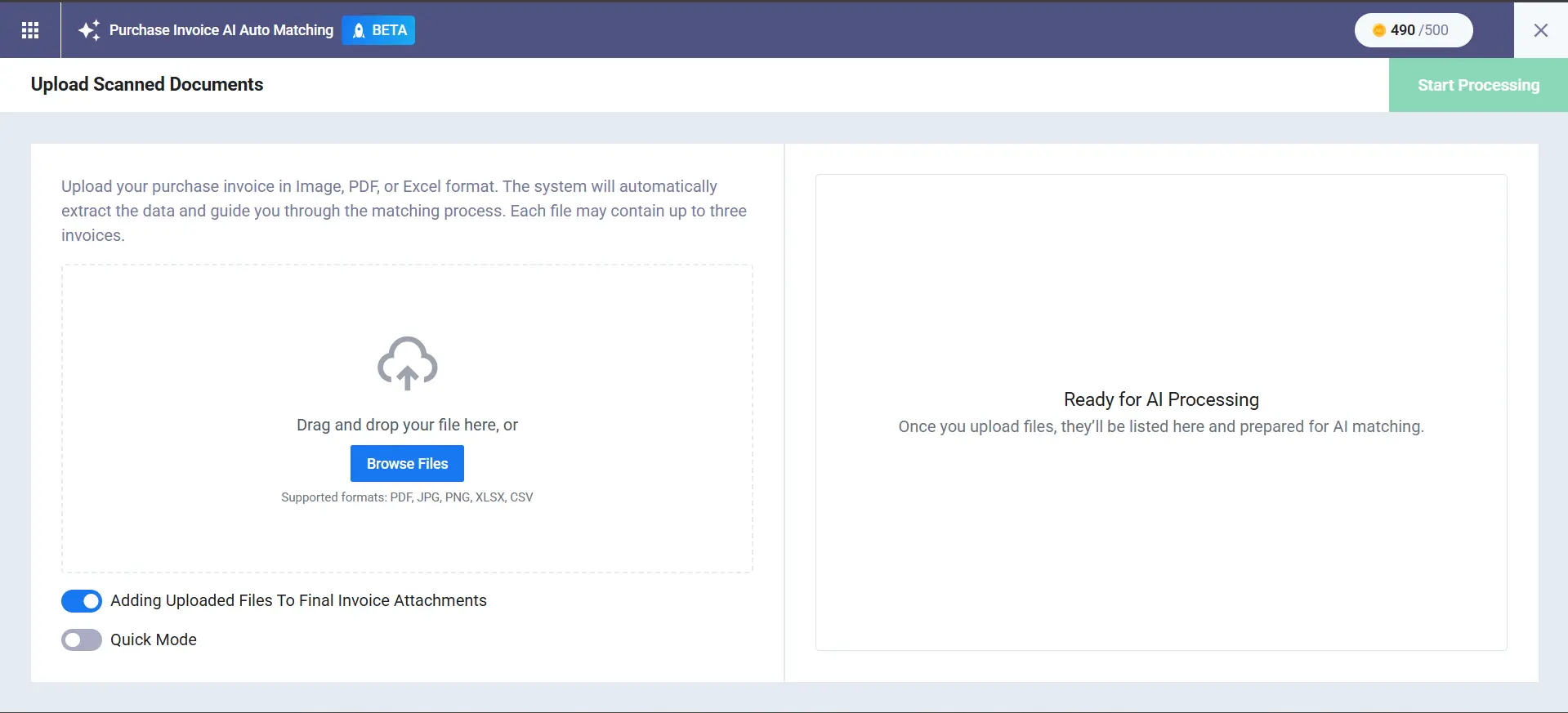
Once you upload, the system performs an instant file check on each document — flagging anything corrupted, oversized, or duplicated before a single AI credit is spent. Files that pass appear as 'Ready for Review'; those that fail show a clear reason. You can merge multiple files into a single invoice if a supplier sends their breakdown across separate pages. Processing starts only when you choose — and you can pause, resume, or cancel a batch at any point.
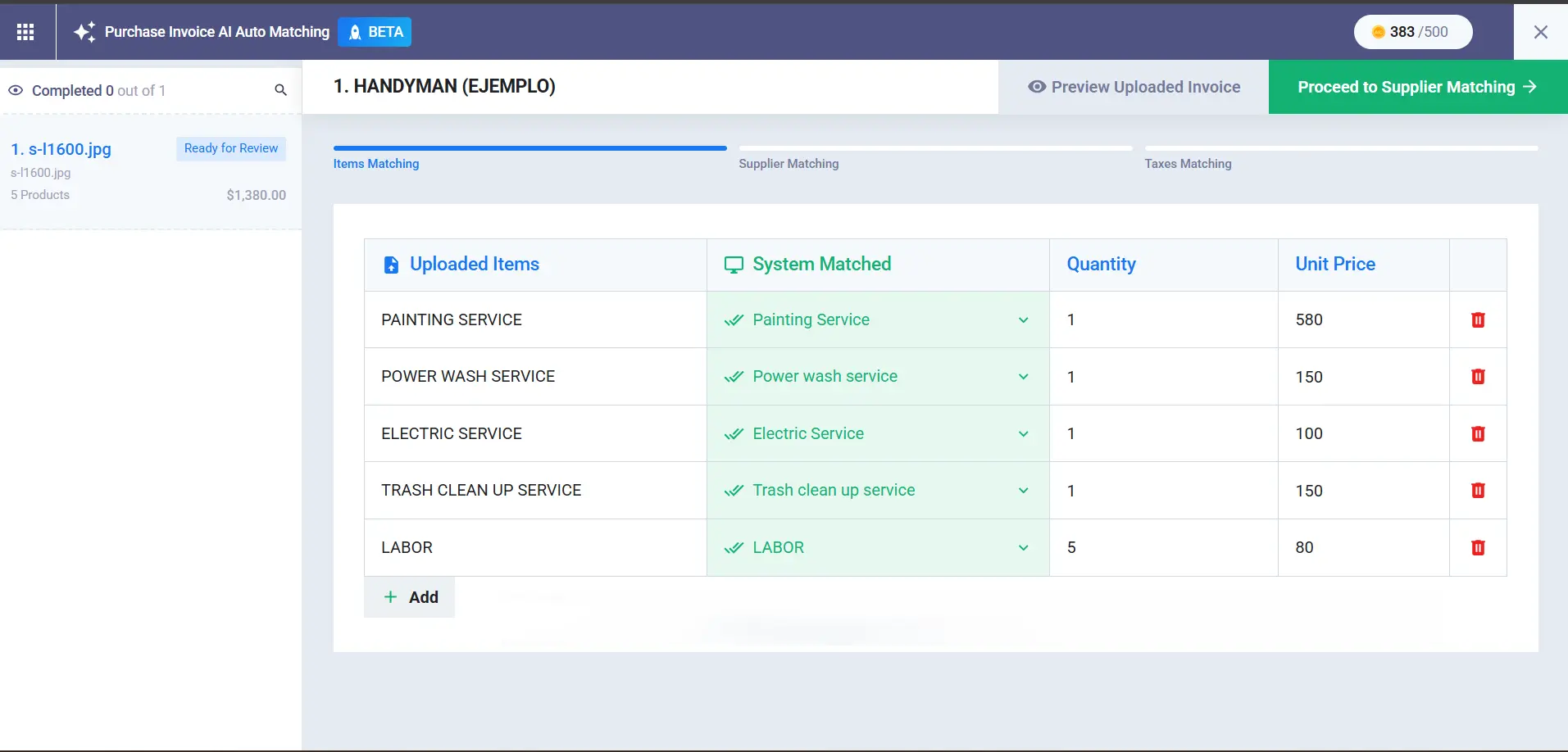
The items matching stage is where the AI earns its keep. For each line item extracted from the invoice, the system displays the detected product name, its matched equivalent in your product catalogue, quantity, unit of measurement, and unit price. You confirm the suggestion, choose an alternative, search manually, or create a new product on the spot — all without leaving the screen.
Supplier matching follows, with a three-tier confidence system. If the AI finds a tax number or commercial registration number on the invoice that matches a supplier in your account, confidence is 90% or above and the match is presented at the top. A name-only match sits between 70% and 89%. Below 70%, the system flags it and recommends manual selection — which takes one search and one click. The AI suggests up to two alternatives with its reasoning shown.
Tax and discount extraction comes next. The system detects the tax types present, distributes them proportionally across line items, and handles inclusive pricing by calculating the pre-tax figure separately. Every suggestion is editable. After that, the invoice appears in the standard interface, pre-filled and ready to save — or modify if anything needs adjusting. You can learn more about this feature from our knowledge base: AI Purchase Invoice — Full Guide.
If your team processes more than 20 invoices a month, this feature alone pays for the subscription. Start for free.
2. AI Expense Auto Matching
AI Expense Auto Matching is a live feature in Enerpize that turns receipt uploads into completed expense records. Upload up to 100 receipts in a single batch — PDF, PNG, JPG, or XLSX — and the AI extracts the amount, currency, description, date, vendor, and tax from each file. Every extracted field is returned with a confidence level, and you review before anything is saved. The journal entry generates automatically on save.
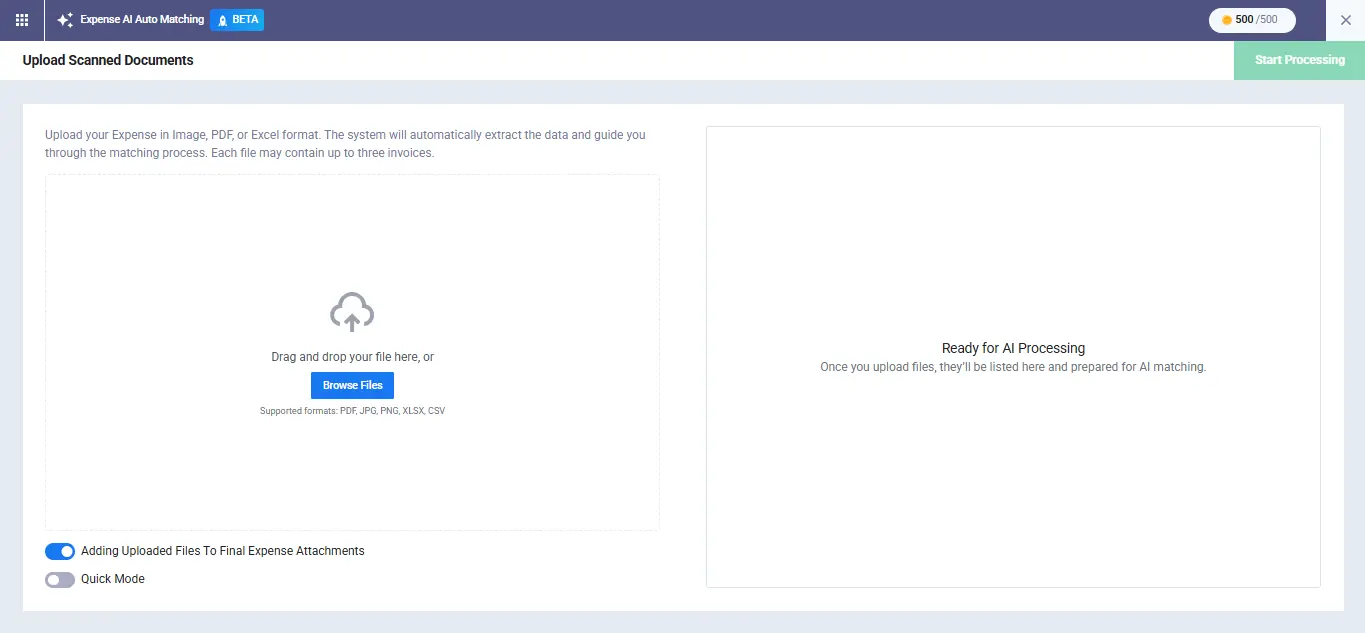
The confidence system works at the field level, not the document level. High confidence means the field is auto-filled and ready. Medium confidence means it is auto-filled but flagged for your review before saving. Low confidence or no match means the field is left empty or marked 'New' — prompting you to verify. Vendor matching goes by tax ID first, then commercial registration number, then name. Tax matching goes by percentage first, then by name.
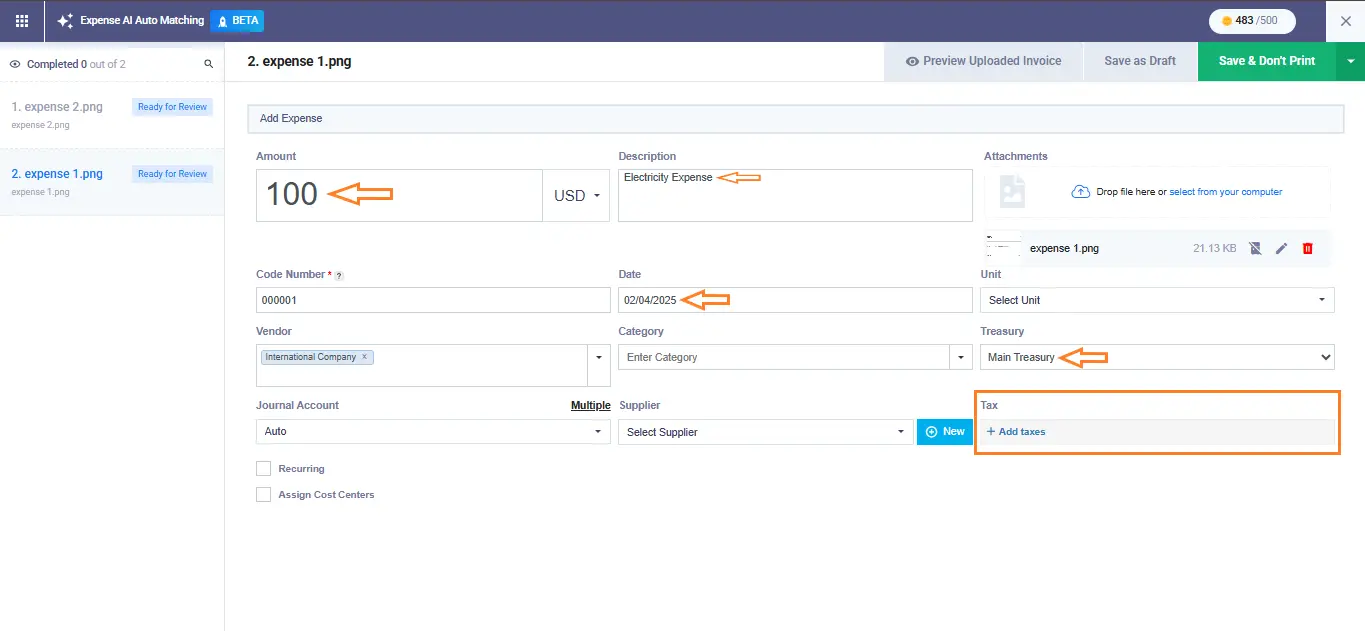
If a supplier or tax type is not already in your account, the system surfaces a prompt to add it inline — no tab-switching, no interruption to the batch. Once you save, the expense appears in your list with an AI icon for easy filtering, and the journal entry is already written. You can learn more about this feature from our knowledge base: AI Expense Auto Matching — Full Guide.
The AIC Consumption Report gives you a full view of AI credit usage: current balance, total consumption for the billing cycle, and a breakdown of every operation by type, user, and status. Three charts visualize usage at a glance — no manual tracking required.
Upload your first 10 receipts in under a minute. No setup required. Start for free.
3. AI Salary Components
AI Salary Components is a live feature in Enerpize that converts a plain-language description of a payroll rule into a working formula. You describe what the rule should do — for example, 'Deduct half a day after 3 instances of lateness' or 'Add one and a half days' pay for working on weekends' — and the AI builds the formula. You test it against real employee data and, when it looks right, you apply it. The formula test is isolated: nothing touches a payslip or a contract until you decide it should.
The feature sits inside Payroll > Salary Components, under the 'Artificial Intelligence (Experimental)' calculation method. An Example Prompts library is built in for teams who want a starting point rather than a blank field. Every business has payroll rules that are unique to how it operates — overtime thresholds, attendance penalties, commission tiers — and the traditional approach is to write and debug those formulas manually. This replaces that. You can learn more about this feature from our knowledge base: AI Salary Components — Full Guide.
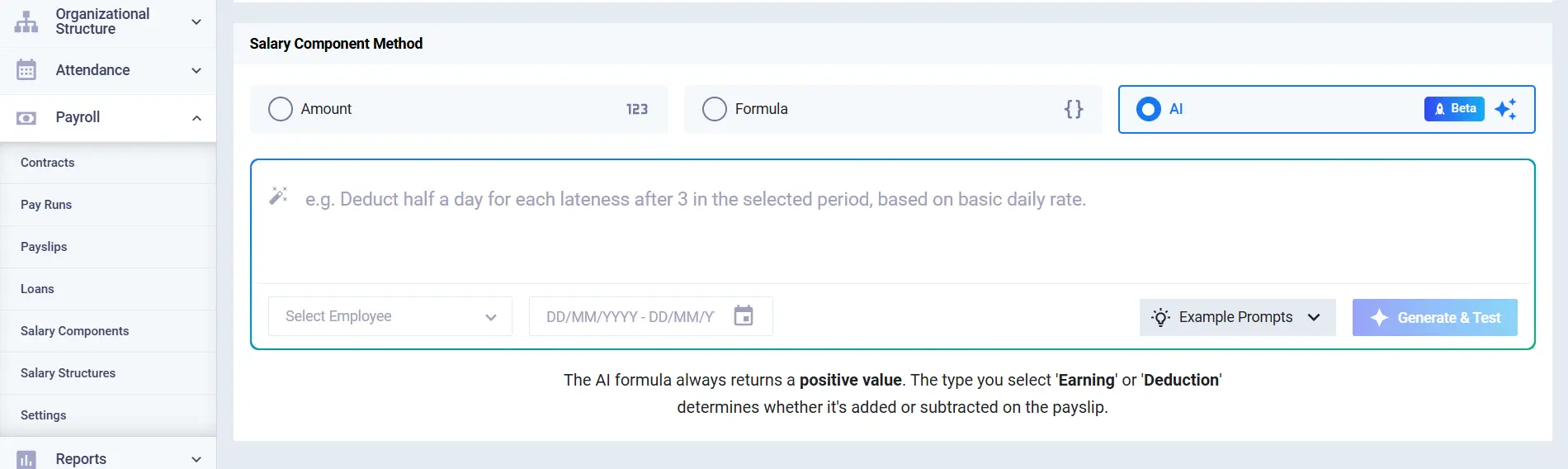
Describe your payroll rule. Let the AI write the formula. Test it before it touches a single payslip. Describe your first salary rule.
Why the Human-in-the-Loop Model Matters
One of the most common objections to AI for ERP is the fear of losing control — that the system will write something into your books that you did not authorize, or apply a formula to payroll that produces the wrong number for a hundred employees at once. It is a reasonable concern, and it is worth addressing directly.
Every action across all three Enerpize AI features requires explicit human confirmation before it is saved. The AI extracts; you verify. The AI matches; you confirm. The AI builds; you test. There is no automatic commit, no background processing that updates your records without your approval. This is not a limitation of the technology — it is a deliberate design principle, built on the understanding that finance data has consequences and that speed without accuracy is worse than slowness.
A 2024 McKinsey survey found that companies with highly automated finance teams spend 60% more time on strategic activities than those still doing things manually. The goal of Enerpize AI is to transfer the repetitive work — data entry, field extraction, formula syntax — to the machine, so that the humans on your finance team can spend their time on the work that requires judgment.
The shift from manual to AI-assisted looks like this in practical terms:
| Task | Manual Process | With Enerpize AI | Time Impact |
| Purchase Invoice Entry | Open invoice, type each line item, match supplier manually, assign tax rule | Upload file — AI extracts and matches everything, you confirm at each step | Up to 80% faster per invoice |
| Expense Receipt Processing | Enter each receipt one by one: amount, date, vendor, category, journal entry | Upload a batch of 100 receipts; AI fills every field, journal auto-generated on save | Minutes vs. hours per batch |
| Payroll Formula Building | Write formula logic manually, test against hypothetical figures, debug errors | Describe the rule in plain English; AI writes the formula, you test on real employee data | Hours of setup per component |
See all three AI features in action — Start your free Enerpize trial.
Is Switching Really That Painful?
The honest answer is: switching ERP platforms can be a project. Migrating historical data, retraining your team, reconfiguring your chart of accounts — none of that is trivial. But the relevant question here is different.
The AI features in Enerpize — invoice matching, expense processing, salary components — do not require a completed migration to activate. You can start using them from day one of your account. Upload an invoice on your first login and the AI will process it. The features work on what you give them, not on what you have historically stored. If you are evaluating Enerpize specifically because you want to reduce manual financial admin, you do not need to wait for a data migration to finish before you feel the difference.
There is also no implementation cost. No consultant to onboard, no deployment fee, no six-week setup window. Enerpize is a cloud-based platform — you register, configure your basics, and you are operational in under a day. For most businesses, the time from signing up to processing their first AI-matched invoice is measured in hours, not weeks.
The switching concern is real for the whole system — and valid. The AI automation concern is separate, and smaller than it looks.
Who Is Enerpize AI Built For?
Enerpize AI was not designed for a company with a dedicated AI team and a data warehouse. It was designed for the finance manager at a 30-person business who is also doing the bookkeeping, or the owner of a 15-person services firm who reviews invoices on Sunday nights because the week is too busy.
More specifically: businesses with 10 to 200 employees, finance teams without data scientists, and operations where a meaningful portion of the working day currently goes to entering numbers that already exist on a piece of paper somewhere. The platform is used by businesses in the United States, Canada, UK, and Australia, and across global markets — each with different compliance requirements, tax structures, and payroll rules, all of which the AI works within because the human always reviews the output before it lands in the books.
If your business is still exporting invoices to a spreadsheet and re-entering them into your accounting system, Enerpize AI was built for exactly that situation.
Getting Started with Enerpize AI
The three AI features run on AIC — AI Credits — which are consumed when each operation completes, not when you upload. Credits are not spent on files that fail the initial check, and you can monitor consumption in real time through the AIC Consumption Report. The report shows your current balance, total usage for the billing cycle, and a per-operation log.
All three AI features are available across Enerpize plans. The best starting point is whichever task costs your team the most time today — for most businesses with supplier invoices coming in regularly, that is AI Purchase Invoice Auto Matching. For businesses with field teams submitting expense receipts, the expense feature delivers the fastest visible return. Payroll formula automation tends to show its value at setup time, when a new component needs to be built and tested. Start your free Enerpize trial.
FAQs:
What AI features does Enerpize currently offer?
Enerpize currently has three live AI features in active beta: AI Purchase Invoice Auto Matching, AI Expense Auto Matching, and AI Salary Components. All three are available to use now, without waiting for a roadmap release.
How does AI purchase invoice processing work in Enerpize?
You upload up to 100 invoices in a single batch — PDF, PNG, JPG, XLSX, or CSV, with a maximum of 10 MB per file. The AI extracts every line item, matches products against your catalogue, identifies the supplier using a confidence tier system, and applies the correct tax rules. At each stage — items, supplier, taxes — you review and confirm before the invoice is saved to your account.
Does Enerpize AI replace my accountant?
No. Every AI action in Enerpize requires human review and confirmation before it is saved. The AI handles extraction, matching, and formula generation — your team retains full control over what enters your books. The purpose is to remove data entry from your accountant's workload, not their judgment from your business.
What are AIC credits and how are they used?
AIC stands for AI Credits — the unit that tracks AI usage in your account. Credits are consumed when each AI operation successfully completes processing, not when you upload a file. You can monitor your balance, total cycle consumption, and a per-operation breakdown in the AIC Consumption Report, found under Finance in the main menu.
Can I describe a custom payroll rule in plain language and have Enerpize build the formula?
Yes. In Payroll > Salary Components, select 'Artificial Intelligence (Experimental)' as the calculation method. Type a plain-language description of the rule — for example, 'Deduct half a day's pay after 3 instances of lateness in a month' — and the system generates the formula. You then test it against real employee data before applying it to any contract or payslip. The test is isolated and does not affect live records.
Summary
Somewhere tonight, a finance manager is entering invoices manually. Not because the technology to automate it does not exist — it does, and it has for a while — but because most of the software built around that technology was designed for enterprises with implementation budgets that most businesses will never see.
The three AI features in Enerpize — purchase invoice matching, expense extraction, salary formula generation — are not in a lab or on a slide deck. They are live, working, and available on the same plan your business might already be using. You upload the file. The AI reads it. You confirm what goes into your books. The stack of forty invoices at 11pm becomes a twenty-minute task that someone reviews over morning coffee.
That is what the best ai-driven ERP software actually looks like in practice. Not a feature list. A Tuesday morning that goes differently than the one before. Try it — start your free Enerpize trial.
About the Author
Omar El Bahr is a Senior Digital Growth Specialist at Enerpize, where he leads SEO, content strategy, and organic growth across international markets. He is a Forbes Communications Council contributor and has written for Entrepreneur on business communication and digital strategy.
Enerpize AI takes the most repetitive parts of your finances off your plate.
Enerpize AI takes the most repetitive parts of your finances off your plate.