



Payments should be easy, fast, and secure. In a world of payments increasingly defined by customer happiness, pushing away grumpiness, bad reviews, negative brand reputation posts, and more is a mandate. That way, businesses can adopt best-in-industry payment practices and build a stronger reputation.
There is such a wide range of payment methods available that businesses only need to select which methods work best for each client base. POS transactions are just one example of an essential—and popular—payment method used by businesses of all sizes.
POS systems used for such transactions enable businesses to streamline checkout processes and experiences across broader business management, UX, and customer implications. As a business owner or executive manager, you surely want to maximize conversions—and listen to checkout music as customers make purchases.
Getting more interested in how PSOs could be a game-changer for your business? Then, read on to learn more about POS transactions, types, and other aspects of optimizing your overall checkout experience.
Key Takeaways
- POS transactions are fast, secure payment methods used online or in-store through systems that manage checkouts and improve customer experience. They’re essential for keeping payments smooth and hassle-free.
- There are three main types: online POS for e-commerce, offline POS for in-person payments, and refund POS transactions for managing returns, all helping businesses handle payments flexibly.
- POS systems process payments via card readers or digital gateways, record purchases, verify funds, and generate receipts, whether in-store or online.
- Using debit cards for POS payments involves added security checks and potential spending limits to protect both businesses and customers from fraud or insufficient funds.
- Implementing a POS system improves efficiency by automating transactions, expanding sales channels, reducing paperwork, and providing businesses with detailed customer and sales data.
- The POS reconciliation process ensures all transactions match records in bank, vendor, or customer statements, helping prevent errors and support accurate financial reporting.
What is a POS Transaction?
A Point of Sale (POS) transaction is a payment method made in person (usually in retail stores) or online using cash or a credit/debit card. As such, POS transactions are fast-track payment methods, particularly at virtual gateways (online) or physical checkout areas in stores.
POS systems require specific software and hardware configurations to function. The requirements for each POS system differ, intuitively, from one vendor and business to another. Put differently, POS setups are far from generic, and customization is king in POS implementations.
Main 3 POS Transaction Types
POS transaction types take many forms, depending on what businesses do, what POSs do, what POSs systems they use, and which payment methods are involved. For example, POS transactions can be classified depending on:
- Payment Method: cash or credit/debit cards.
- Platforms or APIs: mobile or desktop.
- Amounts: in whole or in installments.
For current purposes, though, three transaction-type POS are of particular interest:
Online POS Transactions
These are made online without the customer’s physical presence. E-commerce businesses most commonly use online POS transactions.
As noted, customers pay on the checkout page (via a payment gateway) to place orders and receive transaction receipts: a payment receipt upon approval or only transaction details upon rejection. Typically, all online transactions are synced with the vendor’s POS to update transaction logs in real-time.
Offline POS Transactions
These are made in person and are a rarity in B2B. Still, offline or in-person POS transactions are helpful for wholesalers such as Germany’s Metro Cash & Carry.
A second significant benefit of offline POS transactions in a B2B context is that businesses operating in remote locations can still collect credit or cash instantly without waiting to report to HQ or a nearby office. POS could be a revenue-enhancing method beyond conventional sales channels and reporting.
POS Refund Transactions
CRM, or Customer Relationship Management, is not only about sales or always-good purchases. Even your most loyal customers may choose to return one or more items - and ask for a refund.
As a seller, on- and offline, your POS transactions may involve retractions or reversals in the sales process when customers return products. In such situations, your adopted POS system should be set up to process “reverse payments” and issue refunds to customers.
There are many benefits of having an in-place POS refund transaction processing feature, including:
- Resolving payment disputes fast
- Enhancing customer checkout experience
- Establishing brand trust
A detailed “Refund Policy” - and, of course, following best-in-industry practices in returns management - is a wise piece of documentation you should have as a vendor as part of your overall payment documentation to ensure your customers are well-informed - and respected.
How Does a POS Transaction Work?
The POS transaction process is now a standard. In physical stores or online, millions of customers check out after placing orders in shopping carts. The POS transaction process starts when a customer pays.
This is where the checkout process diverges slightly depending on which payment method is used (credit/debit card or in cash) and where (in a brick-and-mortar store or online).
Once at the checkout point, the Register Associate records all customer purchases using a barcode scanner/reader connected to the POS. This should log all purchase details such as name, quantity, etc.
To put matters into perspective, here is how POS transactions work in three different scenarios.
In-Store Physical POS Transaction Using Credit/ Debit Card
The POS payment process using a credit/debit card is processed as follows:
- The customer swipes, inserts, or taps the card (plastic or virtual on a mobile phone) onto the card reader.
- The POS connects to the cardholder’s bank, prompts for a PIN, verifies the funds are available, and confirms (or does not) the payment.
- The card is debited upon payment approval, or not upon rejection.
- A payment receipt is generated in all cases, with one copy kept for store records and a second copy given to the customer.
In-Store Physical POS Transaction Using Cash
Using cash to pay is much simpler. Customers usually insert the required note or coin amounts or hand them to the register associate.
Online Physical POS Transaction Using Credit/ Debit Card
Understandably, customers need only a plastic or virtual card to pay online. The process is usually as follows:
- The customer goes to the checkout page and is ready to pay.
- Card details are processed once “Pay” is clicked or automatically saved if not saved before.
- An on-screen message appears indicating whether the payment was successful.
- An online receipt is generated and sent to the customer, usually via email or mobile.
Read Also: What Does POS Debit Mean? All What You Need To Know
POS Transaction Examples
POS transactions appear differently depending on how and where a business sells. In liquor retail, wholesale, and service-based environments, each transaction type supports a specific operational need. Below is a unified view of the most common POS transaction examples you’ll encounter.
1- Standard Retail Card Sale
This is the most familiar POS flow. A customer pays at the counter using a card or mobile wallet. The POS processes the transaction instantly, records the sale, and generates a receipt. Funds are settled in accordance with the store’s batch schedule and processor rules. This flow covers everyday purchases in liquor stores, clothing shops, salons, and similar retail environments.
2- Restaurant and Service Industry Billing
In restaurants, the restaurant POS system manages billing after the customer finishes dining. The server processes payment through a POS terminal, often including tips and split payments. In service businesses like salons or spas, customers pay at checkout once the service is complete. These POS transactions improve speed, accuracy, and overall customer experience.
3- Payment Facilitator for Distributor Deliveries
In the liquor industry, payment facilitators play a key role beyond front-counter sales. When distributors deliver product to retailers, the facilitator can collect payment in a single consolidated transaction rather than through multiple small sales. The POS sends invoice-level details so charges are clear, accurate, and settled on time. This supports smoother cash flow between retailers, distributors, and facilitators.
4- Invoice Upload and Settlement for Wholesale Sales
Wholesale transactions—such as selling to restaurant chains like Applebee’s or Chili’s—use a different POS flow. The retailer uploads an invoice through the POS system. The corporate office reviews and pays based on that invoice, and the transaction settles accordingly. This method is designed for high-volume, business-to-business sales rather than simple card swipes.
5- E-commerce and Virtual POS Transactions
For online sales, payments are handled through a virtual POS. Customers enter card details or use digital payment methods, and the transaction is processed securely without a physical terminal. This POS transaction type supports online ordering and omnichannel retail strategies.
Together, these POS transaction examples show how modern POS systems adapt to retail, restaurant, service, delivery, wholesale, and e-commerce use cases—each with its own flow, timing, and settlement structure.
What Does POS Reconciliation Mean?
POS reconciliation is the process of matching POS transactions with bank deposits, accounting entries, cash balances, and other financial records to ensure that all sales recorded in the POS system align with actual payments received.
This process helps identify and prevent discrepancies, such as inaccurate payments, missing transactions, or duplicate entries, while also providing a clear view of daily sales performance and supporting better financial decisions.
Steps of the POS Reconciliation Process
POS reconciliation is a “matchup” process in which information is logged into in-use POS systems and books. Put differently, accounting staff must ensure that all transactions recorded by in-place POS systems are mirrored into the company's books and statements.
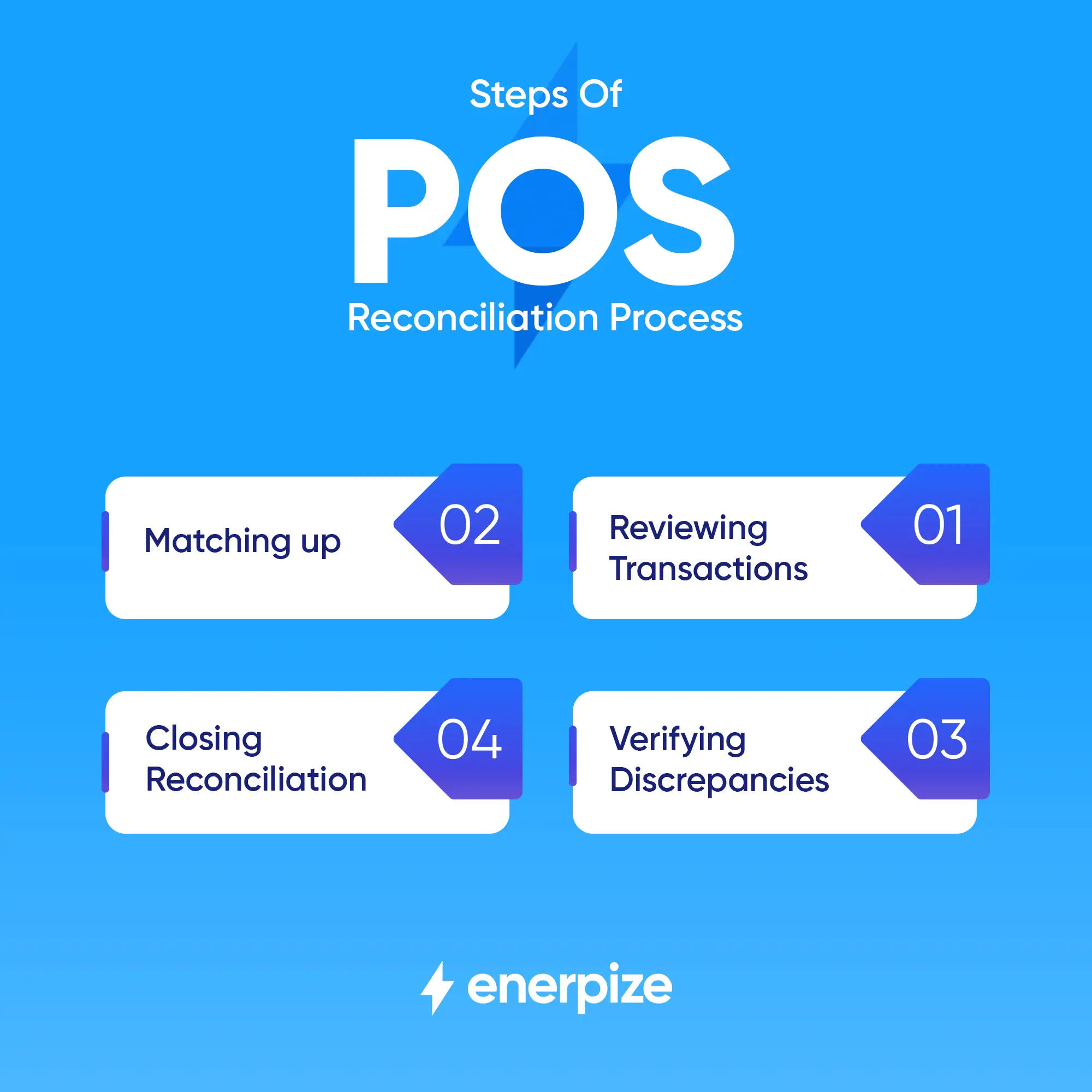
The POS reconciliation process is pretty much straightforward:
- Review all transactions, including refunds, logged to your POS system.
- Match up your transaction list against all available statements and check for discrepancies.
- Verify where discrepancies come from.
- Close your reconciliation process once every transaction has been reviewed, matched, and verified.
Unless your records are set straight, you could encounter a wide range of financial, regulatory, and compliance issues as a business owner or executive manager. So, managing your POS reconciliation process well and on time is essential for your sales management success and for enhancing your business growth.
Some standard reconciliation information includes payment method, product code, transaction processor, sales tax information, and more. That being said, the POS reconciliation process can be classified into:
- Bank Reconciliation: This involves reconciling POS transactions with bank records and statements.
- Vendor Reconciliation: This is where vendor invoices for any products or services are matched against your POS transaction logs.
- Customer Reconciliation: This reconciliation class involves matching POS transaction logs against customer receipts.
The reconciliation process differs slightly depending on the payment method used:
- Cash reconciliation compares POS transaction records with the actual physical cash collected during a specific period, such as the end of a shift or business day.
- Credit card reconciliation, on the other hand, matches POS transaction records with corresponding credit card transactions.
Benefits of POS Implementation for Business
The business world is now engulfed in a revolution of automations, integrations, and service virtualizations. To access markets and customers fast, businesses need to upgrade in-place systems to make an impact. In sales, POS systems are a Holy Grail for businesses big and small, just to do that.
Here is an inexhaustive list of POS implementation benefits:
1- Leveraging efficiencies
Instead of manually processing transactions, vendors can rely on POSs to handle transactions end-to-end automatically, securely, and instantly.
2- Diversifying sales streams
Using POS systems enables businesses to expand on sales channels and, in doing so, increase revenue and enhance CX and UX.
3- Achieving operational excellence
Sales management is time-consuming, especially when done online and for an e-commerce business. So, using a POS system not only streamlines sales processes end-to-end but also contributes to overall operational excellence by eliminating operational lapses.
4- Gaining more granular customer data
The promise of automation goes beyond POS implementation and into a broader understanding of customer journeys, sales performance, brand positioning, and more. So, using POS systems - by default, data-driven, especially in more advanced implementations - helps businesses attract and retain customers.
5- Reducing paperwork processing
This is perhaps an almost given now. As POS systems have become the standard, most vendors have practically forgotten the bygone days when invoices, sales reports, inventory management, and more were done on paper—with incredible resource waste and a huge impact on overall productivity.
Template you may need: Annual Sales Report Excel
The list can go on and on. The bottom line is that POS systems are becoming increasingly necessary for businesses, particularly those operating in 24/7 sales ecosystems such as e-commerce.
Read Also: 6 Reasons that Show You Why to Use Online Accounting Software
POS Transaction Challenges And How To Face
Whether used in physical stores or integrated into e-commerce platforms, POS systems can be complex to manage. Small businesses—especially in fast-moving, digital-first markets—often face recurring challenges across security, performance, hardware, integration, and customer experience.
Fortunately, these risks are well understood, and with the right practices, they can be addressed effectively. Below is a consolidated overview of the most common POS transaction challenges and how businesses can face them:
1. Cybersecurity and Security Risks
POS systems are frequent targets for fraud, phishing, malware, and data breaches. Socially engineered cyberattacks can trick unprepared staff into disclosing sensitive information such as credit card or bank details. Weak access controls may also allow unauthorized users to manipulate transaction data.
How to face it:
Businesses should follow best practices for data security and use POS systems that comply with PCI-DSS standards. Secure, reputable POS hardware and software are essential, along with strict access controls, regular password changes, and staff training to recognize suspicious activity. Using PCI-compliant terminals with encrypted payment processing helps protect customer data and business reputation.
2. Technical Issues and System Downtime
Unexpected crashes, freezes, and software bugs can disrupt POS transactions, resulting in lost sales and long queues. Hardware malfunctions—such as printer jams, scanner failures, or terminal issues—can also halt operations. Network connectivity problems further complicate cloud-based POS transactions.
How to face it:
Quick troubleshooting, regular software and firmware updates, and routine hardware maintenance are key. Rebooting systems, keeping spare components on hand, and ensuring stable internet connectivity help minimize disruptions. POS systems with offline mode allow transactions to be queued and synced later, reducing downtime impact.
3. Slow Transactions and Performance Bottlenecks
Slow checkout processes frustrate both staff and customers. These delays often stem from outdated hardware, limited bandwidth, cluttered interfaces, or inefficient workflows.
How to face it:
Upgrading POS hardware, streamlining on-screen menus, disabling unused features, and maintaining reliable internet connections can significantly speed up transactions. Faster processing improves service flow and reduces customer wait times.
4. Diverse Payment Preferences and Payment Glitches
The growing variety of payment methods—cards, e-wallets, QR codes, and contactless payments—can overwhelm outdated POS systems that are outdated. Payment failures, declined cards, or reader issues can disrupt transactions and harm customer trust.
How to face it:
POS systems should support multiple payment types, including QR code payments and digital wallets. Keeping payment devices up to date, checking cables and connections, and having backup payment options available help ensure smooth transactions across all methods. Businesses that regularly generate QR codes for payments, promotions, or customer interactions should ensure their systems can process them reliably.
5. Hardware and User Interface Challenges
Some POS solutions come with overly complex interfaces or unreliable hardware, increasing the risk of user errors and operational slowdowns. Compatibility issues and a lack of training support can further strain daily operations.
How to face it:
Choosing a trusted POS supplier that provides user-friendly interfaces, up-to-date hardware, regular updates, and customer support can reduce errors and improve efficiency. Reliable hardware and intuitive design make POS systems easier for staff to use correctly.
6. Integration Challenges
POS systems that don’t integrate well with accounting, inventory, CRM, or reporting tools can lead to data inconsistencies, manual entry, and operational inefficiencies. Poor synchronization affects inventory accuracy and financial reporting.
How to face it:
Using Enerpize POS solution with built-in integrations and API capabilities allows seamless data sharing across systems. Consistent data formats and synchronized reporting help maintain accurate records while reducing manual processes and administrative workload.
7. Inventory Accuracy Issues
Mismatches between inventory counts and sales data can result in over-ordering or stock shortages. These issues often arise from manual errors or a lack of real-time syncing.
How to face it:
Inventory management software and real-time updates help ensure accurate stock levels. Regular checks and automated adjustments reduce discrepancies and improve planning.
8. User Error and Operational Inefficiencies
Incorrect data entry, misuse of POS features, and insufficient staff training can lead to inaccurate records, incorrect refunds, and slower service.
How to face it:
Ongoing staff training, simplified workflows, and clearly defined POS procedures help minimize human error and improve transaction accuracy.
9. Customer Experience Challenges
Long wait times, transaction failures, cluttered checkout areas, and poor staff interactions can create unpleasant customer experiences and drive customers away.
How to face it:
Businesses should regularly assess the full customer journey, including queue times, payment speed, and service quality. Efficient POS transactions combined with knowledgeable staff and organized environments support better customer satisfaction.
10. Limited Reporting and Visibility
Basic POS systems may not provide enough insight into sales performance, transaction issues, or customer behavior, making decision-making difficult.
How to face it:
Using POS systems with detailed reporting and analytics allows businesses to review transaction data, identify issues early, and improve operations through informed decisions.
By understanding these POS transaction challenges and addressing them through proper security, reliable hardware, system maintenance, staff training, and integration, businesses can create a more stable, efficient, and customer-friendly POS environment—reducing risks while supporting long-term growth.
Automate Your POS Transactions with Enerpize
Enerpize is a fully integrated online POS software solution that supports both online and in-store sales, enabling businesses to manage their sales operations efficiently from a single platform. Enerpize POS helps you maximize your sales potential by offering a wide range of features, including:
- Multiple payment methods, both online and offline
- Partial and split payments within the same transaction
- Easy handling of returns and refunds, whether partial or full
- Receipt and invoice previews with cloud-synced history
- Flexible discount management at the item or invoice level
- Sales order notes and detailed transaction tracking
- Cash register management, including cash in and cash out
- Inventory management with units, barcodes, variants, and stock tracking
- Compatibility with barcode scanners, printers, cash registers, and scales
- Sales reporting and business insights
- Price groupings and role-based employee permissions
- Full integration with Inventory, Accounting, CRM, and e-invoicing compliance
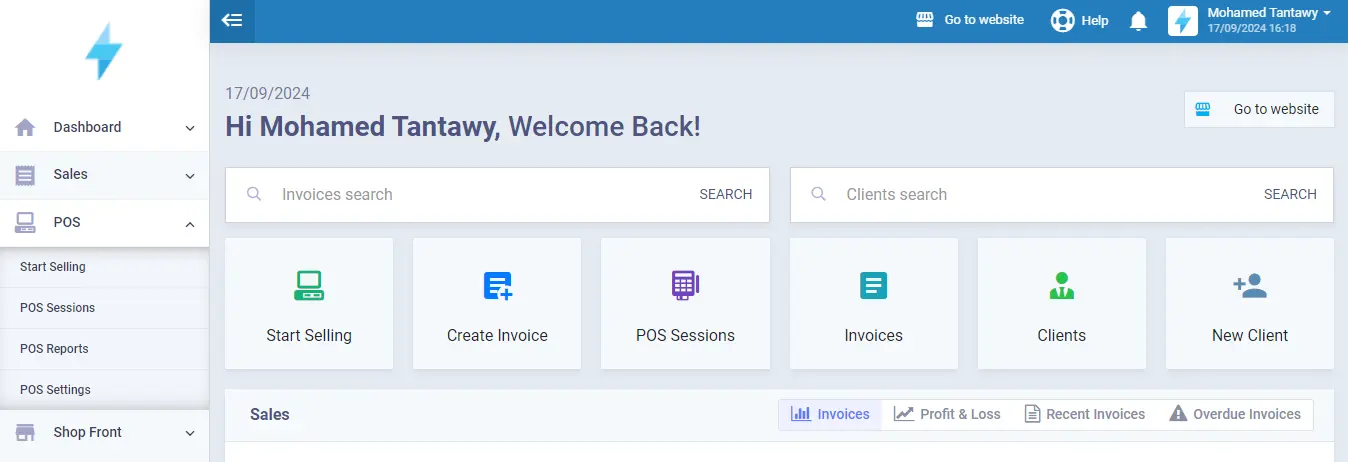
Enerpize POS capabilities empower you to:
- Consolidate all sales components into one unified system.
- Measure performance to improve results using reports and analytics.
- Sell anywhere, using flexible hardware and mobile devices.
In short, Enerpize POS is everything your business needs to manage POS transactions end-to-end, smoothly, quickly, and compliantly.
Try us out and start a next-level journey in sales management - and customer satisfaction.
Final Thoughts
POS systems are becoming indispensable to businesses operating in intensive, data-driven, sales-centered ecosystems, particularly e-commerce platforms. As companies transition to more agile, AI-based, and automated systems, POS systems become increasingly part of sales management, growth, and success.
So, whether transactions are made online, offline, with credit/debit cards, or in cash, POS systems are now a mainstay in sales management to leverage efficiencies, diversify sales streams, achieve operational excellence, gain more granular customer data, and reduce paperwork.
Notably, POS systems help business owners and executive managers match up or reconcile records against statements and credit notes smoothly and efficiently. This makes book closing, auditing, and tax compliance a breeze.
FAQs About POS Reconciliation
What is a POS Transaction in a debit card?
As noted, a credit/debit card transaction is made online or in-store by entering card credentials (cardholder’s name, card expiry date, and CVV code) on the keypad-/swipe-/tap-enabled POS.
So, a POS transaction with a debit card is made in the same way. However, using a debit (vs. a credit) card involves more precautions that vendors take and certain payment limits set to mitigate against possible fraud or non-fund risks.
What is an online POS transaction?
An online POS transaction occurs when a sale is processed through an internet-connected POS system that instantly communicates with the bank or payment gateway to authorize and complete the payment. This typically applies to card or digital wallet payments that require instant verification.
What is the difference between POS and online payment?
A POS transaction occurs at a physical location, such as a store or restaurant, using a POS terminal or system, whereas an online payment takes place on a website or mobile app without physical interaction.
What is the difference between offline POS and online POS?
An offline POS operates without an active internet connection, storing transaction data locally until it reconnects and syncs later. An online POS, on the other hand, requires an internet connection to process transactions in real time, ensuring instant authorization and automatic data updates across connected systems.
POS transactions are easy with Enerpize.

Try our POS module to manage your transactions.
Related Articles
 Accounting
Sales Journal Entry: A Detailed Guide
Read more Accounting
Depreciable Cost: What is & How To Calculate?
Read more Accounting
Cost of Goods Sold Formula and How to Calculate
Read more Accounting
The Best AI-Driven ERP Software Doesn't Just Label Itself AI — Here's What Enerpize Actually Does
Read more Accounting
What Are Lease Journal Entries: Types, Standards & Calculating Steps
Read more Accounting



