Posted on 2 June 2026
Free Medical Invoice Template Download: PDF, Excel, and Word
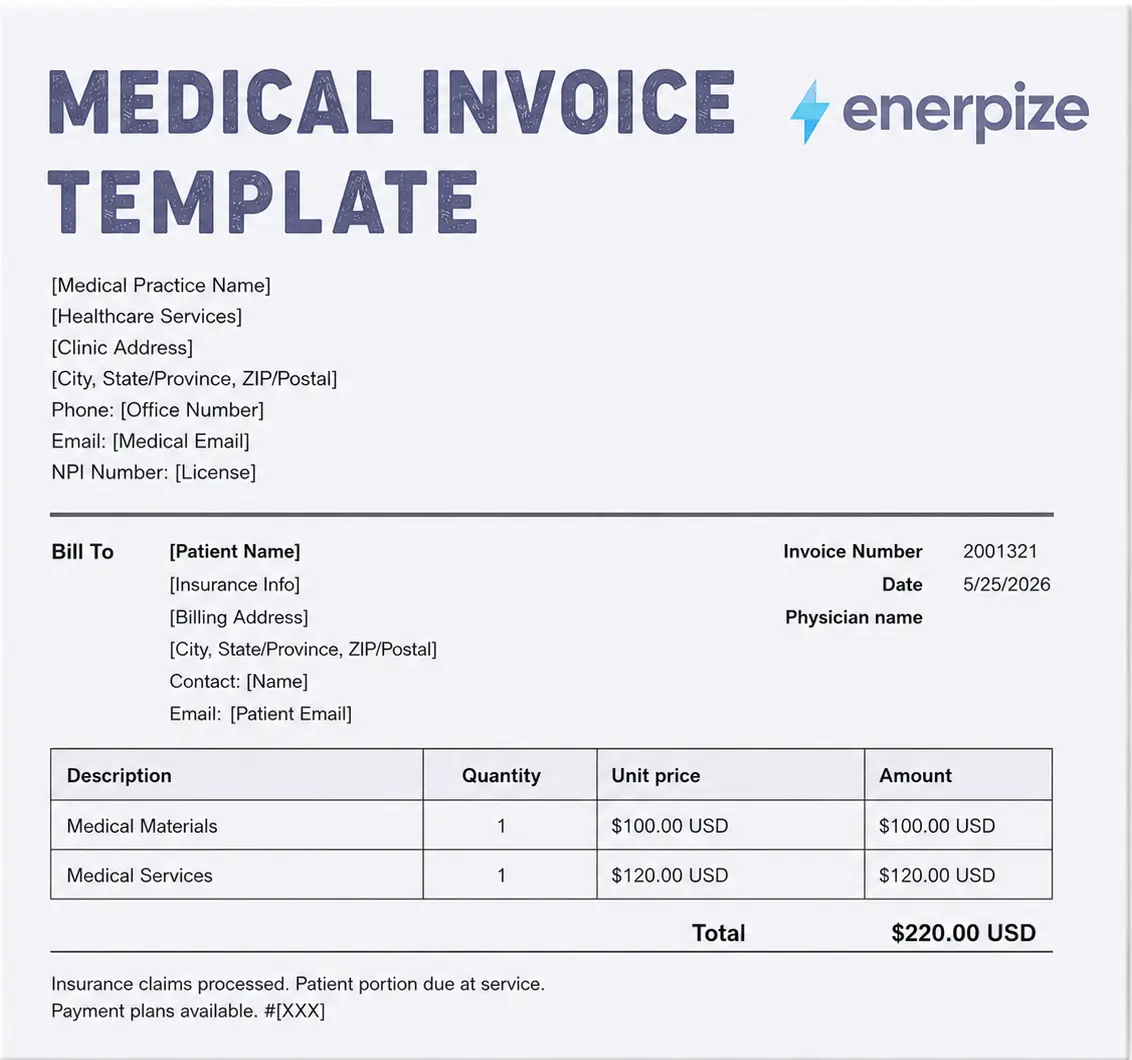
- Fields for provider details, patient information, service line items, and totals. Customize with billing codes, insurance adjustments, and payment terms for your practice.
- Covers consultations, procedures, medications, lab tests, copays, deductibles, and after-hours charges across all medical practice types.
- Supports compliance with standard medical billing requirements including NPI identification, CPT and ICD-10 code placement, and itemized insurance breakdowns.
- The medical invoice template is available in PDF, Word, Excel, Google Sheets, and Google Docs.
A medical invoice template is a structured billing document used by healthcare providers, clinics, pharmacies, and diagnostic labs to request payment from patients and insurers for services rendered.


You sent the invoice. The patient read it, frowned, and called you to ask what half of it means. Sound familiar?
Medical invoicing sits at the intersection of clinical care and business reality, and most practitioners get stuck right there. The service was excellent. The documentation was thorough. But the invoice looked like it was generated by someone who had never spoken to a patient in their life. Jargon-heavy line items, a single bundled total, no payment terms, and a due date buried in the footer like a legal disclaimer nobody reads.
That is the problem this page solves.
Above you will find free medical invoice templates in PDF, Excel, Word, Google Sheet, and Google docs, a field-by-field guide to what every invoice needs, a specialty breakdown for clinics, labs, pharmacies, and more, and a plain-English walkthrough of the rules that govern medical billing in the markets where this template gets used most.
Start sending professional medical invoices today. No credit card needed. Start for free.
What Is a Medical Invoice?
Here is something most billing guides skip: a medical invoice, a medical bill, and a medical receipt are not the same document. Using the wrong one creates confusion, delays payment, and occasionally triggers a dispute that takes three phone calls to resolve.
The distinction is straightforward once you see it laid out.
Document | When It Is Issued | Who Receives It | What It Does |
|---|---|---|---|
| Medical Invoice | Before or at the time of service | Patient or insurer | Formal request for payment |
| Medical Bill | After the service, before payment | Patient | Itemized charge summary |
| Medical Receipt | After payment is received | Patient | Proof that payment was made |
Think of the invoice as the question, the bill as the explanation, and the receipt as the answer. All three matter. Only one is what you are creating here.
A medical invoice is a formal document issued by a healthcare provider to a patient or their insurance company. It itemizes every service rendered, the associated cost of each, any insurance adjustments or copay obligations, and the total balance due. It is both a payment request and a legal record of the transaction.
Payment terms, late fee policies, and debt collection timelines in the US are governed by the Fair Credit Reporting Act and vary by state. Consult a billing compliance specialist for your specific jurisdiction.
What to Include in a Medical Invoice
Every field on a medical invoice serves a purpose. Some protect you legally. Some make it easier for insurers to process the claim without asking follow-up questions. Some simply help the patient understand what they are paying for and why.
Here is what belongs on every medical invoice, and what each field actually does.
Provider Information
Your name or practice name, full address, phone number, and email. If your jurisdiction requires it, include your license number and provider ID. In the United States, that means your NPI number. This is not optional. An invoice without an NPI number will be rejected by most US insurers before anyone reads the line items.
Patient and Insurance Information
Patient full name, date of birth, address, and contact details. If the patient has insurance, include the insurer name, policy number, group ID, and any prior authorization or referral number tied to this visit. The insurer is going to cross-reference every one of these fields against their records. Give them something clean to work with.
Service Line Items
This is where most medical invoices either earn trust or destroy it.
Every service needs its own line. Not a bundled total. Not a single row that says "medical services rendered." A separate line for the consultation, a separate line for the blood draw, a separate line for the medication dispensed. Each line should include a plain-English description, the relevant billing code where required (CPT for procedures in the US, ICD-10 for diagnoses), the unit or quantity, the rate, and the line total.
Patients do not know what CPT 99213 means. Write it as: "Office visit, established patient, moderate complexity (CPT 99213): $145." That sentence takes two seconds to read and eliminates the phone call asking what the charge is for.
Copay, Deductible, and Insurance Adjustments
If the patient has insurance, show the breakdown in plain terms. Something like this works:
- Insurance estimated payment: $120
- Applied to deductible: $75
- Patient copay: $30
- Amount due today: $25
The patient sees exactly what they owe and why. The insurer sees exactly how you have calculated the balance. Everyone moves faster.
The downloadable template above uses a simplified line item structure. Add these rows manually or use Enerpize to apply insurance co-payment rules automatically per patient.
Medical Invoice Formats: Which One to Use
The format you choose depends on how you send the invoice and what the recipient needs to do with it.
The standard for patient-facing invoices. The layout stays fixed regardless of the device it is opened on. Nothing shifts, nothing reformats, nothing gets accidentally edited. Use PDF when you are sending a finalized invoice to a patient or insurer.
Excel
The right choice when you need to calculate, adjust, or work with multiple invoices at once. Formulas handle the arithmetic. Useful for internal billing records, batch processing, or when your billing coordinator needs to update rates across multiple service lines.
Word
The most flexible format for editing layout and text. Good for practices that want to customize the template heavily before converting to PDF for sending. Not ideal as a final delivery format because the layout can shift between systems.
Google Docs
The browser-based alternative to Word for practices that work entirely in the cloud. No software installation, no version mismatch between computers, and no emailing files back and forth between staff. Open the template, fill it in, and export as PDF when you are ready to send. The right choice for small clinics where the front desk, the billing coordinator, and the practice manager all need access to the same document without stepping on each other.
Google Sheets
The cloud equivalent of Excel. Every formula works the same way, the file lives in your Google Drive, and anyone with the right permissions can update rates, add line items, or pull a billing summary without needing to be in the same room. Particularly useful for practices that track multiple patient invoices in a shared sheet and want the totals to update automatically as new services are added.
Fillable Medical Invoice
A fillable PDF combines the stability of PDF with the ability to type directly into fields without needing Word or Excel. This is the format most useful for practitioners who bill occasionally and want something they can complete in under five minutes. The templates above are all available in fillable format.
Medical Invoice Templates by Specialty
The core invoice structure is the same across all medical practices. What changes is the line items. A GP billing for a 15-minute consultation has a very different invoice from a lab billing for 14 individual test panels.
Here is what changes per specialty, and what to watch for in each.
General Practitioner and Doctor Invoice
Line items to include: consultation fee by visit type (new patient vs. established patient), any in-office procedures performed, medications dispensed, referral or authorization numbers if applicable. Attach diagnosis codes only where the insurer requires them for this visit type.
Dental Invoice
Dental invoices use ADA procedure codes rather than CPT codes. Each procedure needs its own line: examination, X-ray, cleaning, filling, extraction, crown. Insurance co-payment rates in dentistry are often calculated per procedure category rather than as a flat percentage, so show the math per line rather than as a single deduction at the bottom.
Lab and Diagnostic Centre Invoice
This is the most line-item-heavy invoice type in medicine. Each test is a separate billable unit. Include the test name, the CPT code if billing a US insurer, the specimen collection or handling fee as its own line, and whether the test was performed in-house or sent to a reference lab. In-house and send-out tests are billed differently and need to be labeled as such.
"Hospital laboratory invoice template" is a common search for good reason. Labs that bundle all tests into a single line routinely face insurer rejections because the payer cannot reconcile the total against their fee schedule without individual line items to match against.
Pharmacy and Medical Store Invoice
Medication invoices need more detail than service invoices. Include the drug name, the dosage and form (tablet, capsule, injection), the quantity dispensed, the lot number if your jurisdiction requires it, and the unit price. If the medication requires a prescription, note the prescribing physician. Taxability varies by medication type and jurisdiction, so flag each line as taxable or exempt rather than applying a blanket rate.
Hospital Invoice
Hospital invoices are typically the most complex because they combine professional fees (the physician) and facility fees (the hospital) in a single document. The clearest approach is to separate these into two sections within the same invoice rather than mixing them into a single undifferentiated list. Label the sections clearly: "Professional Services" and "Facility Charges." The patient and insurer both need to see the distinction.
How to Create a Medical Invoice: Step by Step
Six steps from blank template to sent invoice.
Step 1: Add Your Practice Details
Practice name, address, phone, email, NPI or license number. If you have a logo, add it to the header. This is not just branding. It is the first thing an insurer checks when they receive the invoice.
Step 2: Enter Patient and Insurance Information
Full name, date of birth, address, insurer name, policy number, group ID, authorization number. Check every field against the intake form. A single digit wrong in the policy number will get the claim rejected.
Step 3: List Every Service as a Separate Line Item
One line per service. Plain-English description plus the relevant billing code. Units or minutes and the rate for each. Do not bundle. Do not summarize. Give the insurer and the patient every line they need to verify the total independently.
Step 4: Apply Insurance Adjustments and Copay
Show the full charge, then the insurance estimated payment, then the patient portion. Break out copay, deductible contribution, and coinsurance separately if applicable. The patient should be able to read the invoice and know exactly what to bring to the front desk. If you are using the downloadable template, add these as manual line items in the description column. Enerpize calculates and displays this breakdown automatically.
Step 5: Set Payment Terms
Due date. Accepted payment methods. Late fee policy if you have one. The 180-day credit reporting window if you are billing US patients directly. Same language, every invoice, every time.
Step 6: Download as PDF and Send
Convert the completed invoice to PDF before sending. Email it directly to the patient or insurer, or print for in-person handover. Keep a copy in the patient file.
Manage patient billing, staff payroll, and clinic expenses in one system. Start for free.
Enerpize Medical Invoice Software by Practice Type
A good template solves the invoice itself. What it does not solve is everything that happens around it: the staff payroll that needs to be processed before Friday, the pharmaceutical stock that is running low, the insurance co-payment rule that applies differently to three different patients on the same day, the expense tracking for the new equipment you just purchased.
That is where Enerpize comes in. One login connects your invoicing to every other financial and operational layer of your practice.
Here is what Enerpize does for each type of medical business.
General Medical Clinic
Issue consultation invoices, track income from medicines, X-rays, and lab analyses, and automate insurance co-payment rules so the patient sees exactly what they owe before they leave the room. Connect billing to patient case files, doctor assignments, and CRM follow-up. Every invoice flows directly into your accounts receivable and journal entries without a separate entry step.
Explore Enerpize for Medical Clinics
Dental Clinic
Bill dental procedures, consultations, and one-time supplies as separate invoice lines. Enerpize supports insurance categorization by class and automates co-payment rate application per dental service type. Attach X-rays and case notes directly to patient records alongside their invoice history. Track dental equipment as depreciating assets.
Explore Enerpize for Dental Clinics
Pharmacy and Medical Store
Generate medicine sale invoices with automated tax calculations, discounts, and shipping. Track drug stock by expiry date and serial number. Receive low-stock alerts before a shortage affects patient care. POS-integrated barcode invoicing keeps the pharmacy counter and the accounting system synchronized without manual re-entry.
Explore Enerpize for Pharmacies
Medical and Diagnostic Laboratory
Invoice individual lab tests or full panels, apply insurance co-payment rates per test category, and schedule home visit specimen collection. Deliver results via email or SMS directly from the patient record. Every lab invoice connects to the patient file, the journal entry, and the accounts receivable balance in real time.
Explore Enerpize for Medical Labs
Pediatric Clinic
Bill for children's check-ups, vaccines, and medical supplies with separate line items per service. Insurance billing automates per patient. Parent alerts for medication changes or next appointment reminders go out by email or SMS. Each child's profile carries the full vaccination history, prescription log, and invoice trail in one place.
Explore Enerpize for Pediatric Clinics
OB/GYN Clinic
Issue invoices for pregnancy check-ups, delivery procedures, and post-natal follow-ups. Track each patient's reception order from the initial appointment through birth status. Attach ultrasound images, test analyses, and specialist notes to the patient record alongside the invoice. Insurance co-payment rules apply automatically per service type.
Explore Enerpize for OB/GYN Clinics
How to Verify a Medical Invoice Is Legitimate
The number one query that brings people to this page is "fake medical bill report." And the reason is not what you might expect.
Most people searching that phrase are not trying to create a fraudulent invoice. They received a bill, something about it looked off, and they want to know whether what they are looking at is real. That is a completely reasonable concern. Medical billing errors are more common than most patients realize, and the difference between a legitimate invoice and a fabricated one often comes down to a few specific details.
Here is what a legitimate medical invoice will always have, and what should prompt a closer look.
What a Legitimate Medical Invoice Contains
A real medical invoice will always include the provider's full name and verifiable contact information. In the United States, it will include an NPI number, which you can verify for free at the National Plan and Provider Enumeration System (NPPES) database managed by CMS. The service date and location will match your records of the visit. Every charge will correspond to a specific service you actually received. The billing codes, if shown, will be real CPT or ICD-10 codes that exist in the standard coding systems.
What Should Prompt a Closer Look
No NPI number or license number. A provider name that does not match the practice where you were seen. Charges for services on dates you have no record of. A total that does not match the breakdown of individual line items. Payment instructions directing you to a personal bank account or a payment link that does not match the practice's official website.
If any of these appear, contact the provider directly using the phone number from their official website, not the number printed on the invoice you are questioning.
Medical Invoice Line Items: A Standard Reference
Use this table to build your service list. Each row shows the correct unit type, whether the charge is typically taxable, when to use it, and how to show it clearly on the invoice. The reference table below shows the full range of line items a medical invoice can carry. The downloadable template covers the core fields. Add columns or rows as needed for your specific billing requirements.
Charge or Service | Unit | Taxable | When to Use | How to Show It |
|---|---|---|---|---|
| Office Visit, Established Patient | Item | No | Routine visit, existing patient | Item x rate. Attach diagnosis code to support medical necessity |
| New Patient Examination | Item | No | First visit or long gap in care | Item x rate. Document history, exam, and plan |
| Telehealth Consultation | Time | No | Virtual visit | Minutes x hourly rate. Note platform used and start/end times |
| In-Office Lab Draw | Item | No | Blood draw performed at the clinic | Qty x rate. Link ordered tests and note specimen chain of custody |
| Point-of-Care Test | Item | No | Rapid strep, flu, glucose, etc. | Each test x rate. Record test type, lot number, and result |
| Vaccine Administration | Item | No | Immunization given in clinic | Dose x rate. Capture manufacturer, lot, site, and consent |
| Laceration Repair | Item | No | Clean, anesthetize, and close a wound | Item x rate. Document length, location, and technique |
| After-Hours Surcharge | Item | No | Care outside standard clinic hours | Qty x rate. Apply only when visit meets your after-hours policy |
| Medical Form Completion | Time | No | School, work, disability, or clearance forms | Minutes x hourly rate. Note form type and delivery method |
| Durable Medical Equipment | Item | Yes (varies) | Take-home brace, device, or equipment | Cost x markup. Provide sizing, fit check, and home-use instructions |
| Specimen Handling Fee | Item | No | In-house lab processing or send-out prep | Flat fee per sample. Label as in-house or reference lab |
| Medication Dispensed | Item | Varies | Prescription or OTC product given at visit | Drug name, dosage, qty x unit price. Note lot number if required |
Common Medical Invoicing Mistakes and How to Fix Them
Every one of these mistakes slows down payment. Most of them are completely avoidable.
Using Medical Jargon Without Explanation
An invoice that reads "CPT 99213, ICD-10 J06.9, $145" means nothing to the patient receiving it. They will call the office. They will dispute it. They will delay payment while they figure out what they were charged for. Pair every code with a plain-English description. "Office visit for upper respiratory infection (CPT 99213, ICD-10 J06.9): $145" takes three more seconds to write and eliminates the confusion entirely.
Bundling All Services Into One Line
One line that says "Medical services: $450" is not an invoice. It is a demand note with no supporting evidence. Split every service into its own line with its own unit count, rate, and total. Show the math. Make it verifiable.
Missing Provider Identifiers
An invoice without a license number, NPI, or provider ID will be rejected by most insurers before anyone reviews the clinical content. Add these to your template header once and they will appear on every invoice automatically.
Unclear or Missing Payment Terms
If your invoice does not state a due date, a late fee, and your accepted payment methods, you are relying on the patient to guess. They will not guess correctly. Use identical payment terms language on every invoice, put it in the footer, and never leave it out.
Applying Tax Incorrectly
Medical services are exempt from sales tax in most US states and under GST in most other jurisdictions. Durable medical equipment is often taxable. Medications vary. Applying a flat tax rate across all line items will either overcharge patients on exempt services or undercharge on taxable ones. Check each line item individually and flag taxable items clearly.
Mixing Time Units
If you bill some services by the hour and others by the minute and others by the session, your invoice becomes impossible to audit. Pick one unit system per service category and use it consistently across every invoice.
Key Takeaways
- A medical invoice is a formal payment request, not the same as a medical bill or receipt. Each document has a distinct role in the patient payment cycle.
- Every service needs its own line item with a plain-English description, the relevant billing code, units, and rate. Bundled totals invite disputes.
- In the United States, the Medical Debt Relief Act protects patients from credit reporting on unpaid medical invoices for a minimum of 180 days. Your payment terms language should reflect this.
- CPT and ICD-10 codes belong on the invoice alongside plain-English descriptions. The code alone is not sufficient for patient understanding and may not be sufficient for insurer processing without the accompanying description.
- Medical invoicing does not end when the invoice is sent. Staff payroll, pharmaceutical stock, insurance co-payment rules, and patient record management all connect to the billing cycle. Enerpize manages all of them in one system across seven medical practice types.
- A fillable medical invoice template in PDF format is the fastest path from completed service to sent invoice for solo practitioners and small clinics billing without dedicated billing software.
FAQs
What is the difference between a medical invoice and a medical bill?
A medical invoice is issued by the provider to request payment, typically at or before the time of service. A medical bill is a charge summary sent to the patient after the service has been rendered. An invoice is a formal payment request. A bill is more of an explanation of what was charged. In everyday use the terms get used interchangeably, but for billing purposes the distinction matters because each document serves a different step in the payment cycle.
What is a fillable medical invoice?
A fillable medical invoice is a PDF template with interactive fields you type directly into, without needing to open Word or Excel. You fill in the provider details, patient information, and service lines, then save and send as a completed PDF. It is the fastest option for practitioners who bill occasionally or want a simple, no-software solution.
How do I add CPT and ICD-10 codes to a patient invoice?
Add the CPT code for each procedure and the ICD-10 code for each diagnosis as part of the line item description. The format that works best for both patient readability and insurer processing is: service description, CPT code, ICD-10 code, and the charge. For example: "Office visit, moderate complexity: CPT 99213, ICD-10 J06.9: $145." This gives the patient a plain-English description and gives the insurer the codes they need to process the claim.
Can I include insurance information on a medical invoice?
Yes, and for insurer-facing invoices you should. Include the insurer name, policy number, group ID, and any authorization or referral number. Show the insurance estimated payment, the copay, the deductible contribution, and the patient balance as separate lines. The insurer needs to see their own policy details reflected accurately, and the patient needs to understand exactly what portion is theirs.
What is the 180-day rule for medical invoices in the US?
Under the Medical Debt Relief Act, a healthcare provider cannot report an unpaid medical invoice to a credit bureau, charge interest, or apply penalties until at least 180 days after the payment due date. This is a federal protection for patients. It does not prevent you from following up on unpaid invoices during that window. It simply limits the consequences you can impose until the 180 days have elapsed.
What is the difference between a medical invoice generator and a medical invoice template?
A template is a static document you download, fill in, and send. A generator is a tool that creates the invoice dynamically based on fields you complete in an online form, then outputs a PDF. A generator is faster for regular billing. A template is more flexible for practices that need custom layouts or want to work within their existing document management system. Enerpize functions as a generator integrated into a full practice management system, so the invoice connects directly to your accounts receivable, expense tracking, and payroll.
How do I know if a medical invoice I received is legitimate?
Check for a verifiable provider name and contact details. In the US, look for an NPI number and verify it at the NPPES database. Check that the service dates and descriptions match your records of the visit. Confirm that the billing codes correspond to real CPT or ICD-10 codes. If the payment instructions direct you to a personal account or an unofficial payment link, contact the provider directly through their official website before paying.
Can I use one template for a clinic and a pharmacy?
The standard medical invoice template works for both, but the line items will look different. A clinic invoice lists services, procedures, and time-based charges. A pharmacy invoice lists medications by name, dosage, quantity, and unit price. The header fields, payment terms, and provider information sections are identical. The service line section is where the two diverge. Download the appropriate template variant for each context rather than adapting a single template to both.
What should a no-show or late cancellation fee look like on an invoice?
Use a clear, standalone line item that references your cancellation policy. For example: "Missed appointment fee per practice cancellation policy: $50." State the policy reference and the flat amount. Use the same language every time, and include the cancellation policy terms in the invoice footer so the patient cannot claim they were unaware of the fee.
How does Enerpize help with medical invoicing?
Enerpize connects medical invoicing to every other financial and operational layer of a practice. You can issue invoices for consultations, procedures, medications, and lab tests, automate insurance co-payment calculations, track patient balances, manage pharmaceutical stock, run staff payroll, and generate profit and loss reports all from one login. It supports seven distinct medical business types: general clinics, dental clinics, pharmacies, diagnostic labs, pediatric clinics, OB/GYN clinics, and pharmaceutical supply companies.
Start sending professional medical invoices today. Connect billing, payroll, and expenses in one system. Get Started Free with Enerpize.
About the Author
Omar El Bahr is a Senior Digital Growth Specialist at Enerpize, where he leads SEO, content strategy, and organic growth across international markets. He is a Forbes Communications Council contributor and has written for Entrepreneur on business communication and digital strategy.
Disclaimer: This page is for general informational purposes only and does not constitute legal, tax, or medical billing advice. Regulations and coding standards vary by jurisdiction and can change. Consult a licensed professional for guidance specific to your practice.