Posted on 22 April 2026
Free POS Template Download: Excel, Word, PDF, Google Sheets & Docs
- Free POS template for Excel and Google Sheets with a product list, barcode-ready checkout, printable receipt, live stock levels and an end-of-day cash count
- Type or scan a SKU and the product name, price and tax fill in on their own, with discounts, split payments and change due worked out for you
- Stock goes down with every sale and flags Reorder or Out of stock, so you know what to buy before the shelf is empty
Formulas only, no macros: it opens in Excel for Windows and Mac, Excel online and Google Sheets without security warnings
A POS template is a spreadsheet that works like a simple cash register: it holds your product list, records every sale by SKU, prints a receipt, keeps stock levels current and totals the cash drawer at the end of the day, without paying for point of sale software.


What Is The POS Template?
A POS (point of sale) template is the spreadsheet version of a till.
It provides a consistent format for recording POS transaction details, including transaction ID, date, time, cashier, items, quantities, unit prices, discounts, total amounts, payment methods, and customer information, ensuring that all sales data is captured in an organized and clear manner.
You will see it called a POS spreadsheet, a POS format, a POS sheet, a point of sale template, a cashier sheet, or in Indonesia, a template kasir. Same idea.
Here is what a POS template is not.
It is not a receipt template, which only prints one document. It is not a retail daily sales report, which only summarizes the day. And it is not registered POS software. In some countries that difference matters a lot, and I cover it in the country sections below.
What Does The POS Template Contain?
Most free POS files online are one sheet: a list of sales with a total at the bottom. That is a sales log, not a point of sale.
A working Excel point of sale needs these parts, and this one has all of them:
| Sheet | Why It Matters |
|---|---|
| Settings | Store name, tax ID, currency, tax rate, whether prices include tax, service charge, payment methods and cashiers. Type them once |
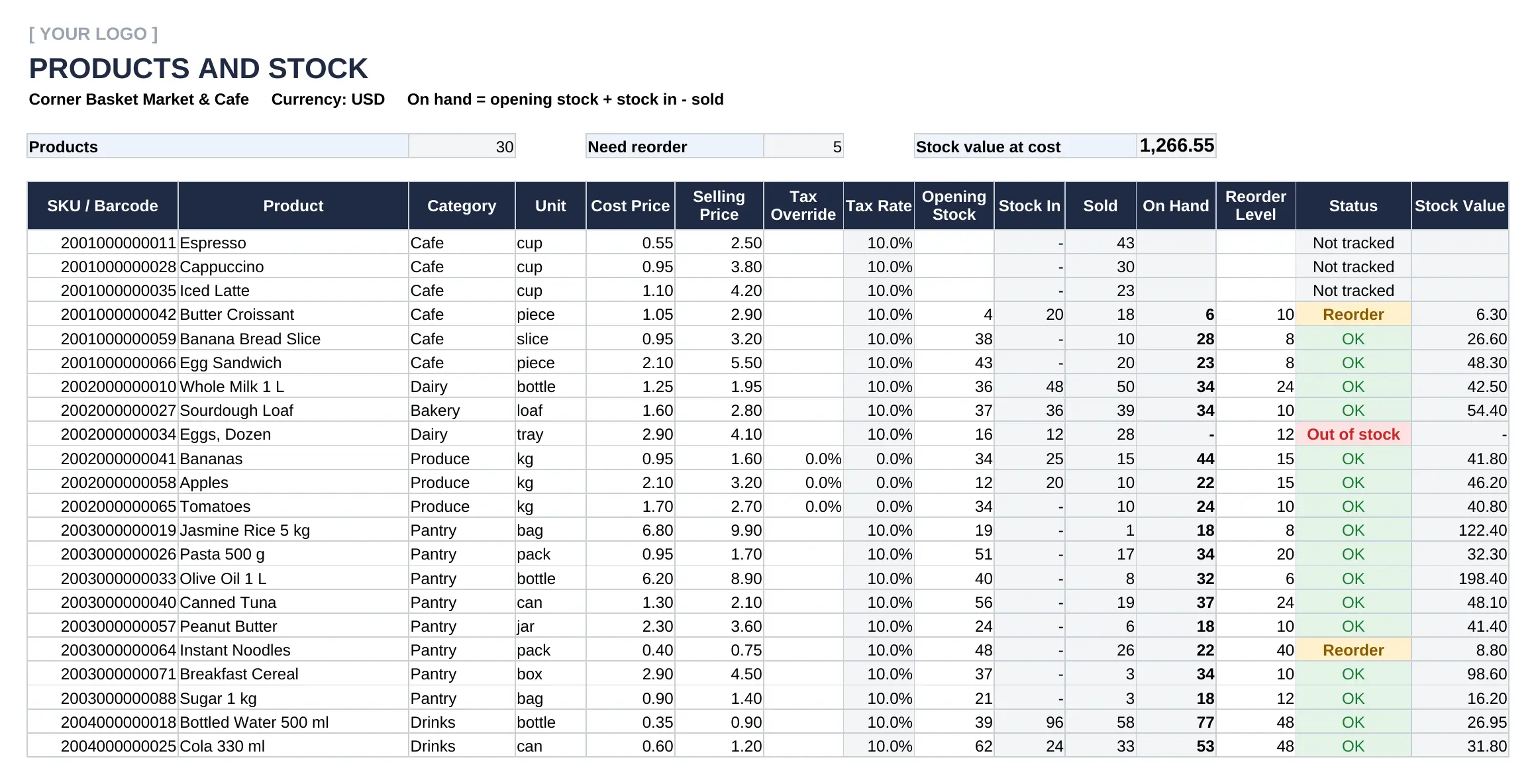
| Products | SKU or barcode, cost, price and tax rate per item, plus opening stock, stock in, sold, on hand and reorder level |
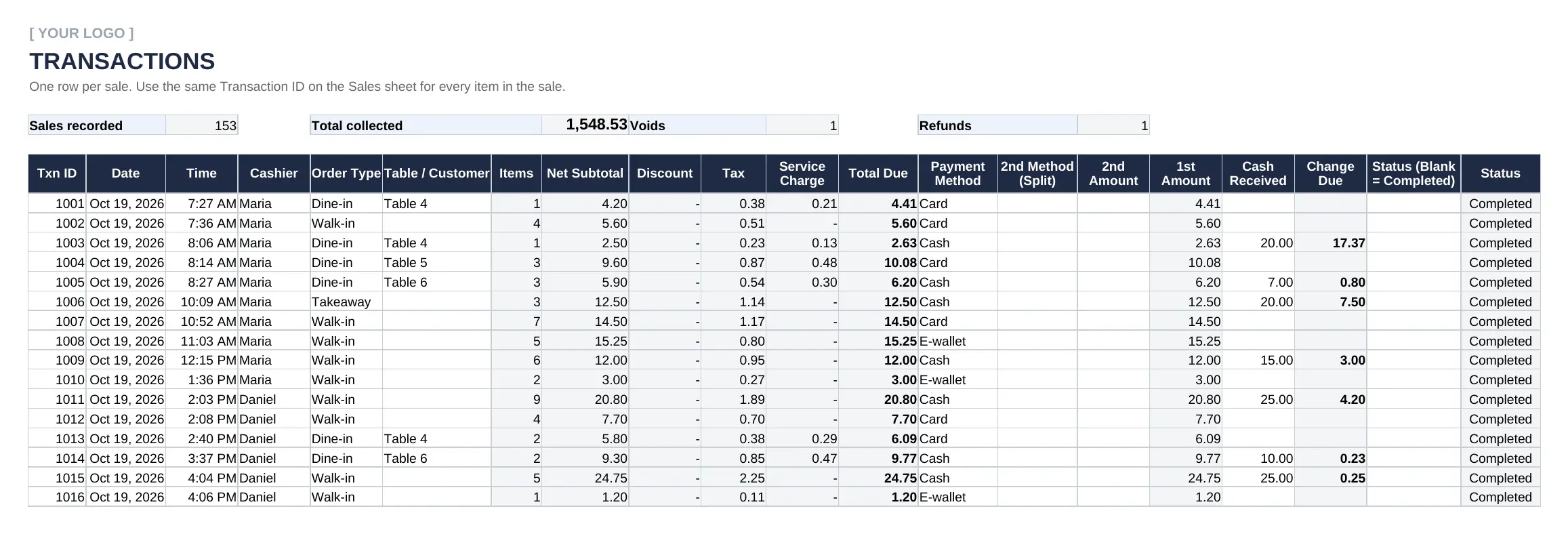
| Transactions | One row per sale: date, time, cashier, order type, table, payment method, split payment, cash received, change due and status |
| Sales | One row per item. The SKU pulls the name, price and tax; you add quantity and discount |
| Receipt | Type a transaction ID and a printable receipt builds itself |
| Stock In | Every delivery, with supplier and cost, so stock on hand stays true |
| End of Day | Sales by payment method, the cash drawer count by denomination, and over or short |
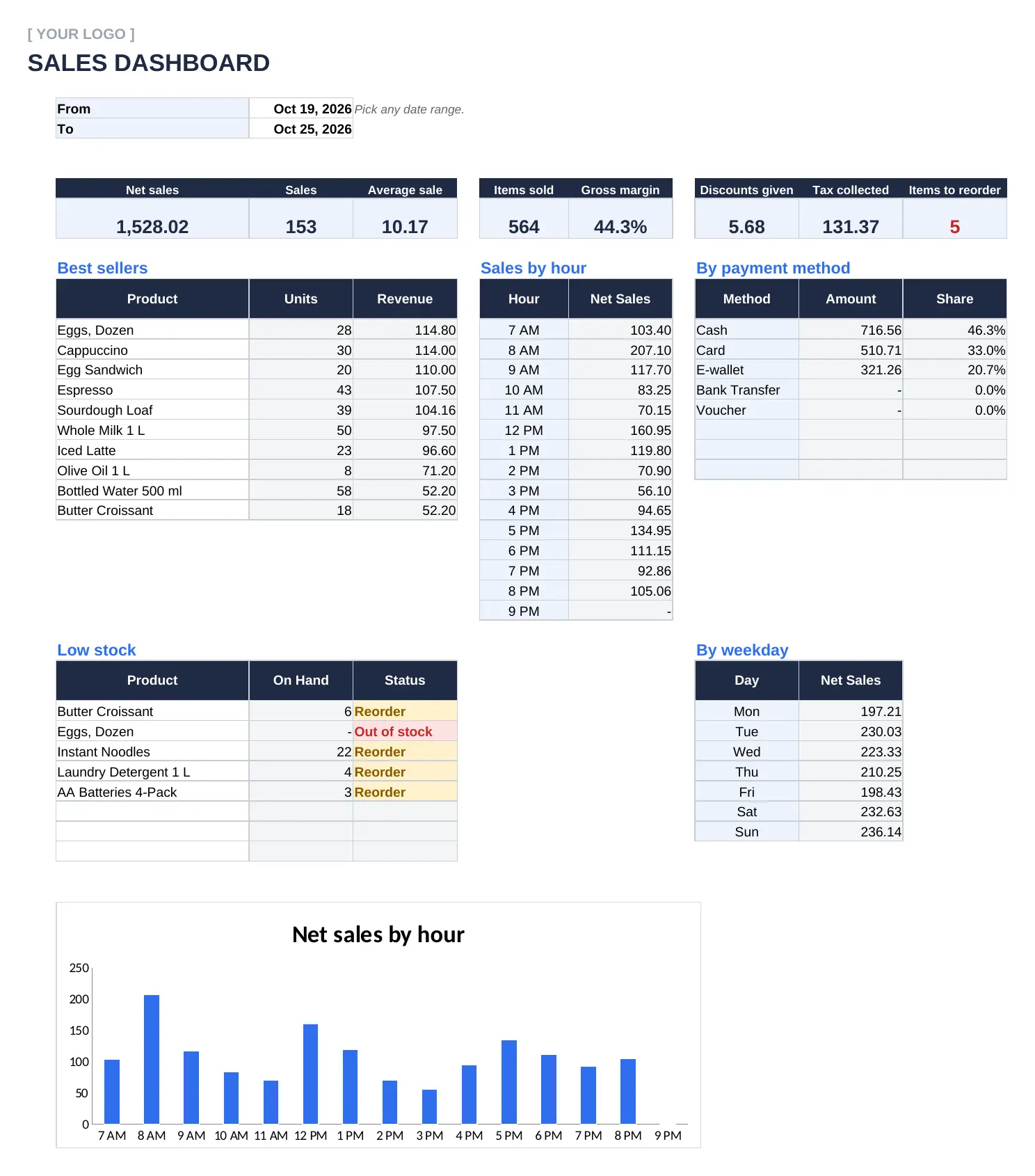
| Dashboard | Net sales, average sale, gross margin, best sellers, busiest hours and low stock for any date range |
If I had to keep one field, I would keep the SKU. Every lookup, every stock count and every best-seller list hangs on it. Get the SKU right and the rest of the file runs itself.
What Our POS Template Includes
Before building this file, I downloaded the free Excel POS files Google shows for "pos system excel free download". Almost every one is a macro-enabled .xlsm. Readers complain the macros get blocked, the file does not open on a Mac, or stock does not update after a sale.
So I built the opposite: an Excel POS template that just opens and works.
No Macros, No Security Warnings
Microsoft now blocks macros in files downloaded from the internet by default. A macro POS often opens as a dead file.
This POS system Excel file is a plain .xlsx with formulas only. It opens in Excel for Windows and Mac, Excel online and Google Sheets, and nothing needs enabling.
Scan and Go
A USB or Bluetooth barcode scanner types the code into the selected cell like a keyboard. Click the SKU cell, scan, and the product name, price and tax appear. No drivers, no code.
Stock That Moves With Every Sale: Excel POS With Inventory
On hand = opening stock + stock in − sold. The moment a sale is entered, the count drops. That is what makes it an Excel POS with inventory, not just a sales list. Below the reorder level, the item turns amber. At zero, red.
In the filled sample, a week of trading leaves eggs out of stock and four other items flagged for reorder. Nobody had to count a shelf to find out. If you want deeper stock control, the inventory management template and the reorder point template pick up where this one stops.
Split Payments and Change Due
Half on card, the rest in cash? Enter the second method and its amount. The first method takes the balance, and change due is calculated from the cash received.
Restaurant Mode Built In
Order types Walk-in, Dine-in, Takeaway and Delivery are ready. Dine-in adds your service charge automatically, and the Table / Customer column holds the table number.
Voids and Refunds That Keep the Books Straight
Never delete a sale. Mark it Void and it stays on record but drops out of sales, stock and cash. For a return, create a Refund transaction with a negative quantity, and stock goes back on the shelf.
A Dashboard You Did Not Have to Build
Pick a date range and see net sales, number of sales, average sale, gross margin, best sellers, sales by hour and by weekday, payment mix and low stock. The sample week shows net sales of 1,528.02 from 153 sales, an average sale of 10.17 and a 44.3% gross margin, with 8 AM the busiest hour.
Available in Excel, Word, PDF, Google Sheets and Google Docs. The Word and PDF files give you a printable two-copy receipt, a paper sales log for when the computer is down, an end-of-day sheet and a stock count sheet.
How to Create a POS System in Excel
To create a POS system in Excel, you need four connected sheets: a product list with SKU and price, a sales sheet where a lookup formula pulls the name and price from the SKU, a transactions sheet for payment and change, and a receipt that pulls one transaction back out. Stock is opening stock plus deliveries minus SUMIFS of units sold.
Here are the formulas behind the file.
Pull the Price From the SKU
In Excel 365 or Google Sheets: =XLOOKUP(B8,Products!A:A,Products!F:F). Older Excel: =VLOOKUP(B8,Products!A:F,6,FALSE). The template uses INDEX and MATCH, which works in every version, and shows "SKU not found" instead of an error when a code is mistyped.
Work Out Tax Both Ways
If your shelf prices include tax, tax = amount − amount / (1 + rate). If tax is added on top, tax = amount × rate. One setting switches between them. In the sample, prices include 10% tax and fresh produce is set to 0%.
Date Each Sale Without NOW()
Most guides tell you to timestamp sales with TODAY() or NOW(). Do not. Both recalculate every time the file opens, so every old sale moves to today's date. Press Ctrl+; for the date and Ctrl+Shift+; for the time. Those values never change.
Number Each Receipt
Use the next number after the last transaction ID. If you prefer a formula, put =MAX(Transactions!A:A)+1 in a spare cell and type its result. Gaps in numbering are the first thing an auditor asks about.
Count Stock Automatically
Units sold per product = SUMIFS(Sales!E:E, Sales!B:B, SKU), counting only completed and refund sales. On hand = opening + stock in − sold. Then a simple IF flags Reorder or Out of stock.
Google Sheets POS Template
Google Sheets has no point of sale template in its own gallery. This one fills the gap.
The Google Sheets POS template has the same tabs as the Excel file. You type in Settings, Products, Transactions and Sales; everything else calculates. It runs in a browser, so a market stall can ring up sales on a phone or tablet and the owner sees them at home.
Open the sample POS template in Google Sheets. Google will ask you to make a copy, and the copy is yours.
One warning: two cashiers typing in the same sheet at the same moment can overwrite each other. Give each till its own Transactions block, or move to POS software once you have more than one register.
POS Receipt Template Excel
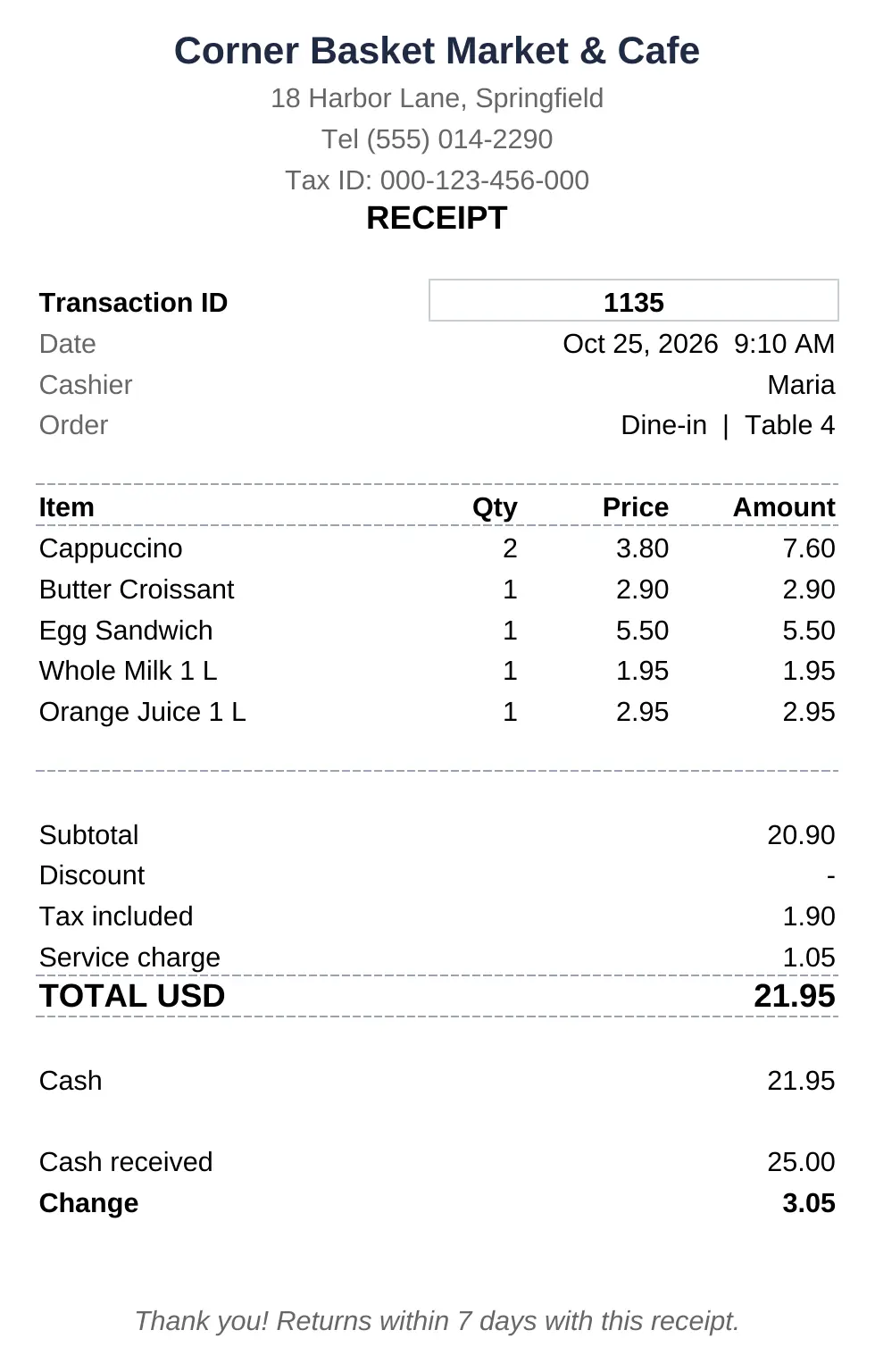
Type a transaction ID into the Receipt sheet and it builds itself: store name, address and tax ID, date and time, cashier, order type and table, every item with quantity and price, subtotal, discount, tax, service charge, total, payment, cash received and change, then your footer.
This POS receipt template prints on an 80 mm receipt printer or on A4. In the sample, transaction 1135 is a dine-in order at Table 4: five items, 1.05 service charge, a total of 21.95 paid with 25.00 in cash and 3.05 change.
End of Day Cash Count
This is the step most POS spreadsheets skip, and the one that catches mistakes.
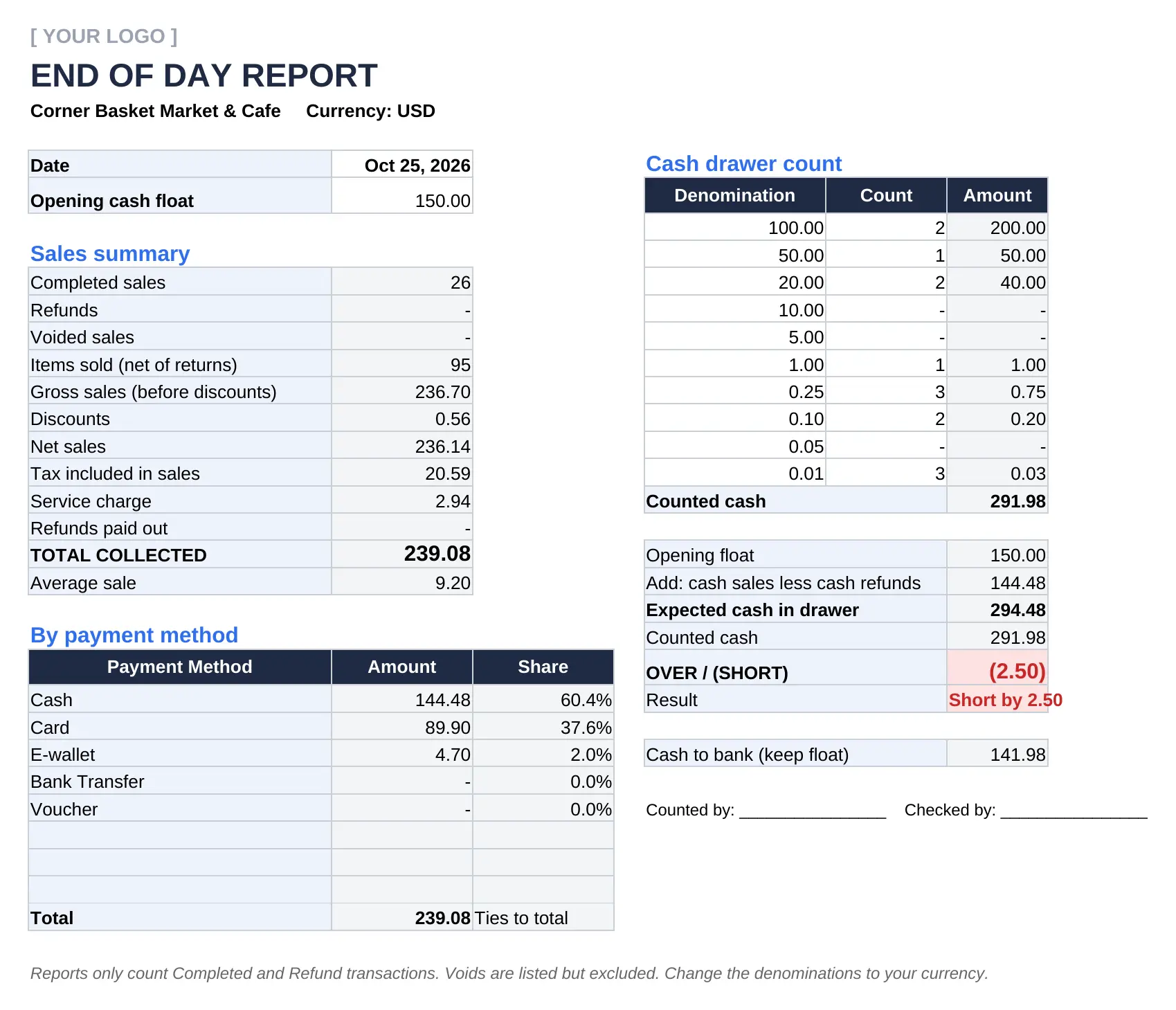
Pick the date. The End of Day sheet totals completed sales, refunds, voids, discounts, tax and service charge, then splits the money by payment method. Count the drawer by denomination, and the sheet compares counted cash with the opening float plus cash sales.
On the sample Sunday, expected cash was 294.48 and the drawer held 291.98. Short by 2.50. Found the same day, that is a wrong change given at the counter. Found a month later, it is a mystery. If you only need the cash side, the daily cash report is a lighter option.
POS Template vs Receipt Template vs Daily Sales Report vs POS Software
| POS Template | Receipt Template | Daily Sales Report | POS Software | |
|---|---|---|---|---|
| Records each sale | Yes, by item | One at a time | No, totals only | Yes |
| Prints a receipt | Yes | Yes | No | Yes |
| Updates stock | Yes, by formula | No | No | Yes, in real time |
| Cash drawer count | Yes | No | Sometimes | Yes |
| Several tills or branches | Hard | No | No | Yes |
| Cost | Free | Free | Free | Subscription |
The rule: a receipt proves one sale, a report sums the day, and a POS template runs the till.
How To Use The POS Template?
1- Fill In Settings
Store name, address, tax ID, currency, tax rate, and whether your prices include tax. Add your payment methods, cashiers and opening cash float. Every receipt and report reads from here, so you type it once.
2- Load Your Products
One row per item. Use the barcode number as the SKU when there is one; size and color variants each get their own SKU. Leave Opening Stock blank for made-to-order items you do not count, like coffee, and they show "Not tracked".
3- Ring Up the Sale
On Transactions, type the next ID, the date (Ctrl+;) and the time (Ctrl+Shift+;), then the cashier and order type. On Sales, scan or type each SKU with the same ID and add the quantity.
4- Take Payment
Pick the payment method. Cash? Enter the amount received and the change appears. Split payment? Enter the second method and amount.
5- Print the Receipt
Type the transaction ID on the Receipt sheet and print. Keep a copy if your tax authority asks for one.
6- Record Deliveries
Every delivery goes on Stock In with the supplier and cost. Skip this and on-hand stock drifts away from reality within a week.
7- Close the Day
Open End of Day, pick the date, count the drawer by denomination, and check over or short before the cash goes to the bank.
8- Review the Week
On the Dashboard, check best sellers, slow hours and the low-stock list, then reorder. Save a copy of the file every month. In Pakistan, for example, FBR's integration rules require electronic invoice records to be kept for six years.
How Enerpize Handles POS
A template captures what happened after the fact. It doesn't ring anything up on a card terminal, doesn't sync two tills, and doesn't tell you anything about a customer until you go looking.
One System for Selling In-Store and Online
Running a physical counter and an online store usually means two separate records that never quite agree with each other. Enerpize's POS software and sales management tools pull from the same product, pricing, and customer data regardless of where the sale happens, and sales sync in real time across locations.
Stock Updates the Moment You Sell
Every POS transaction updates inventory in real time, not at the end of the day and not at the next stocktake. Sell the last unit of something at 11am, and the system knows it's gone at 11am.
Keeps Selling When the Internet Drops
Enerpize POS works in full offline mode and records sales without interruption, then syncs when the connection is back. Barcode scanners, receipt printers, scales and cash registers all work with it.
Close Every Session With a Cash Count
The same end-of-day check this template does by hand: close the sales session, enter the cash you counted, and see the difference. Refunds have their own screen, and partial and split payments are built in.
Receipts and Invoices From the Same Sale
A POS transaction doesn't have to end at the register. Enerpize's invoicing and billing connects directly to point-of-sale activity, so a transaction can produce a proper receipt or invoice automatically.
Every Sale Tied to a Customer Record
Cash sales don't have to be anonymous. When a customer is attached to a transaction, their purchase history builds automatically, useful the moment you want to know who your regulars are or follow up on a return.
If you're tracking transactions across more than one till, one location, or both a physical counter and an online store, that's usually the point where a spreadsheet stops being able to keep up.
POS System Excel Template for the Philippines
The Philippines changed the document a sale needs.
Under RR 7-2024, which implements the Ease of Paying Taxes Act, the invoice replaced the official receipt as the main proof of sale from April 27, 2024. Documents from POS and cash register machines that still say "Official Receipt" are no longer valid, and those machines must be registered with the BIR, as PwC Philippines explains.
What to add for Philippine sales:
- Your TIN in the Tax ID setting
- Receipt title changed to "Invoice" or "Sales Invoice"
- Currency set to PHP and the VAT rate that applies to you
Practical note for Philippine businesses: an Excel file is not a BIR-registered POS. Use the template as your sales and stock log and end-of-day check, and issue your registered invoices separately.
POS Excel Template for Indonesia (Aplikasi Kasir Excel)
Searching for an aplikasi kasir Excel or a template kasir Excel gratis? This file does the job without macros.
For small businesses there is also a tax reason to keep clean daily sales. Under PP 55/2022, individual small business owners with gross turnover under Rp4.8 billion a year can pay a 0.5% final income tax, with the first Rp500 million tax-free, and they must still record gross turnover every month, as DDTC News explains. PP 20/2026 extends the 0.5% rate through tax year 2026 for individuals whose eligibility ended in 2024 or 2025, according to IKPI.
What to add to a template kasir Excel:
- Currency set to IDR and your NPWP in the Tax ID setting
- Denominations on End of Day changed to rupiah notes
- A monthly total of net sales from the Dashboard as your turnover record
Practical note for Indonesian businesses: set the Dashboard to the first and last day of each month and you have your monthly peredaran bruto figure in one cell.
POS Excel Template for India
Small sales get a shortcut in India.
Under Section 31(3)(b) of the CGST Act and Rule 46, a registered shop can skip a tax invoice for supplies under ₹200 to unregistered customers who do not ask for one, but must issue one consolidated tax invoice for those supplies at the close of each day, as TaxHeal sets out. Every tax invoice also needs a consecutive serial number unique for the financial year under CGST Rule 46.
What to add to an Indian POS format:
- Your GSTIN in the Tax ID setting and "Tax Invoice" as the receipt title
- GST rates per product using the Tax Override column
- One transaction ID series per financial year
Practical note for Indian businesses: the End of Day totals give you the figure for the daily consolidated invoice in seconds.
POS Template for Pakistan
Bigger retailers in Pakistan cannot run on a spreadsheet alone.
Tier-1 retailers must use a POS integrated with FBR, and customers can verify an invoice by entering its FBR invoice number or scanning its QR code in the Tax Asaan app, or by SMS to 9966, as the FBR explains. The 2025 integration rules also require electronic invoice records to be kept for six years, according to KPMG Pakistan.
What to add for Pakistani sales:
- Your NTN in the Tax ID setting
- Currency set to PKR and the sales tax rate that applies to you
- A yearly copy of the file, kept for at least six years
Practical note for Pakistani businesses: if you are not a Tier-1 retailer, the template is a solid sales and stock log. If you are, use it for back-office stock and cash checks next to your integrated POS.
Point of Sale Template by Business Type
Grocery and Mini-Marts
Barcodes on everything, so scanning saves the most time here. Set produce sold by the kilo to its own tax rate and watch the low-stock list for milk, eggs and bread.
Cafes and Restaurants
Use Dine-in, Takeaway and Delivery, put the table number on each order and let the service charge add itself. Leave coffee as "Not tracked" and track the croissants that actually run out.
Clothing and Shoes
Every size and color is its own SKU. It feels like extra work on day one. On day thirty it is the only way to know you are out of medium black.
Pharmacies
Track each product by its own SKU, and keep batch and expiry checks in a separate log. A spreadsheet POS is not a dispensing record.
Market Stalls and Pop-Ups
Run the Google Sheets version on a phone. When there is no signal, write sales on the printed daily sales log and type them in that evening.
Key Takeaways
- A point of sale template is a spreadsheet till: product list, sales by SKU, receipt, stock and an end-of-day count.
- The SKU is the field everything else depends on. Use the barcode when there is one.
- Formulas beat macros for a free download: no blocked files, and it works in Google Sheets.
- Do not date sales with TODAY() or NOW(). Use Ctrl+; and Ctrl+Shift+;.
- Never delete a sale. Void it, or refund it with a negative quantity.
- Count the drawer every day. In the sample, a 2.50 shortage shows up the same evening.
- In the Philippines and for Tier-1 retailers in Pakistan, a spreadsheet does not replace a registered or integrated POS.
- More than one till, branch or card terminal is the point to move to POS software.
FAQs
What is a POS template used for?
A POS template is used to record and organize sales in a consistent format: what was sold, when, by whom, at what price, with what discount, and how the customer paid. This POS Excel template also prints receipts, keeps stock levels current and checks the cash drawer at the end of the day.
What should a POS template include?
At minimum: a product list with SKU and price, a transaction ID, date and time, cashier, items, quantity, unit price, discount, tax, total and payment method. A complete one adds stock on hand, a printable receipt and an end-of-day cash count.
Can I make a POS system in Excel?
Yes. A POS system in Excel needs a product sheet, a sales sheet that looks up name and price from the SKU, a transactions sheet for payment and change, and a receipt sheet. SUMIFS keeps stock current. This template already has all of it, built with formulas only.
Does this POS template need macros?
No. It is a standard .xlsx with formulas only, so it opens in Excel for Windows and Mac, Excel online and Google Sheets without enabling anything. Microsoft blocks macros in downloaded files by default, which is why most macro POS files fail to run.
Can I use a barcode scanner with an Excel POS?
Yes. A USB or Bluetooth scanner types the barcode into the selected cell like a keyboard. Click the SKU cell on the Sales sheet, scan, and the product name, price and tax fill in.
Is there a POS template for Google Sheets?
Google Sheets has no point of sale template in its own gallery, but this Google Sheets POS template has the same tabs and formulas as the Excel file. Open the sample, make a copy and start with Settings and Products.
How do I do an end-of-day cash count?
Count the notes and coins by denomination, then compare the total with the opening float plus cash sales minus cash refunds. The difference is your over or short. The End of Day sheet does the math once you enter the counts.
Do I need POS software, or is a spreadsheet enough?
A spreadsheet works for one till with low volume. Once you run more than one location, sell online and in-store, take card payments at volume, or your tax authority requires a registered or integrated POS, POS software starts paying for itself.
Can I use this template for a restaurant or retail store?
Yes. Retail stores use the SKU and barcode columns. Restaurants use the Dine-in, Takeaway and Delivery order types, table numbers and the automatic service charge.
How do I track discounts properly in a POS template?
Keep the discount as its own percentage instead of typing a lower price. The template then shows the full price, the discount and the net amount, and the Dashboard totals what discounts cost you over any period.
About the Author
Omar El Bahr is a Senior Digital Growth Specialist at Enerpize, where he leads SEO, content strategy, and organic growth across international markets. He is a Forbes Communications Council contributor and has written for Entrepreneur on business communication and digital strategy.
Disclaimer
This page and template are general information, not tax, legal or accounting advice. The template is not a registered or tax-authority-integrated point of sale system. Invoicing and record-keeping rules vary by country, so check the rules that apply to your business.