Posted on 4 February 2025
Free Accounts Receivable Template for Excel & Google Sheets
- Available in Excel and Google Sheets, free to download with no sign up required
- Tracks every customer invoice, payment received, and outstanding balance in one structured spreadsheet.
- Used for monitoring overdue accounts, prioritizing collections, and reconciling AR against your general ledger.
Includes aging analysis to identify which invoices are current, approaching due, or already overdue.
An accounts receivable template tracks every invoice you've issued, every payment received, and every balance still outstanding — by customer and due date. Download and customize this free template in Excel or Google Sheets.


What is the Accounts Receivable Template?
An accounts receivable template is a structured spreadsheet for tracking every invoice you've issued, every payment you've received, and every balance still outstanding — organized by customer, due date, and aging status.
This free accounts receivable template is available in Excel and Google Sheets. Download it, enter your open invoices, and you have a real-time view of who owes you what — and how overdue they are.
Every unpaid invoice is cash your business hasn't collected yet. Enerpize tracks every invoice automatically — due dates, payment status, and aging analysis — so nothing slips through. Try Enerpize Free.
What Our Accounts Receivable Template Includes
Most free AR templates give you a table of invoices and a total. Ours goes further, especially now that the underlying file has been rebuilt to actually hold up under real use.
Aging Status and Days Overdue, Calculated Automatically
Not just a due date sitting there for you to check by hand. Every invoice shows whether it's Current, Open, or Overdue the moment you open the file, and exactly how many days overdue it is.
Unlimited Payments Per Invoice
Tracked on a separate payment log. Most templates cap you at a handful of fixed payment columns, ours doesn't, log as many partial payments as an invoice actually needs.
DSO Calculated for You
Enter your total credit sales for the period, and the template calculates your DSO (Days Sales Outstanding) automatically, the one AR metric almost every competitor talks about and almost none actually build into the spreadsheet itself.
Credit Terms and Customer Contact Fields
Not just a customer name. Net 30, Net 60, email, all in the same row as the invoice.
Available in Excel and Google Sheets.
Why Use an Accounts Receivable Template?
Accurate Financial Tracking
This accounts receivable template Excel helps you maintain a clear record of all invoices issued, payments received, and balances due. It’s a comprehensive way to monitor your business’s financial health. In financial accounting, accounts receivable is classified as a current asset — accurate AR tracking directly affects the reliability of your balance sheet and cash flow statement.
Cash Flow Optimization
Track overdue payments and identify trends in customer behavior, ensuring timely follow-ups and improved cash flow management.
Customer Relationship Management
A detailed accounts receivable system fosters transparency and trust with clients. By providing clear invoice records and payment terms, businesses can maintain positive customer relationships.
Risk Mitigation
With features like aging analysis and late payment fee tracking, this accounts receivable template reduces the risk of bad debts and improves collection efficiency.
Ease of Use
The structured format ensures all necessary details, such as invoice numbers, due dates, and outstanding balances, are in one place, simplifying record-keeping and reporting.
What Are the Different Types of Accounts Receivable Templates
Accounts receivable can be classified into several types based on the nature of the transaction and the agreements between the business and its customers.
1- Trade Receivables
Trade receivables, often referred to as accounts receivable, represent amounts owed to a business by its customers for goods or services provided on credit. They are typically short-term assets listed on the company’s balance sheet. Trade receivables are crucial for maintaining cash flow, as they indicate the revenue that is yet to be converted into cash.
Example:
Consider a company, ABC Electronics, that sells $5,000 worth of products to a client on a 30-day credit term. Upon delivery, ABC records a trade receivable of $5,000, which will be cleared when the customer pays within the agreed timeframe.
2- Notes Receivable
Notes receivable are similar to accounts receivable but are formalized with a promissory note. This document specifies the repayment terms, including the deadline and any applicable interest, making it a more formal agreement than standard trade receivables.
- Short-Term Notes: Payments due within a year.
- Long-Term Notes: Payments due beyond a year.
Example:
A construction company, XYZ Ltd., issues a note receivable for $20,000 with a repayment period of six months, including 5% interest. The agreement formalizes the debt, ensuring clarity on the terms and payment expectations.
3- Other Receivables
Other receivables encompass amounts owed to the business that do not arise from standard sales transactions. These include tax refunds, salary advances, interest receivables, or loans to employees or other entities.
Example:
A company loans $1,000 to an employee as a salary advance. This amount is recorded as an "Other Receivable" until it is recovered from the employee’s salary or direct repayment.
Tracking vs. Transferring Receivables
Everything above assumes you're tracking receivables you intend to collect yourself. Sometimes a business instead sells or assigns its receivables to a third party, a lender or a factoring company, in exchange for immediate cash. That's a different transaction entirely: an assignment "with recourse" means you remain liable if the debtor doesn't pay; "non-recourse" transfers that risk entirely to the buyer, usually at a steeper discount. This template isn't built for that scenario, it's for businesses collecting their own receivables directly. If you're considering factoring or assigning receivables, that requires a separate legal agreement, not a tracking spreadsheet.
Related Templates:
Accounts Payable Excel Template
Excel Accounts Payable Reconciliation Template
Accrued Expenses Schedule Template
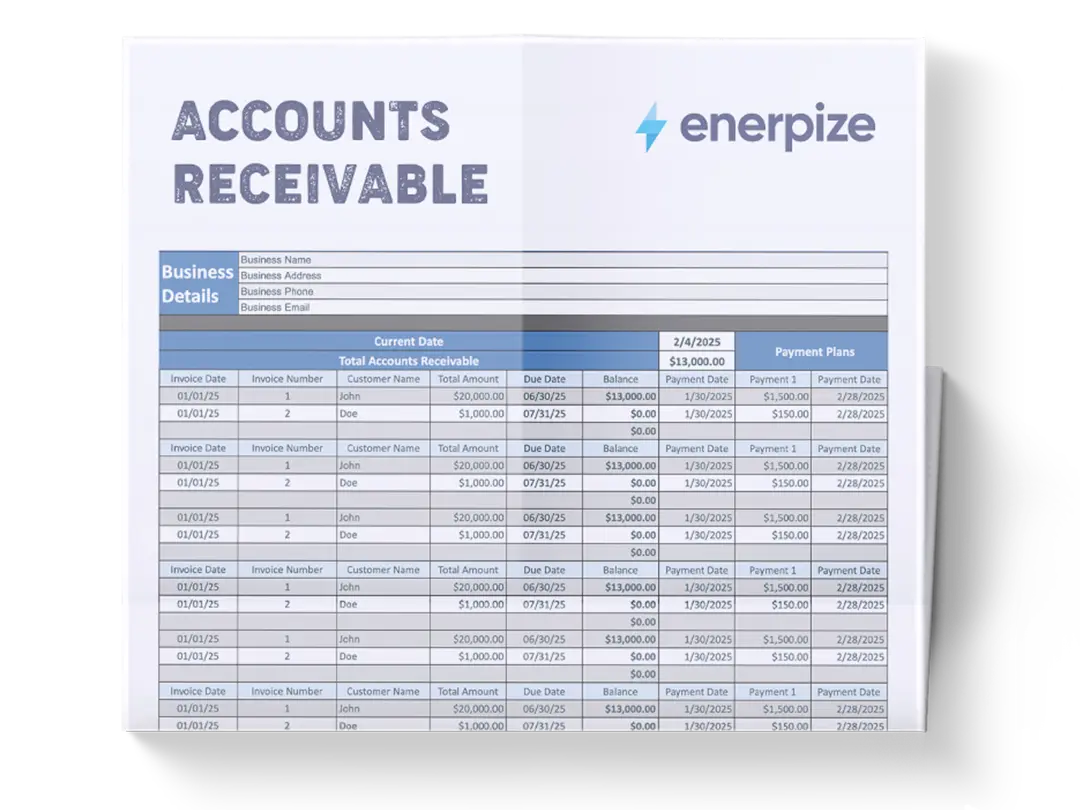
What Does the Accounts Receivable Template Contain?
1- Current Date
- Displays the latest update to ensure records reflect the most recent financial status.
- Helps maintain an up-to-date overview of outstanding balances.
2- Total Accounts Receivable
- Summarize the total outstanding invoices.
- Provides a glance at pending collections and expected cash inflow.
3- Invoice Details
- Invoice Date: Records the date an invoice was issued.
- Invoice Number: A unique identifier for each transaction, preventing duplication.
- Customer Name: Identifies the client associated with the invoice.
- Total Amount: Displays the total billed amount, including taxes and discounts.
- Due Date: Specifies when the payment is expected, helping track overdue amounts.
- Balance: Reflects the remaining unpaid amount after partial payments are made.
4- Payment Plans
- Payment Date: Logs the date when payments are received.
- Payment Amounts: Tracks multiple installments and partial payments for a structured reconciliation process.
- Installment Tracking: Allows multiple payments for a single invoice, ensuring clear documentation of outstanding balances.
Key Accounts Receivable Metrics
Two numbers tell you more about your AR health than any single invoice list ever will.
Net Accounts Receivable
What you actually expect to collect, not just what's been invoiced:
Net Accounts Receivable = (Opening Balance + Credit Sales) − (Cash Collections + Bad Debts)
Opening balance is what customers owed you at the start of the period. Credit sales are new invoices issued during the period. Cash collections are what actually came in. Bad debts are amounts you've confirmed you won't collect and have written off. The result is a realistic number, not one inflated by invoices that were never going to get paid.
DSO (Days Sales Outstanding)
Tells you how long it's actually taking to get paid:
DSO = (Accounts Receivable ÷ Total Credit Sales) × Number of Days in the Period
A lower DSO means faster collections. If your DSO is climbing month over month, that's an early warning sign worth acting on before it shows up as a cash flow problem. This template calculates DSO automatically once you enter your period's credit sales total.
A Worked Accounts Receivable Example
Here's how those two formulas play out with real numbers.
A business starts the month with $12,000 in outstanding receivables. During the month, it issues $8,000 in new credit sales, collects $9,500 in customer payments, and writes off $500 as bad debt after a client became unreachable following repeated follow-ups.
Net Accounts Receivable = (12,000 + 8,000) − (9,500 + 500) = $10,000
That $10,000 is what the business can realistically expect to collect going forward, not the $20,000 it might look like before subtracting what's already been paid and what's been written off.
Now, DSO. If that $10,000 in receivables sits against $8,000 in credit sales for a 30-day period:
DSO = (10,000 ÷ 8,000) × 30 = 37.5 days
That means it's taking this business, on average, about 37.5 days to collect on what it bills. Whether that's healthy depends on the credit terms being offered, if most invoices are Net 30, a DSO of 37.5 means collections are running slightly behind terms, worth watching, not yet alarming.
Accounts Receivable Aging Buckets
| Bucket | Meaning |
|---|---|
| Current | Not yet due |
| 1-30 days overdue | Due date has passed, within the last month |
| 31-60 days overdue | More than a month overdue, follow up recommended |
| 61-90 days overdue | Significantly overdue, escalate collection efforts |
| 90+ days overdue | Consider for write-off after documented follow-up |
This template's aging column sorts every invoice into these buckets automatically, so prioritizing who to follow up with today doesn't require manually checking due dates one by one.
Who Uses an Accounts Receivable Template?
Any business that sells on credit — and needs to track who has paid, who hasn't, and how long overdue invoices have been sitting — has a use for an accounts receivable template.
Small Business Owners and Freelancers
Use it to maintain a clear view of outstanding client payments without accounting software. When you're managing 10–30 active clients, a structured AR template tells you at a glance which invoices are overdue, how much is outstanding in total, and who needs a follow-up call this week.
Accountants and Bookkeepers
Use it as a working document for month-end AR reconciliation. The template provides an organized record of all open invoices that can be cross-referenced against the general ledger to confirm balances before closing the period. Pair it with a statement of account template to send clients a consolidated view of what they owe alongside the AR ledger.
Wholesale and B2B Suppliers
Manage multiple buyers on varying credit terms — net 30, net 60, net 90 — and need a single document that shows which invoices are current, which are approaching due, and which are already overdue. An AR template with aging analysis makes the collection priority obvious without manual sorting.
Finance and AR Teams in Growing Businesses
Use it to standardize AR tracking across the team before migrating to accounting software. A consistent template format means every team member records invoices, payments, and credits the same way — making the eventual migration to a system like Enerpize significantly faster and cleaner.
Startups and Early-Stage Businesses
Use it to establish AR discipline before revenue volume makes manual tracking unworkable. Starting with a structured template builds the habits — consistent invoice numbering, clear due dates, regular reconciliation — that make scaling easier.
How to Use the Accounts Receivable Template
1- Customize the Template
- Enter your business name, logo, and contact details.
- Adjust credit terms, policies, and branding elements to match your company’s financial operations.
2- Enter Invoice Details
- Input customer names, invoice numbers, and total amounts due. If you don't have a standardized invoicing format yet, start with our free invoice template before setting up your AR tracker.
- Specify due dates based on agreed-upon credit terms.
3- Record Payments
- Log received payments under the designated columns.
- Include multiple installment payments to accurately track partial transactions.
4- Monitor Outstanding Balances
- Regularly review remaining balances to identify overdue accounts.
- Utilize the total accounts receivable field to analyze overall outstanding amounts.
5- Track Overdue Accounts
- Identify overdue invoices by checking due dates against the current date.
- Use structured follow-ups for overdue accounts to minimize financial risks.
6- Apply Late Fees (If Applicable)
- Add penalties for overdue invoices based on company policies.
- Automatically update the balance to reflect any late fees incurred.
7- Generate Reports for Analysis
- Summarize accounts receivable, outstanding balances, and payment trends.
- Use data insights to refine credit terms and improve cash flow management.
8- Share and Collaborate
- Keep the template updated and share it with the finance team for smooth coordination.
- Ensure accuracy by regularly reviewing payment records and outstanding invoices.
By following these steps, businesses can simplify their accounts receivable processes, reduce overdue balances, and maintain a healthier cash flow.
Still chasing payments from a spreadsheet? Enerpize sends automatic payment reminders, updates your AR balance in real time, and flags overdue accounts before they become bad debt. Try Enerpize Free.
How Enerpize Handles Accounts Receivable
A template tells you who owes you money. It doesn't chase them for you.
Automatic Reminders, Not Manual Follow-Ups
Enerpize sends payment reminders automatically as invoices approach and pass their due date, so collections don't depend on someone remembering to check the aging report every week.
Real-Time Balances, Not End-of-Day Updates
Every invoice, payment, and credit updates the AR balance the moment it happens, not whenever someone next opens the spreadsheet. Aging status and DSO are always current, not a snapshot from last time someone updated the file.
Connected to Invoicing, Not a Separate System
Invoices, payments, and AR tracking live in the same place, so a payment received against an invoice updates the balance automatically instead of requiring a separate entry to keep the two in sync.
If your business is already juggling reminders across email, a spreadsheet, and a separate invoicing tool, that's usually the point where consolidating starts saving more time than the spreadsheet does.
Accounts Receivable Template vs. Accounts Payable Template
These two templates sit on opposite sides of the same transaction — one tracks money coming in, the other tracks money going out.
An accounts receivable template records what your customers owe you. Every invoice you issue on credit becomes an AR entry. The template tracks the invoice amount, the due date, any payments received, and the remaining balance. Managing AR well means getting paid faster and reducing bad debt.
An accounts payable template records what your business owes to suppliers. Every bill you receive from a vendor becomes an AP entry. The template tracks payment deadlines, outstanding amounts, and cash required to settle liabilities on time. Managing AP well means avoiding late fees, maintaining supplier relationships, and controlling outgoing cash.
| Accounts Receivable | Accounts Payable | |
| Tracks | Money owed to you | Money you owe |
| Document type | Customer invoices | Supplier bills |
| Balance sheet | Current asset | Current liability |
| Goal | Collect faster | Pay on time |
| Risk | Bad debt | Late payment fees |
Both templates are essential for a complete picture of your business's short-term cash position. Your AR balance shows inflows. Your AP balance shows outflows. Together, they determine your working capital at any given point.
Accounts Receivable Best Practices
The template tracks the numbers. These habits make sure the numbers stay accurate and actionable.
Update it every time an invoice is issued or a payment is received
AR is only useful in real time. A template updated weekly is a history document — useful for reporting but not for collection. Every new invoice and every payment received should be logged the same day. Delays create gaps that compound into reconciliation problems at month-end.
Review aging weekly, not monthly
The aging analysis — current, 1–30 days overdue, 31–60 days, 61–90 days, 90+ days — should be reviewed at least once a week. Invoices in the 31–60 day bucket can still be recovered with a professional follow-up. Invoices past 90 days are significantly harder to collect. Weekly review keeps your collection effort focused on the recoverable.
Send statements before making collection calls
Before following up on an overdue invoice, send the client a current statement of account. It gives them a consolidated view of what they owe, removes the "I didn't receive the invoice" objection, and sets a professional tone for the conversation. Most delayed payments are administrative, not intentional — a statement resolves them without confrontation.
Match every payment to a specific invoice
Record payments against the exact invoice number they settle. Logging a payment as a general credit without matching it to an invoice creates AR discrepancies that are hard to trace. If a client pays a partial amount, update the outstanding balance on that specific invoice and note the payment date and reference number.
Reconcile against your general ledger monthly
At the end of each month, the total of all outstanding AR balances in the template should match the AR balance in your general ledger. Any variance means a transaction was either missed, duplicated, or misallocated. Catch it monthly and it takes minutes to fix. Let it accumulate and it can take hours to unravel. Pair this template with an accounts receivable reconciliation template to run a structured month-end check.
Set a write-off threshold and stick to it
Define the point at which an overdue invoice is written off as bad debt — typically 90–120 days past due with no response after multiple follow-ups. Writing off uncollectable debt keeps your AR balance accurate and prevents inflated receivables from distorting your financial reporting.
Accounts Receivable Action Plan
An accounts receivable action plan sets out the steps your team follows to collect outstanding invoices before they become bad debt. Use this three-step process alongside the template above:
Step 1 — Invoice on time
Send the invoice immediately after the sale or service delivery. Include the due date, payment methods, and a clear reference number that matches your AR template.
Step 2 — Follow up before the due date
At 7 days before the due date, send a payment reminder referencing the invoice number and outstanding amount. Log the follow-up date in the template.
Step 3 — Escalate overdue accounts
If payment is not received within 7 days of the due date, move the account to overdue status in the template and send a formal overdue notice. Flag accounts beyond 30 days for collections review.
Plantilla de Cuentas por Cobrar en Excel — Descarga Gratis
Registra facturas, pagos recibidos y saldos pendientes de cada cliente en una sola hoja de cálculo. Descarga esta plantilla gratuita en Excel o Google Sheets y personalízala según las necesidades de tu negocio.
แม่แบบบัญชีลูกหนี้ Excel ดาวน์โหลดฟรี
บันทึกใบแจ้งหนี้ การรับชำระเงิน และยอดคงค้างของลูกค้าแต่ละรายไว้ในสเปรดชีตเดียว ดาวน์โหลดแม่แบบฟรีนี้ในรูปแบบ Excel หรือ Google Sheets และปรับแต่งให้เหมาะกับธุรกิจของคุณ
FAQs
What is an accounts receivable template used for?
An accounts receivable template is used to track all outstanding customer invoices in one place — recording invoice amounts, due dates, payments received, and remaining balances. It gives businesses a real-time view of who owes them money, how much, and how overdue each invoice is, which is essential for cash flow management and collection prioritization.
What should an accounts receivable template include?
A complete accounts receivable template should include: customer name, invoice number, invoice date, payment due date, invoice amount, payments received (with dates), outstanding balance, and aging status (current, 30, 60, 90+ days overdue). Some versions also include credit terms, contact details, and collection notes.
What is the difference between accounts receivable and accounts payable?
Accounts receivable is money owed to your business by customers for goods or services delivered on credit — it's a current asset. Accounts payable is money your business owes to suppliers for goods or services received on credit — it's a current liability. AR tracks inflows, AP tracks outflows. Both need to be managed actively to maintain healthy working capital.
How do I use an accounts receivable aging report?
An AR aging report groups outstanding invoices by how overdue they are — typically current (not yet due), 1–30 days, 31–60 days, 61–90 days, and 90+ days. Use it to prioritize collection efforts: focus on 31–60 day invoices before they age further, and escalate 90+ day invoices to a formal collection process. Review the aging report at least weekly.
How often should I update my accounts receivable template?
Daily is ideal — log every new invoice and every payment the day it occurs. At minimum, update weekly. Delayed updates create gaps in the AR record that turn into reconciliation problems at month-end. The template is only accurate if it reflects transactions in real time.
When should I write off an account receivable as bad debt?
Most businesses write off receivables after 90–120 days past due with no payment or response after multiple follow-up attempts. Bad debt write-offs should be documented and reflect a genuine assessment that the amount is uncollectable — not just overdue. Check your jurisdiction's tax rules, as bad debt write-offs may be deductible.
What is an accounts receivable action plan?
An accounts receivable action plan is a structured collection process that outlines the steps a business follows to recover outstanding invoices — from initial invoicing to overdue escalation. It typically covers invoice timing, payment reminders, and a defined threshold for escalating unpaid accounts to collections.
Join 40,000+ businesses that manage invoices, track payments, and collect faster — without a single manual update. Create Your Free Account.
About the Author
Omar El Bahr is a Senior Digital Growth Specialist at Enerpize, where he leads SEO, content strategy, and organic growth across international markets. He is a Forbes Communications Council contributor and has written for Entrepreneur on business communication and digital strategy.