Posted on 16 August 2026
Free Daycare Invoice Template Download (Word, Excel & Google Sheets)
- Available in Word, Excel, and Google Sheets, free to download with no sign-up required
- Covers per-child tuition, sibling discounts, late pickup fees, and subsidy or funded-hours splits in one structured invoice
- Built with country-specific provider ID fields for the US, Canada, UK, and Australia, matching what each tax or subsidy program actually asks for
- Calculates subtotal, discount, subsidy applied, and balance due automatically in the Excel and Google Sheets versions
A daycare invoice template is a pre-formatted billing document that itemizes childcare tuition, fees, and any subsidy payments for a specific child and billing period. It gives daycare centers, in-home providers, and preschools a document parents can pay against, and in most countries, use to support a childcare tax credit or deduction.


What Is a Daycare Invoice?
Some people search for this as a childcare invoice template, a child care invoice template, or just a child care invoice. All three point to the same type of document, so everything on this page applies whichever term you use.
A daycare invoice is the bill you send a family for childcare covering a set period, usually a week or a month. It lists tuition per child, any extra charges such as meals or a late pickup fee, and subtracts anything already covered by a sibling discount or a government subsidy. What is left is the balance the family owes.
It is not the same as a receipt. A receipt confirms money that has already been paid. An invoice is the request that comes first, and daycare tuition is normally billed in advance of the week or month it covers, not after.
Daycare billing has one complication most service businesses do not deal with. The same invoice usually needs to hold up as tax documentation months later. Parents in the US claim the Child and Dependent Care Credit. Parents in Canada claim the Child Care Expenses Deduction. Parents in Australia reconcile Child Care Subsidy payments against what they were actually billed. If your invoice format is vague, or it changes from one billing cycle to the next, the family ends up doing extra work at tax time, and some of that extra work usually comes back to you as a follow-up email in January or February asking for a corrected copy.
Stop rebuilding this invoice by hand every billing cycle. Start free with Enerpize
Daycare Invoice vs. Daycare Receipt vs. Year-End Tax Statement
These three documents get treated as interchangeable across most of the free daycare invoice templates, daycare bill templates, and daycare receipt templates online. They are not the same document, and mixing them up is the most common mistake in daycare billing.
The order is simple. Invoice first, receipt on payment, one consolidated year-end statement every January carrying your provider ID (EIN, SIN reference, Ofsted number, or CCS provider ID, depending on the country, covered below). Providers using one generic invoice template for all three tend to produce a document that is too vague for any of them.
Need the receipt half of this pair too? Enerpize's receipt template follows the same field structure so both documents stay consistent across a billing cycle.
What Our Daycare Invoice Template Includes
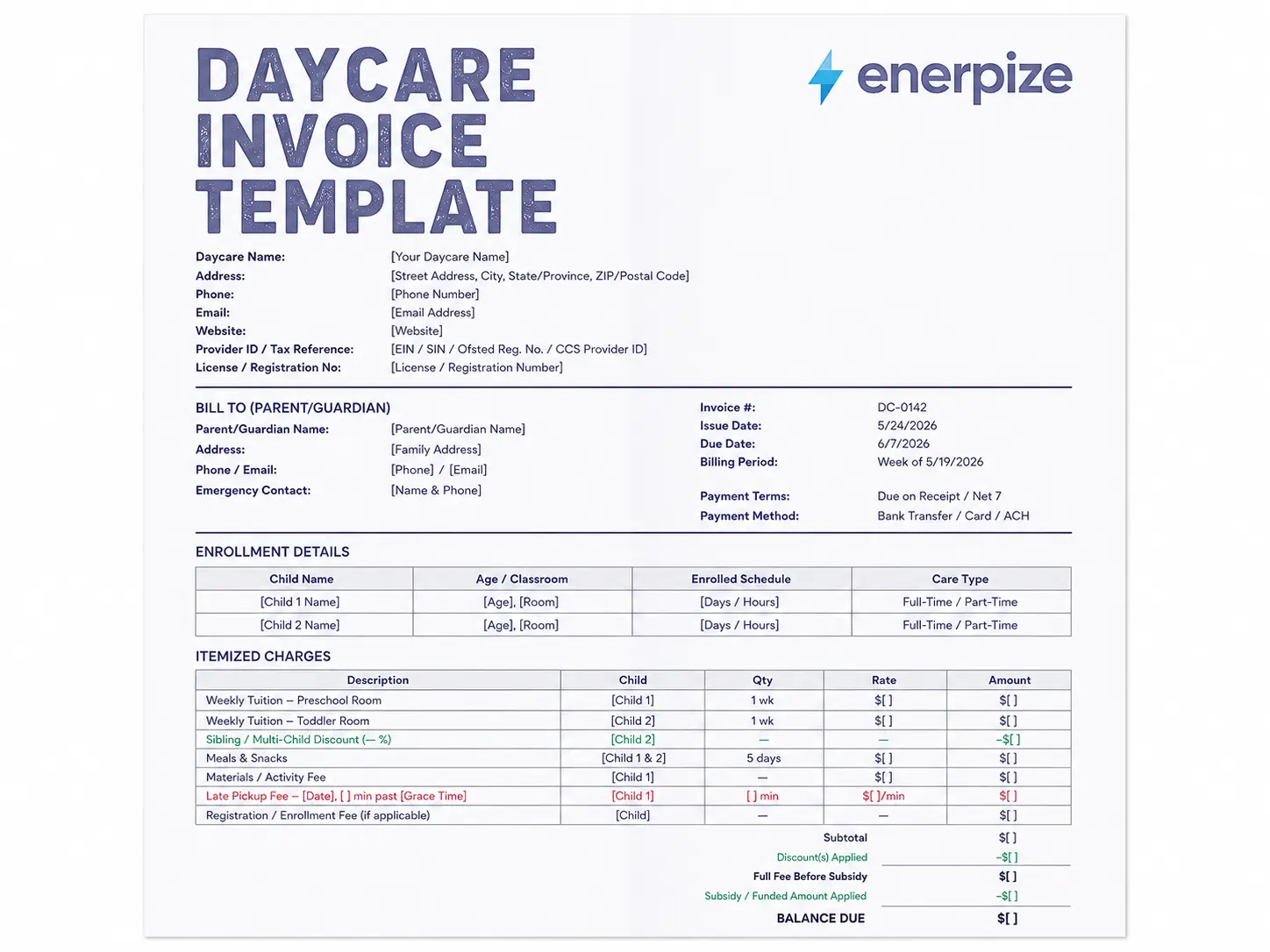
We built this daycare invoice template after going through the free templates that already rank for this search. Almost every one of them handles a single child on a flat rate well, and falls apart the moment a family has two kids in different rooms, a state or CCS subsidy, or a late pickup fee that needs a paper trail. Here is what we added to close those gaps, field by field.
Business and Family Details Block
The header carries your daycare name, address, license number, and a dedicated Provider ID / Tax Reference field for your EIN, SIN, Ofsted registration number, or CCS provider ID. Most generic invoice templates have no field for this at all, which means providers either leave it off or squeeze it into a notes box. Families need this exact number for their tax filing, so it gets its own labeled spot near the header, not buried at the bottom.
Per-Child Enrollment and Tuition Breakdown
Each child gets a separate block: name, age, classroom, enrolled schedule, and care type. Then each child gets a separate tuition line in the itemized charges table, with a Child column tying every row back to the right kid. A family with two or three children in care does not get a single combined tuition number they have to take on faith.
Sibling and Multi-Child Discount Line
The discount is calculated against the applicable child's rate and shown as its own line, in green, clearly separated from the tuition rows above it. It is not subtracted silently from the total. A parent checking the invoice against your published rate card can see exactly where the discount applied and how much it was worth.
Meals, Materials, and Activity Fees Itemized Separately
These sit in their own rows below tuition, not folded into a single "extras" charge. Keeping them separate matters for your own reporting, and it matters for a parent who is trying to work out what portion of the bill is actually childcare tuition versus a one-off supply fee.
Late Pickup Fee Tracking
The late pickup row records the date, the number of minutes past your stated grace period, and the fee itself. A flat, undated late fee is the easiest line on any invoice to dispute months later. A dated, timed one is not.
Subsidy and Funded-Hours Split
This is the section most competing templates get wrong by leaving it out entirely. The invoice shows the full fee, the subsidy or funded amount applied, and the parent's balance due, as three separate lines rather than one adjusted total. That structure matches what Child Care Subsidy in Australia, Tax-Free Childcare in the UK, and state assistance programs in the US expect a family-facing invoice to show, and it is covered in more detail in the country sections below.
Notes and Policy Reference Line
A dedicated notes field references your absence and closure policy by name, rather than restating the whole policy on every invoice, and includes a line noting that the invoice and year-end statement may be used to support a childcare tax credit or deduction claim.
If a discount needs to be issued after the fact, for a missed week or a billing correction, Enerpize's credit note template keeps that adjustment as its own record instead of a manual edit inside next month's invoice.
Download the daycare invoice template free in whichever format fits your workflow:
Daycare Invoicing by Country
Tax and subsidy rules for daycare billing are different in the US, Canada, the UK, and Australia, and the fields your invoice needs to carry differ with them. Here is what matters in each of the four biggest markets for this template.
United States
US parents claiming the federal Child and Dependent Care Credit need a specific set of facts documented, and your invoice, plus the year-end statement built from it, is where that documentation starts.
The credit is calculated on IRS Form 2441. Eligible expenses are capped at $3,000 for one qualifying child or $6,000 for two or more, and the credit equals a percentage of those expenses, 20% to 35% depending on the family's adjusted gross income for the 2025 tax year, with the rate structure widening under 2025's One Big Beautiful Bill Act for 2026 returns. Parents also need your business's Employer Identification Number, or your Social Security Number if you are a sole proprietor in-home provider. IRS Form W-10, Dependent Care Provider's Identification and Certification, is the form built to collect exactly that from you and pass it to the family. If part of your payment comes through a Dependent Care Flexible Spending Account, the parent's employer withholds up to $5,000 pre-tax, and that amount reduces the expenses eligible for the credit dollar for dollar, so your invoice and their W-2 box 10 figure need to match.
What to add to a US daycare invoice:
- Your EIN or SSN, clearly labeled, matching what you would give a family on Form W-10
- Care dates that match the billing period exactly, since eligible expenses are calculated by tax year
- A note separating tuition from anything that does not qualify for the credit, such as a registration fee for a program the child has not started yet
- A subsidy line for state Child Care and Development Fund assistance where it applies, shown separately from the parent's own payment
Full detail on the credit calculation and Form 2441 is in the IRS's instructions for Form 2441.
Canada
Canadian parents claim the Child Care Expenses Deduction on Line 21400 of their T1 return, using Form T778. Unlike the US credit, this is a deduction against income, calculated per child, with hard annual caps.
For 2026, the deduction limit is $8,000 per child under age 7, $5,000 per child aged 7 to 16, and $11,000 per child eligible for the Disability Tax Credit. The deduction is capped at two-thirds of the earned income of whichever parent has the lower net income, and it is generally that lower-income parent who claims it. If you are paid as an individual provider rather than a registered business, the parent's Form T778 requires your Social Insurance Number on their receipt. The CRA cross-references this to confirm you are reporting the income, and a missing SIN is one of the more common reasons a parent's deduction gets denied on review.
What to add to a Canadian daycare invoice:
- Your SIN (individual providers), or business number and GST/HST registration number if you have one
- Each child's name and age, since the deduction cap depends on age
- A total annual amount that is easy to sum across invoices. Parents need this figure at T778 filing time, and CRA expects supporting receipts kept for six years
- A note for Quebec residents that provincial rules through Revenu Québec apply in addition to the federal claim, and this template does not cover Quebec's specific childcare services agreement requirements
Details on the deduction limits and Form T778 are on Canada.ca's Line 21400 page.
United Kingdom
UK childcare billing runs through two government schemes at once, and both need to appear on the invoice cleanly if a family is using them.
Tax-Free Childcare gives working parents a 20% government top-up on childcare payments, up to £2,000 per child per year, or £4,000 if the child is disabled, paid through a childcare account that pays your business directly. Separately, the funded hours scheme, expanded from September 2025, now gives eligible working families up to 30 hours a week of funded childcare for children from 9 months old through to school age, on top of the universal 15 hours available to all 3 and 4 year olds regardless of income. A single invoice can carry all three: the funded hours at no charge, the Tax-Free Childcare top-up paid through the childcare service portal, and whatever balance the parent pays directly for hours beyond the funded allowance.
One fact most templates get wrong by leaving it out entirely: most UK childcare is VAT exempt. Providers registered with Ofsted, or the equivalent in Scotland, Wales, or Northern Ireland, do not charge VAT on childcare services. A standard UK daycare invoice, unlike almost every other invoice template on this site, typically carries no VAT line at all.
What to add to a UK daycare invoice:
- Your Ofsted registration number, or equivalent, in place of a VAT number, since most registered providers do not charge VAT
- Funded hours shown as a separate zero-charge line, distinct from paid hours
- Tax-Free Childcare contributions shown separately from any direct bank transfer or card payment from the parent
- A note if you are one of the smaller number of larger nursery groups that has voluntarily registered for VAT on non-exempt extras like retail sales or party hosting
Details on the scheme and eligibility are on GOV.UK's Tax-Free Childcare page.
Australia
Australian childcare billing is built around the Child Care Subsidy, administered by Services Australia, and the invoice is where the subsidy actually becomes visible to the family.
The government pays the subsidy directly to your service. Families never see that money. They pay only the gap fee, the difference between your session fee and the subsidised amount. From 5 January 2026, all CCS-eligible families are guaranteed at least 72 hours of subsidised care per fortnight regardless of activity level, with subsidy rates reaching up to 90% for lower-income families and tapering down as income rises. Hourly rate caps and income thresholds are indexed annually and next adjust from 6 July 2026. Every fortnightly invoice needs to show the full session fee, the CCS amount applied, and the gap fee owed. Parents specifically expect to see all three, since Services Australia reconciles estimated versus actual CCS payments at the end of each financial year, and an invoice that only shows a lump sum balance makes that reconciliation harder to check.
What to add to an Australian daycare invoice:
- Your service's CCS provider ID and ABN
- Full session fee, CCS amount applied, and gap fee owed, as three separate lines, per fortnight
- A note that approved childcare services are GST-free, so no GST line applies to the tuition fee itself, though non-childcare extras like uniforms may be taxable
- A reminder line about updating income estimates in myGov, since CCS is reconciled annually against actual income
Current CCS rates, the 5 January 2026 changes, and rate cap details are on the Australian Government Department of Education's Child Care Subsidy page.
Bill every family correctly the first time. Enerpize handles per-child tuition, discounts, and subsidy splits automatically. Start free with Enerpize
How to Fill Out the Daycare Invoice Template
Step 1: Add your business details
Daycare name, address, phone, email, and your license or registration number. Add your EIN, SIN reference, Ofsted number, or CCS provider ID depending on your country. This single field saves your families a scramble every tax season.
Step 2: Enter the billing period and due date
Daycare tuition is standard practice to bill in advance of the week or month of care, not after it is delivered. The slot is reserved and staffed whether or not the child attends, so the invoice date should reflect that.
Step 3: List each child on a separate line
Name, classroom or age group, enrolled schedule, and the tuition rate for that child. Do not combine multiple children into a single tuition figure.
Step 4: Add sibling discounts as their own line
Calculate the discount against the applicable child's rate and show it as a clearly labeled deduction, not a silent adjustment to the total.
Step 5: Itemize meals, materials, and activity fees separately
Keep these apart from tuition, each with its own row.
Step 6: Add any late pickup fees
Record the date and the number of minutes past your stated grace period, alongside the fee.
Step 7: Apply any subsidy or funded hours amount
Show it as its own line, with the full fee above it and the parent's balance due below it. Never collapse this into one number.
Step 8: Calculate the subtotal, subsidy or discount total, and final balance due
The Excel and Google Sheets versions calculate all three automatically.
Step 9: Add payment terms and methods
Include a one-line reference to your absence and closure policy.
Step 10: Send it, and keep a copy
At year-end, the same line items roll up into your families' annual tax statements. Keeping the format consistent all year turns that January statement into a quick export instead of a rebuild.
Skip steps 3 through 8. Enerpize builds the per-child invoice, applies the discount and subsidy split, and calculates the balance automatically. Start free with Enerpize
How Enerpize Handles Daycare Invoicing
A downloaded daycare invoice template gets one invoice right. Running a daycare means getting the same invoice right, correctly, for every family, every week, without rebuilding it from scratch each cycle. That is the gap between a template and a system.
Recurring Billing Without Rebuilding the Invoice
Enerpize's invoicing and billing software generates recurring invoices on a schedule you set once, by date and interval, then sends automatic payment reminders on your behalf. Families pay through a client portal where they can view invoices, approve estimates, and check past payments without a phone call to your office. That turns a paper invoice into an online childcare invoice a parent can open, check, and pay from their phone. Some parents call this a childcare online invoice instead, but it is the same document either way. Bank reconciliation is built in across a wide range of supported banks, and the system supports well over a hundred currencies and payment methods, so a daycare billing families in more than one currency is not stuck exporting spreadsheets by hand. If a family needs a refund or a billing correction, that is handled inside the same invoicing flow instead of a manual edit to next month's bill.
Sales and Payments in One Place
Enerpize's sales management software covers the part before the invoice too: price lists per program or age group, item-level discounts, and installment plans for families who need to spread a registration fee or a deposit over more than one payment. Multiple online and offline payment methods are supported, so a family can pay by card, bank transfer, or in person, and it all lands in the same record. The AI invoice processing feature can also read a scanned supplier invoice, a PDF, or an image, and extract the line items automatically, which is more useful on the expense side of running a daycare (supplies, food service invoices from vendors) than on the parent-facing side, but it sits in the same system rather than a separate tool.
Enrollment and Per-Family Records
Enerpize's memberships management module keeps a family's enrollment status, billing plan, and payment history in one record, rather than scattered across separate invoices and a side spreadsheet. When a new child enrolls, or a family adds a second child to the same account, the billing plan updates from one place instead of requiring a new invoice template to be built from scratch.
Built for Schools and Nurseries
Enerpize's schools and nurseries solution extends the same billing engine with enrollment records, classroom assignment, and parent communication in one place, which is the daycare-specific context a general-purpose billing module does not have on its own.
Key Takeaways
- A daycare invoice is not the same document as a daycare receipt or a year-end tax statement. Each serves a different purpose, and treating them as interchangeable is the most common mistake in daycare billing.
- The two fields nearly every free daycare invoice template is missing: a true per-child tuition breakdown for multi-child families, and a visible split between the subsidy or funded amount and the parent-owed gap fee.
- Tax and subsidy documentation requirements differ by country. US families need your EIN or SSN for Form 2441. Canadian families need your SIN or business number for Form T778. UK invoices generally carry no VAT line at all, due to the Ofsted childcare exemption. Australian invoices need the CCS gap fee split shown explicitly, per fortnight.
- Daycare tuition is standard practice to bill in advance, not after care is delivered, since the enrollment agreement reserves a staffed slot regardless of attendance.
- Late pickup fees and sibling discounts should always appear as their own dated, labeled line items, never folded silently into the total.
- This daycare invoice template is free to download in Word, Excel, and Google Sheets, with auto-calculating subtotal, discount, and subsidy formulas in the Excel and Google Sheets versions.
Give every family a correct, tax-ready invoice without rebuilding it each cycle. Start free with Enerpize
About the Author
Omar El Bahr is a Senior Digital Growth Specialist at Enerpize, where he leads SEO, content strategy, and organic growth across international markets. He is a Forbes Communications Council contributor and has written for Entrepreneur on business communication and digital strategy.
Disclaimer: Tax rates, subsidy rules, and invoicing requirements vary by country, state or province, and individual circumstances, and they change often. Confirm current details with the relevant tax authority or a qualified accountant before relying on this page for a specific filing or billing decision.