Posted on 17 August 2025
Free Price List Template for Excel, Word & Google Sheets
- Free to download in Excel, Word, Google Sheets, Google Docs, and PDF — no signup required.
- Fully customizable: add your logo, brand colors, items, and prices in minutes.
- Includes item numbers, names, descriptions, and unit prices in a clean, client-ready format.
- Works for products and services, retail, wholesale, and service-based businesses.
A price list template shows your products or services alongside their prices — item by item, in a format clients can read and act on immediately. Download and customize this free template in Excel, Word, Google Sheets, Google Docs, or PDF.


What is a Price List Template?
A price list template is a structured document that lists your products or services alongside their prices — item by item, in a format your clients can read and act on immediately.
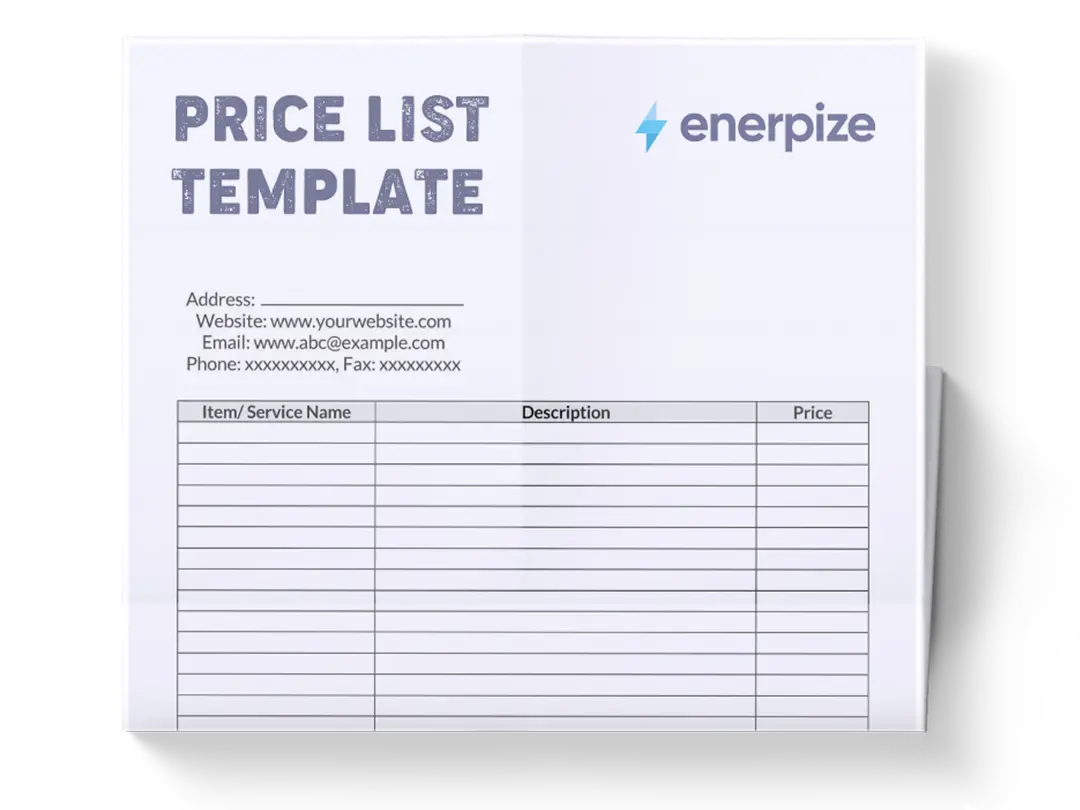
This free price list template is available in Excel, Word, Google Sheets, Google Docs, and PDF. Download it, add your items and prices, and it's ready to send, print, or embed in a quote — no formatting from scratch required.
Your item catalogue is already in Enerpize. Your price list generates itself — always updated, always consistent. Try Enerpize free.
What Our Price List Template Includes
Most free price list templates give you a table and nothing else. Ours goes further, and now the file itself actually backs it up.
A Prices Effective Date, Built Into the Header
Most templates never account for the fact that price lists go stale. Ours has a dedicated field for the date the pricing takes effect, so both you and the client know exactly which version they're looking at, and you have a record if a dispute ever comes up over which rate applied when.
Currency and Tax Notes as Actual Fields
Serving clients across different markets means declaring the currency and whether tax is included, not leaving it implied. Both are dedicated fields in this template, not something you have to remember to type into a description column.
Category Grouping Built Into the Table
Most templates give you one flat list. Ours includes a Category column, so services or products group logically, exactly what makes a price list scannable instead of a wall of rows.
Built to Stand Out, Not Just Function
This keyword's search results are dominated by design tools, Canva, Adobe Express, PosterMyWall, built for branded, printable price sheets. This template includes a logo placeholder and a clear document title, so it holds up visually, not just functionally, against that competition.
Available in Excel, Word, PDF, and Google Sheets.
What Does the Price List Template Contain?
Item Number:
Each product or service is assigned a unique identifier to streamline organization and reference. This is especially useful for managing inventory, placing reorders, or resolving customer queries.
Item Name:
The name should be brief yet descriptive enough to identify the product or service at a glance. This is the first element your client will see, so clarity here is essential.
Item Description:
This is where you provide essential context. Include details that differentiate similar items, highlight key features or benefits, and answer potential questions preemptively.
Unit Price:
State the cost per unit clearly, using consistent formatting (e.g., currency symbols, decimal precision). This section must be regularly updated to reflect changes in pricing strategy, supplier costs, or market trends.
Who Uses the Price List Template?
A price list isn't just a retail tool. Any business that sells products or services at defined prices — and communicates those prices to clients, staff, or partners — has a use for one.
Retailers and Product Sellers
Use it to standardize pricing across their catalogue. Whether you're running a boutique, a wholesale operation, or an e-commerce store, a consistent price list reduces pricing disputes, speeds up order processing, and gives your team a single source of truth. Pair your price list with a purchase order template to close the loop between what you offer and what buyers formally commit to ordering. If you sell in bulk, a wholesale price list template includes tiered pricing structures and minimum order quantities that a standard price list doesn't cover.
Service-Based Businesses
Consultants, freelancers, agencies, and repair services use it to present packages, hourly rates, or retainer options in a format clients can compare without back-and-forth. Clear service pricing reduces the time spent on discovery calls and builds trust before the first meeting.
Event Planners and Caterers
Use it to present multiple service tiers and package options. When clients can see the full menu of options and their prices side by side, decisions happen faster and scope creep is easier to manage.
Sales Teams and Customer Service Reps
Use it as a reference document. A standardized price list means every rep quotes the same price, eliminates ad-hoc discounting, and gives the business a defensible pricing position.
Startup Founders and Small Business Owners
Use it to establish pricing structure early — before they have a CRM, a quoting tool, or a sales team. It forces clarity on cost-to-price ratios and creates a document they can hand to any new hire or sales partner immediately.
How to Use the Price List Template
1- Customize the Template to Match Your Brand
Add your company name, logo, and contact details at the top of the free editable price list template. This not only reinforces your brand identity but also ensures clients can quickly reach you for questions or orders.
2- List Your Products or Services
Organize your offerings logically. For example, if you sell clothing, you might group items by category (e.g., T-shirts, pants, jackets). If you're a service provider, list offerings by service tier or duration.
3- Fill in the Item Number, Name, and Description Fields
- Assign unique item numbers for internal tracking.
- Use concise, specific item names.
- Include detailed descriptions to preempt questions and differentiate similar offerings.
4- Set and Enter Unit Prices
Pricing should be competitive yet profitable. Before entering figures, review market standards, evaluate your cost structure, and determine your margins. Then, input the final price in the price list Word template with the correct formatting. Avoid rounding that creates confusion (e.g., $49.997) and ensure tax details are noted if applicable.
5- Review for Accuracy and Logic
Once filled, go through the entire price list template to verify consistency in naming, spacing, alignment, and math. Test the readability by having someone unfamiliar with your offerings review it. Make corrections to anything unclear, and ensure the prices align with your most recent pricing model.
6- Print for Distribution
Once finalized, save the file as a printable price list template
7- Update Regularly
A stale price list erodes credibility. Set a reminder to revisit the list monthly or quarterly depending on how often your pricing changes.
Done building your price list? Enerpize generates product and service price lists automatically from your item catalogue — always current, always consistent. Try for free.
How Enerpize Handles Pricing
A price list template gets a static snapshot out the door. It doesn't update the moment a price changes, and it doesn't stop a client from working off last month's version by accident.
One Price List, Every Document
In Enerpize, pricing lives centrally and feeds directly into quotes, invoices, and sales orders automatically, so a price change doesn't mean hunting down and updating every document that referenced the old rate.
Multiple Price Lists for Different Clients or Channels
Wholesale clients, retail customers, and specific accounts often need different rates for the same catalog. Enerpize supports multiple price lists assigned to different clients or sales channels, without maintaining separate spreadsheets that can drift out of sync with each other.
Pricing Tied Directly to Your Inventory
A price list is only as reliable as the stock behind it. Enerpize's inventory management connects pricing to real product records, so every item on a price list reflects actual, trackable inventory rather than a static row someone typed in once and forgot to update. Products can be organized by category and unit, matched to supplier costs, and tracked across multiple warehouses, which means a price list generated from the system reflects what you can actually fulfill, not just what you intended to sell. When stock runs low or a product is discontinued, that status is visible from the same place the pricing lives, instead of a client receiving a quote for something that's no longer available.
Prices That Update Everywhere at Once
Update a price once, and it reflects immediately across every future quote or invoice that references it, closing the exact gap a static file can't, the moment between when a price changes and when every document catches up.
If you're maintaining more than one version of your price list for different clients or channels, or your pricing has drifted out of sync with what's actually in stock, that's usually the point where a spreadsheet becomes more upkeep than the pricing itself.
Price List Template vs. Quote Template
These two documents are often confused — and sometimes used interchangeably — but they serve different stages of the sales process.
A price list is a standing document. It shows your standard pricing for all products or services and is typically shared proactively — on your website, in a sales deck, or in an introductory email. It doesn't account for the specifics of a client's situation. Everyone gets the same price list.
A quote (or quotation) is a contextual document. It's generated in response to a specific client request and reflects the actual scope of what they've asked for — quantity, customisation, timeline, applicable discounts, and total cost. A quote is a commitment; a price list is a reference.
The workflow is: price list first, quote second. Your price list informs the quote. Once a client selects from your price list, the next step is issuing an invoice template — the formal request for payment against the items they've confirmed.
| Price List | Quote | |
| Purpose | Show standard pricing | Respond to a specific request |
| Audience | All prospects | One specific client |
| Personalization | None | High |
| Commitment | None | Binding (once accepted) |
| Updated | Periodically | Per client, per project |
Price List Template Best Practices
A price list is only as useful as it is accurate and accessible. These habits keep it working.
Keep It Current
A stale price list is worse than no price list — it creates disputes and erodes trust. Set a calendar reminder to review pricing monthly or quarterly. If your costs change, your list should change within the same week. For project-based businesses, combine your price list with a project cost template to verify your rates cover actual delivery costs before quoting.
Don't List Everything — List What Sells
An exhaustive catalogue overwhelms clients. Lead with your core products or services, group similar items together, and save edge cases for a separate document or a direct conversation. Fewer options, faster decisions.
Be Explicit About What the Price Includes
"Per hour," "per unit," "per project," "excluding VAT" — these qualifiers prevent misunderstandings before they become disputes. If your pricing has conditions, state them in the description field, not in a footnote.
Use Consistent Formatting
Currency symbols, decimal places, and spacing should be identical across every row. Inconsistency looks like an error — and sometimes it is one. Review the list as a table, not row by row.
Version-Control Your Price List
When you update pricing, save the old version. If a client disputes a quote that referenced a previous rate, you need the document you sent them — not the one you updated last week.
Make It Easy to Act On
Your price list should lead somewhere. Add your contact details, a link to request a quote, or a direct download link so clients know what to do next after reviewing your pricing. For teams managing high quote volumes, sales management software automates price list distribution and links pricing directly to your sales pipeline.
Why Use a Price List Template?
Promotes Pricing Transparency:
Clients are more likely to trust and do business with you if they can see exactly what they’re getting and for how much. This transparency reduces friction in the sales process and builds long-term credibility.
Enhances Operational Efficiency:
A standardized price list streamlines sales, quoting, and invoicing workflows. Your team spends less time hunting down prices or clarifying options and more time closing deals.
Improves Client Experience:
A clear, professional-looking price list minimizes confusion and enables faster decision-making. Clients appreciate being able to compare options quickly without back-and-forth communication.
Strengthens Brand Consistency:
When your pricing document reflects your visual identity and communication style, it reinforces your brand at every touchpoint. It signals professionalism and attention to detail.
Price List Templates by Country
India
India is one of the largest real sources of traffic to this page, and GST compliance is the detail most price lists miss here. Under India's GST framework, a price list intended for GST-registered businesses should clearly indicate whether listed prices are inclusive or exclusive of GST, since the applicable rate (5%, 12%, 18%, or 28% depending on the goods or service category) changes the final amount significantly. Using this template's Tax Note field to state "Prices exclude GST" or "Prices include GST" removes the single most common source of pricing confusion for Indian B2B buyers, who will typically assume exclusive pricing unless told otherwise.
Philippines
In the Philippines, businesses issuing price lists to VAT-registered clients should state clearly whether the 12% VAT is included, since Philippine buyers commonly expect prices to be VAT-exclusive by default in B2B contexts unless the list says otherwise. The Currency field in this template is also worth using deliberately here, Philippine businesses serving both domestic and overseas clients often need to distinguish PHP pricing from USD pricing on the same catalog, and leaving that unstated is a common source of quote disputes.
United States
The compliance risk in the US isn't a tax field, it's the pricing itself. The FTC's Guides Against Deceptive Pricing (16 CFR Part 233) prohibit advertising a "was" price that wasn't genuinely offered for a substantial period, and comparing your price against a competitor's or a "suggested retail price" that doesn't reflect an actual, prevailing market rate, according to the FTC's own regulation text. A price list that includes struck-through "before" prices or reference comparisons needs those figures to be real and defensible, not decorative.
On the tax side, US price lists conventionally exclude sales tax, unlike VAT-inclusive markets, since sales tax rates vary by state and even by locality, and are typically calculated at the point of sale rather than baked into a listed price. If your price list is used across multiple states, using the Tax Note field to state "Prices exclude applicable sales tax" avoids the assumption that the listed number is the final one a client pays.
FAQs
What is a price list template used for?
A price list template is used to present your products or services alongside their prices in a clear, standardized format. It gives clients, sales reps, and partners a consistent reference point for pricing — reducing back-and-forth, preventing disputes, and speeding up the buying decision.
What should a price list include?
A price list should include an item number or reference code, the item name, a brief description, and the unit price. Depending on your business, you may also include applicable taxes, minimum order quantities, bulk pricing tiers, and the currency and date the list was last updated.
What is the difference between a price list and a quote?
A price list shows your standard pricing for all products or services — it's a standing document shared proactively. A quote is generated in response to a specific client request and reflects their exact scope, quantity, and any applicable discounts. Your price list informs the quote; they're used at different stages of the sales process.
Can I use this template for both products and services?
Yes. The template is structured to accommodate any item type. For products, use the description field to include specifications like size, material, or SKU. For services, use it to list packages, hourly rates, or deliverables. The format works for either or both in the same document.
How often should I update my price list?
At minimum, review it quarterly. If your costs, supplier rates, or market positioning change, update it immediately — don't wait for the next scheduled review. Always note the date the list was last updated so clients and your team know which version is current.
Do I need to include taxes in my price list?
This depends on your industry, market, and client type. B2B price lists often show pre-tax prices with a note that tax applies. B2C price lists typically show tax-inclusive pricing. Whatever you choose, be consistent and explicit — ambiguity around tax is one of the most common sources of invoice disputes.
Join 40,000+ businesses that manage pricing, quotes, and invoices in one place — without a single spreadsheet. Try for free.
About the Author
Omar El Bahr is a Senior Digital Growth Specialist at Enerpize, where he leads SEO, content strategy, and organic growth across international markets. He is a Forbes Communications Council contributor and has written for Entrepreneur on business communication and digital strategy.