Posted on 6 July 2026
Free Tanzania Invoice Template Download: Excel, Word, PDF & Google Sheets and Docs
- Available in Word, Excel, PDF, Google Docs, and Google Sheets, free to download with no sign-up required
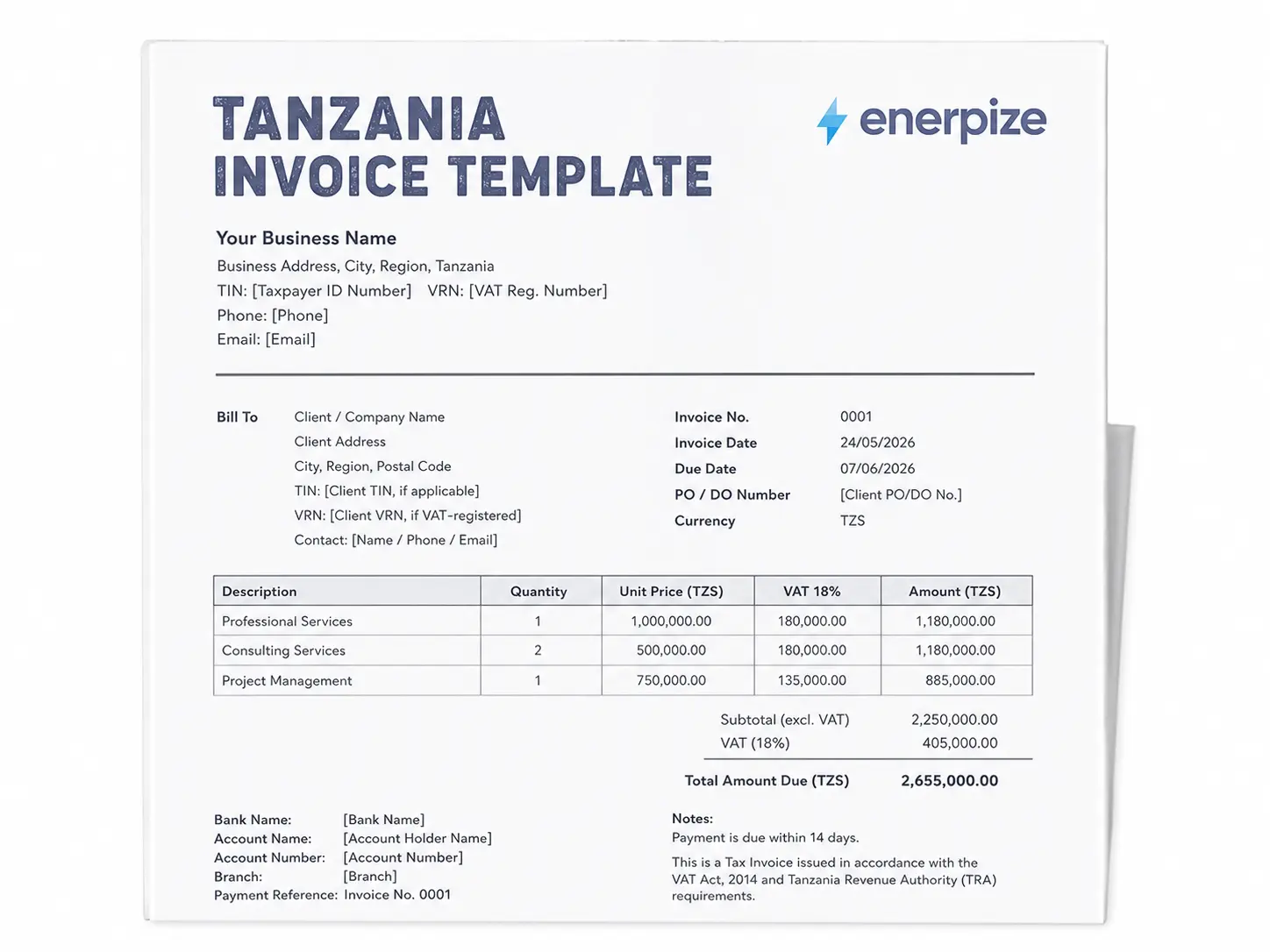
- Covers business details, client details, TIN and VRN numbers, bank details, line items, VAT at 18%, and a compliance note in one structured document
- Built with Tanzania-specific tax fields including the standard 18% VAT rate, TIN and VRN for both supplier and recipient, and TRA-aligned invoice language
- Calculates line item totals, VAT, total discount, and balance due automatically in Excel and Google Sheets
A Tanzania invoice template is a pre-formatted billing document that records services delivered, goods supplied, rates charged, and VAT applied, giving both the business and the client a clear, TRA-aligned record of every transaction.


What Is a Tanzania Invoice Template?
Picture this. You just delivered forty bags of cement to a water project site in Musoma. The truck is empty, the site engineer signed for the delivery, and now you need to get paid. You open a blank Word document and start typing numbers. You know there's a TIN field somewhere in the requirements, but you're not sure if you need a VRN too, or whether "Tax Invoice" needs to be written exactly like that at the top. You send it anyway. Two weeks later, the accounts office calls asking for a corrected version because the invoice is missing the PO number.
That gap right there, between "I made something that looks like an invoice" and "I made something the client's accounts team can actually process," is the reason this page exists.
A Tanzania invoice template is a document that already has the fields Tanzanian tax law expects on a compliant invoice. You fill in your details, you fill in the client's details, you list the goods or services, and the totals calculate themselves. The difference between a template and an invoice that survives a client's compliance check isn't the design. It's whether the structure matches what the Tanzania Revenue Authority actually asks for.
Under the VAT Act, 2014, a registered person making a taxable supply must issue a tax invoice that is serially numbered, generated by an Electronic Fiscal Device where applicable, issued in the prescribed form, and carries certain mandatory information. The standard VAT rate in Tanzania is 18%, and it applies to most goods, services, and immovable property connected to any economic activity in Mainland Tanzania, as confirmed on the Tanzania Revenue Authority's VAT page.
Tax Invoice or Ankara ya Kodi? The Swahili Reference
The word "invoice" in Swahili is commonly rendered as "ankara," and Tanzanian businesses often use both terms interchangeably on their documents. What matters more than the language is the header itself. A compliant tax invoice in Tanzania must state "Tax Invoice" clearly, and if you're reissuing a copy, it must say "Copy Tax Invoice" instead. This convention is spelled out plainly in supplier guidance documents used by multinational buyers operating in Tanzania, and it lines up with what the VAT Act itself requires of a serially numbered, correctly issued invoice.
Start sending TRA-aligned invoices in seconds. Enerpize auto-calculates 18% VAT and fills your bank details automatically. Start for free.
What the Enerpize Tanzania Invoice Template Includes
Here's something I'll say plainly. Most free invoice templates you'll find for Tanzania give you a description box, an amount box, and call it done. I didn't want to build another one of those. If a template is going to represent your business and hold up when a client's accountant looks at it, it needs to actually understand what Tanzania asks for, not just what a generic invoice looks like.
Here's a field-by-field breakdown of what's inside the Enerpize Tanzania invoice template.
Supplier Information Fields
| Field | Purpose |
|---|---|
| Business Name | Your trading name as registered |
| Business Address | Full address including city and region |
| Phone and Email | Contact details for client queries |
| TIN | Your Taxpayer Identification Number, required for tax purposes |
| VRN | Your VAT Registration Number, mandatory if you're VAT registered |
Client (Bill To) Fields
| Field | Purpose |
|---|---|
| Client / Company Name | Full legal name of the recipient |
| Client Address | Billing address |
| Client TIN | Useful for B2B invoicing and audit trails |
| Client VRN | Required where the recipient is also VAT registered |
| Contact Person, Phone, and Email | For internal routing and client communication |
Invoice Identification Fields
| Field | Purpose |
|---|---|
| Invoice Number | Unique sequential serial number |
| Invoice Date | Date of issue |
| Due Date | When payment is expected |
| PO / DO Number | Purchase Order or Delivery Order reference, often mandatory for corporate buyers |
| Currency | TZS by default, with 135+ currency support on the Enerpize platform |
Line Item Fields
| Field | Purpose |
|---|---|
| Description | Accurate description of goods or services supplied |
| Date of Supply | The date the goods or service was actually delivered |
| Quantity | Volume or units |
| Unit Price | Per unit rate in TZS |
| VAT % | Per line VAT rate, 18% standard |
| Net Value | Auto calculated: Qty times Unit Price |
Totals and Tax Fields
| Field | Purpose |
|---|---|
| Subtotal (excl. VAT) | Sum of all line item amounts before VAT |
| Total Discount | Sum of all discounts applied |
| VAT (18%) | Calculated VAT on the net subtotal |
| Total Due (TZS) | Final amount payable including VAT |
Bank Details
EFT and bank transfer remain the standard for B2B payment in Tanzania, so the template includes:
- Bank Name
- Account Holder Name
- Account Number
- Branch
- Payment Reference (pre filled with the invoice number)
Supporting Fields
- Delivery Note Number (mandatory when goods, not services, are supplied)
- Notes / Special Instructions
- Authorised Signature block
- A compliance note referencing the VAT Act, 2014
What sets this apart from a bare bones download isn't decoration. It's that the PO/DO number field exists at all. Most templates you'll find for Tanzania don't have it, and yet it's one of the most common reasons corporate buyers bounce an invoice back for correction. Same goes for the delivery note number field. If you're supplying goods rather than a service, and you don't have somewhere to log that number, the invoice looks incomplete the moment it lands on an accounts payable desk.
Tanzania Tax Invoice Requirements (TRA Rules)
The Tanzania Revenue Authority is specific, if not always exhaustively public, about what belongs on a tax invoice. Miss a required field, and the invoice risks being unusable for a proper VAT record, which means it comes back to you for correction or the client simply refuses to pay until it's fixed. The Tanzania Revenue Authority's VAT page confirms that VAT is charged only by persons registered for VAT, on both local supplies and imports, at a standard rate of 18%.
Electronic Fiscal Devices: The Three Types You Should Know
Tanzania requires most VAT registered businesses to issue invoices through an Electronic Fiscal Device (EFD). There are three types in circulation, and knowing which one applies to your business avoids a wasted purchase.
- Electronic Tax Registers (ETRs): used by retail businesses that issue fiscal receipts manually, think supermarkets and shops.
- Electronic Fiscal Printers (EFPs): used by computerized retail outlets connected to a network, storing every transaction in fiscal memory.
- Electronic Signature Devices (ESDs): authenticate computer generated invoices with a unique signature number that appears automatically on system generated invoices.
This distinction matters because a business using an ETR without the functionality to record full customer details risks having those transactions treated as non compliant, even if the receipt looks fine on the surface.
The TZS 100,000 Rule for Input VAT Claims
Here's an angle almost nobody writing about Tanzania invoicing bothers to explain, and it's one of the more consequential ones if you're on the receiving end of an invoice. A VAT input tax claim on a supply valued above TZS 100,000 is only valid if the tax invoice includes the customer's name, address, TIN, and VRN. Some ETR devices simply can't generate that information. If your supplier's ETR can't produce it, your input tax claim on that invoice may not hold up.
The practical takeaway. If you're a business regularly claiming input VAT, check that your suppliers' fiscal devices actually capture your details correctly, and keep a scanned copy, because thermal receipts fade.
Mandatory Invoice Fields Under the VAT Act
Based on Section 86 of the VAT Act, 2014, a tax invoice issued by a registered person must be serially numbered, true and correct, generated by an EFD where required, issued in the prescribed form and manner, and include the prescribed supplier and transaction information. In practice, and confirmed by supplier compliance guidance used by multinational buyers in the market, this typically means the invoice header states "Tax Invoice," the supplier's TIN and VRN appear clearly, a unique invoice number and date are present, and the description, quantity, and value of the supply are broken out so VAT is visible as a separate figure from the subtotal.
If your business also sits on the other side of a transaction, for instance withholding VAT on supplies as a withholding agent, the Tanzania Revenue Authority's Withholding Tax page sets out the applicable rates, including the 3% and 6% VAT withholding obligations on goods and services respectively.
Skip rebuilding this from scratch every month. Enerpize lets you build, send, and track invoices with 18% VAT calculated automatically and your TIN and VRN saved once. Start for free.
PO/DO Numbers: The Field Generic Templates Skip
If you sell to larger companies in Tanzania, whether that's a manufacturer, an NGO, or a multinational operating locally, you'll run into a "No PO No Pay" policy sooner or later. The purchase order or delivery order number needs to sit on your invoice, and the invoice date has to come after the PO date, not before it. Supplier onboarding documentation from companies operating in Tanzania consistently flags this as one of the most common reasons invoices get rejected and sent back for correction. A template without a dedicated PO/DO field quietly sets you up to forget this every time.
How to Complete Your Tanzania Invoice Template Step by Step
Step 1: Fill in Your Business Header
Start with your business name exactly as it appears on your TIN certificate. Add your address, your TIN, and your VRN if you're VAT registered. This goes in the top left block.
Step 2: Complete the Bill To Section
Fill in your client's name or company name, their address, and their TIN and VRN if they have one. If the transaction value is meaningful and they intend to claim input VAT, this section is not optional. Add a contact name and email so their accounts team can process it without back and forth.
Step 3: Set the Invoice Identification Details
Assign a unique, sequential invoice number. This is one of the easiest compliance mistakes to make by accident, reusing or skipping a number. Enter the invoice date and due date. If you received a purchase order or delivery order from the client, add that number here, and make sure your invoice date is after the PO date.
Step 4: Add Your Line Items
List each product or service on its own row. Include the description, the date the goods or service was actually supplied, the quantity, the unit price, and the VAT rate, 18% for standard supplies. In the Excel and Google Sheets version, the Net Value column calculates itself.
Step 5: Confirm the Totals
Check the subtotal, the VAT amount at 18% of the net subtotal, and the total due. If you're working from the Word or PDF version, calculate these by hand before sending.
Step 6: Add Your Bank Details
Fill in your EFT bank details in the payment section. Pre fill the payment reference with your invoice number so incoming payments are easy to match.
Step 7: Add Notes and Sign
Add any special instructions, whether that's your payment terms, a late fee policy, or delivery notes. Sign the authorised signature block if a physical copy is needed.
Step 8: Save and Send
Save the completed invoice as a PDF before sending it out. An editable Word or Excel file is easy to accidentally alter after the fact, which is not what you want on a tax document. Send it by email, WhatsApp, or whatever channel your client prefers.
Tanzania Invoice Template Formats Available
Word Invoice Template Tanzania
The Word version suits service businesses that want to adjust the layout before converting to PDF. It works in Microsoft Word and Google Docs. Calculations need to be done by hand.
Free Excel Invoice Template Tanzania
The Excel version is built for businesses invoicing regularly and wanting the math done for them. Totals, VAT, and discounts calculate the moment you enter quantities and prices. It also works in Google Sheets, and it's the better fit if your line items and pricing change from client to client.
PDF Invoice Template Tanzania
The PDF version is the print ready, ready to send format. It's the cleanest presentation but needs a PDF editor or manual completion first.
Skip the manual math entirely. Enerpize lets you build, send, and track TRA-aligned invoices in minutes, with 18% VAT calculated automatically and bank details pre saved. Start for free.
VAT Invoice Template Tanzania
A VAT invoice template for Tanzania has one job above everything else, to separate the VAT amount from the net value and display both clearly, not buried inside a single VAT inclusive figure.
The Enerpize VAT invoice template for Tanzania includes:
- A dedicated VAT (18%) line in the totals block, calculated separately from the subtotal
- A VAT % column at the line item level
- The supplier's TIN and VRN in the header
- The recipient's TIN and VRN in the Bill To section, where applicable
If you're approaching the point where VAT registration becomes relevant to your business, building invoices on a structure that already has these fields means you're not rebuilding your invoicing process from scratch the day you register.
Invoice Types Used by Tanzanian Businesses
Not every job needs the same invoice. A consultant billing for a strategy engagement doesn't need the same document as a hardware supplier billing a water authority for cement. Tanzania has enough variety in how businesses transact that one generic template for everything creates either a compliance gap or a confused client.
Proforma Invoice
This is the invoice you send before the sale is final, not after. A supplier proforma invoice in Tanzania typically states the goods, the quantity, the unit price, the total, the payment mode, and a delivery timeline, all before any goods change hands or money moves. It's especially common in procurement heavy sectors like construction supply and government tendered goods, where the buyer needs the number in writing before releasing a purchase order. The proforma invoice template on Enerpize is built to convert cleanly into a full tax invoice once the order is confirmed.
Construction Invoice
Construction billing in Tanzania often means progress payments tied to project milestones rather than one lump sum. Getting the description field right matters here more than almost anywhere else, since a vague line item like "materials supplied" gives an auditor or an accounts team nothing to verify against the purchase order. The construction invoice template is structured with that in mind.
Freelance Invoice
Independent consultants and freelancers in Tanzania sit in a slightly different position from registered companies. You may not have a VRN if you're below the VAT threshold, and your clients range from corporate procurement teams expecting a PO reference to smaller clients who just want a clear number. The freelance invoice template is flexible enough to handle both.
Consulting Invoice
If you bill for time, expertise, or deliverables rather than physical goods, a consulting invoice needs to be specific about what was actually delivered and over what period. "Professional services rendered" tells nobody anything. The consulting invoice template is built around specificity by default.
Credit Note
A credit note isn't a new invoice, it's a correction to one that already exists. If you overbilled, made an error, or need to process a return, the credit note must reference the original invoice number it's adjusting. The credit note template includes that reference field from the start.
Why Tanzanian Businesses Outgrow Templates
A template is a fine place to start. It gives you structure when you had none, it forces you to think through what an invoice actually needs, and it costs nothing. If you're sending two or three invoices a month, a solid template might genuinely be enough.
What a Template Cannot Do
A template has no memory. Every time you open it, it's blank again. You retype the client's TIN. You retype your own bank details. You calculate the VAT by hand. You manually check whether last month's invoice to this same client was ever paid. None of that is difficult on its own, but multiply it across fifteen clients and thirty invoices a month, and the small errors start to compound while the hours quietly disappear.
A template also knows nothing about the rest of your business. It doesn't know your stock is running low. It doesn't know this client still owes you from six weeks ago. It's a document, nothing more.
What Enerpize Does Differently
Enerpize's invoicing and billing software was built for the exact moment a business realizes the template stopped being enough. Over 40,000 businesses across 50+ industries use it because it takes everything a static template forces you to redo by hand and makes it automatic instead.
When you create an invoice in Enerpize, your client's TIN and VRN are already saved from the last time you billed them. Your own bank details are already there. VAT at 18% calculates the second you enter a quantity and a price. The invoice number sequences itself so you never accidentally reuse one. When a due date passes unpaid, a reminder goes out without you having to remember.
Payments That Actually Land
One of the quieter frustrations with template based invoicing in Tanzania is what happens after you hit send. The client gets a PDF, has to go find your bank details, open their banking app, and manually key in an account number and reference. That's several steps between your invoice and your money, and any one of them can introduce a delay or a typo.
With Enerpize, your client gets a link to a client portal where they can view the invoice, see their statement, and pay directly. You can accept partial payments, set up installment terms, and the system updates the invoice status and outstanding balance the moment payment lands, no manual reconciliation required.
The Business Picture a Template Can't Show You
Enerpize's sales management software connects your invoicing to the rest of your operation in a way a static file never will. Your invoices feed straight into your sales reports, so you can see revenue by client, by period, by product, without building a separate spreadsheet to track it manually. Stock levels update automatically when products get invoiced. You can see at a glance which clients pay early and which ones need a nudge, all without digging through a folder of old PDFs.
What Tanzanian Businesses Get Specifically
A few things worth pointing out for Tanzania specifically:
- VAT at 18% calculated automatically at line item level and in the totals block, with net, VAT, and total shown as three separate figures
- TZS as the default currency, with 135+ additional currencies supported for cross border invoicing
- TIN and VRN fields saved once per client and reused automatically on future invoices
- Recurring invoices that send themselves on a schedule you set, with reminders going to clients automatically
- Invoices sendable by email, WhatsApp, or SMS directly from the platform
The template on this page is a solid place to start. Enerpize is where you go once starting from a blank page every single time stops making sense.
Join 40,000+ businesses using Enerpize. Send your first TRA-aligned invoice in minutes. Start for free.
Key Takeaways
- Every VAT registered business in Tanzania must issue a tax invoice that is serially numbered, generated by an approved EFD where required, and includes the customer's TIN and VRN for supplies above TZS 100,000, or the input VAT claim on that invoice may not be valid.
- Real invoicing integration means your TIN, VRN, and client details are saved once and reused automatically, not retyped on every single invoice you send.
- Generic invoice templates built for other markets almost never include a PO/DO number field, which is one of the most common reasons corporate buyers in Tanzania bounce an invoice back for correction.
- Enerpize's Tanzania invoice template is built for TRA style compliance from the header down, covering TIN, VRN, PO/DO references, and 18% VAT as separate, auditable figures.
- Beyond invoicing, Enerpize connects to recurring billing, client payment portals, and sales reporting so the invoice you send becomes part of a bigger financial picture, not a standalone document.
Enerpize is free to start with a 14 day trial, and scales from a single freelance invoice a month to full recurring billing across an entire client base.
FAQs
What must a tax invoice include in Tanzania?
A tax invoice in Tanzania must be serially numbered, generated by an Electronic Fiscal Device where required, and issued in the prescribed form under Section 86 of the VAT Act, 2014. In practice, this means the header states "Tax Invoice," the supplier's TIN and VRN are shown clearly, there's a unique invoice number and date, an accurate description of the goods or services, and the VAT amount shown separately from the subtotal.
What is the VAT rate in Tanzania?
The standard VAT rate in Mainland Tanzania is 18%, as confirmed on the Tanzania Revenue Authority's official VAT page. Exports of goods and services are zero rated, and certain supplies consumed outside Mainland Tanzania can also be zero rated with proof.
What is the difference between an ETR receipt and a tax invoice?
An ETR, or Electronic Tax Register, is one of three types of Electronic Fiscal Device used to generate fiscal receipts, typically in retail settings. A tax invoice is the broader compliance document a VAT registered business issues for a taxable supply, and it should be generated through whichever EFD type applies to that business, whether that's an ETR, an EFP, or an ESD.
Do I need a TIN and VRN on every invoice?
Your own TIN should appear on every invoice you issue as a registered taxpayer. Your VRN is required if you're VAT registered. On the client side, including their TIN and VRN matters most when the transaction value exceeds TZS 100,000 and they intend to claim input VAT, since an invoice missing that detail can invalidate their claim.
What is a proforma invoice used for in Tanzania?
A proforma invoice is sent before a sale is finalized. It states the goods, quantities, prices, and delivery terms so a buyer, often a procurement team or a government backed authority, can review and approve the numbers before releasing a purchase order. It is not a tax invoice and shouldn't be treated as one for VAT purposes.
Can I send invoices via WhatsApp in Tanzania?
Yes. There's no legal requirement dictating how an invoice must be delivered, and WhatsApp is widely used for business communication in Tanzania, invoices included. Enerpize supports sending invoices directly through WhatsApp from within the platform.
What happens if my invoice is missing required fields?
An invoice missing mandatory fields, whether that's the TIN, the VRN, or a properly stated "Tax Invoice" header, risks being treated as non compliant for VAT purposes. For the recipient, this can mean an invalid input VAT claim. For you as the supplier, it usually means the invoice gets sent back for correction before payment is released.
Send your first compliant Tanzania invoice today. Enerpize handles the TIN, VRN, and 18% VAT calculation for you. Start for free.
About the Author
Omar El Bahr is a Senior Digital Growth Specialist at Enerpize, where he leads SEO, content strategy, and organic growth across international markets. He is a Forbes Communications Council contributor and has written for Entrepreneur on business communication and digital strategy.
Disclaimer: This page is for informational purposes only and does not constitute tax or legal advice. TRA requirements are subject to change. Verify compliance directly with TRA or a qualified Tanzanian tax professional before issuing invoices.