Posted on 5 August 2026
W4 Form Template: Word and PDF Download
- Available in Word & PDF, free to download with no signup required
- Matches the 2026 IRS form exactly, including the new Deductions Worksheet lines for qualified tips, overtime, and vehicle loan interest
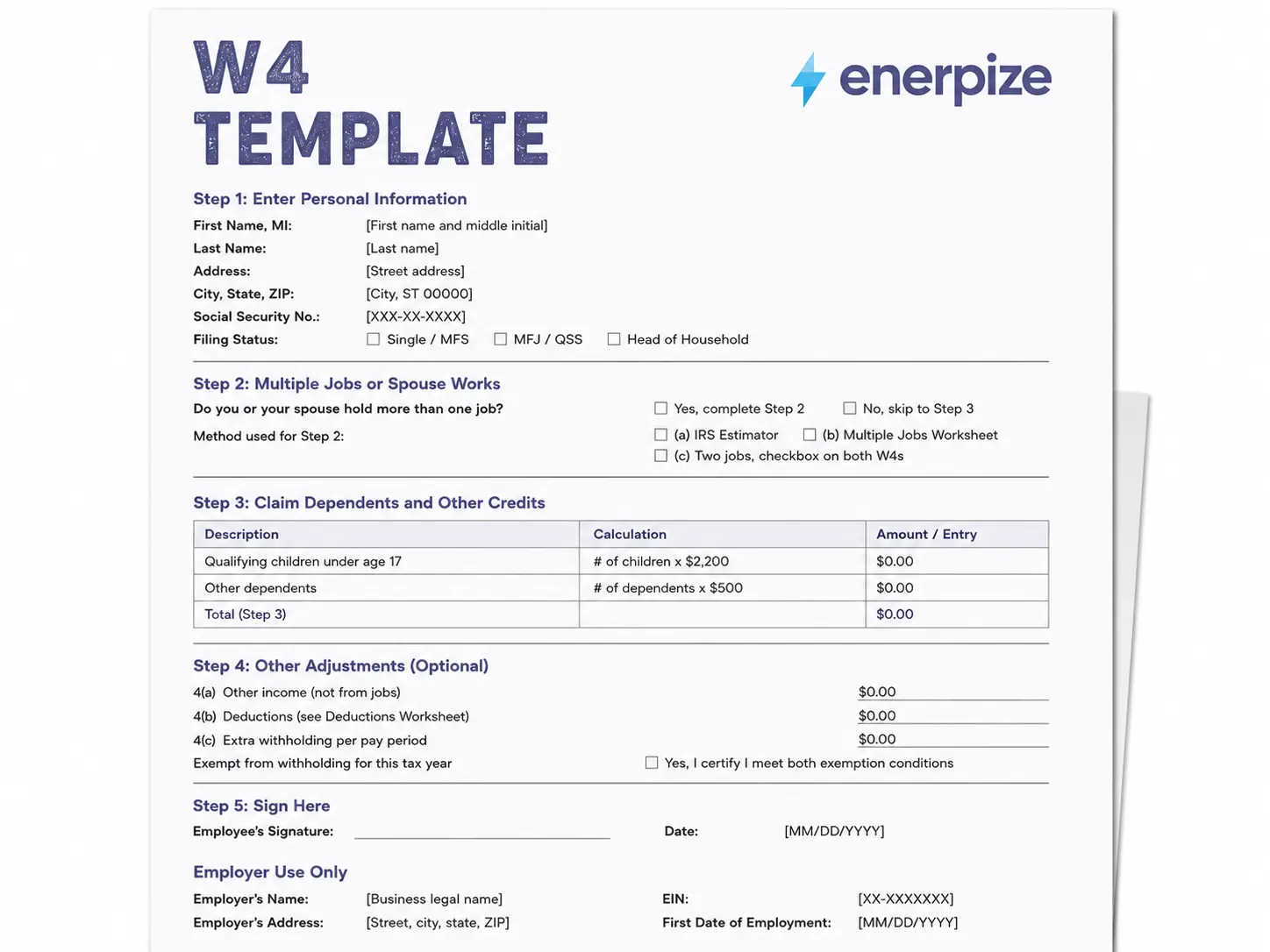
- Covers all five steps plus the employer section in one structured document
- Built for the current $2,200 per child tax credit and the checkbox based exempt certification
A w4 form template is a structured version of the IRS Employee's Withholding Certificate that walks an employee through personal information, dependents, and withholding adjustments before that information ever reaches payroll.


What Is a W4 Form?
Every new hire fills one out. Almost nobody enjoys it. A w4 form is the document the IRS calls the Employee's Withholding Certificate, and its whole job is simple even when the boxes on it are not. It tells an employer how much federal income tax to pull out of each paycheck.
Get it wrong and one of two things happens. Withhold too little and there is a tax bill waiting in April, sometimes with a penalty attached. Withhold too much and the employee spent the year on smaller paychecks just to get that money back as a refund. Neither outcome is a disaster, but neither one is the point either. The point of a w4 form is landing close to what is actually owed.
The form has five steps. Step 1 and Step 5 are required for everyone. Steps 2 through 4 only apply if they fit the employee's situation, multiple jobs, dependents, or extra income that is not coming from a paycheck.
Onboarding paperwork is easier to manage when it lives in one place. Register free with Enerpize
What to Include on a W4 Form
Most blank templates give you a box to type into and nothing else. Here is what a complete w4 form actually needs, field by field.
| Field | Why It Matters |
|---|---|
| First Name, Middle Initial, Last Name | Must match Social Security records exactly, or the SSA flags the mismatch |
| Address | Sets the mailing address on file with the employer |
| Social Security Number | Required for the employer to report withholding under the correct identity |
| Filing Status | Determines the standard deduction and tax rates applied to withholding |
| Step 2 Method | Which of the three multiple job options was used, matters for accuracy |
| Qualifying Children | Multiplied by $2,200 each, feeds directly into Step 3 |
| Other Dependents | Multiplied by $500 each, feeds into Step 3 |
| Other Income (4a) | Income not from a job, increases withholding if entered |
| Deductions (4b) | Reduces withholding, now includes tips, overtime, and vehicle loan interest for 2026 |
| Extra Withholding (4c) | A flat dollar amount added to every paycheck's withholding |
| Exempt Certification | A checkbox on the 2026 form, certifies no tax liability last year or this year |
| Employee Signature and Date | The form is not valid without both |
| Employer's Name, Address, EIN | Completed by the employer, not the employee |
| First Date of Employment | Anchors the record for the employer's own files |
What the Enerpize W4 Template Includes
Matches the Current Form, Not an Old One
The 2026 revision of Form W4 changed more than people realize. There is a new section in the Deductions Worksheet for qualified tips, up to $25,000, qualified overtime compensation, up to $12,500 or $25,000 if married filing jointly, and qualified passenger vehicle loan interest, up to $10,000. None of those three lines existed on the 2025 form. There is also a new seniors deduction, $6,000 per qualifying spouse age 65 or older, also absent from 2025. The Child Tax Credit multiplier moved from $2,000 to $2,200 per qualifying child. Claiming exempt is now a checkbox instead of writing the word "Exempt" by hand below Step 4(c). This template reflects all of that. A lot of the w4 form content floating around right now was written against the old form and never updated.
Every Step, Laid Out the Way the IRS Lays It Out
Step 1 through Step 5, plus the employer section for EIN and first date of employment, all in the same document. Nothing is summarized or simplified into something that looks different from the actual form an employee will eventually need to reference.
Form W4 Form vs Form W2
People mix these up constantly, and the confusion makes sense because both forms show up around the same moments in someone's employment.
| Document | Who Completes It | Purpose | When |
|---|---|---|---|
| Form W4 | The employee | Tells the employer how much federal tax to withhold | At hire, or any time withholding needs to change |
| Form W2 | The employer | Reports total wages and taxes withheld for the year | After year end, by January 31 |
A w4 form is forward looking. It sets up withholding before the paychecks happen. A W2 is backward looking. It reports what already happened after the year closes. An employee fills out a w4 form. An employer generates a W2. They are not interchangeable and they do not overlap in timing.
Keeping W4 elections, contracts, and pay history connected instead of scattered saves real time at year end. Register free with Enerpize
What Is New on the 2026 Form W4
The current 2026 form changed more than a typical annual update. Compared against the 2025 version, three changes stand out, and none of them are cosmetic.
The Deductions Worksheet in Step 4(b) now has a line for qualified tips, up to $25,000. A line for qualified overtime compensation, up to $12,500, or $25,000 if married filing jointly. A line for qualified passenger vehicle loan interest, up to $10,000. All three are new additions tied to the One Big Beautiful Bill Act, and none of them existed on the 2025 version of this worksheet.
There is also a new section for seniors age 65 or older, a flat $6,000 deduction per qualifying spouse, again absent from the prior year's form.
And the exemption process changed. On the 2025 form, an employee claiming exemption had to write the word "Exempt" by hand below Step 4(c). On the 2026 form, that is a checkbox with a certification statement built in.
How to Fill Out a W4 Form
Here is the step by step process, matched directly to what the IRS puts on the form itself.
Step 1: Enter Personal Information
Name, address, Social Security number, and anticipated filing status. This is one of the two steps every employee has to complete, regardless of anything else on the form.
Step 2: Multiple Jobs or Spouse Works
Only fill this out if the employee holds more than one job at once, or is married filing jointly with a spouse who also works. There are three methods here, the IRS Tax Withholding Estimator, the Multiple Jobs Worksheet, or a simple checkbox for two similarly paying jobs. Only one method should be used, not all three.
Step 3: Claim Dependents and Other Credits
This applies if total income is $200,000 or less, or $400,000 or less filing jointly. Multiply qualifying children under 17 by $2,200. Multiply other dependents by $500. Add the totals.
Step 4: Other Adjustments
Optional. Other income not from a job goes in 4(a). Deductions beyond the standard deduction go in 4(b), using the worksheet that now includes the new tips, overtime, and vehicle loan interest lines. Extra withholding per paycheck goes in 4(c).
Step 5: Sign Here
The form is not valid without a signature and date. This is the second step required from everyone, no exceptions.
Federal W4 Form vs State Withholding Forms
A federal w4 form only handles federal income tax. Most states with an income tax run a separate withholding form on top of it, and treating the federal form as the whole picture is a common mistake for anyone hiring across state lines.
Illinois is a useful example. The IL-W-4 asks for basic personal allowances and additional allowances, a structure built around the state's own tax rules rather than the federal step system. An employee can claim allowances for themselves, a spouse claimed as a dependent, and any dependents, then adjust further if they or a spouse are 65 or older or legally blind. None of that maps directly onto the federal Step 3 dependent credits. It is calculated separately, on its own worksheet, submitted to the same employer.
If a business operates in a state with its own income tax, the employee needs both forms on file, not just the federal one. States without an income tax skip this step entirely, but that is the exception, not the rule.
When to Update Your W4 Form
A w4 form is not a one time document. Marriage, divorce, a new dependent, a second job, any of these are reasons to file a new one. There is no limit on how often an employee can submit an updated w4 form, and the IRS specifically recommends revisiting it after any major life change rather than waiting until the next tax season to notice something was off all year.
If you also manage the paperwork on the other side of onboarding, our employee contract template keeps the rest of a new hire's documentation in the same format.
How Enerpize Handles Payroll
Filling out a w4 form is the easy part. What actually eats up an HR person's week is everything downstream of that form, getting the withholding data into a salary structure, keeping it in sync when someone updates their filing status six months later, and making sure payroll does not miss it. That is the part a static template was never going to solve, so here is how Enerpize handles it once the w4 form is signed.
Employee Records Hold the Data, Not a Filing Cabinet
Once an employee submits a w4 form, that information needs a home payroll can actually reach. Employee Management in Enerpize centralizes personal info, employment contracts, and job history in one record, so filing status and dependent counts sit next to the rest of an employee's file instead of living in a separate folder nobody remembers to check.
Salary Structures Turn Withholding Into an Actual Paycheck
This is where the w4 form stops being paperwork and starts affecting a real number. Payroll and Contracts in Enerpize uses smart components for earnings and deductions, with built in tax deductions consolidated into the salary structure. Enerpize's AI built salary rules let you describe a withholding rule in plain language and generate the formula automatically, then simulate it on a real employee before saving, so a Step 4(c) extra withholding amount does not have to be hand calculated into every pay run.
Attendance Feeds Into the Same Calculation
Withholding is only accurate if the pay run underneath it is accurate. Attendance and Leave syncs attendance policies, leave balances, and shift rules directly with payroll, so the hours and deductions behind a paycheck are already correct before withholding is applied on top of them.
The Whole HR Picture in One Place
All of this sits under Enerpize's broader human resources platform, organizational structure, payroll, and contracts together, so a new hire's w4 form is one part of a single onboarding record rather than a form that gets filed away the moment payroll is set up.
New hire paperwork should not live in five different places. Register free with Enerpize
Key Takeaways
- A w4 form, officially the Employee's Withholding Certificate, tells an employer how much federal income tax to withhold from each paycheck.
- Only Step 1 and Step 5 are required for everyone. Steps 2 through 4 apply only if they fit the employee's situation.
- The 2026 revision adds new Deductions Worksheet lines for qualified tips, overtime, and vehicle loan interest, none of which existed in 2025.
- The Child Tax Credit multiplier is now $2,200 per qualifying child, up from $2,000.
- A federal w4 form does not cover state withholding. Most states with an income tax require a separate form.
- Employees can and should file a new w4 form any time a major life event changes their tax situation.
Frequently Asked Questions
What is the purpose of the w4 form?
It tells an employer how much federal income tax to withhold from an employee's paycheck, based on filing status, dependents, and any additional income or deductions the employee reports.
What is the difference between a w4 form and a w2?
A w4 form is completed by the employee before paychecks start, to set withholding. A W2 is issued by the employer after the year ends, reporting total wages and taxes actually withheld.
Do I have to fill out Steps 2 through 4 on a w4 form?
No. Only Step 1 and Step 5 are required. Steps 2 through 4 are optional and only apply if you hold multiple jobs, have dependents, or want to adjust withholding for other income or deductions.
How often can I update my w4 form?
As often as needed. There is no limit, and the IRS recommends submitting a new w4 form after any major life change such as marriage, divorce, a new dependent, or a new job.
What happens if I do not submit a w4 form?
Your employer is required to withhold at the highest default rate, treating you as single with no other adjustments, until you submit a completed form.
Can I claim exemption from withholding on a w4 form?
Yes, if you had no federal tax liability last year and expect none this year. On the 2026 form, this is certified with a checkbox rather than writing "Exempt" by hand.
Is a w4 form sent to the IRS?
No. It stays with your employer. Only your employer submits withholding data to the IRS, and typically only if directed to do so under specific IRS guidance.
Do I need a state withholding form in addition to a w4 form?
In most states with an income tax, yes. The federal w4 form only sets federal withholding. States like Illinois use their own form, such as the IL-W-4, calculated separately from the federal steps.
About the Author
Omar El Bahr is a Senior Digital Growth Specialist at Enerpize, where he leads SEO, content strategy, and organic growth across international markets. He is a Forbes Communications Council contributor and has written for Entrepreneur on business communication and digital strategy.
Disclaimer
This template is provided for informational purposes only and does not constitute tax, legal, or accounting advice. It should not be construed as compliant with IRS regulations, state tax law, or any other regulatory requirement for your specific situation. This template is not a substitute for professional counsel, and you are strongly advised to consult a qualified tax professional or attorney licensed in your jurisdiction before using or adapting it.
This template is provided on an "as is," "with all faults," and "as available" basis. Enerpize expressly disclaims all warranties of any kind, whether express, implied, statutory, or otherwise, including but not limited to warranties of merchantability, fitness for a particular purpose, or non-infringement.
Enerpize does not warrant or make any representations concerning the accuracy, completeness, or reliability of this template, the information in this article, or any results from its use. Enerpize is not affiliated with, endorsed by, or sponsored by the IRS. Always confirm current instructions against the official IRS Form W4 before filing.