


Best Restaurant POS Systems in 2026: 10 Options Compared by Restaurant Type


Last updated: November 12, 2026
What this guide covers
Ten restaurant POS systems, grouped by the kind of restaurant each one suits, with 2026 US software prices, the real cost of running one, and a checklist for demos.
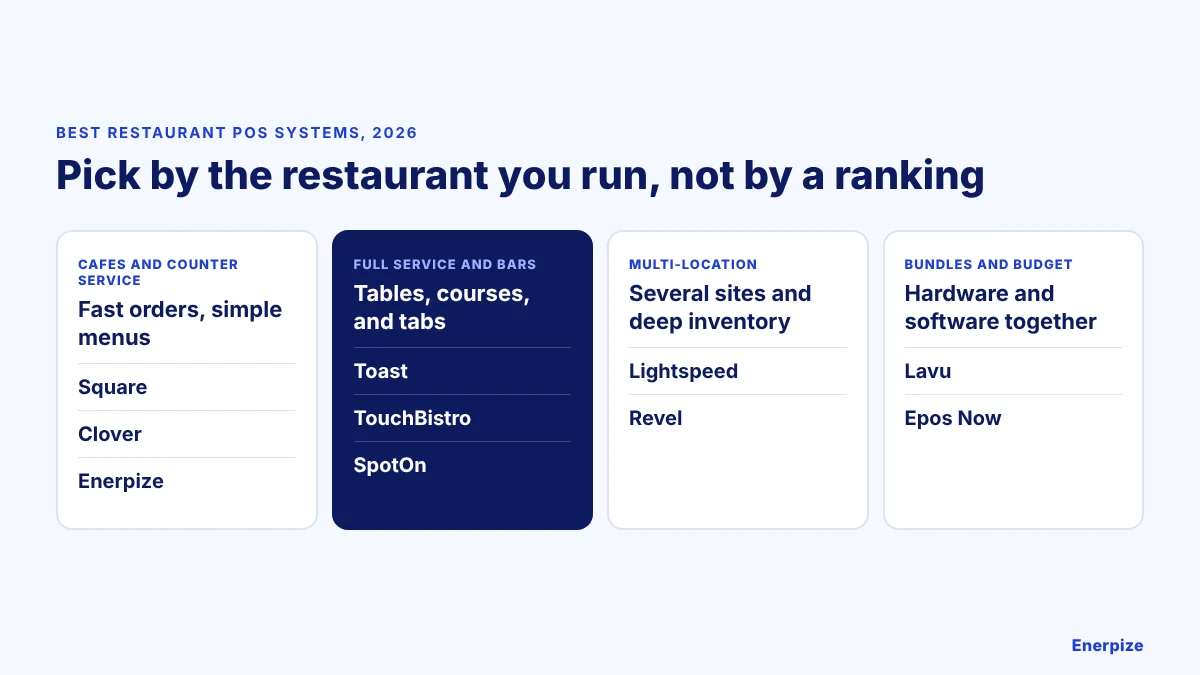
Full service
Toast, TouchBistro, and SpotOn are built around tables, courses, kitchen screens, and tabs.
Cafes and counter service
Square, Clover, and Enerpize suit quick orders and simple menus; Enerpize adds stock, staff, and accounting in one system.
The real cost
Software is one of three bills. Hardware and card processing often cost more than the subscription.
How we compared
US list prices from vendor pricing pages and published guides in November 2026. We make Enerpize, and we say where it fits and where it does not.
What Is a Restaurant POS System?
A restaurant point of sale (POS) system is the software and hardware a restaurant uses to take orders, send them to the kitchen, and accept payments in the restaurant and online: cards, cash, mobile wallets, and contactless. There are several types of POS systems, and cloud-based systems are now the most common because they keep sales data available from anywhere, update automatically, and scale across locations.
The right restaurant POS depends on how you serve. A café, a full-service dining room, and a group of sites need different tools, so this guide groups the best restaurant POS systems by restaurant type instead of ranking them in one order.
Best Restaurant POS Systems at a Glance
Software prices are US list prices as of November 2026. Every system adds hardware and card processing on top.
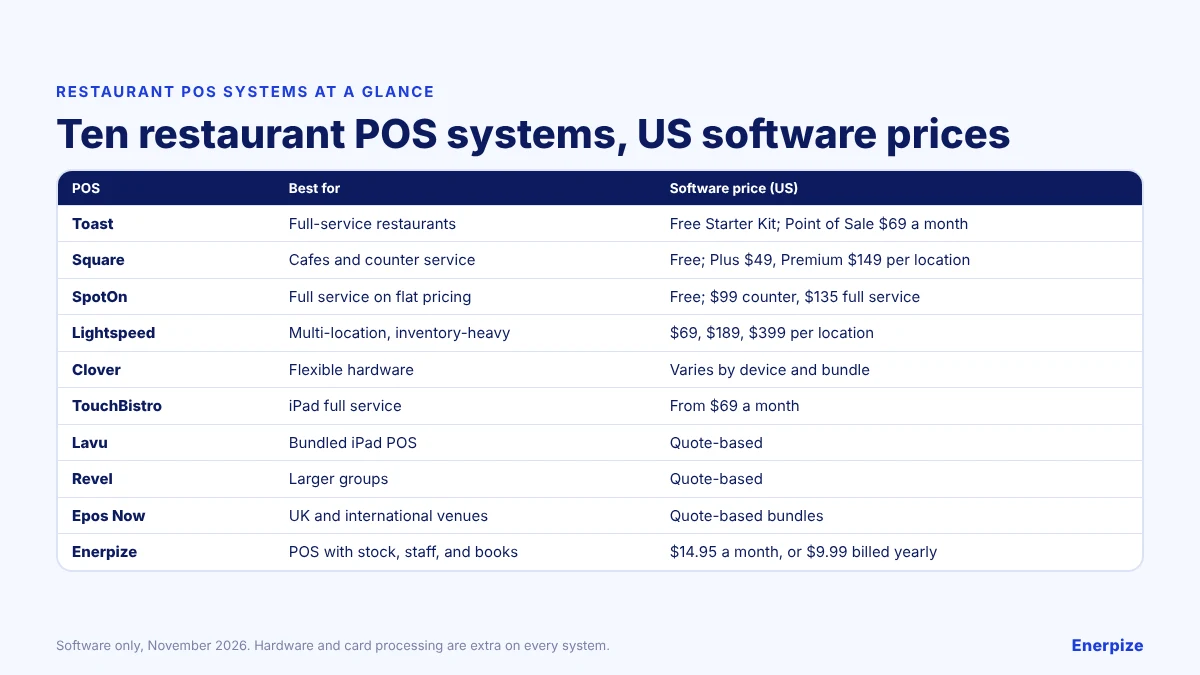
| POS | Best for | Software price (US) |
|---|---|---|
| Toast | Full-service restaurants | Free Starter Kit; Point of Sale $69 a month; custom plans |
| Square for Restaurants | Cafés, food trucks, and counter service | Free; Plus $49, Premium $149 per location |
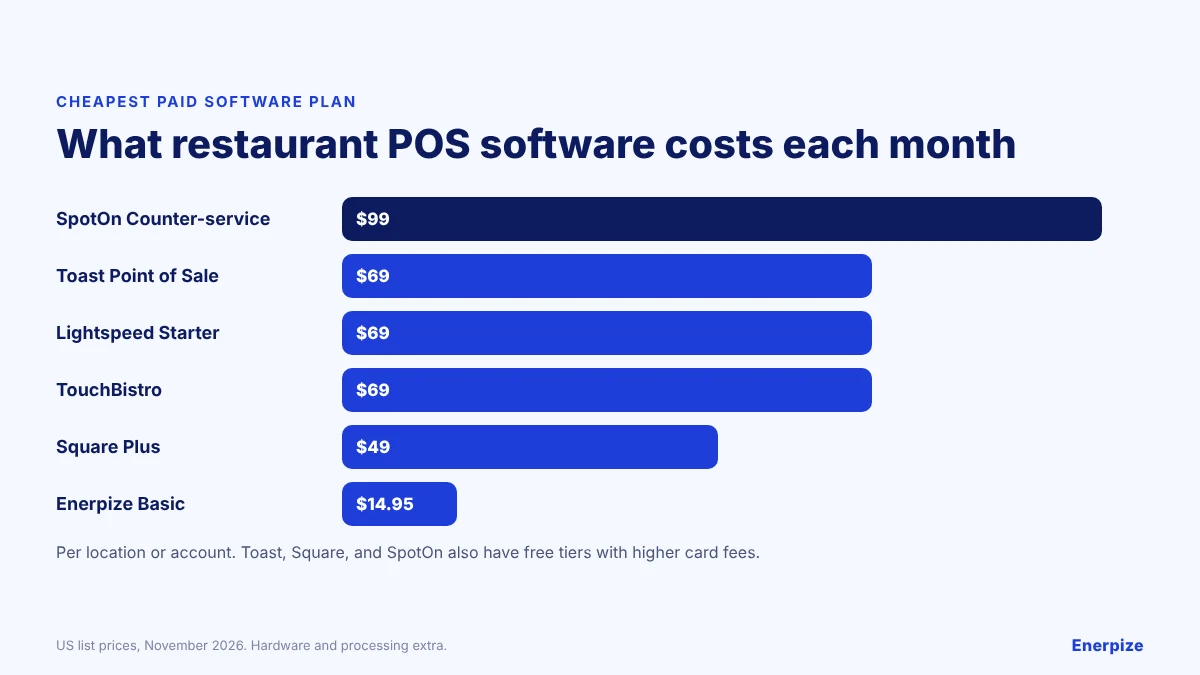
| SpotOn | Full service on flat pricing | Free tier; $99 counter service, $135 full service |
| Lightspeed Restaurant | Multi-location, inventory-heavy groups | $69, $189, $399 per location |
| Clover | Flexible hardware choices | Varies by device and bundle |
| TouchBistro | iPad-based full service | From $69 a month |
| Lavu | Bundled iPad POS | Quote-based |
| Revel | Larger restaurant groups | Quote-based |
| Epos Now | UK and international venues | Quote-based bundles |
| Enerpize | Counter service needing stock, staff, and books in one system | $14.95 a month, or $9.99 billed yearly |
What a Restaurant POS Really Costs
The software fee is the number vendors lead with, but it is only one of three bills.
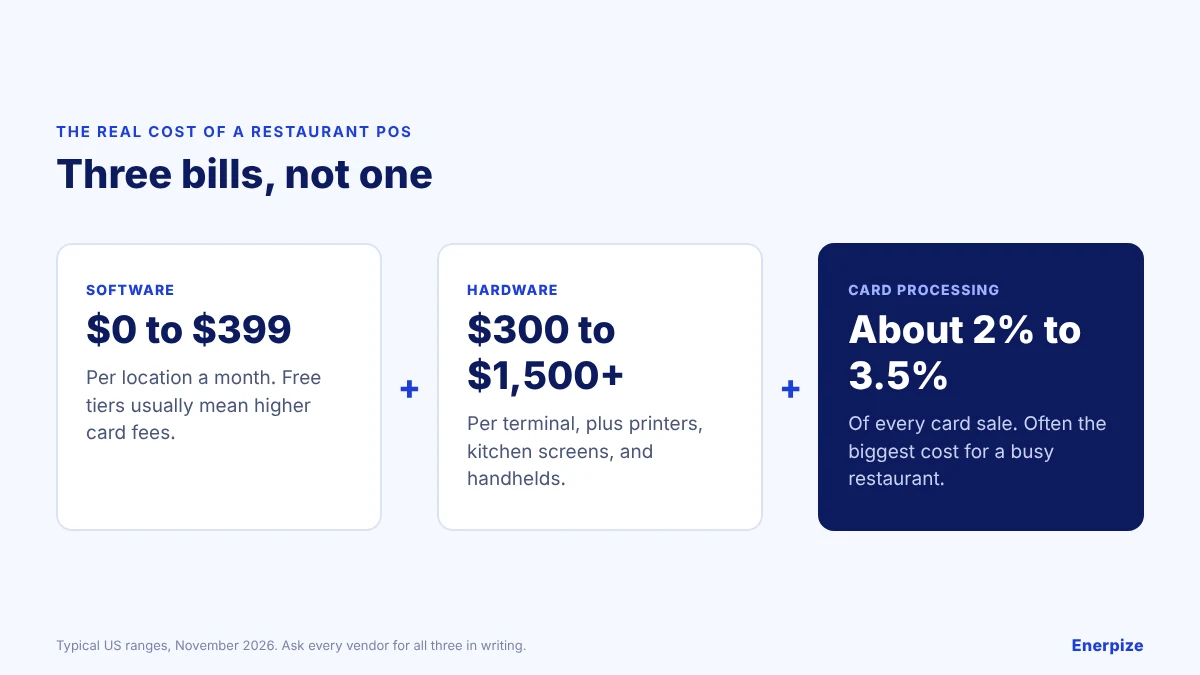
| Cost | Typical US range | What to ask |
|---|---|---|
| Software | $0 to $399 per location a month | Which features are on which plan, and what add-ons cost |
| Hardware | $300 to $1,500+ per terminal, plus printers, kitchen screens, and handhelds | Can I use my own iPads or devices, or must I buy yours? |
| Card processing | About 2% to 3.5% of each card sale | Are rates published or quoted, and am I locked to your processor? |
⚑ Practical note: Free software tiers usually carry higher card fees. For a busy restaurant, a lower processing rate can save more than any difference in subscription price.
The 10 Best Restaurant POS Systems Reviewed
Each review covers who the system suits, what the software costs, and where it starts to pinch.
Full Service and Bars
Toast
Toast is built for restaurants and covers ordering, payments, kitchen display, online ordering, inventory, staff scheduling, payroll, and loyalty in one platform, which reduces the need for third-party systems.
| Best for | Full-service restaurants, mainly in the US |
| Software price (US) | Starter Kit $0, Point of Sale $69 a month, Build Your Own quoted; card processing is quoted rather than published |
Strengths
- Restaurant-first features, including kitchen display and online ordering
- Strong reporting on sales, labour, and inventory
- Built-in loyalty and marketing
Limits
- Works best on Toast’s own hardware, which adds upfront cost
- Processing rates are quoted, and multi-year agreements are common
- Mainly focused on North America
TouchBistro

TouchBistro is an iPad-based POS for full-service restaurants, with tableside ordering, floor plans, menu management, and reporting.
| Best for | Independent full-service restaurants on iPads |
| Software price (US) | From $69 a month; inventory, labour, and other tools are separate subscriptions |
Strengths
- Table management and floor plans
- Tableside ordering on iPads
- Real-time menu updates across terminals
Limits
- Many functions are paid add-ons, so the total grows
- Runs on Apple hardware, which you buy separately
- Fewer cloud-based features than fully cloud systems
SpotOn
SpotOn started as a marketing and loyalty platform and grew into a restaurant POS with ordering, payments, staff tools, and loyalty.
| Best for | Full-service and counter-service restaurants that want predictable bills |
| Software price (US) | Free tier; Counter-service $99 a month, Full-service $135 a month, plus about $3 per employee |
Strengths
- Low published card rates on paid plans
- Integrated payment types, marketing, and loyalty
- Kitchen display and QR ordering on Full-service
Limits
- Hardware adds to the cost
- Can take time for staff to learn
- Per-employee fees on top of the plan
Multi-Location Groups
Lightspeed Restaurant

Lightspeed Restaurant suits groups with several sites or heavy inventory, with table management, detailed reporting, and staff tools.
| Best for | Multi-location and inventory-heavy restaurants |
| Software price (US) | Starter $69, Essential $189, Premium $399 per location a month; Enterprise quoted |
Strengths
- Advanced reporting and integrated POS payments
- Table management, reservations, and waitlists
- Strong multi-location inventory
Limits
- Higher cost than many alternatives
- Setup can take time
- Hardware kits add significant upfront cost
Revel
Revel is a cloud-based POS for restaurants, retail, and hospitality, with mobile ordering, kitchen routing, staff scheduling, and loyalty.
| Best for | Larger restaurant groups |
| Software price (US) | Quote-based |
Strengths
- Order routing to the kitchen with real-time status
- Mobile POS for tableside service
- Digital menus with upsell prompts
Limits
- Pricing is quoted, so budgeting takes a sales call
- Can be complex for new staff
- Reporting less customisable than some rivals
Cafés and Counter Service
Square for Restaurants

Square for Restaurants is a simple, month-to-month POS for cafés, food trucks, and counter-service restaurants, with a genuinely free plan.
Read also: Enerpize ERP Integration for Square
| Best for | Cafés, food trucks, and new restaurants |
| Software price (US) | Free; Plus $49 and Premium $149 per location a month; Free plan processing 2.6% + 15¢ in person |
Strengths
- Free plan and no long contract
- Published card rates
- Works on phones, tablets, and Square hardware
Limits
- Kitchen display is a paid app per device
- Deep full-service workflows are not its focus
- Processing fees add up at high volume
Clover

Clover offers a range of POS devices and software plans, with order management, payments, inventory, staff tools, and an app marketplace.
| Best for | Restaurants that want to choose their hardware |
| Software price (US) | Varies by device, plan, and bundle; hardware is extra or financed |
Strengths
- Wide choice of terminals and handhelds
- App marketplace for add-ons
- Inventory and customer tools
Limits
- Hardware can be expensive
- Pricing depends on the seller, which makes comparison harder
- Processing fees on every card sale
Enerpize

Enerpize online POS software is part of an all-in-one cloud ERP, so every sale updates stock, posts to the accounts, and sits alongside staff and customer records. It runs on devices you already own: phones, tablets, and PCs.
| Best for | Cafés and counter-service businesses that want stock, staff, and accounting in the same system as the till |
| Software price (US) | Basic $14.95, Advanced $39.95, Premium $64.95 a month, or $9.99, $29.95, and $41.63 billed yearly; extra users $5 |
Strengths
- POS, inventory, and accounting on every plan, with low-stock alerts
- Staff scheduling, time tracking, and payroll in the same system, at $2.28 per employee
- Session validation and cash reports that compare expected and actual cash
- Offline capability for brief internet outages
Limits
- Built for counter service rather than full table service; check kitchen display, floor plans, and delivery-app needs in the trial
- No hardware supplied; you choose compatible devices
- Limited interface language options
Bundles and Budget
Lavu

Lavu is an iPad-based restaurant POS with menu management, reporting, staff tracking, and inventory, sold with hardware bundles.
| Best for | Restaurants wanting a bundled iPad setup |
| Software price (US) | Quote-based |
Strengths
- Real-time menu updates
- Cash discount programs to offset card fees
- API for third-party integrations
Limits
- Some users report outages and a learning curve
- Support response times draw complaints
- Pricing is quoted
Epos Now

Epos Now is a UK-based POS with a restaurant edition covering kitchen orders, payments, loyalty, staff tools, and more than 100 app integrations.
| Best for | Venues in the UK and other markets that want a hardware bundle |
| Software price (US) | Quote-based bundles |
Strengths
- Orders sent straight to the kitchen
- Large app marketplace
- Flat-rate processing options
Limits
- Some users report support and billing issues
- Pricing is less transparent than published-rate rivals
Restaurant POS Features to Test in Every Demo
Demos show a quiet menu. Test the features you need on a Friday night.
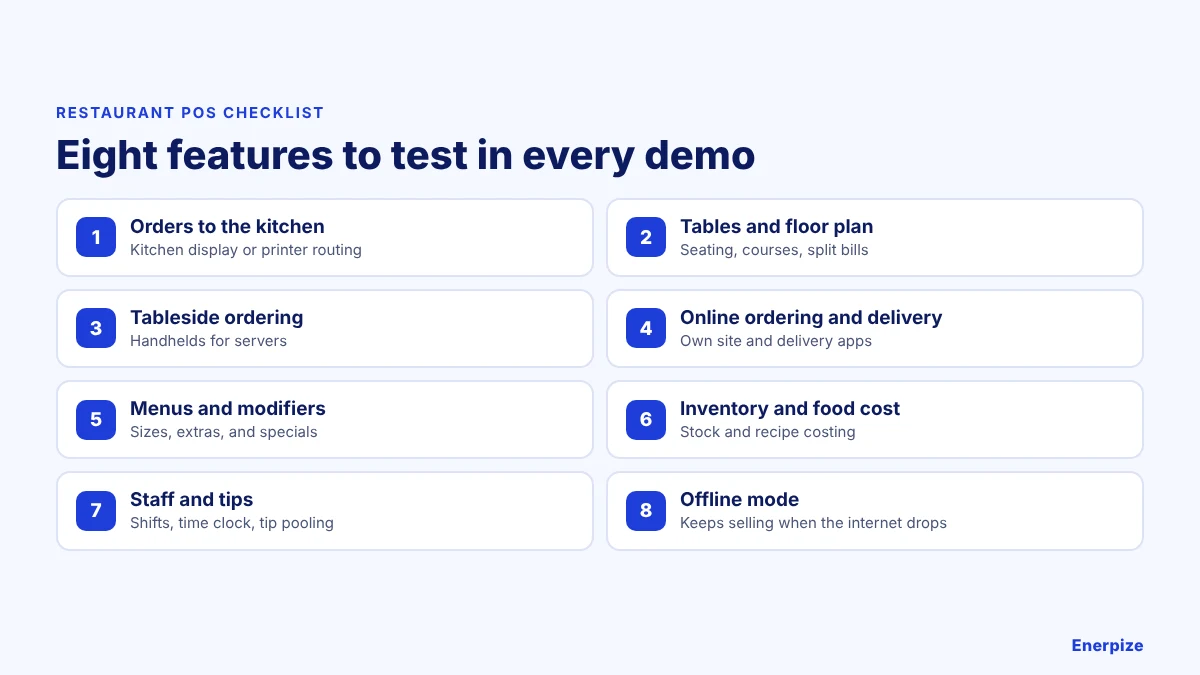
| Feature | Why it matters |
|---|---|
| Orders to the kitchen | A kitchen display or printer routing cuts lost tickets |
| Tables and floor plan | Seating, courses, and split bills for full service |
| Tableside ordering | Handhelds speed up service and table turns |
| Online ordering and delivery | Your own site and delivery apps feeding one order queue |
| Menus and modifiers | Sizes, extras, and specials without workarounds |
| Inventory and food cost | Stock levels and recipe costing protect margins |
| Staff and tips | Shifts, time clock, and tip pooling |
| Offline mode | Keeps selling when the internet drops |
Which Restaurant POS Fits Your Restaurant?
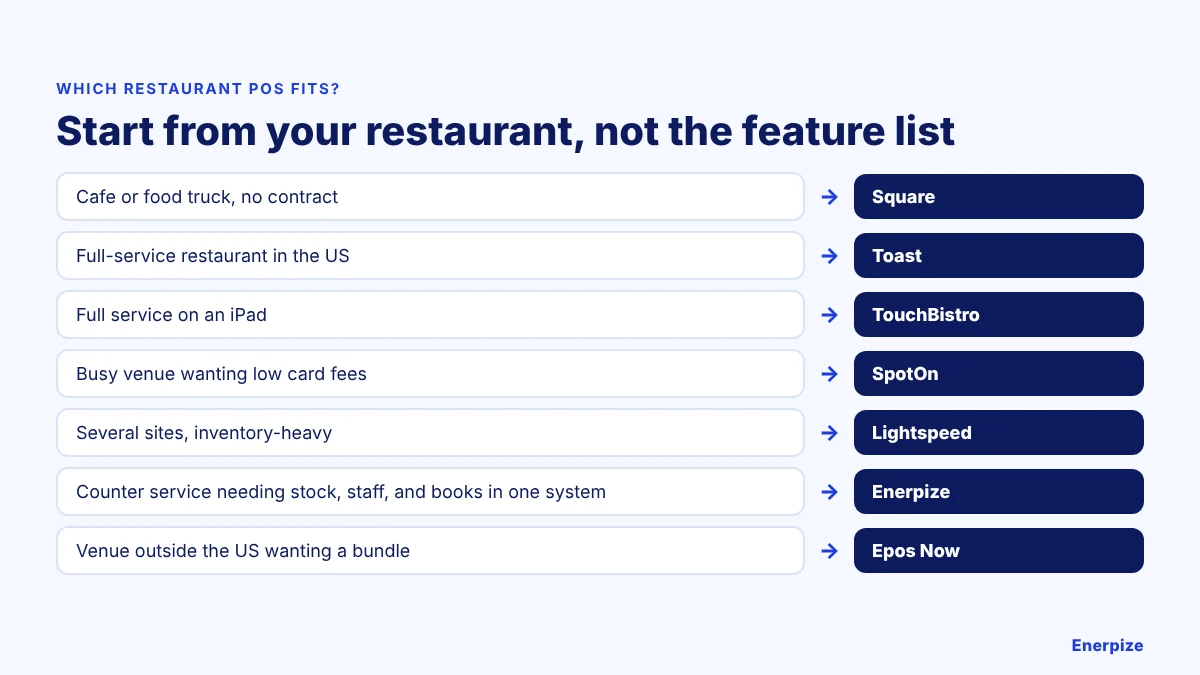
| Your restaurant | Better fit | Why |
|---|---|---|
| Café or food truck that wants no contract | Square | Free plan and published rates |
| Full-service restaurant in the US | Toast | Restaurant-first features in one platform |
| Full service on iPads | TouchBistro | Floor plans and tableside ordering |
| Busy venue that wants low card fees | SpotOn | Low published rates on paid plans |
| Several sites with heavy inventory | Lightspeed | Multi-location reporting and stock |
| Counter service needing stock, staff, and books in one system | Enerpize | POS, inventory, payroll, and accounting together |
| Venue outside the US wanting a bundle | Epos Now | Hardware and software sold together |
How to Choose a Restaurant POS in 6 Steps
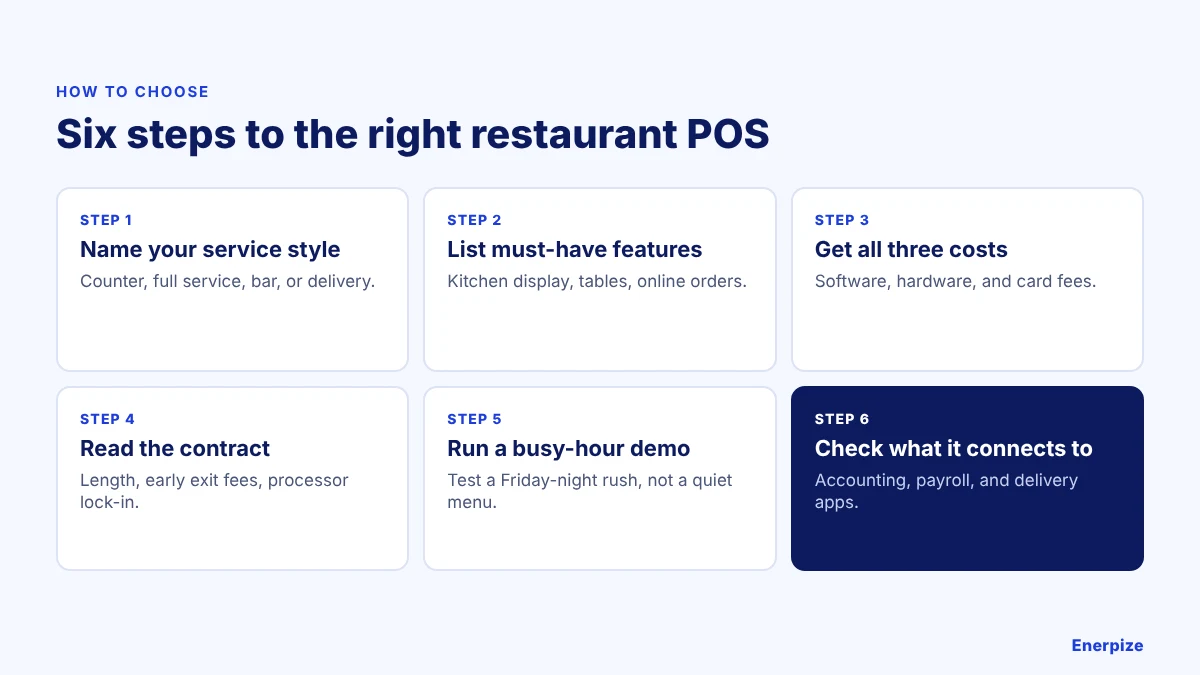
1- Name Your Service Style
Counter service, full service, bar, or delivery-led? Each needs different features, and the system should handle your size today and the sites you plan next.
2- List Your Must-Have Features
Kitchen display, tables, tableside ordering, online orders, inventory, and staff tools. Rank them so you know what you will trade off.
3- Get All Three Costs
Ask every vendor for software, hardware, and card processing in writing, including add-ons and support fees.
⚡ Tip: Compare the total for your real monthly card sales, not the headline plan price.
4- Read the Contract
Check the length, early exit fees, and whether you must use the vendor’s payment processor.
5- Run a Busy-Hour Demo
Ask staff to run a rush on a test menu: modifiers, split bills, refunds, and a kitchen ticket. Ease of use under pressure matters more than feature count.
6- Check What It Connects To
Accounting, payroll, inventory, online ordering, and delivery apps. Every missing link is data someone retypes.
⚡ Tip: Confirm the system meets PCI DSS for card data and backs up your sales.
Common Mistakes When Choosing a Restaurant POS
✕ Comparing subscription prices only
Why it matters: Hardware and card fees often cost more than the software.
Fix: Compare all three costs at your real sales volume.
✕ Signing a long contract unseen
Why it matters: Exit fees and processor lock-in make switching expensive.
Fix: Read the term and exit clauses before signing.
✕ Demoing on a quiet menu
Why it matters: Problems show up during a rush, not a walkthrough.
Fix: Test a busy-hour scenario with your staff.
✕ Ignoring the back office
Why it matters: Retyping sales into accounting and payroll wastes hours.
Fix: Check integrations, or choose a POS inside your accounting system.
Frequently Asked Questions
What is the best POS system for a restaurant?
It depends on how you serve. Toast, TouchBistro, and SpotOn suit full-service restaurants, Square suits cafés and counter service, and Lightspeed suits multi-location groups. If you want your till, stock, staff, and accounts in one system for a counter-service business, Enerpize is worth comparing.
How much does a restaurant POS cost?
In the US, software runs from free to about $399 per location a month, hardware from about $300 to $1,500 or more per terminal, and card processing about 2% to 3.5% of each card sale. Ask for all three costs in writing.
Is Toast or Square better for restaurants?
Toast is built for full-service restaurants and includes features like kitchen display in its platform, but it works best on its own hardware and quotes its card rates. Square has a free plan, published rates, and month-to-month terms, which suits cafés and counter service.
Can I use a restaurant POS on an iPad?
Yes. TouchBistro, Lavu, Revel, Lightspeed, and Square all run on iPads, and cloud systems like Enerpize run in a browser on tablets, phones, and PCs.
Do restaurant POS systems work offline?
Many do for a period, storing orders and syncing when the connection returns, but card payments may be limited. Test offline mode in your demo.
What features should a restaurant POS have?
Order routing to the kitchen, table management, tableside ordering, online ordering and delivery, menu modifiers, inventory and food costing, staff and tip tools, reporting, and offline mode.
About the Author
Omar El Bahr is a Senior Digital Growth Specialist at Enerpize, where he leads SEO, content strategy, and organic growth across international markets. He is a Forbes Communications Council contributor and has written for Entrepreneur on business communication and digital strategy.
Disclaimer: Prices are US list prices from vendor pricing pages and published guides as of November 2026; Lavu, Revel, Epos Now, and Clover bundles are quote-based or vary by seller. Hardware and card processing are extra on every system. Enerpize makes one of the products reviewed. Confirm current details with each vendor before deciding.
Related Articles
 Sales
What Is an Invoice and What Does it Look Like? A Complete Guide
Read more Sales
Pos Tracking: Definition and How to Do
Read more Sales
Small Businesses Management Apps: A Buyer's Checklist
Read more Sales
What Business Platform Handles Sales Orders, Invoicing, Customer Accounts, and Inventory in One Place?
Read more Sales
Best POS for Small Business in 2026: 5 Systems Compared and How to Choose
Read more Sales


