Posted on 17 June 2026
Free Bill of Materials Template Download: Excel, Word, PDF & Google Sheets and Docs
- Available in Word and Excel, free to download with no sign up required
- Covers raw materials, components, sub assemblies, costs, and sourcing details in one structured document
- Built with a BOM Level field so you can track single level and multi level assemblies inside the same template
- Calculates total component count and total material cost automatically once the parts list is filled in
A bill of materials template is a pre formatted document that lists every part, raw material, and sub assembly needed to build a finished product, along with the quantity, cost, and source of each one.


What Is a Bill of Materials Template?
Picture a small workshop on a Tuesday afternoon. Forty units into a production run, somebody reaches for a bin of brackets and finds three left where there should be sixty. The line stops. Someone is on the phone with a supplier who needs four days to deliver. The owner is doing math in his head on what every idle hour just cost him.
None of that happened because the team forgot how to build the product. It happened because nobody had one single, trustworthy list of what the product actually needed in the first place.
That list has a name, and a good bill of materials template is the difference between a production run that runs and one that stalls on a fifty cent bracket.
At its core, a bill of materials is an itemized record of every raw material, component, and sub assembly required to build a finished product, paired with how many of each you need and what each one costs. Think of it as a parts list with consequences attached. Skip a line item, and you find out the hard way, mid production, with a customer waiting on the other end.
A bill of materials template hands you that structure already built. You are not staring at a blank spreadsheet trying to remember every screw, hinge, and cord that goes into your product. You are filling in fields that were already thought through for you.
Skip the manual tracking and build your BOM directly inside a system that already knows what your manufacturing orders need. Start for free.
What Should a Bill of Materials Template Include
Not every BOM template earns its keep. Some are just glorified shopping lists, fine for a hobby project, useless the moment your product has more than four parts. A template built for real production work needs to answer three questions at a glance: what do I need, how much does it cost, and where does it come from.
Core Fields Every BOM Needs
- BOM Level, so you can tell a finished product apart from the parts that build it
- Part Number, a unique internal identifier that survives a vendor change
- Part Name and Description, specific enough that someone other than you can identify the exact part
- Quantity and Unit, how many and in what unit of measure
- Unit Cost and Total Cost, so the BOM tells you what the product costs to build, not just what it is made of
- Make or Buy, whether the part is produced in house or sourced from a vendor
- Vendor or Supplier, the name and contact for purchased parts
Optional Fields for Complex Builds
For more involved products, a few extra fields earn their place. Revision number and approval date keep version control honest. Lead time flags which parts could hold up your whole production schedule. A picture of the part removes any guesswork for whoever is on the floor assembling it. None of these are required for a simple product, but the moment your BOM has more than one level, they stop being optional and start being the reason you can troubleshoot a defect without guessing.
Types of Bill of Materials Templates
There is no single correct shape for a bill of materials. The right one depends on how complicated your product actually is, and pretending a simple product needs a complicated BOM wastes time you do not have.
Single Level BOM
A single level BOM lists every part that goes into a product, once, with the quantity needed. It reads like a shopping list. For a product with few parts and no sub assemblies, this is often all you need. The tradeoff is that if one part fails, a single level BOM will not show you what else it touches.
Multi Level BOM
A multi level BOM, sometimes called an indented BOM, shows the relationships between parts. The finished product sits at the top, its direct components sit one level below, and any sub assemblies those components are built from sit a level below that. If a hinge fails on a cabinet door, a multi level BOM tells you exactly which sub assembly that hinge belongs to, instead of leaving you to search the whole product.
Engineering BOM (EBOM)
An engineering bill of materials reflects how the product was designed, usually pulled straight from a CAD drawing. It exists earlier in the process than a manufacturing BOM and answers a different question. An EBOM tells you what the engineers designed. It does not necessarily tell you how the factory floor will build it.
Manufacturing BOM (MBOM)
A manufacturing bill of materials lists every physical part needed to actually produce and ship the finished good, including packaging and anything else that goes out the door with the product. This is the version most small manufacturers reach for first, since it maps directly to what gets purchased, assembled, and shipped.
Configurable BOM (CBOM)
A configurable BOM is built for products with options. If you sell the same chair in three finishes and two seat widths, a configurable BOM lets you swap components in and out without rebuilding the whole list from scratch every time a customer picks a different combination.
Worth a quick mention, since the term shows up in search results too: a software bill of materials, or SBOM, lists the code components and licenses inside a piece of software, not physical parts. It solves a security and compliance problem, not a manufacturing one, and it has nothing to do with the templates covered here beyond sharing a name.
The Hidden Cost of a Static Bill of Materials Template
Here is what most articles on this topic will not tell you. A spreadsheet BOM is not wrong. It is just temporary, whether anyone admits that or not.
The moment you start selling a bundle, a kit, or a multi pack, a static BOM stops reflecting reality. Your sales platform deducts stock at the bundle level. Your warehouse team is still picking individual components to build that bundle by hand. If nothing connects those two facts, you end up with what amounts to phantom stock, your records say fifty units of a component are available, while thirty of them are already spoken for inside bundles nobody has subtracted yet.
The same gap shows up in plain manufacturing too, just under a different name. An engineer updates a BOM. The version on the factory floor is two revisions behind. Nobody finds out until the wrong screw shows up in a finished product. Spreadsheet based BOMs carry real change management risk for exactly this reason, since there is rarely one single source of truth that everyone is actually looking at.
None of this means skip the spreadsheet. It means know what it is for. A bill of materials template is the right tool to plan a build, price a product, and document what a production run needs before it starts. It is the wrong tool to run live inventory against once you are shipping regularly, because nothing in a static file tells your stock counts that a sale just happened.
This is exactly the gap the Enerpize Manufacturing module was built to close, turning a list you fill in once into a record that updates itself every time a production order moves.
What the Enerpize Bill of Materials Template Includes
Most BOM templates stop at the download. You fill it in, save it somewhere, and hope someone remembers to update it before the next production run. That gap is exactly where this one is different.
The Enerpize Bill of Materials Template gives you the same starting point any good template should, a BOM Level field for hierarchy, a Part Number field that survives a vendor switch, Unit Cost and Total Cost fields with the math already structured, a Make or Buy column, and a Vendor field, all formatted and ready to fill in.
What sets it apart is what happens after you fill it in. Build the same BOM inside Enerpize and it stops being a static file. You can build a comprehensive BOM with all components, raw materials, workstations, and production costs, and customize each one to reflect your actual manufacturing process. From there, manufacturing orders generate directly from the BOM itself, instead of as a separate step someone has to remember to do, while raw material requests, inventory requisitions, and production progress all track together in one place.
Costs do not stop at materials either. Workstation time gets tracked and distributed accurately, and direct and indirect expenses link to specific accounts so the final cost of your product reflects more than just the parts list. Every bit of that rolls up into reports that break manufacturing costs into something you can actually act on, tracking production costs, expenses, and inventory value with full visibility, the same way a work order ties labor and materials together once production actually begins.
That is the differentiator worth remembering. A downloaded template tells you what a build needs on the day you filled it in. A BOM built inside Enerpize keeps telling you that, every single day after, because it is wired into the same system tracking your inventory, your costs, and your production stages.
Assembly Details
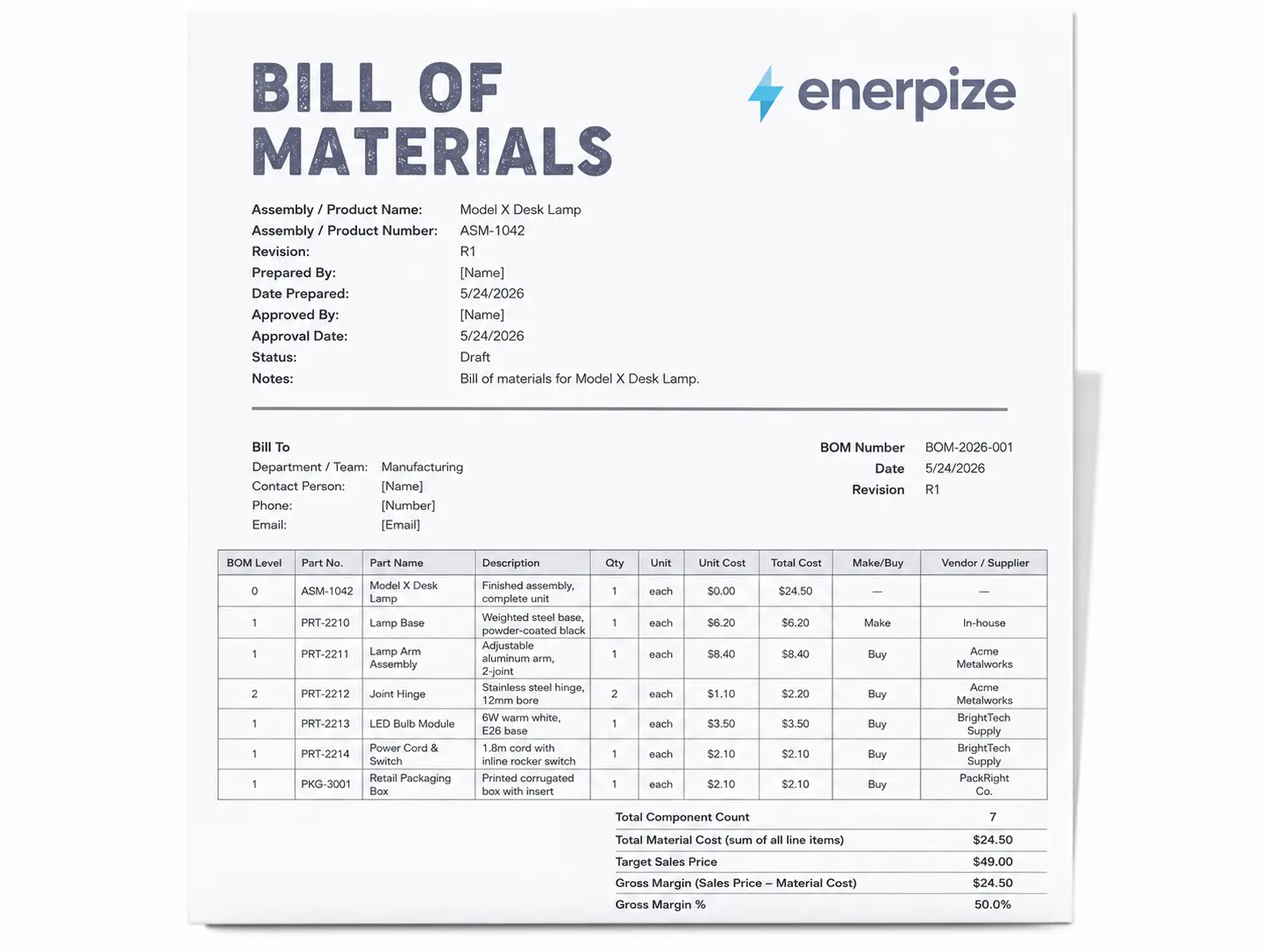
Before a single part gets listed, the template asks for the information that keeps a BOM from becoming a mystery document six months later. Product Name and Assembly Number identify exactly what is being built. Revision, Prepared By, Approved By, and their respective dates create an audit trail so you always know which version is current and who signed off on it. Status moves the document from Draft through In Review to Approved, so it is clear whether a BOM is live or still being worked on. Notes give whoever opens it later the context they would otherwise have to chase down.
None of those fields are decoration. Skip the Revision field and you end up with three versions of the same BOM circulating on the floor with no way to know which one is right. Skip the Approval Date and a change made in engineering takes weeks to catch up with the person actually doing the build.
Parts List
The Parts List is where the template does its real work, and every column earns its place.
BOM Level establishes the hierarchy. Level 0 is the finished product. Level 1 parts go directly into it. Level 2 parts go into a Level 1 component, and so on down. Without that structure, a flat list of parts tells you what a product contains. It does not tell you what depends on what, and that distinction matters the moment something goes wrong mid-run.
Part Number is the internal identifier that stays consistent regardless of who supplies the part. Change vendors and the number stays the same, which matters when purchase orders, inventory records, and production histories all reference it.
Part Name and Description sit in separate fields for a reason. The name is the quick label. The description carries the specification: material, finish, dimensions, rating, whatever someone on the floor needs to confirm they have the right part in their hand without having to call anyone.
Quantity and Unit record how much of each part a single finished product requires, in whatever unit applies. Unit Cost and Total Cost are structured so the multiplication is already handled. Fill in the price and the quantity and the template does the rest, which means the BOM tells you what a product costs to build, not just what it is made of.
Make or Buy flags whether each part is produced in-house or sourced externally. That single column tells you, at a glance, where your cost risk and your lead time risk actually sit. Vendor records the preferred supplier for anything purchased. For parts made in-house, it notes the workstation or department responsible.
Cost Summary
The Cost Summary sits below the parts list and pulls everything into one place. Total Component Count and Total Material Cost update as the parts list fills in. Target Sales Price and Gross Margin give you space to check the numbers against what the market will actually bear.
That last part matters more than it looks. A BOM that only tells you what a product is made of is useful. A BOM that also tells you whether you can make money building it is the reason you fill one in before production starts rather than after you have already priced the job.
Field Guidance and Best Practices
The template closes with two sections most people skip and later wish they had not.
The field guidance explains the purpose behind each column in plain terms, so entries stay consistent whether the person filling it in built the product from scratch or joined the team last month. The best practices cover the habits that keep a BOM useful after the first time someone opens it: updating the Revision field every time something changes, running an inventory check before finalizing so you are not ordering stock already sitting in a bin, keeping one BOM per finished product rather than one sprawling document trying to cover every variant, restricting editing access once a BOM is approved, and pairing the BOM with a production or work order when a run begins so material usage is tracked against the plan from day one.
A template that ships with its own instructions is not being overcautious. It is acknowledging that the person who builds a BOM and the person who uses it six months later are rarely the same person, and the gap between them is exactly where errors get introduced.
How to Use the Enerpize Bill of Materials Template
Step 1: List Your Finished Product First
Start at BOM Level zero. Name the finished product, give it a product or assembly number, and treat this row as the anchor everything else hangs off of.
Step 2: Break Down Every Direct Component
List every part that goes directly into the finished product at BOM Level one. Be specific enough in the description field that someone who has never built this product before could still identify the right part.
Step 3: Add Sub Assemblies Where They Exist
If any Level one component is itself built from smaller parts, list those at BOM Level two underneath it. This is what turns a flat parts list into a true multi level BOM, and it is the step most people skip when they are in a hurry.
Step 4: Fill In Quantity, Unit, and Cost
For every line, record how many units are needed per finished product, the unit of measure, and the unit cost. The total cost column does the multiplication so the page tells you what the product actually costs to build, not just what it contains.
Step 5: Mark Make or Buy and Note the Vendor
Flag whether each part is produced in house or purchased, and note the supplier for anything bought in. This single column tells you, at a glance, where your cost risk and your lead time risk actually sit.
Step 6: Check the Cost Summary, Then Move It Into Production
Once every line is filled in, the cost summary gives you total component count and total material cost in one place. From here, a quotation can be priced off real numbers instead of a guess, and the same BOM is ready to move into a live manufacturing order when production starts.
How Enerpize Handles Bill of Materials
A spreadsheet BOM is a snapshot. It tells you what a product needed on the day someone filled it in. The moment a component changes, a cost updates, or a production run starts, that snapshot starts going stale, and nothing in the file tells anyone it happened.
Enerpize handles a BOM differently. It is not a document you fill in and file. It is a record wired into the same system running your inventory, your manufacturing orders, and your costs, so it stays current the same way your production does.
Build a BOM That Reflects How You Actually Manufacture
Most BOM tools give you a parts list. Enerpize gives you a structure that maps to your actual process.
You can build a comprehensive BOM with every component, raw material, workstation, and production cost included, and customize each one to reflect the specific requirements of the product you are building. If two products share components but differ in assembly, each BOM can reflect that without forcing you into a one size fits all structure. The BOM becomes a description of how the product gets built, not just what it contains.
Generate Manufacturing Orders Directly From the BOM
The step most manufacturers handle manually is the handoff from a finalized BOM to an actual production order. Someone has to take the list, translate it into a work instruction, and remember to do it before the run starts rather than after it should have begun.
In Enerpize, manufacturing orders generate directly from the BOM itself. The financial and operational details carry over automatically, raw material requests, inventory requisitions, and production progress all track together inside the same platform, so the BOM does not stop being useful the moment production begins. It becomes the foundation the order runs on.
Track Material Consumption in Real Time
A BOM tells you what a build should consume. What most tools cannot tell you is what a build actually consumed, in real time, as it happens.
Enerpize connects the BOM to live inventory so that as production moves, material usage updates alongside it. Raw inputs get tracked from the moment they are requisitioned through to the finished good. Inventory records stay accurate throughout the run rather than being corrected after the fact, which is the difference between catching a shortage before the line stops and finding out about it when it already has.
Go Beyond Material Costs
Material cost is the number most BOM tools stop at. It is also the number that gives you the least complete picture of what a product actually costs to build.
Enerpize tracks workstation time and distributes it accurately across production. Direct and indirect expenses link to specific accounts. Every cost that touches the product, not just the parts list, gets allocated to the final output based on your preferred calculation method. The result is a true cost per unit, one that accounts for labor, overhead, and materials together rather than treating the parts list as a proxy for the whole number.
Turn Cost Data Into Something You Can Act On
Knowing what something costs is useful. Understanding where those costs are coming from, and what is driving them up, is what actually changes how you operate.
Enerpize rolls all of that cost data up into reports that break manufacturing expenses into actionable detail. Production costs, expenses, and inventory value sit in one place with full visibility, so the decision about whether to adjust a process, renegotiate with a supplier, or reprice a product is based on numbers you can trace back to their source, not a figure someone assembled from three different files.
The BOM Stays Connected to Everything That Moves With It
The deeper value is not any single feature. It is that the BOM in Enerpize does not sit in isolation.
It connects to inventory so stock levels reflect what production is consuming. It connects to manufacturing orders so production has a live document to run against. It connects to accounting so costs land in the right accounts without a manual entry step in between. It connects to the operations layer so work orders, requisitions, and production stages all reference the same source instead of copies that diverge the moment someone makes a change.
That workshop from the opening, the one that ran out of brackets forty units into a run, had a BOM. It just had one that stopped at the download. The difference Enerpize makes is not the list itself. It is what happens to that list every day after you build it.
A Quick Bill of Materials Example
Say you make a simple wooden step stool. At BOM Level zero sits the finished product, the stool itself. At Level one sit four parts, the seat panel, two side legs, and a crossbar. Each leg needs two screws to attach to the seat, so those screws sit at Level two underneath the leg component, not floating loose in the main list.
Add a unit cost to each line, multiply by quantity, and the total at the bottom tells you the stool costs four dollars and twenty cents in materials to build, before labor. That number is what lets you price it with confidence instead of a guess, and it is the entire reason a bill of materials example like this one is worth more than the parts list it looks like on the surface.
Key Takeaways
- A bill of materials template lists every raw material, component, and sub assembly needed to build a product, along with quantity, cost, and source
- Core fields to include are BOM Level, Part Number, Description, Quantity, Unit Cost, Total Cost, Make or Buy, and Vendor
- Single level BOMs suit simple products, multi level BOMs suit anything with sub assemblies
- A static spreadsheet BOM is fine for planning a build but cannot reflect live inventory once you are shipping regularly
- The Enerpize template covers Assembly Details, a structured Parts List, a Cost Summary, and field guidance, everything needed to plan a build and price it before production starts
- Manufacturing orders in Enerpize generate directly from the BOM, so the handoff from planning to production is not a separate step someone has to remember
- Material consumption, workstation time, and direct and indirect costs all track together, so the final cost per unit reflects more than just the parts list
- A BOM connected to the system running your inventory, your orders, and your costs stays accurate every day after you build it, not just on the day you filled it in
Frequently Asked Questions
What is a bill of materials template used for?
It is used to plan and document every part, raw material, and sub assembly a product needs before production starts, so nothing gets missed and the true material cost is known in advance.
What is the difference between a single level and multi level BOM?
A single level BOM lists every part once with no hierarchy. A multi level BOM shows which parts belong to which sub assembly, which matters the moment your product has more than one layer of components. Without that structure, a flat list tells you what a product contains but not what depends on what, and that distinction matters when something goes wrong mid run.
What should be included in a bill of materials?
At minimum, a BOM Level, part number, part name and description, quantity, unit of measure, unit cost, total cost, whether the part is made or bought, and the vendor for anything purchased. For products with sub assemblies, revision number, approval date, and lead time earn their place too.
Is a bill of materials the same as a packing slip?
No. A bill of materials documents what goes into building a product before it exists. A packing slip documents what is actually being shipped once an order is fulfilled. They cover different stages of the same product's life.
Can a bill of materials template be used outside manufacturing?
Yes, with adjustments. Anyone assembling a kit, a bundle, or a project with multiple parts can use the same structure, even outside traditional manufacturing, though the deepest value still shows up in physical product builds.
How does Enerpize keep a BOM connected to live inventory?
Manufacturing orders generate directly from the BOM, and raw material requests, inventory requisitions, and production progress all track together inside the same manufacturing module. Material consumption updates in real time as production moves, workstation costs get distributed accurately, and inventory records stay current throughout the run rather than being corrected after the fact.
What costs does Enerpize track beyond materials?
Workstation time, direct expenses, and indirect expenses all link to specific accounts and get allocated to the finished product based on your preferred calculation method. The result is a true cost per unit that accounts for labor and overhead alongside the parts list, not a material cost standing in as a proxy for the whole number.
Does Enerpize replace the need for a BOM template?
Not at the start. The template is the right tool to plan a build, document what a production run needs, and price a product before it goes into the system. What Enerpize changes is what happens after that, turning a static list into a live record that updates as production actually happens instead of sitting still in a folder somewhere.
About the Author
Omar El Bahr is a Senior Digital Growth Specialist at Enerpize, where he leads SEO, content strategy, and organic growth across international markets. He is a Forbes Communications Council contributor and has written for Entrepreneur on business communication and digital strategy.
Disclaimer: This article and the accompanying template are provided for general informational purposes. Costs, fields, and processes should be adapted to your own product, industry, and local requirements.