Posted on 1 February 2026
CRM Template Excel & Google Sheets
- The CRM template is available in Excel and Google Sheets.
- It tracks every deal from Lead to Contract with structured ownership and statuses.
- Prioritize pipeline focus and filter by urgency and value.
- Standardize CRM processes to ensure consistency and accountability.


What is a CRM Template?
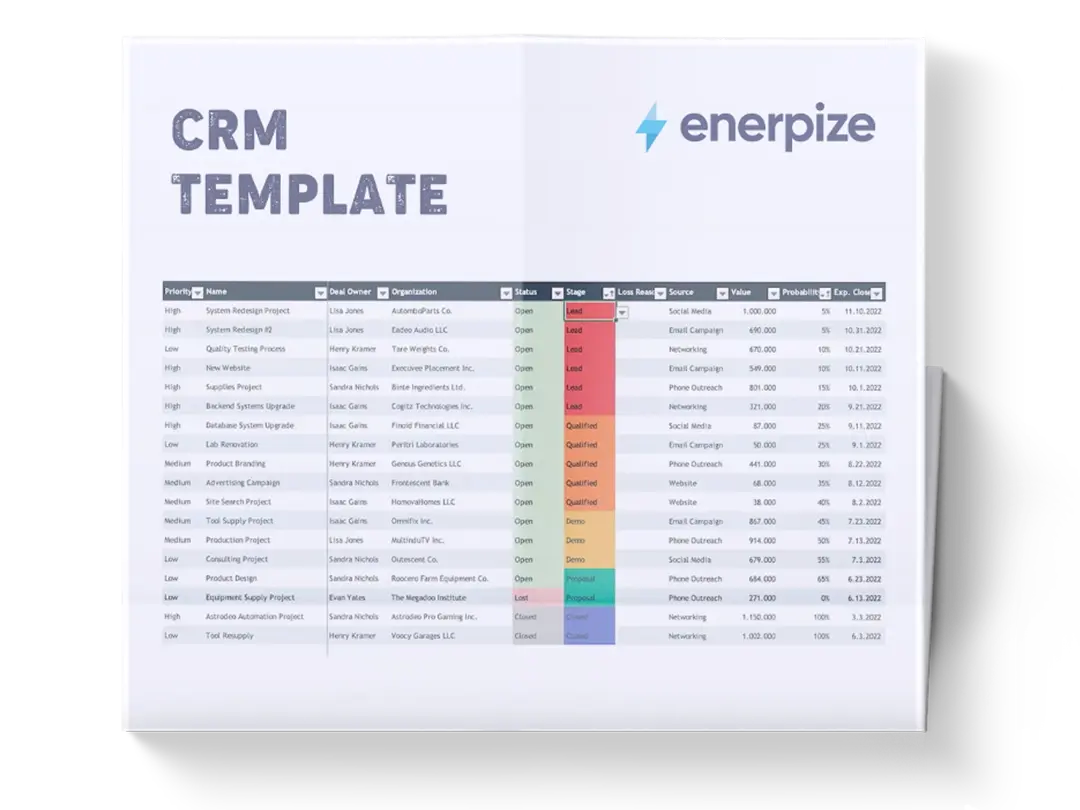
A CRM (Customer Relationship Management) template is a tracking system to capture, organize, and manage the lifecycle of client interactions and sales deals. It provides a unified view of every sales opportunity, who owns it, how it’s progressing, and where it sits in the pipeline.
The CRM template formalizes stages of engagement from early lead capture through qualification, trial, closure, and contract. By doing so, it creates a systematic, repeatable way to monitor performance, assess priorities, and enable better forecasting.
What Does the CRM Template Contain?
Stage
Identifies the current lifecycle phase of the opportunity (e.g., Lead, Qualified, Trial, Closed, Contract). This sets expectations for what actions and conversions are appropriate at that point.
Priority
A numeric value (1–5) indicating urgency or strategic importance. Lower numbers signify higher priority, helping teams focus on deals that require immediate attention or are most likely to convert.
Name
The title of the contact, company, or transaction. This is the primary identifier for each record and should be consistent for clarity during reviews.
Category
Describes the type of customer or lead category (e.g., Customer, Prospect, Other). This field supports segmentation for analysis and strategy (e.g., new vs returning, referral vs inbound).
Account Manager
The person responsible for managing the client relationship as a whole — typically someone overseeing long‑term engagement and service delivery.
Deal Manager
The individual directly driving the sales process or conversion — the point person for follow‑ups, negotiations, and next actions.
Source
Captures where the lead originated from (e.g., Referral, Website, Google search, Social media, Advertisement). This enables tracking of channel effectiveness and ROI.
Website
The lead or client’s primary web presence. This supports context for research, personalization, and qualification.
How to Use the CRM Template
1- Set Up the Template for Your Sales Period
Before entering any data, open the CRM template and establish the timeframe or campaign context you’ll use (e.g., “Q1 Sales”, “January–March Pipeline”). Consistency around periods allows you to run comparative reports and forecast outcomes.
2- Capture Every New Lead Immediately
As soon as a potential buyer enters your pipeline:
- Add one row per lead
- Populate the Name field with the company or individual
- Ensure consistent naming conventions to avoid duplicates
This step prevents early losses due to scattered notes, inbox flags, or missed entries.
3- Assign Priority and Track Source
Once the lead is captured:
- Set Priority from 1 (highest urgency) to 5 (lowest) based on strategic value, deal size, or timing
- Complete the Source field to track where they came from
These early tags help focus attention and feed analytics on channel effectiveness.
4- Define Roles: Account Manager & Deal Manager
Assign responsibility:
- Account Manager for relationship oversight
- Deal Manager for execution, follow‑ups, and conversion progress
Clear ownership ensures no deal falls through the cracks.
5- Move Leads Through Stages Systematically
Use Stage to document progression:
- Lead = Initial capture
- Qualified = Confirmed interest and fit
- Trial = Active product/service evaluation
- Closed = Deal won or lost
- Contract = Legal and billing finalization
Update this field every time new customer actions occur. This gives real‑time visibility into pipeline health.
6- Leverage Website Field for Contextual Insight
Use the Website link to research prospects, personalize communication, and tailor solutions. This boosts conversion rates because conversations are informed rather than generic.
7- Review Regularly: Dashboard Mindset
Set a cadence, daily for deal owners; weekly for team leads. Watch for:
- Stalled deals stuck in the same stage
- High‑priority deals not moving
- Source channels with low conversion
These signals indicate where process changes are needed.
Related Templates
Importance of a CRM Template
Provides Consistent Visibility Into Pipeline Health
A CRM template gives teams a single, structured view of all active opportunities. With fields like Stage, Priority, and Source clearly defined, decision‑makers can quickly assess where deals cluster or stall. Rather than relying on mental models or scattered notes, this template creates an auditable source of truth that’s easy to review during weekly sales huddles or forecasting meetings. For example, if many deals remain in Trial but fail to convert, that signals a need to revisit onboarding or demo scripts. Transparent visibility reduces surprises at quarter‑end and enables proactive coaching and strategy adjustment.
Strengthens Accountability Across Functions
By assigning both an Account Manager and a Deal Manager, the template removes ambiguity about who is responsible for what. This dual assignment ensures continuity across both relationship maintenance and sales execution. Sales leaders no longer need to chase activity updates; the CRM structure makes responsibility visible at a glance. Over time, this clarity improves team performance and discipline, as gaps in ownership become obvious and rectifiable. Teams that lack this level of accountability typically see deals stagnate or slip through the cracks.
Improves Prioritization and Resource Allocation
With Priority baked into the workflow, teams can focus effort where the greatest impact lies. Deals with urgent timing, strategic significance, or high conversion likelihood rise to the top. Instead of treating every opportunity equally, this template supports intentional resource allocation — sales time, marketing follow‑ups, executive support, and service onboarding. Prioritization directly affects productivity: reps spend less time on low‑impact tasks and more on actions that accelerate revenue.
Enables Reliable Forecasting and Pipeline Planning
When consistently updated, this CRM template turns transaction data into forecasting power. Leaders can analyze patterns to build expectations for future periods. Sources become measurable channels, enabling smarter budget decisions for acquisition and nurture campaigns. Without such a structure, forecasts are often guesses; with it, they’re informed estimates grounded in current pipeline signals. This reliability is essential for businesses planning staffing, production, and financial commitments.
Who Can Use a CRM Template?
Sales Representatives and Deal Closers
Individual contributors use this template as a personal operating system. They gain clarity on which deals are the highest priority and what steps to take next. With structured fields like Stage and Priority, reps can avoid mental overload and make measurable progress each day. Because the template is simple and consistent, it lowers friction for updates, meaning data is fresher and more accurate. This is especially useful for reps managing dozens of active conversations at once.
Sales Managers and Team Leads
Managers rely on CRM templates to assess team activity beyond closed revenue. They can see pipeline coverage, bottlenecks, and conversion patterns across stages. With consistent data, coaching becomes more objective and targeted rather than anecdotal. For example, a cluster of deals stuck in Qualified may indicate a need for qualification playbooks or script improvements. Leaders use this visibility to allocate resources, adjust strategy, and forecast with confidence.
Small Business Owners Without CRM Software
Not all organizations are ready for full CRM systems like Salesforce or HubSpot. For small teams or early‑stage businesses, this template provides a lightweight yet structured alternative. It delivers process discipline without software costs or complexity. Owners get clarity on sales progress and performance without learning new tools — making strategic planning more grounded.
Marketing Teams Tracking Lead Quality
Marketing leaders can use the Source and Priority fields to link acquisition channels to business outcomes. This helps answer questions like “Which campaigns deliver high‑priority deals?” or “Which inbound sources produce qualified leads?” Because the template connects lead origin to downstream stages, marketing can refine its strategies based on real performance, not vanity metrics.
Cross‑Functional Operations Teams
Operations or revenue operations teams use this template to coordinate handoffs between sales, service, and finance. Each field standardizes expectations, reducing lost work during transitions. For instance, moving a record from Closed to Contract signals billing and onboarding teams to begin formal procedures. This clarity improves internal workflows across departments.
Looking for Beyond Just Tracking Deals in a Spreadsheet?
While this CRM template helps you organize leads, assign ownership, and monitor deal progress, growing businesses often need more advanced capabilities. That’s where Enerpize, our all‑in‑one ERP platform, comes in.
With Enerpize Online CRM Software, you can:
- Centralize CRM data with automated relationship tracking and reporting.
- Integrate sales pipeline with marketing, finance, and fulfillment workflows.
- Scale processes with automation, alerts, and real‑time dashboards.
If you’re ready to move beyond spreadsheets, Enerpize brings enterprise‑grade control to growing teams.