Posted on 6 August 2026
Onboarding Checklist Template: Word, PDF Free Download
- Available in Word, PDF and Google Docs free to download with no sign up required, built around six onboarding stages from preboarding through the first 90 days
- Includes a compliance documents table covering the United States, United Kingdom, Australia, and Canada in one place
- Tracks format per task so onsite and remote hires follow the same structured process instead of two separate documents
An onboarding checklist is a structured list of tasks, documents, and introductions that guides a new hire from the moment they accept an offer through their first few months on the job.


What Is an Onboarding Checklist?
Think of it as the master list that sits underneath everything else in a new hire's first few months. Not the welcome email, not the training plan, not the handbook. The list that makes sure all of those things actually happen, in order, on time, by the right person.
An onboarding checklist covers the practical side (equipment, logins, paperwork) and the human side (introductions, check ins, feedback) in one document. Miss the practical side and a new hire spends their first week waiting on a laptop. Miss the human side and they spend their first month feeling like nobody planned for them to show up.
Most businesses already do some version of onboarding without writing any of it down. That works fine until the person who normally handles it goes on leave, or the company hires three people in the same month, or someone forgets to request building access and the new hire spends day one sitting in reception. A checklist is what turns onboarding from something one person remembers into something the business actually does consistently, whether it is a two person team or a two hundred person one.
The terms get used loosely. Some people search for a new hire checklist, others for a new employee onboarding checklist, others for an employee onboarding checklist. In practice these all describe the same document, whether the business calls it a staff onboarding checklist or a new employee onboarding checklist internally. What changes is the level of detail underneath it, and that is where most free versions fall short.
Want onboarding tasks tied directly to payroll and attendance instead of living in a separate document? Start free with Enerpize
What the Enerpize Onboarding Checklist Template Includes
Most onboarding checklist templates online are one long list with a checkbox next to each line. Fine for a five person company. It falls apart the moment more than one department is involved, because nobody knows who actually owns "set up system access," and a checked box tells you a task got done, not who was supposed to do it or whether it is still open.
We built ours around ownership first.
Owner on Every Task
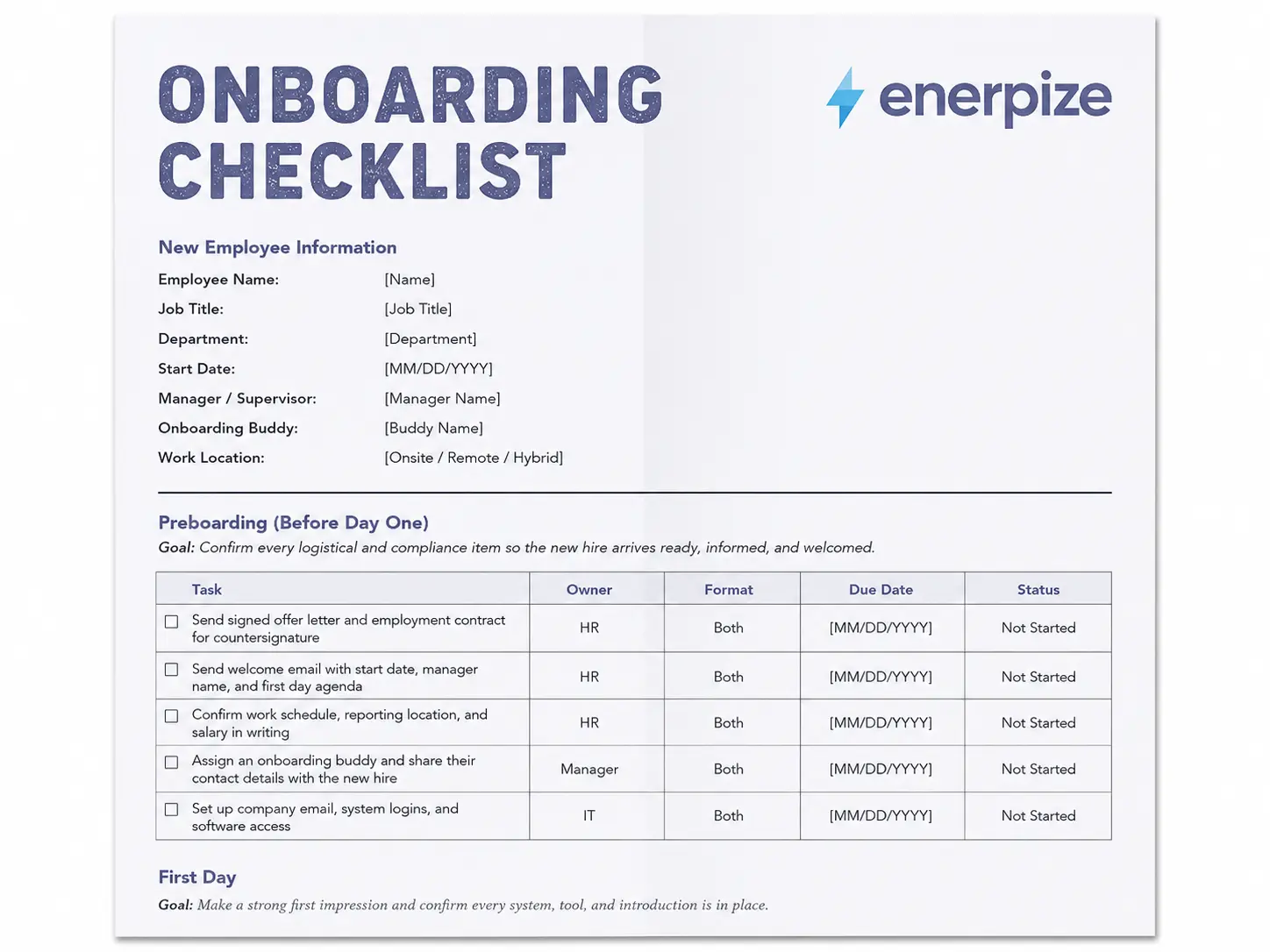
Every task in the Enerpize onboarding checklist template has an owner column, HR, IT, manager, or onboarding buddy, so a checklist handed to three different people does not turn into three different people assuming someone else has it covered. That single column is the difference between a checklist that gets used past week one and one that quietly stops being updated by week three.
One Template for Onsite and Remote
The template also separates onsite and remote tasks without making you build two different documents. Format is its own column next to each task, so a hybrid team can hand the same file to every new hire and only the relevant rows change, onsite, remote, or both. You are not maintaining a separate remote onboarding checklist and a separate onsite one side by side.
Named Compliance Documents by Country
The compliance table is the part most templates skip entirely. Ours lists the actual named documents, not a vague line like "complete required paperwork," split by country, United States, United Kingdom, Australia, and Canada, so a business hiring across more than one of those markets is not stitching together four different checklists from four different sources.
That is the differentiator. Not a longer list. A structure that survives contact with more than one department and more than one country.
What to Include in an Onboarding Checklist
Most free templates give you a title, a few generic line items, and a checkbox. That is not enough for a business managing more than a handful of hires a year, or one that has to prove onboarding actually happened if a new hire disputes something later.
Here is what a complete new hire onboarding checklist needs, and what separates a genuinely usable set of onboarding documents from a single generic page.
| Field | Why It Matters |
|---|---|
| Employee Name and Job Title | Identifies who the checklist belongs to |
| Start Date | Anchors every deadline in the checklist to a fixed date |
| Manager and Onboarding Buddy | Names the two people most responsible for the first few weeks |
| Work Location | Onsite, remote, or hybrid changes which tasks apply |
| Task Owner | HR, IT, manager, or buddy, assigned per task, not per checklist |
| Format | Whether the task applies onsite, remote, or both |
| Due Date | A specific date, not a vague stage like "week one" |
| Status | Not started, in progress, or complete, not just a checkbox |
| Compliance Documents | Named forms required for the country the new hire works in |
| Sign Off | Confirmation from both employee and manager that the checklist is complete |
The two fields most templates leave out entirely are task owner and status beyond a checkbox. Without an owner, a checklist becomes a list nobody is accountable for. Without a real status field, there is no way to tell a task in progress from one nobody has started, and that difference matters when a new hire is sitting in week two wondering why their equipment still has not shown up. The onboarding documents section deserves the same level of specificity. A line that says "collect required paperwork" tells a new HR hire nothing. A line that names Form I-9 by name does.
The Onboarding Checklist by Stage
An onboarding checklist template works best broken into stages, not one flat list. Each stage has a different goal, and mixing them together is how a two page checklist turns into a wall of text nobody reads past the first section.
Preboarding
Preboarding starts the moment the offer is signed, not on day one. Send the signed offer letter and, where applicable, the employment contract for countersignature. Our offer letter template and employee contract template cover this exact step, so the paperwork exists before the checklist even starts. Send the welcome email with the start date, manager name, and first day agenda. Confirm work schedule, reporting location, and salary in writing. Assign an onboarding buddy and share their contact details before the new hire arrives. Request compliance documents early enough that nothing is still outstanding on day one. Set up email, logins, and software access, and for remote hires, ship equipment with tracking so there is no first day scramble waiting on a delivery.
First Day
The first day is about confirming everything actually works, not introducing new information. Confirm every login and access credential functions correctly before the new hire needs it. Give an office tour for onsite hires, or a virtual tools and team walkthrough for remote ones. Introduce the new hire to their team and key stakeholders. Walk through essential policies and the employee handbook. Collect any outstanding compliance paperwork so it does not carry into week two.
First Week
The first week shifts from logistics to relationships and role clarity. Schedule individual meetings with direct colleagues, not just a single group introduction. Review job responsibilities and initial assignments in specific terms, not a general overview. Provide role specific training materials. Confirm the new hire actually knows where to find key resources, not just that the resources exist. For onsite and hybrid hires, this is also the point where attendance tracking should already be running against the real start date rather than a placeholder entered later, and our attendance tracker template is built for exactly that handoff. Close the week with a short check in to catch confusion early, before it turns into disengagement.
First 30, 60, and 90 Days
This is where most free checklists stop entirely, and it is also where onboarding either sticks or quietly falls apart. A checklist that ends at day five looks complete on paper and misses the stretch of time where a new hire actually decides whether they made the right move. At 30 days, confirm mandatory compliance training is complete and send a short onboarding experience survey while the memory is still fresh. At 60 days, review progress against the plan set in week one and provide additional training where gaps show up. At 90 days, hold a structured performance conversation, confirm any probation requirements are met, and formally close out the checklist rather than letting it fade out unfinished.
Set 30, 60, and 90 day check ins once and let Enerpize remind the right person automatically. Start free with Enerpize
IT and Remote Onboarding Checklists
A general employee onboarding checklist covers the shared steps every new hire needs. Two groups usually need something more specific layered on top of it.
IT Onboarding Checklist
An IT onboarding checklist is not a separate document so much as a deeper version of a handful of rows already in the general checklist. Hardware needs to be ordered, imaged, and either delivered or staged before day one. Accounts need to be provisioned with the correct access level for the role, not a default template that gets fixed later. Software licenses need to be assigned, and for anything security sensitive, multi factor authentication needs to be set up before the account is ever used, not after. The mistake most businesses make is treating IT setup as one line item on the main checklist. It works better as its own short checklist that IT owns and reports back on, feeding into the main one rather than living buried inside it. A dedicated IT onboarding checklist also makes handoffs between IT staff easier, since the next person covering onboarding does not have to reverse engineer what a vague line like set up access was supposed to include.
Remote Onboarding Checklist
A remote onboarding checklist is not a different set of goals, just a different set of logistics. Equipment has to ship with tracking instead of sitting on a desk. The office tour becomes a video walkthrough of team channels and shared drives. The onboarding buddy relationship matters more, not less, because a remote hire cannot lean over and ask a quick question the way an onsite one can. The first check in should happen sooner too, often by the end of day one rather than day three, simply because there are fewer informal moments where a remote hire's confusion becomes visible on its own.
Onboarding Checklist vs Onboarding Plan vs New Hire Checklist
These three terms get used interchangeably, and that is where a lot of businesses end up with duplicate documents that say slightly different things.
| Onboarding Checklist | Onboarding Plan | New Hire Checklist | |
|---|---|---|---|
| What it is | Task by task list with owners and dates | Goals and milestones for the first 90 days | Often used as another name for the onboarding checklist |
| Focus | Completion tracking | Performance and development | Completion tracking |
| Format | Table with status per task | Narrative goals tied to timeframes | Table with status per task |
| Owned by | HR, IT, and manager jointly | Primarily the manager | HR, IT, and manager jointly |
In practice, a new hire checklist and an onboarding checklist describe the same document in most businesses. An onboarding plan is different. It is less about whether a task got done and more about what the new hire is expected to achieve by day 30, 60, and 90. The strongest onboarding process uses both, a checklist to confirm the logistics happened, and a plan to track whether the new hire is actually succeeding in the role.
Onboarding Compliance Documents by Country
This is the section most onboarding checklist templates skip, and it is also where getting it wrong actually costs something. Missing a required document is not a paperwork inconvenience in any of these four countries. It can mean a delayed start, a fine, or in some cases a hire who legally should not have started working yet.
United States
Every new hire needs Form I-9 completed within three business days of the start date, verifying identity and work authorization. Our I-9 template matches the current form if you need a copy to prepare with. Form W-4 sets federal tax withholding, and many states require a separate state withholding form on top of it. Our W-4 template covers that piece. Direct deposit authorization and an employee handbook acknowledgment round out the core paperwork. The I-9 requirement applies to every employer in the country, regardless of size.
United Kingdom
Employers must complete a right to work check before a new hire's first day, verifying eligibility through a passport, visa, or digital share code. A written statement of employment particulars is a legal requirement and must be issued on or before day one, not sometime in the first month. The right to work check process is not optional and applies regardless of the new hire's nationality.
Australia
The Fair Work Information Statement is legally required for every new employee, full time, part time, or casual, and must be provided before or as soon as possible after they start. A tax file number declaration is submitted to the employer directly rather than to the Australian Taxation Office. The Fair Work Information Statement requirement applies across every industry covered by the national workplace relations system.
Canada
A TD1 Personal Tax Credits Return is required at the federal level, and most provinces require their own provincial version as well. A Social Insurance Number must be confirmed before the first pay run, since payroll cannot legally process a new hire without one. The TD1 form is updated annually, so always confirm you are using the current version.
If your business hires across more than one of these countries, do not assume one compliance checklist covers all of them. The paperwork, the deadlines, and the legal consequences for missing a step are genuinely different in each one.
How Enerpize Connects Onboarding to Payroll and Attendance
A checklist tells you what needs to happen. It does not connect that task to the systems that actually run once the new hire starts. That gap is where a lot of onboarding data ends up stuck in a spreadsheet nobody updates past the first week, re-typed into payroll by someone who was not part of the original hiring conversation and has no way to catch a mismatch.
Enerpize Employee Management
New hire records created during onboarding do not need to be re-entered once the new hire's start date arrives. Job title, department, manager, and start date flow directly into Enerpize Employee Management, so the same information you collected on the offer letter is already sitting in the system when the first pay run happens.
Enerpize Payroll
Once compliance documents are collected, whether that is a W-4, a TD1, or a tax file number declaration, payroll setup does not start from a blank form. New hires flow from onboarding directly into pay runs, with contracts, salary components, and tax details already attached rather than transcribed a second time by someone in finance.
Enerpize Attendance
For onsite and hybrid hires, attendance tracking starts on the actual first day recorded during onboarding, not a manually entered date that drifts from what really happened. That matters most during probation periods, where an accurate first day date is often what a performance review or a probation report is measured against.
Stop re-entering the same new hire details three times across HR, payroll, and attendance. Start free with Enerpize
Onboarding Best Practices
Onboarding best practices come up constantly in HR research, and most of them come down to a few habits that separate an onboarding checklist that actually gets used from one that gets filled out once and forgotten.
Keep the checklist visible to everyone involved, not just HR. A manager who cannot see what IT already completed will ask the new hire questions that were already answered. Set a specific due date on every task, never a vague stage like "before day one," since vague deadlines are the ones that slip. Review the checklist itself every few months. Roles change, tools change, and a checklist that was accurate a year ago quietly stops matching how the business actually onboards people. Treat the first 90 days as part of onboarding, not an afterthought tacked onto the first week, since that is genuinely where most new hires decide whether the job matches what they were told it would be.
Measure whether the checklist is actually working, not just whether it got filled out. A completed checklist tells you the tasks happened. It does not tell you whether the new hire feels ready, whether they understood the training, or whether they are still with you three months later. Pair the checklist with a short survey at 30 and 90 days, and pay closer attention to what new hires say is missing than to how many boxes got checked.
Key Takeaways
- An onboarding checklist is a task by task document with owners, dates, and status. An onboarding plan is a separate document focused on performance goals, not task completion.
- The two fields most free templates leave out are a named task owner and a real status field beyond a checkbox. Both are what keep a checklist accountable past the first week.
- Onboarding compliance documents genuinely differ by country. The United States, United Kingdom, Australia, and Canada each require different named forms with different deadlines.
- The first 30, 60, and 90 days matter as much as the first week, and this is the stage most free checklists stop covering entirely.
- IT onboarding and remote onboarding are not separate goals, just deeper detail layered onto specific rows of the same checklist.
Connecting onboarding data to payroll and attendance directly avoids re-entering the same new hire information three separate times.
Frequently Asked Questions
What is an onboarding checklist?
An onboarding checklist is a structured list of tasks, documents, and introductions covering a new hire's first few months, from the moment they accept an offer through their first 90 days on the job. It tracks what needs to happen, who owns it, and whether it is complete.
What should be included in a new hire onboarding checklist?
At minimum, employee details, a named owner and due date per task, a format field for onsite or remote tasks, a status beyond a simple checkbox, and a compliance documents section listing the specific forms required for the new hire's country.
How long does the onboarding process take?
Most structured onboarding processes run through the first 90 days, though some businesses extend check ins through the first six months to a year. The first week covers logistics and introductions, while the following months focus on performance and integration.
What is the difference between an onboarding checklist and an onboarding plan?
An onboarding checklist tracks whether specific tasks got done, paperwork, equipment, introductions. An onboarding plan focuses on performance goals and milestones for the first 30, 60, and 90 days. Most businesses need both, not one instead of the other.
What onboarding documents are legally required?
It depends entirely on the country. In the United States, Form I-9 and Form W-4 are required. In the United Kingdom, a right to work check and a written statement of employment particulars are required. Australia requires a Fair Work Information Statement, and Canada requires a TD1 form. None of these are optional where they apply.
Do onboarding requirements differ by country?
Yes, significantly. The documents, the deadlines, and the consequences for missing a step are different in the United States, United Kingdom, Australia, and Canada. A single generic onboarding checklist template does not cover all four accurately.
How do I create an onboarding checklist?
Start by breaking the process into stages, preboarding, first day, first week, and the first 30, 60, and 90 days. Assign a named owner to every task, add a due date and status field, and include the compliance documents specific to where the new hire is employed.
What is a 30-60-90 day plan?
A 30-60-90 day plan sets specific goals for a new hire at each of those three milestones, typically shifting from learning the role at 30 days, to applying it at 60 days, to contributing independently by 90 days. It works alongside an onboarding checklist rather than replacing it.
About the Author
Omar El Bahr is a Senior Digital Growth Specialist at Enerpize, where he leads SEO, content strategy, and organic growth across international markets. He is a Forbes Communications Council contributor and has written for Entrepreneur on business communication and digital strategy.
Disclaimer
This article is for general informational purposes only and is not legal or HR advice. Onboarding and compliance requirements vary by country and change over time, so confirm current requirements with a qualified professional before relying on this content.